Should You Connect With the Job Poster on LinkedIn After Applying?
Should you connect with the job poster on LinkedIn after applying? Yes — here's exactly when to reach out, what to say, and mistakes that hurt your chances.
📅 ⏱ 13 min read📝 ~2500 words
Yes — in most cases, sending a thoughtful LinkedIn connection request after applying is appropriate and can genuinely help. A pattern observed across thousands of job seeker journeys is that candidates who connect with the job poster with a specific, brief note get a profile view from the recruiter far more often than those who apply and wait. The key variables: timing, tone, and whether you're reaching out to a recruiter versus the direct hiring manager. Get those right, and reaching out becomes a quiet competitive advantage rather than a risk.
Yes, connect — a short, specific note to the job poster is appropriate after applying and often prompts a profile view.
Timing matters — wait 24–48 hours after submitting your application before reaching out.
Recruiters vs. hiring managers — your message angle should differ depending on who posted the role.
Easy Apply submissions often reach a recruiter's ATS queue, not their inbox — a connection request bridges that gap.
The biggest mistake is sending a blank connection request with no note — it reads as lazy to a recruiter who sees dozens daily.
Profile completeness is the hidden variable — a sparse LinkedIn profile undermines every outreach attempt before it lands.
Why This Question Comes Up — and Why It Actually Matters
Most job seekers describe the post-application experience as dropping a letter into a void. You hit submit, the confirmation screen appears, and then — nothing. That silence is the precise moment the impulse to connect with the job poster on LinkedIn kicks in. But the question is not just about managing anxiety. It is a genuinely strategic decision that affects recruiter inbox visibility — the likelihood that your name surfaces in a recruiter's active awareness rather than sitting dormant in an ATS queue.
According to Loopex Digital's LinkedIn Statistics 2026, LinkedIn processes approximately 6,060 job applications every minute — amounting to over 8.7 million applications daily. In that volume, standing out requires more than a submitted form.
8.7M+
LinkedIn job applications submitted every single day — your connection request is what makes your name human in that volume
What LinkedIn Job Applications Look Like From the Recruiter's Side
When you submit through Easy Apply — LinkedIn's one-click application feature that sends your profile data directly to the employer — your application lands in the recruiter's ATS (applicant tracking system) or LinkedIn Recruiter dashboard, not their personal inbox. That distinction matters. The recruiter may not open it immediately, and your profile may not appear in their feed unless they actively search. A LinkedIn connection request, by contrast, shows up as a notification — a different channel, a different moment of attention. That is why connecting with the job poster on LinkedIn after applying can serve as a second point of contact that the application itself cannot provide.
Also worth noting: according to LinkedIn's own hiring statistics for 2026, more than 122 million professionals have received interviews through LinkedIn, and over 35 million people have been hired through the platform. The network effect is real — but it only activates when you use it.
Should You Connect With the Recruiter or Hiring Manager After Applying? (Honest Answer)
When to connect with a recruiter after applying for a job
The conventional advice — "just wait and let your application speak for itself" — is outdated for most roles. Teams that actively follow up on LinkedIn job search applications with a personalised note consistently see more profile views and faster recruiter responses than those who do not. The nuance is in how you reach out, not whether you should.
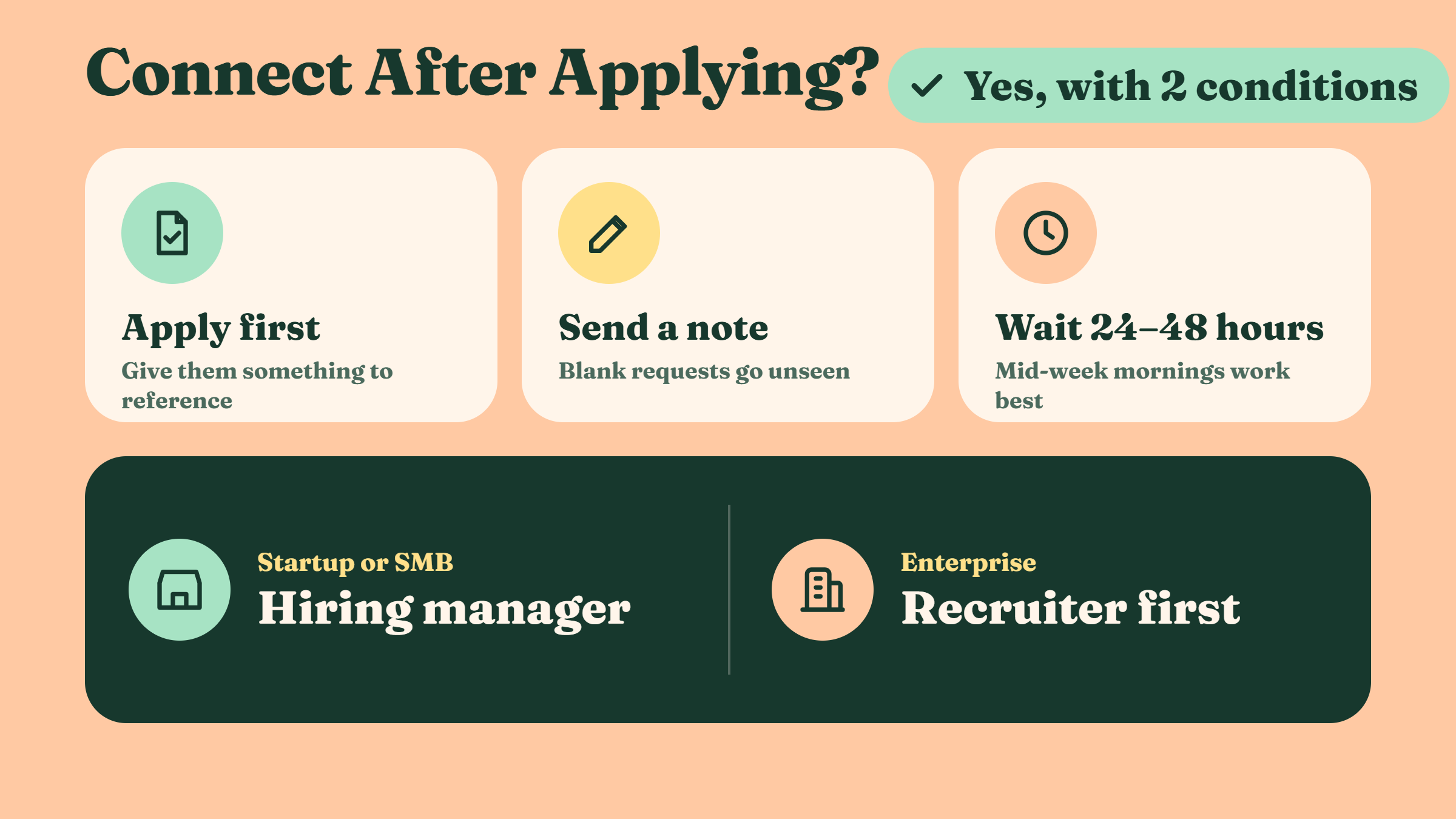
Should you connect with job poster on LinkedIn? Yes, with two conditions:
Apply first. Always submit the application before connecting — the recruiter needs something to reference when your name appears.
Send a note. A blank connection request is a missed opportunity. Every blank request is effectively invisible to a recruiter scanning 30 notifications.
Connecting without a note is the LinkedIn equivalent of walking into an interview, making eye contact, and saying nothing. The note is the whole point.
Does reaching out on LinkedIn help a job application? Based on patterns seen across active job seekers, yes — particularly when the role has moderate competition (under 200 applicants). In high-volume postings with 500+ applicants, the connection still creates a name-recognition moment, which is more than most applicants get.
When Should You Message the Job Poster on LinkedIn?
Wait 24–48 hours after submitting your application. This gives the recruiter time to potentially see your application in their ATS before your name appears as a connection request — so it reads as follow-up, not desperation. If you apply on a Friday, wait until Monday morning. Timing a message on a Tuesday or Wednesday morning tends to perform best, since recruiter inboxes are typically cleared and active at the start of the mid-week.
Will Contacting the Hiring Manager Hurt My Application?
Rarely — but context matters. Will contacting the hiring manager hurt my application? Only if you come across as demanding, skip the recruiter entirely at large companies, or message before applying. A well-framed, respectful note almost never backfires. At startups and SMBs, going directly to the hiring manager is often welcomed. At enterprise companies, reaching out to the recruiter is the safer first step.
⚠️
Warning:At large enterprise companies, messaging the hiring manager before going through the recruiter can create friction. Always check whether the job poster is a recruiter (HR/talent acquisition title) or the direct manager — and adjust your approach accordingly.
How to Connect and What to Say — Message Templates and Etiquette
Contacting someone on LinkedIn ethically comes down to three things: be brief, be specific, and make it about them — not about what you need. The worst connection notes open with "I applied for your role" and end with "please review my application." That puts pressure on the recruiter and adds nothing new. The best ones open with a genuine observation and end with zero demands.
Messaging hiring manager on LinkedIn follows slightly different logic than messaging a recruiter. With a hiring manager, lead with a specific skill or result relevant to their team's work. With a recruiter, express genuine enthusiasm for the role and confirm your application is already submitted.
Sample Connection Request Notes for 2026
Each note below fits within LinkedIn's 300-character connection request limit:
To a recruiter:
"Hi [Name] — I just applied for the [Role Title] position and wanted to connect directly. I've spent 4 years in [relevant area] and am genuinely excited about what [Company] is building. Happy to answer any questions."
To a hiring manager:
"Hi [Name] — I applied for [Role Title] today. I noticed your team is focused on [specific initiative from their posts/company page] — that aligns closely with work I did at [Previous Company]. Would love to connect."
Both examples are specific, reference the actual role, and end without pressure. That is what a LinkedIn note to hiring manager after applying should feel like — a warm introduction, not a chase.
How to Follow Up on a Job Application on LinkedIn (Without Being Annoying)
If you connected and heard nothing after 5–7 business days, one follow-up message is appropriate. Keep it to two sentences: acknowledge you know they're busy, and restate your enthusiasm in one specific line. Then stop. How to follow up on a job application LinkedIn style means exercising restraint — one connection request, one follow-up, then let the process run its course. Candidates who message repeatedly are remembered, but not in the way they want. For more on smart outreach approaches, see smart ways to reach out on LinkedIn for job opportunities in 2026.
💡
Pro Tip:Before sending any message, visit the job poster's LinkedIn profile and look at their recent posts or activity. Referencing something specific they've shared — a company announcement, an article they engaged with — elevates your note from generic to memorable.
Common Mistakes That Hurt Your Chances (And How to Avoid Them)
What not to do when contacting a recruiter on LinkedIn
The most common failure mode is not reaching out too aggressively — it is reaching out too vaguely. A recurring pattern among job seekers trying to stand out is that they invest energy in finding the right person but then send a message indistinguishable from every other candidate's.
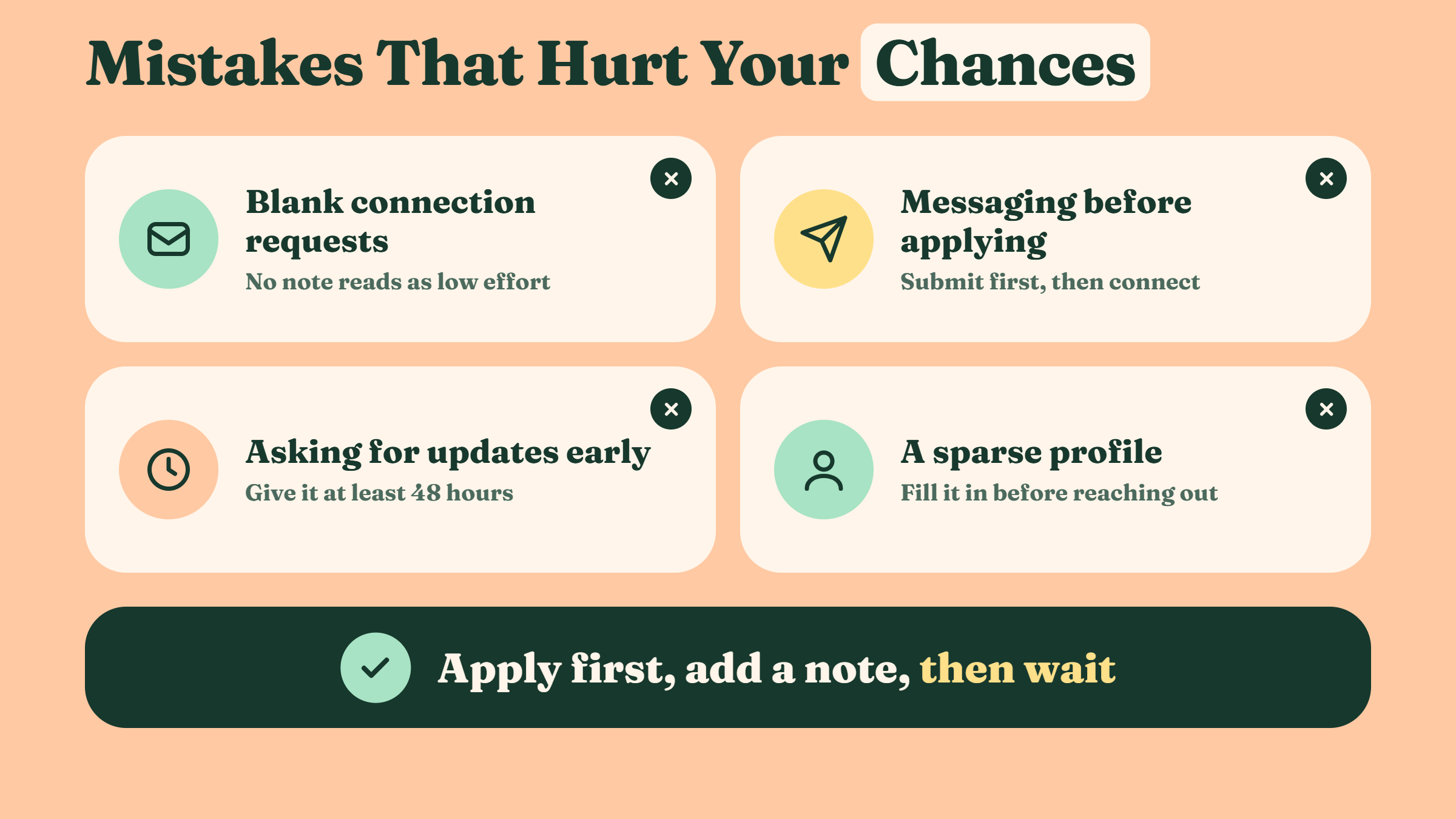
The mistakes that actually damage applications:
Blank connection requests — no note signals minimal effort. Recruiters see dozens of these daily and move on.
Messaging before applying — "I'm thinking about applying" is not a conversation starter. Submit first, then connect.
Asking for status updates too soon — "Have you had a chance to review my application?" within 48 hours reads as impatient, not keen.
Ignoring LinkedIn profile completeness — if your profile is sparse, the connection request prompts a profile visit that confirms mediocrity. Your profile should be full before you apply, let alone reach out.
✓ The LinkedIn Outreach Checklist (Before You Hit Send)
☐Application already submitted before sending the connection request
☐Waited 24–48 hours after applying before connecting
☐Connection note includes the specific role title
☐Note references one specific, genuine reason for interest
☐LinkedIn profile is complete (photo, headline, summary, experience)
☐No demands, no status requests — low pressure closing only
☐Only one follow-up message planned if no response after 7 business days
The Application Tracking Gap Most Job Seekers Miss
A less-discussed pain point: most candidates cannot find their own application history after submitting. How to view applied jobs on LinkedIn app: tap the Jobs tab at the bottom of the screen → tap My Jobs at the top → select Applied from the tabs. This works on both Android and iPhone. How to view applied jobs on LinkedIn app iPhone follows exactly the same path — Jobs → My Jobs → Applied.
If you need to withdraw an application — how to withdraw job application on LinkedIn: go to My Jobs → Applied → find the role → tap the three-dot menu → select Withdraw application. Note that withdrawing removes your application permanently and cannot be undone. LinkedIn job application settings also let you manage your saved application information and auto-fill preferences under Settings → Data Privacy → Job seeking preferences.
To strengthen your profile before reaching out, it also helps to understand the difference between LinkedIn connections vs. followers — because whether you connect or simply follow the job poster affects how your request is perceived.
Want Your LinkedIn Profile to Make an Impression Before You Even Message?
HyperClapper helps professionals grow real LinkedIn visibility through community engagement and AI-powered post activity — so when a recruiter clicks your profile, they see an active, credible presence.
Frequently Asked Questions About Connecting With Job Posters on LinkedIn
Is it a good idea to connect with the person who posted a job on LinkedIn after I have already applied?
Yes — it is a good idea when done correctly. A specific, brief connection note creates a second touchpoint that your application alone cannot. Recruiters who receive a personalised note are more likely to visit your profile than those who only see your name in an ATS queue. Apply first, wait 24–48 hours, then send a short, role-specific note.
What should I write in a LinkedIn connection request to a recruiter after applying for a job?
Keep it under 300 characters. Name the specific role, state one genuine reason you are excited about it, and end with no pressure: "Hi [Name] — I just applied for [Role] and wanted to connect. I've spent [X years] in [area] and am genuinely excited about [Company's] work in [specific area]. Happy to answer any questions." That is the full template.
How long should I wait before messaging the job poster on LinkedIn after submitting my application?
Wait 24–48 hours after submitting. This ensures the recruiter can potentially see your application before your connection request arrives, so it reads as a follow-up rather than a pre-emptive move. Sending the same day — especially within hours — can read as impatient. Mid-week mornings (Tuesday–Wednesday) tend to get the best response rates.
Can reaching out to a hiring manager on LinkedIn after applying hurt my chances?
Rarely — but it can if you message before applying, sound demanding, or skip the recruiter entirely at a large enterprise. A respectful, specific note almost never backfires. At startups, going directly to the hiring manager is often welcomed. At large companies, start with the recruiter who posted the role and let them route you appropriately.
What is LinkedIn Easy Apply and how does it apply to follow-up strategy?
Easy Apply is LinkedIn's one-click application feature that sends your profile data to the employer without leaving the platform. Because Easy Apply routes submissions into an ATS or recruiter dashboard — not a personal inbox — a follow-up connection request is especially valuable. It creates a direct notification to the recruiter that a standard Easy Apply submission cannot.
How do I find the jobs I've already applied to on LinkedIn?
Open the LinkedIn app → tap Jobs → tap My Jobs → select the Applied tab. On desktop: click Jobs in the top nav → click My Jobs on the left sidebar → select Applied. This shows all roles you applied to via LinkedIn, including Easy Apply submissions. If you applied externally through a company website, those will not appear here.
How to add LinkedIn profile to job application?
Most application forms include a "LinkedIn URL" field — paste your public profile URL there (found under your profile → Edit public profile and URL → copy the URL). For Easy Apply, LinkedIn sends your profile automatically. For external forms, your URL gives recruiters direct access to your full profile, recommendations, and activity — more context than a résumé alone provides.
What consistently separates job seekers who get callbacks from those who disappear into the queue is not the application itself — it is the intentional, well-timed human signal that follows it. The candidates who connect thoughtfully, with a specific note, are the ones who stay visible long after the submission confirmation screen closes. Tools like HyperClapper can help ensure that when a recruiter does click through to your LinkedIn profile after your message, they find an active, engaged presence — not a dormant page that contradicts the enthusiasm you just expressed. For guidance on crafting the right message once you do connect, see the full guide on LinkedIn thank you messages after connecting.
👋
⚡ Free plan
Leaving already?
Grab 3 free boosts on your next LinkedIn post — real likes & comments from 5,000+ creators. No card, cancel anytime.