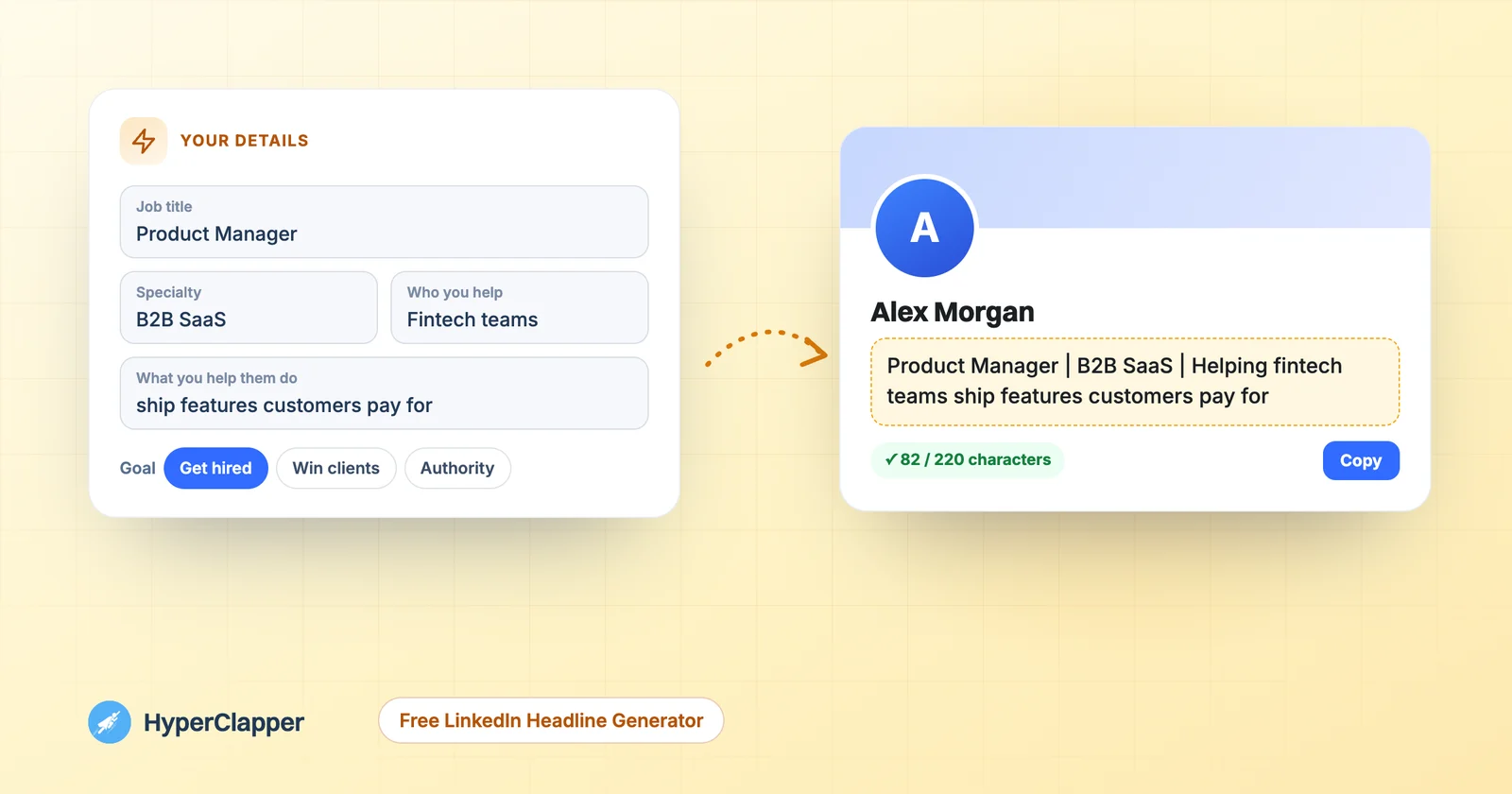
Type your job title, what you specialise in and who you help. You get headlines built from proven formulas in an instant, plus five more ideas from AI, each checked against LinkedIn's 220-character limit.

A LinkedIn headline generator is a tool that writes the short line that sits under your name on LinkedIn. That line is your headline, and it travels with you everywhere: on your profile, in search results, next to every post and comment you write, and in connection requests and messages.
Most people never open your full profile. They see your photo, your name and your headline, then decide whether to click. A headline that only says "Student" or "Manager at Company" gives them no reason to. A clear headline says what you do, who you help and why it matters, in a few words.
HyperClapper's free LinkedIn headline generator gives you two kinds of ideas. Formula headlines appear instantly from the details you type, using structures that work for job seekers, freelancers and thought leaders. AI ideas add five more options with a different angle. Use one as it is, mix parts of two, or edit it until it sounds like you.
Use the title people search for, such as Product Manager or UX Designer. Being specific helps: "B2B SaaS Product Manager" beats "Manager".
Add what you specialise in, who you help, what you help them do and a proof point. Then pick your goal: get hired, win clients or build authority.
Click Generate headlines to see up to six formula headlines, with a character count on each. Click Get 5 AI ideas for more angles, then copy the one you like.
On LinkedIn click Me, then View profile, then the pencil next to your name. Paste the headline into the Headline field, adjust a word or two so it sounds like you, and save.
Everything runs in your browser except the optional AI ideas. There is nothing to install and no account to create.
Up to six headlines appear as you type, built from proven structures such as Role | Specialty | Proof and I help [who] [do what].
Choose get hired, win clients or build authority, and the order and wording of the headlines change to match what you want from LinkedIn.
One click asks our AI for five more headlines with a different angle, for when you want fresh wording.
Every headline shows its length against LinkedIn's 220-character limit, so nothing gets cut off when you paste it.
Each headline has its own Copy button, so moving it to LinkedIn takes seconds.
Your details stay in your browser. Only your job title is sent, and only when you ask for AI ideas.
Good headlines usually follow a simple pattern. Pick the formula that matches your goal, then fill in the brackets with your own details. LinkedIn allows up to 220 characters, but your headline is often shortened in search results, comments and invitations, so put the most important words first.
The most common format, and a safe choice for almost anyone. It tells people what you do, what you focus on and why they should trust you.
Best for freelancers, consultants, coaches and founders who want clients. It puts the reader and their problem first.
Best when you have a clear result to point to. Use real numbers only, and only ones you are comfortable sharing in public.
If you are looking for work, name the role you want and your strongest skills. This helps recruiters find you when they search for that job title.
If you are moving into a new field, show where you came from and where you are going, so people are not confused by your past job titles.
Use these LinkedIn headline examples as inspiration, not as copy and paste. Swap in your own skills, industry and results. For more ideas tailored to you, type your role into the generator above.
Lead with your stack and the kind of products you build.
Name your channel and the type of company you help grow.
Say who you sell to and what you sell. Add a result only if it is true and shareable.
Show the type of product and the outcomes you focus on.
Recruiters search for tools, so name them.
Mention the kind of experiences you design and for whom.
Show what you are building and the mission or scope behind it.
Put the client and the result first, since that is what buyers look for.
Say which roles you hire for, so candidates know to reach out.
Go beyond "Student at [University]". Add your field, skills and the role you want next.
Your headline is one of the places LinkedIn search looks when people search for a role or skill. A few small choices make a big difference to who finds you.
Think about what someone would type to find a person like you. Use the common name for your job title, then add your niche, tools and industry.
These are the patterns that make a headline easy to scroll past.
Read your headline out loud. Does it answer "what do you do?" in the first few words? Would the people you want to reach understand it? If yes, you are ready. Revisit it whenever your role, goals or focus changes.
A short walkthrough of how a good post plus a strong first hour helps you grow.
All free, all in your browser, no signup. See all free tools
Yes. It is free and you do not need an account. Formula headlines have no limit. AI ideas are free too; if you ask for many in a row, you may need to wait a few minutes.
LinkedIn allows up to 220 characters in the headline field. In search results, comments and invitations it is often shortened, so keep your most important words at the start. Staying under about 120 characters is a good rule if you want the whole headline to show in more places.
Start with your role, add your specialization or niche, then add the value you bring or a result you can back up. Use keywords people search for and skip vague words like "passionate". The formulas on this page are a good place to start.
Focus on the role you want and the skills you bring, not on being between jobs. For example: "Digital Marketing Specialist | SEO and paid search | Open to new roles". You can also use LinkedIn's Open to Work feature to signal that you are looking.
Your job title is a good start because people search for it, but it is rarely enough on its own. Add your niche, skills or who you help so you stand out from everyone else with the same title.
AI is great for getting past a blank page. It gives you several options in seconds. The best results come when you treat them as drafts and add your own details, such as your industry, tools and real results.
Your headline is one of the fields LinkedIn uses when people search for profiles, so the words in it matter. Using the job title and skills people actually search for helps the right people find you.
You can, and one or two can add personality. Keep it professional for your field, and do not let emojis replace the words people search for.
Update it whenever your role, goals or focus changes, for example when you start job hunting, switch careers or launch a new service. Many people also review it every few months to keep it fresh.
The headline is the one-line summary that shows almost everywhere on LinkedIn. The About section is the longer story on your profile. The headline gets people to click, and the About section tells them more once they arrive. Both should tell the same story.
Your headline shows under every post and comment you publish, so more people see it when your posts get engagement. Boost your LinkedIn posts with HyperClapper and get likes and comments from real professionals in the first hour. Start free with 3 boosts a month, no credit card needed.
Grab 3 free boosts on your next LinkedIn post — real likes & comments from 5,000+ creators. No card, cancel anytime.
+5k