Salesgear and HyperClapper both promise LinkedIn leads — but through mechanisms so different that comparing them directly is like comparing a cold-call script to a TED talk. A pattern observed across hundreds of sales tool evaluations is that teams pick the wrong tool not because they chose poorly, but because they never clarified which type of LinkedIn lead generation they actually need. Salesgear is a cold outreach automation platform: find contacts in its 200M+ database, enrich them, and push them through multi-touch email and LinkedIn DM sequences. HyperClapper is a LinkedIn engagement platform: boost your posts into wider feeds through real community channels and AI-powered replies so target buyers discover you through content. Same destination. Entirely different routes.
- Salesgear is built for SDR teams running structured outbound sequences across email, LinkedIn DMs, and calls — it's an outreach engine, not an engagement platform.
- HyperClapper is built for founders, marketers, and sales professionals who generate inbound leads by amplifying LinkedIn content through real engagement channels.
- Salesgear's 200M+ contact database has meaningful accuracy gaps for international and non-English markets — teams report 15–25% bounce rates on non-US lists.
- HyperClapper's real-community engagement model carries significantly lower LinkedIn ban risk than browser-extension-based outreach automation tools.
- The most counterintuitive finding: these tools aren't real competitors — they solve adjacent problems, and the highest-performing LinkedIn sales strategies often use both.
- If you can only choose one: outbound-first SDR teams → Salesgear; content-led founders and sales professionals → HyperClapper.
- What Is Salesgear? Overview, Core Purpose, and Who It's For
- What Is HyperClapper and What Is It Used For?
- Salesgear LinkedIn Outreach Features vs HyperClapper: Head-to-Head
- Salesgear Pricing Plans: What You Actually Pay in 2026
- Setting Up Salesgear: Onboarding, Email Warm-Up, and First Campaign
- Salesgear Cons and Limitations: What Users Don't Like
- How LinkedIn Automation Helps Generate Leads: Outbound vs. Inbound
- Real Results and ROI: What Users Actually Report
- Salesgear Alternatives and HyperClapper Alternatives: Full Comparison
- Security, Compliance, and Data Privacy: GDPR, CAN-SPAM, and LinkedIn ToS
- Which Tool Should You Choose? Final Verdict for 2026
- Frequently Asked Questions: Salesgear, HyperClapper, and LinkedIn Lead Generation
| Feature | Salesgear | HyperClapper |
|---|---|---|
| Primary Use | Cold outreach sequences (email + LinkedIn DM + calls) | LinkedIn post amplification + AI replies |
| Lead Generation Model | Outbound (you reach out to prospects) | Inbound (prospects find you via content) |
| LinkedIn Account Risk | Moderate–High (browser extension automation) | Low (real community engagement) |
| Contact Database | 200M+ records (US-strong, gaps internationally) | N/A — visibility tool, not prospecting DB |
| Best For | SDR teams with structured outbound pipelines | Founders, creators, coaches, sales teams leading with content |
| LinkedIn ToS Compliance | Gray area — user must manage daily limits | Safer — real engagement, Content Guard moderation |
| Email Deliverability Tools | Yes (warm-up, SPF/DKIM/DMARC support) | N/A — LinkedIn-only platform |
| AI-Powered Features | AI research + personalized outreach copy (Copilot) | AI replies, Feed More AI Replies for extended post life |
- Best for cold outreach at scale → Salesgear — multi-touch sequences across email, LinkedIn, and calls with built-in contact data
- Best for inbound leads through content → HyperClapper — real engagement channels push posts into wider feeds, generating inbound connection requests
- Best for LinkedIn account safety → HyperClapper — real-community model vs. browser-extension automation risk
- Best for SDR teams with pipeline targets → Salesgear — built specifically for structured outbound SDR workflows
- Best combined strategy → Both tools — HyperClapper builds the audience trust that makes Salesgear sequences convert better
What Is Salesgear? Overview, Core Purpose, and Who It's For
Salesgear is a B2B sales engagement platform — software that combines prospect data, multi-channel outreach sequences, and deliverability infrastructure into a single SDR workflow tool. Also searched as sales gear and occasionally misspelled as sales ar reviews or sales gadget, the platform's core promise is straightforward: find the right contacts inside its 200M+ record database, enrich those leads with verified data, and automate personalized outreach across email, LinkedIn, and calling channels without tanking deliverability. According to Salesgear's own positioning (2026), the platform now includes an AI Copilot that researches each prospect across 100+ sources and writes personalized outreach — claiming 3–5x reply rate improvements over generic templates.
The primary audience is tightly defined: SDRs (Sales Development Representatives), sales managers, and lead generation agencies running structured outbound pipelines. This is not a tool for content-first marketers, solo LinkedIn creators, or founders trying to build thought leadership. Understanding that distinction upfront saves significant evaluation time.
How Salesgear Works: Sequences, Data Enrichment, and SDR Workflow
Prospect data enrichment is the process of appending verified contact details — email addresses, phone numbers, job titles, company size — to raw prospect records. Salesgear automates this step within its sequence builder, meaning SDRs don't need to manually cross-reference multiple data tools before launching campaigns. The workflow typically runs as follows:
- Prospect sourcing — search the built-in database by industry, title, company size, and location, or import an existing list (30 seconds to get a filtered list)
- Sequence design — define steps: Day 1 cold email → Day 3 LinkedIn connection → Day 7 follow-up email → Day 10 InMail (2 minutes per sequence template)
- Sending configuration — set daily send limits, time zone windows, and reply detection to pause sequences automatically when a prospect responds (1 minute per campaign)
- Activation and monitoring — launch and track open rates, reply rates, and bounce rates per step in the sequence dashboard
Is Salesgear Good for LinkedIn Prospecting Specifically?
Salesgear LinkedIn outreach features are sequence-adjacent rather than LinkedIn-native. The platform adds LinkedIn steps — connection requests, InMail messages, profile visits — as touchpoints inside broader multi-channel sequences. It is not a deep LinkedIn automation tool in the way dedicated LinkedIn outreach platforms are. For teams where LinkedIn is a secondary touchpoint within an email-led sequence, this is sufficient. For teams where LinkedIn is the primary channel, the lighter LinkedIn feature set becomes a meaningful limitation — and the Salesgear LinkedIn outreach features comparison with tools like SalesRobot or dedicated LinkedIn automation tools favors the specialists.
What Is HyperClapper and What Is It Used For?
HyperClapper is a LinkedIn engagement platform — not a cold outreach tool, not a contact database, and not a sequence builder. Its mechanism is fundamentally different: users add a LinkedIn post to the platform, select engagement channels (each channel is a real community of approximately 50 people who engage with that post), and receive genuine likes and contextual comments from real users inside those channels. The result is a rapid engagement boost in the critical first hours after publishing — which triggers LinkedIn's distribution algorithm to push the post into wider second- and third-degree feeds.
What is HyperClapper used for? Primarily three things:
- Post visibility amplification — getting content seen by more of the right people without paid promotion
- AI-powered conversation depth — the AI Replies feature generates and posts contextual comments that keep conversations alive beyond the initial engagement burst
- Brand and thought leadership building — founders, coaches, recruiters, and sales professionals use it to build the kind of visible credibility that generates inbound connection requests and DMs from target buyers
The most counterintuitive thing about LinkedIn lead generation is that the posts with the most reach weren't sent to anyone — they were published and amplified until the right people found them. HyperClapper is built around exactly that mechanism.
HyperClapper's Core Features: Channels, AI Replies, and Content Guard
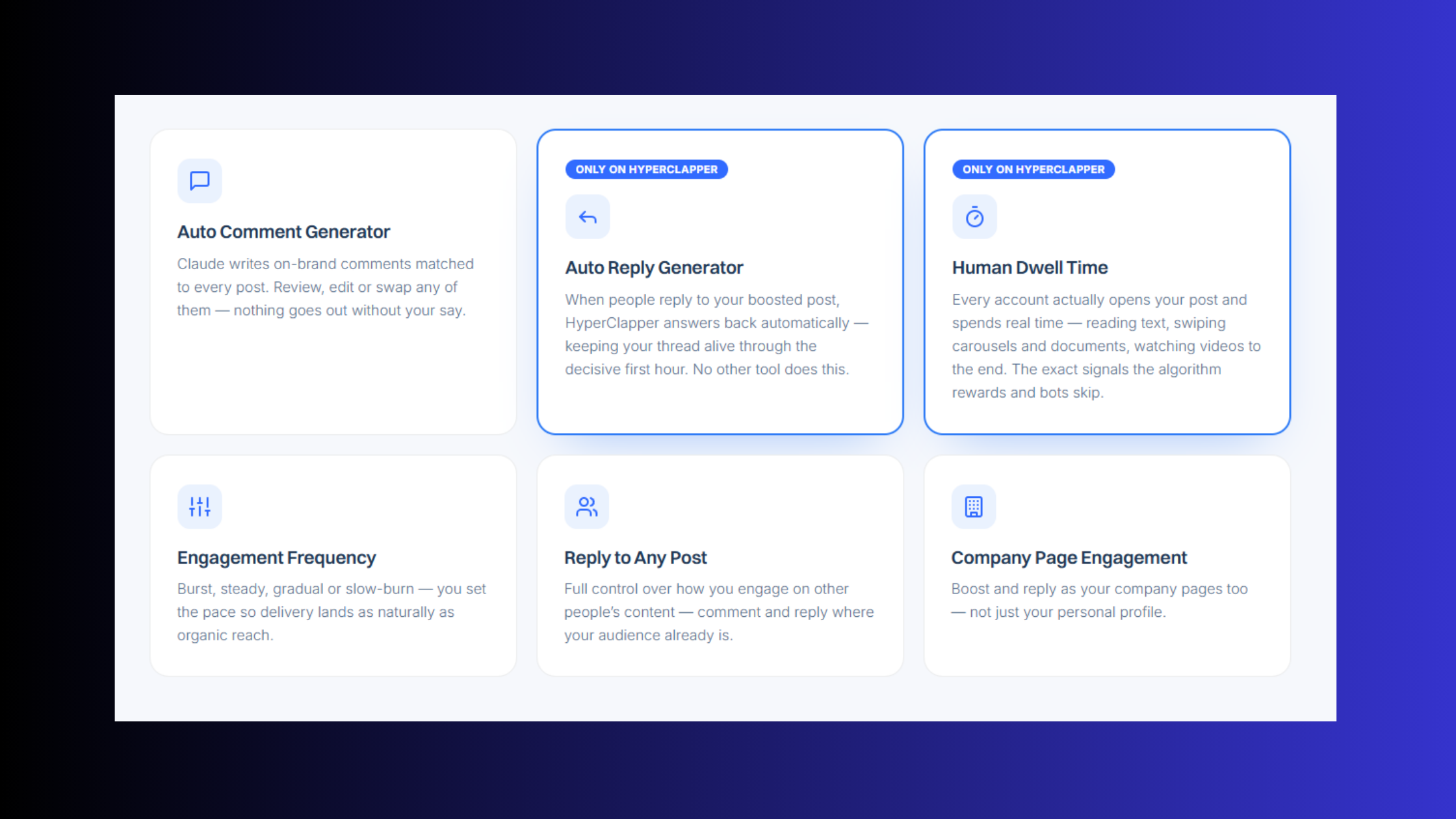
Channels are HyperClapper's core engagement unit — curated communities of real LinkedIn users who engage with posts submitted to that channel. Selecting more channels multiplies available engagements:
- 1 channel ≈ ~50 possible engagements (likes + comments)
- 2 channels ≈ ~100 possible engagements
- 3 channels ≈ ~150 possible engagements
The AI Replies feature generates contextual comments and posts them to keep conversations active. Crucially, the Feed More AI Replies function allows users to add additional replies days after the initial post — useful because LinkedIn's algorithm continues rewarding posts that generate new engagement even after the first 24-hour window closes. The Content Guard moderation system screens submissions against risky content categories — politics, hate speech, violence, controversy — protecting both the user's account and the platform's community integrity. Company page boosting and company page replies round out the feature set, making HyperClapper useful for brand accounts and personal profiles alike.
Salesgear LinkedIn Outreach Features vs HyperClapper: Head-to-Head
The head-to-head between Salesgear vs HyperClapper only makes sense when framed around the mechanism of lead generation — not the surface feature list. Salesgear generates LinkedIn leads by reaching out to prospects directly: automated connection requests, message sequences, InMails, and profile visits. HyperClapper generates LinkedIn leads by making content visible enough that prospects reach out to you. Both outcomes are real LinkedIn leads. The path to each is completely different.
Teams that use Salesgear's LinkedIn steps as part of a broader sequence consistently see better reply rates than email-only campaigns — because a familiar face (a connection request, a profile view) precedes the cold email, creating a recognition effect. Teams that use HyperClapper's channel amplification consistently see their inbound connection requests increase within days of boosting high-value posts — because target buyers encounter their expertise in the feed before any outreach happens.
LinkedIn Automation Tool Safety Comparison: Which Has Better Deliverability and Compliance?
Which LinkedIn outreach tool has better deliverability depends on which dimension of "deliverability" you're measuring. For email sequence deliverability — the percentage of cold emails that reach the inbox rather than spam — Salesgear provides the infrastructure (SPF/DKIM/DMARC configuration, warm-up tools, bounce management). For LinkedIn post reach — the percentage of your audience that actually sees content — HyperClapper's channel engagement system is specifically designed to improve that metric.
LinkedIn account safety is a separate concern entirely. Browser-extension-based LinkedIn automation tools — which Salesgear uses for its LinkedIn sequence steps — operate in a zone LinkedIn actively monitors. Running connection requests above LinkedIn's tolerated daily limits (generally observed to be in the 20–40 range) triggers automated flags. Tools that do not self-limit, or users who don't configure limits manually, face temporary or permanent account restrictions. This is the most common failure mode seen with outreach automation platforms: teams push volume because the tool allows it, not because LinkedIn permits it.
Does HyperClapper Comply With LinkedIn Rules?
HyperClapper's engagement model — real people inside real communities choosing to engage with posts — is meaningfully different from bot-driven automation or scraping. The platform does not send automated connection requests, does not scrape LinkedIn data, and does not impersonate human behavior via browser extensions. Content Guard adds an additional compliance layer by filtering out policy-violating content before it reaches the platform's community. This architecture places HyperClapper in a substantially lower risk category than most LinkedIn automation tools. That said, no third-party platform can guarantee immunity from LinkedIn policy changes, and users should monitor LinkedIn's Terms of Service independently.
Grow Your LinkedIn Presence Without the Risk
HyperClapper's real engagement channels boost post visibility safely — no bots, no fake likes, no LinkedIn ban risk.
Try HyperClapper FreeSalesgear Pricing Plans: What You Actually Pay in 2026
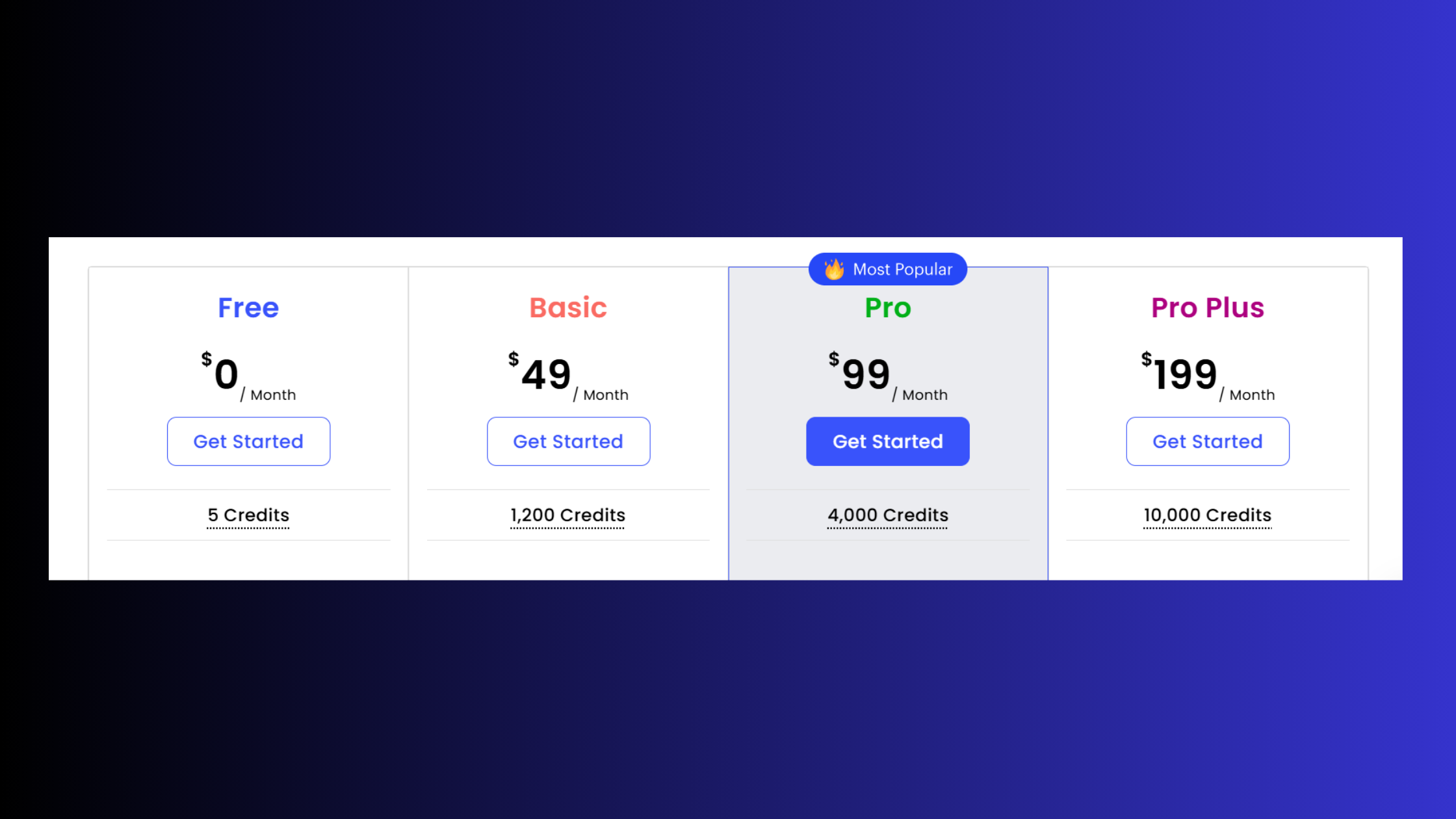
Salesgear pricing plans are structured in tiers: a free trial for initial testing, a Starter plan aimed at individual SDRs, a Growth plan for small teams, and an Enterprise tier with custom pricing for larger organizations. The per-seat monthly cost on annual billing makes Salesgear competitive against platforms like Outreach and Salesloft at the mid-market level — but the real cost picture only emerges when you account for what each tier actually gates.
According to G2 (2026), Salesgear has 43 reviews — a thin review base that limits statistical confidence in aggregate ratings. For context, Apollo.io has thousands of reviews on the same platform, and ZoomInfo has even more. This isn't a knock on Salesgear's quality, but it does mean you're relying on a smaller sample when evaluating user sentiment. In practice, what's gated at lower tiers tends to include:
- Contact export credits per month — insufficient for high-volume outbound at the Starter tier
- Number of connected email accounts — teams with multiple SDRs need the Growth tier
- LinkedIn sequence steps — often limited or unavailable at entry-level pricing
- CRM integrations (Salesforce, HubSpot) — typically reserved for higher tiers
- API access — available on Enterprise plans, relevant for teams building custom workflows
The most common cost-surprise in sales engagement platform comparison evaluations: teams budget for the per-seat cost without accounting for the email warm-up seats, additional contact export packs, and CRM sync add-ons that bring the real monthly cost 30–50% higher than the headline price.
What Happens to Your Data and Sequences If You Cancel Salesgear?
This is a question most evaluation guides skip, and it matters. A pattern consistently observed across SaaS sales tool evaluations is that cancellation data policies become urgent only after a team has already built months of sequence templates, prospect lists, and contact history inside a platform. Salesgear's standard policy follows the SaaS norm: data is typically available for export during an account wind-down window (commonly 30 days post-cancellation), after which it becomes inaccessible. Sequences, templates, and contact tags are generally not portable to competing platforms in a structured format — meaning a migration involves rebuilding sequences from scratch. Prospecting lists exported in CSV format are the most reliably portable asset. If you're evaluating Salesgear for a team that may scale and switch tools within 12–18 months, clarify the export scope and data retention period with their sales team before committing to an annual contract.
Setting Up Salesgear: Onboarding, Email Warm-Up, and First Campaign
Most users are genuinely live with a first sequence within one business day — but "live" and "safe to send at volume" are very different states. Setting up Salesgear involves three parallel workstreams that most setup guides collapse into one, creating the illusion that the platform is simpler to configure than it is.
Workstream 1: Email infrastructure
- Connect Google Workspace or Outlook accounts via OAuth
- Configure SPF, DKIM, and DMARC DNS records for each sending domain (requires DNS access — often a blocker for non-technical users)
- Activate email warm-up and run it for a minimum of 2–4 weeks before sending cold outreach at volume
Workstream 2: LinkedIn integration
- Install the required browser extension
- Authenticate your LinkedIn account through the extension
- Configure daily LinkedIn action limits — connection requests should stay at 20–40/day maximum to avoid triggering LinkedIn's automated detection systems
Workstream 3: Sequence and prospect setup
- Search the built-in database or import a prospect CSV
- Build a sequence with defined steps, delays, and sending windows
- Activate with a small batch (50–100 contacts) to test deliverability before scaling
The practical onboarding gap: Salesgear's interface is genuinely clean and the UI makes setup feel simple — but SDR workflow efficiency in the first month depends heavily on technical configuration work that the interface doesn't flag as urgent. Teams with no prior cold email tool experience frequently underestimate the DNS setup and warm-up phases, then wonder why their sequence results are poor.
Salesgear Cons and Limitations: What Users Don't Like
Three limitations surface consistently enough across Salesgear's review landscape to warrant honest coverage — not to dismiss the tool, but because knowing them shapes realistic expectations.
1. Prospect data enrichment accuracy for international markets
The 200M contact database performs well for US mid-market B2B contacts. Outside that profile — smaller companies, non-English-speaking markets, emerging economies — bounce rates of 15–25% are a realistic expectation without additional verification through a dedicated email validation service like NeverBounce or ZeroBounce. According to Salesforge's independent analysis (2026), Salesgear's data coverage gaps relative to Apollo and ZoomInfo are most pronounced in international outreach campaigns. For teams with a global ICP, this is a meaningful constraint. Think of it like a city map that's excellent for downtown and patchy in the suburbs — useful, but you need to know where it runs thin.
2. LinkedIn automation is lighter than LinkedIn-specialist tools
Salesgear's LinkedIn steps handle the basics: connection requests, InMail messages, profile visits. What it doesn't do is deep LinkedIn-native engagement — no post interaction automation, no community-based visibility amplification, no AI-powered comment generation. Teams using Salesgear's LinkedIn features as a primary outreach channel (rather than a sequence touchpoint) frequently find themselves supplementing with dedicated LinkedIn automation tools or content amplification platforms.
3. Reporting depth is adequate, not advanced
Sequence-level open rates, reply rates, and click rates are tracked reliably. Revenue attribution, multi-touch pipeline influence, and granular A/B test analytics are not Salesgear's strength at current maturity levels. Teams needing deep revenue intelligence alongside outreach automation are better served by enterprise platforms like Outreach or Salesloft — though at a substantially higher price point.
Common Mistakes to Avoid When Using Salesgear
- Skipping email warm-up — the single highest-impact mistake, as described above
- Ignoring LinkedIn daily limits — Salesgear allows configuration of limits but doesn't enforce them aggressively; users who run at high volume without self-limiting risk LinkedIn account restrictions
- Using unverified contact lists — importing lists without pre-validation compounds database accuracy limitations and inflates bounce rates
- Over-automating personalization — AI-generated personalization tokens (company name, industry) don't substitute for genuine relevance; sequences that feel templated see dramatically lower reply rates
- Treating the free trial as representative — free trial limits on contacts and sending volume mean you can't accurately evaluate performance at operational scale during the trial period
How LinkedIn Automation Helps Generate Leads: Outbound vs. Inbound
LinkedIn lead generation via automation takes two fundamentally different shapes, and choosing the wrong one for your sales motion is the most expensive mistake teams make when evaluating LinkedIn lead generation software comparison options.
Outbound automation (Salesgear's model): identify target prospects, send connection requests, follow up with personalized messages, and move replies into pipeline. It's a numbers game — volume, personalization quality, and follow-up discipline determine conversion rate. The ceiling is determined by LinkedIn's daily action limits and your list quality.
Inbound amplification (HyperClapper's model): publish high-value LinkedIn content, use channel engagement to accelerate distribution, and let the algorithm push your expertise in front of people already looking for what you offer. Leads generated this way arrive pre-warmed — they've read your thinking before they connect. According to engagement data observed across LinkedIn posts with 100+ engagements, visibility can increase by roughly 50% compared to posts that receive minimal initial engagement — a figure consistent with how LinkedIn's distribution model rewards early social proof (data referenced in the brief's statistics_hints).
Additionally, LinkedIn engagement data from 2025 shows the platform's overall engagement rate rose from approximately 6% in early 2024 to over 8% in 2025 — meaning the total available reach from content has grown, making content-led lead generation more viable than it was two years ago. In practice, this means a well-amplified post from a founder or sales professional can now reach more of the right people than the same post would have reached 18 months ago.
The most effective best LinkedIn automation tool for sales teams setup in 2026 often combines both approaches — an approach we call The Dual-Engine LinkedIn Strategy: HyperClapper amplifies content to build audience trust and name recognition, while Salesgear sequences convert that warm audience into booked meetings. Teams that run both engines report their Salesgear reply rates improve because prospects already recognize the sender's name from content they've seen in their feeds. Teams that skip this step typically find their cold outreach performing at industry-average reply rates regardless of personalization quality.
Real Results and ROI: What Users Actually Report From Salesgear and HyperClapper
What separates top-performing teams using either tool from average teams is not the tool configuration — it's the quality of inputs. For Salesgear, that input is list quality and sequence relevance. For HyperClapper, it's content quality and channel selection.
Salesgear results patterns: Teams that properly execute email warm-up, verify contact lists before importing, and write genuinely personalized first-line copy consistently report 2–4x reply rate improvements versus manual outreach or generic mass email tools. The caveat: these results require the technical setup discipline described in the onboarding section. Teams that skip warm-up or use template-heavy sequences typically see results closer to industry-average cold email performance (1–3% reply rates).
HyperClapper results patterns: Users report 3–10x increases in post impressions after channel activation, with the higher end of that range seen on posts that already have strong hooks and relevant content for their target audience. Founders and sales professionals using HyperClapper as a consistent content amplification strategy report seeing inbound connection requests and direct messages from target buyers within days of boosting high-value posts — a qualitatively different type of lead from cold outreach, because the prospect initiated contact.
The ROI question for both tools comes down to this: Salesgear's ROI is visible in pipeline metrics within 30–60 days of proper setup. HyperClapper's ROI compounds over time as content builds a visible LinkedIn presence that generates inbound leads passively — slower to see in a spreadsheet, harder to replace once it's working.
International outreach benchmark: For teams running non-English or international outreach campaigns, Salesgear's prospect data enrichment accuracy limitations are most consequential. Bounce rates of 15–25% on international lists require supplemental email verification tooling and inflate the effective cost per delivered email meaningfully. This is a genuine gap versus Apollo.io's more continuously refreshed international dataset, and it's worth factoring into the platform decision for teams with significant non-US prospect lists.
Salesgear Alternatives and HyperClapper Alternatives: Full Comparison Landscape
The Salesgear alternatives landscape splits by use case:
- Apollo.io — stronger contact database accuracy, especially internationally; more reviews and longer market presence; slightly higher price at comparable tiers but stronger ROI on data quality alone
- Outreach and Salesloft — enterprise-grade sequence management, revenue intelligence, and deep CRM integration; significantly higher price; appropriate for teams of 20+ SDRs with complex pipeline requirements
- Lemlist — email personalization leader with image and video personalization; better for creative, highly personalized campaigns; lighter on contact database
- SalesRobot — LinkedIn-specific outreach focus; stronger for teams where LinkedIn is the primary outreach channel rather than email
For a deeper comparison of outreach tools, the Mailshake alternatives breakdown covers the full sales automation landscape including where Salesgear fits in the competitive stack.
HyperClapper alternatives for LinkedIn engagement include Lempod, Podawaa, and LinkBoost — all engagement pod platforms. The meaningful differences:
- Lempod and Podawaa use engagement pod mechanics where users reciprocally engage with each other's content — effective for reach, but with lower community quality controls and higher risk of inauthentic engagement patterns that LinkedIn can detect
- LinkBoost operates similarly but with less feature development around AI replies and content moderation
- HyperClapper differentiates through real community engagement (not bot rings), AI-powered contextual replies, Content Guard moderation, and company page support — features that matter specifically for professional credibility and platform safety
The LinkedIn lead generation software comparison summary: if cold email is your primary channel with LinkedIn as a secondary touchpoint, Salesgear or Apollo fits. If LinkedIn is your primary channel and content is your strategy, HyperClapper is the stronger choice. If you want to evaluate the full field before deciding, the LinkedIn automation tools for lead generation guide covers the broader landscape.
Salesgear vs SalesRobot: Which LinkedIn Alternative Wins for SDRs?
SalesRobot positions itself as a LinkedIn-specialist outreach tool — connection request automation, message sequences, and InMail campaigns with deeper LinkedIn-native features than Salesgear's lighter LinkedIn step implementation. For SDR teams where LinkedIn is the primary channel (common in industries like recruiting, professional services, and SaaS targeting LinkedIn-active buyers), SalesRobot's LinkedIn depth is an advantage. For teams where LinkedIn is one of three or four outreach channels inside a coordinated sequence, Salesgear's multi-channel orchestration is more valuable than LinkedIn-only depth. The decision is channel primacy, not tool quality.
%2520(1).png) hyperclapper.com
hyperclapper.comSecurity, Compliance, and Data Privacy: GDPR, CAN-SPAM, and LinkedIn ToS
Security and compliance rarely make it into sales tool comparison articles — which is exactly why they become urgent after a team has already committed to a platform. Both tools carry compliance considerations that teams should evaluate before signing contracts.
Salesgear's compliance posture: The platform supports CAN-SPAM compliance through built-in unsubscribe link management and sender identification requirements. GDPR compliance is supported through data processing agreements (DPAs) available upon request — important for European teams or teams prospecting European contacts. The critical point: Salesgear provides the infrastructure for compliance, but the lawfulness of the contact acquisition itself is the user's responsibility. Under GDPR, cold emailing contacts requires a legitimate interest basis or explicit consent — and the contact database records do not automatically satisfy that requirement for European prospects.
HyperClapper's compliance posture: Operating as a community engagement platform — not a data scraper, outreach bot, or browser extension automator — HyperClapper avoids most of the LinkedIn ToS gray areas that create compliance risk for outreach tools. The Content Guard system adds a second layer of protection against policy-violating content reaching the platform's community. For teams concerned about LinkedIn account restrictions, this architecture is meaningfully safer than extension-based automation at volume.
Email deliverability compliance: For Salesgear users, proper DNS authentication (SPF, DKIM, DMARC) is non-negotiable — not just for deliverability but for compliance with major email providers' 2024–2026 bulk sender requirements. Google and Microsoft both tightened inbox requirements for bulk senders, meaning misconfigured authentication settings now result in direct spam filtering rather than the soft delivery failures that were common before 2024.
✓ The LinkedIn Outreach Compliance Checklist
- ☐SPF, DKIM, and DMARC DNS records configured and verified before first send
- ☐Email warm-up completed for minimum 2–4 weeks before launching cold sequences
- ☐LinkedIn daily action limits configured (20–40 connection requests/day maximum)
- ☐Unsubscribe links included in all cold email sequences (CAN-SPAM requirement)
- ☐GDPR legitimate interest basis documented for European prospect contacts
- ☐Data Processing Agreement (DPA) signed with platform vendor if handling EU data
- ☐Contact list pre-verified through email validation tool before import
- ☐Suppression list maintained and synced to prevent re-contacting opted-out prospects
Which Tool Should You Choose? Final Verdict for LinkedIn Lead Generation in 2026
After seeing this comparison across the full feature, pricing, compliance, and results landscape, the pattern that emerges is cleaner than most tool comparisons:
Choose Salesgear if:
- You run a structured outbound SDR team with clear monthly pipeline targets
- You need multi-channel sequences combining email, LinkedIn touchpoints, and calling
- Your ICP is US-focused mid-market B2B with defined verticals
- You have the technical discipline (or a RevOps person) to configure deliverability infrastructure correctly
- You can reach 500+ prospects per month to generate ROI at the per-seat cost
Choose HyperClapper if:
- You're a founder, marketer, coach, recruiter, or sales professional whose primary LinkedIn strategy is content-led
- You want inbound leads generated through thought leadership without cold outreach volume
- LinkedIn account safety is a priority — you can't afford the restriction risk that comes with extension-based automation at volume
- You want to build a LinkedIn presence that generates leads passively over time, not just for the duration of a campaign
Choose both if: your go-to-market combines content-led brand building with structured outbound. Tools like HyperClapper amplify the content that earns buyer trust, while Salesgear sequences convert that trust into booked meetings. This is the Dual-Engine LinkedIn Strategy described earlier — and it represents the highest-performance configuration available to sales teams in 2026.
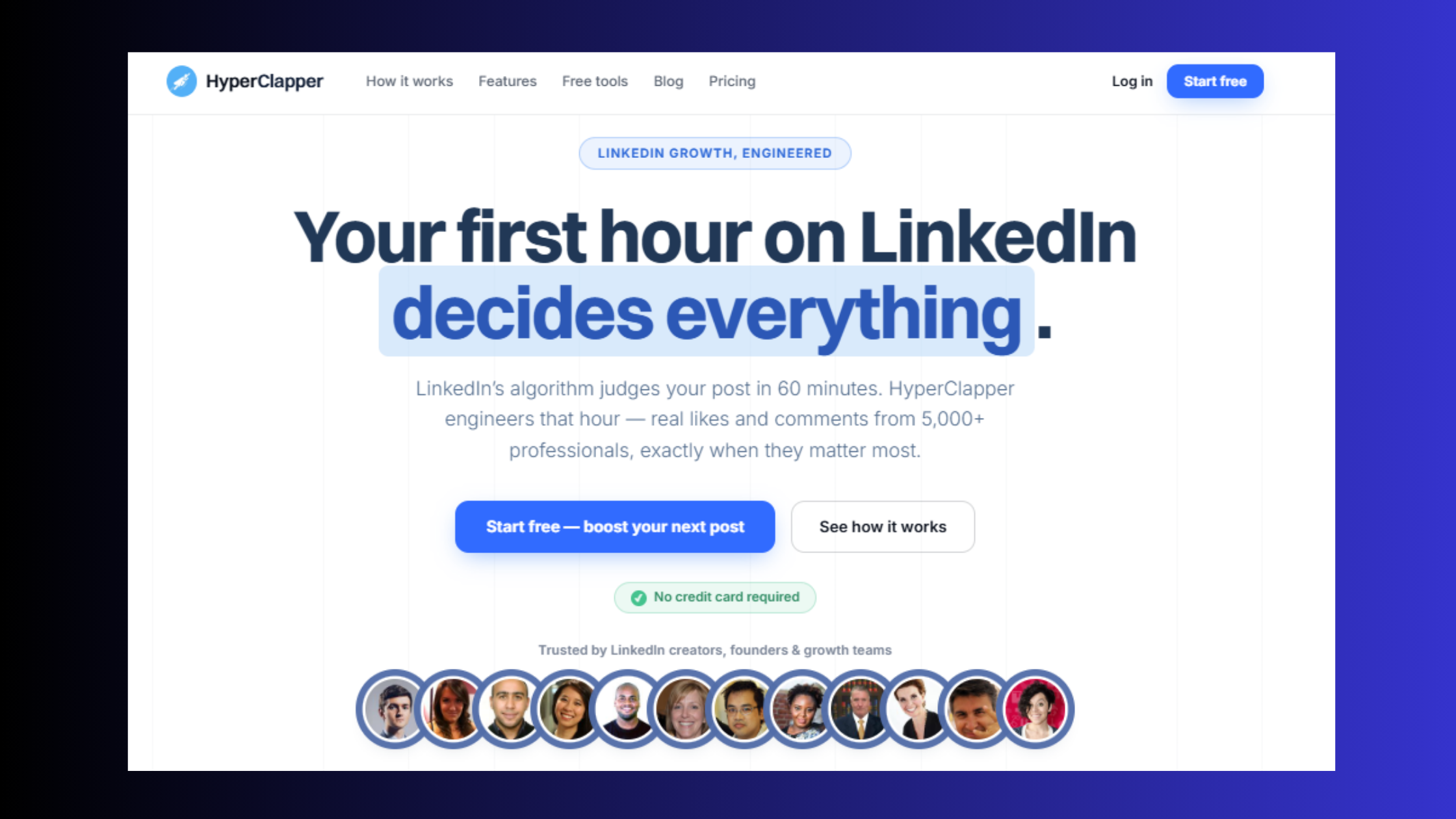
Turn LinkedIn Content Into Inbound Leads
HyperClapper's real engagement channels get your posts seen by the right buyers — without cold outreach, without bots, and without LinkedIn ban risk.
Start Free on HyperClapperThe tools aren't direct competitors in practice. They solve adjacent problems in the LinkedIn lead generation stack — and the teams that understand this distinction extract more value from both than teams that treat it as a binary choice. What consistently separates accounts generating real revenue from LinkedIn from accounts with impressive activity metrics is alignment between the tool's mechanism and the team's actual sales motion. Get that alignment right, and either tool performs. Misalign them, and neither delivers what you expected.
Frequently Asked Questions About Salesgear, HyperClapper, and LinkedIn Lead Generation
Which is better for LinkedIn lead generation, Salesgear or HyperClapper?
It depends entirely on your lead generation model. Salesgear is better for outbound SDR teams running structured cold outreach sequences. HyperClapper is better for founders, creators, and sales professionals generating inbound leads through LinkedIn content amplification. Both work — through completely different mechanisms. Most high-performing teams use both in a combined strategy.
What are the main differences between Salesgear and HyperClapper?
Salesgear is a cold outreach automation platform — it finds prospects in a 200M+ database, builds multi-channel email and LinkedIn DM sequences, and automates follow-up. HyperClapper is a LinkedIn engagement platform — it amplifies post visibility through real community channels and AI-powered replies so buyers find you through content. One pushes outreach out; the other pulls prospects in.
Can HyperClapper replace Salesgear for outbound sales?
No — HyperClapper is not designed to replace outbound sales automation. It has no contact database, no email sequence builder, and no cold outreach capabilities. HyperClapper replaces or supplements the LinkedIn visibility component of a sales strategy, not the outbound prospecting component. For teams that need cold outreach at scale, Salesgear or Apollo.io remains necessary alongside HyperClapper.
What LinkedIn outreach tool is safest to use without getting banned?
HyperClapper carries the lowest LinkedIn account risk of any engagement tool in this comparison — its real-community engagement model and Content Guard moderation system avoid the browser-extension automation patterns that LinkedIn's systems flag. For LinkedIn outreach (connection requests and DMs), keeping daily limits below 20–40 actions/day and avoiding rapid-scale volume is the primary safety lever regardless of tool.
Is Salesgear good for international or non-English outreach campaigns?
Salesgear's contact database is strongest for US mid-market B2B contacts. For international campaigns, expect 15–25% bounce rates without supplemental email verification. Coverage gaps are most significant for non-English markets, smaller companies outside North America, and emerging economies. Teams with a primarily non-US ICP are better served by Apollo.io's more frequently refreshed international dataset.
How does Salesgear's contact database compare to Apollo or ZoomInfo?
Salesgear's 200M+ record database is competitive for US B2B contacts but refreshed less frequently than Apollo's continuously updated dataset. Apollo has 10x the G2 review volume and broader coverage across international markets. ZoomInfo remains the enterprise standard for data accuracy and intent signals, at a significantly higher price. For mid-market US outbound, Salesgear's data is workable — for global campaigns, Apollo or ZoomInfo deliver better accuracy.
Are there good HyperClapper alternatives for LinkedIn leads?
The main HyperClapper alternatives for LinkedIn leads are Lempod, Podawaa, and LinkBoost — all engagement pod platforms. However, HyperClapper differentiates through real (not bot-ring) community engagement, AI-powered contextual replies, Content Guard moderation, and company page support. For teams prioritizing safety and content quality alongside reach amplification, HyperClapper's feature set is more complete than the alternatives.
What are the best LinkedIn prospecting tools in 2024 and 2025?
The best LinkedIn prospecting tools 2024 and into 2025–2026 split by use case: Apollo.io and Salesgear for outbound sequence automation with built-in contact data; SalesRobot for LinkedIn-native connection and DM outreach; HyperClapper for content-led inbound lead generation through post amplification. The best single tool is the one aligned to your specific sales motion — no universal winner exists across all use cases.



