How to Write a LinkedIn Testimonial That Gets Noticed Fast
Learn how to write LinkedIn testimonials posts that actually get noticed — from asking ethically to formatting for reach. Step-by-step guide with examples and templates.
📅 ⏱ 16 min read📝 ~3100 words
A pattern observed consistently across high-performing LinkedIn profiles is that the people who benefit most from testimonials are rarely the ones who ask for them most often — they're the ones who know how to turn a raw recommendation into a post that actually performs. LinkedIn testimonials posts are one of the highest-trust content formats on the platform: social proof delivered in someone else's voice, which the algorithm treats differently from self-promotional content. The challenge isn't getting praise — it's knowing how to ask without feeling awkward, format without looking desperate, and post without killing your credibility.
Key Takeaways
A LinkedIn recommendation (profile feature) and a LinkedIn testimonial post (content strategy) are different things — most guides never explain this.
The ask is easier than you think: timing it right and giving the person a framework makes all the difference.
Specificity beats superlatives — the most effective recommendations follow a situation → contribution → outcome structure.
Formatting matters as much as content: your hook, line breaks, and tagging strategy directly influence post reach.
Testimonials should make up roughly 10–15% of your content mix — any more and your audience starts to disengage.
You have full control over which recommendations appear on your profile — you're never stuck with one that no longer fits.
What a LinkedIn Testimonial Actually Is (And Why Most Miss the Point)
Difference between a LinkedIn recommendation and a testimonial post
LinkedIn Recommendation vs. Testimonial Post: Key Differences
Most guides conflate two distinct things — and that conflation is exactly why people execute this wrong. A LinkedIn recommendation is a structured feature built into the platform: someone writes a testimonial about you directly through LinkedIn, it appears in the Recommendations section of your profile, and it's permanently tied to your professional history. A LinkedIn testimonial post, by contrast, is a content strategy move: you take praise — from a recommendation, a client email, a DM, a Slack message — and publish it as a standalone post designed to generate engagement and reach.
Both matter. But they serve different purposes. One builds profile credibility. The other builds algorithmic reach and real-time social proof with your current audience. Knowing which you're working with changes everything about how you execute.
Why Testimonial Posts Work: Post Visibility Triggers and Social Proof
Testimonial posts generate engagement because they trigger two things simultaneously: trust signals in readers (someone else vouches for you) and curiosity about the story behind the result. This is engagement-driven storytelling — content that performs because it's inherently human, not because it's promoted. According to SocialPilot (2026), the average engagement rate on LinkedIn posts is approximately 5.2%, up 8% year-over-year — and posts built around social proof and personal narrative consistently sit above that benchmark.
5.2%
Average LinkedIn engagement rate in 2026 — social proof posts routinely beat this benchmark
The community pain point here is real: most professionals know they need testimonials but freeze at execution — unsure how to ask, how to reformat someone else's words ethically, and how to write a hook that makes anyone stop scrolling. The sections below fix all three.
How to Ask for a LinkedIn Recommendation Without Feeling Awkward
What to Say When Requesting a LinkedIn Recommendation
The professionals who get the best recommendations ask at the right moment, not the right wording. Request immediately after a visible win — a project delivered, a launch completed, a problem solved. At that point, the other person has specific memories to draw from, and saying yes feels natural rather than obligatory.
Here's a copy-ready template for how to ask for a LinkedIn recommendation that actually works:
"Hi [Name] — I really enjoyed working together on [specific project]. If you'd be open to it, a LinkedIn recommendation from you would mean a lot. Even a few sentences about [specific skill or outcome] would be great. Happy to return the favour anytime."
What makes this work: it's specific, it's low-pressure ("a few sentences"), and it names exactly what to write about. Vague requests produce vague recommendations. The more context you give, the more useful the result — and the easier you make it, the more likely they'll actually do it.
💡
Pro Tip:Send your recommendation request via LinkedIn's built-in feature — it keeps the context on-platform and makes it one click for the other person to respond. Navigate to their profile → More → Request a recommendation.
Getting Permission to Share Testimonials Publicly
Turning a private message or email into a public post requires explicit permission — always. This isn't just good manners; in regulated industries it's a compliance requirement. Always get permission before publishing. A simple DM — "I'd love to share your kind words in a post — would that be okay with you?" — takes 10 seconds and protects both parties.
Legal and compliance note: In finance, healthcare, and legal services, regulatory bodies (including the FTC in the US and equivalent agencies in other markets) have specific rules about publishing client testimonials. Some require disclosures; others restrict testimonials from clients in active relationships. If you work in a regulated sector, verify with your compliance team before posting any client testimonial publicly.
⚠️
Warning:Never share a client testimonial publicly without explicit written permission. Even a DM or email response saying "yes, go ahead" counts — but verbal permission does not. Keep a record.
How to Write a LinkedIn Recommendation or Testimonial That Actually Stands Out
A simple guide to writing better LinkedIn recommendations!
LinkedIn Recommendation Examples by Relationship Type
The most common mistake when writing a recommendation is reaching for adjectives instead of evidence. "Incredible communicator" means nothing. "Delivered the project two weeks early and kept every stakeholder informed with weekly written updates" means everything.
Here's the structure that works across every relationship type — what makes a good LinkedIn recommendation every time:
Situation: What was the context or challenge?
Contribution: What specific thing did this person do?
Outcome: What happened as a result — ideally with a number?
Forward endorsement: Who would you recommend them to?
Tailored by relationship:
LinkedIn testimonial for colleague: "We worked together on [project]. [Name] took ownership of [specific task] when the timeline was under pressure and delivered [result]. Any team would be lucky to have them."
Manager to direct report: "I managed [Name] for two years. She grew from [starting point] to [achievement] — a trajectory I rarely see. Her instinct for [skill] is genuinely rare."
Client to service provider: "We hired [Name] to solve [problem]. Within [timeframe], we saw [measurable result]. The ROI was clear. We've already re-engaged them for phase two."
A LinkedIn recommendation example for a software engineer: "I worked with [Name] during a critical product launch. He architected the backend solution that let us scale from 500 to 50,000 users in under three months — without a single major incident. Calm under pressure, rigorous in code reviews, and genuinely collaborative. I'd hire him again without hesitation."
Common Mistakes That Make LinkedIn Recommendations Invisible
Teams that skip the structure above consistently produce recommendations that read like a job description, not a human endorsement. The most common failures:
Opening with "I had the pleasure of working with..." — every recruiter has read this 10,000 times
Listing skills instead of demonstrating them through a story
Using superlatives ("the best I've ever worked with") without evidence to back them up
Writing more than 150 words without a narrative arc — recommendations that are too long get skimmed
How long should a LinkedIn recommendation be? Three to five sentences is the sweet spot. Long enough to be credible, short enough to be read in full. On mobile — where most LinkedIn browsing happens — anything over 100 words risks losing the reader before the endorsement lands.
How to Format a LinkedIn Testimonial Post for Maximum Engagement
How to write a testimonial post that gets engagement
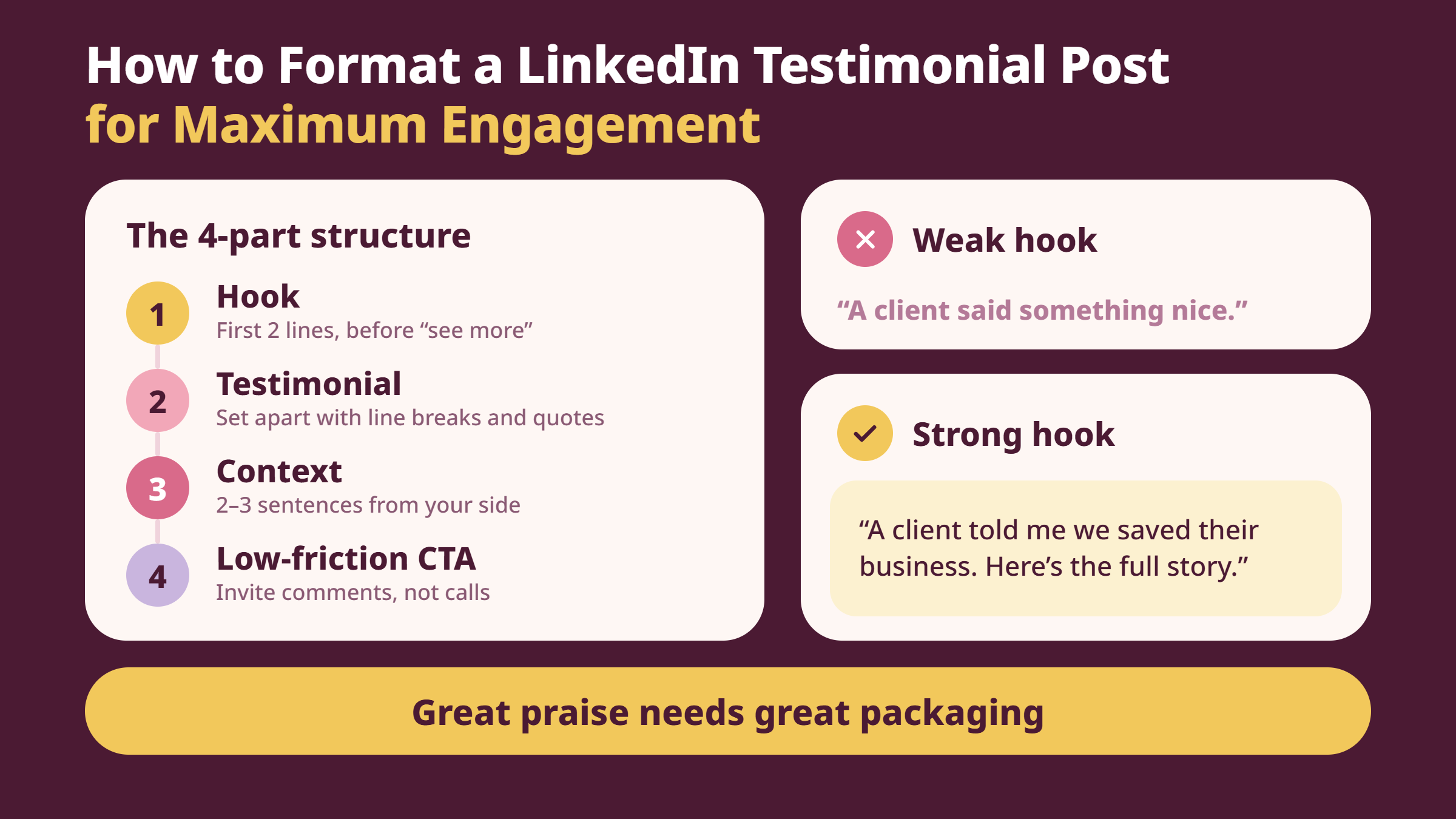
Having a great testimonial and knowing how to post it are two completely separate skills. This is the gap most competitor articles miss entirely — they explain what a testimonial is but never show you how to package it into a post that the algorithm rewards.
The structure that consistently outperforms:
Hook (first 2 lines): This is what shows before "see more" — it must create curiosity or signal a result. Not "A client said something nice." Instead: "A client told me we saved their business. Here's the full story."
The testimonial itself: Set it apart visually. Use line breaks above and below, quotation marks, and ideally italics. Make it scannable — a wall of text buries the best part.
Your brief context: Two to three sentences explaining the situation from your side. This humanises the post and adds credibility.
Low-friction CTA: Not "Book a call." Instead: "If you're dealing with [problem], I'd love to hear what you're working on — drop it in the comments."
According to Metricool's 2026 LinkedIn data, posts that include a question receive 77% more comments than standard posts. In practice, adding a single open question at the end of your testimonial post — tied to the problem the testimonial speaks to — can meaningfully lift comment velocity in the critical first hour after publishing.
Visual Testimonials on LinkedIn: Images, Graphics, and Video
Screenshot testimonials shared as images perform well when the text is large enough to read on mobile without zooming. Generic graphic templates with a quote overlaid tend to look corporate — a simple screenshot of a real message, with the sender's permission, often outperforms polished design. Video testimonials on LinkedIn are the highest-trust format when available: a 60–90 second clip of someone speaking directly to camera generates both higher watch time and a strong trust signal that a text post simply can't replicate.
How the LinkedIn Algorithm Treats Posts With Social Proof Elements
LinkedIn's distribution model rewards posts that generate meaningful conversations — comments, especially multi-turn threads, carry more weight than likes alone. A testimonial post that prompts five people to share their own related experience will consistently outperform a polished corporate announcement. What separates top performers here is pairing the testimonial with a question that makes responding feel natural, not performative.
Posting frequency: testimonials should represent roughly 10–15% of your content mix. Post them more often than that and your audience starts associating your account with self-promotion — engagement drops, and the algorithm follows suit. Once or twice a month, well-structured, consistently outperforms a weekly cadence of mediocre ones.
Get More Eyes on Your Testimonial Posts
HyperClapper connects your posts with real engagement from relevant professionals — so your best content gets seen, not buried.
Risks, Red Flags, and What to Do When Testimonials Go Wrong
How to Make Your LinkedIn Recommendation Stand Out (Not Backfire)
A poorly written recommendation can genuinely damage the profile it's meant to support. Vague praise from a connection with no shared context — "Great guy, highly recommend!" — raises questions rather than building trust. A recommendation that contradicts your current positioning (glowing praise for a role you've pivoted away from) can create friction with recruiters or clients trying to understand where you're headed. Grammatical errors reflect on both writer and recipient.
If you receive a recommendation that doesn't serve your current positioning, you are not obligated to display it. LinkedIn gives you full control over your Recommendations section — received recommendations can be hidden without notifying the writer. This is an underused feature. Periodically audit what's visible on your profile and retire anything that no longer represents where you are professionally.
How to handle negative or fake testimonials: For recommendations you've received, you can choose not to show them on your profile. For fake or fraudulent content posted elsewhere about you, LinkedIn's reporting tools allow you to flag it for review. Fake or incentivized testimonials carry real risk — the FTC requires disclosure when endorsements involve compensation, and equivalent bodies in the EU and UK hold similar standards. Publishing an incentivized testimonial without disclosure isn't just an ethical issue; in regulated contexts, it can have legal consequences.
🔴
Avoid:Offering any form of incentive — discounts, reciprocal recommendations, or gifts — in exchange for a testimonial without clear disclosure. This violates FTC guidelines and equivalent regulations in most markets, and puts both you and the reviewer at risk.
✓ The LinkedIn Testimonial Quality Checklist
☐Got explicit written permission before posting any private message or email as a testimonial
☐Testimonial includes a specific situation, contribution, and measurable outcome
☐Post hook is written for the first 2 lines visible before "see more"
☐Testimonial text is visually set apart with line breaks and quotation marks
☐Tagged the testimonial giver only with their advance consent
☐Post ends with an open question or low-friction CTA to drive comments
☐Verified compliance requirements if operating in a regulated industry
☐Testimonials are no more than 10–15% of your recent content mix
For creators and professionals who want their testimonial posts to land with real reach after publishing, tools like HyperClapper connect posts with real engagement groups — so the algorithm sees early traction and distributes further. Meaningful early comments, especially on a trust-heavy post like a testimonial, directly influence how far LinkedIn pushes the content in the first 90 minutes after publishing.
What consistently separates a testimonial post that compounds reach from one that flatlines is not the quality of the praise — it's whether the post gives the audience something to respond to. A testimonial without a hook is a trophy in a locked cabinet.
HyperClapper
Frequently Asked Questions About LinkedIn Testimonials and Recommendations
How do you do a testimonial on LinkedIn?
To add a recommendation on LinkedIn, go to the person's profile, click "More," and select "Recommend." Write your testimonial directly in the platform using the situation-contribution-outcome structure. To post a testimonial publicly, take a quote (with permission), format it as a post with a strong hook, and publish it to your feed. Both serve different purposes — profile credibility vs. real-time social proof.
How long should a LinkedIn recommendation be?
Three to five sentences is the ideal length for a LinkedIn recommendation — roughly 75 to 150 words. This is long enough to include a specific situation and outcome, short enough to be read in full on mobile. Recommendations over 200 words risk losing the reader before the endorsement lands. Shorter is almost always stronger, provided the specificity is there.
What is the ideal structure for a LinkedIn recommendation that gets noticed?
The structure that consistently outperforms: open with the context (what challenge or project you shared), describe the specific contribution the person made, name a measurable outcome where possible, and close with a forward-looking endorsement ("I'd work with them again without hesitation"). Skip adjectives unless they're backed by evidence. Specificity is what makes a recommendation credible and memorable.
How do you write a LinkedIn testimonial that sounds genuine and not generic?
Write the way you actually speak, not the way you think a professional reference should sound. Name a specific moment — a meeting, a decision, a deadline — rather than describing qualities in the abstract. If you wouldn't say "consummate professional" to someone's face, don't write it. The most credible recommendations read like a precise anecdote told to a friend, not a performance review.
What are the biggest mistakes people make when writing LinkedIn recommendations?
The most common failures: opening with "I had the pleasure of working with..." (every reader skips this instantly), listing traits instead of demonstrating them through a story, using superlatives with no supporting evidence, and writing more than 150 words without a narrative arc. Recommendations that could apply to any person in any role provide zero signal — and zero value to the recipient.
How long does it take for a LinkedIn recommendation to appear on someone's profile?
A LinkedIn recommendation appears on the recipient's profile as soon as they accept it — there's no platform processing delay. After you submit it, LinkedIn sends the recipient a notification. They review it and choose to accept or decline. The typical turnaround is one to three days, though some people take longer. It won't appear publicly until explicitly accepted and set to visible by the recipient.
Can a LinkedIn recommendation hurt your profile?
Yes, in specific circumstances. A vague recommendation from a low-credibility connection adds noise rather than trust. A recommendation praising skills that contradict your current positioning can confuse potential employers or clients. Grammatical errors reflect on both parties. You control what's displayed — any received recommendation can be hidden from your profile without notifying the writer, so audit your Recommendations section periodically.
What should I include in a LinkedIn testimonial?
Include a specific situation or challenge, the person's concrete contribution or skill in action, a measurable outcome where possible, and a clear forward-looking endorsement. Skip generic adjectives. The goal is to give the reader — whether a recruiter, a client, or a potential collaborator — one specific reason to trust this person that they couldn't have written themselves. That specificity is what client advocacy content actually means.
HyperClapper gives your LinkedIn posts real early engagement — from real people — so the algorithm distributes them further. Try it on your next testimonial post.
After seeing this pattern play out across thousands of LinkedIn posts, the clearest finding is this: the testimonial itself is only half the work. Accounts that invest equally in the ask, the format, and the post structure — and that keep testimonials as a consistent but measured part of their content mix — build the kind of compounding credibility that no single viral post can create. Accounts that skip any one of those three typically find that even genuine, well-written praise disappears into the feed within hours, unseen.
👋
⚡ Free plan
Leaving already?
Grab 3 free boosts on your next LinkedIn post — real likes & comments from 5,000+ creators. No card, cancel anytime.