LinkedIn Post Mockup Generators: Free Tools Compared
Compare the best free LinkedIn post mockup generators in 2026. Preview sponsored content, carousel ads, and organic posts before publishing — step-by-step workflow included.
📅 ⏱ 12 min read📝 ~2300 words
A linkedin sponsored content mockup is a feed-accurate simulation of how your post or ad will appear inside the LinkedIn interface — before it goes live and before you spend a dollar on distribution. A pattern observed consistently across marketing teams is that campaigns approved from generic design files (a Canva export, a Figma frame, a screenshot) routinely surface layout surprises at launch: truncated headlines, cropped thumbnails, misaligned CTA buttons. A proper linkedin post mockup generator eliminates that entire category of error. It shows stakeholders exactly what the audience will see — sponsored label, profile image, reaction bar, and all — inside a realistic feed environment.
Key Takeaways
Who this is for: marketers, agencies, founders, and creators who need to preview and approve LinkedIn content before publishing or spending on ads.
What you'll learn: the difference between a post preview and a full ad mockup, which free tools are most accurate, and a step-by-step approval workflow.
Most tools are partly free: true unlimited free tiers are rare — most cap exports, watermark downloads, or restrict carousel support.
Canva is not a mockup tool: it shows design in isolation, not inside a real LinkedIn feed environment with sponsored labels and UI chrome.
Counterintuitive finding: LinkedIn's own native preview is free but is the worst option for stakeholder approval — no shareable link, no multi-format comparison.
After the mockup: engagement quality matters as much as creative quality — getting early traction on a post signals LinkedIn's algorithm to distribute further.
What Is a LinkedIn Post Mockup Generator (and Why Marketers Need One in 2026)
A LinkedIn post mockup generator is a web-based tool that replicates the LinkedIn feed UI around your content — your copy, image, headline, CTA button, and sponsored label — without requiring you to publish or run a live campaign. The result is a feed-accurate ad rendering: a visual that is indistinguishable from a real in-feed post when shared as a screenshot or link.
According to LinkedIn's own content design data, posts with images get 2x more engagement than text-only posts. That makes the visual creative arguably the highest-leverage variable in any campaign — which is exactly why getting it reviewed accurately before launch matters.
2×
More engagement for LinkedIn posts with images vs. text-only posts
LinkedIn Post Preview vs. LinkedIn Content Mockup: What's the Difference?
LinkedIn Post Preview vs. LinkedIn Content Mockup
These two terms get used interchangeably, but they represent different things in practice:
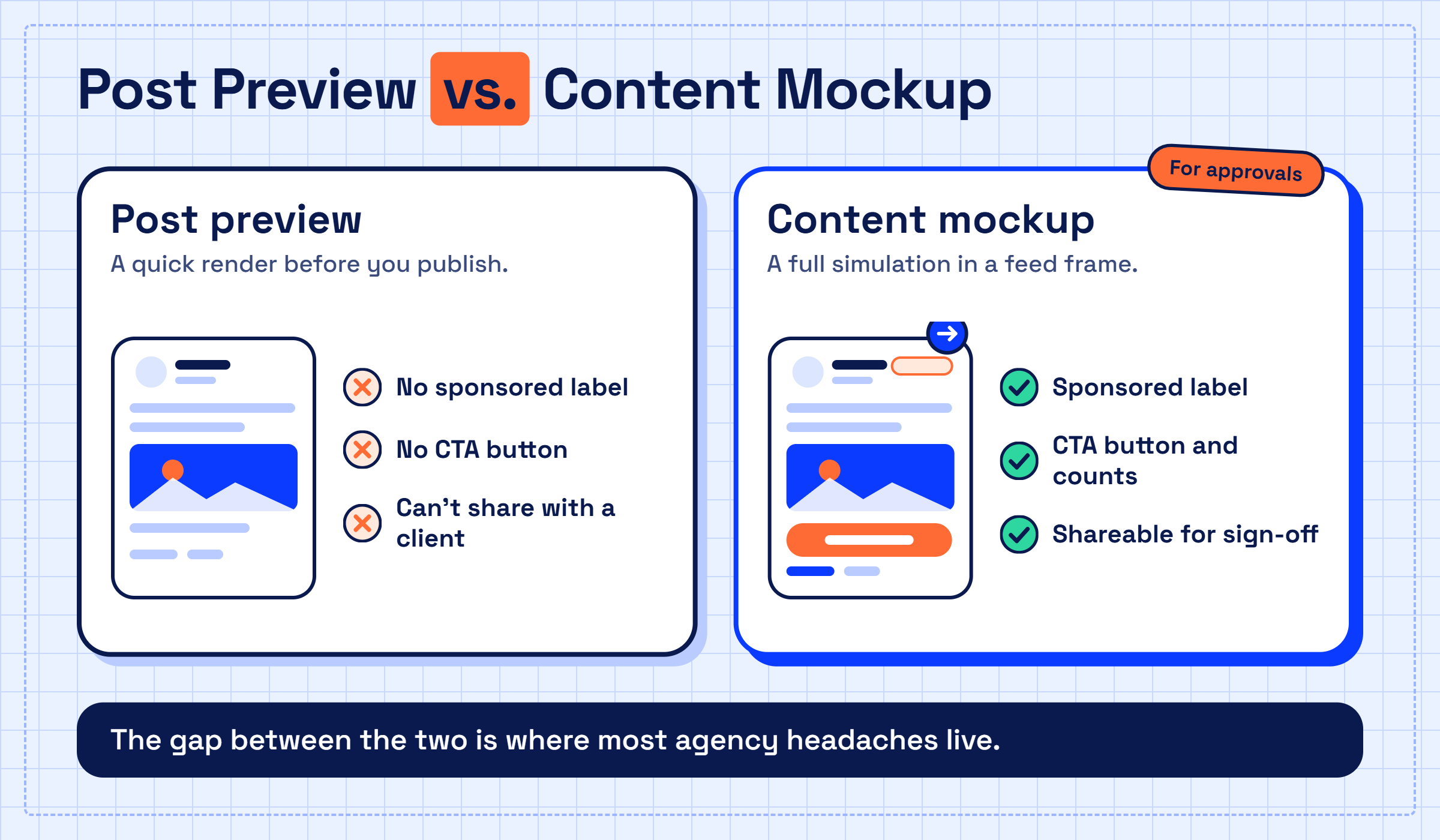
LinkedIn post preview — a quick render of how an organic post will look before you hit publish. LinkedIn's native editor has this built in. It's functional for personal content but shows no sponsored label, no CTA button, and can't be shared with a client.
LinkedIn content mockup — a full simulation of an ad or organic post inside a realistic feed frame, including UI chrome, engagement counts, company name, and optionally a "Sponsored" label. This is what campaign creative review and stakeholder approval workflows actually require.
The gap between the two is where most agency headaches live. Knowing which you need before choosing a tool saves real time.
Best Free LinkedIn Post Mockup Generators Compared
The best free LinkedIn post mockup generators in 2026 aren't all equally free. Most use a freemium model: unlimited previews in-browser, but paywalled exports, watermarked downloads, or restricted carousel support. The table below reflects what's genuinely usable at no cost.
Tool
Best For
Carousel Support
Shareable Link
Free Tier Limit
PPC Ad Editor
Agencies, full ad preview
✅ Yes
✅ Yes
Limited exports
AdPreviewer
Quick single-image checks
❌ No
✅ Yes
Watermarked
LinkedIn Campaign Manager Preview
Native accuracy, single user
✅ Yes
❌ No
No export
Canva LinkedIn Template
Brand design iteration
✅ Partial
✅ Yes
No feed simulation
Figma Community Files
Design-team handoffs
✅ Yes
✅ Yes
Manual updates required
Which LinkedIn Mockup Tool Is Most Accurate for Feed Rendering?
PPC Ad Editor consistently renders the closest match to live LinkedIn UI — it replicates the sponsored label, company logo placement, reaction bar, and "See more" text truncation point accurately. The most common failure mode in other tools is incorrect text cutoff: they truncate copy at the wrong character count, leading to approvals on mockups that look different once live.
💡
Pro Tip:Always count your post copy characters in the tool's preview — LinkedIn truncates single-image sponsored posts at approximately 150 characters on mobile. If your hook lands after that cutoff, most mobile users will never read it.
Do LinkedIn Mockup Tools Work for Carousels and Images?
Carousel ad visualization is where most free tools fall short. Only PPC Ad Editor and LinkedIn's native Campaign Manager preview support multi-slide carousel rendering at no cost. Figma community files can replicate it, but require manual frame-by-frame setup. Tools marketed as a social media post mockup generator free solution — including several browser extensions — typically support single-image formats only and display a carousel as a flat static image. For multi-image ad formats, budget for PPC Ad Editor's paid tier or use Campaign Manager directly.
LinkedIn Post Mockup Generator vs. Canva and Other Alternatives
Canva is not a LinkedIn post preview tool. It's a design tool. The distinction is important: Canva shows you how your creative looks in isolation — on a white canvas or against a branded background. It does not place that creative inside a realistic LinkedIn ad preview environment with a profile image, connection count, sponsored label, or reaction bar.
Canva tells you how your ad looks. A LinkedIn mockup generator tells you how your ad looks to your audience — and those are two completely different things.
LinkedIn mockup generator alternatives — Canva, Adobe Express, and Figma community files — are genuinely useful for:
Brand asset creation and visual iteration
Teams already embedded in a Canva or Adobe workflow
Producing clean export files to hand off to a media buyer
A dedicated LinkedIn simulator tool wins when you need a shareable preview URL for client sign-off, when the creative includes a CTA button that must be reviewed in context, or when you need side-by-side desktop and mobile comparison. For pure creative development, Canva is fine. For campaign creative review with real UI chrome, it isn't the right tool.
hyperclapper.com
Best LinkedIn Creator Tools to Post Faster in 2026
Discover the best LinkedIn creator tools for 2026 to streamline posting, boost engagement, and grow your professional brand fast.
How to Preview a LinkedIn Post Before Publishing: Step-by-Step
How to Preview a LinkedIn Post Before Publishing
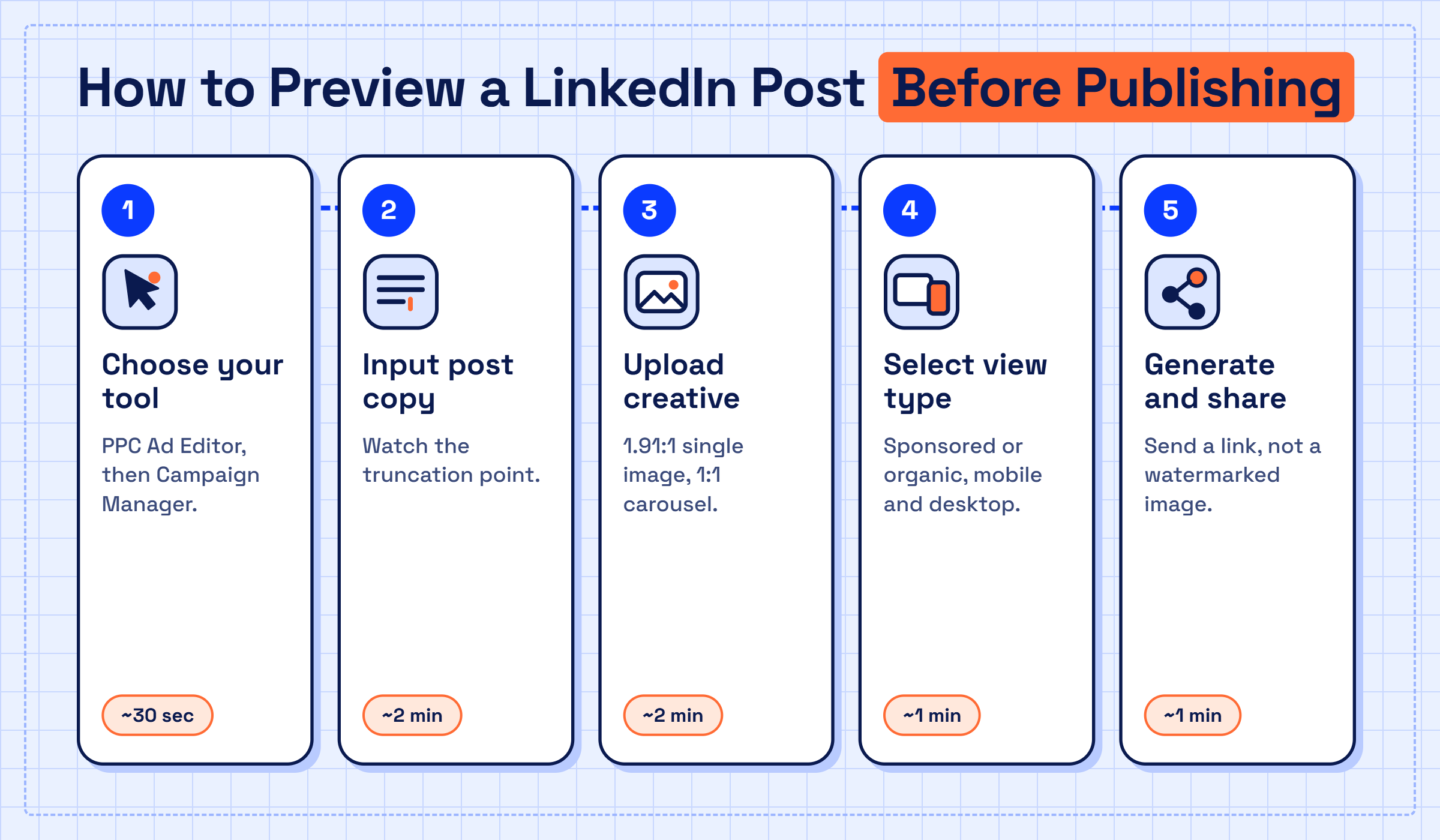
The most reliable workflow for previewing a LinkedIn post before publishing — whether organic or sponsored — follows the same five-step sequence regardless of which tool you use.
Choose your tool — PPC Ad Editor for sponsored content with shareable links; LinkedIn Campaign Manager native preview for final accuracy check before launch. (~30 seconds)
Input post copy — paste your headline, body text, and destination URL. Watch for the character truncation point in real time. (~2 minutes)
Upload creative assets — single image, carousel slides, or video thumbnail. Check that the tool respects LinkedIn's recommended aspect ratios (1.91:1 for single image, 1:1 for carousel). (~2 minutes)
Select view type — toggle between "Sponsored" and organic view. Configure CTA button label if applicable. Enable both mobile and desktop preview simultaneously. (~1 minute)
Generate and share — export a shareable preview link (not a watermarked image) for stakeholder approval. Collect feedback before final upload to Campaign Manager. (~1 minute)
⚠️
Warning:Never skip the mobile preview step. Text truncation, image crop behavior, and CTA button visibility differ significantly between desktop and mobile. Approving only a desktop mockup is the most common cause of live creative surprises on LinkedIn campaigns.
Common Mistakes to Avoid When Using LinkedIn Mockup Tools
Approving from a watermarked export — clients focus on the watermark, not the creative. Use a shareable link instead.
Skipping the native Campaign Manager check — always do a final preview inside LinkedIn's own ad preview environment before launch, even if the mockup looked perfect.
Using an outdated tool version — LinkedIn updates its feed UI periodically. A tool that hasn't been updated in six months may show an old post frame.
Treating the mockup as the final quality gate — mockups are for creative and copy approval, not performance validation. A beautiful mockup of mediocre copy still underperforms.
Once your creative is approved, make sure it actually reaches people
HyperClapper connects your post to real engagement channels so early traction signals LinkedIn's algorithm to distribute further — without bots or fake activity.
Limitations and Risks of Free LinkedIn Mockup Tools
Free tools drift. That's the clearest pattern seen across teams that rely heavily on third-party mockup generators: a tool that matched the LinkedIn UI precisely in January may show a visibly outdated post frame by Q3 of the same year, because LinkedIn updates its interface and the tool's maintainers don't always keep pace. This erodes client trust in ways that are hard to recover from mid-campaign.
Beyond UI drift, four consistent limitations affect free LinkedIn post mockup tool options:
Watermarked exports — most free tiers add branding to downloaded files, making them unprofessional for client-facing presentations.
No shareable preview links — some tools require the reviewer to have an account just to open a mockup, creating friction in the stakeholder approval workflow.
Static only — no tool simulates engagement counts, reach estimates, or how the post renders for different audience segments. What you see is a snapshot, not a live simulation.
Format gaps — video ad previews and conversation ads are poorly supported across free tiers.
🔴
Avoid:Using a polished mockup as a substitute for LinkedIn's native Campaign Manager preview before launch. Mockup tools are for stakeholder approval; Campaign Manager is the final accuracy check. Skipping the latter step means shipping creative you've never seen in a real ad environment.
Teams that build an approval workflow that includes both a shareable mockup link and a Campaign Manager pre-launch check consistently ship cleaner creative with fewer last-minute revisions. The mockup handles the conversation; the native preview handles the final gate.
✓ The LinkedIn Mockup Approval Checklist
☐Copy pasted into tool — verify character count at truncation point
☐Creative uploaded at correct aspect ratio (1.91:1 single image / 1:1 carousel)
☐Both mobile and desktop previews reviewed and approved
☐Sponsored label visible and correctly positioned
☐CTA button text reviewed in context (not just in a brief)
☐Shareable preview link (not watermarked image) sent to stakeholder
☐Final check inside LinkedIn Campaign Manager native preview before launch
Great creative needs great reach — not just approval
Tools like HyperClapper give your approved post the early engagement signals it needs to get distributed by LinkedIn's algorithm — through real community channels, not automation.
Frequently Asked Questions About LinkedIn Post Mockup Generators
What is the best free tool to generate a LinkedIn post mockup in 2026?
PPC Ad Editor is the strongest free option for sponsored content mockups — it supports carousel ad visualization, shareable preview links, and renders the sponsored label accurately. For organic posts only, LinkedIn's native "Preview" button in the post editor is free and accurate but cannot be shared with stakeholders.
How do I create a realistic LinkedIn post preview without publishing?
Use a dedicated LinkedIn post preview tool like PPC Ad Editor: paste your copy, upload your image or carousel slides, toggle the "Sponsored" view, and generate a shareable link. This produces a feed-accurate render without creating a draft campaign or spending any budget.
Are there any free tools that simulate the LinkedIn feed for mockups?
Yes — PPC Ad Editor, AdPreviewer, and LinkedIn's own Campaign Manager preview all simulate the LinkedIn feed at no cost, though each has limits. PPC Ad Editor offers the most complete free tier for sharing mockups externally. Campaign Manager is the most accurate but has no shareable link capability.
Which LinkedIn mockup generators support mobile and desktop preview?
PPC Ad Editor supports simultaneous mobile and desktop rendering — the most important feature for stakeholder approval. LinkedIn Campaign Manager also shows both views. Most other LinkedIn simulator tool options show desktop only by default, which misses how mobile truncation affects copy and image crop.
Can I see how my LinkedIn post looks before posting?
Yes. LinkedIn's native post editor has a built-in preview button — click the three dots or "Preview" option before publishing. For sponsored content, Campaign Manager includes a preview function inside the ad creation flow. Neither option produces a shareable link, so for client review you'll need a third-party tool.
Are LinkedIn post mockup generators really free?
Most are free to preview in-browser but restrict exports. Are LinkedIn post mockup generators really free in full? Rarely — watermarks on downloads, limits on carousel support, or paywalled shareable links are the most common restrictions. PPC Ad Editor's free tier is the most generous for agency use cases.
What is a LinkedIn post mockup generator?
A LinkedIn post mockup generator is a web tool that wraps your post copy and creative assets inside a rendered LinkedIn feed frame — including profile image, company name, reaction bar, and optionally a sponsored label — so you can review and share what your content will look like before it goes live.
👋
⚡ Free plan
Leaving already?
Grab 3 free boosts on your next LinkedIn post — real likes & comments from 5,000+ creators. No card, cancel anytime.

 hyperclapper.com