
The LinkedIn profile custom button is a dedicated, clickable call-to-action that appears directly beneath your name and headline — one of the highest-visibility spots on your entire profile. A pattern observed across optimized LinkedIn profiles is that this button consistently outperforms buried About-section links for driving real traffic: visitors don't have to dig for it. It points to any URL you choose — a website, booking page, newsletter, or sign-up form — and turns passive profile views into measurable action. If you don't see it on your profile, you're likely missing one of two requirements: Creator Mode or a LinkedIn Premium subscription.
- The LinkedIn profile custom button is available to Premium subscribers and users with Creator Mode enabled — not everyone by default.
- It appears under your name/headline and links to an external URL — far more visible than links buried in your About section.
- Button types include: Visit my website, Book an appointment, View my shop, Learn more, and Sign up.
- If your button is missing, the most common causes are Creator Mode being off, no active Premium plan, or an unsaved profile edit.
- The button only converts if the rest of your profile builds enough trust — a strong headline and active posting cadence are essential companions.
- Counterintuitive finding: More profile traffic matters more than the button itself — boosting post engagement with tools like HyperClapper sends more visitors to your profile in the first place.
- What Is the LinkedIn Profile Custom Button
- Who Can Add a Custom Button — and Which Links Are Allowed
- How to Add a Custom Button on LinkedIn: Step-by-Step
- Why Your LinkedIn Custom Button Might Be Missing
- LinkedIn Profile Optimization Tips to Maximize Your Custom Button's Impact
- Frequently Asked Questions About LinkedIn Custom Buttons
What Is the LinkedIn Profile Custom Button (and Why It Matters in 2026)
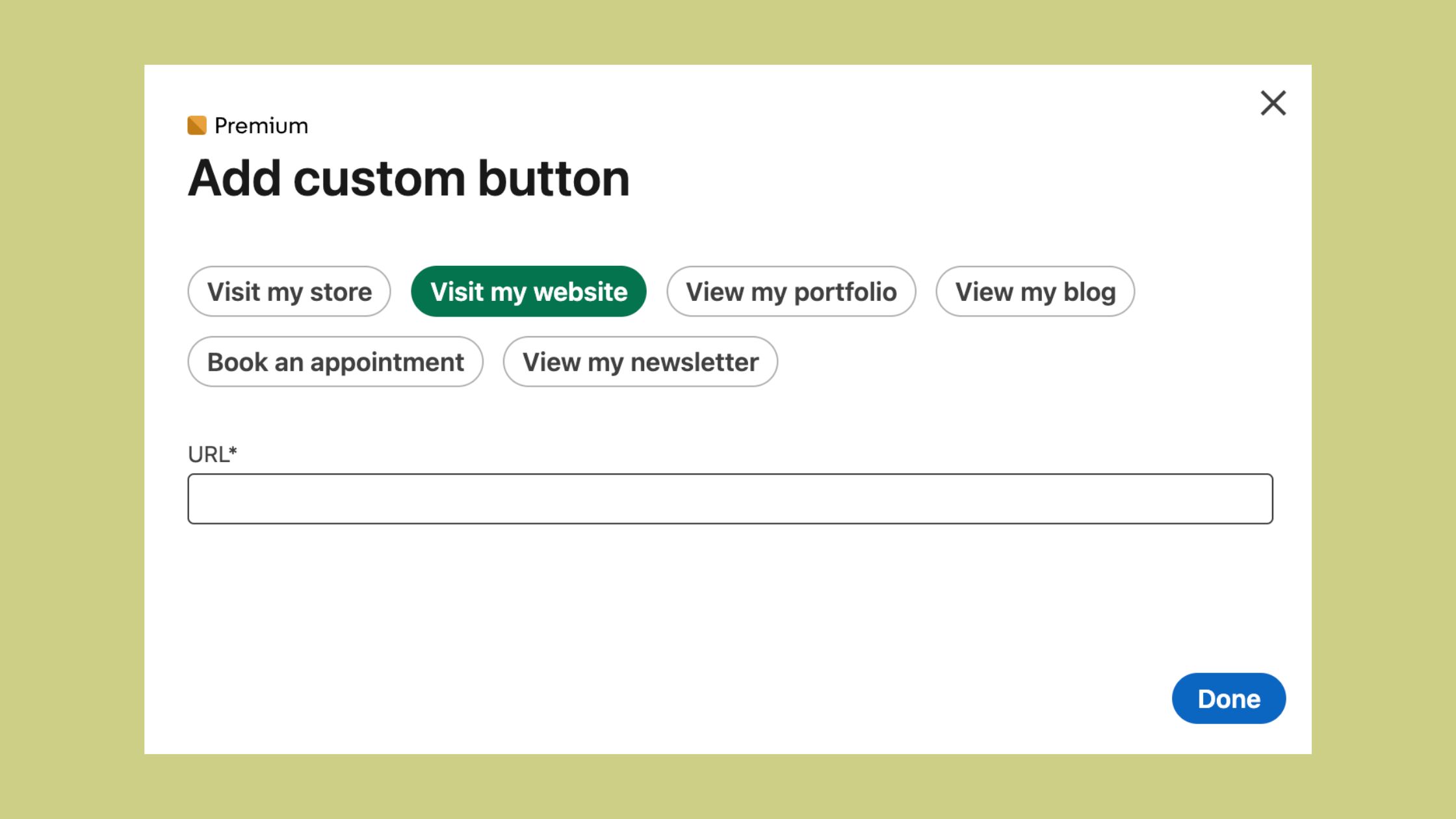
What is the custom button on LinkedIn profile? It is a prominently placed, labeled CTA button that sits directly under your name and headline — before visitors even scroll. Unlike a URL dropped into your About section (which most visitors never reach), the custom button is part of your profile's above-the-fold real estate. It is purpose-built for LinkedIn profile call-to-action optimization: converting profile visitors into newsletter subscribers, booked calls, or website traffic without friction.
This distinction matters more than most professionals realize. The About section is a narrative space — visitors read it to evaluate you, not to take action. The custom button exists for a single purpose: a click. That structural difference is why profiles using it well tend to see meaningfully higher LinkedIn profile conversion rates on their external destinations compared to buried link strategies.
Available link types include:
- Visit my website — for portfolio, company site, or blog
- Book an appointment — for coaches, consultants, and service providers
- View my shop — for creators selling products
- Learn more — for a course, offer, or specific landing page
- Sign up — for newsletter or community registration
LinkedIn Featured Section vs Custom Button: Key Differences
The LinkedIn featured section vs custom button debate comes up often, and they serve different purposes. The Featured section is a content showcase — media, posts, links, documents — best used to build credibility and demonstrate work. The custom button is purely transactional: one link, one action, maximum visibility. Think of the Featured section as your portfolio wall and the custom button as the front door. Both matter, but they are not substitutes for each other.
Who Can Add a Custom Button — and Which Links Are Allowed
Not every LinkedIn account gets access to the custom button. In 2026, who can add a custom button on LinkedIn comes down to two paths: activating Creator Mode (free) or subscribing to LinkedIn Premium (paid). Creator Mode is LinkedIn's content-creator profile configuration that unlocks additional features including the custom button, follower counts, and profile link prominence. Premium subscribers get the button regardless of Creator Mode status.
LinkedIn Creator Mode and the Custom Button Connection
Creator Mode is a LinkedIn profile setting that switches your profile's orientation from "connector" to "content creator" — it prioritizes followers over connections and surfaces creator-specific tools. Enabling it is free and takes under a minute. This is the fastest path to unlocking the custom button without paying for Premium.
Regarding LinkedIn Premium features for profile customization: Premium Career, Premium Business, Sales Navigator, and Recruiter tiers all include the custom button. Free accounts without Creator Mode do not. The practical advice: if you are primarily a content creator or personal brand builder, enable Creator Mode first. If you are in sales or recruiting and already using Premium for its other features, the button comes bundled.
How to Add a Custom Button on LinkedIn: Step-by-Step
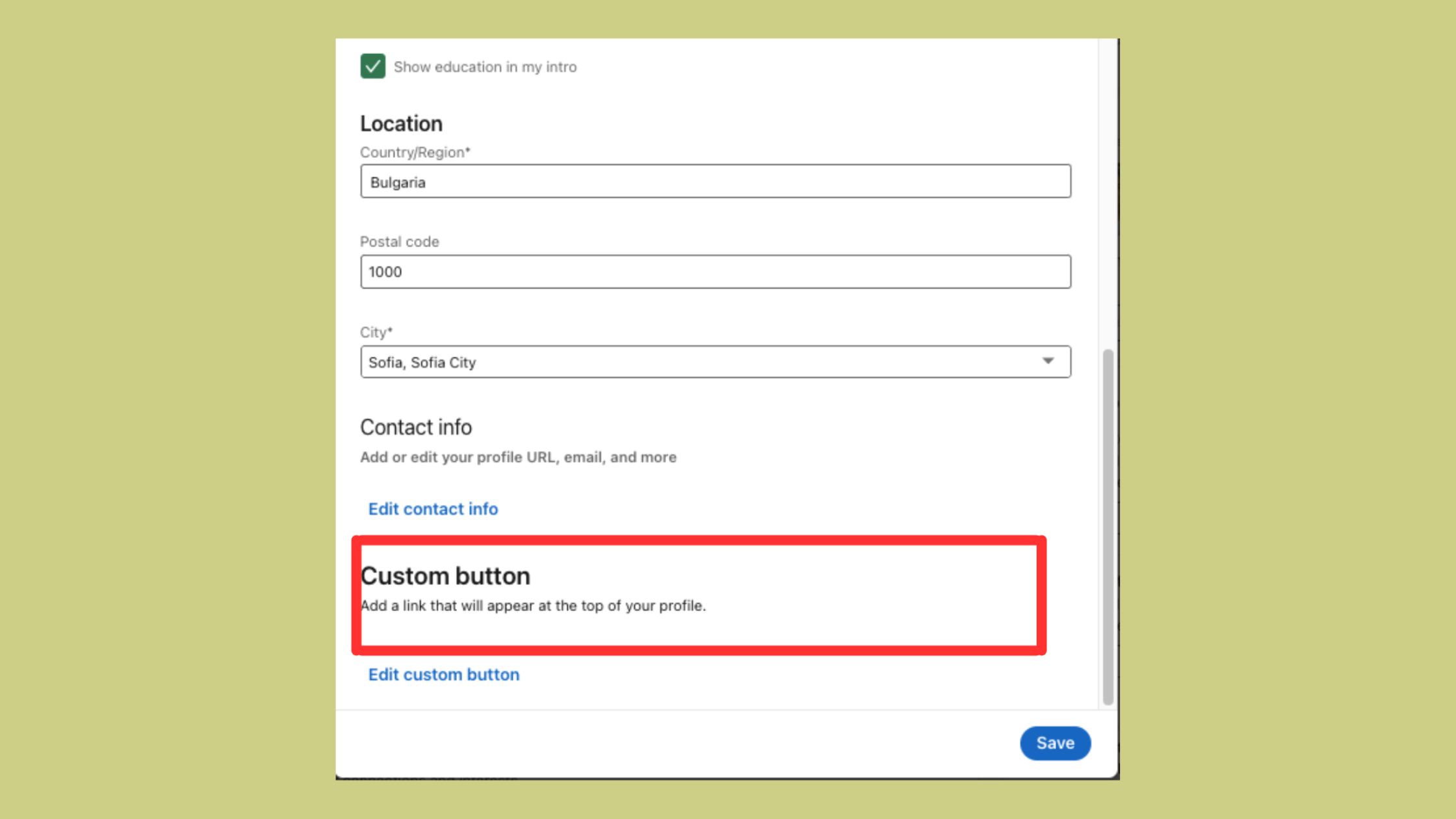
Here is exactly how to add a custom button on LinkedIn — the process is the same on desktop and takes under two minutes:
- Go to your LinkedIn profile and click the Edit (pencil) icon on your intro section. (~10 seconds)
- Scroll down within the edit panel until you see the Website or Custom button field. It appears near the bottom of the intro editor. (~15 seconds)
- Select your button type from the dropdown: Visit my website, Book an appointment, View my shop, Learn more, or Sign up. (~10 seconds)
- Paste your destination URL into the URL field. Use a UTM-tagged link if you want to track conversions in Google Analytics. (~20 seconds)
- Click Save. Your button goes live immediately. (~5 seconds)
Verify it published correctly: open your profile in an incognito or private browsing window. You should see the button prominently under your headline. This is exactly what visitors see — including recruiters, prospects, and new followers.
Common Mistakes to Avoid When Setting Up Your Custom Button
- Sending visitors to your homepage. A generic homepage has too many competing actions. Send them to a specific landing page built for one conversion.
- Skipping UTM parameters. Without tracking, you cannot prove the button is actually improving your LinkedIn profile conversion rate. Add
?utm_source=linkedin&utm_medium=profile&utm_campaign=custom-buttonto any URL. - Never rotating the link. The best-performing profiles treat the custom button as a campaign slot — updated by offer, season, or goal — not a permanent fixture.
Why Your LinkedIn Custom Button Might Be Missing (and How to Fix It)
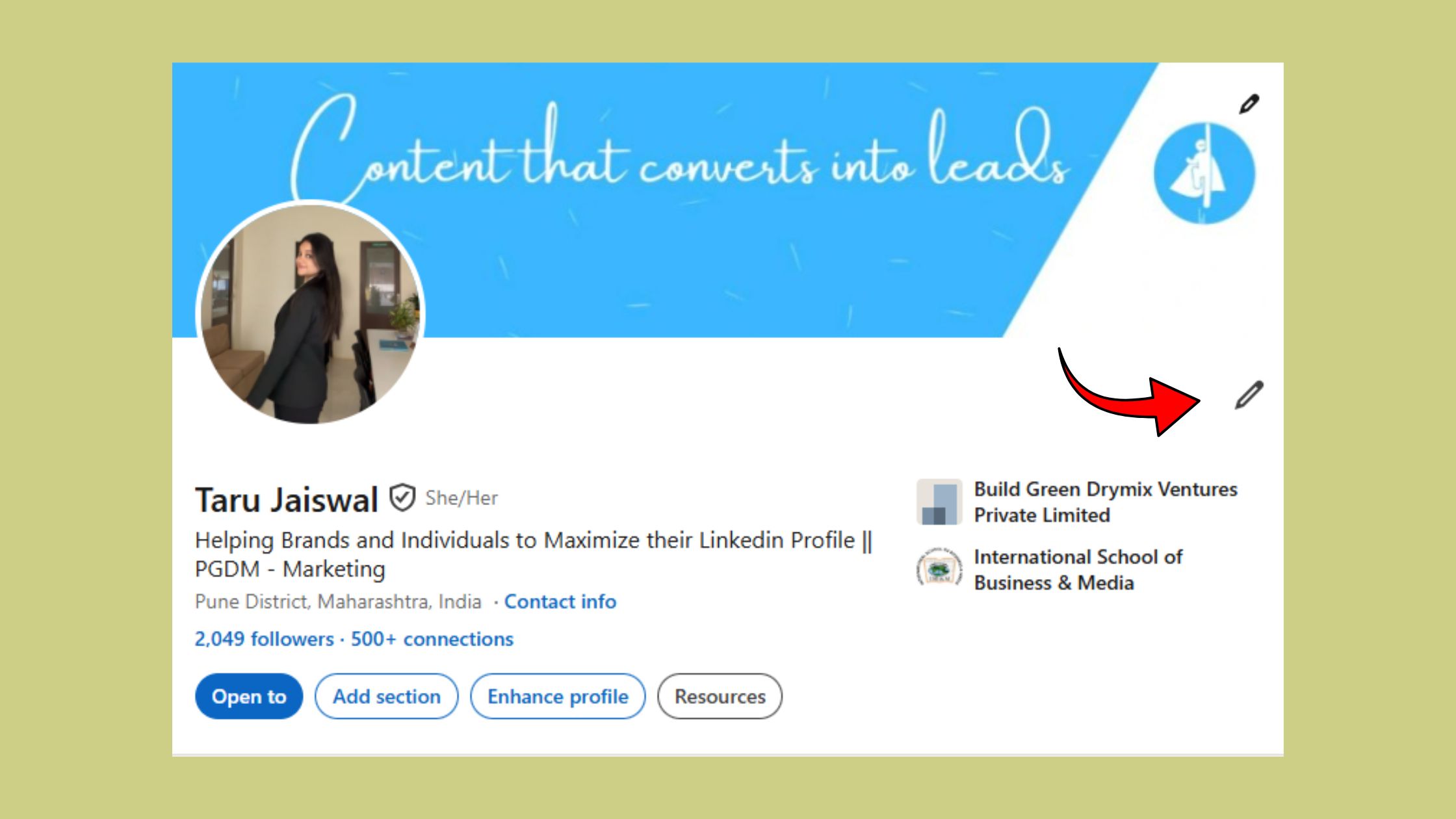
The most common failure mode here is also the most fixable: the button disappears or never appears because one of three conditions is not met. Work through this checklist before assuming it's a LinkedIn bug.
✓ LinkedIn Custom Button Troubleshooting Checklist
- ☐Check Creator Mode: go to Settings → Visibility → Creator Mode and confirm it is toggled ON
- ☐Confirm your Premium subscription is active (if relying on Premium rather than Creator Mode)
- ☐Re-open your intro editor and confirm the button URL and type are saved — unsaved edits are the silent culprit
- ☐Clear your browser cache or switch from the mobile app to desktop — app versions sometimes lag behind feature rollouts
- ☐Check the button is visible from an incognito window — not just from your logged-in view
- ☐If none of the above works, wait 24–48 hours — LinkedIn staggers feature rollouts and A/B tests new UI elements
The "why is my LinkedIn custom button missing" question most often resolves at step one or three. Creator Mode being accidentally toggled off during a profile edit is the most-reported cause across LinkedIn help forums.
Does the Custom Button Actually Help with Profile Views and Visibility?
The custom button does not directly affect LinkedIn's search ranking algorithm — it does not push you higher in LinkedIn search results. What it does affect is what happens after someone lands on your profile. Does LinkedIn custom button help with profile views? Indirectly, yes: a well-optimized profile with a clear CTA tends to generate more engagement signals (saved profiles, connection requests, follows) which feeds back into algorithmic visibility over time. The button itself is a conversion tool, not a discovery tool.
The custom button is the last mile of your LinkedIn visibility strategy — it only works if something else gets people to your profile first. Fix the discovery problem before optimizing the conversion.
LinkedIn Profile Optimization Tips to Maximize Your Custom Button's Impact in 2026
Teams that treat the custom button as a standalone fix typically see disappointing results. The button sits at the end of a trust chain: a visitor finds your post, reads your headline, skims your profile, and — if everything has built enough credibility — clicks. Weaken any link in that chain and the button conversion suffers regardless of how good your destination URL is.
These LinkedIn profile optimization tips 2024–2026 work together as a system:
- Headline: Lead with the outcome you create, not your job title. Visitors decide within seconds whether to read further.
- About section: Results-focused, first-person, with a natural mention of what your button links to — primes the click.
- Posting cadence: Active posting is what sends visitors to your profile in volume. A profile with a perfect button but no recent posts gets almost no organic traffic.
- Profile photo and banner: Visual trust signals that affect whether visitors scroll past the header at all.
Using HyperClapper to Drive More Traffic to Your LinkedIn Profile
The custom button only converts as many visitors as actually arrive at your profile. This is where consistent, high-engagement posts make the real difference. LinkedIn personal brand visibility strategy at scale means your content needs to reach beyond your existing network — and engagement velocity on posts is the primary signal LinkedIn's algorithm uses to expand distribution.
Tools like HyperClapper are built specifically for this: real community members engage with your posts through structured channels, generating the early engagement signals that trigger broader reach. More post reach means more profile visitors. More profile visitors means more custom button clicks. The math is simple — the execution is where most creators fall short.
If you're comparing engagement platforms, see how HyperClapper compares to Podawaa for LinkedIn marketing, or check the full comparison of the top 5 LinkedIn engagement pods.
Get More Profile Visitors — Then Convert Them with Your Custom Button
HyperClapper boosts your LinkedIn post reach through real community engagement — sending more qualified visitors to your profile, where your custom button can do its job.
Try HyperClapper FreeAlso worth reviewing: LinkedIn's own profile URL affects how your profile appears in Google search. If you haven't customized yours yet, this guide on editing your LinkedIn URL for a clean custom link is a fast five-minute win alongside the button setup.
What consistently separates accounts with strong LinkedIn social selling optimization from those that plateau is not any single feature — it is the combination of consistent content output, strong profile trust signals, and a clear conversion path. The custom button is that conversion path. Get the other two right, and the button's impact compounds.
Frequently Asked Questions About LinkedIn Custom Buttons
How do I add a custom button to my LinkedIn profile and what does it do?
To add a custom button, go to your profile, click the Edit pencil on your intro section, scroll to the custom button field, select a button type (e.g. "Book an appointment"), paste your URL, and save. The button appears prominently under your name and headline, directing visitors to an external destination — acting as a dedicated CTA for converting profile views into leads or traffic.
Why don't I see the option to add a custom button on my LinkedIn profile?
The custom button only appears for accounts with Creator Mode enabled or an active LinkedIn Premium subscription. If you see neither option in your intro editor, check Settings → Visibility → Creator Mode and toggle it on — it's free. If Creator Mode is already on and the button still doesn't appear, clear your cache or try from a desktop browser rather than the mobile app.
Is the LinkedIn custom button only available for Premium accounts?
No — it is also available for free accounts that have Creator Mode enabled. LinkedIn Premium subscribers get the button regardless of Creator Mode status, but enabling Creator Mode (which is free) is the fastest way to unlock it without paying. In 2026, both pathways remain active.
What is the best link to use for a LinkedIn profile custom button?
The best link depends on your current goal. Coaches and consultants typically see the strongest results with a booking page (Calendly, Cal.com). Creators growing an audience should use a newsletter sign-up. Anyone driving website traffic should link to a specific landing page — not a homepage — built around a single action. Always add UTM parameters to track clicks accurately.
Does having a custom button improve your LinkedIn profile views or search ranking?
The custom button does not directly boost your LinkedIn search ranking. It is a conversion tool, not a discovery tool. Indirectly, a well-optimized profile with a clear CTA may generate more engagement signals (follows, saves, connection requests) that feed back into algorithmic visibility — but the primary driver of profile views remains the reach of your published content.
How is the LinkedIn custom button different from links in the Featured section?
The custom button is a single, prominently placed CTA above the fold — visitors see it immediately without scrolling. The Featured section is a content showcase lower on the page used to build credibility through posts, documents, and media. The two serve different roles: Featured builds trust, the custom button captures the resulting action. Both should be used together, not as substitutes.



