LinkedIn Profile Builder: Tools to Create a Strong Profile Fast
Discover the best LinkedIn profile builder tools for 2026 — AI writers, headline generators, and step-by-step tips to create a strong, recruiter-ready profile fast.
📅 ⏱ 15 min read📝 ~2900 words
A LinkedIn profile builder is any tool — AI-powered or template-driven — that helps you structure, write, and optimize every section of your LinkedIn presence faster than starting from scratch. A pattern observed across thousands of profiles is that the gap between a mediocre and a high-performing profile rarely comes down to experience level. It comes down to whether someone has translated raw job duties into achievement-based language that signals real impact to recruiters and algorithms alike. The right linkedin profile creator tool closes that gap in minutes, not days.
Key Takeaways
LinkedIn profile builders range from AI writers to resume converters — the best combine keyword targeting with achievement-style language generation.
A complete, optimized profile can be built in under 30 minutes using an AI LinkedIn profile writer; manual-only approaches typically take 2–4 hours.
Most guides explain what to include — almost none explain how to measure whether your profile is actually working after you've optimized it.
Headline and photo have the highest recruiter-impact-per-minute ratio — always start there.
Post engagement and profile strength compound together: each post surfaces your profile to new viewers who haven't connected yet.
The most counterintuitive finding: AI drafts are a starting point, not a finished product — unedited AI output tends to homogenize your brand into generic professional speak.
What Is a LinkedIn Profile Builder (and Why It Matters in 2026)
LinkedIn profile builders fall into two categories: AI LinkedIn profile writer tools — software that generates or rewrites your headline, summary, and experience bullets using your input — and manual optimization guides that tell you what to include in each section without writing it for you. AI tools are faster and better for first drafts; guides are more useful when you need strategic framing and don't want to start from scratch.
Your LinkedIn profile is a business asset in 2026, not just an online CV. According to Joe Apfelbaum's LinkedIn Stats 2026 report, the platform now has over 1.3 billion registered members. In that volume, recruiter search visibility — how prominently your profile appears in recruiter searches — is determined almost entirely by your headline keywords and profile completeness, not your experience level. A strong profile generates inbound leads, interview requests, and speaking opportunities without you actively doing anything.
1.3B+
LinkedIn members worldwide — making profile differentiation more critical than ever
The real problem most professionals face isn't knowing what fields to fill in — it's translating a list of job duties into achievement-based bullet writing that demonstrates measurable impact. This is where builder tools and AI writers earn their value, and where purely generic advice articles consistently fall short.
What a Strong LinkedIn Profile Actually Includes
What should a strong LinkedIn profile include?
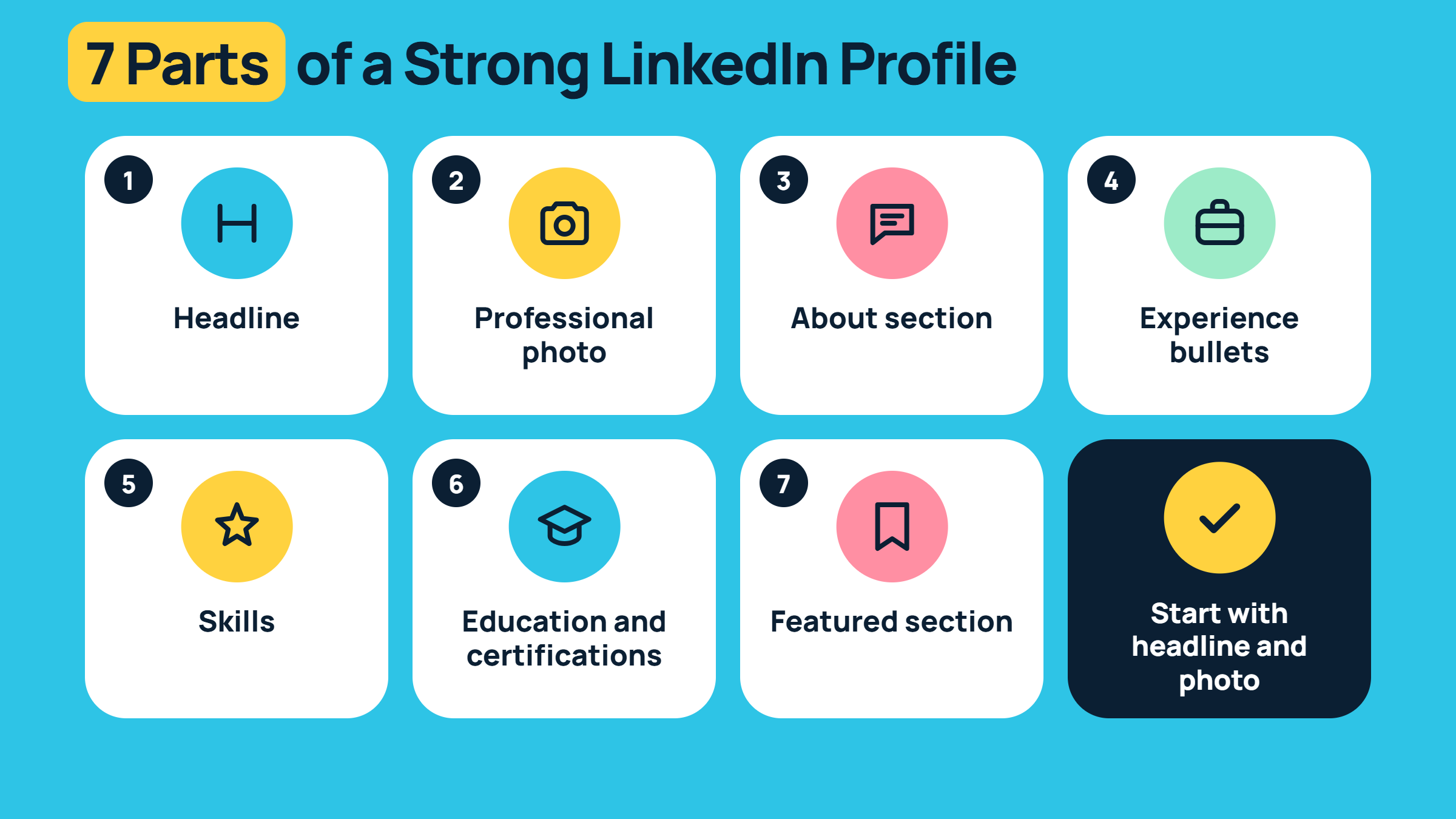
What should a strong LinkedIn profile include? At minimum, seven elements work together:
Headline — keyword-rich, role-specific, and benefit-oriented (not just your job title)
Professional photo — consistently one of the top factors in profile view rates (see our guide to LinkedIn profile photo tips)
About section — a narrative summary in first person with a clear professional value proposition
Experience bullets — achievement-based, not duty-based, with quantified outcomes wherever possible
Skills — strategically ordered to attract endorsements from the right people
Education and certifications — particularly relevant for early-career profiles and career changers
Featured section — the most underused real estate on LinkedIn; use it for case studies, articles, or portfolio links
The professionals who get the most inbound from LinkedIn aren't always the most experienced — they're the ones who've translated their experience into the language recruiters and buyers actually search for.
Best LinkedIn Profile Builder Tools: Free vs Paid (Including AI Options)
Teams that test multiple LinkedIn profile creator tools quickly discover the same pattern: free tiers generate passable summaries, paid tiers generate competitive profiles. The practical difference is keyword targeting — free tools produce generic professional language, while paid tools let you tune output toward specific industries, seniority levels, and recruiter search terms.
Tool Type
Best For
Free Tier?
Key Limitation
AI Profile Writer (e.g. Teal, Kickresume)
Full profile drafting from scratch
Yes (limited rewrites)
Generic tone without customization
Resume Worded
ATS scoring + resume language polish
Yes (basic score)
Optimizes for ATS, not LinkedIn search
LinkedIn Headline Generator
Fast headline variants for A/B testing
Often free
Doesn't optimize rest of profile
Resume-to-LinkedIn Converters
Migrating resume content quickly
Yes
Imports structure, not LinkedIn-specific language
HyperClapper
Post engagement + profile reach amplification
Free trial
Focused on engagement, not profile writing
Can AI Write Your LinkedIn Profile for You?
Can AI write my LinkedIn profile for me? Yes — and it can do so in under 10 minutes. But the honest answer is: AI writes a draft, not a final profile. What AI does well is generating achievement-style language from vague input ("I managed a team") and suggesting industry-relevant keywords. What it does poorly is capturing your specific context — the nuance of why you made a career move, the particular problem you solved, or the tone that makes your professional brand narrative feel authentic rather than assembled.
💡
Pro Tip:Feed AI tools a bullet list of specific numbers and outcomes from your actual roles — "reduced support tickets by 30%", "managed $2M budget" — rather than job descriptions. The output becomes dramatically more useful and personalized.
LinkedIn Headline Generator and Summary Examples
A LinkedIn headline generator produces multiple headline variants based on your role, skills, and target audience — saving the iteration time most professionals skip. Check out our free LinkedIn headline generator and our best LinkedIn headline and summary samples for examples you can adapt directly. Strong headline structure: Role | Specific outcome you deliver | Audience you serve. Example: "B2B SaaS Marketing Leader | Turning cold pipelines into closed revenue | Helping Series A–C teams scale demand gen."
LinkedIn profile summary examples that perform well share a common structure: open with a hook that names the problem you solve, follow with two or three specific accomplishments, and close with a clear call to action or invitation to connect. Third-person summaries consistently underperform — first-person language increases connection acceptance rates and feels more approachable to recruiters reading dozens of profiles in a session.
How to Create a Strong LinkedIn Profile Fast: Step-by-Step
How to Create a Strong LinkedIn Profile Fast
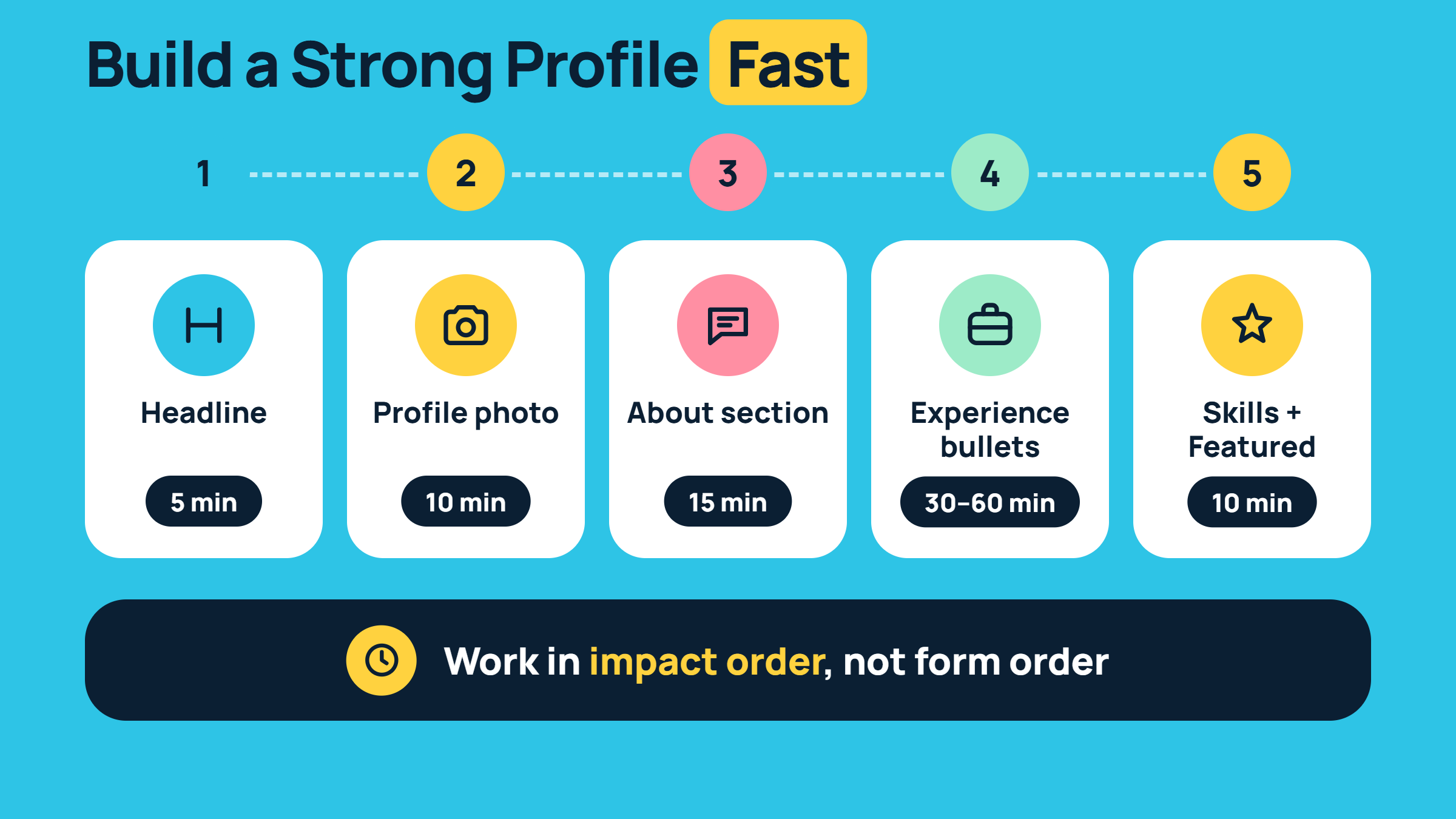
How to create a strong LinkedIn profile in the least time: work in impact order, not form order. LinkedIn's profile interface invites you to fill fields top-to-bottom, but that's not the sequence that maximizes results. Start with what recruiters see first.
Headline (5 minutes) — Write 3 variants, test with a linkedin headline generator, pick the most keyword-specific one. This single field drives more search appearances than any other section.
About section (15 minutes) — Write in first person. Open with the problem you solve. Include two specific results. Close with what you're looking to do next or how to reach you.
Experience bullets (30–60 minutes) — Use the formula: Action Verb + Task + Measurable Result. Example: "Reduced customer churn by 18% by redesigning the onboarding email sequence." This is where AI assistance adds the most value — paste your raw responsibilities and let the tool reframe them as outcomes.
Skills + Featured (10 minutes) — Order skills strategically (most relevant to your target role first). Add one Featured item — even a single LinkedIn article or external link beats a blank section.
⚠️
Warning:Skipping the experience bullet rewrite is the single most common optimization failure. A profile with five keyword-rich bullets describing actual outcomes outperforms a profile with twenty generic duty-based lines — every time.
How long does it take to build a LinkedIn profile? A complete, optimized profile from scratch typically takes 2–4 hours manually. Using an AI LinkedIn profile creator tool cuts the initial drafting phase to under 30 minutes — the remaining time goes to personal editing, fact-checking the AI's output against your real experience, and adding the specifics no tool can generate for you. For step-by-step optimization of an existing profile, see our LinkedIn profile optimization guide.
How to Make Your LinkedIn Profile Stand Out to Recruiters
How do I make my LinkedIn profile stand out? The most reliable differentiator — based on patterns seen consistently across high-performing profiles — is specificity. Generic profiles describe what the person did. Stand-out profiles describe what changed because they did it. Beyond language, three tactical moves separate profiles that attract inbound from those that sit dormant:
Use your full 220-character headline — most profiles use under 100 characters, missing keyword coverage
Add a Creator Mode banner that visually signals your professional domain at a glance
Request 2–3 targeted recommendations from colleagues who can speak to specific outcomes — not generic praise
What LinkedIn profile sections matter most to recruiters? Consistently, the top three are headline, current title/company, and the first three lines of the About section (the visible preview before "see more"). Everything else supports those three — but if those three don't convert, the rest won't be read.
LinkedIn Profile Optimization: Measuring Whether Your Profile Is Actually Working
How to tell if your LinkedIn profile is performing?
Most LinkedIn profile optimization tips stop at "fill out every section." Almost none explain what to do after you've optimized — and that's the actual gap. Profile view analytics are the feedback mechanism most professionals ignore entirely, and they're the fastest way to know whether your changes are working.
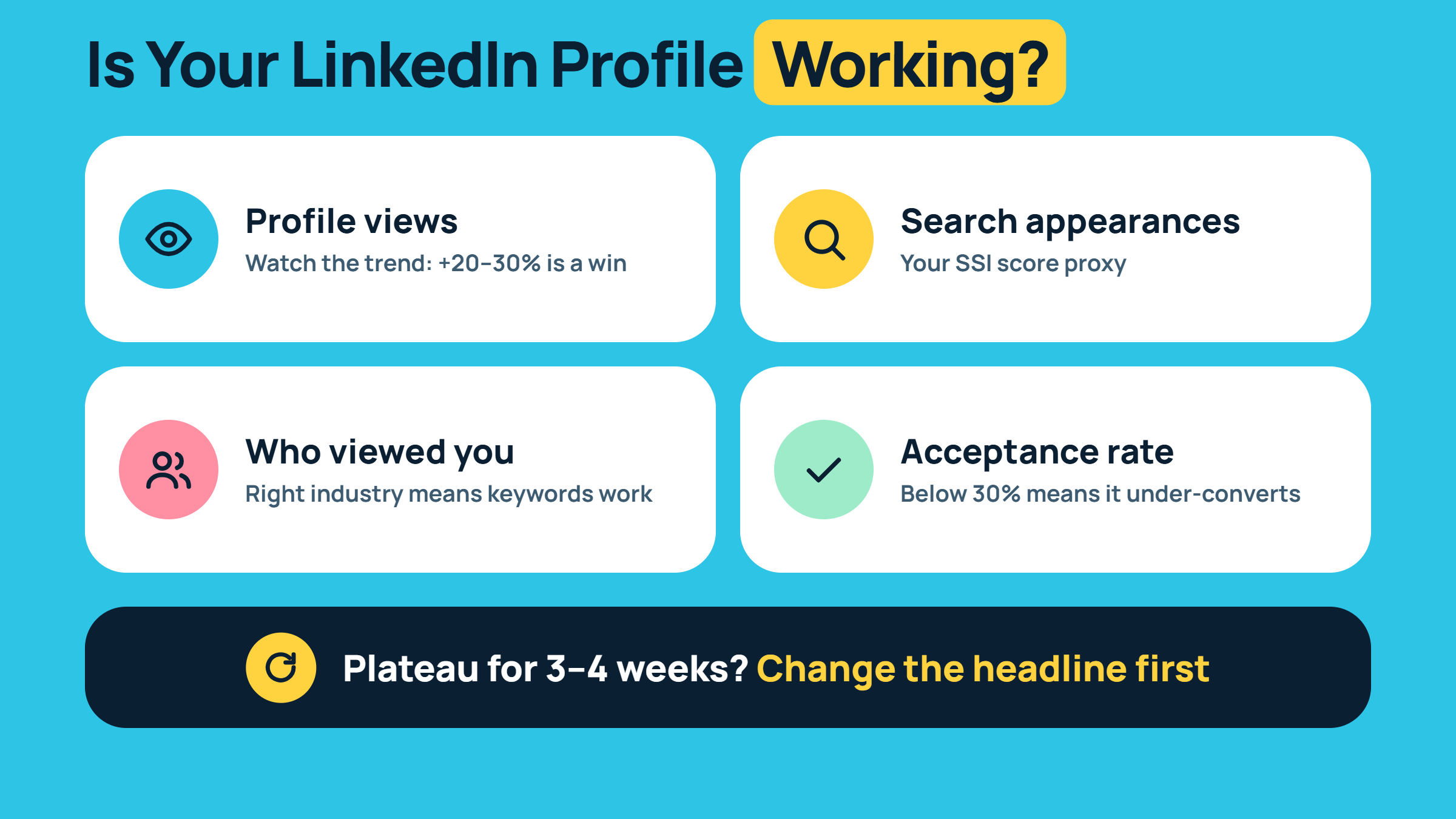
After optimizing, monitor these signals weekly:
Profile views — absolute count matters less than the trend; a 20–30% week-over-week increase after a headline change is a clear signal it's working
Search appearances — shows how many times you appeared in LinkedIn search results; this is your LinkedIn SSI score proxy (the LinkedIn SSI score is a 0–100 index measuring your social selling effectiveness across four pillars)
"Who viewed your profile" demographics — if recruiters from your target industry are appearing here, your keyword targeting is correct; if random industries are showing up, revisit your headline
Connection acceptance rate from cold outreach — if it's below 30%, the profile is under-converting warm interest
When to iterate: if profile views plateau for 3–4 consecutive weeks after an optimization pass, the first variable to change is your headline. Small copy adjustments — swapping one keyword phrase, leading with a different role noun — can produce measurable view-count shifts within 5–7 days. Don't overhaul the whole profile. Test one variable at a time.
How Post Engagement Amplifies Profile Reach (and Tools That Help)
Creators who pair a strong profile with consistent posting see compounding returns that purely passive profiles never access. Each post surfaces your profile to non-connections who haven't seen you yet — meaning post engagement directly feeds profile view volume. This is the mechanism most profile-optimization guides miss entirely.
For professionals building this engine, HyperClapper connects your posts with real engagement groups (called channels) — communities of real LinkedIn users who engage with content in your niche. One channel delivers around 50 possible engagements; adding two or three compounds reach meaningfully. Higher early engagement signals LinkedIn's algorithm to distribute the post more broadly — which means more non-connections see your profile link in the comment section and click through.
Turn Your Optimized Profile Into a Lead-Generating Asset
HyperClapper boosts your LinkedIn posts with real engagement from relevant professionals — so every post drives more profile views, not just impressions.
The most common failure mode isn't a weak summary or a blurry photo — it's using your job title as your headline. Job titles use zero searchable keywords that recruiters actually type into LinkedIn's search bar. "Marketing Manager at Acme Corp" returns far fewer search impressions than "B2B Marketing Manager | Demand Generation | SaaS Pipeline Growth."
Beyond the headline, the highest-impact errors seen consistently across profiles include:
Third-person About sections — they signal formality and distance; first-person builds trust faster
Listing job duties instead of achievements — "responsible for managing social media" vs. "grew LinkedIn following 3× in 6 months by launching a weekly video series"
Blank About section — LinkedIn's own data suggests profiles with a completed About section receive significantly more inbound — leaving it empty is leaving recruiter attention on the table
No featured section content — the only section that links out to your actual work, yet most professionals leave it empty
🔴
Avoid:Publishing unedited AI output directly to your LinkedIn profile. AI tools tend to homogenize language into the same 15–20 phrases ("results-driven professional", "passionate about innovation") that appear across millions of profiles. Edit every draft for specificity before publishing.
A related risk: keyword stuffing in the headline and summary. LinkedIn's algorithm is sophisticated enough to deprioritize profiles that read unnaturally. A headline crammed with 12 keyword phrases separated by pipes reads as spam — and humans skip it in under two seconds. Balance optimization with readability. For a full deep-dive on LinkedIn optimization tips, tools, and strategies, that resource covers every section in detail.
What separates profiles that consistently generate inbound from profiles that look complete but sit dormant is not any single section — it is the combination of clear keyword targeting, achievement-based language, and an active content presence that keeps surfacing the profile to new audiences. Miss any one of those three, and the other two underdeliver.
✓ LinkedIn Profile Builder Launch Checklist
☐Headline uses 2+ specific keywords relevant to your target role — not just your job title
☐Professional headshot is current, well-lit, and face-forward (no logos, no group crops)
☐About section is written in first person and includes at least one specific result
☐Every experience role has at least one achievement bullet using Action Verb + Task + Measurable Result
☐Featured section has at least one piece of content — article, case study, or external link
☐Skills are ordered by relevance to target role — not by when you added them
☐Profile view analytics checked weekly — with a note of baseline views before optimization
☐AI-generated sections have been personally edited for specificity and tone before publishing
Hyperclapper
Frequently Asked Questions About LinkedIn Profile Builders
What is the best tool to build a LinkedIn profile quickly?
The fastest combination is an AI LinkedIn profile writer (such as Teal or Kickresume) for drafting, paired with a dedicated LinkedIn headline generator for headline variants. AI tools can produce a complete first draft in under 30 minutes — but always edit the output personally before publishing to ensure specificity and authentic tone.
How can I use AI to write a better LinkedIn profile?
Feed the AI tool specific numbers and outcomes from each role — not job descriptions. Input like "reduced onboarding time by 40%, managed 6-person team, launched 3 product features in Q1" produces targeted achievement bullets. Review every output for accuracy and edit for your personal voice before it goes live on your profile.
What makes a LinkedIn profile attractive to recruiters in 2026?
Recruiters in 2026 prioritize three signals: a keyword-specific headline (not just a job title), quantified achievement bullets in experience, and a completed About section written in first person. Profiles that lead with measurable outcomes — not generic responsibilities — consistently generate more recruiter outreach and search appearances.
Is there a free tool that generates a LinkedIn profile from my resume?
Yes — tools like Teal, Resume Worded, and Kickresume offer free tiers that convert resume content into LinkedIn-formatted sections. Note that the linkedin profile resume builder and resume builder from linkedin profile flows are both available in most platforms, though free tiers limit rewrite depth and keyword targeting compared to paid plans.
How long does it take to build a LinkedIn profile from scratch?
Manually, a complete and optimized profile takes 2–4 hours. Using an AI linkedin profile creator tool cuts drafting to under 30 minutes — with another 30–60 minutes for personal editing, achievement rewrites, and adding specific context only you can provide. Plan for 90 minutes total with AI assistance for a publish-ready profile.
Which LinkedIn profile sections matter most to recruiters?
The top three recruiter-priority sections are: headline (determines search visibility), current role title and company (credibility check), and the opening lines of the About section (the preview shown before "see more"). Everything else — skills, featured, recommendations — reinforces a first impression already formed in those three fields.
What's the difference between Resumeworded vs LinkedIn profile tools?
Resume Worded focuses on ATS (applicant tracking system) scoring and optimizing resume language for job application parsing. LinkedIn-specific tools optimize for LinkedIn's own search algorithm, profile view rate, and keyword indexing. If your goal is recruiter search visibility on LinkedIn, a dedicated LinkedIn profile creator tool outperforms Resume Worded for that use case.
Your Profile Is Built — Now Make Sure People See It
A strong profile needs strong post engagement to keep surfacing to new audiences. HyperClapper connects your content with real LinkedIn users who engage with your posts — turning every post into a profile discovery moment.