
A pattern observed across thousands of LinkedIn profiles is this: the creators who get the most reach aren't the ones who avoid AI — they're the ones who've figured out how to use it without erasing themselves from the content. LinkedIn AI automation is not a single switch you flip. It's a spectrum running from "ChatGPT helped me restructure this draft" all the way to "a bot is sending 200 connection requests per day on my behalf." The first approach builds a personal brand. The second gets accounts restricted. Most professionals are stuck somewhere in the anxious middle, unsure which actions are safe — and that gap is exactly what this guide addresses.
- AI assistance (drafting, editing, profile writing) is low-risk and effective — full behavioral automation (bulk DMs, mass connections) is what triggers LinkedIn restrictions.
- Over 81% of long-form LinkedIn posts in a 2026 study were flagged as likely AI-written — standing out now requires injecting real voice, not just better prompts.
- The safest workflow combines AI drafting + human editing + real community engagement amplification.
- Taplio, Shield Analytics, and HyperClapper solve different problems — using them together covers content, analytics, and engagement in one stack.
- LinkedIn's ToS targets behavioral automation, not AI-assisted writing — knowing the difference protects your account.
- Posting 3–4 well-edited AI-assisted posts per week consistently outperforms 7 generic, unedited ones.
- What Is LinkedIn AI Automation (and Why Most People Get It Wrong)
- Using AI to Write LinkedIn Posts That Actually Sound Like You
- Best AI Tools for LinkedIn Content Creation and Engagement in 2026
- Is Using AI on LinkedIn Against the Rules?
- Building a Personal Brand on LinkedIn with AI: A Practical Workflow
- FAQ: Using AI for LinkedIn Without Getting Flagged or Sounding Generic
What Is LinkedIn AI Automation (and Why Most People Get It Wrong)

LinkedIn AI automation is the use of AI tools to assist with content creation, profile optimization, engagement, and outreach — with or without removing human judgment from the process. That distinction matters more than most guides acknowledge.
The binary framing — "automate everything" or "do it all manually" — leaves a practical middle ground completely unaddressed. The real opportunity is in using AI for the high-volume, low-judgment tasks (drafting, editing, formatting, scheduling) while keeping humans in the loop for the high-trust, high-risk actions (outreach, connection requests, replies to sensitive conversations).
How LinkedIn AI Tools Actually Work in 2026
Most linkedin ai tools operate in one of two modes: content assistance (writing, editing, tone matching, post generation) or behavioral automation (sending messages, visiting profiles, requesting connections, engaging with posts on your behalf). The content assistance category is broadly safe. The behavioral category is where LinkedIn's detection systems — trained to spot engagement velocity patterns, connection request warm-up sequences, and human-mimicry automation thresholds — become relevant.
LinkedIn's algorithm uses LinkedIn algorithm behavioral signals to distinguish organic human activity from scripted automation. Unnaturally even timing, identical message templates, and sudden spikes in daily actions are the primary triggers — not the fact that your post was drafted with AI assistance.
The most common failure mode isn't using too much AI — it's using it in the wrong layer. AI writing a draft is invisible to LinkedIn's systems. AI clicking "connect" 300 times in an afternoon is not.
Using AI to Write LinkedIn Posts That Actually Sound Like You
According to Originality.ai's LinkedIn AI Content Study (July 2026), more than 81% of long-form LinkedIn posts analyzed were flagged as likely AI-written. That's not a signal to stop using AI — it's a signal that the bar for standing out has never been lower for anyone willing to edit properly.
The biggest reason using AI to write LinkedIn posts produces generic output is simple: the prompts lack personal context. Feed ChatGPT a blank instruction ("write a LinkedIn post about leadership") and you get a LinkedIn post about leadership that 40,000 other people also published this week.
ChatGPT Prompts for LinkedIn Posts That Don't Feel Robotic
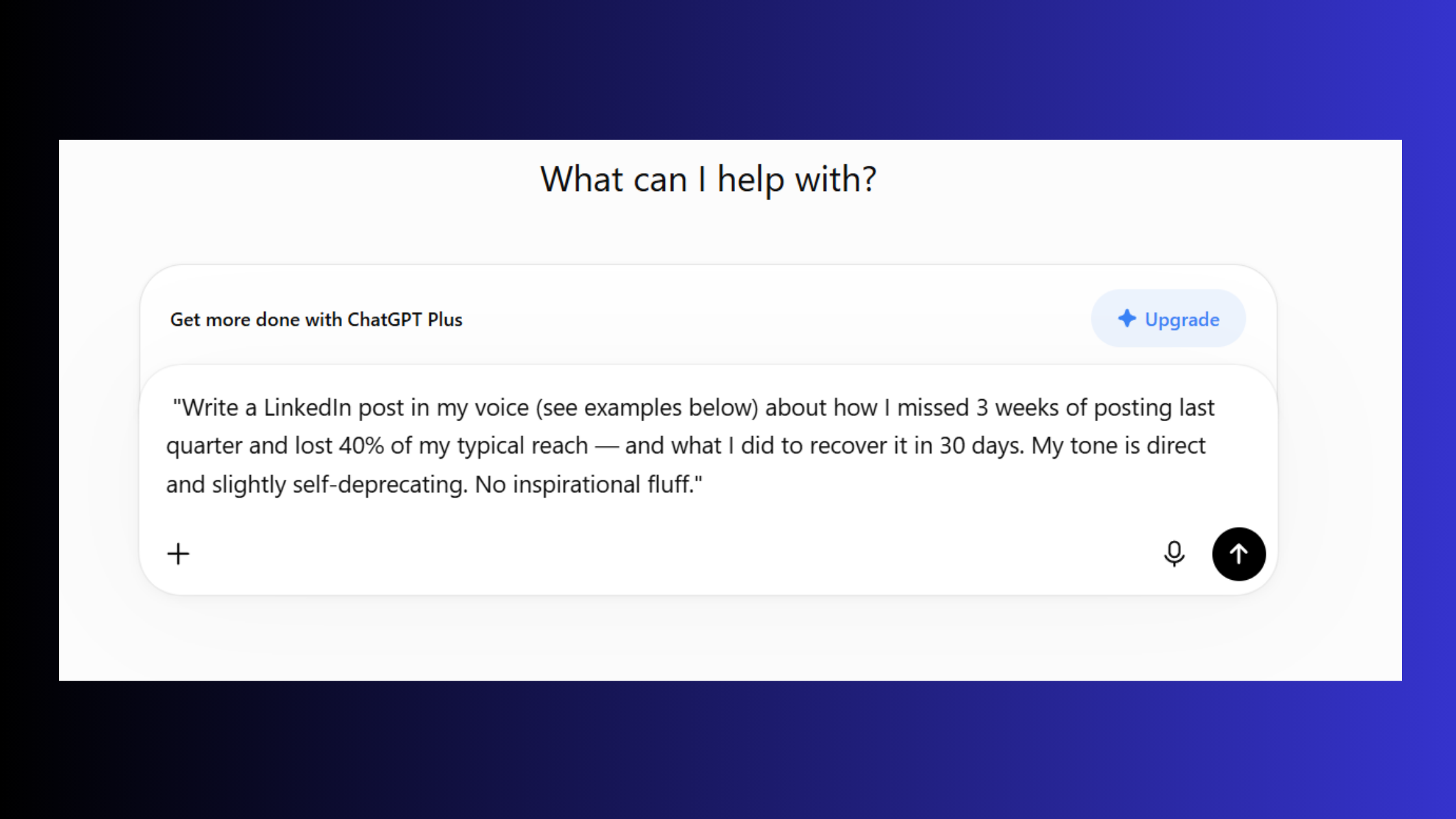
The best ChatGPT prompts for LinkedIn posts share three elements: a specific personal experience, a clear opinion, and a concrete outcome or number. Compare these two prompts:
- Generic: "Write a LinkedIn post about why consistency matters."
- Persona-loaded: "Write a LinkedIn post in my voice (see examples below) about how I missed 3 weeks of posting last quarter and lost 40% of my typical reach — and what I did to recover it in 30 days. My tone is direct and slightly self-deprecating. No inspirational fluff."
The second prompt gives the model something real to work with. For more frameworks like this, see our guide on ChatGPT prompts for LinkedIn that sound human.
On the question of can people tell if your LinkedIn post is AI written: yes — reliably — when it uses hedge phrases ("in today's fast-paced world"), passive constructions, and zero specific data. No — when it opens with a specific moment, includes a real number, and has a clear take. The tell isn't the AI. It's the lack of editing.
AI LinkedIn Profile Optimization Tips That Still Feel Human
Strong AI LinkedIn profile optimization tips follow the same principle: use AI to structure and sharpen, not to generate from scratch. Feed the model your actual career history, your clients' real outcomes, and your genuine area of expertise — then ask it to rewrite your About section for clarity and scannability. The result sounds like a better version of you, not a template. For a full walkthrough, our LinkedIn optimization guide covers every section in sequence.
Best AI Tools for LinkedIn Content Creation and Engagement in 2026
Most "best tools" lists treat every tool as interchangeable. They aren't. The best linkedin ai tools solve specific problems — and using the right tool for each layer of your LinkedIn strategy matters far more than picking the "top-rated" option.
| Tool | Best For | Free/Paid | Risk Level |
|---|---|---|---|
| ChatGPT / Claude | Post drafting, profile writing | Free + Paid | Low |
| Taplio | Content scheduling, carousel creation, AI post inspiration | Paid (~$49/mo) | Low |
| Shield Analytics | Post performance tracking, audience analytics | Paid (~$25/mo) | Low |
| HyperClapper | Real engagement amplification + AI replies + Content Guard | Paid | Low (safety-first) |
| Meet Alfred | Multi-channel outreach sequences | Paid (~$59/mo) | Medium–High |
On Taplio vs Shield Analytics for LinkedIn: these tools are frequently compared as alternatives, but they actually solve different problems. Taplio is a content creation and scheduling platform — it helps you generate post ideas, build carousels, and publish consistently. Shield is a pure analytics layer — it tells you which posts worked and why. Most serious LinkedIn creators use both simultaneously rather than choosing between them.
What to Look for in an AI LinkedIn Bot vs. a Safer Engagement Tool
The distinction between a linkedin ai bot and a safer engagement platform comes down to one question: does it simulate human behavior to perform actions on your behalf, or does it connect you with real humans who engage organically?
On the AI LinkedIn post generator free vs paid question: free tools like ChatGPT work well for drafting, but they stop there. Paid tools add scheduling, engagement amplification, and analytics — the combination that actually moves the needle on reach. For personal brand builders, HyperClapper is the strongest choice in the engagement layer specifically because it uses real channels — groups of real LinkedIn users who engage with your posts — rather than bot accounts. That distinction is what separates low-risk amplification from the kind that gets accounts flagged.
Want real engagement — not bots — amplifying your LinkedIn posts?
HyperClapper connects your posts to real engagement channels and generates AI replies that keep conversations alive — without risking your account.
See How HyperClapper WorksIs Using AI on LinkedIn Against the Rules? Risks, Limits, and What Actually Gets Accounts Banned
Teams that read LinkedIn's Terms of Service carefully consistently find the same thing: is using AI on LinkedIn against the rules is the wrong question. LinkedIn's ToS prohibits scraping, fake accounts, and automated actions that simulate human behavior at scale without authorization. It does not prohibit AI-assisted writing, profile editing, or scheduling.
The account safety anxiety driving most tool-comparison discussions is real — but it's misdirected. The risk is behavioral, not content-based. Here's how specific actions map to actual risk tiers:
- Low risk: AI drafting posts, AI-assisted profile editing, scheduled publishing via approved tools, AI-suggested replies posted manually
- Medium risk: Engagement pods with real users, AI reply generation with human review, third-party analytics tools reading your own data
- High risk: Bulk connection automation without warm-up sequences, DM sequences sent at scale, scraping company pages, fake engagement accounts
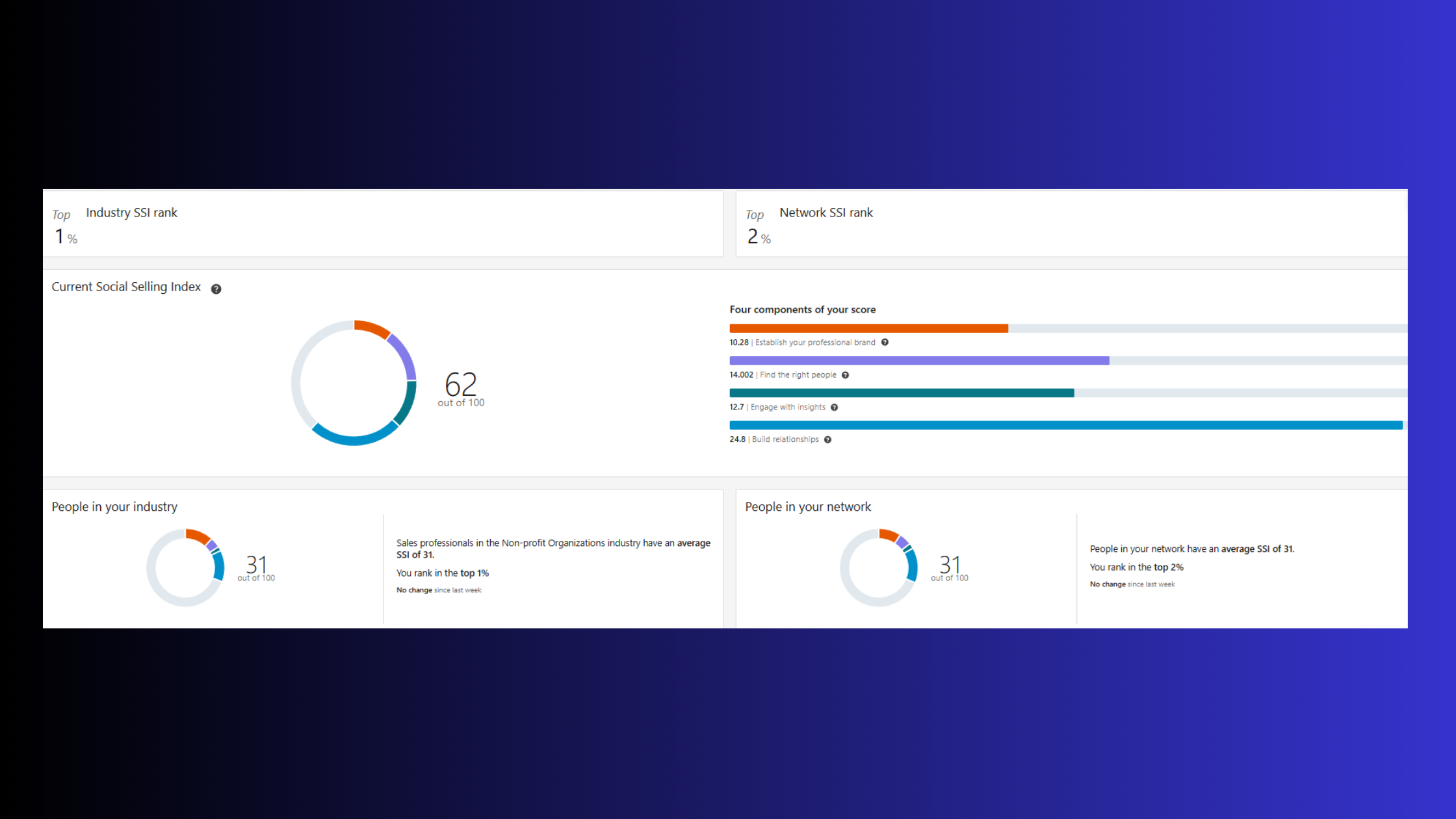
LinkedIn SSI score impact — where SSI is LinkedIn's Social Selling Index, a 0–100 score measuring profile strength, network building, engagement, and relationship-building — works as an early warning system. A sudden SSI drop after introducing a new tool is a signal to throttle back usage immediately, not to wait and see.
Common Mistakes That Make AI LinkedIn Automation Risky
What separates low-risk AI users from restricted accounts isn't the category of tool — it's the operational patterns. The most common failure modes:
- Starting a new automation tool at full capacity instead of ramping up gradually over 2–3 weeks
- Using the same message template verbatim across hundreds of outreach sequences
- Running behavioral automation without randomized timing intervals
- Ignoring early signals (SSI drops, slower content distribution) and continuing at scale
Accounts that skip the warm-up phase typically find their connection request acceptance rate drops and their posts see reduced distribution within 7–10 days — before any formal restriction is applied.
Building a Personal Brand on LinkedIn with AI: A Practical Workflow
A personal brand on LinkedIn with AI doesn't emerge from a single great post — it compounds from a repeatable weekly system. Here's what a structured workflow actually looks like in practice:
- Monday (20 minutes): Use ChatGPT to generate 4 post drafts from a prepared topic list. Include your opinions, a relevant recent experience, and one specific number in each prompt.
- Tuesday (30 minutes): Apply the 3-edit rule to each draft — remove the generic opener, add a specific personal example, and rewrite the CTA in your own phrasing.
- Wednesday–Friday: Publish one post per day and use HyperClapper channels to boost early engagement velocity patterns — the speed and volume of early likes and comments that signal to LinkedIn's algorithm that the post deserves wider distribution.
On the question of how often should you post on LinkedIn with AI: consistency beats volume every time. Three to four well-edited posts per week outperform seven generic ones — and accounts that drop below three posts per week see algorithmic reach decay within 10–14 days, typically requiring 3–4 weeks of consistent publishing to recover baseline distribution.
To make AI-generated LinkedIn content sound human, the 3-edit rule is the single most effective technique: (1) delete the first sentence — AI openers are almost always the weakest part; (2) add one specific real-world example or number; (3) rewrite the closing in your own conversational phrasing. Most content that passes as human-written has had these three interventions applied.
For how to add your own voice to AI content at scale, the most effective method is building a personal voice document: a running Google Doc with your characteristic phrases, opinions you hold strongly, recurring themes in your work, and the way you naturally end a thought. Paste this into every AI session before asking for a draft. The model learns your rhythm far faster than any system prompt.
Professionals using this structured AI workflow — consistent publishing plus real engagement amplification — report 2–4x post reach growth within 60 days. That outcome is consistent with how LinkedIn's algorithm rewards posts that accumulate comments quickly: early engagement velocity triggers broader distribution, and tools like profile optimization paired with engagement amplification compound that effect over time.
✓ The Human-Sounding AI Post Checklist
- ☐Deleted the AI-generated opening sentence and replaced with a specific moment or observation
- ☐Added at least one specific number, name, or real-world example from your actual experience
- ☐Rewritten the CTA or closing line in your own natural phrasing
- ☐Removed hedge phrases: "in today's landscape", "it's important to", "leverage", "delve into"
- ☐Verified post has a clear POV — not just information, but your take on it
- ☐Scheduled at a time your audience is active (Tuesday–Thursday, 7–9am or 12–1pm typically strongest)
- ☐Queued in HyperClapper channels to boost early engagement velocity within first 60 minutes of publishing
Turn your AI-assisted posts into posts that actually get seen
HyperClapper's real engagement channels boost your post's early velocity — giving LinkedIn's algorithm the signal it needs to distribute your content further.
Start Boosting Posts on HyperClapperFrequently Asked Questions About Using AI for LinkedIn
How can I use ChatGPT to write LinkedIn posts without sounding like everyone else?
Feed ChatGPT your past posts and a specific personal experience before asking for a draft. The model needs your voice, not a blank prompt. Add one concrete number or outcome, delete the AI-generated first sentence, and rewrite the closing in your own words. Those three edits separate your post from the 81% that read as generic AI output.
What's the best way to edit AI-written LinkedIn content to sound more like me?
The fastest method is the 3-edit rule: delete the opener, insert a real personal example, rewrite the CTA in your own phrasing. Beyond that, maintain a personal voice document with your characteristic phrases, recurring opinions, and sentence rhythm — paste it into every AI session as context. AI matches patterns; give it yours to match.
Does LinkedIn penalize or flag AI-generated content in the algorithm?
No — LinkedIn does not currently penalize content for being AI-written. The algorithm responds to engagement signals, not content origin. What hurts AI-generated content is reader disengagement: generic posts get skipped, skipped posts get no early engagement velocity, and low velocity means reduced distribution. The penalty is audience-driven, not algorithmic.
How do I write a LinkedIn About section using AI that still feels personal?
Start by writing a rough, unedited paragraph about what you actually do and why it matters to the people you help. Feed that, plus 2–3 client outcomes with real numbers, to an AI with the instruction: "Rewrite this for clarity and impact — keep my voice and do not add corporate language." The AI structures it; you supply the substance. See our full LinkedIn profile optimization guide for section-by-section prompts.
What are the best free vs. paid AI LinkedIn tools and is the cost worth it?
Free tools — ChatGPT, LinkedIn's native AI suggestions — handle drafting well. They stop at the content layer. Paid tools like Taplio (~$49/mo) add scheduling and content analytics; HyperClapper adds real engagement amplification that moves the needle on post reach. For creators publishing 3+ times per week and prioritising growth, the paid layer typically pays for itself within 30–60 days in reach and lead volume.
Can people tell if your LinkedIn post is AI-written, and does it matter?
Readers can reliably identify AI-written posts when they contain hedge phrases, passive voice, and no specific data or personal examples. With proper editing — the 3-edit rule applied — most readers cannot tell. Whether it matters depends on your audience: in thought leadership niches, perceived authenticity affects credibility directly, which is why editing AI output is non-negotiable, not optional.
Are linkedin ai bots safe to use for engagement and outreach?
It depends entirely on what the bot does. AI tools that assist with writing carry low risk. Tools classified as linkedin ai bots that send automated connection requests, DMs, or fake engagement at scale carry medium-to-high account restriction risk. The distinguishing factor is whether the tool simulates human behavioral actions — that's what LinkedIn's detection systems target, not AI content creation.



