
If you want to know how can i delete a linkedin account without throwing away years of contacts and pipeline data, the answer is: export everything first, then close. A pattern observed consistently across professionals who regret deleting LinkedIn is that they skipped the data export step — and discovered too late that their connections list, messages, and saved leads were gone permanently. LinkedIn confirms it generally deletes account data within 30 days of closure — there's no going back after that window. This guide walks you through every step: what to save, how to delete the account (including inaccessible accounts), and what to do with your network after you leave.
- Export your data archive first — connections, messages, and posts are permanently deleted after account closure; there is no recovery option.
- Deactivation is reversible; deletion is not — if you just need a break, use the temporary hibernation option instead.
- Cancel Premium and Sales Navigator before you close — subscriptions can keep billing even after deletion is initiated.
- Lost your login? You must recover account access before LinkedIn will process a deletion request — covered in full below.
- Your connections are not notified when you delete — proactively reach out to key contacts before you go.
- Most counterintuitive finding: for many professionals, rebuilding their LinkedIn strategy with better engagement tools is a stronger ROI move than deleting the account entirely.
- What Happens to Your Connections and Leads When You Delete LinkedIn
- How to Export LinkedIn Connections, Leads, and Data Before You Delete
- How to Delete Your LinkedIn Account (Standard and Inaccessible Accounts)
- LinkedIn Alternatives for Lead Generation After You Leave
- Common Mistakes to Avoid When Closing Your LinkedIn Account
- Frequently Asked Questions About Deleting Your LinkedIn Account
What Happens to Your Connections and Leads When You Delete LinkedIn

Deleting your LinkedIn account is permanent and irreversible after the grace period. Every connection, message thread, endorsement, recommendation, and piece of profile data is removed — and none of it can be recovered once LinkedIn completes the deletion on its backend. According to LinkedIn's own data privacy documentation, account data is generally deleted within 30 days of closure. During that window your profile is immediately invisible to others, but you can cancel the deletion request and reactivate if you act quickly.
Your connections lose the ability to find or contact you through LinkedIn entirely. Any ongoing conversation context, shared message history, or relationship signals stored only inside LinkedIn disappears with the account. If you had active Sales Navigator saved lists, InMail credits, or lead recommendations tied to your personal account, those are also affected — Sales Navigator subscriptions do not automatically pause or transfer, and saved lead lists tied to a closed account are not recoverable.
Deactivation vs. Permanent Deletion: Which One Do You Actually Need?
Deactivation (LinkedIn calls it "hibernating" your account) is a temporary pause — your profile becomes invisible, you stop appearing in searches, but all your data, connections, and content are preserved. You can reactivate at any time by logging back in. Permanent deletion closes the account entirely with no recovery option after the grace period.
Most people asking how to deactivate linkedin account temporarily actually want hibernation, not deletion. If your goal is a break from the platform, burnout recovery, or testing life without LinkedIn for a month, hibernation is the right choice. Deletion makes sense only when you intend to leave permanently, want your data removed for privacy reasons, or are starting a completely new LinkedIn presence with a fresh account.
How to Export LinkedIn Connections, Leads, and Data Before You Delete
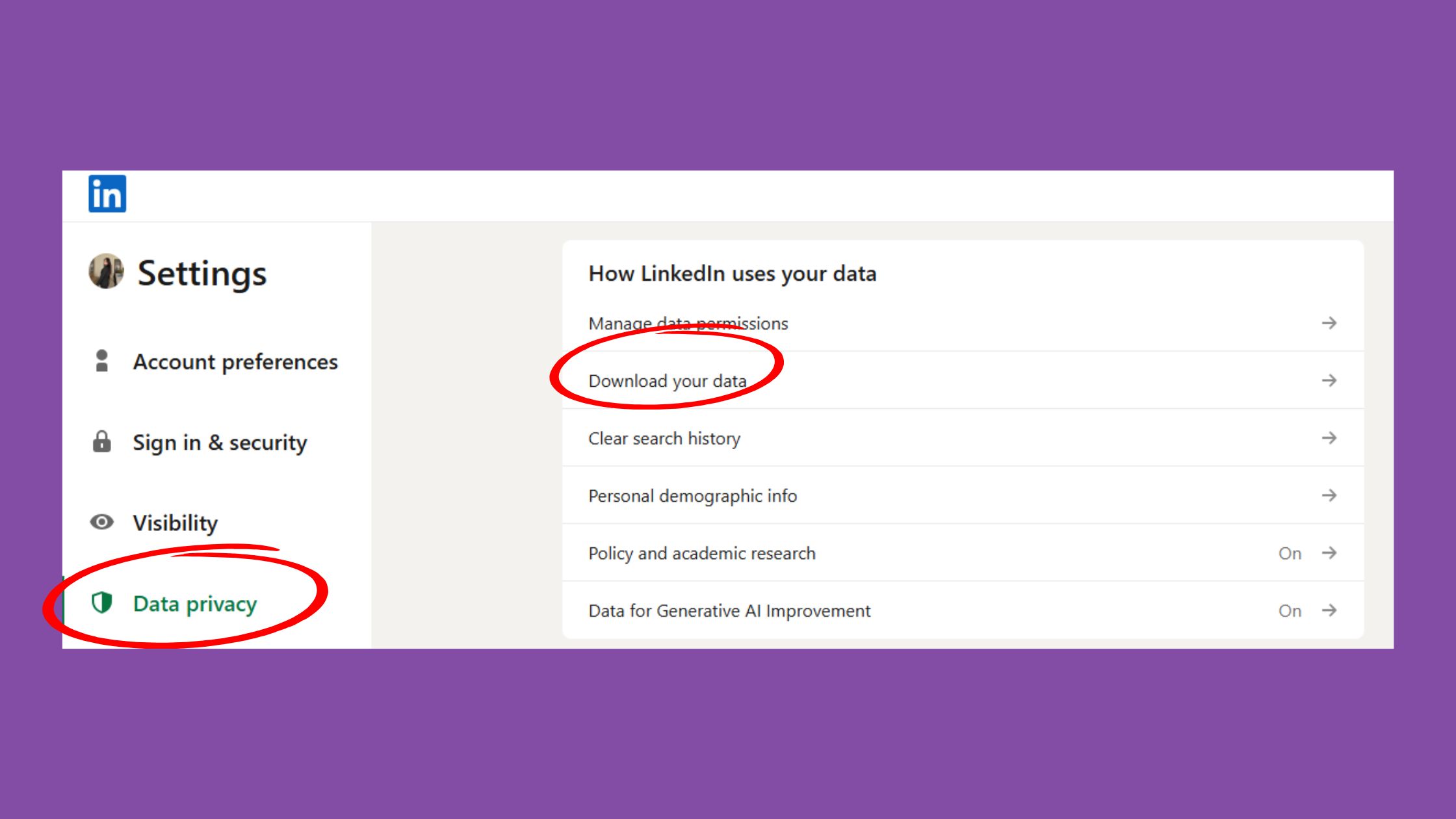
The single most important step before closing your LinkedIn account is downloading your data archive — and it is the step most people skip. Your LinkedIn data archive contains your full connections list (including email addresses where members made them visible), your complete message history, every post you have published, profile details, activity history, and more. Once the account is closed and the 30-day deletion window passes, this data cannot be retrieved by any means.
To download LinkedIn data archive, follow these steps:
- Go to Settings & Privacy (click your profile photo → Settings).
- Select Data Privacy from the left menu.
- Click "Get a copy of your data."
- Choose "Connections" and any other files you want (Messages, Posts, etc.).
- Click Request archive. LinkedIn emails you a download link — usually within 10 minutes for smaller files, up to 24 hours for a full archive.
How to Export LinkedIn Leads to a CRM (Step-by-Step)
Once you have your connections CSV, importing it into a CRM takes under five minutes for most platforms:
- Open the downloaded
Connections.csvfile — it contains First Name, Last Name, Email Address, Company, Position, and Connected On date. - In your CRM (HubSpot, Salesforce, Pipedrive, etc.), navigate to Contacts → Import.
- Upload the CSV and map the columns to your CRM fields.
- Tag all imported contacts with a "LinkedIn export" label so you can follow up and explain how you have their contact details.
Note: not every connection shares their email address — some entries will show only name and company. For those contacts, the best CRM to store LinkedIn contacts is one with an enrichment feature (e.g. HubSpot with its built-in enrichment, or a tool like Clay) that can fill in missing contact data from other sources. LinkedIn data export tools like PhantomBuster can also help extract additional profile data before you close.
Delete LinkedIn Account Without Losing Connections: A Pre-Deletion Checklist
✓ LinkedIn Account Closure Pre-Deletion Checklist
- ☐Download your LinkedIn data archive (Settings → Data Privacy → Get a copy of your data)
- ☐Export your Connections CSV and import it into your CRM or address book
- ☐Save any Sales Navigator lead lists or notes — screenshot or export before closing
- ☐Cancel LinkedIn Premium, Sales Navigator, or Recruiter subscriptions separately
- ☐Message your top 20–30 key contacts with alternative contact details before you go
- ☐Save any written recommendations or endorsements you want to keep (copy them out manually)
- ☐Confirm you have an alternative lead channel running before you close the account
How to Delete Your LinkedIn Account (Standard and Inaccessible Accounts)
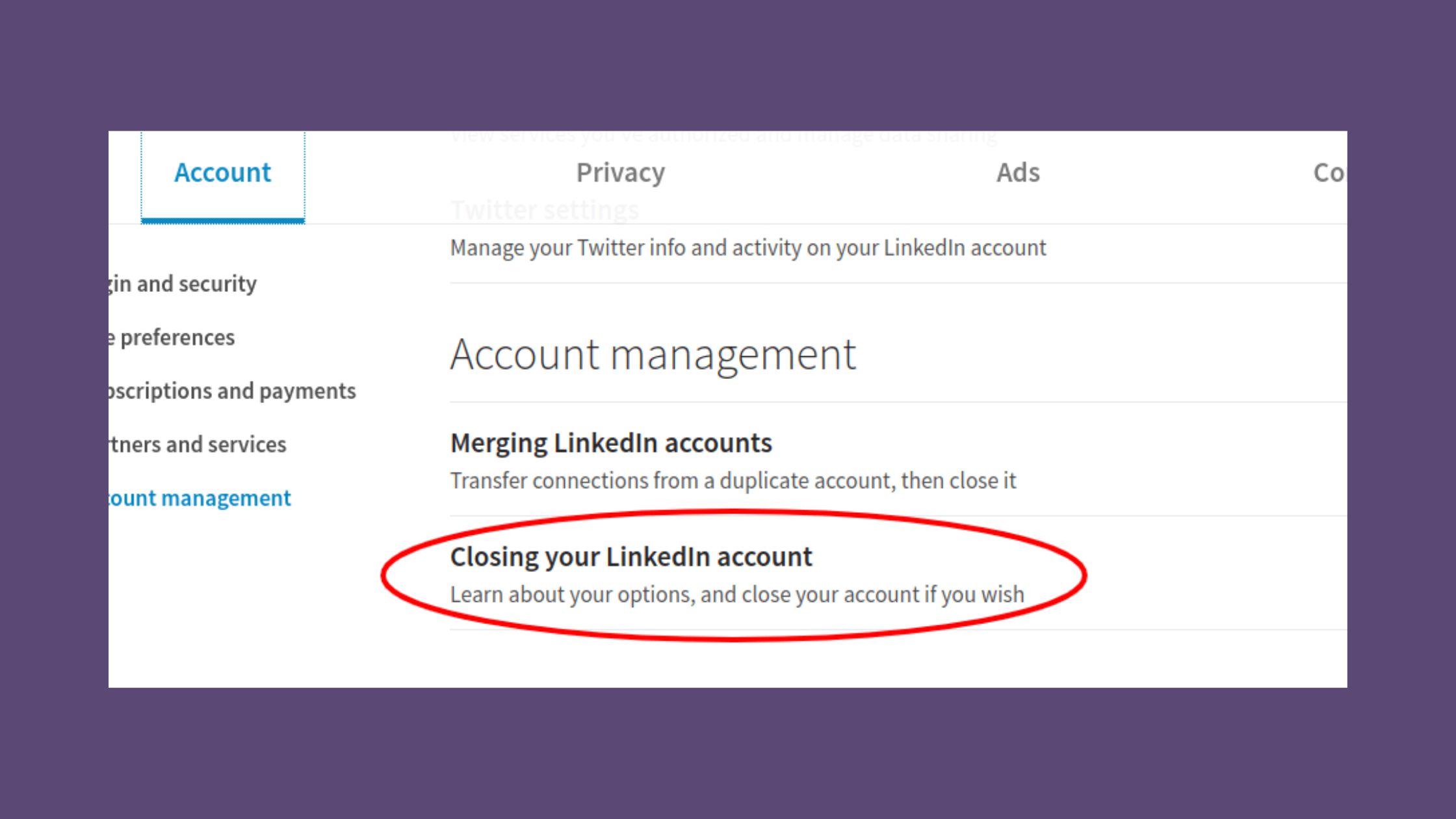
The standard LinkedIn account closure process requires active login access and takes about two minutes on desktop. The path on mobile is slightly different — and a recurring pain point across community forums is that the mobile app sometimes redirects users to desktop to resolve account issues before deletion can proceed.
Step-by-Step: How to Delete a LinkedIn Account You Can Access
On Desktop:
- Click your profile photo (top right) → Settings & Privacy.
- Go to Account Management (bottom of the left menu).
- Click "Close account."
- Select your reason and click Next.
- Enter your password to confirm.
- Click "Close account" to finalise.
How to delete linkedin account permanently in mobile (iOS/Android):
- Tap your profile photo → Settings.
- Scroll to Account Management → Close account.
- Follow the on-screen prompts. If the app redirects you to desktop, open LinkedIn in your mobile browser instead — the full Settings menu is accessible there.
After you confirm, your profile becomes invisible immediately. How long does LinkedIn take to delete account data completely? According to LinkedIn's data privacy documentation, full data removal is generally completed within 30 days. During that period, you can cancel the deletion by logging back in.
How to Delete a LinkedIn Account You Can No Longer Access
This is the scenario most articles ignore — and the one that generates the most community frustration. The LinkedIn account closure process requires email verification, which means you must have access to the email address tied to your account before LinkedIn will process a deletion request.
If you have lost access to your LinkedIn account, work through these steps in order:
- Try LinkedIn login recovery: Go to linkedin.com → click "Forgot password?" and request a reset link to your registered email.
- If you no longer have that email address: On the password reset page, click "This isn't right" or "I no longer have access to this email" — LinkedIn will prompt you to verify your identity via phone number, if one was added to the account.
- Submit an identity verification request: If neither email nor phone works, go to LinkedIn's Help Center → "Sign in and password" → "I can't sign in" → and submit a support ticket with government-issued ID. LinkedIn's identity verification team can grant access to the account owner.
- How to delete old linkedin account without password or email: Once LinkedIn support verifies your identity, they can either restore access so you can close it yourself, or process the closure directly if you request it through the support ticket.
How to delete linkedin account without password ultimately comes down to proving identity to LinkedIn support. The process can take 3–7 business days once a ticket is submitted with valid ID.
LinkedIn Alternatives for Lead Generation After You Leave
Leaving LinkedIn does not mean abandoning professional networking — but it does mean replacing its unique combination of reach, search visibility, and warm outreach capability. According to Cognism's 2025 LinkedIn statistics report, LinkedIn's user base grew from 644 million in 2019 to over 1.15 billion users — making it the largest professional network in the world by a significant margin. That reach is genuinely difficult to replicate elsewhere.
Should You Delete or Just Rebuild Your LinkedIn Strategy?
Teams that rebuild their LinkedIn strategy rather than deleting their account consistently see better ROI than those who leave and return. If the frustration driving deletion is low engagement, poor visibility, or content that gets ignored — those problems are solvable without closing the account.
Tools like HyperClapper are specifically built for this scenario: real community engagement through channels (groups of real users who engage with your posts), AI-powered replies that keep conversations active, and post boosting that drives genuine visibility — without aggressive automation. For professionals who are considering deletion primarily because LinkedIn "isn't working," rebuilding with better engagement infrastructure is worth trying before closing permanently. You can read more about how to grow on LinkedIn without getting your account restricted as a practical starting point.
If you are genuinely leaving, LinkedIn alternatives for lead generation include:
- Apollo.io or Hunter.io — for prospecting by job title, company, and industry without a LinkedIn presence
- Twitter/X and Substack — strong for thought leadership in tech, media, and creative industries
- Industry-specific Slack communities and Discord servers — high-intent but lower volume than LinkedIn
- Email newsletters and direct outreach via enriched CRM data — the highest-converting channel once the relationship exists
The most common failure mode when leaving LinkedIn is deleting the account before an alternative lead channel is generating consistent pipeline. The platform gap shows up 60–90 days later — by which point restarting from scratch is the only option.
Starting fresh on LinkedIn after deletion is possible — you can create a new account using a different email address. LinkedIn's terms require each person to maintain only one personal account, so the old account must be fully closed before creating a new one. Keep this in mind if your goal is a clean reset rather than a permanent exit. For context on managing multiple accounts safely, see this guide on multiple LinkedIn accounts without a ban.
Not sure deletion is the right move? Try rebuilding your LinkedIn reach first.
HyperClapper connects your posts with real engagement communities — more visibility, real comments, zero bots.
See How HyperClapper WorksCommon Mistakes to Avoid When Closing Your LinkedIn Account
What separates a smooth account closure from one people regret is almost always one of four avoidable mistakes — and the community discussion around this topic surfaces the same ones repeatedly.
- Mistake #1: Deleting without exporting data first. The connections list, message history, and post archive are permanently gone after the deletion window closes. There is no LinkedIn support escalation that recovers them.
- Mistake #2: Not cancelling Premium or Sales Navigator separately. Closing your LinkedIn account does not automatically cancel paid subscriptions — billing may continue. Cancel through your subscription settings or your app store billing (if you subscribed on mobile) before initiating closure.
- Mistake #3: Assuming connections are notified. They are not. LinkedIn does not send any notification to your connections when you close your account. If maintaining key relationships matters, proactive outreach before you leave is entirely your responsibility.
- Mistake #4: Confusing deactivation with deletion. Creators who skip the deactivation option and proceed directly to account closure are the most common source of regret. If you want a break rather than a permanent exit, use Settings → Account Management → Hibernate account instead.
After seeing this pattern across hundreds of account closure questions in community forums, the consistent finding is clear: the regret almost never comes from leaving LinkedIn — it comes from not preparing the exit. Save the data, cancel the subscriptions, notify your contacts. The rest is straightforward.
Before you close your account — see if better engagement fixes the problem
HyperClapper's real engagement channels and AI-powered replies help your LinkedIn posts reach far more of your network — without automation risk.
Try HyperClapper FreeFrequently Asked Questions About Deleting Your LinkedIn Account
Can I permanently delete a LinkedIn account?
Yes, you can permanently delete a LinkedIn account through Settings → Account Management → Close account. Once confirmed, your profile becomes invisible immediately and LinkedIn deletes your data within 30 days. After that window, the deletion cannot be reversed and your data cannot be recovered by any means.
Can I reactivate my LinkedIn account after deleting it?
Can I reactivate my LinkedIn account after deleting it? Yes — but only within the 30-day grace period after initiating deletion. Log back in during that window and LinkedIn will cancel the closure automatically. After 30 days, the account is permanently gone and you would need to create a new one from scratch.
Why won't LinkedIn allow me to delete my account?
LinkedIn requires verified login access — including email verification — before it processes an account deletion. The most common blockers are an outdated email address, a forgotten password, or an unresolved account flag. Recover access first through LinkedIn's identity verification support process, then proceed with closure.
How do I delete a LinkedIn account and start a new one?
Close your existing account fully and wait for LinkedIn to confirm closure before creating a new one. LinkedIn's terms prohibit simultaneous personal accounts. Use a different email address for the new account. Your old connections, posts, and profile data will not carry over — you start from zero.
If I delete my LinkedIn account will I lose all my leads and contacts permanently?
Yes — unless you export them first. Download your data archive (Settings → Data Privacy → Get a copy of your data → Connections) before closing. The CSV includes names, emails where available, and company details. Import that file into a CRM immediately. After the 30-day deletion window, the data is unrecoverable.
What is the safest way to leave LinkedIn without losing my business network?
The safest way to leave LinkedIn without losing your business network is: export your connections CSV, import it into a CRM, message your top contacts with alternative details, cancel all paid subscriptions, then close the account. Running this checklist before closure means leaving with your network intact regardless of what happens to the platform account.
Is there a way to deactivate LinkedIn temporarily instead of deleting it?
Yes — LinkedIn's "Hibernate" feature lets you deactivate your account temporarily without deleting it. Go to Settings → Account Management → Hibernate account. Your profile disappears from search and your connections cannot contact you, but all data, connections, and content are fully preserved and restored when you log back in.
Does deleting LinkedIn affect Sales Navigator?
Yes. Sales Navigator is tied to your LinkedIn account, so closing your personal account terminates your Sales Navigator access. Saved lead lists, notes, and InMail credits associated with that account are not recoverable. Contact LinkedIn Sales Solutions support before closing to discuss licence transfer options if you have an active team subscription.



