Discover the best dialers for cold calling in 2026 — power, AI, and predictive compared. PhoneBurner vs Kixie vs Orum with pricing, compliance risks, and a team-fit framework.
📅 ⏱ 16 min read📝 ~3100 words
A cold calling dialer is software that automates the process of placing outbound calls — eliminating dead time between dials, handling voicemail drops, and logging call outcomes automatically. A pattern observed consistently across high-volume sales teams is that manual dialing burns 30–50% of a rep's productive hours on busy signals, wrong numbers, and voicemail navigation — hours that a dialer converts into live conversations. According to Allo's analysis of 72,339 real calls (2026), the average cold call connect rate is 26% — meaning roughly 1 in 4 dials reaches a live person. Getting more dials per hour directly multiplies that opportunity. The challenge is choosing the right type of dialer, because the wrong choice doesn't just underperform — it can expose your team to significant legal liability.
Key Takeaways
Four distinct dialer types exist — power, predictive, auto, and AI/parallel — and choosing the wrong type is more damaging than picking the wrong brand.
AI dialers can reach 150–300 dials/rep/hour but carry elevated TCPA compliance risk; power dialers are slower and safer for regulated industries.
PhoneBurner, Kixie, and Orum are the top three platforms — each wins for a different use case and budget.
Compliance is the most underweighted factor in dialer selection — TCPA violations can cost millions per incident.
Free and budget dialers exist, but they typically lack CRM integration and compliance safeguards that growing teams need.
The right framework — daily call volume, list quality, and compliance exposure — determines your dialer type before brand choice even begins.
What Is a Cold Calling Dialer and How Does It Work?
A cold calling dialer — also called cold calling dialer software — automates the mechanical parts of outbound calling: sequencing numbers from a list, skipping unanswered calls, dropping pre-recorded voicemails, and logging dispositions directly into your CRM. The rep's job shrinks to one thing: talking to live humans.
The productivity math is straightforward. Without a dialer, a rep manually dials, waits through rings, navigates voicemail, logs the outcome, and finds the next number — a cycle that averages 3–4 minutes per attempt. A dialer collapses that to under 30 seconds of dead time between live connections, which can triple effective talk time per shift. According to Bebop.ai's 2026 cold calling data, the average success rate for booking meetings is roughly 2–5% of conversations — so volume is a direct lever on output.
Modern CRM-integrated dialer systems go further: call outcomes, recordings, notes, and scheduled follow-ups sync automatically. Teams using HubSpot, Salesforce, or Pipedrive eliminate manual data entry entirely, which improves sales cadence automation and keeps pipeline data clean.
💡
Pro Tip:Before evaluating any dialer brand, identify your daily call volume per rep. That single number determines which dialer type you need — and type selection matters more than feature comparisons between brands.
Cold Calling Software Features to Look For
Dialer features that matter, compliance first.
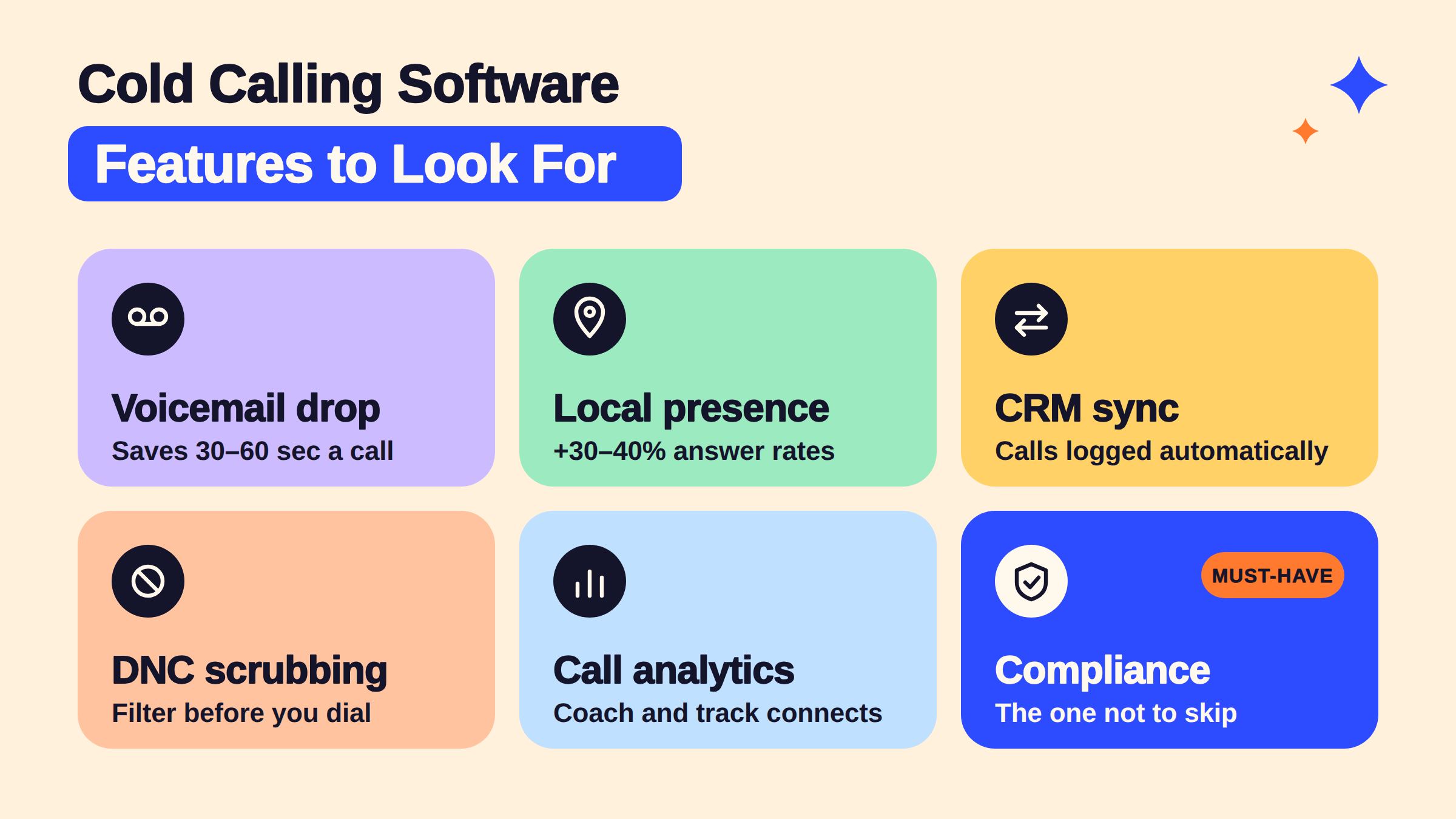
When evaluating cold calling dialer software, the features that actually move metrics are:
Voicemail drop — pre-recorded messages that land instantly, saving 30–60 seconds per unanswered call
Local presence dialing — matching the caller's area code to the prospect's location, which raises answer rates by 30–40% in most tests
CRM sync — automatic logging of dispositions, recordings, and next steps
DNC list scrubbing — filtering numbers against Do Not Call registries before dialing
Call recording and analytics — for coaching and tracking call connect rate over time
That last point is where most feature comparison articles stop short. Compliance controls aren't a bonus — they're the feature that determines whether using the tool is a legal risk. That distinction becomes critical in the next section.
Power Dialer vs Predictive Dialer vs Auto Dialer vs AI Dialer — Which Type Is Right for You?
Most "best dialer" listicles rank tools by popularity. What they consistently skip is that choosing the wrong dialer type — before you've even compared brands — is the most expensive mistake a sales team can make. Here's the decision framework most articles omit:
Dialer Type
Best For
Calls/Hour (Est.)
Compliance Risk
Typical Price Range
Power Dialer
B2B, regulated industries, relationship selling
60–80
Low
$50–$150/seat/mo
Predictive Dialer
High-volume call centres, clean lists
80–150
Medium
$100–$300/seat/mo
Auto Dialer
Broadcast outreach, appointment reminders
100–200+
High (TCPA)
$75–$200/seat/mo
AI/Parallel Dialer
Enterprise SDR teams, DNC-scrubbed B2B lists
150–300+
High without controls
$200–$600/seat/mo
How Does a Predictive Dialer Work?
A predictive dialer works by using an algorithm to dial multiple numbers simultaneously, predicting when a rep will finish their current call and connecting them to the next live answer with minimal gap time. The system factors in average call duration, rep availability, and list connect rates to calculate how many lines to dial in parallel. In practice, a predictive dialer keeps reps in near-continuous conversation — but it also means calls occasionally connect before a rep is ready, which creates abandoned call compliance issues under TCPA rules.
What Is the Difference Between an Auto Dialer and a Power Dialer?
The core difference: an auto dialer dials numbers automatically and can operate without a live rep on standby — often used for recorded message delivery. A power dialer for cold calling dials one number at a time and only connects the call when a rep is ready to speak. Power dialers give reps full control and are significantly lower TCPA compliance risk because they never create an "abandoned call" — a call that connects to a live person with no rep available.
The most common failure mode in dialer selection is teams choosing an AI or auto dialer for the volume gains, then discovering that their contact list quality and consent posture can't support it — legally or operationally.
Best Cold Calling Dialers in 2026: PhoneBurner vs Kixie vs Orum and Beyond
Teams consistently reaching the highest list penetration rate aren't always using the most advanced tool — they're using the tool matched to their workflow. Here's an honest, outcome-based breakdown of the top platforms for the best dialer for cold calling in 2026:
phoneburner.com
Best Sales Dialer Software To Close More Deals | PhoneBurner
kixie.com
Kixie PowerCall – Better Sales Made Simple
Kixie’s AI-powered sales platform offers advanced dialers, including PowerDialer and Click-to-Call, with AI-driven call routing, voicemail detection, and CRM in…
PhoneBurner — Power dialer. Best for SMBs, solo reps, and teams new to dialers. Flat-rate pricing, no per-minute fees, and an exceptionally clean interface. Deep HubSpot and Salesforce sync.
Kixie — Power + parallel hybrid. The strongest mid-market choice for a CRM-integrated dialer. Local presence dialing, multi-line dialing, and flexible integrations make it the most versatile option for teams scaling from 5 to 50 reps.
Orum — AI/parallel dialer. Exceptional for enterprise SDR teams doing 100+ dials/day per rep with DNC-scrubbed B2B lists. The Orum AI dialer uses machine learning to detect live answers and connects reps instantly. Cost is 3–5x higher per seat than PhoneBurner — overkill for teams under 50 dials/day or calling consumer numbers.
The PhoneBurner vs Kixie vs Orum comparison ultimately maps to team size and daily volume. PhoneBurner wins on pricing transparency. Kixie wins on CRM flexibility and mid-market depth. Orum wins on raw connect volume — but only if your list quality can justify the compliance exposure.
6.2%
Average cold call connect rate across 3.5 million dials in 2026 — top SDR teams hit 9–12% with better data and timing
According to Salesfinity's analysis of 3.5 million dials (2026), the average connect rate sits at 6.2%, with top-performing teams reaching 9–12% through cleaner data and strategic call timing. In practice, a dialer that adds 50 extra dials per rep per day at a 6% connect rate generates 3 additional live conversations — compounded across a team of 10, that's 30 more conversations daily from the same headcount.
Free Dialer for Cold Calling: What's Actually Available
A genuinely free dialer for cold calling is rare — and usually limited. HubSpot's built-in calling is the most widely used free option, offering basic click-to-dial and call logging for HubSpot CRM users at no extra cost. Google Voice provides free outbound calling but zero sales workflow features. JustCall and Aircall offer free trials (7–14 days), not permanent free tiers.
The honest framing: free dialers work for teams making fewer than 20 calls per day who need basic logging. Beyond that threshold, the missing features (voicemail drop, local presence, CRM sync, compliance controls) cost more in lost productivity than the subscription fee of an entry-level paid tool.
Cold Calling Dialer Software Pricing: What to Expect in 2026
Dialer pricing runs $50 to $500+ per seat, so watch for per-minute fees.
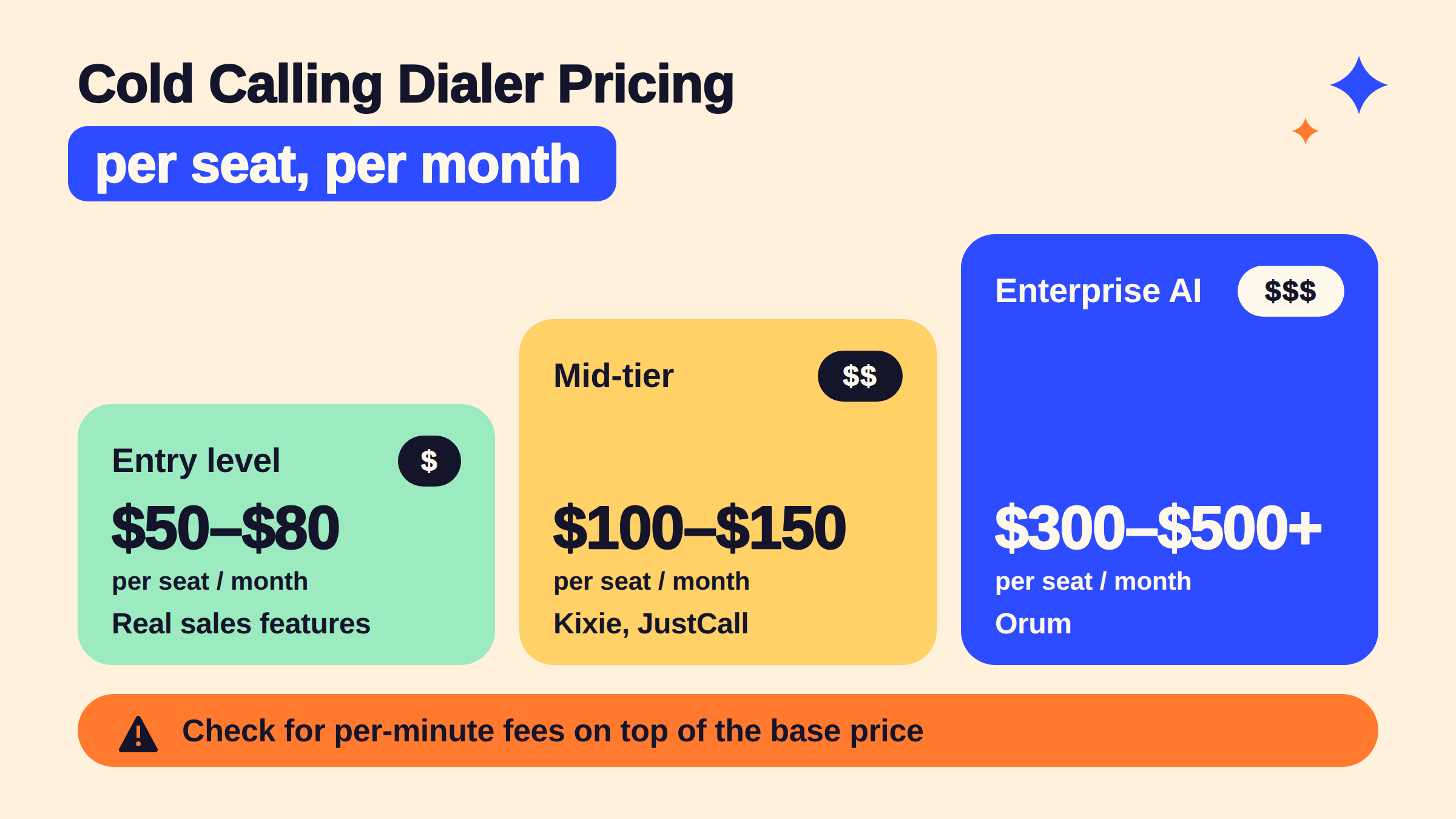
For the cheapest dialer for cold calling with real sales features, expect to pay $50–$80/seat/month. Mid-tier platforms (Kixie, JustCall) run $100–$150/seat/month. Enterprise AI dialers like Orum typically start at $300–$500+/seat/month. Most platforms price per seat with no per-minute fees on unlimited models — but confirm this before signing, as some charge per-minute on top of the base fee, which balloons costs for high-volume teams.
Compliance, Legal Risk, and Common Mistakes When Using a Cold Calling Dialer
Is cold calling with a dialer legal? Yes — but the answer has important conditions that most dialer comparison articles skip entirely. The Telephone Consumer Protection Act (TCPA) — federal legislation governing automated calls and texts to US phone numbers — requires prior express written consent before using an auto dialer to call mobile phones. B2B calls to business landlines have more flexibility, but several states (Florida, Oklahoma, and Texas) have enacted stricter state-level laws that apply even to B2B scenarios.
TCPA compliance risk is systematically underweighted in buying decisions. A single class-action TCPA lawsuit can result in statutory damages of $500–$1,500 per call — and class actions covering thousands of calls have resulted in eight-figure settlements. Teams must:
Scrub contact lists against the National Do Not Call Registry before every campaign
Honor opt-outs within 10 business days (immediately in practice)
Maintain written consent records for any consumer-facing automated dialing
Ensure their dialer type matches their consent posture — AI/parallel dialers calling consumer mobiles without consent is the highest-risk scenario
⚠️
Warning:AI and predictive dialers calling consumer mobile numbers without prior express written consent are the most TCPA-exposed scenario in outbound sales. One class-action covering 10,000 calls at $1,000/call is a $10M liability. Always match dialer type to consent posture before launch.
On the volume question — how many calls can a dialer make per hour: power dialers average 60–80 completed dials per rep per hour. AI and parallel dialers reach 150–300 dials per hour. Higher volume is not inherently better — it amplifies compliance exposure proportionally. According to Cognism's 2026 cold calling report analysing over 200,000 calls, the average call lasts 82 seconds — meaning raw dial count is less important than connect rate and conversation quality.
Common Cold Calling Dialer Mistakes to Avoid
🔴
Avoid:Choosing a dialer based on calls-per-hour alone. Teams that optimise for raw volume without accounting for list quality typically see connect rates collapse within 30–60 days as numbers get flagged as spam by carrier algorithms.
Skipping DNC scrubbing — even a single campaign without list scrubbing creates legal exposure
Using an AI dialer for consumer lists — the speed that makes AI dialers valuable for B2B becomes the liability multiplier for consumer calling
Ignoring local presence — calls from an 800 number answer at roughly half the rate of local area codes
No voicemail drop strategy — leaving no voicemail on every missed call wastes the touch; leaving the same voicemail every time trains prospects to ignore it
How to Choose the Right Cold Calling Dialer for Your Team: A Decision Framework
How to choose the right cold calling dialer for your sales team
Rather than ranking tools by feature count, use three inputs to determine your dialer type — then select a brand within that category. Teams that work backwards from this framework avoid the most expensive dialer mistakes seen across scaling sales organisations.
The 3-Variable Dialer Selection Framework:
Daily call volume per rep — the single most decisive variable
List quality and consent status — determines how aggressive your dialing mode can legally be
Compliance exposure level — consumer vs. B2B, state laws, industry regulations
In plain decision-tree form:
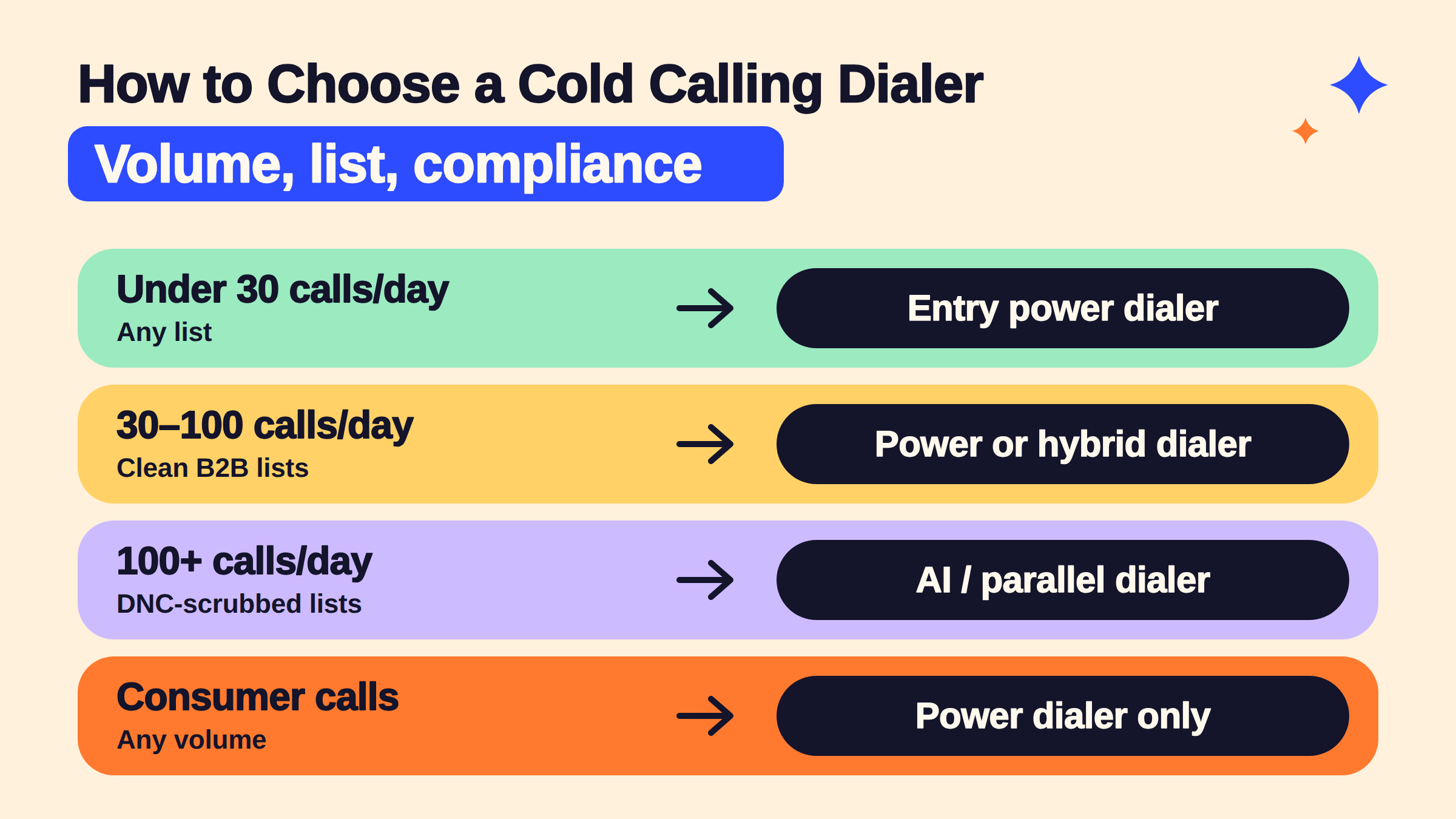
Under 30 calls/day: Free or entry-level power dialer (HubSpot calling, PhoneBurner entry tier)
30–100 calls/day, clean B2B lists: Mid-tier power dialer or Kixie-style hybrid — this is the best dialer for cold calling real estate scenario too, where relationship quality matters as much as volume
100+ calls/day, DNC-scrubbed lists: AI/parallel dialer (Orum, Salesfinity) — the auto dialer for sales teams at enterprise scale
Consumer-facing calls, any volume: Power dialer only — regardless of volume, compliance posture eliminates the AI option
Auto Dialer for Sales Teams: Matching the Tool to Your Sales Cadence
What separates top-performing sales teams from average ones isn't the dialer brand — it's how well the dialer integrates into the existing sales cadence automation workflow. An auto dialer for sales teams only adds value when the surrounding sequence (email, LinkedIn touch, call attempt, voicemail) is already structured. Dropping a dialer into a chaotic or inconsistent cadence typically produces more dials but not more pipeline.
For teams asking which cold calling dialer works best with Salesforce or HubSpot: Kixie and Outreach have the deepest Salesforce integrations, with bi-directional sync and native sequence triggering. HubSpot-native teams get the most consistent experience from HubSpot's built-in calling tool or PhoneBurner's HubSpot sync, which logs every call disposition and recording directly to the contact record.
For cold outreach that combines calling with digital touchpoints, pairing your dialer with a LinkedIn visibility strategy measurably improves warm-up rates before the first dial. This guide on cold outreach automation covers how to sequence channels for faster replies and more closed deals — and for teams building LinkedIn presence alongside their cold calling motion, avoiding spam filters on LinkedIn cold messages is a skill that compounds the value of every dial.
✓ Cold Calling Dialer Selection Checklist
☐Calculate your daily call volume per rep before comparing any tool
☐Verify your list consent status — B2B landline vs. consumer mobile determines dialer type
☐Confirm DNC scrubbing is built into the platform — not a manual step
☐Check CRM integration depth — bi-directional sync, not just one-way logging
☐Test local presence dialing in a pilot — measure answer rate before and after
☐Confirm pricing model — flat-rate unlimited vs. per-minute fees at your projected volume
☐Set up voicemail drop before going live — never leave manual voicemails at scale
Get more from every cold outreach touch
Dialers handle the calls. HyperClapper handles LinkedIn — so prospects already know who you are before your number shows up on their phone. Warm outreach converts at 3–5x the rate of cold-only sequences.
Frequently Asked Questions About Cold Calling Dialers
What is the best dialer software for B2B cold calling in 2026?
For most B2B teams, Kixie is the strongest all-around choice — it combines power and parallel dialing, deep CRM integration, and local presence at a mid-market price. PhoneBurner is the better pick for simplicity and pricing transparency. Orum leads on raw connect volume for enterprise teams doing 100+ dials per rep daily with clean, DNC-scrubbed lists.
Which cold calling dialer works best with Salesforce or HubSpot?
Kixie and Outreach offer the deepest Salesforce integrations, including bi-directional sync and native sequence triggers. For HubSpot, PhoneBurner's HubSpot sync and HubSpot's own built-in calling tool both log call outcomes, recordings, and follow-ups directly to the contact record without manual data entry.
What are the differences between a parallel dialer and a power dialer for sales?
A power dialer for cold calling dials one number at a time and connects the rep only to live answers — high control, low compliance risk, 60–80 dials/hour. A parallel dialer simultaneously dials multiple lines and connects the rep the moment a live answer is detected — higher volume (150–300+ dials/hour) but elevated TCPA risk if lists include consumer mobiles without prior consent.
How do I choose a cold calling dialer for my sales team?
Use three inputs: daily call volume per rep, list consent status (B2B vs. consumer), and compliance exposure level. These three variables determine your dialer type before brand selection begins. Under 30 calls/day: entry power dialer. 30–100 calls/day with clean B2B lists: mid-tier power or hybrid. 100+ calls/day with scrubbed lists: AI/parallel. Consumer lists at any volume: power dialer only.
Is cold calling with a dialer legal?
Yes, with conditions. TCPA requires prior express written consent before using an auto dialer to call consumer mobile numbers. B2B calls to business landlines have more flexibility, but several states (Florida, Oklahoma, Texas) have tightened rules. All teams must scrub lists against the National DNC Registry and honour opt-outs immediately. Power dialers carry the lowest compliance risk; AI/auto dialers carry the highest.
How many calls can a dialer make per hour?
Power dialers average 60–80 completed dials per rep per hour. Predictive dialers reach 80–150. AI and parallel dialers can hit 150–300+ dials per hour per rep. Higher volume amplifies compliance exposure proportionally — teams should match dial rate to list quality and consent posture rather than maximising raw call output.
What is Mojo Dialer and who is it best for?
Mojo Dialer is a power dialer built specifically for real estate agents and mortgage professionals — one of the most searched dialers in the residential real estate space. It offers triple-line dialing, built-in lead management, and skip tracing integrations. It's a strong choice as the best dialer for cold calling real estate at a price point ($99–$149/seat/month) accessible to solo agents and small teams.
What consistently separates sales teams with strong pipeline from teams with high dial counts is not the dialer brand — it is whether the dialer type, list quality, and compliance posture were matched before the first campaign launched. Teams that get all three right see compounding improvements in connect rate and conversion. Teams that miss any one typically plateau or face legal exposure regardless of how many calls they make.
👋
⚡ Free plan
Leaving already?
Grab 3 free boosts on your next LinkedIn post — real likes & comments from 5,000+ creators. No card, cancel anytime.

 phoneburner.com