Superhuman Email Review 2026: Is It Safe for Your Inbox?
Superhuman email review 2026: discover if this fast, AI-powered client is safe, worth the cost, and right for your inbox. Read our honest, in-depth analysis.
📅 ⏱ 17 min read📝 ~3300 words
A pattern observed across hundreds of productivity tool reviews is that Superhuman generates more polarised opinion than almost any other email client — enthusiasts swear it changed how they work, sceptics call it a $30 skin over Gmail. The truth, after examining it from every angle, is more specific than either camp admits. Superhuman email review 2026 coverage consistently reveals a tool that genuinely delivers for one type of user (high-volume, inbox-zero-committed professionals) and meaningfully oversells itself to everyone else. For 2026, the privacy and AI questions are equally important as the productivity ones — this review covers both honestly.
Key Takeaways
Who it's for: Founders, executives, and sales professionals handling 80+ emails daily who are committed to an inbox-zero workflow
Privacy reality: Superhuman is not end-to-end encrypted — emails pass through their servers for AI processing; understand that before connecting a regulated work inbox
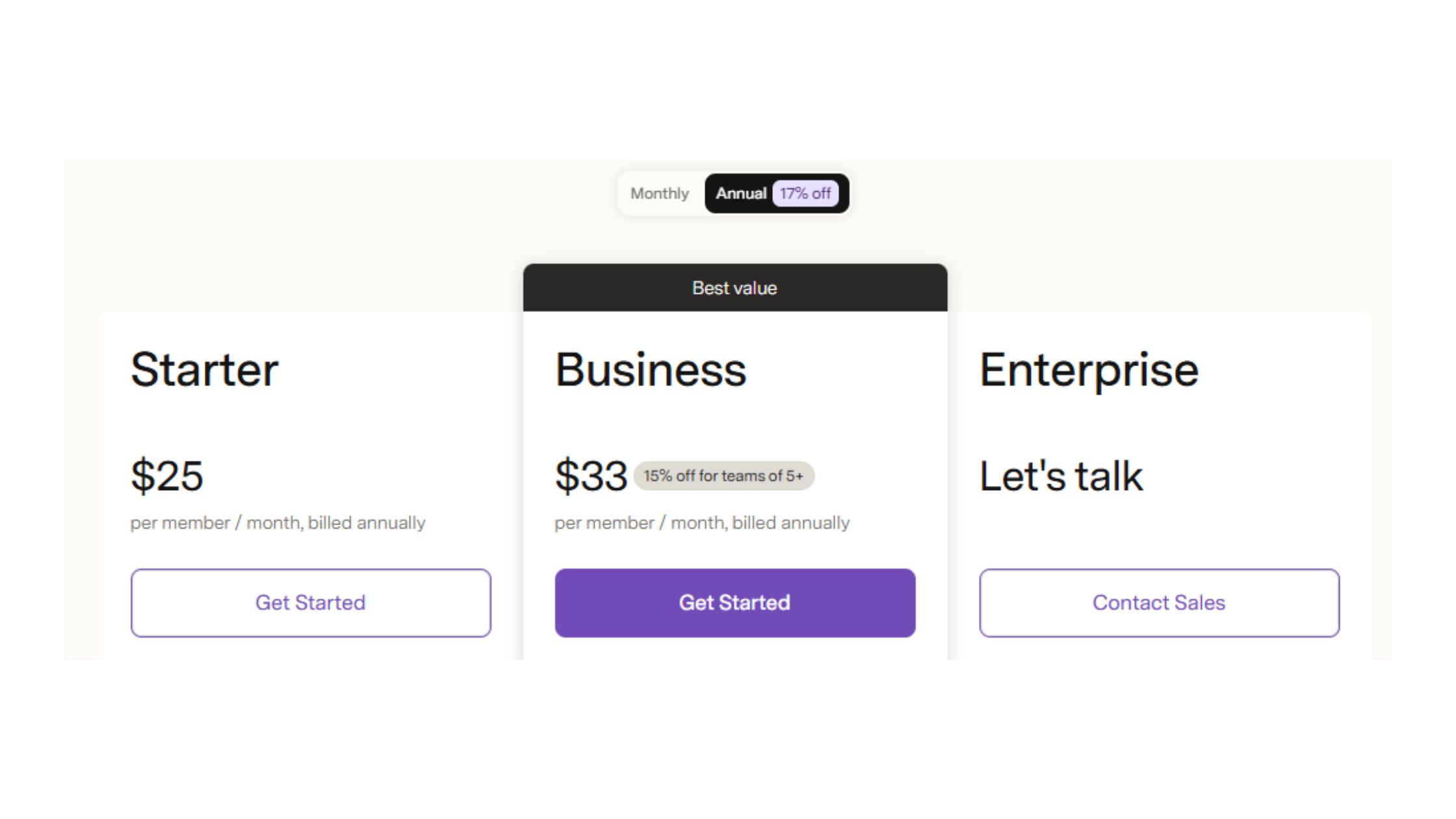
Pricing: $30/month individual, $25/user/month on annual team plans — one of the highest price points in the category
Biggest 2026 change: Grammarly integration now lives directly in the compose window, meaningfully improving the writing experience
Most counterintuitive finding: Mobile is the tool's weakest point — Superhuman is a desktop-primary product, not a cross-device one
Honest alternative: Shortwave at $9–$18/month covers most AI features at a third of the price for price-sensitive users
Superhuman is a premium email client built on top of Gmail and Outlook that replaces the default interface with a faster, keyboard-driven experience designed around the inbox zero methodology — the practice of processing every email to a clear action state so your inbox never becomes a backlog. It works by connecting to your existing email account via OAuth (the same secure handshake used by apps like Calendly or Zapier), syncing messages through Superhuman's servers, and layering AI triage, smart filtering, and shortcut navigation on top.
The core promise is cognitive load reduction — specifically, that every action (archive, reply, snooze, split inbox, follow-up) is reachable in under two keystrokes. Unlike standalone email apps, Superhuman is a productivity layer, not a new email provider. Your emails still live in Gmail or Outlook. You are paying for the interface and the methodology, not for new storage or delivery infrastructure.
The Inbox Zero Methodology Behind Superhuman
Inbox zero is a workflow discipline, not a feature — it means your inbox reflects decisions, not deferral. Superhuman is designed to make that discipline frictionless: every keyboard shortcut, every AI label, every split inbox is scaffolding for that single behavioural goal. Teams that adopt both the tool and the methodology consistently see the time savings. Teams that buy the tool without changing the workflow typically find it expensive and underused — a recurring pattern among professionals who skip the mandatory onboarding call.
The tool does not save time on its own. The methodology does. Superhuman is what happens when someone builds a very fast vehicle for a road most people haven't decided to drive on yet.
The practical implication: if you are not already committed to processing email as a workflow (not a background task), Superhuman's speed advantage mostly makes you faster at the wrong habits. Now that the baseline is clear, the 2026 AI features are where the value proposition has genuinely shifted.
Superhuman AI Features in 2026: What's Actually New?
The 2026 version of Superhuman leans heavily into AI — and the additions are more substantive than the typical annual "we added AI" press release. Superhuman AI email features now include AI triage (which auto-labels importance before you open a thread), AI summaries (which surface the key ask from long email chains), and AI compose (which drafts replies in your own writing style, learning from your sent history over time).
What separates Superhuman's AI implementation from generic GPT wrappers is context awareness. The reply suggestions pull from the specific thread history, not just the last message — so a suggested reply to a vendor negotiation reads differently from one in a client check-in. That distinction matters for professionals who need replies that do not read like generic AI output.
How the Grammarly Integration Changes Real Workflows
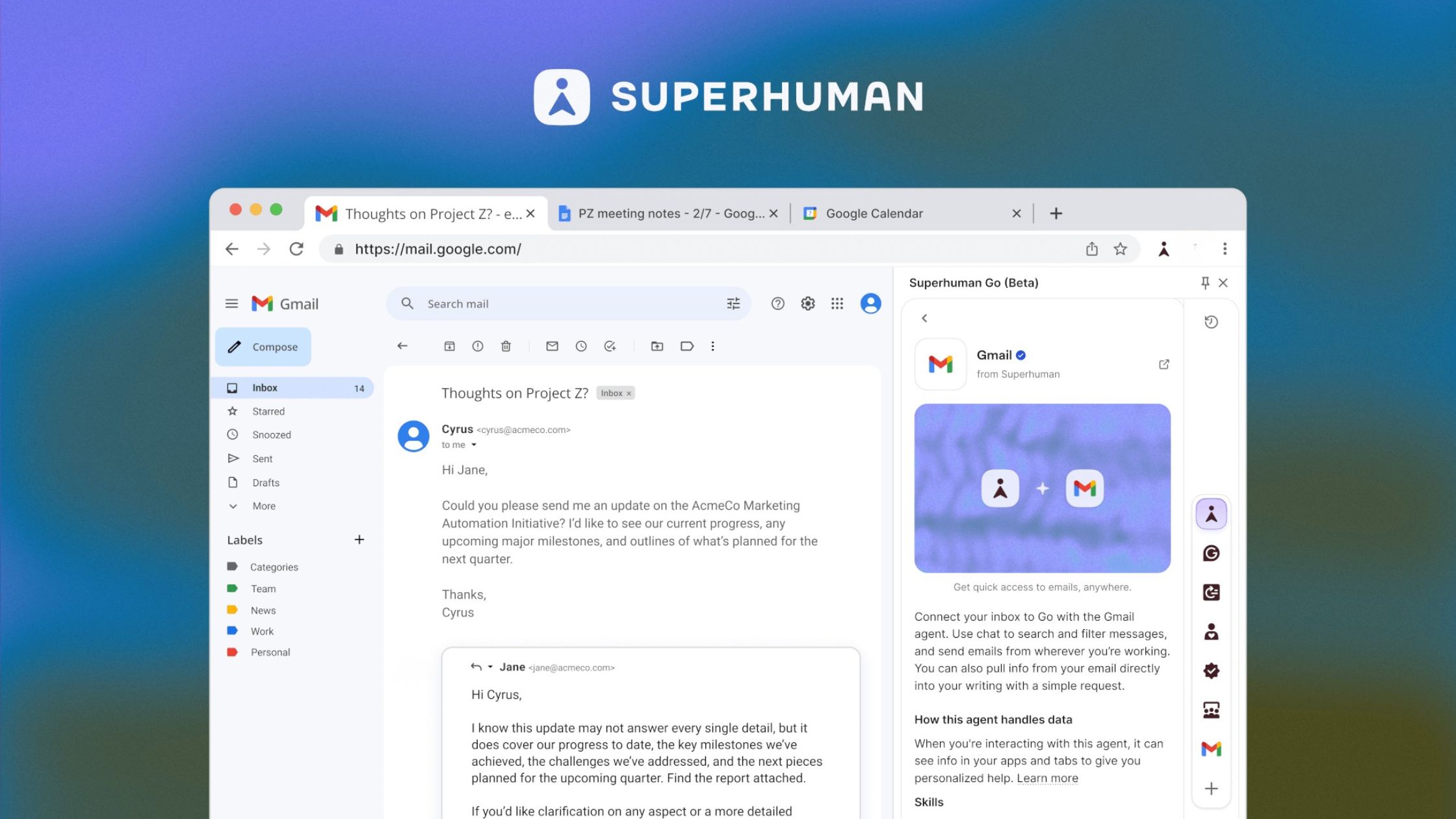
The Grammarly acquisition has meaningfully changed the day-to-day writing experience for 2026 users. Inline tone suggestions, clarity nudges, and grammar corrections now appear directly in the compose window — without switching tools, browser extensions, or copy-pasting. In practice this collapses the "write draft → paste into Grammarly → revise → paste back" loop that added 30–60 seconds to every important email.
For high-volume inboxes, the Ask AI feature lets you query your email history in natural language — "find the contract Sara sent in March" — which reduces dependence on keyboard shortcut productivity for search-heavy workflows. According to Gmelius (2026), Superhuman users report saving an average of 3+ hours per week on email based on the company's own user data.
3+ hrs/week
Average time saved on email, reported by Superhuman users
💡
Pro Tip:Enable AI triage and AI summaries first — get comfortable with those for two weeks before turning on AI compose. Users who activate everything at once often turn it all off within a month because the compose suggestions interfere with their natural writing rhythm.
The 3-hour saving claim is Superhuman's own figure, so independent validation is limited. Alfred's independent 2026 review confirms that Superhuman loads emails in under 100ms versus Gmail's 1–3 seconds, and that power users who have fully adopted the shortcut system process email noticeably faster — but stops short of endorsing the 3-hour claim as universal.
Superhuman Privacy and Security: The Complete Picture for 2026
Is Superhuman email safe? The honest answer is: safer than most third-party email apps, but not suitable for every work inbox — and the distinction depends entirely on your data sensitivity. Here is what the permissions actually mean in practice.
Superhuman Email Data Access Permissions Explained
Superhuman email data access permissions are broad by design. When you connect via OAuth, Superhuman requests read, send, and modify permissions across your full mailbox — not a sandboxed subset. This is how the AI features work: they need access to thread history to generate context-aware suggestions, and they need send permissions to dispatch replies you approve.
This is meaningfully different from saying "Superhuman can read my emails" in a sinister sense — it is more accurate to say their servers process your email content to power AI features, in the same way Google's own servers process Gmail for Smart Reply and spam filtering. The relevant question is whether you are comfortable with a third party's infrastructure touching regulated, confidential, or legally sensitive communications. For most professionals, that answer is yes. For healthcare workers (HIPAA), financial advisers (SEC/FINRA), or lawyers, it warrants a direct conversation with Superhuman's enterprise team before connecting a work inbox.
As of 2026, Superhuman states it does not sell email data to third parties and uses data only to provide and improve the service. Their privacy policy details retention periods and deletion rights. Audit transparency — independent third-party security certifications like SOC 2 Type II — remains more limited than enterprise-grade tools like Google Workspace or Microsoft 365. If your company has a strict IT governance requirement, self-serve plans are not designed for that use case; enterprise procurement through Superhuman's sales team covers SSO, SCIM provisioning, and custom data retention agreements.
Superhuman Email Read Receipts Tracking: What You Should Know
The Superhuman email read receipts tracking controversy is worth understanding even though it was resolved in 2019. Superhuman originally embedded invisible tracking pixels in outbound emails by default and shared recipient location data (derived from IP address at email-open time) with senders — without recipient knowledge or consent. The resulting backlash was significant. What happened with Superhuman privacy controversy was swift: Superhuman removed the location data sharing and made read receipts opt-in rather than on by default.
In 2026, read receipts are entirely opt-in for senders. Recipients still cannot disable receipt of tracking pixels sent by Superhuman users who have turned the feature on — which is a limitation shared by virtually every email read-receipt tool, including those built into Outlook and HubSpot Sales. What matters for your evaluation: the passive data sharing issue was addressed, but the underlying tracking capability exists as it does with most sales email tools. If you are receiving email from a Superhuman user, knowing this is simply good digital awareness.
⚠️
Warning:If you work in healthcare, legal, or financial services, confirm Superhuman's current compliance posture with their enterprise team before connecting your primary work inbox. Standard OAuth access covers full mailbox content, and self-serve plans do not include a Business Associate Agreement (BAA) or equivalent compliance documentation.
Superhuman Email Pricing 2026: Worth It?
Superhuman Email Pricing 2026
Superhuman email pricing 2026 for individual users and $25/user/month on annual team plans — one of the highest price points in the email client category by a wide margin. The honest ROI question is one most reviews dodge: at $30/month, you need to recover roughly 15–20 minutes of productive work per day (assuming a $90K annual salary) just to break even on the subscription cost.
For a founder or executive managing 100-plus emails daily, that math often works. The 3+ hours per week saving claim, if even partially real for your workflow, covers the cost multiple times over. For a professional who gets 30–40 emails a day and already uses Gmail shortcuts, it almost never works — the marginal speed gain is real but not $360/year real.
Who Actually Gets Their Money's Worth
The most common failure mode, based on community feedback patterns, is buying Superhuman at a moment of inbox overwhelm — treating it as a solution to a volume problem rather than a workflow problem. Overwhelm comes from the absence of a triage system, not from a slow interface. Superhuman solves the interface. You still need to provide the system.
Users who get clear value fall into a specific profile:
Processing 80+ emails daily as a regular baseline
Already committed to inbox zero as a working practice
Using primarily desktop (the mobile gap matters here — see the experience section below)
Working in a role where email speed has direct revenue or client impact (sales, recruiting, executive communication)
Free alternatives close a meaningful portion of the gap for users outside this profile. Gmail with keyboard shortcuts enabled covers the core speed behaviour. AI-layered outreach tools increasingly handle email-adjacent workflows. Shortwave's free tier adds AI summaries and threading. The gap Superhuman maintains is polish, speed, and the behavioural scaffolding — not raw features.
🔴
Avoid:Signing up for Superhuman without completing the onboarding call. The onboarding is where you learn the shortcut system that underpins every speed claim. Users who skip it and treat it like a normal email client typically cancel within 60 days — having paid $60 for a prettier Gmail.
Growing your LinkedIn presence while you fix your email workflow?
HyperClapper helps creators and founders boost LinkedIn post visibility with real engagement from relevant professionals — no bots, no fake activity.
Superhuman for Teams: Enterprise and Collaborative Use in 2026
The Superhuman email for teams review picture is more nuanced than the individual use case. Superhuman for Teams adds shared snippets (reusable reply templates across the whole team), admin controls for onboarding consistency, and team-wide keyboard shortcut standards — genuinely useful for sales teams and agencies where communication speed and consistency are both KPIs.
What it does not offer: shared inboxes, ticketing-style assignment, or thread ownership transfer. This is not a Helpscout or Front replacement. Teams with shared support queues or customer-facing inboxes operated by multiple agents will hit this ceiling quickly. The collaboration model is individual-inbox-first — Superhuman makes each person faster, but it does not make the inbox itself collaborative.
For remote and async-first teams, the combination of AI triage, snooze, and scheduled send meaningfully reduces the pressure to monitor email in real time — a genuine win for async communication overhead reduction. The 'send later' and snooze functions let team members batch their communication without leaving messages unaddressed. Enterprise procurement requires contacting sales for SSO, SCIM provisioning, and custom data retention — plan for a 1–2 week sales cycle if IT approval is required.
Superhuman vs Shortwave and Other Alternatives in 2026
After seeing the alternatives landscape across multiple review cycles, the competitive picture for 2026 is clearer than it has ever been: Superhuman vs Shortwave is the only genuinely close comparison. Everything else is a different trade-off, not a direct substitute.
Budget-conscious users wanting AI on top of free Gmail
Free–$10
AI replies, triage layer
Strong
Outlook
Microsoft 365 ecosystems, enterprise IT requirements
Included in M365
Copilot (M365 licence)
Strong
Alternatives Comparison: Features, Price, and Best-Fit User
Superhuman alternatives 2026 cover a wide range of trade-offs. Shortwave is the default recommendation for price-sensitive users who want AI-native email — it covers AI summaries, threading, and keyboard shortcuts at $9–$18/month. For Mac-first users who do not need AI but want near-Superhuman speed, Mimestream at $4/month is the right pick. Gmail combined with Fyxer covers a surprising amount of Superhuman's value proposition at near-zero cost — the gap is in polish and behavioural scaffolding, not raw features.
Comparing Outlook directly to Superhuman is mostly apples-to-oranges: Outlook is infrastructure, Superhuman is a workflow methodology tool. Users on Microsoft 365 with Copilot access have a credible AI email experience at no additional cost. Is Superhuman better than Outlook for raw productivity? For keyboard-driven inbox-zero workflows, yes — but Outlook's ecosystem integration, mobile parity, and compliance tooling make it the rational choice for enterprise environments.
shortwave.com
Shortwave — Automate your email with AI
Agentic AI that helps you organize, write, search, schedule, and more with just a prompt
Real-World Superhuman Experience: Mobile, Desktop, and Common Mistakes
On desktop, Superhuman delivers on its speed promise. The keyboard-first design and near-instant search make it genuinely faster than Gmail for power users who invest the time to learn the shortcut system — and that investment is real, typically two to three weeks before it becomes muscle memory.
On mobile, the experience is notably weaker. The iOS and Android apps lack the full keyboard shortcut system and some AI features are desktop-only. This makes Superhuman a desktop-primary tool — which matters significantly if your email workflow spans devices. Creators who skip this step typically find that Superhuman saves time on their MacBook and costs time on their phone, as they context-switch between two different email paradigms. For Superhuman to deliver its full ROI, your primary email time must be at a desk.
Superhuman's mobile experience is the strongest argument for its competitors. If 40% of your email time is on a phone, the desktop speed advantage shrinks proportionally — and suddenly $30/month is harder to justify against a $9 alternative with better mobile parity.
✓ The Superhuman Setup Checklist
☐Complete the mandatory onboarding call before using the product independently
☐Enable only AI triage and summaries in week one — hold off on compose and ask AI
☐Review which mailbox scopes you've granted — confirm you're comfortable with full mailbox access
☐Set up split inboxes for the top 3 email types you receive (not all 10 at once)
☐Decide on read receipts preference before sending a single email — opt-in or out explicitly
☐If using a work inbox in a regulated industry, contact Superhuman's enterprise team about compliance documentation
☐Test the mobile app on day one — if mobile is a primary email context for you, flag this before the trial ends
What Happens to Your Data and Workflow If You Cancel
This is one of the most commonly asked questions on superhuman email reddit threads and one most reviews ignore. When you cancel Superhuman, your emails are not deleted — they remain in Gmail or Outlook exactly as they were before. Superhuman is a layer, not a host. The practical workflow impact is a return to your previous client interface, with no data loss. Superhuman states it deletes your data from their servers within a defined
Frequently Asked Questions About Superhuman Email in 2026
Is Superhuman email worth it?
Superhuman is worth it for founders, executives, and sales professionals handling 80+ emails daily who are committed to inbox-zero workflows — they consistently report saving 3+ hours weekly. For casual or moderate email users, the $30/month price is hard to justify when alternatives like Shortwave deliver most AI features at a third of the cost.
Is Superhuman email safe?
Superhuman is safe in the conventional sense — it uses OAuth for account access and has no public record of data breaches. However, it is not end-to-end encrypted, meaning emails pass through Superhuman's servers for AI processing. Users with regulated or sensitive work inboxes should review their compliance requirements before connecting.
Is Superhuman better than Outlook?
Superhuman is not a replacement for Outlook — it is a productivity layer that sits on top of Gmail or Outlook. It wins on keyboard-driven speed, AI triage, and inbox-zero workflow support. Outlook wins on native calendar integration, enterprise IT controls, and offline reliability. They solve different problems for different user types.
Is Superhuman email safe to use with a work inbox in 2026?
Superhuman is generally safe for standard professional inboxes in 2026, but it is not appropriate for regulated industries without compliance review. Because emails are processed through Superhuman's servers to power AI features, organizations subject to HIPAA, SOC 2, or similar frameworks should verify Superhuman's compliance documentation before connecting a work account.
Does Superhuman sell or share your email data with third parties?
Superhuman's privacy policy states it does not sell your email data to third parties. Email content is processed on Superhuman's servers solely to deliver product features like AI summaries and smart triage. However, "not sold" is not the same as fully private — AI processing requires server-side access to your message content by definition.
What permissions does Superhuman need to access your Google account?
Superhuman requests broad Gmail OAuth permissions, including read, compose, send, and delete access. This is standard for full-featured email clients, equivalent to what tools like Zapier or Calendly request. The key distinction is that Superhuman syncs messages through its own servers rather than operating purely client-side, which is what enables AI processing.
Has Superhuman had any security breaches or privacy issues?
Superhuman had a notable privacy controversy in 2019 when its read-receipt tracking feature drew public criticism for enabling senders to track recipients' location and open times without consent. Superhuman subsequently made read receipts opt-in. As of 2026, there is no public record of a data breach, though the 2019 episode shaped ongoing scrutiny of its privacy practices.
Is Superhuman email worth the monthly cost for productivity?
At $30/month, Superhuman is worth it only when the inbox-zero methodology accompanies the tool. Users who adopt both consistently report meaningful time savings. Users who pay for the interface without changing their email workflow typically find it expensive and underused. The pricing is high relative to alternatives — value depends almost entirely on behavioral commitment, not feature access alone.
👋
⚡ Free plan
Leaving already?
Grab 3 free boosts on your next LinkedIn post — real likes & comments from 5,000+ creators. No card, cancel anytime.

 shortwave.com