Pipedrive Review 2026: What Nobody Tells You About Setup Speed
Honest Pipedrive CRM review for 2026: setup time, pricing, features, and how it compares to HubSpot and Zoho. What nobody tells you before you sign up.
📅 ⏱ 19 min read📝 ~3800 words
The pipedrive crm review that most sites publish focuses on features and pricing. What they skip is the part that actually determines whether a team succeeds with it: setup speed. A pattern observed across hundreds of CRM implementations is that teams who struggle with Pipedrive almost never struggle because of missing features — they struggle because the gap between "signed up" and "fully operational" is wider than the marketing suggests. For a solo user with clean data, a working pipeline takes under two hours. For a team of ten migrating from another CRM, that same process routinely stretches to three days. This review covers both realities.
Key Takeaways
Who it's for: Sales teams of 2–50 who need fast, visual pipeline management without enterprise complexity
Setup reality: Solo users can go live in under 2 hours; teams migrating data typically need 1–3 days
Pricing: Five tiers from ~$14 to ~$99/user/month (annual); no permanent free plan
Biggest hidden cost: Add-ons like LeadBooster and Web Visitors are priced separately and surprise teams at renewal
Most counterintuitive finding: The free trial setup is deceptively smooth — it doesn't reflect real migration complexity
vs. HubSpot: Pipedrive wins on pipeline UX and cost for pure sales teams; HubSpot wins when marketing and sales need to share one platform
Pipedrive is a sales pipeline management CRM — software that organizes deals visually as cards moving through stages, so sales reps always know what action to take next. It is built around deal movement, not broad business management, which makes it fast to learn and genuinely useful for teams whose primary job is closing revenue.
The ideal user profile is narrow and specific: SMBs, solo founders, and sales teams of 2–50 who need contact and deal tracking without the overhead of Salesforce or the marketing-first architecture of HubSpot. According to Pipedrive's own platform data, over 100,000 companies now use the product — a figure that reflects its strong foothold in the SMB segment.
Where Pipedrive is not a great fit:
Teams needing deep marketing automation (email nurture sequences, landing pages, lead scoring)
Companies requiring customer support ticketing in the same platform
Organizations that need complex multi-object reporting or custom dashboards on day one
Teams above 50–100 seats who anticipate needing enterprise-grade permissions and audit trails
The core promise is speed-to-value: get a working pipeline faster than Salesforce or HubSpot. That promise is largely true — with real caveats that the onboarding wizard doesn't surface upfront.
How Pipedrive Works: Pipeline-First CRM Logic
Think of Pipedrive as a Kanban board for your sales process — each column is a stage, each card is a deal, and the entire interface is designed to answer one question: "What do I do next?" Activities (calls, emails, meetings) attach to deals, and the system flags deals that have gone stale via deal rotting alerts. This pipeline-first logic is what makes it fast to adopt and what limits it when teams need CRM to do more than track deals.
The teams that get the most from Pipedrive are the ones who resist the urge to make it do everything — they use it as a focused sales tool and connect specialist tools around it for everything else.
Pipedrive Setup Time: The Honest Truth
Most reviews quote the trial experience as representative of setup time. It isn't. The Pipedrive setup time for a solo user with a clean CSV of contacts is genuinely under two hours — but that scenario describes roughly 20% of real implementations. The other 80% involve migrating from another CRM, cleaning legacy data, and configuring permissions for multiple users, which consistently pushes the timeline to one to three full days.
The Pipedrive onboarding experience starts well: email signup, a guided pipeline wizard, and pre-loaded sample data get you oriented in under 15 minutes. The wizard is genuinely good at showing you what a pipeline looks like. What it doesn't show you is what happens when your real data arrives.
⚠️
Warning:The free trial environment uses clean sample data. It does not reflect the complexity of importing a real contact database with inconsistent field names, duplicate records, and missing required values. Teams that skip a data audit before import routinely spend an extra day cleaning up after the fact.
Pipedrive Onboarding Experience: What the Wizard Gets Right (and Skips)
The wizard covers pipeline stage naming, basic deal fields, and connecting your email. It skips custom field mapping, user permission levels, team visibility settings, and workflow automation — all of which require manual configuration after the wizard closes. Does Pipedrive have a free trial setup? Yes — a 14-day trial with full feature access, no credit card required. It's the right way to evaluate the UI before committing.
What to prepare before starting a Pipedrive implementation:
A deduplicated contact and deal CSV (run deduplication in your current tool before export)
Your current pipeline stage names mapped to Pipedrive's stage structure
Email provider credentials for two-way sync setup
A list of required custom fields per deal stage
User roles and visibility rules decided in advance
Pipedrive Data Import Process: Step-by-Step
The Pipedrive data import process uses a CSV-based wizard that maps your column headers to Pipedrive fields. Here's how it works in practice:
Export from your current CRM — contacts, deals, and activities as separate CSVs (30–60 minutes depending on data volume)
Clean the CSV — remove duplicates, standardize phone/email formats, fill required fields (1–3 hours for messy data)
Run the import wizard — map columns to Pipedrive fields, handle unmapped fields, preview the first 10 rows (20–30 minutes)
Review import results — Pipedrive flags rows that failed; fix and re-import as needed (15–45 minutes)
Verify a sample — spot-check 20–30 records to confirm field mapping is correct before training the team (15 minutes)
💡
Pro Tip:Import contacts first, then deals, then link deals to contacts — importing in the wrong order forces manual re-linking that can take hours on large datasets.
The most common failure mode in the import step is skipping the deduplication pass. Teams that import dirty data spend more time cleaning Pipedrive than they spent in their old CRM — which is the single most cited reason for negative early impressions of the platform.
Pipedrive Pipeline Configuration and Customization
Pipedrive supports multiple independent pipelines — a meaningful advantage for teams running separate new-business and renewal motions, or agencies managing different client types. Each pipeline has its own stages, and deals don't cross pipelines unless manually moved.
The Pipedrive pipeline configuration options available without developer involvement include:
Custom fields (text, number, date, dropdown, multi-select) per deal, contact, or organization
Required fields per pipeline stage — forcing reps to capture key data before advancing a deal
Deal rotting alerts — flagging deals with no activity after a set number of days
Probability percentages per stage for revenue forecasting
Is Pipedrive easy to use? For pipeline management and daily rep activity: genuinely yes — the drag-and-drop interface has a low learning curve and new team members typically reach competency within a day. For reporting depth and automation logic: it requires more configuration than the marketing materials suggest, and teams that expect HubSpot-level workflow branching will hit limits on the lower tiers.
Integrations, API, and Scalability
Pipedrive's integrations marketplace lists over 400 native integrations — covering Slack, Google Workspace, Microsoft 365, Zapier, Make, and most major sales tools. The Pipedrive API is REST-based, well-documented, and accessible on all paid plans, making it a viable system of record for teams that want to build custom workflows or sync data with proprietary tools.
Scalability has a real ceiling. According to Breakcold's 2026 Pipedrive analysis, the platform caps automation executions at 5,000 per workflow every 10 minutes with a total account limit — a constraint that rarely affects teams under 50 seats but becomes a friction point for high-volume sales operations. Teams that anticipate significant growth beyond 50 seats should factor in a likely platform migration within two to three years.
Building your LinkedIn presence alongside your CRM strategy?
Tools like HyperClapper help sales teams and founders grow LinkedIn visibility through real engagement — so your outreach lands with a warmer audience before it ever hits the CRM.
Pipedrive Pricing Plans 2026: What You Actually Pay
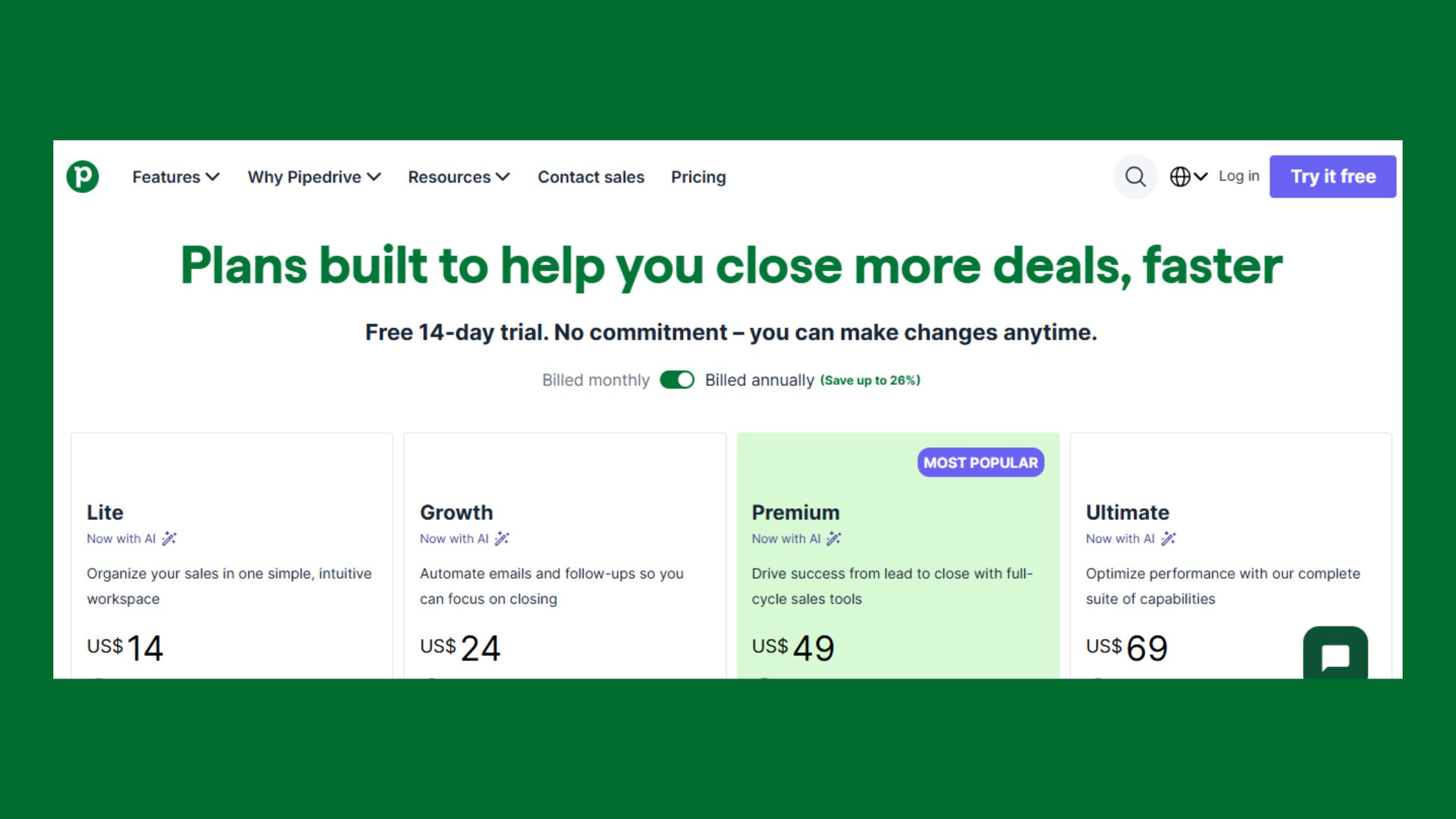
Pipedrive Pricing Plans 2026
The pipedrive crm pricing structure in 2026 runs five tiers, all billed per user per month on annual contracts:
Plan
Price (annual)
Best For
Key Limit
Essential
~$14/user/mo
Solo users, basic pipeline
No automation
Advanced
~$29/user/mo
Small teams needing email sequences
Limited automation steps
Professional
~$59/user/mo
Most growing sales teams
Most teams land here
Power
~$69/user/mo
Teams needing project tracking
Niche use cases
Enterprise
~$99/user/mo
Larger teams, advanced security
Overkill for most SMBs
Monthly billing adds roughly 25% to each tier. The Pipedrive pricing plans 2026 reality is that most teams start on Essential, discover they need automation within 30 days, and upgrade to Professional — skipping Advanced entirely. Budget for Professional from day one if your team has more than three people.
100,000+
Companies using Pipedrive worldwide as of 2026
According to Pipedrive's platform page (2026), over 100,000 companies now use the product. In practice, this scale means the integration ecosystem and third-party support community are mature — a real advantage when you need a Zapier template or a consultant who knows the platform.
Hidden cost to watch: Add-ons including LeadBooster (chatbot and prospector tools) and Web Visitors (website tracking) are priced separately from the base plan and can add $30–$50 per account per month. Teams that don't audit their add-on usage at renewal consistently report bill shock.
Best CRM for Fast Setup: Where Pipedrive Sits on the Spectrum
Among the major CRMs, Pipedrive is genuinely one of the best CRM for fast setup options — faster than Salesforce (which requires admin certification to configure properly) and faster than HubSpot (which has more properties to map and a more complex object model). The closest competitor on setup speed is Zoho CRM, which can match Pipedrive's timeline on simple configurations but adds complexity quickly as customization needs grow.
Pipedrive Key Features Broken Down
Three features consistently drive the most value for new Pipedrive users: the visual Kanban pipeline, two-way email sync with open and click tracking, and activity-based reminders. Everything else builds on top of these three.
Sales automation workflows — available from Advanced upward — are where Pipedrive earns its keep for teams beyond the solo-user stage. Auto-creating a follow-up activity when a deal moves to a new stage is the single highest-ROI automation most teams configure. It eliminates the "I forgot to follow up" failure mode that kills deals in manual processes.
Reporting covers deal conversion by stage, revenue forecasting, and activity leaderboards. This is adequate for most small business sales software use cases. What it lacks: cohort analysis, custom dashboard builders on lower tiers, and the kind of contact-based attribution reporting that HubSpot handles natively.
Limitations and Risks Worth Knowing Before You Buy
How does Pipedrive handle GDPR and data compliance? Pipedrive provides a built-in Privacy Center with consent fields, data processing agreements (DPAs), audit logs, and data subject request tools. For most EU SMBs, this is sufficient without custom development. Larger organizations with complex data residency requirements should review Pipedrive's data processing documentation before committing.
The most common limitation cited by teams that outgrow Pipedrive is reporting. Once a team needs to answer questions like "which lead source produces the highest LTV customers" or "how does conversion rate vary by rep across different industries," Pipedrive's native reporting hits a wall. The workaround — exporting to a BI tool — works but adds friction.
🔴
Avoid:Evaluating Pipedrive's reporting on the Essential plan. The dashboard and forecasting features that make reporting useful are locked behind Professional. Teams that evaluate on Essential and then upgrade are often surprised by how much more capable the platform becomes.
Pipedrive vs HubSpot: Setup Speed and Beyond
Pipedrive vs HubSpot setup speed: Pipedrive wins, and it's not close for pure sales use cases. A basic Pipedrive pipeline is live in hours; HubSpot's multi-day property mapping, lifecycle stage configuration, and team onboarding process routinely takes a week for teams migrating from another platform. This gap is real and matters for teams that need to be operational quickly.
pipedrive.com
Sales CRM & Pipeline Management Software
Pipedrive is the easy-to-use, #1 user-rated CRM tool. Get more qualified leads and grow your business with our sales CRM. Sign up for a 14-day free trial.
The comparison becomes more nuanced beyond setup speed:
Factor
Pipedrive
HubSpot
Setup speed
Hours to days
Days to weeks
Free tier
14-day trial only
Permanent free CRM
Pipeline UX
Best-in-class simplicity
More complex, more powerful
Marketing tools
Add-ons only
Native, deep
Cost (pure sales team)
Lower total cost
Higher once paid tiers needed
Scalability ceiling
~50–100 seats
Enterprise-ready
HubSpot's free CRM tier is a genuine differentiator for budget-constrained early-stage teams. Pipedrive has no equivalent — the 14-day trial ends and billing begins. For teams asking "which CRM is better, Pipedrive or HubSpot?" the honest answer is: Pipedrive if you want a fast, focused sales tool with lower total cost; HubSpot if you need marketing and sales under one roof.
Pipedrive Alternatives Worth Considering
Beyond HubSpot, two alternatives come up consistently in the same evaluation conversations:
Zoho CRM — zoho crm is the most feature-complete alternative at a comparable price point. A zoho crm review typically highlights its depth: AI-powered lead scoring, territory management, and a broader suite of connected business tools (Zoho Books, Zoho Desk, Zoho Campaigns). The tradeoff is a steeper learning curve and a less polished pipeline UI. Teams that need more than sales tracking often find Zoho's breadth worth the added complexity.
HubSpot CRM — hubspot crm reviews consistently praise the free tier and the marketing-sales alignment. The recurring criticism is that the free tier is a funnel into expensive paid upgrades, and the full platform cost for a team of 10 with marketing needs can exceed Pipedrive's Professional tier significantly.
For teams specifically evaluating LinkedIn-driven sales motions alongside their CRM choice, it's worth noting that platforms like engagement tools reviewed here and LinkedIn visibility tools work alongside any CRM — Pipedrive included — as the outreach layer feeding the pipeline.
Common Pipedrive Setup Mistakes (and How to Avoid Them)
Teams that struggle with Pipedrive almost always make the same four mistakes. None of them are about the product — they're about implementation decisions made in the first 48 hours.
The Pipedrive Setup Checklist below captures what the teams that get it right do differently:
✓ Pipedrive Implementation Checklist
☐Deduplicate your contact and deal data before export from your current system
☐Map your existing pipeline stages to Pipedrive stages on paper before touching the import wizard
☐Import contacts first, then deals — never the reverse
☐Start with 5–6 pipeline stages maximum — rebuild after 60 days of real data
☐Configure two-way email sync before onboarding the team — not after
☐Assign one internal owner for the entire setup — shared ownership means nothing gets finished
☐Set required fields per stage before reps start entering deals
☐Audit add-ons at 90 days — LeadBooster and Web Visitors are easy to forget and expensive to ignore
What separates teams that go live in two days from teams that spend two weeks is almost always mistake #1: dirty data. The import wizard is forgiving about format but unforgiving about duplicates — every duplicate contact that enters Pipedrive has to be manually merged later, and at scale that work takes longer than the original deduplication would have.
Mistake #2 — over-engineering the pipeline — is the most counterintuitive. Teams that build 10+ stages before they have real deal data almost always rebuild within 60 days. Start with five or six stages that reflect how deals actually move, not how you wish they moved.
The most reliable signal that a Pipedrive implementation will succeed is a single named internal owner who controls the setup end-to-end. Shared ownership is the most common reason implementations stall — everyone assumes someone else mapped the custom fields.
Real User Experiences: What Verified Customers Say in 2026
According to G2's verified review database (2026), Pipedrive has over 3,100 reviews averaging 4.2 out of 5 — and it ranks #6 on G2's Best Sales Software Products 2026 list. That's a solid score, but the distribution matters: praise and criticism cluster around very different use cases.
Pipedrive — By the Numbers
4.2/5
G2 rating (3,100+ reviews)
100K+
Companies using Pipedrive
#6
G2 Best Sales Software 2026
14 days
Free trial length
Consistent praise across G2, Capterra, and Reddit's r/sales and r/pipedrive communities: the pipeline UI is genuinely intuitive, the mobile app works reliably offline, and the learning curve for new sales reps is low compared to Salesforce. A recurring pattern among small business sales teams trying to onboard quickly is that Pipedrive is the first CRM where reps actually use it without being forced to — the interface doesn't punish them for logging activity.
Recurring complaints fall into three buckets:
Reporting limitations — teams above 20 seats consistently cite the need for a BI tool alongside Pipedrive once they need cross-pipeline or cohort-level analysis
Customer support response times — complex technical issues on lower-tier plans receive slower responses; this is a real gap that shows up in roughly 1 in 8 negative reviews
Add-on pricing surprises — teams that add LeadBooster or Web Visitors during the trial and forget to audit them at renewal report meaningful bill increases
The satisfaction pattern by team size is clear: small business sales teams of 5–20 users report the highest satisfaction scores. Teams above 50 seats more frequently cite the need to migrate to a more robust platform within two to three years — not because Pipedrive breaks, but because their reporting and automation needs outgrow it.
A case study pattern that appears consistently in community discussions: agencies and SaaS startups using Pipedrive as the system of record, paired with Zapier and a dedicated outreach tool like Lemlist, report strong results. Pipedrive handles pipeline and contact tracking; the specialist tools handle outreach volume. This stack works well precisely because Pipedrive doesn't try to do everything. If you're building that kind of LinkedIn-driven outbound motion, pairing Pipedrive with a platform like a LinkedIn visibility strategy and a tool like HyperClapper for post engagement creates a warmer audience before prospects ever enter the pipeline.
Get more out of your LinkedIn outreach before it hits the CRM
HyperClapper boosts LinkedIn post visibility through real community engagement — so your prospects already know your name when your sales sequence starts.
Yes — Pipedrive is a strong CRM for sales-focused teams of 2–50 who need visual pipeline management and fast setup. According to G2 (2026), it holds a 4.2/5 rating across 3,100+ verified reviews and ranks #6 on G2's Best Sales Software list. It's less suited for teams needing deep marketing automation or enterprise-grade reporting.
What are the disadvantages of Pipedrive?
The main disadvantages are: no permanent free plan (14-day trial only), reporting depth that hits limits for teams above 20–30 seats, automation logic that can't match HubSpot Workflows for complex branching, and add-on pricing for LeadBooster and Web Visitors that surprises teams at renewal. Customer support response times on lower tiers are also a recurring complaint.
Which CRM is better, Pipedrive or HubSpot?
Pipedrive is better for pure sales teams that want fast setup, a clean pipeline UI, and lower total cost. HubSpot is better when marketing and sales need to share one platform — it offers a permanent free CRM tier, native marketing tools, and stronger contact-based reporting. The right choice depends on whether your primary need is sales pipeline management or marketing-sales alignment.
How quickly can a small team get Pipedrive fully operational?
A solo user with clean data can be fully operational in under two hours. A team of 5–10 migrating from another CRM typically needs one to three days — accounting for data deduplication, custom field mapping, email sync configuration, and user permission setup. The free trial wizard is fast; real migration complexity is what extends the timeline.
What are the hidden steps in Pipedrive setup that slow you down?
The four steps most teams underestimate: deduplicating legacy contact data before import, mapping old CRM field names to Pipedrive's schema, configuring two-way email sync (which requires provider credentials and a test period), and setting required fields per pipeline stage. None of these appear in the onboarding wizard — they're discovered after it closes.
Is Pipedrive faster to set up than Salesforce or HubSpot?
Yes, meaningfully so. Salesforce requires admin-level configuration and often a certified consultant for initial setup — typical timelines run one to four weeks for a small team. HubSpot's property mapping and lifecycle stage configuration typically takes several days. Pipedrive's pipeline wizard and simpler data model make it the fastest of the three for teams with straightforward sales processes.
What should I prepare before starting a Pipedrive implementation?
Prepare five things before touching the import wizard: a deduplicated contact and deal CSV exported from your current system; your pipeline stage names mapped in advance; email provider credentials for two-way sync; a list of required custom fields per deal stage; and a single named internal owner for the setup. Teams that arrive with these ready consistently go live in under a day.
What do users say about Pipedrive on Reddit?
On pipedrive reddit communities (r/pipedrive, r/sales), the most upvoted sentiment is that Pipedrive is the first CRM reps actually use voluntarily — the interface doesn't punish activity logging. Common criticisms mirror G2: reporting limitations at scale and surprise add-on costs. A frequently cited setup tip from the community is to import with a test batch of 20 records before running the full import.
👋
⚡ Free plan
Leaving already?
Grab 3 free boosts on your next LinkedIn post — real likes & comments from 5,000+ creators. No card, cancel anytime.


 pipedrive.com