LinkedIn for Journalists: Find Sources and Build an Audience
LinkedIn for journalists is more than a job board — learn how to find expert sources, build an audience, and attract editors with the right profile and content strategy.
📅 ⏱ 14 min read📝 ~2700 words
LinkedIn for journalists functions less like a résumé host and more like a beat reporter's intelligence layer — when it's used intentionally. A pattern observed consistently across working journalists who get real value from the platform is that they treat it as a two-sided asset: a place to passively attract story leads, expert sources, and inbound PR pitches while simultaneously staying visible to hiring editors. According to Cision's 2025 State of the Media Report, 59% of reporters now use LinkedIn more than any other social platform for professional networking — making it, by that measure, the number one platform journalists use globally. That shift has happened quietly while the conversation stayed focused on Twitter/X.
Key Takeaways
Who this is for: Staff reporters, freelance journalists, and journalism students building a professional presence on LinkedIn
What you'll learn: How to build a profile that attracts sources, editors, and pitches simultaneously — without looking like you're job hunting
Source-finding: LinkedIn Advanced Search is one of the most underused reporting tools available to journalists — free, precise, and professional in context
Audience growth: Text-first posts, newsletter publishing, and consistent beat commentary compound into a reader base that belongs to you, not your employer
Counterintuitive finding: LinkedIn Premium is worth it for active freelancers and beat reporters specifically for InMail credits — not for the profile analytics
The core mistake: Most journalists only touch LinkedIn when job-hunting, missing months of passive source generation and editorial visibility in between
Is LinkedIn Actually Worth It for Journalists in 2026?
Yes — but only if you stop treating it like a job board. The journalists who dismiss LinkedIn as a "corporate résumé site" are comparing it to Twitter/X on Twitter's terms: speed, edge, breaking news. LinkedIn wins on different terms entirely. It is slower, more considered, and professionally contextualised — which makes it better for expert sourcing, editorial credibility, and long-term audience building than it is for real-time news commentary.
LinkedIn vs. Twitter/X for Journalism: Honest Comparison
Factor
LinkedIn
Twitter/X
Expert sourcing
Excellent — searchable by title, company, industry
Good — but noisy, unverified
Breaking news
Weak — wrong platform for real-time
Strong — native to fast news culture
Hiring editor visibility
High — editors actively recruit here
Moderate
Audience ownership
Newsletter subscribers — portable
Followers only — platform-dependent
Inbound PR pitches
High volume — with the right profile signals
Lower — harder to filter
The core argument for is LinkedIn good for journalists: it is the only platform where a reporter can simultaneously field expert contacts, attract editorial opportunities, and grow a subscriber base — in one feed, without needing a large following to start seeing returns.
LinkedIn does not compete with Twitter. It solves a different problem — one journalists feel acutely but rarely frame this way: how to build a professional presence that generates inbound value without constantly broadcasting.
How to Build a Journalist LinkedIn Profile That Attracts Sources, Pitches, and Editors
How to build a journalist LInkedIn profile that attracts sources and editors
Most journalists' LinkedIn profiles are built for HR — which makes them useless for the people who actually matter: sources, PR contacts, and assigning editors. The fix is beat reporter positioning: structuring your profile so that any visitor — in under ten seconds — knows your exact area of expertise and how to work with you.
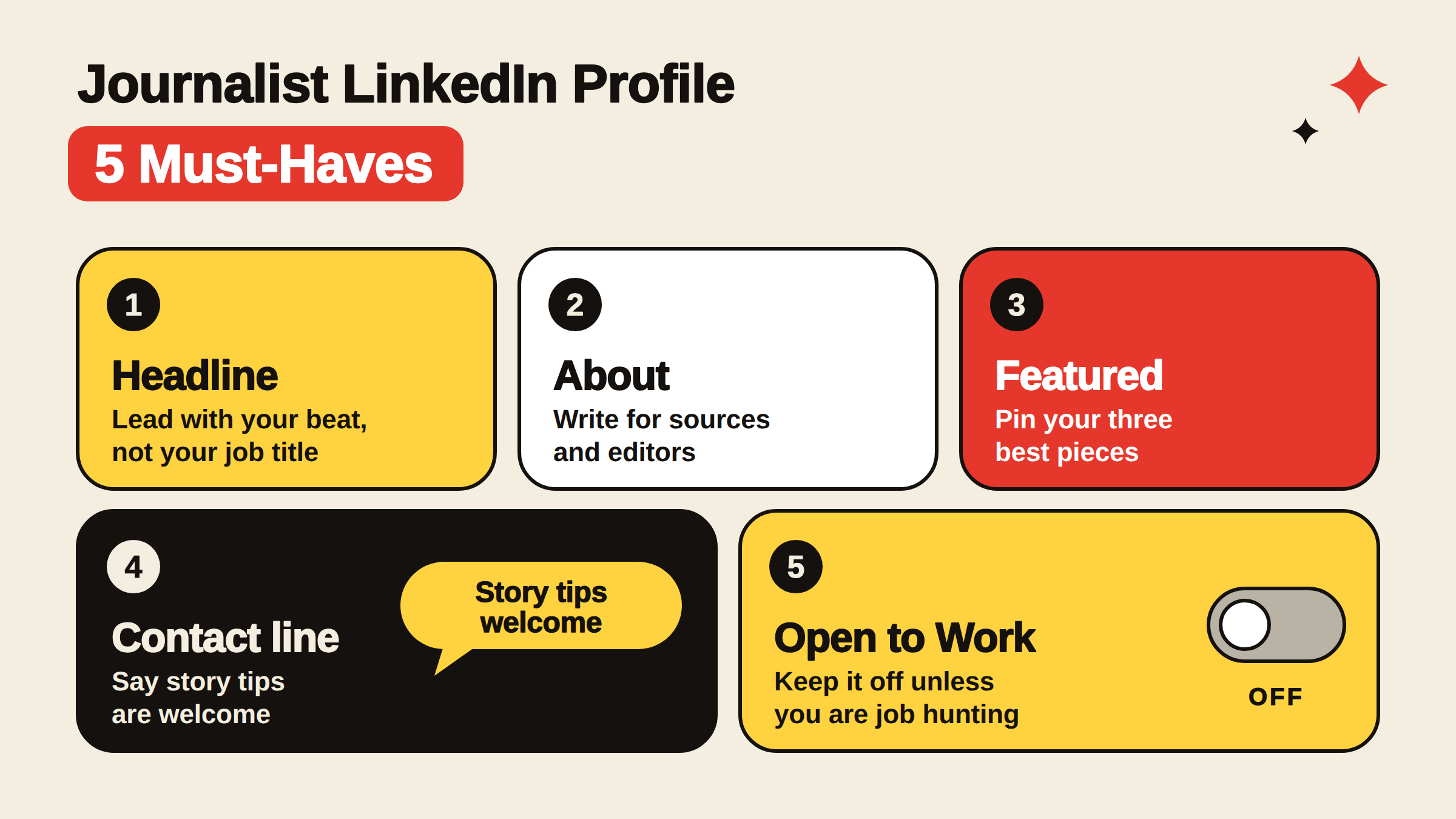
What Every Journalist Should Include in Their LinkedIn Profile
Headline: Lead with your beat, not your job title. "Tech Policy Reporter | Covering AI regulation, data privacy, and platform accountability" outperforms "Staff Writer at [Publication]" for both search discoverability and source attraction.
About section: Write it for two audiences — a source deciding whether you're relevant, and an editor deciding whether you're credible. Open with what you cover, name your biggest stories or beats, and close with how to reach you.
Featured section: Pin your three best published pieces — the ones that show range, rigour, and your signature angle.
Contact preferences: A single line — "Story tips and expert sources welcome via LinkedIn message" — dramatically improves pitch quality by signalling you're open and setting the right context.
Open to Work: Keep it off unless you're actively seeking roles. It confuses the dual audience and shifts your profile's perceived purpose entirely.
💡
Pro Tip:Your About section's first two lines appear in LinkedIn search results before "See more" — write them as a punchy, beat-specific summary, not a career history. That's what a source scanning results will read before clicking through.
The journalist personal branding LinkedIn challenge is specific: you want to look authoritative and expert-accessible without signalling job desperation. Keeping the focus on your beat coverage — not your employment status — solves this automatically. For a deeper guide on building that presence, see how to build a personal brand on LinkedIn.
How to Find Sources on LinkedIn: Search, Outreach, and Expert Discovery
How journalists find sources on LinkedIn step by step
Teams that build source networks on LinkedIn before they need them — not during deadline panic — consistently land better quotes, faster. The platform's search infrastructure is genuinely powerful for reporting. How do journalists use LinkedIn to find experts? The standard workflow is simpler than most assume.
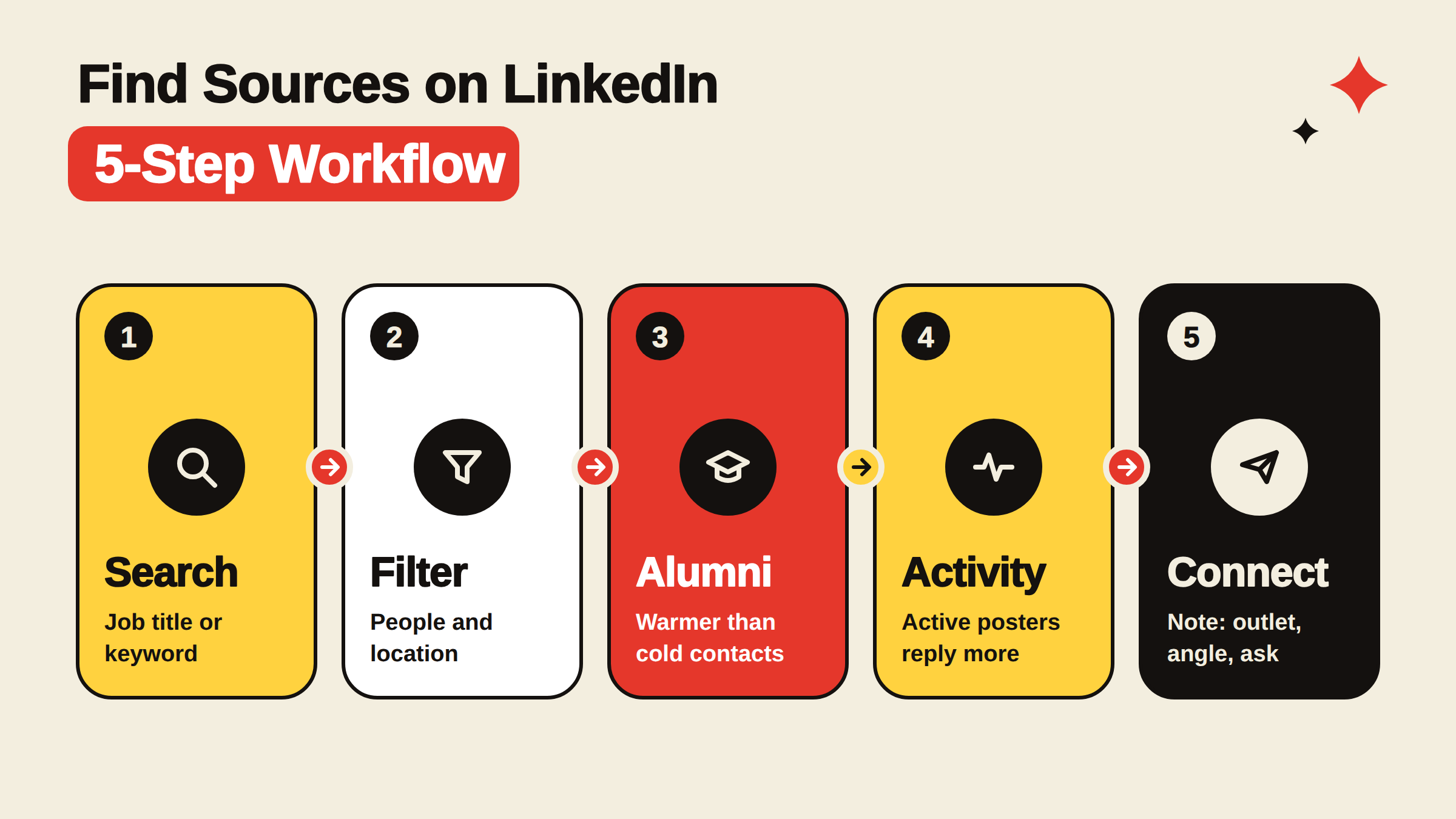
LinkedIn Advanced Search for Journalists: A Step-by-Step Workflow
Open the search bar and enter a job title or keyword relevant to your story (e.g. "chief sustainability officer" or "trauma surgeon").
Apply filters — People → Location → Current Company or Industry. For geographic stories, the location filter alone saves significant time.
Check alumni networks — filtering by your university often surfaces sources who are warmer to contact than cold strangers.
Review activity signals — sources who post regularly on LinkedIn are far more likely to respond than dormant profiles.
Send a connection request with context — a brief, honest note stating the outlet, the story angle, and what you're asking for. ≈3 sentences. No vague "I'd love to connect."
LinkedIn advanced search for journalists becomes especially powerful when combined with Boolean operators: searching "head of" AND "clinical trials" or "former" AND "FDA" AND "policy" can surface hard-to-find expert witnesses who would never appear in a standard press release.
How to Reach Out to Sources on LinkedIn Without Seeming Spammy
The most common failure mode is a connection request that reads like a cold sales pitch — vague, benefit-focused from the sender's perspective, and lacking any professional context. What works consistently is the opposite: transparency, brevity, and specificity.
Name your outlet and story in the first sentence
State exactly what expertise you're looking for — not a general "pick your brain" request
Respect their time explicitly: "30-minute call or happy to exchange questions via message"
Never connect without a note when the purpose is a source request — it creates a confusing first impression
⚠️
Warning:Connecting with a source under the guise of general professional networking before disclosing a story agenda is a credibility and ethics risk. Transparency upfront — even when it feels forward — consistently produces better response rates and cleaner source relationships.
On LinkedIn Premium worth it for journalists: InMail credits (which allow messaging people outside your network) are the genuinely useful feature for reporters. If you're regularly sourcing experts who are not 1st- or 2nd-degree connections, Premium pays for itself in time saved. For staff writers with deep existing networks, the free tier is usually sufficient.
What to Post on LinkedIn as a Journalist (and How to Grow Your Audience)
60% of LinkedIn's algorithm weight goes to dwell time — how long someone reads your post before scrolling. This is why text-first posts outperform link drops: a link takes users off the platform immediately, which LinkedIn penalises algorithmically. Sharing your article as a link with no additional commentary is the single most common posting mistake journalists make.
1.9B
People visit LinkedIn every month as of May 2026 — giving journalists an enormous expert and audience pool to tap
According to Hootsuite's 2026 LinkedIn statistics, 1.9 billion people visit LinkedIn every month, and LinkedIn video views are up 36% year-on-year. In practice, this means a thoughtful text post about your beat — framed as a practitioner insight rather than a news summary — will reach a professional audience that is actively paying attention, not doom-scrolling.
LinkedIn Tips for Freelance Journalists: Building Audience and Attracting Editors
Freelancers get disproportionate value from LinkedIn because it collapses three needs into one platform:
Pitching editors: Editors scout LinkedIn for journalists covering specific beats — a strong content presence makes you findable before you pitch
Source cultivation: Regular beat commentary surfaces you in the feeds of potential sources who start to see you as a credible voice in their space
Audience building: LinkedIn Newsletter subscribers belong to you — not your current outlet — making it one of the few audience-ownership tools available to solo journalists
On what to post on LinkedIn as a journalist: the content types that build editorial visibility fastest are behind-the-byline posts (how a story came together, what you learned that didn't make the piece), sharp commentary on trends in your beat, and native text posts that distil a published story's key finding into a standalone insight. The LinkedIn Newsletter guide covers how to convert that audience into a subscriber list you control.
For journalists building a journalism audience on LinkedIn from scratch: post at least 3x per week for the first 90 days. Accounts that drop below that frequency in the early phase see reach decay that takes 3–4 weeks of consistent posting to recover.
✓ The Journalist LinkedIn Content Checklist
☐Share published stories as text-first posts — lead with the key finding, add the link in comments
☐Post one "behind the byline" process note per story — it builds credibility with both sources and editors
☐Engage with posts from experts in your beat space before you need them as sources
☐Publish one LinkedIn Article or Newsletter post per month to build a subscriber list
☐Reply to every comment on your posts within the first hour — early engagement signals boost algorithmic reach
☐Keep your headline and About section updated after every major story — your profile is a living byline page
For journalists wanting to accelerate early post reach, tools like HyperClapper connect your posts with real engagement communities — helping new content get the initial traction that prompts LinkedIn's algorithm to distribute it further. It works by connecting posts with real people in relevant channels, not bots or fake activity, which keeps your account safe while giving your content a meaningful early boost.
Get Your LinkedIn Posts Seen by the Right People
HyperClapper connects your content with real engagement communities — real likes and comments from relevant professionals, not bots.
Risks, Limitations, and Common Mistakes Journalists Make on LinkedIn
Creators who skip the platform calibration step — adjusting their voice from Twitter's combative register to LinkedIn's expert-helpful register — typically find their posts underperform and conclude the platform "doesn't work for journalists." The platform does reward expertise and usefulness. It does not reward provocation for its own sake.
Breaking news doesn't land here. LinkedIn is not a real-time platform. Using it for live news commentary looks out of place and rarely gains traction with its audience.
The job-board trap. A recurring pattern among journalists on LinkedIn is treating it exclusively as a career tool — updating profiles only during active job searches. This misses months or years of passive source generation and editorial visibility that consistent presence delivers.
Source transparency. Connecting with a potential source under a general networking premise before disclosing a story agenda is an ethical grey area that damages trust when the agenda emerges. Disclose early. It actually improves response rates.
Platform voice mismatch. LinkedIn rewards helpfulness and expertise. Journalists accustomed to Twitter's combative culture who try to replicate that tone here will find it falls flat — recalibrating to thoughtful commentary outperforms edge-for-edge's-sake content on this platform.
🔴
Avoid:Posting raw article links as your LinkedIn content strategy. LinkedIn's algorithm actively suppresses posts that send users off-platform immediately. Put your key finding in the post body; link in the first comment. This single change can double post reach.
What separates journalists who build genuine LinkedIn presence from those who don't is not posting frequency alone — it's the combination of a beat-clear profile, consistent expert commentary, and treating source outreach as an ongoing relationship practice rather than a deadline-driven transaction.
Build the LinkedIn Presence Your Byline Deserves
Whether you're a freelancer building an audience or a beat reporter cultivating sources, a strong LinkedIn personal brand starts with the right visibility. HyperClapper helps journalists get genuine early engagement on posts — so the algorithm works with you, not against you.
Frequently Asked Questions About LinkedIn for Journalists
How can a journalist use LinkedIn to find expert sources for a story?
Use LinkedIn Advanced Search filtered by job title, company, industry, and location to find precisely relevant experts. Review their recent posts to confirm they're active and engaged. Send a connection request with a transparent, 2–3 sentence note naming your outlet, story angle, and what you're asking for. Alumni filters and Boolean keyword combinations improve precision significantly.
What is the best way for a journalist to build an audience on LinkedIn?
Post text-first content 3x per week — your key story findings, beat commentary, and behind-the-byline process notes. Publish a LinkedIn Newsletter to convert followers into subscribers you own. Engage with posts from experts in your beat space consistently. Early commenting on trending professional posts in your subject area accelerates discoverability faster than follower count alone.
How do I reach out to sources on LinkedIn without seeming spammy?
Be transparent immediately — name your outlet and story in the first sentence. Specify exactly what expertise you need and how much of their time you're asking for. Avoid vague "I'd love to connect" language. Sources respond to specificity and honesty. Never use a networking-pretext connection before disclosing your reporting agenda — it damages trust when it surfaces.
What should a journalist include in their LinkedIn profile?
Lead your headline with your beat, not your job title. Write an About section aimed at sources and editors — not HR. Pin your three strongest published pieces in the Featured section. Add a contact line welcoming story tips or expert sources. Keep "Open to Work" off unless actively job-seeking; it shifts your profile's perceived purpose in a way that undercuts beat credibility.
Is LinkedIn Premium worth it for journalists?
Yes, specifically for active freelancers and beat reporters who regularly need to contact experts outside their existing network. InMail credits — which allow messaging non-connections directly — are the genuinely useful feature. For staff writers with deep existing networks and institutional press contacts, the free tier is usually sufficient. The profile analytics are secondary to the outreach capability.
Can I publish articles on LinkedIn?
Yes. LinkedIn's native Articles feature lets you publish long-form pieces directly on the platform, and LinkedIn Newsletter allows you to build a subscriber list that receives your posts by email — independent of your employer. Both formats improve profile credibility and can reach audiences well beyond your direct connections through LinkedIn's own distribution.
Should journalists be on LinkedIn?
Yes — with realistic expectations about what it does well. LinkedIn is not a breaking-news platform. It excels at expert sourcing, editorial visibility, and audience ownership through newsletters. According to Cision's 2025 State of the Media Report, 59% of reporters now use it more than any other social platform for professional networking — a strong signal that the journalism community has already made this shift.
👋
⚡ Free plan
Leaving already?
Grab 3 free boosts on your next LinkedIn post — real likes & comments from 5,000+ creators. No card, cancel anytime.