
A linkedin automation tool like Dripify is cloud-based software that runs connection requests, follow-up messages, and profile visits on autopilot — so you can reach hundreds of prospects without logging in manually each day. A pattern observed across thousands of outreach campaigns is that the tool itself rarely determines success or failure; the warm-up sequence and daily limits do. Get those right, and automation multiplies your pipeline. Get them wrong, and LinkedIn flags your account within weeks.
- What Is Dripify and How Does LinkedIn Automation Actually Work?
- Dripify Features Review and Pricing Plans
- LinkedIn Automation Safety Limits: What Actually Gets Accounts Banned
- Dripify Alternatives: When to Look Elsewhere
- Frequently Asked Questions About Dripify and LinkedIn Automation
- Dripify is a cloud-based LinkedIn outreach sequencer — good for pipeline building, not for content visibility.
- LinkedIn restricted over 1 million accounts in 2025; daily connection limits (20–25 for new accounts) are the single most important safety lever.
- Skipping the account warm-up sequence is the most common reason accounts get banned — not the tool choice itself.
- Dripify vs Expandi: both are outreach tools; Expandi offers more granular campaign logic at similar pricing.
- If your goal is post visibility rather than cold outreach, HyperClapper is a different category of tool — and a safer LinkedIn footprint.
- The free trial gives roughly one week to test real sequences — enough for a small campaign, not a full funnel.
According to GigRadar (2025), LinkedIn automation tools get 15–45% of accounts restricted within six months — and LinkedIn restricted over 1 million accounts in 2025 alone. In practice, that risk is front-loaded: accounts that skip the warm-up phase in their first two weeks face the highest exposure.
What Is Dripify and How Does LinkedIn Automation Actually Work?
Dripify LinkedIn automation is a cloud-based outreach sequencer — it builds multi-step funnels (connect → message → InMail → endorse) and executes them against a filtered lead list while you focus elsewhere. The core mechanism relies on behavioral mimicry thresholds — randomised delays between actions and a dedicated IP per user — to reduce the chance LinkedIn's detection systems flag the activity as bot-like.
A drip campaign sequence cadence works like this: you upload a CSV or connect a Sales Navigator search, define your funnel steps and timing gaps, and Dripify runs each step only when the previous one is completed. That conditional logic is what separates sequencers from simple bulk-message tools.
One thing Dripify explicitly does not do: it has no content scheduling, no post-engagement features, and no mechanism for boosting the reach of your LinkedIn posts. It is an outreach and pipeline tool — full stop.
Does Dripify Work with Sales Navigator?
Yes — Dripify works with Sales Navigator on Pro and Advanced plans. Users can pull lead lists directly from a Sales Navigator search, which dramatically improves targeting precision. The Basic plan restricts you to CSV imports and standard LinkedIn searches, so Sales Navigator integration is a meaningful upgrade trigger for teams running account-based campaigns.
Dripify Features Review and Pricing Plans
The Dripify features review story is solid for outreach teams but thin everywhere else. Core capabilities include multi-step drip sequences, A/B message testing, team management dashboards, CSV imports, and Zapier/webhook integrations. Analytics exist but stay surface-level — open rates, reply rates, and campaign conversion counts — without the depth a dedicated LinkedIn analytics tool would give.
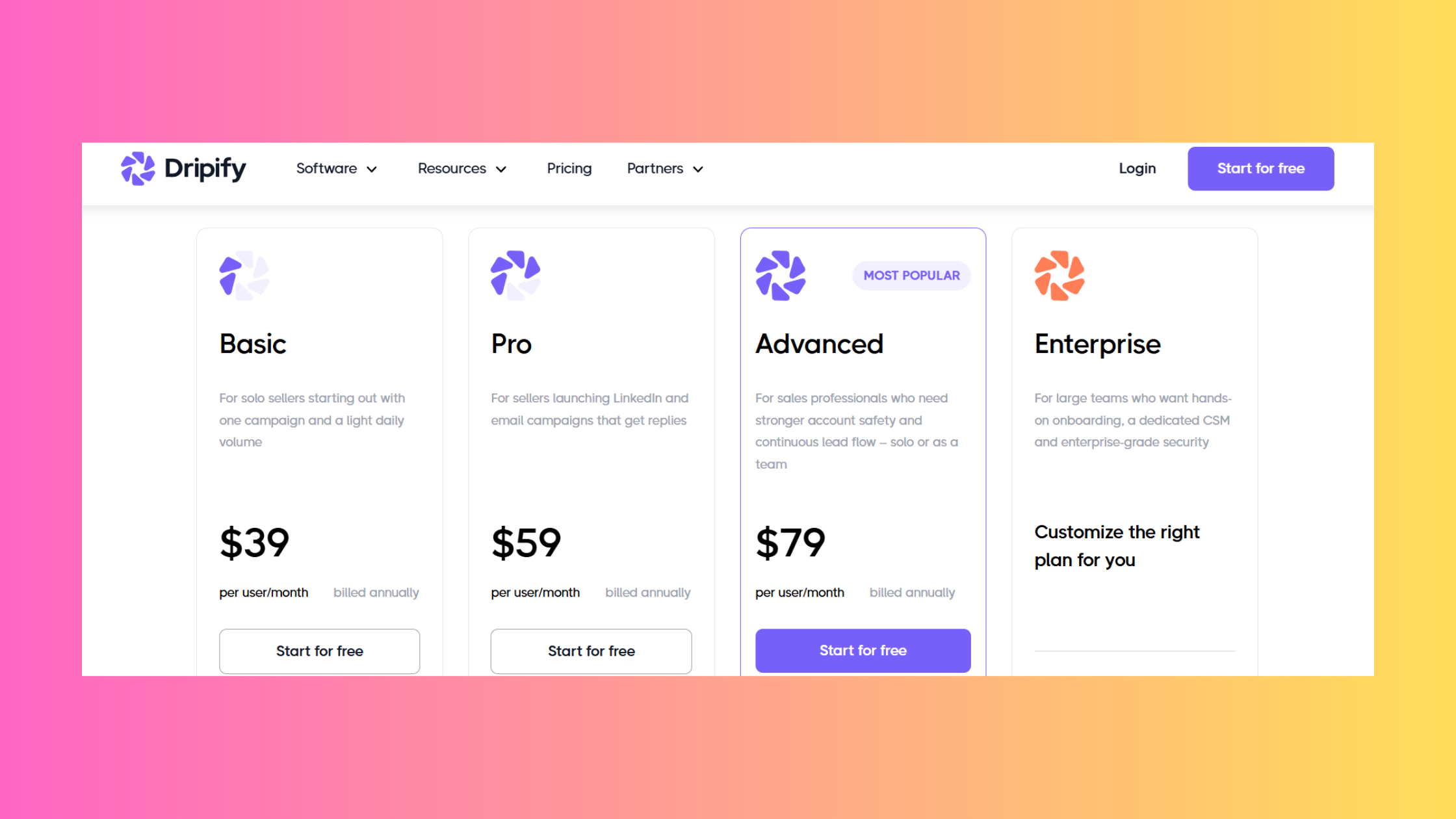
Dripify pricing plans break into three tiers:
- Basic (~$39/mo): One drip campaign, CSV imports, basic analytics. No A/B testing, no integrations, no Sales Navigator.
- Pro (~$59/mo): Unlimited campaigns, A/B testing, Sales Navigator support, Zapier integration, advanced analytics.
- Advanced (~$79/mo): Everything in Pro plus team management, shared inbox, and multi-user seats.
For solo founders or small teams running one or two campaigns, Basic is genuinely limiting — the single-campaign cap forces an upgrade before you've validated the channel.
Is the Dripify Free Trial Worth It?
The Dripify free trial lasts seven days with access to Pro-tier features. That's enough runway to build one sequence and get early reply data — but not enough to see a full funnel complete if your connection acceptance rate is average. Most practitioners use it to validate their opening message copy rather than test an entire multi-step campaign. Worth it for a quick copy test; insufficient if you need to evaluate team features or long-sequence logic.
The tool's free trial tells you whether your message hooks work. It doesn't tell you whether the tool is safe at scale — that only becomes clear after several weeks of consistent usage.
LinkedIn Automation Safety Limits: What Actually Gets Accounts Banned
Account safety is the single most anxious recurring pain point in every Reddit and Quora thread about LinkedIn automation — and the gap most tool-review articles never fill. Most articles recommend tools. Almost none give you the specific numbers that determine whether LinkedIn flags your account.
Here are the thresholds that matter:
- New/unwarmed accounts: 20–25 connection requests per day maximum.
- Warmed accounts (4+ weeks of gradual scaling): Up to 50 connection requests per day.
- Profile-view velocity: Viewing more than 80–100 profiles per day consistently triggers detection.
- Message volume spikes: Sending 50+ messages per day in week one is a near-certain flag.
- LinkedIn SSI score impact: A low Social Selling Index score (below 50) combined with high automation volume significantly increases restriction risk.
What happens when you exceed LinkedIn automation safety limits? Soft restrictions come first — your connection request acceptance rate drops as LinkedIn quietly deprioritises your requests. Then InMail delivery slows. Then you receive a warning. Then suspension. The Dripify LinkedIn account banned risk is real, but the sequence is predictable and largely avoidable.
What Are Dripify's Connection Request Limits Per Day?
Dripify's recommended daily limit is 20–30 connection requests for new users, scaling to 40–50 after a proper warm-up period. The platform enforces a hard cap lower than LinkedIn's theoretical maximum to reduce ban risk. Accounts that override these defaults and manually push higher volumes are responsible for the majority of restrictions reported in community forums.
Is Dripify Safe to Use on LinkedIn? Common Mistakes to Avoid
Is Dripify safe to use on LinkedIn? Yes — if you follow warm-up protocols and stay within daily limits. The most common failure mode is new users launching full-volume campaigns on day one, skipping the LinkedIn account warm-up sequence entirely. A warm-up means starting at 10–15 actions per day and increasing by 5–10 actions per week over 2–4 weeks before reaching target volume. Teams that skip this step typically find their accounts restricted within 30 days regardless of which tool they use.
For a deeper breakdown of safe operating limits and proxy configurations, see our guide on safe LinkedIn automation limits, proxies, and bot security.
✓ The LinkedIn Automation Safety Checklist
- ☐Account is at least 90 days old with a complete profile before starting automation
- ☐Start at 10–15 actions/day and increase by no more than 10/day per week
- ☐Never exceed 50 connection requests per day, even on a warmed account
- ☐LinkedIn SSI score is above 50 before scaling volume
- ☐Campaign is running through a cloud tool (not a browser extension) with a dedicated IP
- ☐Connection acceptance rate is monitored weekly — if it drops below 20%, pause and review targeting
Dripify Alternatives: When to Look Elsewhere
The core reasons users search for Dripify alternatives cluster into three buckets: pricing feels high for solo users running a single campaign, concern about ban risk after seeing community horror stories, or a realisation that Dripify doesn't solve their actual problem — visibility, not pipeline.
Dripify vs Expandi
Both are cloud-based outreach tools. Dripify vs Expandi comes down to campaign logic granularity versus ease of use. Expandi offers more conditional branching (e.g. "if accepted within 3 days → send message A; if accepted after 7 days → send message B") and is frequently cited as slightly safer due to stricter built-in limits. The tradeoff: a steeper learning curve and pricing in the same $60–80/mo range. For teams already comfortable with multi-branch logic, Expandi wins. For those who want fast setup, Dripify's interface is cleaner.
Other alternatives worth evaluating — linkedin helper, dux-soup, and browser-extension tools — sit at a lower price point but carry meaningfully higher ban risk because they operate inside your browser rather than through a dedicated cloud environment. The comparison of better alternatives to browser-based tools covers this tradeoff in detail.
Best LinkedIn Automation Tools in 2026: How Dripify Stacks Up
According to Simular's 2026 roundup, the best linkedin automation tool choices depend entirely on use case — Expandi leads for cloud-based outreach sequences, while newer AI-native tools are gaining ground for full-stack automation. Dripify sits comfortably in the mid-tier: better safety than browser extensions, easier setup than Expandi, but lacking the AI-layer features now appearing in newer platforms.
| Tool | Best For | Risk Level | Starting Price |
|---|---|---|---|
| Dripify | Outreach sequences, mid-market teams | Medium (with warm-up) | ~$39/mo |
| Expandi | Complex campaign logic, agencies | Medium-low | ~$99/mo |
| LinkedIn Helper | Budget outreach, individuals | Higher (browser-based) | ~$15/mo |
| Dux-Soup | Simple profile visits, low volume | Higher (browser-based) | ~$14/mo |
| HyperClapper | Post visibility, content creators, brand building | Lower (no connection automation) | See hyperclapper.com |
The decision rule is straightforward: if your bottleneck is pipeline — not enough conversations started — a linkedin outreach automation tool like Dripify fits. If your bottleneck is visibility — posts aren't reaching the right people — that's a different problem requiring a different tool. For linkedin tools for lead generation that work through content rather than cold outreach, HyperClapper connects your posts to real engagement channels, driving genuine interaction without touching LinkedIn's connection request limits at all.
Want LinkedIn visibility without the ban risk?
HyperClapper boosts your posts through real community engagement and AI-powered replies — no connection automation, no warm-up anxiety.
See How HyperClapper WorksFor a full side-by-side of outreach platforms including Apollo, Lemlist, and SalesRobot, the 2026 outreach tool comparison covers the full competitive landscape.
Frequently Asked Questions About Dripify and LinkedIn Automation
What is the best LinkedIn automation tool?
The best linkedin automation tool depends on your goal. For outreach sequences, Expandi and Dripify lead; for post visibility and engagement, HyperClapper is the stronger choice. There is no universal winner — match the tool to your specific bottleneck: pipeline or visibility. See our 2026 best LinkedIn automation software guide for a full breakdown.
How can I automate my LinkedIn?
You can automate LinkedIn through outreach tools (Dripify, Expandi) for connection and message sequences, or engagement tools (HyperClapper) for post boosting and replies. Start with a clear goal — pipeline generation or content visibility — then choose the tool category that addresses it. Always warm up a new account before scaling any automation volume.
How many LinkedIn connection requests can Dripify send per day?
Dripify recommends 20–30 connection requests per day for new users, scaling to 40–50 after a 2–4 week warm-up period. Exceeding these limits — even within Dripify's settings — significantly increases the risk of LinkedIn soft restrictions. The platform enforces internal caps below LinkedIn's theoretical maximum specifically to reduce this risk.
What is the safest LinkedIn automation tool that won't get my account banned?
Cloud-based tools with built-in daily limits (Dripify, Expandi) are meaningfully safer than browser extensions (Dux-Soup, LinkedIn Helper) because they operate from a dedicated IP rather than your browser session. For the lowest possible ban risk, HyperClapper avoids connection automation entirely — it boosts posts through real community engagement, leaving no automation fingerprint on your outreach activity.
What happens to my LinkedIn account if I use automation tools like Dripify?
Used correctly — within daily limits and after a proper warm-up — most accounts see no issues. Used aggressively, the progression is: lowered connection request acceptance rate → InMail throttling → account warning → temporary restriction → permanent suspension. According to GigRadar (2025), 15–45% of accounts using automation tools face restrictions within six months.
Is Dripify better than doing LinkedIn outreach manually?
For volume-dependent prospecting, yes — Dripify can run 30–50 daily touchpoints that would take 2–3 hours manually. Data from SBL shows optimised sequences achieving an 18% reply rate versus the 3–5% industry average. But for high-value, targeted outreach to senior buyers, manual personalisation consistently outperforms automated sequences on response quality.
Which Dripify alternative is best for small business LinkedIn lead generation?
For small businesses focused on outreach, LinkedIn Helper offers a lower-cost entry point, though its browser-based architecture carries higher ban risk. For small businesses where content is the primary lead generation channel, HyperClapper's engagement boost model — connecting posts to real audiences through channels — delivers more compounding visibility at lower risk than cold connection campaigns.
Is there a free tool for LinkedIn post automation?
No major LinkedIn post automation tool offers a genuinely useful free tier indefinitely — most free plans are time-limited trials. Dripify's free trial lasts seven days. For post scheduling, Buffer and Taplio offer limited free plans. For engagement boosting, HyperClapper's paid tiers are the most feature-complete option for real audience interaction rather than just scheduled publishing.
Build LinkedIn visibility that compounds — without cold outreach risk
HyperClapper connects your posts to real engagement channels and AI-powered replies — the approach that turns good content into genuine reach.
Start with HyperClapperWhat consistently separates accounts that scale on LinkedIn from those that stall — despite using the same tools — is not the platform they chose. It's whether they matched the tool category to their actual bottleneck, respected warm-up protocols, and treated automation as a multiplier on a good message rather than a substitute for one.



