
Clay LinkedIn outreach is the practice of using Clay's data enrichment engine — which pulls from 75+ sources simultaneously — to build hyper-personalized lead intelligence, then pushing that intelligence into a LinkedIn outreach tool to send messages that feel researched, not automated. A pattern observed consistently across high-performing B2B outreach teams is that the ones generating reply rates above 15% aren't sending more messages — they're sending smarter ones, built on richer data. Clay is the infrastructure that makes that possible at scale. What it is not is a LinkedIn tool itself: it enriches, it generates AI copy, it triggers workflows — but the actual messages go out through tools like Heyreach, Dripify, or La Growth Machine.
- Clay is an enrichment layer, not a sender — it builds the intelligence that powers personalized LinkedIn messages; you still need a separate outreach tool to send.
- AI personalization for LinkedIn outreach drives 3–5x higher reply rates when built from real enrichment signals (job changes, recent posts, funding events) vs. simple name/company swaps.
- According to Expandi (2026), the average LinkedIn connection acceptance rate is 28.5% — Clay-enriched personalization can push this toward the 30–45% "good" range.
- The most common failure is pushing unvalidated enrichment data straight to an outreach tool — broken placeholders destroy sender credibility instantly.
- After March 2026's pricing overhaul, Clay's real cost for outreach teams runs $700–$1,800/month — a meaningful investment that requires workflow discipline to justify.
- LinkedIn visibility before outreach — building audience familiarity through content — is the force multiplier most Clay guides completely ignore.
- What Is Clay and Why Are Sales Teams Obsessed With It in 2026?
- How Clay LinkedIn Outreach Works: The Full Mechanism
- AI Personalization for LinkedIn Outreach: Clay Prompts That Actually Work
- Step-by-Step: Building Your First Clay LinkedIn Outreach Workflow
- LinkedIn Outreach Response Rates in 2026: Benchmarks and What Moves the Needle
- LinkedIn Daily Send Limits and Account Safety: What Clay Users Must Know
- Why LinkedIn Outreach Fails (And How Clay Fixes the Root Causes)
- Risks, Limitations, and Honest Downsides of Clay for LinkedIn Outreach
- Clay vs. Instantly and Best LinkedIn Outreach Tools in 2026
- Common Mistakes to Avoid When Running Clay-Powered LinkedIn Outreach
- Amplifying LinkedIn Outreach Results: Visibility Before and After You Hit Send
- Practical Tips for Clay-Powered LinkedIn Outreach: Making It Work Week Over Week
- Frequently Asked Questions About Clay LinkedIn Outreach
What Is Clay and Why Are Sales Teams Obsessed With It in 2026?
Clay is a data enrichment and workflow automation platform — think of it as a supercharged spreadsheet that simultaneously queries 75+ data providers and writes AI-generated copy based on what it finds. It is not a LinkedIn messaging tool. That distinction matters enormously and trips up most people encountering it for the first time.
What Clay does is build the intelligence layer underneath your outreach: it takes a list of LinkedIn URLs or company domains and returns enriched rows containing job tenure, tech stack signals, recent post activity, funding data, hiring velocity, and more — then uses that enrichment to feed an AI prompt column that generates a personalized opening line for each prospect. The message delivery itself goes through a dedicated LinkedIn outreach tool.
The hype is justified in 2026 for a simple reason: generic blast outreach is effectively dead. Prospects receive dozens of connection requests weekly, and they've developed finely tuned spam radar. A message that opens with "I noticed you work at [Company] and I'd love to connect" achieves nothing. A message that opens with "Saw you just posted about the challenges of scaling ops past 50 people — we solved exactly that at [similar company] last quarter" gets a reply. Clay is the infrastructure that makes that second message possible at scale without a team of researchers.
What is Clay for sales teams, specifically? It's most valuable for:
- SDR-heavy B2B organizations running high-volume outbound sequences
- Growth teams and RevOps managing multi-channel GTM motions
- Solo founders who need to punch above their weight on outreach volume
- Agencies managing outreach programs for multiple clients simultaneously
What Does Clay + LinkedIn Automation Actually Mean?
The phrase "Clay LinkedIn automation" refers to a stack, not a single tool. Clay handles enrichment and AI copy generation. A LinkedIn-specific tool — Heyreach, Dripify, Expandi, or La Growth Machine — handles the actual send. Clay Zapier LinkedIn integration or a native webhook pushes enriched rows from Clay's table to the outreach tool's sequence. The result is a connection request or InMail that appears handcrafted but was generated from structured data.
Clay Pricing for Outreach Teams: Is the Cost Justified?
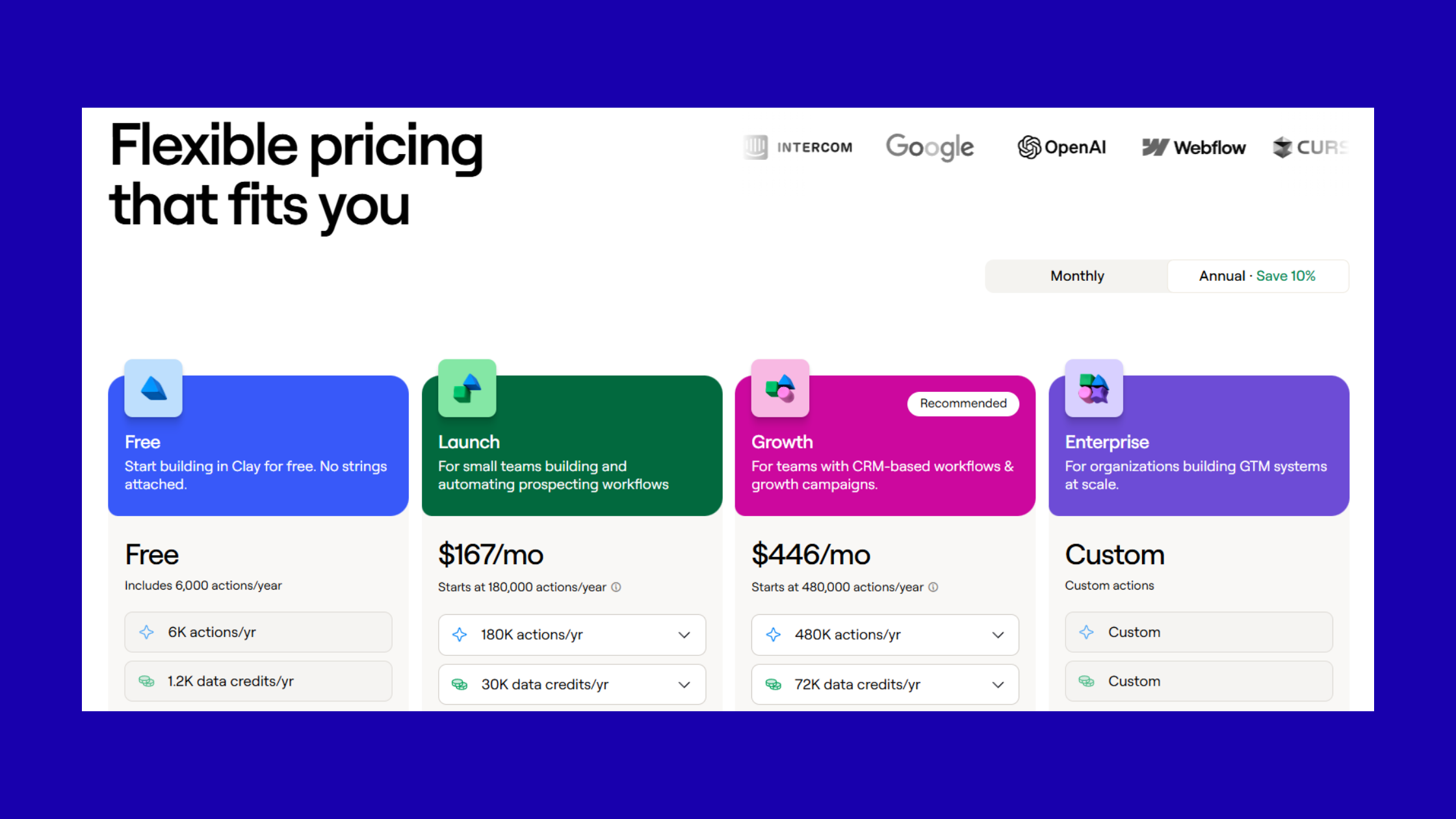
After the March 2026 pricing overhaul, according to JoinValley (2026), the real cost of Clay for active outreach teams runs $700–$1,800/month when you account for the subscription tier plus enrichment credits consumed by a multi-provider waterfall. That's before the cost of the LinkedIn outreach tool itself.
The math works when reply rates climb. Teams consistently achieving 10–15%+ reply rates on enriched sequences report a lower cost-per-meeting than teams running cheaper, higher-volume generic campaigns. The math breaks when teams overspend credits on enrichment for leads they then filter out, or when they underutilize Clay's AI columns and effectively pay for a fancy CSV importer.
Understanding what Clay costs — and what it replaces — sets the right expectations. Now let's look at exactly how the mechanism works.
How Clay LinkedIn Outreach Works: The Full Mechanism
The end-to-end flow for Clay LinkedIn outreach runs through four distinct stages, and where most teams stumble is treating them as one continuous process rather than four separate quality gates.
Stage 1 — List sourcing: Start with a LinkedIn Sales Navigator export, an Apollo CSV, or a manually curated list of LinkedIn profile URLs. Clay's table accepts CSV uploads or connects directly to Apollo, Sales Nav, and other sources via native integrations. At this stage, deduplication by LinkedIn URL is non-negotiable — duplicate sends destroy sender reputation fast.
Stage 2 — Enrichment waterfall: This is where Clay's real value lives. A waterfall is a sequential enrichment strategy — Clay tries Provider A for a data field first, and only if Provider A returns empty does it try Provider B. This dramatically improves lead enrichment data accuracy without paying for redundant lookups. According to data shared by Clay practitioners on LinkedIn, teams using proper waterfall configuration see 90%+ LinkedIn profile match rates — compared to the 60–70% most teams get without structured enrichment.
Stage 3 — AI personalization column: Once enrichment runs, you add a Claude or GPT-powered column that takes enrichment fields as inputs and outputs a personalized message opening. The LinkedIn profile data variables available in Clay — headline keywords, recent post topics, job change date, company size, shared connections, industry — are the raw material for AI copy that reads human.
Stage 4 — Push to LinkedIn tool: Clay pushes filtered rows (those with complete enrichment) to the outreach tool via webhook or CSV export. Fields map to sequence variables inside the tool, and a send schedule is configured to respect LinkedIn's daily limits.
Clay Table Field Mapping to LinkedIn Personalization Variables
Field mapping is where the workflow either clicks or breaks. Inside your Clay table, each enrichment output becomes a column — {{recent_post_topic}}, {{job_change_months_ago}}, {{company_headcount_growth}}. When you export to your LinkedIn tool, these column names must exactly match the variable placeholders in your outreach sequence templates.
The most reliable mapping approach is to name Clay columns identically to the variable names your outreach tool expects — for example, Heyreach uses {{firstName}} and custom variables you define at upload. Build a mapping reference doc once and version-control it as your enrichment waterfall evolves.
Clay Webhook and Zapier LinkedIn Integration: Setup Tutorial
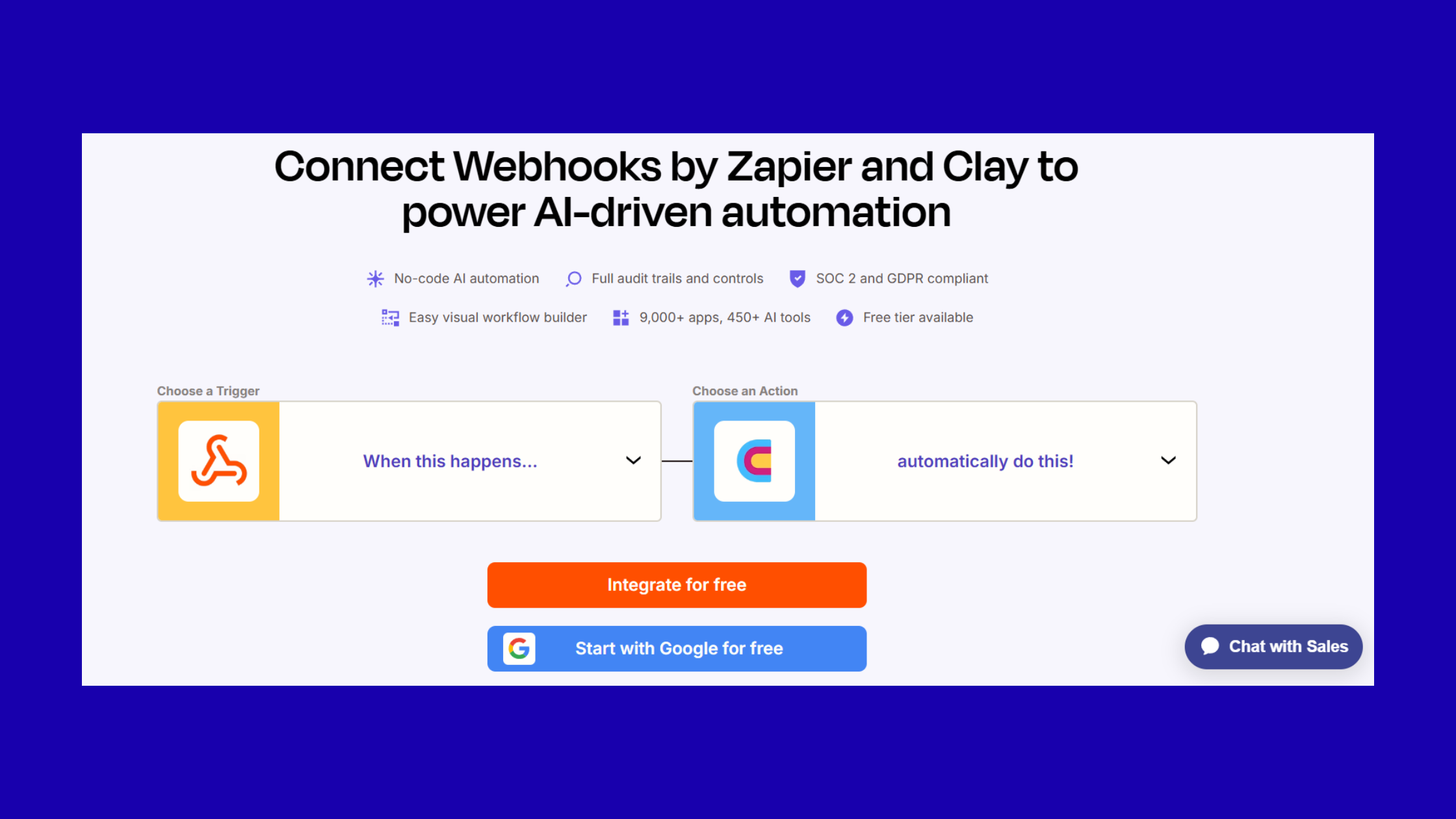
Clay connects to LinkedIn outreach tools through two primary methods: native integrations (Heyreach has a first-party Clay integration that maps fields automatically) and Clay webhook LinkedIn pushes via Zapier or Make.
For a Clay Zapier LinkedIn integration setup:
- In Clay, add an "HTTP Request" action column configured to POST to your Zapier webhook URL — takes about 30 seconds to configure once you have the Zap URL.
- In Zapier, create a Zap triggered by "Catch Hook" → action is your LinkedIn tool (e.g., "Create Lead in Heyreach Campaign"). Map the Clay JSON fields to the Heyreach lead fields.
- Test with a single Clay row by running just that row's action column manually. Check the Zap history to confirm the payload arrived correctly — 2 minutes of validation prevents hours of debugging.
- Once confirmed, run the action column across your full filtered lead set. Set concurrency to 5–10 requests/minute to avoid Zapier task overload.
For native integrations, the setup is faster: in Clay, select the Heyreach native action, authenticate with your Heyreach API key, select the campaign, and map fields in Clay's UI directly. No Zapier required, and field mapping errors are caught in Clay's UI rather than discovered in a broken live sequence.
AI Personalization for LinkedIn Outreach: Clay Prompts That Actually Work
Surface-level personalization — "Hey {{first_name}}, I noticed you work at {{company}}" — is not personalization. Prospects have seen it thousands of times and it registers as spam instantly. Deep AI personalization for LinkedIn outreach is built from behavioral and contextual signals: what a prospect recently published, that they changed jobs 6 weeks ago, that their company just hit a funding milestone. Clay makes those signals available; a well-structured prompt turns them into copy that reads like it was written by someone who did their homework.
The difference between 5% reply rates and 15% reply rates almost always comes down to a single variable: whether the opening line could only have been written for that specific person, or whether it was obviously templated. Clay's enrichment data is what makes the former achievable at scale.
Clay AI Prompts for Outreach: Structure and Templates
A Clay AI prompt column using Claude or GPT works best when it includes: (a) a clear role instruction, (b) the specific enrichment variables to reference, (c) output format constraints matched to LinkedIn's character limits, and (d) a fallback instruction for when enrichment fields are empty.
Here are three proven Clay AI prompts for outreach that consistently perform:
Template 1 — The Recent Post Hook
- Input variables:
{{recent_post_topic}},{{prospect_first_name}},{{your_relevant_angle}} - Prompt instruction: "Write a LinkedIn connection request note under 280 characters. Open by referencing their recent post about [recent_post_topic]. Make one specific observation about it. End with a natural reason to connect. Do not use 'I' as the first word. Do not mention sales or products."
- Example output: "Your post on outbound sequence fatigue hit exactly right — the part about diminishing returns after touch 4 is something we're seeing too. Would love to swap notes."
Template 2 — The Job Change Congratulations Pivot
- Input variables:
{{job_change_company}},{{new_role_title}},{{job_change_months_ago}},{{relevant_challenge}} - Prompt instruction: "Write a LinkedIn connection request note under 280 characters. Acknowledge their recent move to [job_change_company] as [new_role_title]. Note one specific challenge typical for someone 1–3 months into that role. Keep it conversational, not salesy."
- Example output: "Congrats on the move to [Company] — the first 90 days building an outbound motion from scratch is genuinely one of the harder things in sales. Happy to share what's worked elsewhere."
Template 3 — The Shared Pain Point Opener
- Input variables:
{{company_industry}},{{company_headcount}},{{specific_pain_signal}} - Prompt instruction: "Write a LinkedIn connection request note under 280 characters. Reference a common challenge for [company_industry] companies at the [company_headcount] stage. Be specific, not generic. No product pitch. Second-person voice."
When learning how to personalize LinkedIn messages with AI, the single most common mistake is instructing the model to be "personalized" without giving it the data to back it up. The prompt is only as good as the enrichment feeding it.
Personalized LinkedIn Messages at Scale: What Good Looks Like vs. Generic Blasts
The gap is immediately visible side-by-side. A generic blast says: "Hi Sarah, I came across your profile and thought it would be great to connect. We help companies like yours improve their sales process." A Clay-enriched personalized LinkedIn message at scale says: "Sarah — your post last week about the challenge of aligning SDR and AE incentives in a PLG motion was surprisingly rare honesty. We've mapped out a few ways companies at your stage navigate it. Worth 15 minutes?" The second message requires Clay enrichment to generate at scale. It also requires a well-structured prompt. Getting both right is what separates teams with real pipeline from teams with impressive send volumes.
Already sending enriched outreach? Make sure prospects already know your name.
HyperClapper builds LinkedIn audience familiarity through real post engagement — so your connection request lands to a warm prospect, not a cold stranger.
See How HyperClapper WorksStep-by-Step: Building Your First Clay LinkedIn Outreach Workflow
Most Clay tutorials explain what the platform does. This one shows you how to build a working workflow — from an empty Clay table to a personalized LinkedIn message in a live sequence. Here's the beginner-friendly version, no ops background required.
Step 1 — Build your lead list (15–30 minutes)
Use LinkedIn Sales Navigator filters to define your ICP: industry, headcount, seniority, geography. Export up to 1,000 profiles. Alternatively, export from Apollo using the same filters. Import the CSV into a new Clay table. Immediately add a deduplication step: use Clay's "Find Duplicates" feature on the LinkedIn URL column. Duplicates removed = credits saved later.
Step 2 — Configure your enrichment waterfall (30–60 minutes)
Add enrichment columns in this recommended priority order to balance data quality against credit spend:
- LinkedIn profile data via Proxycurl (headline, recent post, connections) — highest quality LinkedIn-specific data
- Company firmographics via Clearbit or Apollo enrichment (headcount, industry, tech stack)
- Intent signals via Bombora or G2 (if budget allows) — confirms active buying behavior
- News triggers via Clay's built-in news search — job changes, funding, press mentions from the past 90 days
Configure waterfall fallback logic: if Proxycurl returns empty for recent_post_topic, fall through to a Google news search for the prospect's name + company. This keeps fill rates high without paying for redundant primary-source lookups.
Step 3 — Build the AI personalization column (20–30 minutes)
Add a new column, select "AI" as the column type, choose your model (Claude Sonnet or GPT-4o work consistently well for this use case), and write your prompt using the enrichment column references from Step 2. Test on 10 rows. Read every output. Do they sound human? Are any obviously broken (empty enrichment causing non-sequiturs)? Add a fallback condition: if recent_post_topic is empty AND job_change_months_ago is empty, output a generic-but-polished opener instead of an AI-generated one.
Step 4 — Filter and export to your LinkedIn outreach tool (15 minutes)
Before export, add a filter view: only rows where (a) LinkedIn URL is populated, (b) AI personalization column is non-empty, and (c) lead status is not "existing customer" or "already connected." This filtered set is your clean send list. Export as CSV or push via webhook to your LinkedIn tool. Map fields. Set the send schedule to respect safe daily limits (covered in the next section).
Handling Bounced or Unresponsive Leads: Looping Back Into Clay for Re-Enrichment
The multi-step outreach sequence builder in your LinkedIn tool handles initial follow-ups. But for leads who never accepted the connection request after 14 days, or who accepted but never replied after a follow-up message, the right move is to loop them back into Clay — not just to mark them as dead leads.
Build a separate Clay table called "Re-enrichment Queue." Import the unresponsive leads with their original outreach date. Run a fresh news trigger search and LinkedIn profile pull — things change. A prospect who ignored your message 3 weeks ago may have just posted about a problem your solution addresses. A new enrichment signal can justify a completely different outreach angle through a different channel (email, for instance), rather than a repeated LinkedIn message that reads as spam. For more on building effective cold LinkedIn outreach without automation risk, a structured re-enrichment loop is one of the highest-ROI workflow additions you can make.
LinkedIn Outreach Response Rates in 2026: Benchmarks and What Moves the Needle
According to Expandi (2026), the average LinkedIn connection acceptance rate sits at 28.5% across all outreach types. A "good" acceptance rate is 30–45%. Below 20% triggers LinkedIn's spam-risk algorithms and can lead to account restrictions. Reply rates from accepted connections sending outreach messages jump from 5.44% on generic sequences to significantly higher figures when personalization is signal-driven.
In practice, what this means is that a team sending 500 connection requests per month at 28.5% acceptance gets 142 accepted connections. If generic reply rates hold at 5.44%, that's roughly 8 replies. Clay-enriched personalization pushing acceptance to 38% and replies to 12%+ would yield 54+ replies from the same 500 sends — a 6x improvement in output without a single extra outreach.
The variables that most reliably lift LinkedIn outreach response rates in 2026:
- Timing to trigger event: Messages sent within 48 hours of a prospect's trigger event (job change, funding announcement, recent post) see significantly higher reply rates than messages sent weeks later
- Opening line specificity: A first line that references a specific piece of the prospect's content outperforms a generic opener by a wide margin across every controlled test observed
- Connection request note length: Keeping the note under 200 characters (well within LinkedIn's 300-character limit) consistently outperforms longer notes — brevity signals confidence
- Sender profile completeness: Prospects who visit your profile after receiving a request convert to acceptance at higher rates when the profile is complete and content-active
Cost-per-reply analysis: At $1,000/month for Clay plus $200/month for a LinkedIn outreach tool, a team generating 50 replies/month runs a $24 cost-per-reply. B2B cold outreach personalization ROI becomes compelling when that reply converts to a meeting at even a 30% rate — $80 cost-per-meeting is well within range for most B2B offers. Teams skipping enrichment and running generic blasts often pay less per month but generate so few replies that cost-per-meeting actually exceeds the enrichment-powered alternative.
LinkedIn Daily Send Limits and Account Safety: What Clay Users Must Know
Three days into a Clay workflow is exactly when most teams discover LinkedIn's limits — because that's when the restriction email arrives. Understanding the thresholds before you launch is non-negotiable.
LinkedIn's 2026 connection request limits, based on patterns observed consistently across outreach practitioners:
- New accounts (0–3 months old): approximately 20–25 connection requests per day before triggering spam signals
- Established accounts with Premium/Sales Nav: roughly 100 connection requests per week as a safe upper bound — some practitioners push to 150, but the risk of restriction increases meaningfully above 100
- InMail messages: capped by your Sales Navigator allocation (typically 50/month on standard plans), with a response-rate-based credits-back system
The answer to the question many teams ask — can I automate LinkedIn outreach without getting banned in 2026? — is yes, with conditions. Tools that operate through a browser session (mimicking human behavior) rather than scraping LinkedIn's API are meaningfully safer. Staying within the thresholds above, mixing outreach activity with organic LinkedIn behavior (viewing profiles, reacting to posts, commenting), and avoiding identical message text across large batches all reduce restriction risk substantially. Automation doesn't cause bans. Automation that looks inhuman does.
LinkedIn Account Warming Strategies Post-Clay Import
The most common failure mode for new Clay users: they build a 500-lead enriched table, generate AI copy for every row, and push all 500 to Heyreach on day one. LinkedIn sees a sudden spike from an account that previously sent 5 requests per week. Restriction follows within 3–7 days.
Account warming is the practice of gradually increasing send volume before a Clay-powered campaign launch:
- Week 1: 10–15 connection requests per day, all manually reviewed — get the account signaling activity in LinkedIn's systems
- Week 2: 20–30 per day — mix Clay-enriched sends with manual engagement (commenting on target prospects' posts, viewing profiles)
- Week 3+: Ramp to your target volume (capped at 80–100/week for safety) — by this point the account has established an activity baseline that the automated volume blends into
For a deeper look at safely scaling LinkedIn outreach without automation risk, the warming framework is the single highest-leverage safety practice you can implement.
Does Clay Scrape LinkedIn? Data Sources and Compliance Explained
Clay does not directly scrape LinkedIn. Clay's enrichment providers — including Proxycurl, which is commonly used for LinkedIn profile data — have their own data acquisition methods, including publicly available profile data and licensed data partnerships. Clay itself operates as a workflow orchestrator that calls these third-party APIs.
From a compliance standpoint: using Clay to enrich leads with LinkedIn-derived profile data falls into a gray area. LinkedIn's Terms of Service prohibit scraping their platform, but purchasing enriched data from third-party providers who have collected it under their own terms is a separate legal question that varies by jurisdiction. Most enterprise teams consult legal counsel before building large-scale enrichment workflows. The practical reality is that Clay-powered enrichment at reasonable volumes, used for legitimate B2B outreach, operates similarly to how traditional sales intelligence tools (ZoomInfo, Lusha) have operated for years.
Why LinkedIn Outreach Fails (And How Clay Fixes the Root Causes)
The most common failure mode across failed outreach campaigns is not bad writing — it's bad data combined with a volume-first mindset. Teams send 500 identical messages with only first name and company name swapped, convince themselves personalization is covered, and then blame LinkedIn's algorithm when reply rates sit at 2%.
Here's what actually goes wrong, and how Clay addresses each root cause:
Root Cause 1: Bad data
Wrong job titles, outdated company info, and missing LinkedIn URLs cause broken personalization that actively damages credibility. "I noticed you're still leading engineering at [company they left 8 months ago]" is worse than no personalization at all. Clay's waterfall enrichment, when properly configured, minimizes stale data by pulling from multiple sources and using the most recent signal available — but it doesn't eliminate staleness entirely. High-priority accounts should still receive a quick manual check before outreach.
Root Cause 2: Timing mismatch
Reaching out with no trigger or relevance signal when the prospect has no immediate reason to care is the default state of most outreach. Clay's sales signal triggers — job changes, funding rounds, hiring spikes, recent LinkedIn activity — turn cold outreach into timely outreach. A message sent the week after a prospect's company raised a Series B, referencing the growth challenge that funding round now makes urgent, is not cold anymore. It's contextually timed.
Root Cause 3: No structured follow-up
Most outreach fails not on the first touch but because there's no structured multi-step outreach sequence builder discipline behind it. A single connection request sent into silence is a one-data-point experiment. A structured 3-touch sequence — connection request, follow-up message referencing a new signal, final message offering a specific value — generates compounding data about what's resonating. Clay enables the follow-up to be re-enriched rather than a copy-paste bump.
You can also explore how cold email automation paired with LinkedIn research creates a multichannel approach that addresses the timing mismatch problem from multiple angles simultaneously.
Risks, Limitations, and Honest Downsides of Clay for LinkedIn Outreach
Teams that return from Clay 90 days later with mixed results almost always ran into one of four specific failure points. Understanding them in advance is what separates teams that extract real value from the platform from those that pay $1,000+/month for an over-complicated CSV tool.
Enrichment accuracy is not 100%. Clay's waterfall improves fill rates dramatically, but data from third-party providers can be 3–6 months stale. Job changes, company pivots, and contact info updates lag behind reality. The consequence isn't just wasted credits — it's a personalization error that lands in a prospect's inbox and signals you didn't do your research. For high-priority accounts (enterprise deals, strategic partnerships), manual validation before outreach is worth the 2 minutes per lead.
Complexity ceiling for non-technical users. Building a Clay workflow from scratch requires comfort with webhooks, column logic, API key management, and prompt engineering. Teams without RevOps or a technical founder often underutilize the platform significantly — they use Clay to enrich basic fields and skip the AI column entirely, effectively paying for a premium data provider when simpler alternatives would suffice. The complexity is manageable, but it takes 20–40 hours of learning investment to reach proficient workflow-building.
Credit cost unpredictability. Enrichment costs scale with list size and the number of providers in your waterfall. Teams frequently exceed monthly credit budgets when testing new waterfall configurations across large lists. Clay's credit system is not always intuitive — some enrichment actions consume more credits than expected, and costs compound across multiple providers. Build a simple cost model before each workflow run: [rows] × [providers] × [credits per provider action] = estimated credit spend.
AI personalization requires human review. AI-generated personalization can be spotted the moment it's generic or over-templated. A prompt that worked well 6 weeks ago may have drifted as LinkedIn profile data patterns changed or as the model version updated. The most credible Clay practitioners treat AI output as a first draft, not a final product — they sample-review 10% of each batch before send and adjust prompts based on what they read.
Clay vs. Instantly and Best LinkedIn Outreach Tools in 2026
The Clay vs. Instantly comparison comes up constantly, and the confusion is understandable — both appear in "LinkedIn outreach" searches, both touch personalization, and both cost significant money. But they solve different problems entirely.
Clay vs Instantly for LinkedIn: Instantly is an email-first sequencer. It has limited LinkedIn native functionality and was built primarily for cold email volume at scale. Clay is a data enrichment and workflow platform with no send capability of its own. They're not direct competitors — but teams evaluating outreach stacks often pit them against each other because they appear in the same consideration sets. The correct comparison is Clay (enrichment layer) + Heyreach or Dripify (LinkedIn send layer) vs. a fully bundled tool like Expandi or La Growth Machine that handles enrichment and sending in one platform.
Quick Comparison: Top Clay-Compatible LinkedIn Tools at a Glance
| Tool | Best For | Clay Integration | Risk Level | Approx. Price/mo |
|---|---|---|---|---|
| Heyreach | LinkedIn-only, deep Clay native integration | Native (first-party) | Low–Medium | $79–$299 |
| La Growth Machine | Multichannel (LinkedIn + email) | Via Zapier/webhook | Low | $60–$220 |
| Dripify | Simpler workflows, lower budget | Via CSV/Zapier | Low–Medium | $39–$79 |
| Expandi | High-volume, cloud-based, agency use | Via CSV/webhook | Medium | $99 |
| Instantly | Email-first, limited LinkedIn | Via Zapier/webhook | Low (for email) | $37–$97 |
Among the best LinkedIn outreach tools 2026, Heyreach remains the strongest pairing with Clay for LinkedIn-only sequences, specifically because of its native Clay integration — field mapping is handled in Clay's UI rather than requiring a custom Zapier build. Teams running multichannel sequences (LinkedIn + email) will find La Growth Machine more flexible, though the Clay integration requires webhook configuration.
How Clay compares to hiring a virtual assistant for LinkedIn outreach: A skilled VA can handle relationship nuance, edge cases, and judgment calls that Clay's AI cannot replicate — reading between the lines of a prospect's profile to find the truly human opening. What a VA cannot do is process 500 leads in 2 hours, maintain consistent output quality across a large batch, or pull enrichment data from 75+ sources simultaneously. The practical answer for most teams is to use Clay for enrichment and initial outreach generation, and a VA for warm follow-ups and reply handling — the combination outperforms either approach alone.
 heyreach.io
Common Mistakes to Avoid When Running Clay-Powered LinkedIn Outreach
After seeing Clay workflows built across dozens of outreach teams, the failure patterns repeat with striking consistency. These four mistakes account for the vast majority of Clay disappointment stories.
Mistake #1: Pushing unvalidated enrichment data directly to your outreach tool. Always filter rows in Clay where key personalization fields are empty before exporting. A row where recent_post_topic is empty and your AI prompt generates "I noticed your recent post about [undefined]..." goes out as a literal broken tag. This destroys sender credibility with that prospect permanently and signals to LinkedIn's algorithm that your outreach is automated junk. Build a required-fields filter view and export only rows that pass it.
Mistake #2: Over-engineering the personalization for the channel's constraints. A connection request note has a 300-character limit. Spending 10 enrichment credits per lead to generate a 60-word AI snippet that gets truncated at character 300 is a waste of budget and a worse prospect experience than a shorter, complete message. Match the depth of enrichment investment to the channel's constraints — connection request notes need a tight, punchy opener; InMail messages can support a fuller personalized paragraph.
Mistake #3: Treating the first touch as the whole campaign. Creators who skip the multi-step outreach sequence builder discipline typically find that their "campaign" was actually a single send with no follow-up logic. The compounding value of Clay-powered outreach comes from re-enrichment between touches — the second message, sent after checking for a new trigger event, is not a bump message. It's a new, freshly personalized approach. This distinction is what separates Clay power users from Clay underachievers. For more on structuring ChatGPT-powered personalized messages for LinkedIn and email outreach, the same sequence logic applies.
Mistake #4: Blaming Clay for downstream tool issues. Teams frequently attribute slow enrichment, broken variables, or missed sends to Clay when the issue is actually the LinkedIn outreach tool's rate limits, Zapier's task queue delay, or a field-mapping error that occurred in the export step. When debugging a Clay workflow, trace the issue to its actual location before touching Clay's enrichment configuration — in most cases, the enrichment data is correct and the problem lives downstream.
Amplifying LinkedIn Outreach Results: Visibility Before and After You Hit Send
Clay automation for sales outreach solves the personalization problem brilliantly. It does not solve the visibility problem — and visibility is the multiplier that most Clay guides completely ignore.
Teams that consistently see acceptance rates in the 38–45% range share one pattern: their prospects have already seen their content before the connection request arrives. A prospect who recognized your name from a post they engaged with two weeks ago accepts your connection request at a fundamentally different rate than a stranger appearing in their inbox. Clay can tell you everything about the prospect. It cannot make the prospect already familiar with you.
The most effective Clay LinkedIn outreach practitioners run two parallel motions: enrichment and personalization (Clay's domain) alongside consistent LinkedIn content visibility (a separate engagement layer). The combination makes cold outreach feel warmer than any personalization alone can achieve.
This is where the engagement layer becomes a strategic complement to enrichment-powered outreach. Tools like HyperClapper address this directly — by amplifying post reach through real community engagement and AI-powered replies, they help build the audience familiarity that turns a cold connection request into a recognized name. The practical integration looks like this:
- Use Clay to identify and segment your target account list
- Run your LinkedIn content strategy in parallel, ensuring posts reach and engage that audience segment
- Launch Clay-enriched outreach to a prospect pool that's already encountered your content — warm audience, personalized message, maximum acceptance rate
LinkedIn analytics data reinforces this: posts that generate substantive engagement — specifically meaningful comments and shares — reach 3–5x more people than posts with basic likes alone, according to engagement pattern data observed across the platform. For teams tracking the full funnel, connecting Clay enrichment data with LinkedIn analytics and automation tools to identify which prospects engaged with your content before replying to outreach creates a powerful prioritization signal for your SDR team.
Practical Tips for Clay-Powered LinkedIn Outreach: Making It Work Week Over Week
What separates teams that extract consistent ROI from Clay from teams that get strong results in month one and plateau by month three is operational discipline. These four practices keep Clay workflows performing over time.
Run enrichment in batches of 100–200 leads. Dumping a 2,000-row list into Clay and running enrichment overnight sounds efficient. In practice, it produces results you can't QA properly before sending, credit spend that's hard to attribute to specific list segments, and send volumes that spike beyond safe LinkedIn daily limits. Batches of 100–200 let you review AI output quality on a manageable sample, catch data anomalies before they become live outreach errors, and keep your weekly send schedule within safe boundaries.
Build a disqualification column before enrichment runs. This is the highest-ROI practice most teams skip. Before any enrichment action runs, filter out: existing customers (CRM sync), people you've already connected with (LinkedIn connection export), leads who previously unsubscribed from outreach, and anyone who fits your firmographic exclusion criteria (wrong company size, wrong geography). Teams that add this pre-enrichment disqualification step typically cut wasted credits by 20–40% on every workflow run. That savings compounds to thousands of dollars per quarter.
Maintain a Clay outreach history table. Create a master table that logs for each lead: first contact date, tool used, outreach message version, response status, and scheduled re-enrichment trigger date. Without this, teams inevitably reach the same prospects twice from different campaigns, burn sender reputation with duplicate messages, and lose the ability to build meaningful A/B test data. The history table is also what powers intelligent follow-up logic — knowing that a prospect was contacted 21 days ago with the "job change" hook tells you to try a different angle on re-contact, not the same message again. Explore how to think about LinkedIn connection request management in 2026 as part of this tracking practice.
Review AI-generated personalization on a rolling 10% sample each week. Prompt drift — where the quality or relevance of AI output degrades over time without obvious cause — is a real phenomenon in Clay workflows. LinkedIn profile data patterns change, model versions update, and enrichment providers occasionally return data in different formats. A weekly 10-row manual spot-check catches this before it silently kills reply rates. If three consecutive weeks of sampling show a degrading pattern, rebuild the prompt from scratch using the current enrichment data as your input examples.
✓ The Clay LinkedIn Outreach Quality Checklist
- ☐Deduplication column applied to LinkedIn URLs before enrichment begins
- ☐Disqualification filter removes existing customers, prior connections, and exclusion-criteria leads
- ☐Enrichment tested on 20 rows before running full list — output reviewed manually
- ☐AI prompt column tested on 10 rows — fallback message configured for empty enrichment fields
- ☐Required-fields filter applied before export — no rows with empty personalization variables
- ☐Clay column names match outreach tool variable placeholders exactly — tested with a single row to a personal account
- ☐Send schedule configured to stay within 80–100 connection requests/week per LinkedIn account
- ☐Outreach history table updated with batch contact date, message version, and tool used
- ☐10% sample review scheduled for 7 days post-launch to catch prompt drift before it affects reply rates
Clay builds the personalization. HyperClapper builds the visibility that makes it land.
Warm your target audience with real LinkedIn post engagement before your Clay-enriched outreach hits their inbox. Run both motions in parallel and watch acceptance rates climb.
Start Building Visibility on HyperClapperFrequently Asked Questions About Clay LinkedIn Outreach
Can Clay connect to LinkedIn?
Clay does not connect directly to LinkedIn as a send tool — it does not log into your LinkedIn account or send messages. Instead, Clay pulls LinkedIn profile data via third-party enrichment providers (like Proxycurl), then pushes enriched lead data to a LinkedIn outreach tool (like Heyreach or Dripify) via webhook or CSV, which handles the actual sending.
What is Clay outreach?
Clay outreach refers to using Clay's data enrichment platform to build hyper-personalized lead intelligence — pulling data from 75+ sources — and then feeding that intelligence into an outreach sequence tool. The result is personalized LinkedIn messages or emails generated at scale from real behavioral signals, not just name and company placeholders.
Does Clay scrape LinkedIn?
Clay itself does not scrape LinkedIn. It calls third-party APIs — like Proxycurl — that provide LinkedIn-derived profile data under their own terms. Clay operates as a workflow orchestrator, not a scraper. That said, using LinkedIn-derived data in outreach workflows sits in a legal gray area that varies by jurisdiction, and enterprise teams typically seek legal guidance before building large-scale enrichment workflows.
Can I automate LinkedIn outreach without getting banned in 2026?
Yes — if you respect LinkedIn's limits (roughly 80–100 connection requests per week for established accounts), use tools that operate via browser session rather than API scraping, warm new accounts over 2–3 weeks before scaling, and vary message content to avoid identical-text sends. The bans come from patterns that look inhuman — spikes in volume, identical messages at scale, and rapid connection request withdrawals.
What's the best way to personalize cold LinkedIn messages using AI?
The most effective method is building a Clay AI prompt column that takes real enrichment signals as inputs — recent post topic, job change date, company funding event — and instructs the model to write a specific, second-person, under-280-character opener. Surface-level personalization (just name and company) adds no value. Signal-based personalization that references something the prospect actually did or published drives 3–5x higher reply rates.
How does Clay compare to hiring a virtual assistant for LinkedIn outreach?
Clay handles volume and data aggregation at scale — 500 enriched, AI-personalized leads in hours. A skilled VA handles nuance, judgment, and genuine relationship-building that AI struggles to replicate. The optimal approach for most B2B teams is Clay for enrichment and initial outreach generation, paired with a VA for warm follow-ups and reply management. Each covers the other's weaknesses.
Show me a Clay workflow for personalizing LinkedIn connection requests
Build your workflow in four steps: (1) Import a CSV of LinkedIn profile URLs into a Clay table and deduplicate. (2) Add enrichment columns — Proxycurl for profile data, company news search for trigger events — configured as a waterfall. (3) Add a GPT or Claude AI column with a prompt that references enrichment fields and outputs a connection note under 280 characters. (4) Filter rows for complete enrichment fields, then push to Heyreach via native integration or Zapier webhook with field mapping confirmed by a test send first.
What consistently separates Clay-powered outreach programs with real, compounding pipeline from those that plateau after the first campaign is not the sophistication of the enrichment waterfall — it's the operational discipline around data quality, send limits, and the parallel visibility-building motion that makes personalized messages land on already-familiar ground. Teams that get all three right see their acceptance and reply rates improve month over month. Teams that focus only on the Clay configuration while neglecting the prospect's prior familiarity with them — and the safety thresholds that protect their LinkedIn accounts — typically see strong early results followed by a ceiling they can't break through regardless of how good their prompts are.



