A pattern observed consistently across social media professionals is that the majority miss critical trending topics in Twitter not because the signals aren't there — but because the platform defaults to local trends and quietly reverts that setting after every app update. Twitter's Explore tab surfaces trends based on sudden velocity spikes, not raw volume, which means a story exploding globally may be completely invisible on your feed if your location is still set to your city. To see worldwide trends on Twitter, you need to manually override the location setting — and know it may reset on you without warning.
- Twitter defaults to local or personalised trends — you must manually switch to "Worldwide" in Explore settings, and re-apply it after app updates.
- Trending topics measure velocity (how fast conversation is accelerating), not total tweet volume — small topics can trend if they spike sharply enough.
- Two users set to "Worldwide" can see different trends because personalisation filters layer on top of location settings.
- Third-party tools like Trendsmap and Getdaytrends give geographic and historical data the native Explore tab cannot.
- Promoted trends look identical to organic trends in the Explore tab — knowing the difference protects you from accidentally amplifying paid placements.
- Marketers who act within the first 30–60 minutes of a trend spike see significantly higher reach from newsjacking campaigns than those who wait.
- What Twitter Trending Topics Actually Are
- How to See Worldwide Trends on Twitter
- Twitter Trends Not Showing Worldwide — Fixes
- Best Tools to Track Twitter Trends Globally in 2026
- How to Monitor Global Twitter Conversations for Market Research
- Frequently Asked Questions About Twitter Trending Topics
What Twitter Trending Topics Actually Are (And How Twitter Decides What's Trending)
Trending topics on Twitter are phrases, hashtags, or keywords experiencing a sudden, sharp acceleration in tweet volume — not necessarily the most-tweeted topics overall. Think of it like a seismograph: it doesn't measure the size of a mountain, it measures the tremor. A niche topic with 40,000 tweets in 20 minutes will trend over a topic with 2 million slow-burn tweets accumulated over a week. According to Brainforge AI, Twitter analyzes 500 million daily tweets using big data and machine learning to surface these velocity signals in near real-time.
The algorithm also weights uniqueness — it filters out topics that have been consistently high-volume for weeks so that genuinely new conversation breaks through. This is why Twitter trending topics explained often surprises newcomers: what trends isn't always the biggest story of the day, it's the freshest spike. According to CNET's analysis of Twitter data, on average about 17% of the top 1,000 query terms from one hour are no longer in the top 1,000 during the next hour — trends cycle faster than most professionals expect. In practice, this means monitoring trends once a day is insufficient for time-sensitive content strategies.
Organic Trends vs. Promoted Trends: What's the Difference?
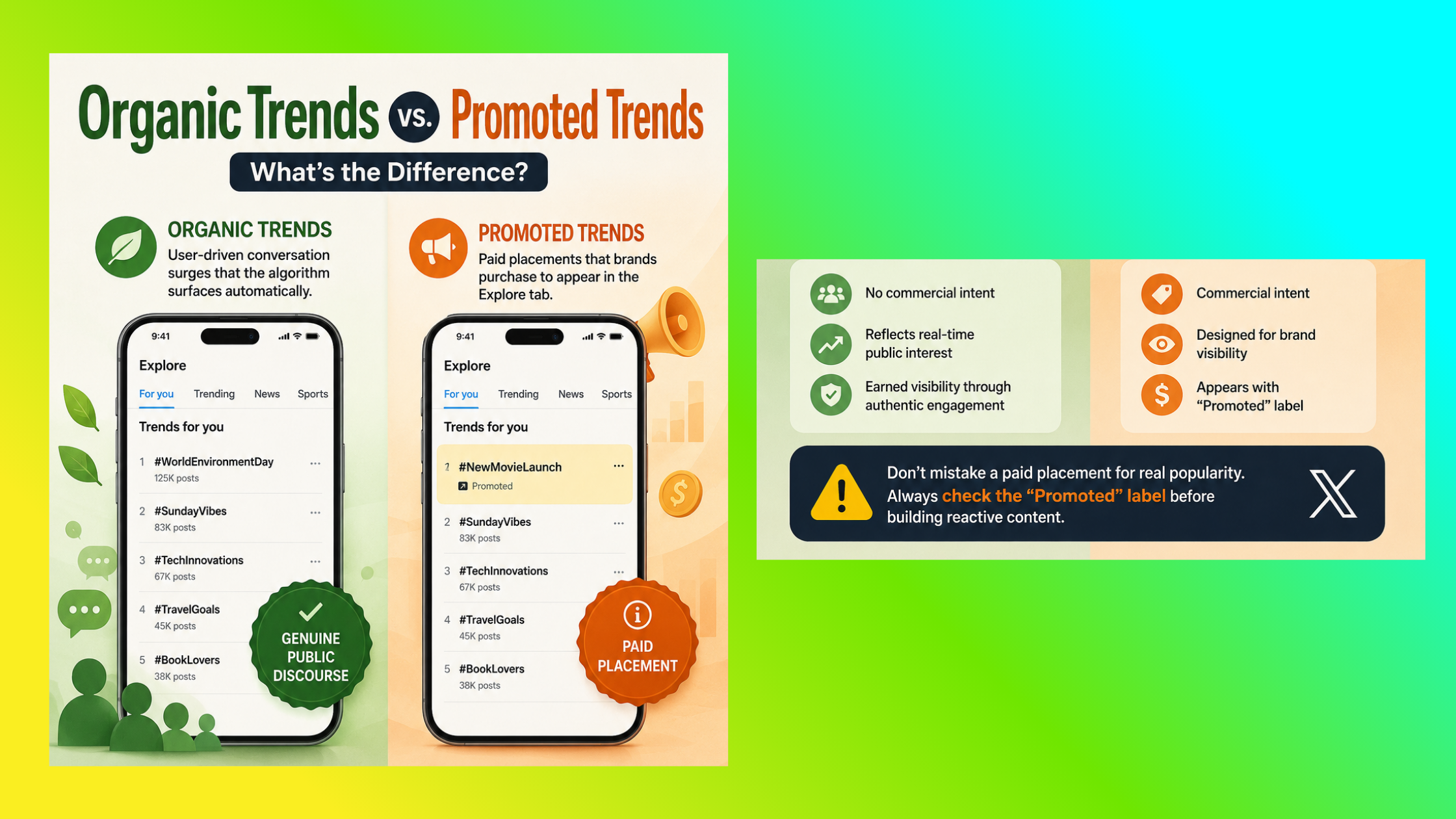
Most users never notice the distinction. Organic trends are user-driven conversation surges that the algorithm surfaces automatically — they carry no commercial intent and represent genuine public discourse. Promoted trends are paid placements that brands purchase to appear inside the Explore tab alongside organic results. They are labeled with a small "Promoted" tag, but the visual treatment is nearly identical to organic trends. The most common failure mode here is marketers treating a promoted trend as an editorial signal of genuine public interest — it isn't. Always check the label before building reactive content around a trending topic.
What Do Twitter Trend Numbers Mean?
The tweet count shown beneath a trending topic is a snapshot of recent activity, not a cumulative lifetime total. A trend showing "85,000 Tweets" means roughly 85,000 tweets containing that phrase or hashtag have been posted in the recent window Twitter is measuring — often just the past few hours. This means numbers can look surprisingly small for globally significant stories. What that number tells you is momentum right now — not overall importance. For accurate reach estimates, cross-reference with a third-party hashtag analytics tool rather than relying on the native count alone.
Trending on Twitter doesn't mean popular overall — it means accelerating fastest right now. The number is a speedometer reading, not an odometer total.
How to See Worldwide Trends on Twitter and Change Your Trending Location
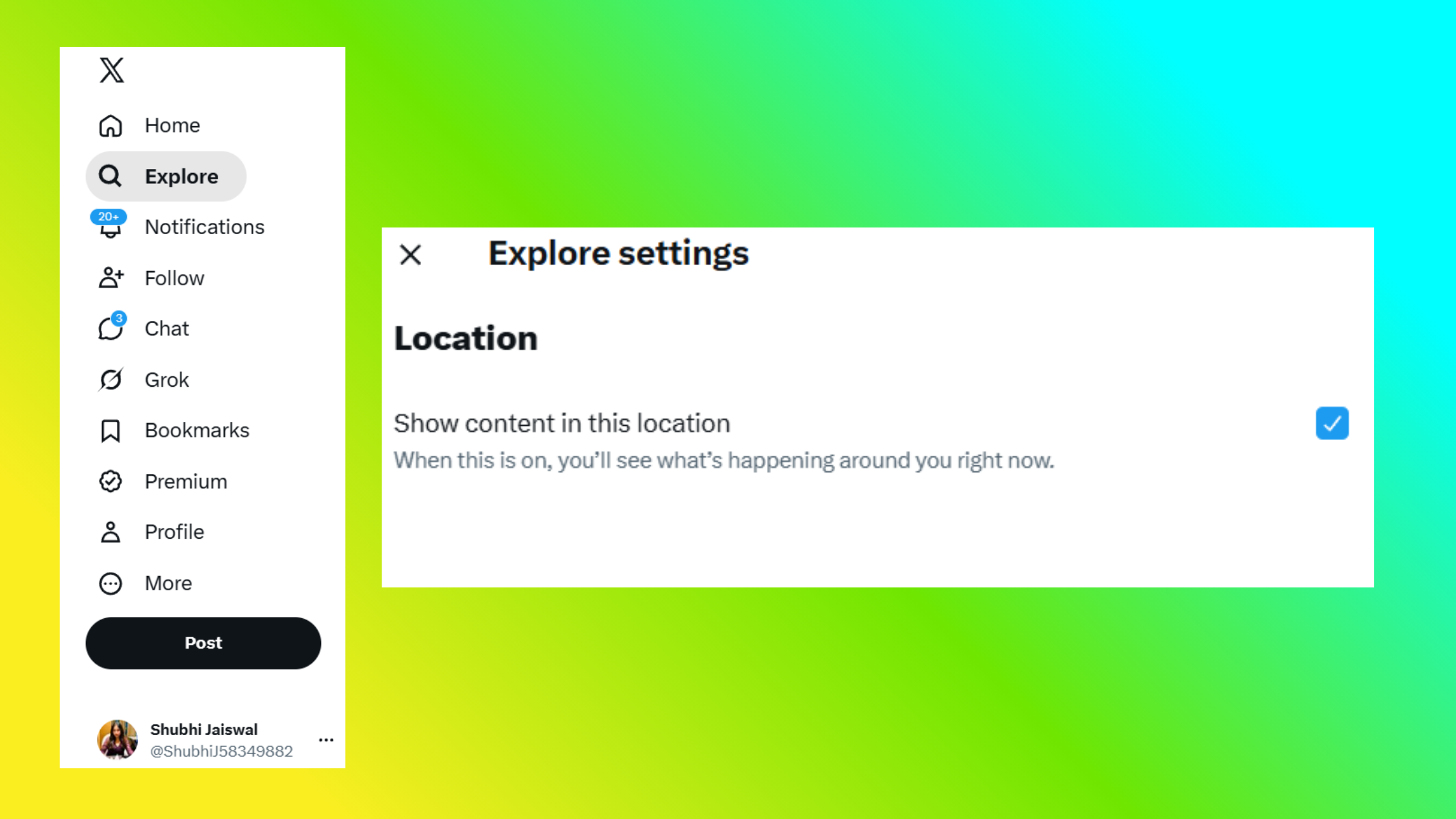
Switching to worldwide trends takes under 60 seconds on both desktop and mobile — but the exact path differs slightly between platforms, and it resets more often than most users realise.
Desktop: Step-by-Step
- Go to the Explore tab (the magnifying glass icon in the left sidebar). ~5 seconds
- Click the settings gear icon next to the search bar at the top of the page. ~5 seconds
- Select "Explore locations" from the dropdown menu that appears. ~5 seconds
- Choose "Worldwide" from the location list. ~5 seconds
- Return to the Explore tab — the trending list now reflects global activity. ~5 seconds
Mobile (iOS and Android): Step-by-Step
- Open the X app and tap the Explore (magnifying glass) icon in the bottom navigation bar.
- Tap the search bar at the top of the Explore screen.
- Tap the settings gear icon that appears in the top-right corner.
- Tap "Explore locations" and select "Worldwide" from the list.
The mobile UI shifts between app versions, so the gear icon's exact position may vary slightly — but it always appears adjacent to the search bar within the Explore tab.
Why Twitter Removed the Persistent Worldwide Trends Feature
Earlier versions of Twitter included a persistent worldwide trends widget in the sidebar that stayed set to global by default. Twitter removed this as part of the broader shift toward personalised, localised feeds — the reasoning being that local trends drive higher click-through rates and engagement for most users. The tradeoff is that power users and professionals who need to monitor global Twitter conversations now carry the burden of manually managing that setting. For anyone using Twitter as a real-time intelligence tool, this change matters more than almost any other UI update in recent years.
Can You See Twitter Trends from Another Country?
Yes. The same "Explore locations" menu that offers "Worldwide" also lists individual countries. You can switch to trending topics in the United States, United Kingdom, India, Brazil, or any other major region Twitter tracks. This makes it possible to see Twitter trends from another country without a VPN or workaround — the setting is built directly into the native app. Third-party tools like Trendsmap and Getdaytrends go further, offering city-level geographic granularity that the native app does not support.
Twitter Trends Not Showing Worldwide — Common Problems and Fixes
Teams that rely on Twitter for real-time intelligence consistently run into the same handful of issues. The most frequent is the location setting reverting silently — reapplying the worldwide preference in Explore settings fixes it immediately in roughly 9 out of 10 cases.
The less obvious cause: Twitter trends not showing worldwide as expected even after the setting is applied correctly. This happens because Twitter layers personalisation filters on top of location settings. If the "Trends for you" feature is active, Twitter overlays your interest graph on top of the location you selected. Two accounts both set to "Worldwide" can see meaningfully different trend lists based on their engagement history. This is by design, not a bug — but it means "Worldwide" is not a neutral, unfiltered view of global conversation. It's a personalised worldwide view.
A third edge case: newer accounts or accounts with no listed location can receive restricted or heavily localised trend feeds as a spam-prevention measure. If you're monitoring from a brand-new account, this may explain why the Worldwide setting appears to have no effect. Building some organic activity on the account first resolves it in most cases.
Common Mistakes to Avoid When Monitoring Twitter Trends
- Checking trends once daily — given 17% of top trends rotate out within a single hour, daily checks miss the majority of spikes.
- Assuming worldwide means unfiltered — personalisation still applies; cross-reference with third-party tools for objective data.
- Confusing promoted trends for organic signals — always check the "Promoted" label before reacting to a trending topic.
- Ignoring the Explore tab category filters — tabs for News, Sports, and Entertainment let you filter Twitter trends by topic, dramatically reducing noise for niche monitoring.
Best Tools to Track Twitter Trends Globally in 2026
The native Explore tab handles real-time simplicity well. What it cannot do is show you where a trend is geographically concentrated, how it evolved over the past 48 hours, or what the audience sentiment looks like beyond raw volume. That's where dedicated tools earn their place.
Twitter Trend Tracking Tools Compared: Native vs. Third-Party
| Tool | Best For | Geo Depth | Historical Data | Free Tier |
|---|---|---|---|---|
| X Native Explore | Real-time spot checks | Country-level | None | Yes |
| Trendsmap | Geographic heatmaps | City-level | Limited | Limited |
| Getdaytrends | Country-by-country archives | Country-level | Yes | Yes |
| Tweetbinder | Hashtag analytics + history | Country-level | Yes | Limited |
| Brandwatch | Audience sentiment analysis + volume history | Global | Yes | No (enterprise) |
| Sprout Social | Cross-platform social listening | Global | Yes | Trial only |
For content creators and professionals monitoring LinkedIn trends alongside Twitter activity, the guide to finding trending topics on LinkedIn covers how viral content discovery works differently across platforms — understanding both together gives you a significant edge for cross-platform content timing.
The best tools to track Twitter trends globally ultimately depend on your use case: Trendsmap for journalists and geo-targeted campaign teams, Getdaytrends for archival research and pattern spotting, and enterprise social listening platforms for brands that need audience sentiment analysis layered over volume data.
How to Monitor Global Twitter Conversations for Market Research and Campaigns
What separates top-performing social teams from average ones is not how often they check trends — it's what they do with them in the first hour. Trending topics in Twitter are among the fastest real-time signals available for understanding what an audience actually cares about at any given moment, which makes them uniquely valuable for market research and reactive campaign planning.
The brands that win on trending topics are not the ones with the fastest approval chains — they're the ones who built the approval chain before the trend arrived.
How to Use Twitter Trends for Market Research
Map trending hashtags on X against your product categories weekly. When a hashtag in your space spikes, look beyond the hashtag itself at the tweets driving it — the specific language people use, the complaints being amplified, and the accounts generating the most engagement. This is faster and more specific than any survey for surfacing real-time audience pain points. Cross-referencing twitter trending worldwide topics against industry-specific terms reveals which conversations are locally driven and which have genuine global traction — a critical distinction before investing campaign budget.
For a deeper look at how finance influencers use market trend signals on LinkedIn, the same pattern-reading logic applies: the platform differs, but the practice of mapping conversation velocity to content strategy is consistent across networks.
Using Worldwide Trends as Breaking News Social Signals
Checking what's trending on X today is a standard workflow for newsrooms, PR teams, and social editors who need to track breaking news social signals before they reach mainstream outlets. The advantage Twitter holds over other platforms for this use case is raw speed — significant events typically appear in the trending topics tab within 5–15 minutes of breaking, often before any major publication has filed a story.
Newsjacking — aligning brand messaging with an organic trend — drives outsized reach when timed correctly. Creators who skip the context-checking step typically find themselves publishing content that lands during the controversy phase of a trend rather than the enthusiasm phase, which consistently produces negative engagement outcomes. Always read at least 20–30 recent tweets within a trend before publishing anything attached to it.
The 60-Minute Trend Window is the framework that consistently separates reactive campaigns that land from those that fall flat: the first 60 minutes of a trend spike is when organic amplification is highest, the conversation is still forming, and the brand can add genuine value rather than looking like a latecomer. After 90 minutes, most trend spikes have already peaked, and late entries compete against thousands of identical reactive posts. Set up keyword alerts in TweetDeck or a social listening tool to get notified within that window without manual monitoring.
Monitoring trending hashtags on X today across category tabs (News, Sports, Entertainment) also helps content teams pre-schedule recurring trend patterns. Weekly hashtags like industry Twitter chats or day-of-week themes are predictable enough to plan in advance, while volatile breaking trends need a rapid-response workflow rather than a content calendar slot.
Turn LinkedIn Trend Insights Into Real Post Engagement
If you're cross-posting trend-driven content to LinkedIn, HyperClapper boosts your posts with real community engagement — so your reactive content actually gets seen when timing matters most.
See How HyperClapper Works✓ The Twitter Trend Monitoring Checklist
- ☐Set Explore location to "Worldwide" and verify it hasn't reverted before each monitoring session
- ☐Check the "Promoted" label on any trending topic before treating it as an organic signal
- ☐Read 20–30 tweets within a trend before publishing reactive content to check the context
- ☐Cross-reference native Explore trends with a third-party tool (Trendsmap, Getdaytrends) for geo and historical context
- ☐Use the Explore tab category filters (News, Sports, Entertainment) to filter Twitter trends by topic and reduce noise
- ☐Act within 60 minutes of a trend spike for newsjacking — after 90 minutes, reach potential drops sharply
- ☐Set up keyword alerts in TweetDeck or a social listening tool to catch trend spikes without manual refreshing
The same intelligence discipline that makes Twitter trend monitoring valuable applies across platforms. If you're building a broader social media news feed presence, the signals LinkedIn surfaces about profile and post activity offer a complementary layer of audience intent data that Twitter trends alone cannot provide.

Trending on Twitter? Make Sure Your LinkedIn Content Keeps Up
HyperClapper connects your trend-reactive LinkedIn posts with real engagement communities so early momentum builds fast — not gradually over days.
Start Boosting Posts FreeFrequently Asked Questions About Twitter Trending Topics
What's trending on Twitter right now?
To see what's trending on Twitter right now, open the Explore tab in the X app or on desktop, set your location to "Worldwide" in the settings gear, and the trend list updates in near real-time. The native tab refreshes every few minutes. For a continuously updated feed, use a tool like Getdaytrends which archives live trend data by country and updates without manual refreshing.
What are the top 10 trending topics?
The top 10 trending topics on Twitter are listed in the Explore tab under "Trending" — ranked by velocity, not total volume. The list is personalised by default, so two users see different rankings unless both switch to "Worldwide" with personalisation disabled. According to SocialBu's 2026 analysis, AI tools and tech breakthroughs are consistently among the top trending categories globally this year.
How to see trending topics on Twitter?
Open the X app or visit x.com, tap or click the Explore (magnifying glass) icon, then click the settings gear next to the search bar. Select "Explore locations" and choose "Worldwide" to see global trending topics on Twitter rather than your local default. This setting must be re-applied after app updates or browser cache clears, as Twitter reverts it automatically.
What is going viral on Twitter?
Something "going viral" on Twitter typically means a single tweet, video, or account is accumulating shares and engagement at an exponential rate — distinct from a hashtag trending, which measures aggregate conversation volume. A post can go viral without generating a trend, and a trend can exist without any single viral post. Viral content discovery tools like social listening dashboards track both signals separately for a complete picture.
How do I change my Twitter trends to show worldwide instead of local results?
Go to the Explore tab, click the gear icon next to the search bar, select "Explore locations," and choose "Worldwide." On mobile, the gear icon appears after tapping the search bar within Explore. To change Twitter trending location to worldwide, this setting must be reapplied periodically — Twitter resets it after updates. There is no permanent worldwide lock in the current native app.
Why am I missing important Twitter trends that others are seeing?
The most common reason is that your Explore location is still set to a local region rather than Worldwide. The second reason is personalisation: Twitter's "Trends for you" feature filters trends through your interest graph, so your worldwide view is still tailored to your account history. Using a secondary account with no engagement history, or a third-party tool like Trendsmap, gives a less filtered global view. This directly answers why why are my Twitter trends local not global — it's usually both settings working against you simultaneously.
Does Twitter show different trends to different users and why?
Yes. Twitter shows different trends to different users intentionally, based on three layers: your detected or set location, your personalised interest graph built from your engagement history, and your account's language settings. Even two users both set to "Worldwide" will see different trend rankings if their engagement histories differ significantly. Disabling personalisation in Explore settings reduces — but does not eliminate — this variation.
What is the best way to monitor global Twitter trends for breaking news?
Set Explore to "Worldwide," disable personalisation filters, and run a parallel TweetDeck column for your key monitoring keywords. Cross-reference every 30 minutes with Trendsmap for geographic context. For high-stakes monitoring, a paid social listening platform like Brandwatch or Sprout Social surfaces real-time breaking news social signals with sentiment context that the native Explore tab cannot provide — worth the cost for newsrooms or PR teams in fast-moving industries.
After seeing this pattern across teams that use Twitter for competitive intelligence, the consistent finding is this: the professionals who get the most value from trending topics in Twitter aren't those who check most frequently — they're the ones who built a workflow that catches the right trends in the right window, without relying on the platform's defaults to do it for them. The settings, tools, and timing framework above are what that workflow looks like in practice.



