How Long Should a LinkedIn Post Be to Beat the 2026 Algorithm?
Discover the ideal LinkedIn post length for 2026. Learn the optimal character count, how the algorithm ranks posts by length, and how to maximise reach.
📅 ⏱ 12 min read📝 ~2300 words
The ideal LinkedIn post length in 2026 sits between 1,000 and 1,800 characters — roughly 150 to 250 words. That's the range where dwell time, readability, and early engagement velocity align to clear LinkedIn's algorithmic filter. A pattern observed consistently across high-performing posts is that length alone never determines reach; what the algorithm actually rewards is how long someone stays reading and whether they engage meaningfully after. Shorter posts can win on impact. Longer posts can win on depth. What reliably fails is padding — adding words to hit a number without earning them.
Key Takeaways
Sweet spot: 1,000–1,800 characters (150–250 words) for native text posts gives the best balance of dwell time and engagement rate.
Hard limit: LinkedIn posts cap at 3,000 characters — but the real threshold that matters is the 210-character "see more" cut-off.
Algorithm logic: LinkedIn's 2026 feed ranks posts on early engagement velocity and comment depth, not character count.
Format matters as much as length: White space and short paragraphs outperform dense walls of text at any length.
Counterintuitive finding: LinkedIn does not penalise long posts — it penalises low-dwell content. A compelling 2,500-character story can outrank a lazy 300-character post.
Timing amplifies reach: Hitting peak windows (Tue–Thu, 7–9 AM) dramatically improves your chance of clearing the first algorithmic filter.
What Is the LinkedIn Character Limit and How Does Post Length Actually Work?
The LinkedIn post character limit in 2026 is 3,000 characters for standard native posts — roughly 400–500 words depending on average word length. That is the hard ceiling. But the number most creators should be focused on is far smaller.
The "See More" Threshold: Why 210 Characters Is Your Real Limit
The see more truncation in LinkedIn
The see more truncation — LinkedIn's automatic cut-off that hides the remainder of a post behind a click — kicks in at approximately 210–220 characters on desktop. Everything above that line is invisible until a reader actively chooses to expand it. This means your opening two to three sentences are doing all the heavy lifting. They are your hook, your promise, and your reason to keep reading.
The LinkedIn see more threshold characters function like a headline: if those first 210 characters do not create curiosity or deliver an immediate, specific value, the rest of your post goes unread. Treat that window as prime real estate.
💡
Pro Tip:Write your first line last. After drafting the full post, go back and rewrite the opening sentence so it creates a reason to click "see more" — a bold claim, a counterintuitive number, or an unfinished story.
LinkedIn Text Post vs. Article Reach: Which Format Wins in 2026?
The LinkedIn text post vs. article reach question has a clear answer in 2026: native text posts reach more people in the short term. LinkedIn Articles and Newsletters live on your profile and get indexed by Google, giving them long-term discoverability — but the LinkedIn feed heavily favours native content because it keeps users on the platform longer. Think of Articles as SEO assets and native posts as distribution engines. Use both, but do not expect your 2,000-word article to get the same feed reach as a tight 200-word observation.
How the 2026 LinkedIn Algorithm Ranks Posts by Length and Format
How LinkedIn algorithm decides post reach 2026
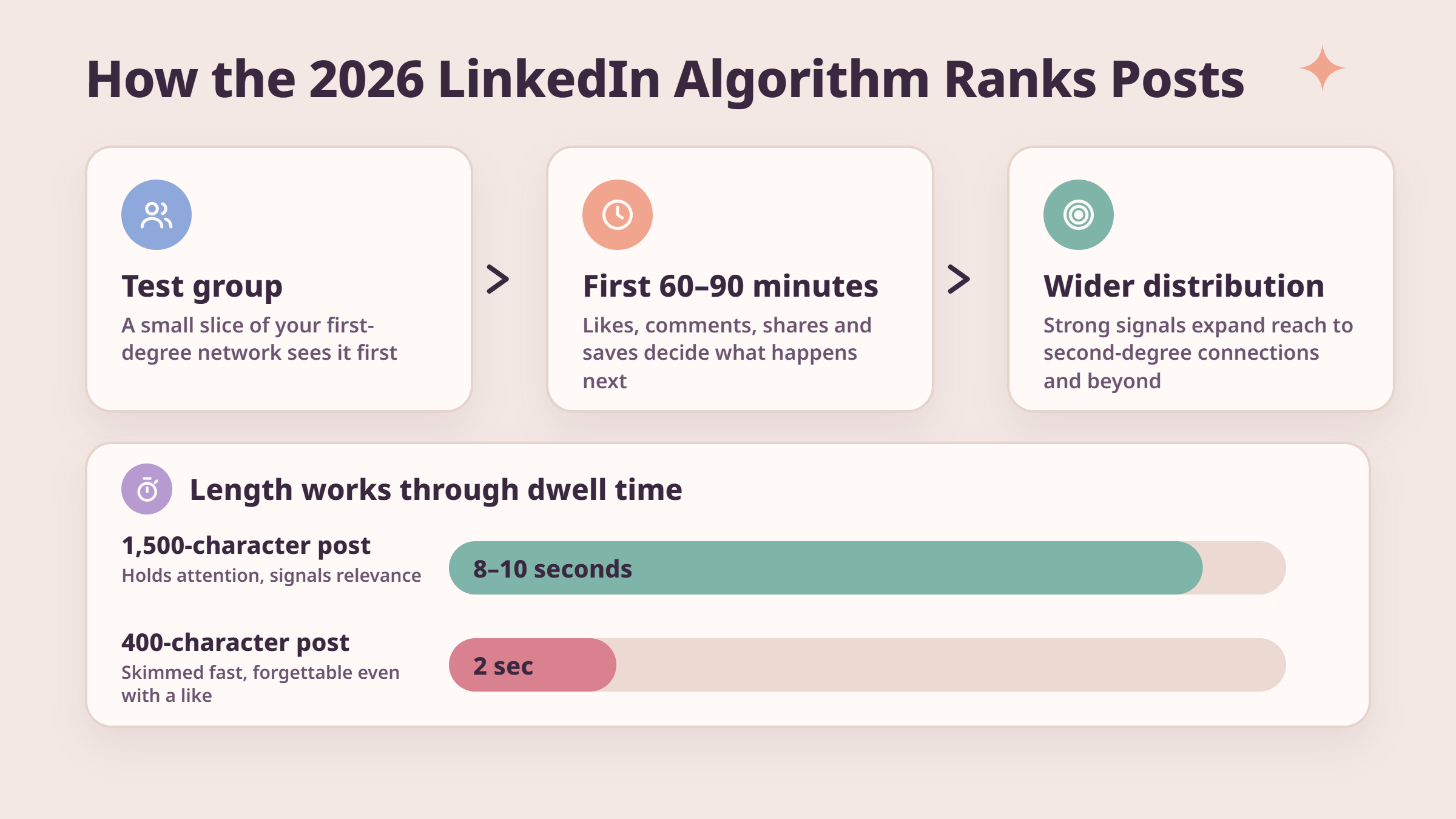
The LinkedIn algorithm ranking factors in 2026 operate through a multi-stage filter. Every post starts with a small test group drawn from your first-degree network. If that group generates strong engagement signals — likes, comments, shares, and saves — within the first 60 to 90 minutes, the algorithm expands distribution to second-degree connections and beyond. Length affects this process indirectly, through dwell time.
Dwell time on LinkedIn posts is the measure of how long a viewer's screen stays on your post before scrolling away. A well-structured 1,500-character post that holds attention for 8–10 seconds signals relevance. A 400-character post skimmed in 2 seconds signals something forgettable, even if it gets a quick like.
Does LinkedIn Penalise Long Posts? The Truth About Post Length and Visibility
Does LinkedIn penalise long posts? No — but it effectively penalises low-quality long posts. The distinction matters. A 2,800-character post that tells a genuinely compelling story with real tension and a takeaway will hold dwell time and generate comments. The same character count filled with filler phrases, vague advice, and unnecessary recaps will bleed engagement quickly. LinkedIn post length 2026 algorithm scoring is not a word count audit; it is a behavioural signal audit.
The algorithm does not read your post. It watches how other people react to it — and every second of dwell time is a vote you either earn or lose.
Why Short LinkedIn Posts Often Get More Engagement
Short posts frequently outperform longer ones for a simple reason: they remove friction. A two-line observation, a single bold claim, or a direct question can be absorbed instantly and responded to in seconds. The LinkedIn feed ranking signals that matter most — early comment velocity especially — are easier to generate when the post demands less cognitive effort to process. What separates top performers here is that they use short posts strategically, not because they are lazy, but because they know which ideas need space and which land harder at 100 words.
The Optimal LinkedIn Post Length and Character Count for Maximum Reach
LinkedIn post character count for most reach
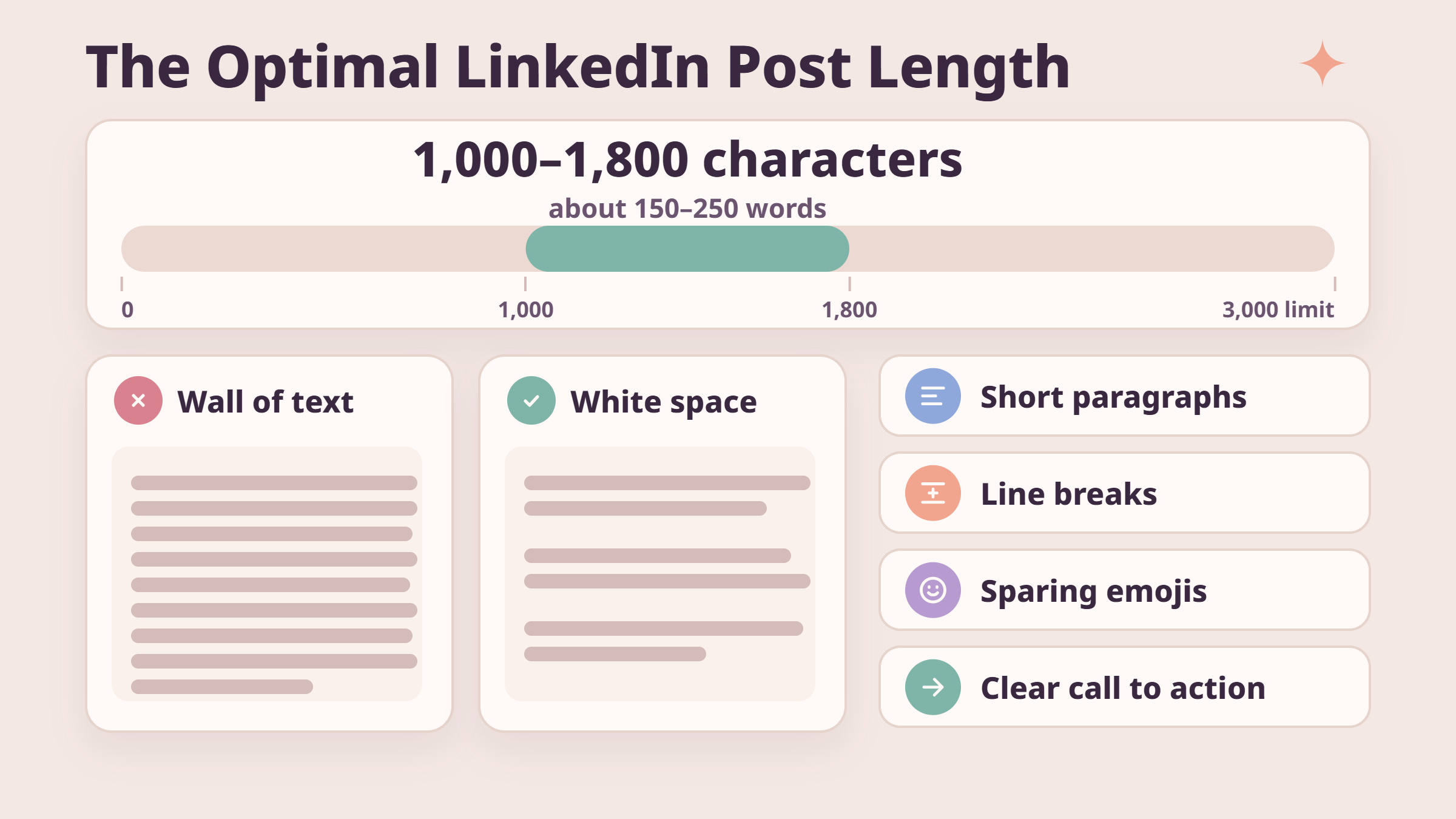
Posts between 100 and 200 words consistently see higher engagement rates than posts that overshoot into long-form territory without a clear narrative reason. The optimal LinkedIn post character count range of 1,000–1,800 characters (around 150–250 words) gives you enough room to develop a thought, include a concrete example, and end with a clear call to action — without padding.
1,000–1,800
Characters — the consistent sweet spot for LinkedIn post engagement rate in 2026
Format decisions amplify or undermine whatever length you choose:
Short paragraphs (1–3 lines): Make any post feel readable at any length.
Line breaks between ideas: Create breathing room and improve dwell time.
No dense walls of text: A 600-character block paragraph reads harder than a 1,500-character post with white space.
Emojis used sparingly: One or two can improve scannability; overuse signals low-quality content to the algorithm.
Engagement Rate by Content Format: Text, Image, Video, and Document Posts
Best LinkedIn post format for engagement 2026
The engagement rate by content format in 2026 breaks down differently depending on what you are optimising for:
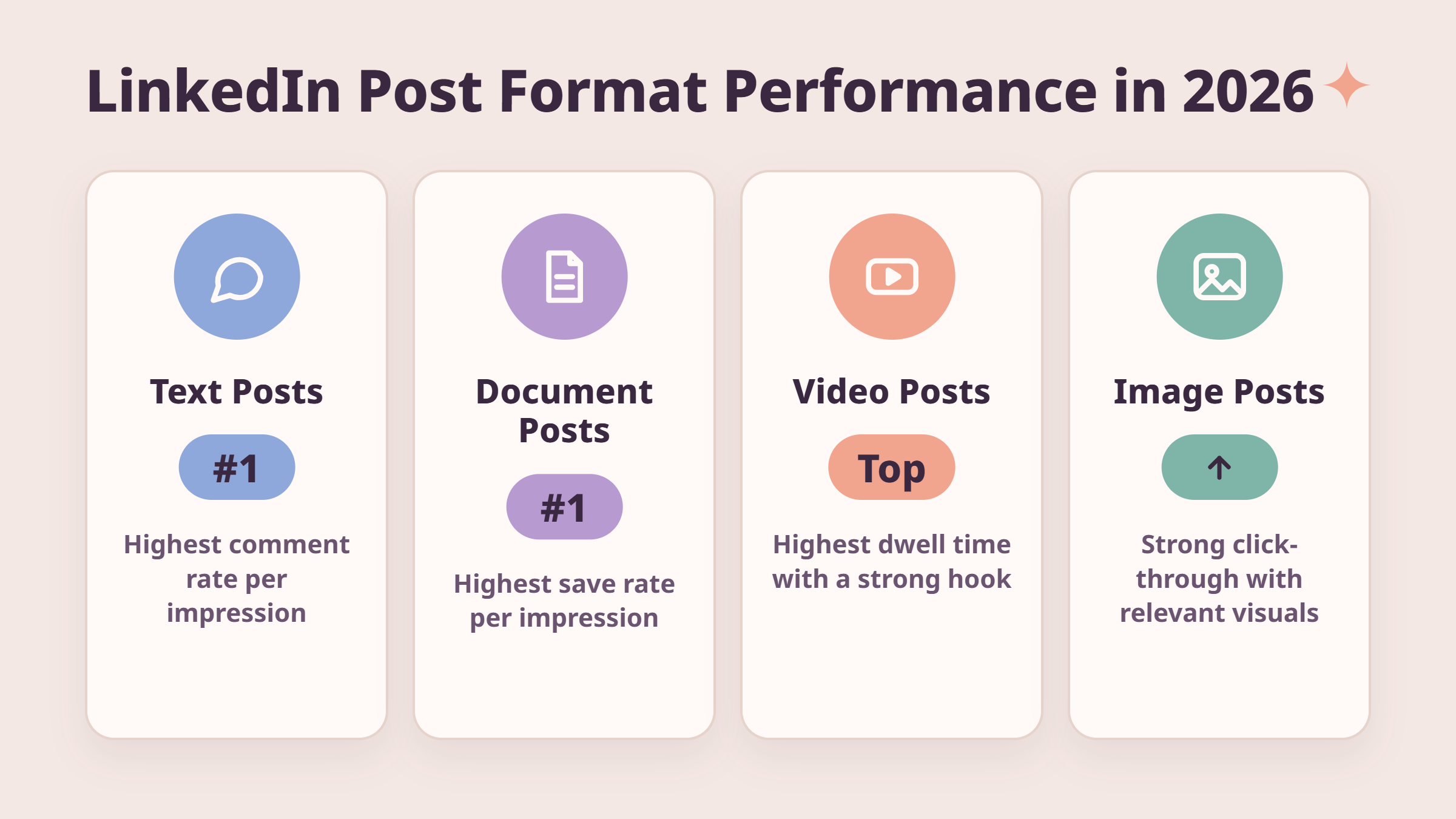
Native text posts: Highest comment-to-impression ratio. Best for thought leadership, opinions, and stories.
Image posts: Strong click-through when the visual is genuinely relevant. Learning how to post on LinkedIn with image effectively means pairing the visual with a strong text hook, not using the image as a caption replacement.
Document/carousel posts: Highest save rates. Saves are a powerful feed ranking signal in 2026.
Video posts: Highest dwell time potential but only when the first 3 seconds create immediate reason to keep watching.
How to Increase LinkedIn Post Reach: Timing, Tools, and Engagement Strategy
Getting the length right is only half the equation. How to increase LinkedIn post reach comes down to what happens in the first 90 minutes after you publish — and that is largely a timing and engagement coordination problem.
Best LinkedIn Scheduling Tools 2026 and Analytics
When is the best time to post on LinkedIn? The data pattern that holds across most B2B audiences points to Tuesday through Thursday, 7–9 AM and 12–1 PM in your audience's primary timezone. These windows catch professionals when they are just starting or breaking from their workday. Missing them by even a few hours can cut your early engagement velocity in half — and a weak first 90 minutes typically means the algorithm never scales your distribution at all.
The best LinkedIn scheduling tools 2026 include LinkedIn's own native scheduler (now more reliable than it was in earlier years), Buffer, and Hootsuite. Each lets you hit consistent timing windows without being tied to your phone at 7 AM. But scheduling tools are not an engagement strategy — they are a delivery mechanism. A post published at exactly the right time with zero engagement in the first hour will still fail to clear the algorithmic filter.
This is where LinkedIn analytics tools to track post performance become essential. LinkedIn's native analytics dashboard shows impressions, profile visits, and engagement breakdowns by post. Over time, tracking which lengths, formats, and topics generate the highest impressions per post tells you more than any general guide — including this one.
💡
Pro Tip:Tools like HyperClapper help coordinate early engagement from real community members, giving your post the initial velocity it needs to pass LinkedIn's first-stage filter. Real engagement from relevant people in the first hour is the single most reliable way to expand reach.
Common LinkedIn Post Mistakes That Kill Reach
Teams that consistently over-perform on LinkedIn avoid a specific set of errors that average accounts repeat. The most common failure mode is treating LinkedIn like a broadcast channel — publishing content and waiting passively for results. LinkedIn's feed ranking signals reward accounts that generate conversations, not just impressions.
Posting without engaging back: If you do not reply to comments within the first hour, the algorithm deprioritises further distribution.
Using external links in the post body: LinkedIn suppresses posts that drive traffic away from the platform. Put the link in the first comment instead.
Writing for length, not value: A 2,500-character post that meanders loses the reader by line 5 and tanks dwell time scores.
Ignoring format on mobile: Over 60% of LinkedIn views happen on mobile. A paragraph that looks fine on desktop becomes an unreadable block on a phone screen.
⚠️
Warning:Accounts that drop below 3 posts per week often see algorithmic reach decay within 10–14 days. Recovering distribution after a posting gap typically requires 3–4 weeks of consistent activity to rebuild momentum.
Want your next post to reach more of your network from the start?
HyperClapper connects your posts with real engagement channels so the algorithm sees early activity — and scales your reach beyond your existing following.
☐Opening 210 characters create genuine curiosity or deliver a specific value
☐Post is between 1,000–1,800 characters unless a longer story genuinely requires more
☐Paragraphs are 1–3 lines maximum with clear line breaks between ideas
☐No external links in the post body (moved to first comment)
☐Post is scheduled for Tuesday–Thursday between 7–9 AM or 12–1 PM
☐Replies to comments are planned for within 60 minutes of publishing
☐Post has been checked on mobile view before publishing
Hyperclapper
Frequently Asked Questions About LinkedIn Post Length and the 2026 Algorithm
How long can your LinkedIn post be?
LinkedIn posts have a hard character limit of 3,000 characters — approximately 400–500 words. This applies to standard native text posts. LinkedIn Articles have a much higher limit. The more practically important threshold is 210–220 characters, where LinkedIn truncates your post and shows a "see more" link to reveal the rest.
What is the ideal LinkedIn post length to maximise reach in 2026?
The ideal length is 1,000–1,800 characters (roughly 150–250 words). This range consistently balances dwell time and engagement velocity. Short enough to read quickly, long enough to develop a real idea. Posts in this range tend to clear LinkedIn's first algorithmic filter more reliably than either very short or very long posts. See more about what makes posts go viral in 2026.
How does LinkedIn's 2026 algorithm treat long versus short posts?
LinkedIn's 2026 algorithm does not directly penalise length. It evaluates dwell time, early engagement velocity, and comment depth. A long post that holds attention and generates substantive replies outperforms a short post that gets scrolled past. The algorithm effectively lets your audience vote on whether your length was justified — through their reading behaviour and engagement.
Does using more than 3,000 characters hurt LinkedIn post performance?
You cannot exceed 3,000 characters in a native LinkedIn post — the platform hard-stops you at the limit. Within that limit, using characters up to around 2,500–3,000 does not inherently hurt performance, but posts that length must sustain genuine narrative interest throughout to maintain dwell time. Padding to the limit without substance will depress engagement scores.
What type of LinkedIn post format gets the most impressions from the algorithm?
Document/carousel posts generate the highest save rates, which are a strong 2026 feed ranking signal. Native text posts generate the highest comment-to-impression ratios. Video posts drive the most dwell time when the opening 3 seconds hook the viewer. The best format depends on your goal — saves for reach, comments for conversation, video for brand depth. Explore the full LinkedIn marketing strategy for 2026 to combine formats effectively.
When is the best time to post on LinkedIn for maximum visibility?
The consistently strongest windows are Tuesday through Thursday, 7–9 AM and 12–1 PM in your audience's timezone. These windows align with the moments professionals are most active on feed. Missing them means your post enters a low-engagement period, weakening the early signals LinkedIn needs to decide whether to scale your distribution.
What consistently separates accounts with real reach from accounts with impressive follower counts is not the length of any single post — it is the combination of a compelling hook, a well-timed publish, and genuine early engagement that tells the algorithm this post is worth showing to more people. Get all three right, and the character count becomes a secondary concern.
👋
⚡ Free plan
Leaving already?
Grab 3 free boosts on your next LinkedIn post — real likes & comments from 5,000+ creators. No card, cancel anytime.