Learn how to remove connections from LinkedIn without drama — no notifications sent, step-by-step desktop and mobile guide, bulk cleanup tips, and etiquette answered.
📅 ⏱ 21 min read📝 ~4100 words
Knowing how to remove connections from LinkedIn is one of those skills everyone eventually needs but few feel confident using. A pattern consistently observed across LinkedIn users at every career stage is that the hesitation isn't technical — the platform makes removal easy — it's emotional: will they find out? The short answer is no. LinkedIn does not notify the removed person. Understanding this single fact removes the main barrier, and what follows is a complete guide covering the exact steps on desktop and mobile, how to clean up connections in bulk without third-party tools, what actually happens to your messages and endorsements, and the etiquette questions that make people second-guess themselves unnecessarily.
Key Takeaways
No notification is sent — LinkedIn does not alert anyone when you remove them as a connection, by design.
Desktop and mobile removal both take under 10 seconds once you know where to look.
Bulk removal is possible natively — LinkedIn's filter tools let you batch-identify and remove connections without any third-party software.
Messages, endorsements, and group memberships survive — removal does not wipe your conversation history or their skills endorsements on your profile.
Unfollow, remove, and block do very different things — using the wrong one is the most common mistake beginners make.
Network quality matters algorithmically — a smaller, engaged network consistently outperforms a large, disengaged one for content reach.
What It Means to Remove a LinkedIn Connection (And Why It's More Common Than You Think)
Removing a LinkedIn connection — also called a linkedin disconnect — is the act of permanently severing a 1st-degree relationship on the platform. That's different from unfollowing someone (which hides their posts from your feed but keeps the connection) and very different from blocking (which prevents either party from viewing the other's profile entirely). Removal simply resets the relationship back to 2nd or 3rd degree, as if you had never connected.
LinkedIn network cleanup has become a genuine professional practice, not just spring cleaning. LinkedIn's algorithm distributes content primarily to your 1st-degree connections first. If large portions of your network are dormant accounts, irrelevant industries, or connections you accepted years ago out of politeness, those dead-weight contacts are quietly suppressing your post reach every single day. Network quality now matters more than network size on this platform.
The stigma around removal is worth addressing directly. Removing a connection is not rude. Careers evolve, industries change, and a connection that made perfect sense in 2019 may have zero relevance to what you're building today. Professionals across every field — recruiters, founders, marketers, sales teams — regularly audit their networks as a deliberate strategy, not an act of hostility.
This guide covers everything in sequence: the stealth aspect (privacy around notifications), exact steps on desktop and mobile, a native bulk-removal method, what survives a removal, and the etiquette questions that trip people up most often.
Does LinkedIn Notify When You Remove or Disconnect a Connection?
Does LinkedIn Notify When You Remove or Disconnect a Connection?
No — LinkedIn does not send any notification when you remove a connection. No email is triggered, no in-app alert appears, and no activity feed event announces the removal. This behaviour has been consistent through LinkedIn's multiple redesigns and remains the same in 2026. LinkedIn's silence on this is deliberate design: the platform treats connection removal as a private account action, the same way it handles unfollows.
This is the single question that holds more people back from removing connections on LinkedIn than anything else. Once you understand that the removed person receives zero notification, the hesitation largely disappears.
LinkedIn's no-notification policy on connection removal is not a gap or oversight — it's a deliberate design choice that treats network management as a private, personal act. The platform has maintained this approach consistently while expanding nearly every other notification type.
When it comes to linkedin remove connection will they know — technically, they won't be told. But there are indirect signals a perceptive person could eventually notice:
Your profile changes from 1st to 2nd degree when they visit it
The mutual connection count in their view of your profile may change slightly
They lose the ability to send you a direct message without InMail (LinkedIn's paid messaging feature)
If they had your contact details visible via the connection, those disappear
None of these trigger a notification. All require the removed person to actively visit your profile and notice the badge change. In practice, the vast majority of removed contacts never notice at all.
Can Someone Tell If You Removed Them on LinkedIn?
They can only tell if they actively look. There's no passive signal. If someone checks your profile and sees the degree indicator has changed from 1st to 2nd, a careful observer might put it together — but this requires them to remember what your relationship level was before, which most people don't track. The answer to can someone tell if you removed them on LinkedIn is: theoretically yes, practically almost never.
💡
Pro Tip:Before a large cleanup session, set your connections list visibility to "Only you" under Settings → Visibility → Who can see your connections. This prevents a removed contact from browsing your network and noticing gaps, even if they do visit your profile afterward.
Now that the notification question is settled, here's exactly what does and doesn't change once you remove someone.
What Actually Happens When You Remove a LinkedIn Connection
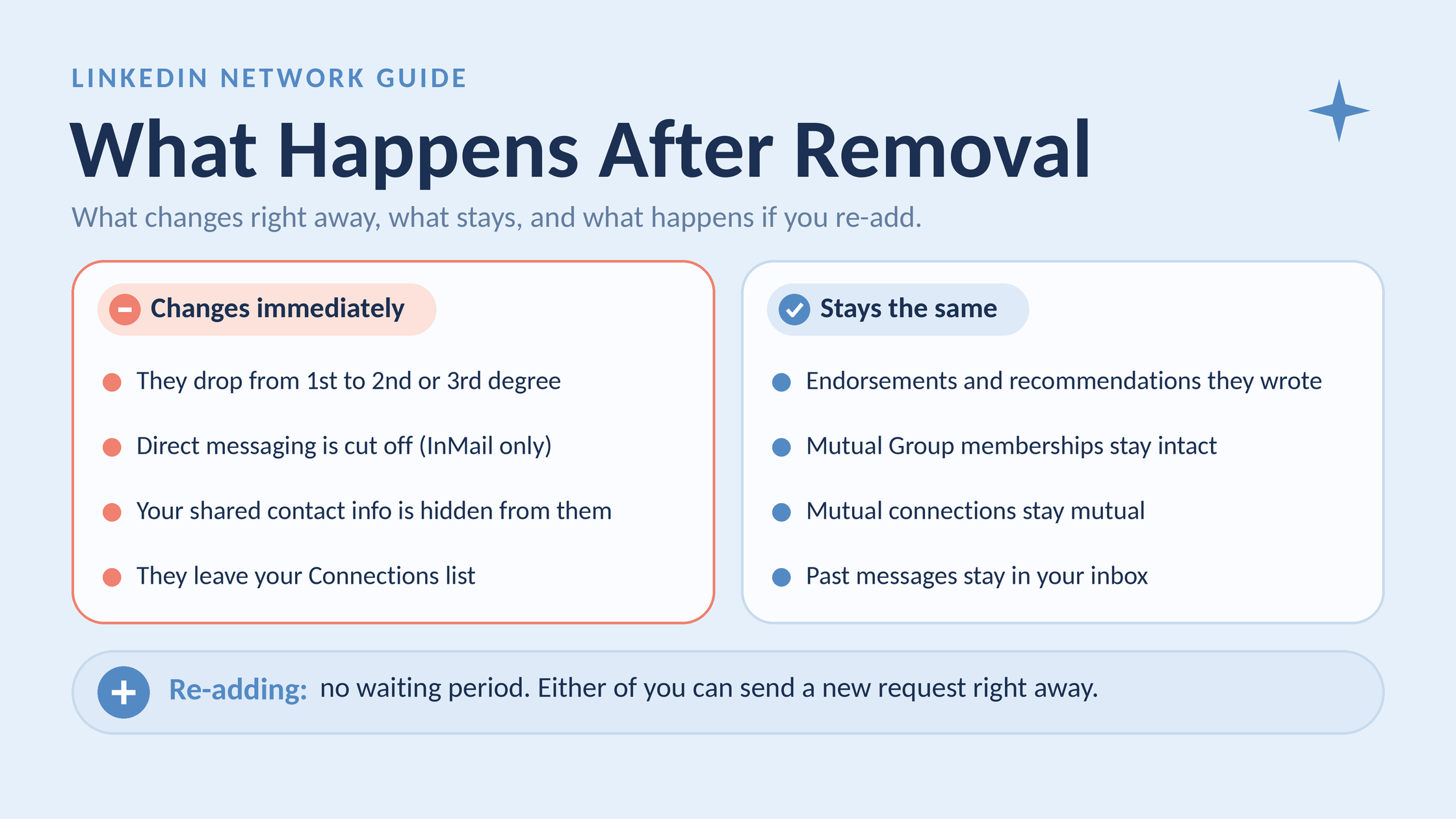
Removing a connection ends direct messaging, but your endorsements, groups and old messages stay.
Four things happen immediately when you remove a connection — and several things people assume happen, don't.
What changes immediately:
They drop from 1st-degree to 2nd or 3rd degree in your network
Direct messaging is severed for both parties (no more free DMs without InMail)
Your contact information shared through LinkedIn (phone, email set to visible to connections) is no longer accessible to them
They no longer appear in your first-degree Connections list or your direct network analytics
What does NOT change:
Endorsements and recommendations they wrote for you remain on your profile untouched
Your mutual LinkedIn Group memberships are unaffected — you can both still post in the same groups
Your mutual connections remain mutual connections for both parties
Past messages in your inbox are still visible — message history is not deleted
On the question of what happens when you remove a connection on linkedin regarding re-adding: LinkedIn imposes no mandatory waiting period. A removed person can technically send you a new connection request immediately after removal. Whether you see it depends on your connection request settings. You can also re-send a request to them just as freely.
Will Removing a LinkedIn Connection Affect Your Network or SSI Score?
SSI (Social Selling Index) is LinkedIn's 0–100 score measuring how well you build relationships, engage with insights, find the right people, and establish your professional brand. Removing a small number of connections has negligible SSI impact. Removing large swaths of disengaged connections can, counterintuitively, improve your SSI over time — because the "Engage with Insights" and "Build Relationships" pillars reward meaningful interactions, and a trimmed, active network produces more of those relative to network size. Will removing a LinkedIn connection affect my network in terms of metrics? Only positively, if the removed connections were inactive.
1 billion+
LinkedIn members worldwide — meaning your algorithm-weighted network quality matters more than ever for standing out
LinkedIn's own platform data indicates the network has surpassed one billion members globally, making connection relevance a genuine ranking factor for both content distribution and profile search visibility. In practice, a 500-connection network with 15% engagement rate outperforms a 3,000-connection network with 2% engagement rate for post reach — every time.
How to Remove a LinkedIn Connection: Step-by-Step (Desktop and Mobile)
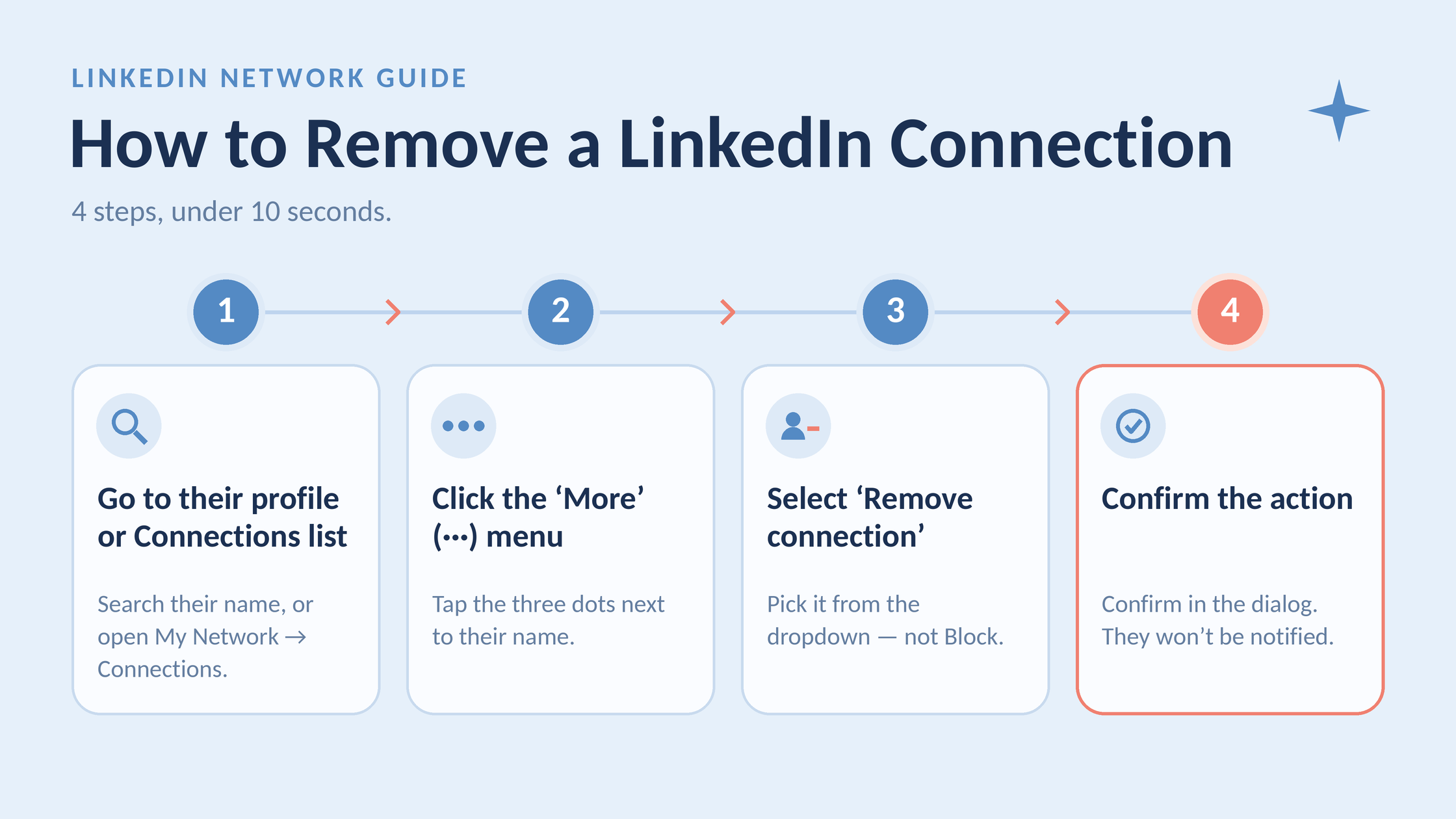
4 steps to remove a LinkedIn connection in under 10 seconds.
There are two desktop routes and one mobile method. The fastest depends on whether you're removing one person or working through a list.
Desktop: Via Their Profile
Navigate to the person's LinkedIn profile (search their name in the top bar)
Find the "1st" badge button next to their name — click it, or click the "More" button (three dots) if the layout shows that instead
Select "Remove connection" from the dropdown
Confirm in the dialogue that appears — takes under 10 seconds total
Desktop: Via Your Connections List (Faster for Multiple Removals)
Click My Network in the top navigation bar
Click Manage my network on the left panel, then select Connections
Use the search bar to find a specific person, or use the filter options to narrow by company, location, or industry
Find the person in the list — click the three-dot menu (···) to the right of their name
Select "Remove connection" — you stay on the same list view, making the next removal immediate
💡
Pro Tip:The Connections list route is meaningfully faster than visiting profiles one by one. After each removal, the list refreshes in place — you don't need to navigate back. Use this method whenever you're removing more than 3–4 people in a session.
Remove LinkedIn Connection on Mobile: What's Different
The remove LinkedIn connection on mobile process is nearly identical on both iOS and Android, though the button placement feels slightly different on a small screen:
Open the LinkedIn app and navigate to the person's profile
Tap the "More" button (···) near the top-right of their profile — NOT the connect/follow button
Scroll down in the bottom sheet that appears and tap "Remove connection"
Tap Remove in the confirmation prompt
The main difference on mobile is that the "More" menu button is easy to miss — it's a small icon that blends with the header. The most common mobile mistake is accidentally tapping "Report/Block" instead of "Remove" because the options are close together on smaller screens. Always confirm what you've selected before tapping the final confirmation.
How to Export Your LinkedIn Connections List Before Removing Anyone
Before removing connections, especially in bulk, export your connections data. This preserves email addresses and names that would otherwise become inaccessible once the connection is gone.
Go to Settings & Privacy → Data Privacy → Get a copy of your data
Select Connections from the data options
Click Request archive — LinkedIn emails you a download link within 10 minutes
Download the CSV file, which includes Name, Email Address, Company, Position, and Date Connected
Do this before you remove anyone. Once removed, a contact's email is no longer accessible through LinkedIn unless they made it public independently.
How to Clean Up LinkedIn Connections in Bulk (Without Third-Party Tools)
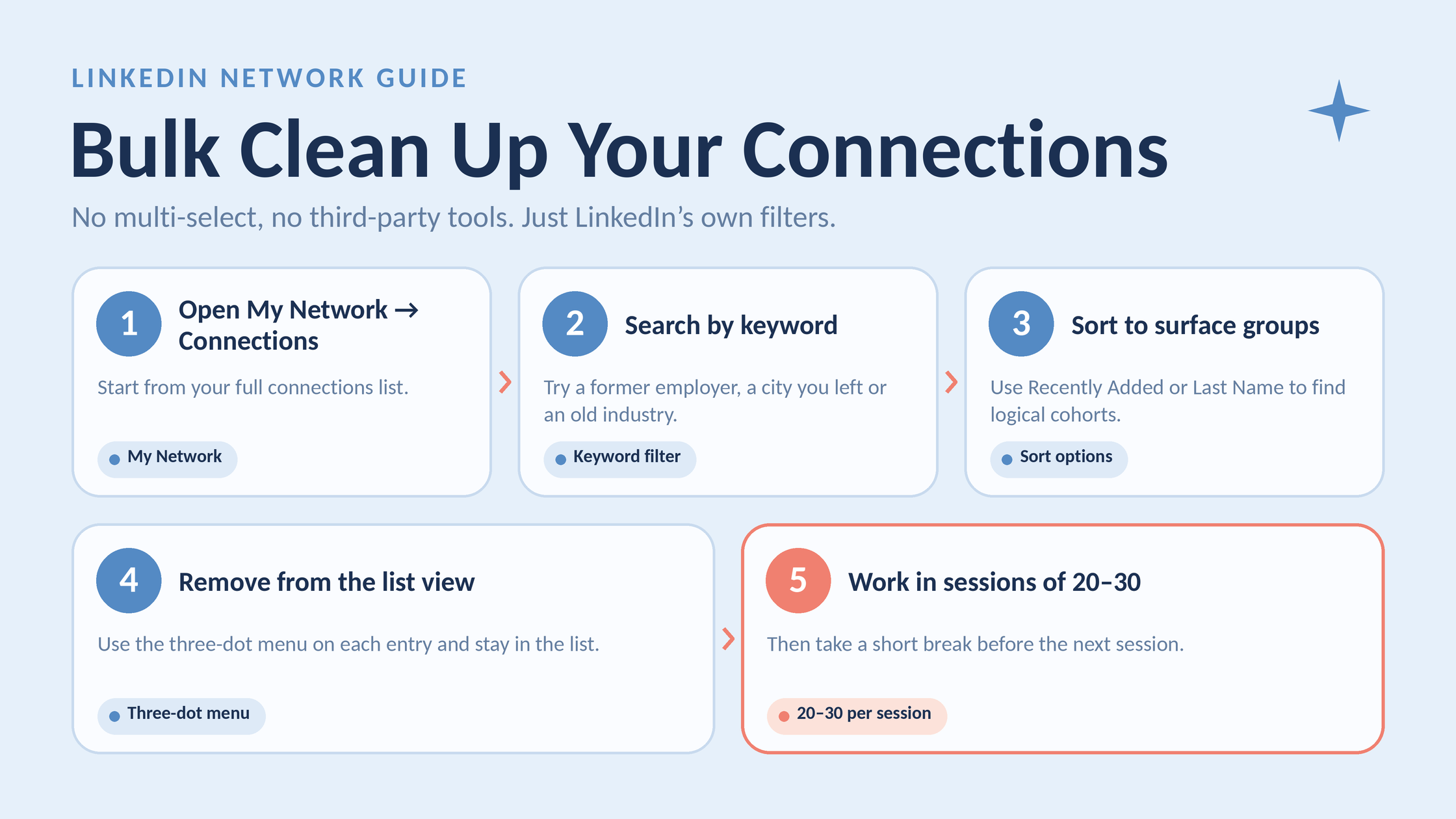
Clean up your LinkedIn connections in bulk using only LinkedIn’s own filters.
The most common complaint heard from professionals attempting a LinkedIn network cleanup is that there's no checkbox to select 50 people and remove them at once. That's correct — LinkedIn's native interface does not support multi-select removal. What it does support is powerful enough to make bulk cleanup manageable if you work strategically.
Think of LinkedIn's filter system as a sorting machine rather than a deletion machine. You use it to surface logical cohorts of connections — then remove them in sequence from the same list view, which is much faster than visiting profiles individually.
How to remove connections from linkedin in bulk using native filters:
Go to My Network → Connections
Use the search bar at the top of your connections list to filter by keyword (e.g. a former employer's name, a city you've left, an industry you've pivoted away from)
Use the filter options — sort by Recently Added or Last Name to surface logical groups
Work down the filtered list using the three-dot menu on each entry to remove connections one by one — staying in list view keeps this moving quickly
Work in sessions of 20–30 removals, then take a short break before the next session
⚠️
Warning:LinkedIn does not penalise accounts for removing connections, but performing hundreds of removals in a single rapid session can trigger automated behaviour flags. Working in sessions of 20–30 with short breaks between them is a prudent practice — it mirrors how a human would naturally work through a task like this.
Strategic LinkedIn Network Audit: Who to Remove and When
A recurring pattern among professionals trying to clean their LinkedIn network is that they approach it reactively — removing someone only after an awkward interaction — rather than proactively using clear criteria. A criteria-based audit removes the emotional guesswork.
Consider removing connections who fit any of these profiles:
No profile activity in 12+ months — dormant accounts add zero engagement value
Completely different industry with no relevant overlap — a connection from a previous life chapter that no longer reflects your professional identity
Accepted invitations you don't recognise — a common artifact of accepting too freely early in your LinkedIn career
High-volume content posters whose content consistently irritates or distracts you — unfollow is usually enough, but removal is valid if the relationship is truly irrelevant
Former contacts from a company or role where the relationship has naturally ended — especially if they never interact with your content
What separates top performers here is that they treat their network like a curated professional asset — not a vanity metric. The goal is a network that actively responds to and amplifies the work you're publishing, not one that simply looks large on a profile page.
Unfollow vs. Remove vs. Block on LinkedIn: Which One Should You Use?
Most professionals conflate these three actions. They do fundamentally different things, and choosing the wrong one is the most common mistake in LinkedIn connection management.
Action
Stays Connected?
Notified?
Can Still Message?
Best For
Unfollow
Yes
No
Yes
Noisy contacts you want to keep but not hear from daily
Remove / Disconnect
No (drops to 2nd/3rd)
No
No (InMail only)
Inactive, irrelevant, or misaligned connections
Block
No (full restriction)
No direct alert, but mutual visibility is severed
No
Harassment, spam, or serious professional boundary violations
The difference between unfollow and disconnect LinkedIn comes down to one thing: relationship status. Unfollow is a feed preference — they remain 1st-degree, can message you freely, and your content still appears on their feed. Disconnect (remove) ends the 1st-degree relationship, costing both parties direct message access. How to block vs remove on LinkedIn is a different decision entirely — block creates mutual invisibility, which is why it should be reserved for genuine boundary violations, not just unwanted connections.
How to Block vs. Remove on LinkedIn: The Practical Difference
Blocking is more visible in its effects than most people realise. When you block someone on LinkedIn:
Neither party can view the other's profile
You disappear from each other's search results
Shared group content from each other becomes invisible
No notification is sent — but the sudden disappearance from each other's view is itself a signal a perceptive person may notice
Removal is quieter and less disruptive. Use block only when removal doesn't go far enough.
Can You Hide Connections on LinkedIn? (And How)
Yes — can you hide connections on linkedin is a common question, and the answer is yes, partially. LinkedIn lets you control who sees your connections list. Here's how to hide connections on linkedin:
Go to Settings & Privacy → Visibility → Visibility of your LinkedIn activity
Find "Who can see your connections"
Change it to "Only you"
This prevents others from browsing your connections list. Your connections can still see that you are connected to each other — the setting hides the full list, not individual relationships. For a full breakdown of how LinkedIn's connection model differs from following, the connections vs. followers on LinkedIn guide covers the structural differences in detail.
How a Cleaner LinkedIn Network Boosts Your Content Reach and Visibility
LinkedIn's content distribution algorithm works on an engagement-velocity model. Engagement velocity is the speed at which a post receives meaningful interactions — likes, comments, shares — within the first 60–90 minutes after publishing. Your 1st-degree connections are the first audience the algorithm shows your post to, using their response rate as a signal to decide whether to push it to 2nd-degree and beyond.
If your 1st-degree network is full of inactive accounts or people outside your content's relevance, their non-engagement actively suppresses your reach. The algorithm sees: "post shown to 400 people, 3 interactions = low-interest content." It doesn't know those 400 people haven't logged in this year. It just sees the ratio.
Teams that consistently prune their networks to remove dormant connections report that their average post reach improves noticeably — not from the removal itself, but from the resulting improvement in engagement rate as a percentage of network size. LinkedIn profile relevance also benefits: a network aligned with your actual professional niche increases your likelihood of appearing in relevant "People You May Know" suggestions and search results for your target audience.
Network cleanup is one half of the equation. The other half is ensuring the connections you keep are actually seeing and engaging with your content. Tools like HyperClapper are built for exactly this — amplifying post visibility and driving real engagement from a relevant audience, so that a leaner, cleaner network translates into compounding reach rather than a smaller bubble. Real engagement from 300 well-matched connections will outperform passive silence from 3,000 random ones, every time.
For a full breakdown of LinkedIn's network growth strategies and how connection quality feeds into them, the approach matters more than the numbers suggest at first glance.
Get More From the Connections You Keep
HyperClapper boosts your LinkedIn post visibility with real engagement from relevant audiences — so a cleaner network actually performs the way it should.
Common Mistakes to Avoid When Removing LinkedIn Connections
The most common failure mode in LinkedIn connection management isn't removing the wrong people — it's skipping preparation steps that are trivially easy to do and significantly painful to have missed afterward. Here are the five mistakes seen most often:
✓ The LinkedIn Connection Cleanup Checklist
☐Export your connections CSV from Settings → Data Privacy before removing anyone
☐Set your connections list visibility to "Only you" before starting a large cleanup
☐Define your removal criteria before you start — industry, inactivity period, former employer, etc.
☐Use the Connections list filter view for speed — never visit each profile individually
☐Work in sessions of 20–30 removals with breaks between — avoid rapid-fire mass removal
☐For uncertain cases: unfollow first for 30 days, then remove if you don't notice the absence
☐Double-check you're selecting "Remove connection" — not "Block" — especially on mobile
The specific mistakes to know:
Removing without exporting first. Once a connection is removed, their email address — if it was only accessible through LinkedIn — is gone permanently. The export takes three minutes. Don't skip it.
Blocking instead of removing by accident. On mobile especially, the "Block" option sits close to "Remove connection" in the dropdown. The effects are dramatically different. Block is mutual and more noticeable; remove is quiet. Always read the option before confirming.
Mass-removing without criteria. Speed-purging based on instinct eliminates valuable dormant contacts — someone who hasn't liked a post in a year might still be a warm contact in a future job search. Use filter-based cohorts and criteria, not gut reactions at speed.
Leaving the connections list public before a large cleanup. A public connections list means a savvy removed contact can notice your mutual count with shared connections has dropped. Lock it to "Only you" first.
Not considering unfollow as a middle ground. For uncertain cases — connections you're not sure about — unfollow them for a month. If you don't miss them, remove with confidence. This is especially relevant for is it rude to remove a LinkedIn connection situations involving former colleagues or clients.
🔴
Avoid:Removing former clients or close colleagues without first considering what you lose. These relationships may have professional value that isn't reflected in their LinkedIn engagement behaviour — an unfollow preserves the connection while cleaning your feed. Remove only when the relationship has genuinely ended.
The professionals who manage LinkedIn networks most effectively treat removal not as rejection but as curation — the same way an editor removes unnecessary words from a strong draft. What remains is cleaner, clearer, and more effective.
Ready to Make Your LinkedIn Network Actually Work for You?
After you clean up your connections, HyperClapper helps the ones you keep engage with your content — turning a curated network into real, compounding reach.
Frequently Asked Questions About Removing LinkedIn Connections
If I remove a LinkedIn connection, will they know?
No — LinkedIn sends zero notification when you remove a connection. There is no email alert, no in-app badge, and no activity feed event. The removed person can only notice indirectly if they visit your profile and see the degree indicator has changed from 1st to 2nd. In practice, the vast majority never notice.
What is the difference between unfollowing and removing a connection on LinkedIn?
Unfollowing hides someone's posts from your feed but keeps the 1st-degree connection intact — they can still message you freely and you remain connected. Removing (disconnecting) ends the 1st-degree relationship entirely, cutting off direct messaging for both parties. Neither action sends a notification to the other person.
How do I quietly remove someone from my LinkedIn network without them finding out?
Set your connections list visibility to "Only you" in Settings → Visibility before you start. Then remove the connection normally — LinkedIn sends no notification regardless. With your list hidden, the removed person cannot even browse your network to notice they're gone. The change is effectively invisible unless they actively check their own relationship status with your profile.
Does removing a LinkedIn connection delete messages and endorsements?
No. Past messages in your inbox remain visible to both parties after removal — the conversation history is preserved. Endorsements and recommendations the person wrote for you also stay on your profile unchanged. What disappears is the ability to send new free direct messages — both parties would need InMail (a paid feature) to message each other again.
Can you tell if someone removed you as a connection on LinkedIn?
Not directly — LinkedIn doesn't tell you. You can only notice indirectly: if you visit their profile and see you're now 2nd-degree instead of 1st, or if you can no longer send them a free direct message. LinkedIn does not send any notification, so most people never realise they've been removed unless they actively check.
Can a removed connection still see my LinkedIn profile and content after removal?
Yes, unless your profile is set to private. After removal, the person becomes a 2nd or 3rd-degree connection — they can view whatever your profile visibility settings allow for that degree. If your posts are public or visible to "All LinkedIn members," they can still see your content. Only blocking prevents them from seeing your profile entirely.
Can you re-add someone after removing them on LinkedIn?
Yes. LinkedIn imposes no mandatory waiting period after removal. Either party can send a new connection request immediately. The removed person sees a standard invitation — there is no label indicating they were previously removed. You can reconnect at any time as freely as with any other LinkedIn member.
Does removing a LinkedIn connection affect your mutual connections or shared group memberships?
No. Mutual connections remain mutual — the removal only affects your direct 1st-degree relationship, not the independent connections others have with both of you. Shared LinkedIn Group memberships are also unaffected — both parties can continue posting and commenting in the same groups after removal.
After seeing this pattern across thousands of LinkedIn profiles, what consistently separates accounts with genuine reach from accounts that simply look large is not the size of the network — it is the quality and engagement rate of the connections that remain. Removing the dead weight is not a concession; it is the strategic move that makes everything else work.
👋
⚡ Free plan
Leaving already?
Grab 3 free boosts on your next LinkedIn post — real likes & comments from 5,000+ creators. No card, cancel anytime.