
The Twitter video length limit is not a single number — and that is precisely why so many creators get burned by it. A pattern observed across countless forum threads and support tickets is that users on different account tiers report wildly different upload experiences from the same app: one person caps out at 45 seconds, another casually posts a 10-minute clip. Both are telling the truth. The limit is entirely tier-dependent, and most help articles still cite one outdated figure. This guide gives you the full, current breakdown — by account type, by device, and by use case — so you stop guessing and start uploading correctly.
- Free accounts are capped at 2 minutes 20 seconds (140 seconds) and 512 MB per upload — no exceptions without upgrading.
- X Premium unlocks up to 3 hours of video; Premium Plus pushes that to 4 hours with a 16 GB file size cap on web and iOS.
- Third-party schedulers (Buffer, Hootsuite) route through API limits — even Premium users may hit the 2:20 wall when posting this way.
- The most common mistake is not exceeding duration — it is exceeding the 512 MB file size cap, which causes silent truncation or rejection.
- Optimal engagement length is 30–60 seconds for most content types, regardless of what your account tier allows.
- The X rebrand in 2023–2024 changed video policies significantly; articles dated before 2025 are likely citing wrong numbers.
- What Is the Twitter Video Length Limit in 2026?
- Twitter Video Upload Limit by Account Type
- Why Is My Twitter Video Being Cut Off?
- How to Post Longer Videos on Twitter
- Facebook Video Length Limit — How X Compares
- Frequently Asked Questions About Twitter Video Length Limits
What Is the Twitter Video Length Limit in 2026? (And Why It Keeps Confusing People)
The Twitter video length limit depends entirely on your account tier — there is no single universal cap, which is the root cause of almost every confusing forum thread on the topic. Free (standard) users are limited to 2 minutes and 20 seconds, while X Premium subscribers can upload videos several hours long. Most older articles cite one number as if it applies to everyone, which stopped being accurate the moment Twitter introduced subscription tiers and then rebranded to X.
How the X (Twitter) Rebrand Changed Video Policies
When Twitter became X in 2023, the platform didn't just change its logo — it overhauled its subscription structure and, with it, its video upload policies. Twitter Blue, the original paid tier, had a video length limit of 60 minutes for subscribers. After the rebrand, X restructured into X Premium and X Premium Plus, extending video upload lengths significantly beyond what Twitter Blue offered. The X video length limit 2024 transition period left a trail of contradictory documentation that persists across the web today. If you are reading an article that cites "60 minutes" as the Premium cap, it is describing a policy that no longer exists.
Twitter Video Upload Limit by Account Type: Free vs. X Premium vs. API
According to Tweetfull (2026), non-premium users are limited to 140 seconds and a 512 MB max file size, while Premium Plus subscribers can post up to 4 hours with a 16 GB file size cap on web and iOS. The Twitter video upload limit by account type is the single piece of information most guides bury or omit entirely.
X Video Length Limit 2026: Quick-Reference Table by Tier
| Account Type | Max Duration | Max File Size | Notes |
|---|---|---|---|
| Free (Standard) | 2 min 20 sec | 512 MB | Default for all new accounts |
| X Premium | ~3 hours | 8 GB | Web and iOS; mobile app may vary |
| X Premium Plus | 4 hours | 16 GB | Highest tier; web and iOS |
| API / Third-Party Apps | 2 min 20 sec | 512 MB | Applies regardless of account tier |
| Advertisers (Promoted) | 10 minutes | 1 GB | Via Ads Manager only |
So: can you post 10-minute videos on Twitter? Yes — but only through the Ads Manager as a promoted video. Organic posts are capped at 2:20 for free users and up to 4 hours for Premium Plus. The answer to "how long can a Twitter video be without premium" is exactly 2 minutes and 20 seconds, full stop.
Twitter Video Specs for Creators: Dimensions, Resolution, and Bitrate
Getting the duration right is only half the battle. According to HeyOrca (2026), the recommended standard video size is 1280×720px at a 16:9 aspect ratio, with a max file size of 512 MB for standard accounts. Vertical video should be 1080×1920px. These are the Twitter video specs for creators that matter most:
- Recommended resolution: 1280×720px (landscape) or 1080×1920px (vertical)
- Aspect ratio: 16:9 (landscape), 9:16 (vertical), 1:1 (square)
- Codec: H.264 (MP4 container preferred)
- Frame rate: 30fps or 60fps (constant, not variable)
- Max bitrate: 25 Mbps (keep below 8,000 kbps for reliable uploads under 512 MB)
- Audio: AAC-LC, stereo, 128 kbps minimum
The most common encoding mistake is variable frame rate — iPhones and screen recorders often produce VFR files by default, and X's encoder rejects or silently truncates them more often than constant-frame-rate files.
Why Is My Twitter Video Being Cut Off? Common Mistakes and Hidden Restrictions
Creators who skip pre-upload encoding checks typically find their videos silently trimmed or rejected without a clear error message — and almost always blame the duration limit when the real culprit is the file size. A 90-second clip shot at 4K or with a high-bitrate recorder can easily exceed 512 MB, triggering the media file size cap rather than the duration limit. These are different problems with different fixes.
Does Twitter Compress Long Videos? What Happens to Quality
Does Twitter compress long videos? Yes — X re-encodes every video upload through its own transcoding pipeline regardless of how well you encoded it beforehand. This means a file you compressed once gets compressed again, and the quality loss is compounded. The practical fix is to pre-encode to X's preferred specs (H.264, 1280×720, constant 30fps, ~6,000–8,000 kbps bitrate) before uploading. This gives X's encoder clean, already-optimised source material, which produces noticeably better output than uploading a raw 4K file and letting the platform do all the work.
Other hidden culprits behind truncation and upload failures:
- Third-party scheduling tools: Buffer, Hootsuite, and similar apps post through the API tier, which enforces the 2:20 limit even on Premium accounts. An X Premium user posting through a scheduler will hit the 2:20 wall every time.
- Variable bitrate (VBR) encoding: X's transcoder handles constant bitrate (CBR) more reliably. VBR files from screen recorders and some phone cameras are a frequent silent failure mode.
- Non-standard codecs: HEVC (H.265), VP9, and AV1 files are often rejected or auto-converted with significant quality loss. H.264 in an MP4 container remains the safest choice.
How to Post Longer Videos on Twitter: Workarounds and Best Practices
The most direct path to longer uploads is upgrading to X Premium — but for creators not ready to pay, threading is the most engagement-friendly free workaround. Splitting a 6-minute video into three sub-2:20 clips posted as a thread often performs better than a single long upload because each clip generates its own reply thread and engagement signal.
The Twitter Video Upload Checklist
✓ Twitter Video Upload Checklist
- ☐Confirm video duration is under 2:20 (free) or check your tier limit
- ☐Check file size is under 512 MB (free) or 8 GB (Premium)
- ☐Encode as H.264 MP4 — not HEVC, VP9, or AV1
- ☐Use constant frame rate (30fps or 60fps) — not variable
- ☐Set bitrate to 6,000–8,000 kbps for a clean sub-512 MB file
- ☐Post directly via X.com or the X app — not through a third-party scheduler if you need the full tier limit
- ☐Enable "Web Optimized" in HandBrake for faster streaming starts in-feed
What Is the Ideal Video Length on Twitter/X for Maximum Engagement?
What separates top-performing video posts from average ones on X is rarely the total duration allowed — it is how quickly they hook the viewer. According to Opus Clip research (2026), 40.7% of all X video clips that performed well fell in the 30–60 second range. This means the platform technically allows you to post hours of content, but the audience stops watching well before 2 minutes for most content types. In practice, treat 45 seconds as your target and 90 seconds as your ceiling — not because of the limit, but because of how X's algorithm distributes video content based on completion rate.
For creators needing the best tool to trim video for Twitter, three options consistently perform well across different technical skill levels:
- HandBrake (free, desktop): best for encoding and bitrate control — ideal for getting under 512 MB
- Kapwing (browser-based): best for trimming, adding captions, and exporting to exact duration
- Clideo (browser-based): simplest interface for quick cuts without software installation
And on the question of how to post longer videos on Twitter without upgrading: host on YouTube or Vimeo, then share the link on X. The platform auto-generates a native-looking preview card that plays inline in the feed — for most viewers, it is functionally indistinguishable from a native upload, and it bypasses the duration limit entirely.
Facebook Video Length Limit — How X Compares
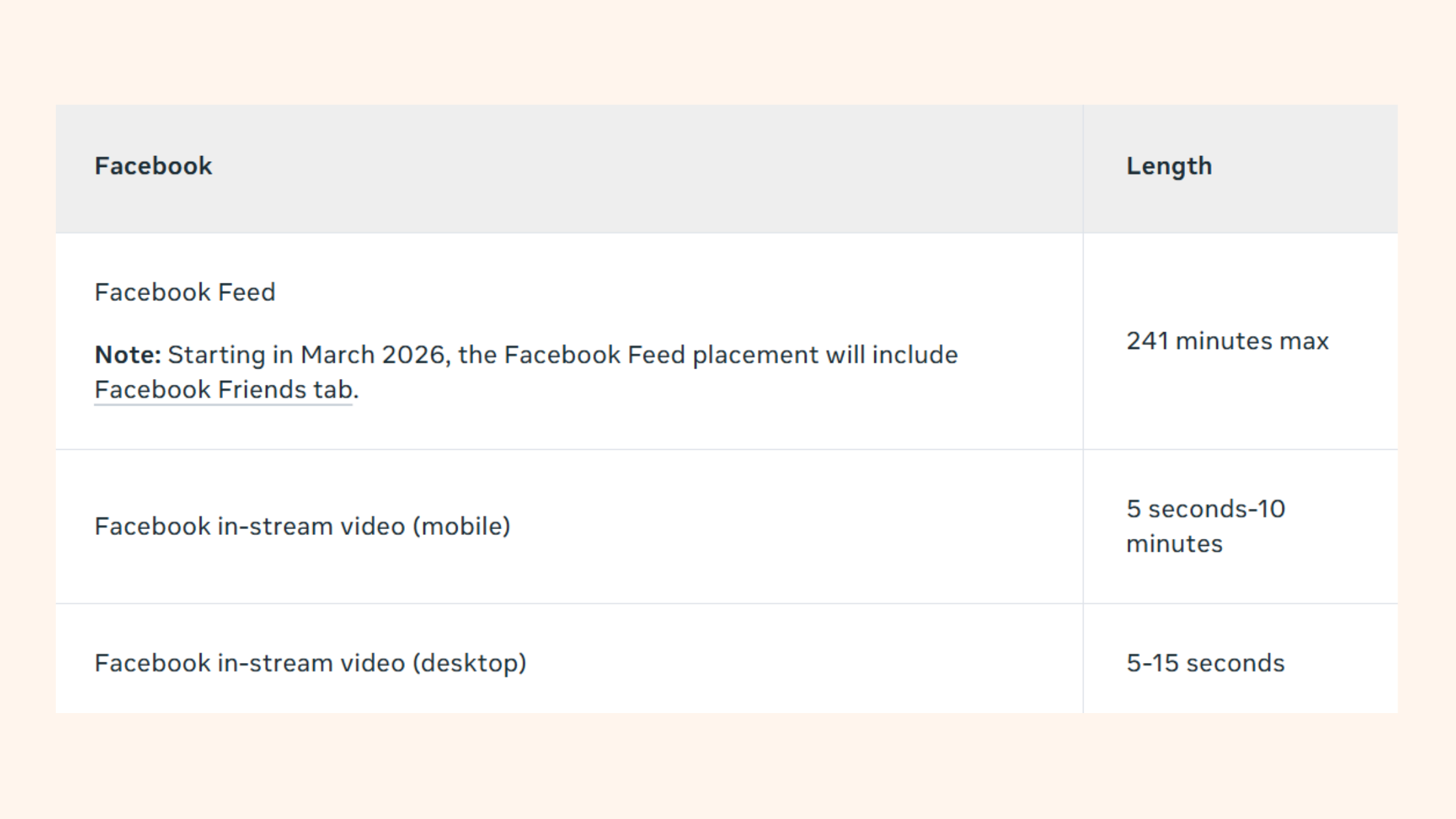
The facebook video length limit is considerably more generous across all account types than X's free tier. Standard Facebook users can upload videos up to 240 minutes (4 hours) long with a 10 GB file size cap — compared to X's 2 minutes and 20 seconds for free accounts. Facebook Reels are capped at 90 seconds, and Facebook Live sessions can run indefinitely.
The gap matters for cross-platform creators: a long-form video that posts natively on Facebook requires heavy editing to meet X's free-tier limit, or a Premium subscription to come close to parity. Teams that repurpose content across both platforms consistently find it more efficient to edit for X's shorter format first, then expand for Facebook — not the other way around.
For LinkedIn video, which is another frequent cross-posting destination: native video caps at 10 minutes for personal profiles and 30 minutes for company pages. If you are managing LinkedIn content alongside your X and Facebook strategy, understanding ideal LinkedIn post length for maximum engagement is worth reviewing — the optimal lengths differ significantly from what works on X.

Growing on LinkedIn as well as X?
HyperClapper helps LinkedIn creators get real engagement — likes, comments, and post visibility — through community-powered channels and AI-generated replies, without bots or fake activity.
Try HyperClapper FreeFrequently Asked Questions About Twitter Video Length Limits
Can you post a 3-minute video on Twitter?
No — not on a free account. The standard Twitter/X video length limit for free users is 2 minutes and 20 seconds (140 seconds). A 3-minute video requires an X Premium subscription, which extends the upload limit to approximately 3 hours depending on the plan and platform (web or mobile).
What is the longest video I can post on Twitter?
The longest video you can post on X is 4 hours, available on the X Premium Plus tier when uploading via web or iOS, with a 16 GB file size cap. Standard free accounts are limited to 2 minutes and 20 seconds. Advertisers using Ads Manager can post up to 10 minutes as promoted video content.
Can you send 5-minute videos on Twitter?
Yes — but only with an X Premium subscription. Free accounts are capped at 2 minutes and 20 seconds. If you need to share a 5-minute video without upgrading, host it on YouTube or Vimeo and paste the link into your post — X will generate an inline preview card that plays in the feed.
Did Twitter remove the video limit?
No — Twitter/X did not remove the video limit. It expanded the limit for paid subscribers significantly, from 60 minutes under old Twitter Blue to up to 4 hours under X Premium Plus. Free accounts remain capped at 2 minutes and 20 seconds. The confusion stems from the rebrand and the rollout of new subscription tiers in 2023–2024.
What are the current Twitter video length limits for free and premium accounts?
Free accounts: 2 minutes 20 seconds (140 seconds), 512 MB max. X Premium: approximately 3 hours, 8 GB max. X Premium Plus: 4 hours, 16 GB max on web and iOS. API and third-party apps: 2:20 regardless of account tier. These figures reflect the X video length limit 2024 restructure and apply as of mid-2026.
Why does Twitter cut my video short even when it's under the limit? And how do I upload a video longer than 2 minutes 20 seconds on X?
The most frequent cause is a file size exceeding 512 MB, not the duration. High-bitrate or high-resolution files are silently trimmed or rejected. To upload longer than 2:20, you need X Premium — or compress to meet the free-tier specs. Always check file size before blaming the duration cap. Re-encoding to H.264 at 6,000–8,000 kbps resolves the majority of silent truncation failures.
What did the Twitter Blue video length limit change to after the rebrand?
The Twitter Blue video length limit was 60 minutes before the rebrand. After X restructured its subscriptions in 2023–2024, that was replaced by X Premium (approximately 3 hours) and X Premium Plus (4 hours). Twitter Blue itself no longer exists as a product — it was retired and replaced by the current X Premium tiers.
What consistently separates creators who get their content seen from those who keep troubleshooting failed uploads is not technical expertise — it is knowing which tier's rules they are actually operating under. The limit is not one number. It never was. Know your tier, encode for the platform, and your upload problems largely disappear.



