
Twitter publishing best practices are not a list of things to post — they are a repeatable workflow that connects format, timing, and intent to measurable outcomes like clicks, follower growth, and content distribution. A pattern observed across high-performing accounts is that the creators saving the most time are not the ones posting most frequently: they are the ones who batch, schedule, and repurpose systematically, then let automation handle delivery. The goal of this guide is not to add more tasks to your week. It is to cut the ones that eat your hours without moving the needle.
- Batching content into 1-2 weekly sessions recovers more time than any other single habit
- Posting time affects initial velocity — the first 30 minutes matter more than the hour of day
- Threads convert better than standalone link tweets because they build trust before asking for the click
- Buffer suits solo creators; Hootsuite suits teams — neither is universally better
- Embedded tweets via Twitter Publish add social proof but carry measurable page speed costs
- The most common time-wasting mistake is logging in daily to post reactively instead of publishing from a queue
- What Twitter Publishing Best Practices Actually Mean in 2026
- How to Schedule Tweets and Build a Content Batching Strategy
- Best Time to Post on Twitter — and When to Avoid Posting
- Twitter Thread Publishing Tips and Tweet-to-Landing-Page Funnel
- Best Twitter Scheduling Tools for Creators: Buffer vs Hootsuite and Beyond
- How to Embed Tweets and Twitter Feeds on Your Website
- Frequently Asked Questions About Twitter Publishing Best Practices
What Twitter Publishing Best Practices Actually Mean in 2026

Most Twitter advice focuses on vanity engagement — likes, impressions, follower counts. Twitter publishing best practices, properly defined, are the decisions that connect your content to conversion outcomes: link clicks, email signups, landing page visits. The distinction matters because the tactics that maximise impressions and the tactics that drive traffic are often completely different.
Why Most Twitter Advice Doesn't Save You Time
The most common failure mode is treating Twitter as a daily task rather than a managed channel. Creators who log in every morning to think of something to post spend 45-60 minutes per day on a platform that could be managed in 2-3 hours per week. The advice to "stay active" is sound; the interpretation of doing it manually every day is where the hours disappear.
What separates top performers here is the shift from reactive posting to a structured content distribution workflow. They write in batches, schedule in advance, and only open Twitter intentionally — to reply, to monitor, or to review analytics. The feed does not dictate their schedule.
Does Twitter Publish Still Work After the Rebranding to X?
Yes — Twitter Publish (publish.twitter.com) still functions as of 2026, generating oEmbed codes for individual tweets and timeline widgets. The rebranding to X changed the product's name in interface copy but did not deprecate the embed infrastructure. The endpoint remains live and the generated HTML still renders correctly across major CMS platforms.
What did change: several third-party embed libraries that relied on Twitter's older widget.js have experienced intermittent issues following API restructuring in 2023–2024. If you have older embedded tweet widgets on your site, it is worth auditing them — some may be rendering as broken cards rather than live tweets.
The rebranding to X made the platform's documentation harder to find, but the underlying embed infrastructure is intact. The accounts losing reach from embedded content are losing it to page speed, not to broken APIs.
Legacy advice about Twitter's algorithm — particularly anything written before mid-2023 — should be treated with skepticism. Distribution mechanics, reply visibility, and link suppression have all shifted meaningfully since the rebrand. The timing, format, and threading advice in this guide reflects current platform behaviour.
How to Schedule Tweets and Build a Content Batching Strategy

The single highest-leverage change most creators can make is adopting a Twitter content batching strategy: dedicating one or two focused sessions per week to write and queue all content, rather than logging in daily. In practice, a 90-minute Monday session can cover an entire week of tweets, threads, and scheduled replies.
Tweet Scheduling and Cadence: Finding Your Sustainable Rhythm
The question of how often should you post on Twitter depends heavily on your goal. According to Today Made (2026), brands posting 3-5 tweets per day see the best engagement rates, while high-growth accounts often post 10+ times daily. But volume without strategy produces noise, not results.
A more useful framework by goal:
- Traffic to external content: 1-3 tweets daily, heavily weighted toward threads and link posts
- Brand awareness / community building: 3-5 tweets daily, mixing original takes, replies, and retweets
- Audience growth from zero: 5+ tweets daily with aggressive reply activity — volume matters more at this stage
Creators who skip the batching step and try to maintain high-volume posting manually typically burn out within 6-8 weeks and go quiet — which is algorithmically worse than posting less consistently from the start.
Content Distribution Workflow: From One Piece to Ten Tweets
The most efficient way to repurpose content for Twitter efficiently is to treat every long-form piece you publish as a source asset. A single 1,500-word blog post can generate:
- 1 announcement tweet with a link
- 1 thread summarising the 5 key points
- 3 standalone quote tweets pulled from the best lines
- 1 question tweet using the post's central debate
- 1 results or data tweet if the post includes statistics
That is 7-8 pieces of content from one source, scheduled across 2-3 weeks. Teams that build this repurposing step into their publishing workflow report spending 60-70% less time on original Twitter content creation — the long-form work feeds the short-form queue automatically.
Knowing what to post is half the battle — the other half is knowing when your posts will actually be seen.
Best Time to Post on Twitter — and When to Avoid Posting
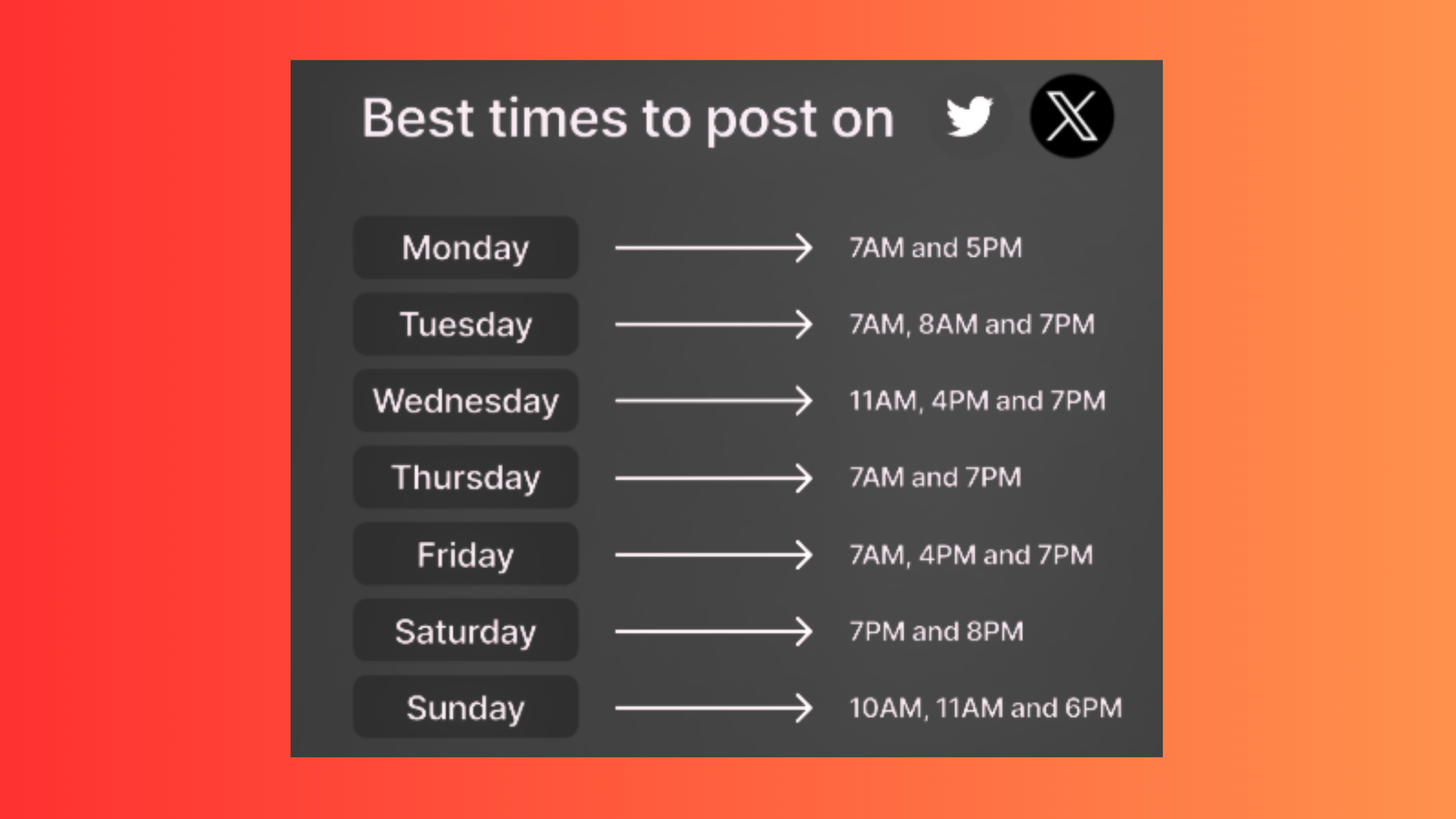
According to Sprout Social (2026), there is a sharp engagement peak at 8 a.m. on Tuesdays and Wednesdays — capturing the "pre-market coffee scroll" before most users switch into work mode. Buffer's 2026 analysis identifies 9 a.m. on Wednesday as the single best posting time across accounts. These windows are consistent enough to use as defaults when you are starting out.
Tweets with images receive 150% more retweets than those without, according to Brenton Way's 2026 Twitter statistics analysis. In practice, this means adding a simple quote card or screenshot to your scheduled posts — not elaborate graphics — is one of the highest-ROI format changes you can make. A plain text tweet with a 30-second visual asset consistently outperforms that same tweet without one.
The best time to post on Twitter for engagement, aggregated across multiple 2026 datasets:
- Best days: Tuesday, Wednesday, Thursday
- Best morning window: 8–9 a.m. in your audience's primary timezone
- Best midday window: 9–11 a.m. and 12–1 p.m. (per Hootsuite data cited by Stack Influence)
When is the worst time to post on Twitter: late Friday afternoons (3 p.m. onwards), Saturday mornings for B2B audiences, and any window during a major breaking news event — when a single topic dominates the timeline and organic content is essentially invisible.
Using Your Own Data to Override Generic Timing Advice
Generic timing benchmarks are a starting point. Your own Twitter analytics tools will tell you when your audience is actually online — and that number is often different from the industry average, particularly if your audience is concentrated in a specific region or professional niche. Check native Twitter Analytics under the "Audience" tab monthly, and adjust your scheduled windows accordingly. After seeing this across multiple account types, the pattern is clear: accounts that calibrate to their own audience data outperform accounts following generic benchmarks by roughly 20-30% on click-through rates.
With timing optimised, the next lever is structure — specifically, how threads and CTAs determine whether your audience clicks or just scrolls past.
Twitter Thread Publishing Tips and Tweet-to-Landing-Page Funnel
Threads consistently outperform standalone link tweets for driving external traffic. The mechanic is straightforward: a thread builds trust and context over 5-10 tweets before asking for the click, which improves landing page conversion compared to a cold link with two lines of copy. Think of a thread as a mini sales page that lives inside Twitter's native format.
Thread Structure for Maximum Click-Through
The thread structure for traffic that works across verticals follows a consistent pattern:
- Hook tweet (tweet 1): A bold claim, surprising stat, or direct promise — no link here. The hook earns the read; adding a link in tweet 1 signals to the algorithm that you are trying to send people away, which suppresses distribution.
- Value tweets (tweets 2-7): Deliver the promised value in discrete steps or insights. Each tweet should be complete enough to stand alone.
- Credibility tweet (tweet 8): A specific result, case study sentence, or validation point.
- CTA tweet (final tweet): One clear action. Use specific Twitter call-to-action copy — "Grab the free template" outperforms "Check the link" consistently because it names the value the reader is getting.
The tweet-to-landing-page funnel works because you have answered the reader's core question before they click. They are not arriving cold — they arrive already convinced, which is why thread traffic tends to convert at higher rates than direct link posts.
Common Twitter Publishing Mistakes That Kill Reach and Traffic
The question "why is my Twitter reach so low" almost always has one of three answers:
- Link in tweet 1 of a thread — suppresses algorithmic distribution before the thread has a chance to build engagement
- No engagement in the first 15 minutes — the algorithm reads early engagement velocity as a quality signal; a post with zero interaction in the first 15 minutes rarely recovers its distribution window
- Posting and disappearing — accounts that post and immediately log off miss the reply window where early engagement is most concentrated
Choosing the right tool to manage this workflow makes the difference between a system that runs itself and one that adds daily friction.
Best Twitter Scheduling Tools for Creators: Buffer vs Hootsuite and Beyond
The best Twitter scheduling tools for creators depend entirely on use case. Solo creators need thread-native scheduling, a simple queue interface, and link-in-bio features. Agencies need multi-account management, approval workflows, and cross-platform reporting. No single tool wins both categories.
What to Look for in a Twitter Scheduling Tool
Before comparing specific tools, the non-negotiables for any automate Twitter posting workflow setup:
- Native thread scheduling (not just individual tweets)
- Optimal send-time suggestions based on your account data
- Queue-based publishing (not just calendar slots)
- Analytics that surface click-through rate, not just impressions
- Bulk import or CSV upload for content batching
| Tool | Best For | Thread Support | Price Range | Standout |
|---|---|---|---|---|
| Buffer | Solo creators | ✓ Native | Free – $18/mo | Simplest UX, clean queue |
| Hootsuite | Teams / agencies | ✓ Via composer | $99+/mo | Approval flows, multi-platform |
| Typefully | Thread-heavy creators | ✓ Thread-first | Free – $19/mo | Best thread editor available |
| Hypefury | Growth-focused users | ✓ Native | $19–$49/mo | Auto-retweet, evergreen queue |
On the question of Buffer vs Hootsuite for Twitter scheduling: Buffer wins on simplicity, cleaner thread scheduling, and a much lower price point for individuals. Hootsuite wins for teams that need content approval workflows, multi-account management across 5+ profiles, and integrated reporting. Neither is universally better — the right choice depends on whether you are a solo operator or managing multiple accounts for clients.
For Twitter analytics tools to track post performance, native Twitter Analytics covers basic impressions and engagement. Third-party tools like Typefully and Shield add historical data, link click tracking, and content performance patterns that the native dashboard does not surface — particularly useful for identifying which thread topics actually drive clicks vs. which ones just collect likes.

Manage Your LinkedIn Presence on Autopilot Too
While you're optimising your Twitter workflow, HyperClapper handles LinkedIn engagement with real community boosts and AI-powered replies — so both channels grow without doubling your time.
See How HyperClapper WorksHow to Embed Tweets and Twitter Feeds on Your Website
Embedded tweets are live tweet renderings inside a webpage — Twitter Publish generates the oEmbed HTML code that makes this work. They are useful for adding social proof to blog posts, product pages, and landing pages without manually screenshotting content.
How to Embed a Tweet Step by Step
The process using Twitter Publish is straightforward:
- Navigate to publish.twitter.com
- Paste the URL of the tweet you want to embed
- Select your display options (theme, width)
- Copy the generated HTML snippet
- Paste into your CMS — works in WordPress (both Classic and Block editor via a Custom HTML block), Shopify page sections, and any raw HTML template
For a Twitter feed embed (a full timeline widget), use the "Embedded Timeline" option in Twitter Publish — select Profile, List, or Collection. This is useful for brand pages and sidebars showing recent activity, though it carries the page speed tradeoffs described below.
Performance and Privacy Risks of Embedded Tweets
The benefits of embedding Twitter content — dynamic engagement counts, visual variety, real-time updates — come with real costs that most implementation guides skip entirely.
Page speed impact: Twitter's embed script (widgets.js) is a render-blocking resource. A single embedded tweet can add 300-500ms to page load time. Multiple embeds on one page create measurable Core Web Vitals degradation, particularly on Largest Contentful Paint (LCP) and First Input Delay (FID). The fix is to load embeds asynchronously or use a lazy-loading wrapper — both WordPress plugins like Embed Privacy and manual async loading via JavaScript solve this.
What happens to embedded tweets if the original tweet is deleted: The embed renders as a broken card — a grey box with a "This tweet is unavailable" message. There is no fallback content. For evergreen content that relies on embedded tweets for key evidence or quotes, this is a real risk. Screenshot backups or static quote cards are a more reliable long-term format.
Privacy and GDPR considerations: Twitter's embed script drops third-party cookies on page load, which means it counts as a third-party data processor under GDPR. Sites operating in the EU need to either obtain user consent before loading the embed or use a consent-wrapper solution that delays the script until consent is given. Ignoring this is a compliance risk, not just a technical one.
Alternatives to Twitter Publish for Embedding Social Content
When page speed, privacy compliance, or reliability are concerns, several alternatives handle social embeds more cleanly:
- EmbedSocial / Curator.io: Aggregate feeds with GDPR-compliant loading and caching
- Static screenshot + link: Zero performance cost, fully accessible, no breakage risk — loses live engagement data
- Juicer.io: Multi-platform social feed aggregator with consent management built in
- Manual blockquote with link: Native HTML
<blockquote>citing the tweet URL — no script dependency, fully indexable text content
Teams that consistently prioritise Core Web Vitals find that static approaches — screenshots or styled blockquotes — deliver the social proof benefit without the performance penalty. The dynamic engagement counter an embedded tweet shows is rarely the reason a reader trusts the content.
✓ The Twitter Publishing Efficiency Checklist
- ☐Set up one weekly 90-minute batching session — write and queue all content in one go
- ☐Schedule first posts for Tuesday or Wednesday at 8–9 a.m. in your audience's timezone
- ☐Build a repurposing template: every blog post generates at least 5 tweet formats
- ☐Place external links in the final thread tweet — never in tweet 1
- ☐Use specific CTA copy ("Download the checklist") not generic ("See the link")
- ☐Audit embedded tweets on your site — check for broken cards after the X rebrand API changes
- ☐Review Twitter Analytics monthly to calibrate your posting windows to your actual audience
- ☐Add a consent wrapper to embedded tweet scripts if operating under GDPR jurisdiction
Ready to Apply the Same Efficiency to LinkedIn?
Frequently Asked Questions About Twitter Publishing Best Practices
What is the most efficient way to manage Twitter posting without spending hours every week?
Batching all your content into one or two focused weekly sessions is the single most efficient approach. Write every tweet and thread in a single document, then queue them in your scheduling tool in one pass. This separates creative work from publishing and cuts total weekly time to under three hours.
How do top social media managers batch and schedule Twitter content?
Top social media managers dedicate a 90-minute block — typically Monday — to write and schedule an entire week of content at once. They draft everything in a document first, then import it into a tool like Buffer or Hootsuite. Replies and engagement are handled in separate, time-boxed daily check-ins rather than open-ended browsing sessions.
Does posting time really affect Twitter engagement or is it a myth?
Posting time genuinely affects early engagement velocity, and the first 30 minutes after publishing matter most. A strong initial signal — replies, retweets, clicks — tells the algorithm to push the tweet further. The specific hour matters less than avoiding known dead zones like late nights and early weekday mornings in your audience's timezone.
What Twitter publishing mistakes waste the most time for content creators?
Logging in daily to post reactively is the biggest time drain — creators who do this spend 45 to 60 minutes per day on a task that batch scheduling reduces to under 30 minutes weekly. Other costly mistakes include posting standalone links without thread context, ignoring analytics entirely, and manually reposting content that a repurposing workflow would handle automatically.
Can automating Twitter posts hurt your reach or account standing?
Automation itself does not hurt reach when used correctly. Scheduling tools that post via Twitter's official API are platform-compliant and carry no algorithmic penalty. Problems arise when automation replaces all human interaction — accounts that never reply or engage organically see declining reach because the platform deprioritises one-way broadcast behaviour over time.
What is the best Twitter scheduling tool for solo creators versus teams?
Buffer is generally the better fit for solo creators because its interface is simpler and its pricing scales down to individual use. Hootsuite suits teams that need multi-account management, approval workflows, and shared content calendars. Neither is universally superior — the right choice depends on team size and whether you need collaboration features or just a clean publishing queue.
How do you repurpose long-form content for Twitter without it feeling repetitive?
Treat each long-form piece as a source asset that generates multiple distinct tweet formats: an announcement link tweet, a thread summarising key takeaways, and two or three standalone insight posts pulled from different sections. Spacing these out over one to two weeks keeps your feed varied while one piece of content fuels an entire week of posts.



