A recurring pattern among professionals trying to improve their LinkedIn presence is that they rewrite their summary three or four times and still end up with something that sounds exactly like everyone else's. The problem is almost never effort — it's structure. Most LinkedIn summaries open with a job title echo or a generic trait list, waste the only 300 characters LinkedIn shows before the "see more" cutoff, and miss the one thing a strong linkedin summary generator or a human writer must do: answer the reader's silent question, "Why should I care about this person?" According to YaduLink (2026), an optimized summary generates 3.2x more profile views and 2.8x more connection requests on average. This guide shows you exactly how to fix that — with real examples, copy-ready templates, and a practical prompt framework for using AI without sounding like a bot.
- For whom: Job seekers, founders, freelancers, recruiters, and professionals who want their LinkedIn About section to actually convert readers into connections or opportunities.
- What you'll learn: How to structure, write, and optimize a LinkedIn summary — with role-specific examples, step-by-step instructions, and AI prompting frameworks.
- Why it matters: LinkedIn's algorithm indexes the About section for keyword ranking — a weak summary hurts both recruiter visibility and search placement.
- Most counterintuitive finding: The opening line matters more than the entire rest of the summary — LinkedIn shows only ~300 characters before cutting to "see more."
- AI tools help — but only if prompted correctly: Generic prompts produce generic output. The prompt quality determines whether the result sounds like you or like a job description template.
- The one thing most profiles get wrong: Listing traits instead of building a career narrative arc with specific, verifiable outcomes.
- What Is a LinkedIn Summary — and Why Most People Get It Wrong
- Why Your LinkedIn Summary Sounds Generic — and How to Fix It
- How Long Should a LinkedIn Summary Be — and What to Include
- How to Start a LinkedIn Summary Without Saying "I Am"
- LinkedIn Summary Examples That Actually Work (By Career Stage and Role)
- How to Write a LinkedIn Summary Step by Step
- Using a LinkedIn Summary Generator Without Sounding Like a Robot
- Does Your LinkedIn Summary Actually Matter for Job Search and Recruiter Visibility
- LinkedIn Summary Templates You Can Actually Customize
- LinkedIn Profile Writing Services — When to DIY and When to Hire
- Frequently Asked Questions About LinkedIn Summaries
What Is a LinkedIn Summary — and Why Most People Get It Wrong
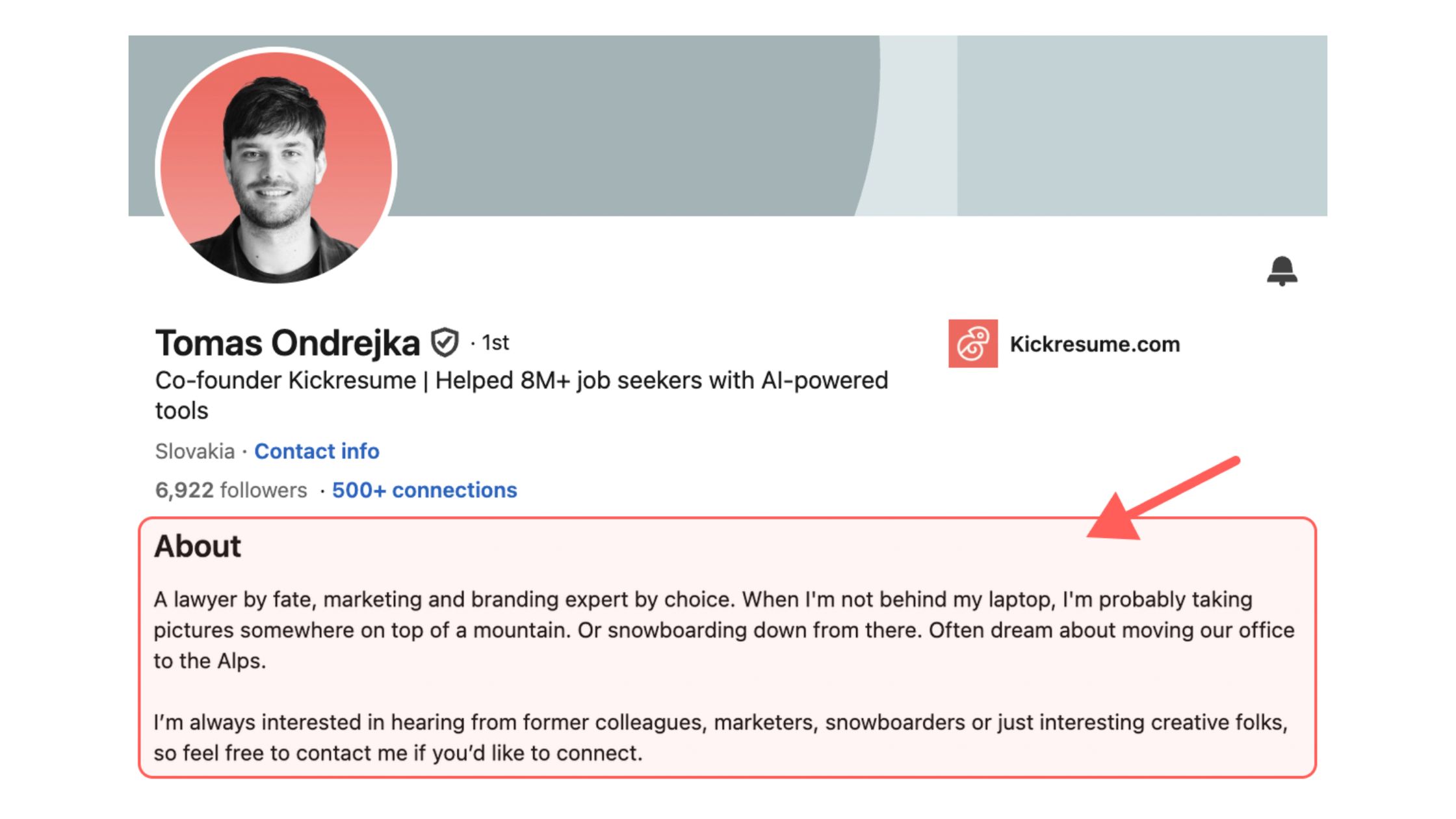
The LinkedIn About section is a 2,600-character field that functions as your professional brand statement — not a resume rewrite, not a job title echo, and definitely not a list of adjectives. It's the only place on your profile where you get to speak directly, in your own voice, to someone who just became curious enough to click on your name. Most profiles waste it entirely.
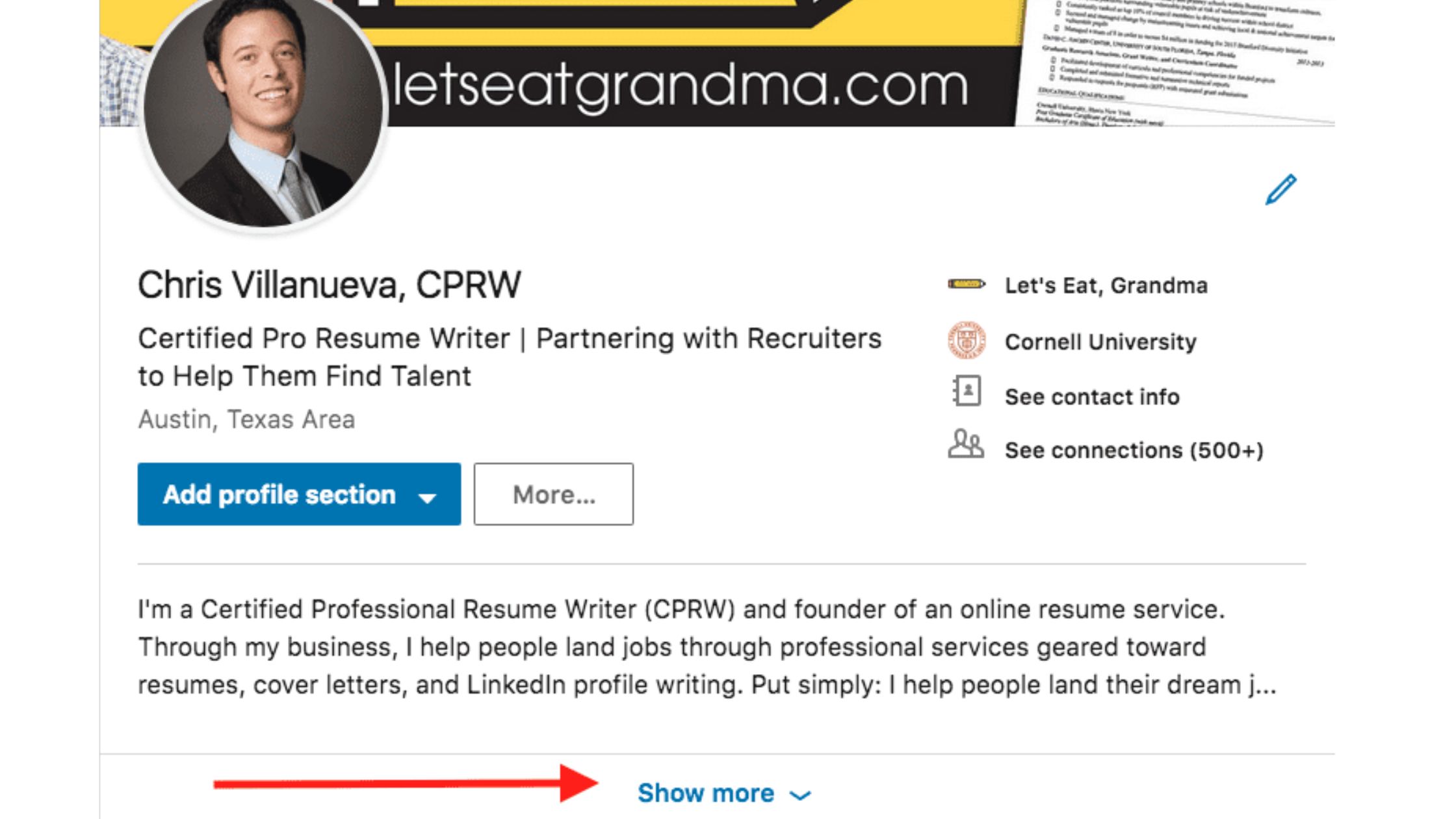
The most common failure mode is opening with "I am a passionate professional with X years of experience in Y." Recruiters and potential clients have read that sentence roughly ten thousand times. It provides no signal about what makes you worth reaching out to. Worse, it wastes the critical first 300 characters — the only text LinkedIn displays in search results and profile cards before requiring a click to read more.
How LinkedIn's Algorithm Reads Your About Section
LinkedIn's search algorithm treats the About section as a primary keyword field — meaning profile visibility signals are directly tied to what you write there. If a recruiter searches "B2B SaaS marketing leader" and your About section contains exactly those words in a natural context, you surface. If your About section says "passionate about driving results," you don't. Think of it as a second headline: whatever terms describe your work most precisely belong in the first two sentences, not buried at the end of the third paragraph.
LinkedIn also rewards completeness. According to The Muse, LinkedIn All-Star users — whose profiles score highest on completeness — are 40 times more likely to receive opportunities through the platform. The About section is one of the key completeness signals. Having 40 words or more in your summary also ensures you appear in LinkedIn's keyword search results at all, which makes it a baseline requirement, not an optional polish step.
Now that you understand what the algorithm is actually reading, the next question is why so many well-intentioned summaries still come out sounding identical.
Why Your LinkedIn Summary Sounds Generic — and How to Fix It
Teams that audit profiles at scale consistently see the same structural problem: summaries list traits instead of building a career narrative arc with specific outcomes. "Results-driven," "team player," "passionate about innovation" — these phrases appear on in roughly 8 out of 10 profiles reviewed across industries. They're not lies. They're just useless signals because they don't differentiate anyone from anyone else.
AI-generated summaries make this worse when the input is weak. A linkedin summary generator reflects what you give it. Feed it "I'm a marketing manager with 7 years of experience," and it produces a polished version of that same vague description. The tool isn't the problem — the prompt is. Authentic voice optimization requires specific raw material: actual numbers, named industries, real problems you've solved, and specific methodologies you use.
The most common reason a LinkedIn summary sounds robotic isn't that it was written by AI — it's that it was written without specificity, and AI simply packages that vagueness more fluently.
Common Mistakes to Avoid in Your LinkedIn Summary
The mistakes fall into a predictable pattern:
- Opening with a job title restatement — "Senior Product Manager at [Company]" is already in your headline. Don't repeat it in your About section.
- Using unmeasured trait language — "passionate," "driven," "results-oriented" tell the reader nothing verifiable.
- Writing in the third person — "John is a seasoned executive..." reads like a press release and creates distance. LinkedIn is a first-person platform.
- No call to action — The summary ends, and the reader has no idea what to do next.
- One solid wall of text — Recruiters skim. A 300-word paragraph with no line breaks gets skipped.
- Keyword stuffing without context — Dropping in "SEO | SEM | Google Analytics | PPC" as a list signals desperation, not expertise.
The fix is straightforward: replace every adjective with a specific fact. "Results-driven" → "reduced client churn by 34% in Q3 2024." That one swap does more for your credibility than any amount of polished prose around it.
How Long Should a LinkedIn Summary Be — and What to Include
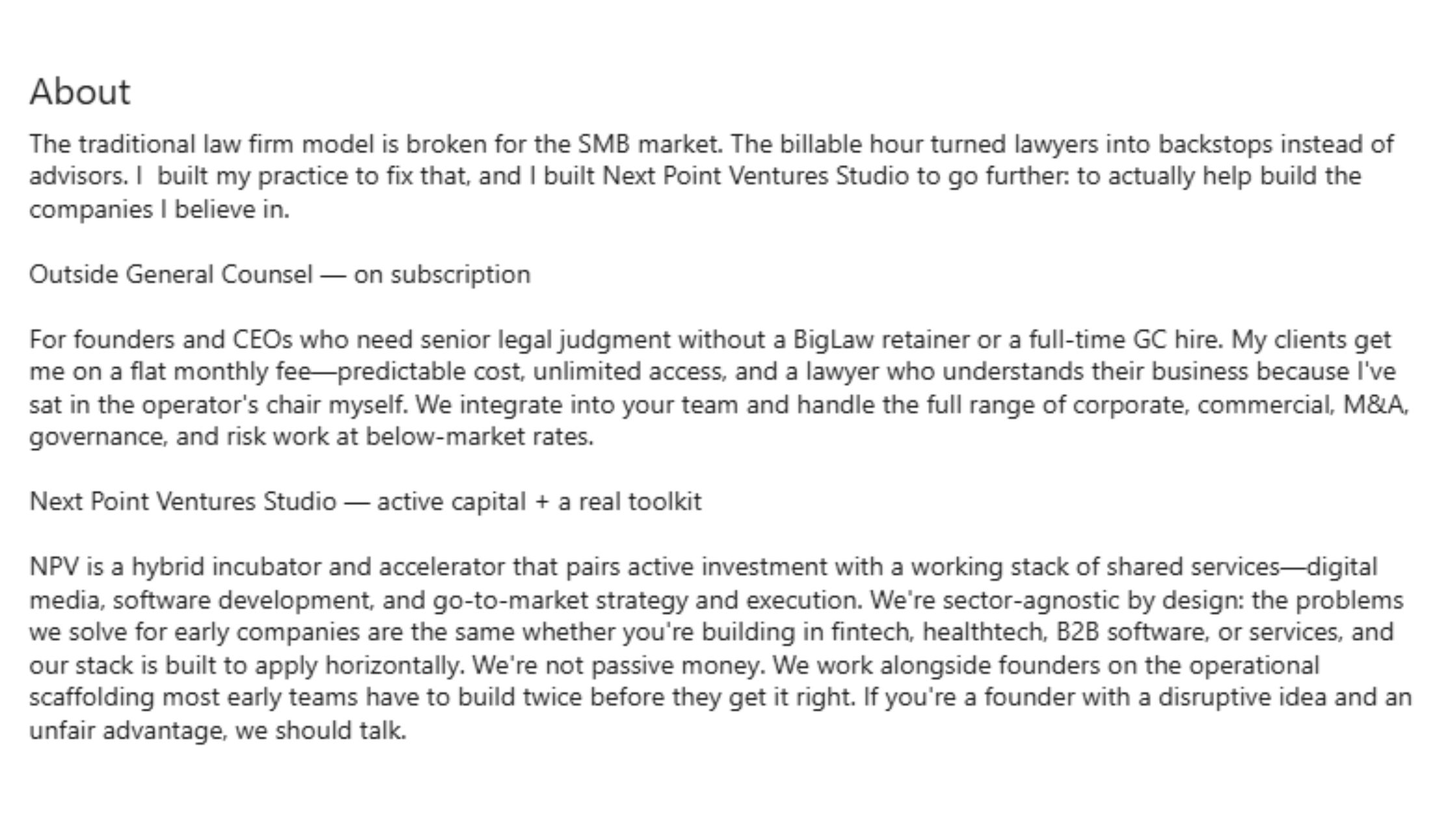
The optimal range for most professionals is 1,200–1,800 characters (roughly 200–300 words). The field allows 2,600 characters, but longer is not better — it's just more of the same risk that your key points get buried before the reader clicks away. The 200–300 word range is long enough to show depth, short enough to hold attention, and broad enough to include meaningful keywords without stuffing.
What consistently separates high-performing summaries from average ones is not length — it's the density of useful signal per line. A 150-word summary that answers "who do I help, how do I help them, and what should you do next" outperforms a 400-word summary that restates the Experience section in different words.
What to Include in a LinkedIn About Section
A well-structured summary covers four elements:
- Opening hook (first 1–2 sentences, 200–300 characters max) — a problem you solve, a result you've driven, or an audience-first statement. This is what shows before "see more."
- Core expertise + context (2–3 sentences) — specific industries, methodologies, tools, or the scale at which you operate. This is where profile visibility signals and keyword relevance live.
- One or two specific achievements — a number, a named outcome, or a recognizable context. Not a list of everything you've done; one or two things that prove the claim above.
- Call to action (1 sentence) — what should a reader do next? "Connect with me if..." / "Reach out at..." / "Visit [URL] to see..." Give them a clear next step.
How to Start a LinkedIn Summary Without Saying "I Am"
The strongest openers put the reader's context first — a problem they recognise, a result they want, or a specific audience they belong to. The question of how do I start a LinkedIn summary without saying I am has a simple answer: don't start with yourself at all. Start with the person reading it.
Four approaches that work consistently:
- Problem-first: "Most B2B pipelines stall not because the product is weak — but because the messaging is generic." (Then explain what you do about it.)
- Result-first: "40% reduction in customer acquisition cost. That's the typical outcome when I take over a paid media account." (Immediate credibility signal.)
- Audience-first: "For early-stage founders navigating their first marketing hire — I've been that hire 11 times." (Immediate relevance signal.)
- Question-first: "What does it actually take to scale a product from 0 to $1M ARR without a sales team?" (Earns the click every time, if the question is specific.)
Each of these passes the "why should I care" test in the first sentence. None of them require you to describe yourself before earning the reader's attention.
LinkedIn Summary First Person vs Third Person
Write in first person. Always. The LinkedIn summary first person vs third person debate isn't really a debate — third person ("Sarah is an award-winning strategist who...") reads like a press bio, signals that someone else wrote it or that the author is uncomfortable with directness, and creates an uncomfortable distance on a platform designed for direct professional connection.
First-person first-person tone calibration means writing as yourself — specific, direct, and honest — without turning the About section into a stream of consciousness. The goal is the confidence of someone who knows exactly what they do and who they do it for. That voice is first person, and it's not shy about outcomes.
LinkedIn Summary Examples That Actually Work (By Career Stage and Role)
Examples segmented by career stage outperform generic templates because the structural challenge is genuinely different at each level. A recent graduate has no metrics to cite; a senior executive has too many and needs to edit ruthlessly. The examples below demonstrate how the same four-part structure — hook, expertise, evidence, CTA — adapts across contexts.
LinkedIn Summary Examples for Job Seekers and Recent Graduates
The most anxious group when it comes to the About section is early-career professionals and career changers who feel like they have nothing to put there. That anxiety is misplaced. A strong summary at this stage isn't about what you've done — it's about what you're moving toward and why, supported by whatever specific experience you do have (projects, internships, coursework, freelance work, volunteer roles).
Example — Recent Graduate (Marketing):
Marketing graduate with hands-on experience running paid social campaigns for a campus startup that reached 12,000 users in six months. I focus on the intersection of data and creative — obsessive about what makes someone stop scrolling. Looking for my first full-time role in digital marketing or growth, ideally at a company where testing is part of the culture. Open to connect or chat — reach me at [email].
What works here: a specific number (12,000 users), a clear perspective ("obsessive about what makes someone stop scrolling"), and a direct ask. The candidate has no career history — and doesn't need one to make this compelling. This is one of the better LinkedIn summary examples for those just starting out.
Example — Career Changer (Teacher → Instructional Designer):
After eight years designing curriculum for high-needs classrooms, I moved into instructional design because the skills transfer completely and the scale multiplies by a thousand. I now build learning experiences for enterprise teams — using the same principles that got a 94% course completion rate in a district with 60% ESL enrollment. If you're building L&D at a company where learner outcomes actually matter, let's talk.
LinkedIn Summary Examples for Sales, Marketing, Engineering, and HR
For mid-career professionals, the structural challenge is usually too much to say. The discipline is narrowing to the one or two things that define your professional brand statement — the claim that makes someone think "that's exactly who I need."
Example — Marketing Leader:
I build demand generation engines for B2B SaaS companies between $5M and $50M ARR — the stage where performance marketing starts to matter more than hustle. In the last three years: 3 companies, 2.4x average pipeline growth, 1 acquisition. Currently open to VP Marketing conversations. Reach out directly or connect and I'll follow up.
Example — Software Engineer:
Backend engineer with a focus on distributed systems and latency reduction. Most recent project: rebuilt a payment processing microservice that cut p99 latency from 840ms to 120ms. I care about code that's readable three years later by someone who wasn't in the room. Open to senior and staff-level roles at product companies. Coffee or async chat — happy either way.
Example — HR Professional:
HR business partner with 9 years supporting high-growth tech companies through their first 10 to 200 person scale-ups. My focus is building the talent infrastructure before it becomes urgent — structured hiring, manager development, and comp frameworks that don't embarrass you when you IPO. Ask me about the time I rebuilt an entire onboarding system in 30 days during a hiring freeze.
LinkedIn Summary Examples for Freelancers, Consultants, and Recruiters
The core challenge for freelancers and consultants writing a personal brand LinkedIn summary is making it clear that you're open for business without sounding desperate — and making it easy for the right clients to self-select. The summary should answer two questions simultaneously: "What exactly do you do?" and "Is this person for me?"
Example — Freelance Consultant:
Independent go-to-market consultant for Series A and B SaaS companies that have product-market fit but haven't yet figured out the sales motion. I work in 90-day engagements. Typical outcome: a defined ICP, a repeatable outbound sequence, and a pipeline that doesn't depend entirely on founder relationships. Two to three clients at a time. Currently have one opening for Q3. DM me if the timing works.
Example — Recruiter (Agency or In-House):
Technical recruiter specialising in engineering and product roles for Series A–C startups. I've placed 200+ engineers across 40+ companies and I still pick up the phone for every candidate. If you're a hiring manager tired of ghost candidates, or an engineer tired of irrelevant outreach, I do things differently. Let's find out if that's worth a 15-minute call.
For more examples across roles, see the full LinkedIn summary examples guide with additional before/after breakdowns.
How to Write a LinkedIn Summary Step by Step
The most common failure mode when people sit down to write their summary is starting with the words. Start with the brief instead. Before you write a single sentence, answer four questions — and the writing becomes almost automatic.
- Define your goal (2 minutes). Are you open to new roles, building a client pipeline, growing a personal brand, or establishing thought leadership? The answer changes every word that follows. A job seeker needs intent signals and keywords. A consultant needs a value proposition and a CTA. A thought leader needs a perspective and a proof point. If you skip this step, the summary tries to do everything and accomplishes nothing.
- Write your opening hook (5 minutes). Use one of the four opener types from the previous section. Draft three options. Pick the one that would make you stop scrolling. Keep it under 220 characters.
- Build the evidence layer (10 minutes). Two or three sentences. Specific industries, specific outcomes, specific tools or methodologies that define your approach. Replace every adjective with a fact. "Experienced in SaaS" → "8 years in B2B SaaS, mostly focused on mid-market enterprise sales."
- Close with a clear next step (2 minutes). One sentence. What should someone do after reading this? "Connect with me if you're hiring for [role type]." "Reach out at [email] if you need [specific outcome]." "Visit [URL] to see recent work." Don't leave the reader with nowhere to go.
LinkedIn Profile Tips to Stand Out Beyond the About Section
The About section works hardest when the rest of the profile reinforces it. Isolated optimization — a strong summary on an otherwise thin profile — produces limited results. The headline carries keywords; the Experience section provides evidence; the Featured section shows proof. A well-written summary on a profile with a blurry photo, an empty headline, and zero recommendations still underperforms. For a broader view of what makes a complete profile work, the LinkedIn optimization guide covers the full picture — including headline strategy and Featured section placement.
How Often Should You Update Your LinkedIn Summary
Update your summary whenever your goal changes — not on a fixed calendar schedule. Four triggers that justify a rewrite:
- You're actively job searching (update to signal availability and intent)
- Your role, title, or industry has shifted meaningfully
- Your primary audience has changed (e.g., pivoting from B2B to B2C consulting)
- Your summary is getting profile views but not converting to messages or connections (a signal it's attracting the wrong readers)
What does not justify a rewrite: minor job changes within the same role, adding new skills that belong in the Skills section, or routine updates to keep it "fresh." Unnecessary rewrites introduce new problems and rarely fix the real ones.
Using a LinkedIn Summary Generator Without Sounding Like a Robot
An ai linkedin summary generator is software that produces a draft LinkedIn About section based on the inputs you provide — your role, experience, target audience, and goals. The fastest way to understand the quality ceiling of any generator is this: it can only be as specific as the information you give it.
The practical gap most guides miss — and the gap that shows up repeatedly in community discussions — is that writers tell readers to "use AI" without showing which details to feed the tool. The prompt quality is the entire variable. A bare prompt produces generic output. A specific prompt produces something that actually sounds like you.
According to testing covered by JobRight.ai (2026), the best AI LinkedIn summary generators work most effectively when they're given rich narrative input — not just job titles and years of experience, but specific outcomes, audience descriptions, and tone guidance.
How to Prompt an AI Tool to Match Your Real Voice
This is The Voice-Match Prompt Framework — the input structure that consistently produces summaries that read like the person, not like a template.
Give the tool these six inputs:
- Your role and target audience: "I'm a B2B SaaS marketing leader targeting Series A–C startups."
- Your goal for the summary: "I'm building inbound consulting pipeline, not job searching."
- Two or three specific achievements with numbers: "Grew organic pipeline by 180% over 18 months. Reduced CAC by 27% in one quarter."
- Your tone in one sentence: "I write like I talk — direct, specific, no buzzwords."
- What you want readers to do after reading: "Send me a DM if they're building a demand gen function from scratch."
- One thing you want to avoid: "Don't use the words 'passionate,' 'results-driven,' or 'leverage.'"
That sixth point — telling the tool what not to produce — is the most underused input and the one that has the most impact on whether the output sounds like you or like everyone else.
Can ChatGPT Write Your LinkedIn Summary — and Should It?
ChatGPT can produce a strong first draft. It should not produce your final summary without a human editing pass. The distinction matters because AI tools default to their training distribution — which means they produce the most statistically common version of a LinkedIn summary, not the most distinctive one. Creators who skip the editing step typically find that their AI-written summary reads identically to summaries produced for people in entirely different industries, which defeats the purpose of the About section entirely.
The right workflow: use a linkedin profile summary generator or ChatGPT to get to a full draft fast, then do one pass to reinsert your actual voice — swap one generic phrase for a specific example, restore any unusual word choices the tool smoothed out, and confirm the call to action matches your actual goal. That combination beats both writing from scratch (slower) and publishing the raw AI output (less authentic).
Get More Eyes on Your LinkedIn Content
A great summary gets people to your profile. HyperClapper gets your posts seen by the right people — real engagement from real professionals in your niche, not bots.
See How HyperClapper WorksFrequently Asked Questions About LinkedIn Summaries
What is a good summary for a LinkedIn profile?
A good LinkedIn summary opens with a specific, compelling hook in the first 300 characters, then builds a career narrative using real outcomes, named industries, and verifiable numbers. It speaks directly to the reader's question of why you matter — not what your job title is.
Can ChatGPT write my LinkedIn profile?
Yes, ChatGPT can write your LinkedIn profile, but only if you give it specific inputs — actual results, target roles, industries, and your tone of voice. Generic prompts produce generic output. Feed it raw material like metrics and named problems solved, and the result sounds like you rather than a job description.
Can AI write my resume summary?
AI can write a strong resume summary when prompted with specific context: years of experience, measurable achievements, target role, and industry. Without that detail, AI defaults to filler phrases like 'results-driven professional.' The quality of your prompt directly determines whether the output is usable or generic.
What makes a LinkedIn summary stand out from the rest?
A standout LinkedIn summary leads with a specific outcome or bold statement in the first sentence, uses first person, and tells a career story rather than listing traits. Concrete numbers, named problems you've solved, and a clear value proposition for your target reader separate memorable profiles from the other 1.3 billion.
Can you give me an example of a unique LinkedIn summary?
A unique summary might open: 'I help Series A SaaS companies cut churn by fixing the onboarding gaps their product teams miss — reduced 30-day drop-off by 41% across three clients in 18 months.' It names the audience, states the outcome, and leads with proof rather than personality adjectives or a job title echo.
What are the biggest mistakes people make in their LinkedIn summary?
The biggest mistakes are opening with a job title restatement, using vague traits like 'passionate' or 'results-driven,' and burying the hook past the 300-character cutoff. Writing in third person, omitting measurable outcomes, and skipping a clear call to action are also common errors that make profiles invisible to recruiters.
How do I write a LinkedIn summary that gets recruiters to reach out?
Place your target role keywords naturally in the first two sentences so LinkedIn's search algorithm surfaces you. Follow with two or three specific achievements with numbers, name the industries or company types you serve, and end with a direct call to action — an email address or an invitation to connect with context.
Should I write my LinkedIn summary in first person or third person?
Write in first person. Third-person summaries read as stiff and impersonal — phrases like 'John is a strategic leader' signal that someone else wrote it, which undercuts authenticity. First person creates a direct conversation with the reader and aligns with how LinkedIn is designed to function as a professional networking platform.
How long should a LinkedIn summary be?
Aim for 200 to 400 words, using LinkedIn's full 2,600-character limit only if every sentence earns its place. The opening 300 characters are the most critical since that is all LinkedIn displays before 'see more.' Shorter summaries under 40 words may not appear in keyword search results at all.



