A LinkedIn profile view is a record of someone visiting your profile page — and what you can do with that data depends almost entirely on two things: your account tier and the viewer's chosen privacy setting. Free accounts see only the 5 most recent visitors and a 90-day total count. Premium unlocks up to 365 days of named viewer history, trend graphs, and filters by company, title, or location. The catch that most guides never mention: the moment you enable Private Mode to browse anonymously yourself, LinkedIn immediately disables your ability to see who has viewed your profile — even on Premium. That tradeoff is the real story here.
- Free users see only the 5 most recent profile viewers and a 90-day view total — names only appear if the viewer used Public mode.
- LinkedIn Premium unlocks 365 days of viewer history, filter tools (company, title, location), and viewer trend graphs.
- Private Mode is a one-way door — enabling it hides your visits from others, but also blinds you to your own viewers simultaneously.
- A viewer's subscription tier (free vs. Premium) does not affect whether you can see them — their privacy setting does.
- A complete LinkedIn profile generates 21x more profile views than an incomplete one, making optimization the highest-ROI visibility lever available.
- Your viewer list is a warm-lead signal — the most actionable move is reaching out within 48 hours of a high-value viewer visiting.
- Does LinkedIn Show Who Viewed Your Profile — and How Does It Work?
- Free vs. Premium Profile Views: Exactly What Each Plan Shows You
- How to View a LinkedIn Profile Anonymously — and the Real Tradeoffs
- How to Use Your LinkedIn Profile Viewer Data and Grow Views Organically
- Frequently Asked Questions About LinkedIn Profile Views in 2026
Does LinkedIn Show Who Viewed Your Profile — and How Does It Actually Work?
LinkedIn does notify you when someone views your profile, but what you can see about that visit depends on two variables: the viewer's selected privacy mode and your own account tier. A viewer who browsed in Public mode shows up with their full name, headline, and company. A viewer in Private mode appears as a generic "LinkedIn Member" entry with no identifying data whatsoever. Your subscription level controls how many viewers you can see and how far back the history goes — it does not magically unmask anonymous visitors.
One detail worth knowing upfront: whether a viewer has a free or Premium account does not affect your ability to identify them. What matters is the viewer's chosen privacy setting, not their subscription tier. A Premium member browsing in Private mode is just as invisible to you as a free user doing the same.
The Four LinkedIn Viewing Modes and Their Exact Consequences
LinkedIn offers four distinct ways to view profile on LinkedIn, each with a different visibility outcome for both parties:
- Public (Your name and headline): The viewer is fully identified to the profile owner. You, the viewer, retain access to your own viewer list. Most professionals browse this way.
- Semi-private (Job title and industry only): The profile owner sees something like "A marketing manager in the tech industry" — no name, no company. You keep your viewer data intact.
- Private mode (LinkedIn Member): The profile owner sees only a generic anonymous visit. You lose the ability to see your own viewer list entirely — including on Premium. This is the tradeoff LinkedIn buries in fine print.
- Logged-out / incognito browser: No notification is sent to the profile owner at all. The visit is invisible. You see whatever LinkedIn shows publicly without logging in.
A recurring pattern among users trying to use Private Mode is genuine surprise when they discover their own viewer list has gone dark. LinkedIn surfaces this in Settings but does not make it prominent during the mode-selection step — which is why it keeps catching people off guard.
What Information Do LinkedIn Profile Viewers Actually See About You?
When someone visits your profile, what they see is your LinkedIn profile visibility settings at work. A public profile shows your full name, headline, location, current role, education, skills, and recent activity. If you have set your profile to be visible only to logged-in members, logged-out viewers see a stripped-down version. Crucially, does LinkedIn notify you when someone views your profile? Yes — but only if they are logged in. Anonymous browser visits from logged-out sessions generate no notification on your end.
The most valuable insight here is not who viewed you — it is the pattern of when and from where they viewed you. A cluster of views from a specific company following a post is a stronger buying signal than a random single visit.
Free vs. Premium Profile Views: Exactly What Each Plan Shows You in 2026
The gap between free and paid is significant for anyone who wants to turn profile view linkedin data into actionable intelligence. Free accounts show only the 5 most recent visitors — names visible only if those viewers browsed in Public mode — plus a rolling 90-day view count. That 90-day total tells you momentum but not identity. According to LinkedIn Help Center, free users also do not see visitor data for profile views beyond the most recent handful, and viewing timeframes may vary.
A complete LinkedIn profile generates 21x more profile views than an incomplete one, according to Cognism's 2026 LinkedIn statistics. In practice, this means your profile's completeness — photo, headline, summary, skills — is a bigger driver of inbound views than any paid feature. This means optimizing your profile is the single highest-ROI action before worrying about which plan to buy.
How Many Profile Views Can You See on LinkedIn Free — and Where the Gaps Are
On a free account, how many profile views can you see on LinkedIn free comes down to a hard limit: 5 named viewers (in Public mode) and a 90-day total count. If 40 people visited your profile this week, you identify at most 5 of them — the rest are invisible unless they chose to browse publicly. The 90-day window also resets on a rolling basis, so you cannot build historical trend data without Premium.
The LinkedIn who viewed profile last 90 days figure shown on free accounts is useful for spotting content-driven spikes but falls short for recruiting outreach, sales prospecting, or understanding your true audience composition. That is the gap Premium directly addresses.
Is LinkedIn Premium Worth It Just for Profile Views?
Is LinkedIn Premium worth it for profile views alone? Rarely — unless profile views are a direct revenue signal for you. For job seekers in active search mode, the ability to see which recruiters from target companies visited you, then reach out while you're still top of mind, has tangible ROI. For sales professionals using LinkedIn as a prospecting channel, the same logic applies.
On the question of LinkedIn Premium Career vs Business for profile insights: Career is optimized for job seekers and shows who from target companies viewed you. Business adds deeper company analytics and unlimited profile searches. For pure profile-viewer intelligence, Career is sufficient and cheaper. The LinkedIn Premium free trial — typically 30 days in 2026 — gives you immediate access to the see full list of LinkedIn profile viewers feature. That window is a legitimate way to audit your actual audience before committing.
The LinkedIn Premium profile viewer feature also surfaces viewer trend graphs — week-over-week and month-over-month — which turn raw counts into interpretable signals. According to LinkedIn's Premium subscriber insights documentation, Premium users can filter viewer data by date range and see percentage change from the prior week. That context is what separates data from intelligence.
How to View a LinkedIn Profile Anonymously — and the Real Tradeoffs No One Explains
There are four steps to browse in linkedin private mode — and one critical consequence LinkedIn does not highlight prominently during setup:
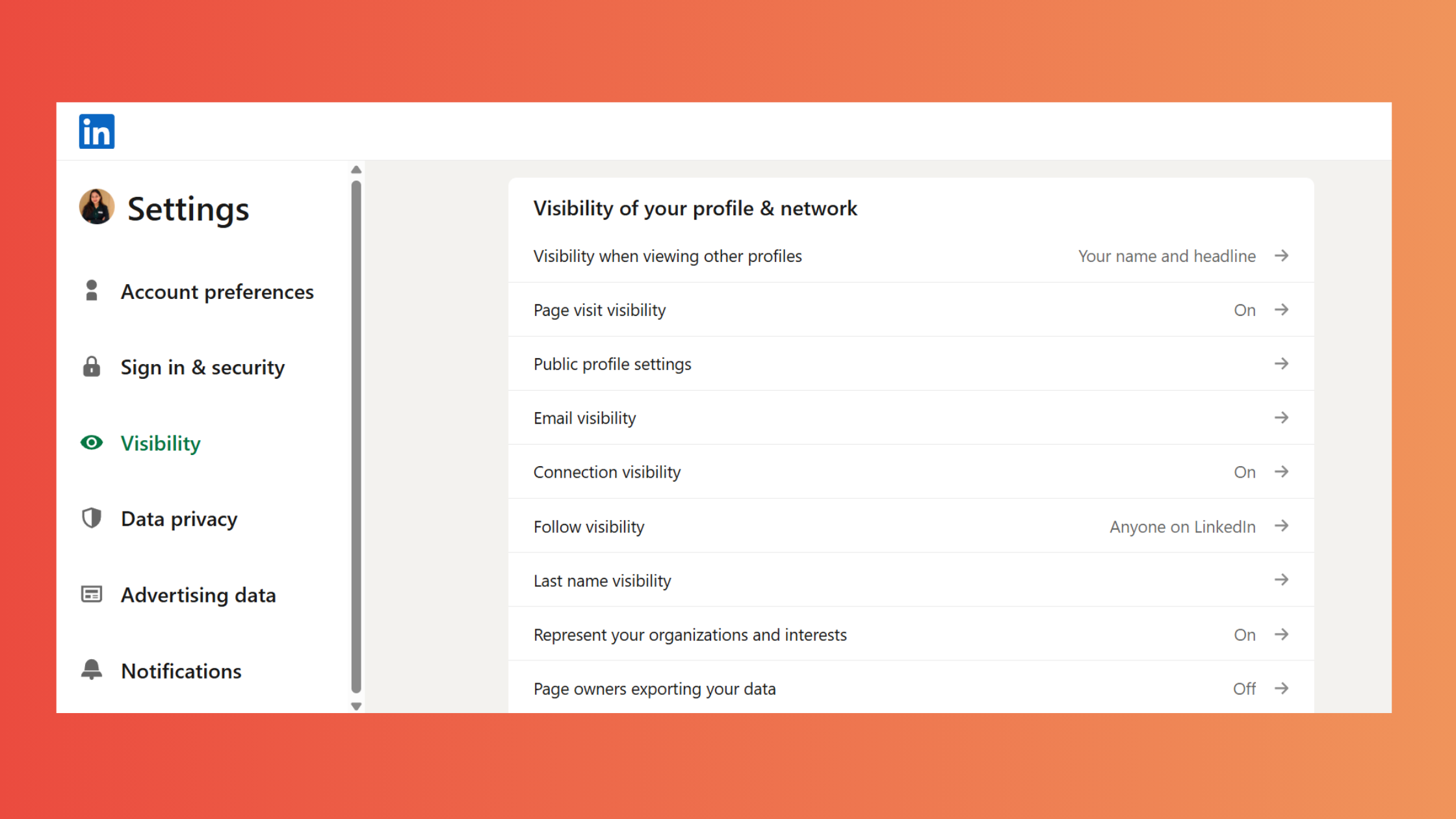
- Go to Settings & Privacy — click your profile photo, select "Settings & Privacy" from the dropdown. (~5 seconds)
- Navigate to Visibility — select the "Visibility" tab in the left sidebar. (~5 seconds)
- Open Profile viewing options — click "Profile viewing options" under the "Visibility of your LinkedIn activity" section. (~5 seconds)
- Select Private mode — choose "Private profile characteristics." Your visits now register as "LinkedIn Member" with no identifying data sent to the profile owner. (~5 seconds)
This is the most commonly missed detail in guides covering how to view linkedin profile privately and how to hide linkedin profile view. Most articles explain that Private Mode exists. Almost none explain that it is a mutual blackout — you disappear to them, and they disappear from your viewer data simultaneously.
On the question of linkedin how to view profile anonymously without losing your viewer data: the only practical workarounds are:
- Use a fully logged-out browser tab for one-off anonymous checks — the how to view linkedin profile incognito approach. No notification is sent. Your viewer feed stays intact on your main account.
- Use a second browser profile logged out of LinkedIn entirely for competitive research sessions.
- A secondary LinkedIn account is sometimes suggested but violates LinkedIn's Terms of Service — avoid it.
Does viewing someone's profile notify them even in Private Mode on your end? No. In Private Mode, the target profile receives only a generic anonymous-visit notification. They see that a visit occurred but receive zero data about you — no name, headline, company, or location.
Which Viewing Mode Should You Actually Use? A Use-Case Decision Framework
Teams that match their viewing mode to their actual goal consistently get better outcomes than those who apply a single setting to all situations. Here is the Profile Viewing Mode Decision Framework:
- Job searching actively: Stay in Public mode. Recruiters viewing your profile notice when you visit theirs — it signals interest and often triggers an outreach. The visibility is a feature, not a risk.
- Competitive research (sales, recruiting): Use a logged-out browser tab or Semi-Private mode. You retain your viewer data; the target sees only a vague industry reference.
- Researching before a sensitive conversation (negotiation, due diligence): Use Private Mode or logged-out access. The information blackout on your own viewer feed is an acceptable tradeoff for a one-off session.
- Building your personal brand: Stay Public. Every visit you make is a soft touchpoint — people often check back the profile of whoever viewed them. This is passive networking.
To check how to view linkedin profile as public — meaning how to preview what others see on your own profile — go to your profile page and select "More → View as" from your profile header. This shows your profile exactly as a non-connection would see it, which is a valuable step before an active job search or outreach campaign. The same feature answers how do you view your linkedin profile as someone else and how to view your own linkedin profile from an outside perspective.
%2520(1).png) hyperclapper.com
hyperclapper.comHow to Use Your LinkedIn Profile Viewer Data — and Grow Views Organically
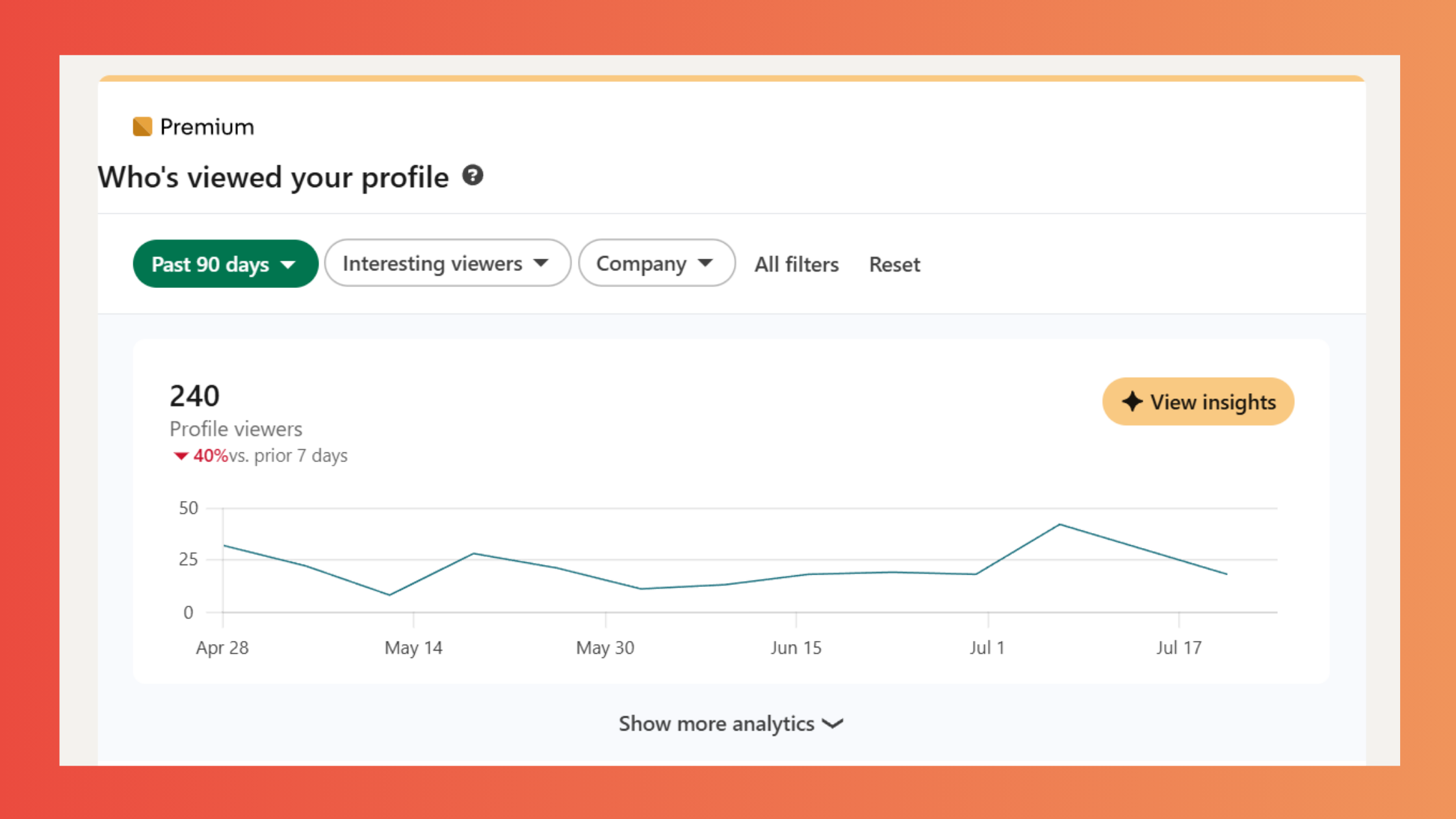
Viewer data without a follow-up action is just a number. The most effective approach — observed consistently across high-performing LinkedIn accounts — is to treat the who view my linkedin profile list as a warm-lead queue rather than a vanity metric. Sort by "Most recent" and focus outreach on high-value contacts within 48 hours of their visit, while you're still fresh in their memory.
According to ConnectSafely's 2026 LinkedIn statistics, users with 500+ connections receive 3.2x more profile views than those with fewer than 100 connections. In practice, this means every new connection adds compounding profile visibility — not just one more follower, but a proportionally larger distribution footprint. This means that consistent, targeted connection-building is the most direct lever for organic profile view growth.
What to Do When a Recruiter Views Your Profile
When a recruiter views your profile, send a connection request within 48 hours. Use this template as a starting point:
"Hi [Name], I noticed you visited my profile — I'd love to connect and learn more about what you're working on at [Company]. Happy to share more about my background if helpful."
Keep it conversational, not transactional. Recruiters receive dozens of follow-ups framed as formal cover letters. A brief, human message stands out. If they viewed your profile without sending a message, the visit itself is the signal — they are exploring. Your outreach simply opens the door.
Interpreting Viewer Trends Over Time
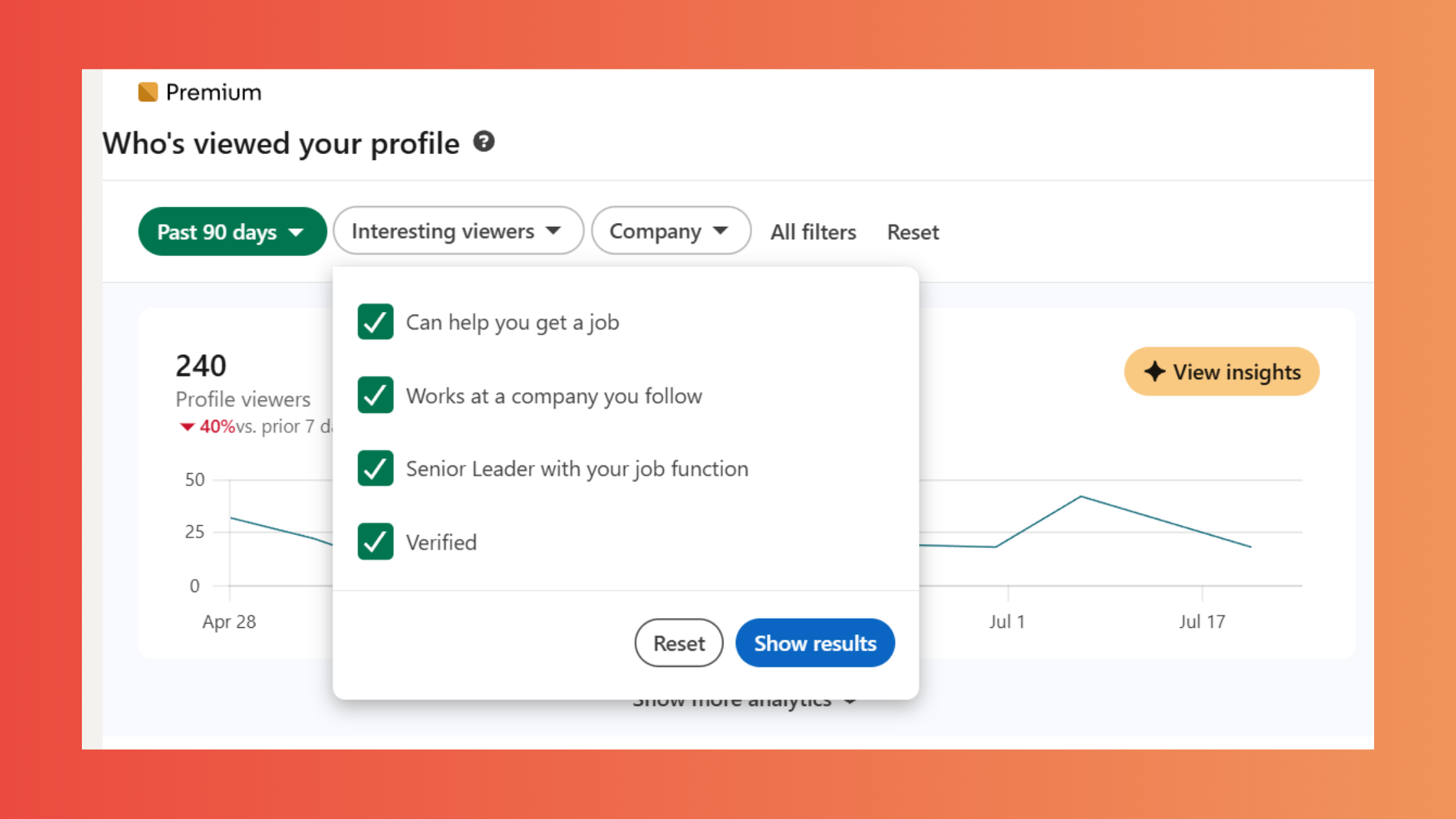
A spike in view profile on linkedin data after a specific post is a content signal, not a coincidence. Note the post format, topic, posting time, and hashtag set — then replicate. A flat or declining view trend despite consistent posting almost always signals a headline or hook problem, not a content quality problem. The content is fine; nobody is clicking through to read it.
LinkedIn's Social Selling Index (SSI) — a free score available at linkedin.com/sales/ssi — measures four pillars including "Establishing your professional brand." A higher SSI correlates with more profile impressions because LinkedIn's algorithm rewards active, complete, engaging profiles with broader distribution. Tracking your SSI weekly alongside your profile view count gives you a leading indicator: SSI improvements typically precede view count increases by 1–2 weeks.
Third-Party Tools and LinkedIn Analytics Beyond the Native Dashboard
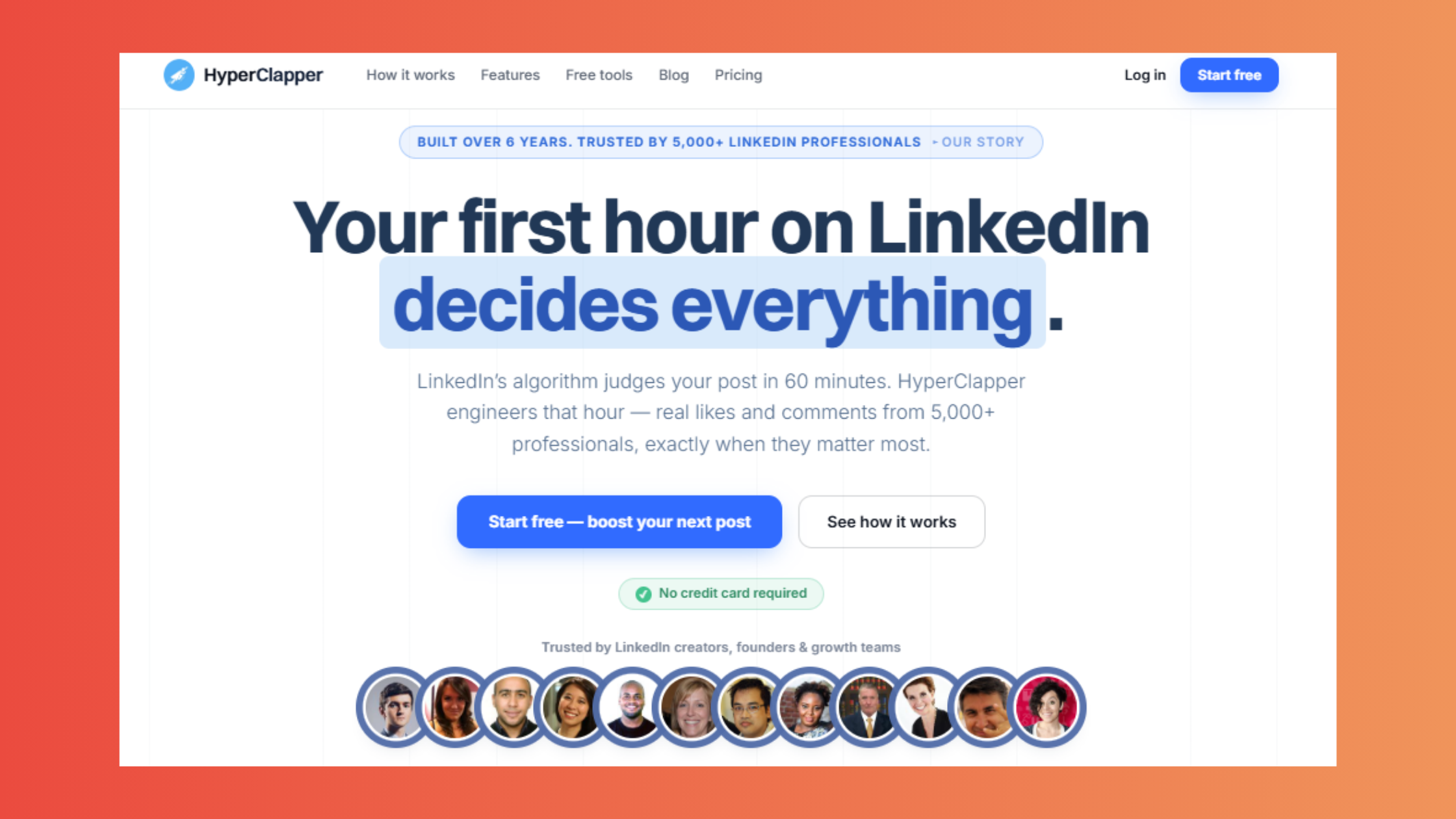
LinkedIn's native analytics cover the basics. For deeper how to view profile views on linkedin trend analysis — content attribution, audience segmentation, competitor benchmarking — third-party platforms fill the gaps. Tools like HyperClapper go further: beyond analytics, they connect engagement data with actual post performance, showing which content drove profile visits rather than just reporting totals after the fact. That attribution loop — post → engagement → profile views — is what turns data into a repeatable growth strategy.
What separates top performers here is not just using better tools — it is closing the loop between post engagement and profile traffic. Creators who track this consistently find that 2–3 high-engagement posts per month generate more profile views than daily posting with low engagement. More is not always more.
✓ LinkedIn Profile View Optimisation Checklist
- ☐Complete every profile section — photo, headline, summary, skills, experience — to unlock the 21x view multiplier
- ☐Set your viewing mode to match your current goal (Public for job search, Semi-Private for research)
- ☐Check your viewer list within 48 hours of posting — identify high-value contacts and send a personalised outreach
- ☐Track your LinkedIn SSI score weekly alongside profile view counts to catch growth trends early
- ☐Note the post format, hashtags, and posting time after any view spike — replicate that combination within 2 weeks
- ☐Use the "View as" feature before any job search or outreach campaign to audit your public-facing profile
- ☐If starting a Premium trial, do so immediately after a major content push — capture the full viewer list at peak activity
Want more people viewing your LinkedIn profile in the first place?
HyperClapper connects your posts with real engagement communities — so more views, likes, and comments drive your profile directly in front of the right audience.
Boost Your LinkedIn VisibilityFrequently Asked Questions About LinkedIn Profile Views in 2026
What does LinkedIn Premium show you about who viewed your profile that the free plan doesn't?
LinkedIn Premium unlocks the full viewer list for the past 365 days — compared to just 5 recent viewers on free. It also adds filter tools (sort by company, job title, or location), week-over-week viewer trend graphs, and percentage change data. For job seekers and sales professionals, this turns a vague count into a targeted outreach list. See the full breakdown in our LinkedIn Premium viewer guide.
Can I see who viewed my LinkedIn profile if they have a free account and I have Premium?
Yes — if that free-account viewer browsed in Public mode, their name, headline, and company appear in your Premium viewer list exactly as any other identified visitor would. A viewer's subscription tier is irrelevant. What determines visibility is solely their chosen privacy setting: Public, Semi-Private, or Private mode. A free-plan visitor in Public mode is fully visible; a Premium visitor in Private mode is completely invisible.
How accurate is LinkedIn's profile view count, and are there known bugs or delays?
LinkedIn's profile view count is directionally reliable but not perfectly precise. LinkedIn's own Help Center acknowledges that view counts may lag by several hours and that viewing timeframes can vary. In practice, small discrepancies of a few views are normal and not indicative of a bug. Treat the count as a trend indicator — a 40% week-over-week spike is meaningful; a difference of 2–3 views is noise.
Can I see everyone who viewed my LinkedIn profile without paying?
No. LinkedIn profile views free vs premium access is a hard platform limit: free accounts are capped at the 5 most recent viewers. Even with a perfect profile and full Public-mode visitors, only 5 names are shown at any time. The remaining visitors — potentially dozens or hundreds — remain invisible without a Premium subscription or a timed free trial.
Is it worth upgrading LinkedIn just to see profile viewers?
Only if viewer identity translates directly into revenue or career outcomes for you. For active job seekers and sales professionals with high inbound profile traffic, the ROI is clear — knowing which company or recruiter visited you enables targeted follow-up. For most casual users, the free 5-viewer limit and 90-day count are sufficient. The 30-day LinkedIn Premium free trial profile views window is a low-risk way to test the value before committing.



