A pattern observed consistently across job seekers on LinkedIn is that visibility problems are almost never about profile completeness — they're about keyword misalignment. Recruiters don't browse LinkedIn the way a friend reads your profile. They run filtered searches using exact job titles, skills, and locations, and LinkedIn's algorithm ranks results based on how precisely your profile fields match those search terms. A profile that's 100% complete but uses the wrong language is effectively invisible. The good news: fixing visibility is a targeted, learnable process — and most of it comes down to a handful of high-weight fields.
- Profile completeness (All-Star status) gets you indexed — keyword placement in your headline and skills determines where you rank in recruiter searches.
- Recruiters spend 7–10 seconds on a profile card before deciding to click — your headline and photo are doing most of the filtering work.
- The headline is LinkedIn's highest-weighted text field for search — defaulting to your job title alone wastes 180+ characters of indexable keyword space.
- The Open to Work badge doubles inbound recruiter messages on average, but the recruiter-only setting is not completely private — know the difference.
- Profile updates reset freshness signals — a profile untouched for 6+ months quietly loses search ranking regardless of keyword quality.
- Most counterintuitive finding: growing your connection count past 500 is an SEO act — it directly expands the recruiter search network where your profile appears.
- Why Your LinkedIn Profile Feels Invisible
- What Recruiters Actually Look at on LinkedIn
- Photo and Banner Tips That Make a Recruiter Stop
- Writing a LinkedIn Headline That Ranks and Gets Clicked
- How to Write a LinkedIn Summary That Attracts Recruiters
- LinkedIn Profile Keyword Strategy
- LinkedIn Open to Work Settings Explained
- Featured Section, Experience, and Education
- How Often to Update Your LinkedIn Profile
- Common LinkedIn Profile Mistakes That Kill Recruiter Interest
- LinkedIn Premium and Profile Writing Services
- Step-by-Step LinkedIn Profile Optimization Checklist for 2026
- Frequently Asked Questions About LinkedIn Profile Optimization
Why Your LinkedIn Profile Feels Invisible (And What's Actually Going On)
The visibility paradox on LinkedIn is this: completeness and rankability are different things. According to LinkedIn's own data (2026), profiles with complete information are 40 times more likely to receive opportunities than incomplete ones — but "complete" only means you've cleared the minimum indexing threshold. Where you rank within those results depends entirely on keyword placement, field weight, and engagement signals. Most job seekers optimise for completeness and stop there. That's the gap.
How LinkedIn's Search Algorithm Actually Ranks Profiles in 2026
LinkedIn's search algorithm — the system that determines which profiles surface when a recruiter types a job title or skill — weighs specific fields at different rates. The headline and skills section carry the most ranking weight. Experience titles carry moderate weight. Experience description bullets carry the least. A recruiter searching "Product Manager" will surface profiles in this rough priority order: those with "Product Manager" in their headline first, then those with it as a current job title, then those who only mention it in their descriptions.
Profile completeness scores, specifically the All-Star status LinkedIn awards once you fill in photo, headline, summary, experience, education, skills, and connections, are a minimum indexing requirement. Think of All-Star status as getting onto the playing field, not winning the game. Once you hit it, the algorithm stops rewarding completeness and starts rewarding relevance.
The LinkedIn SSI score (Social Selling Index) — a 0–100 metric across professional identity, network, engagement, and relationships — correlates with profile reach, though LinkedIn doesn't publish the exact weighting. Profiles that sit below 50 SSI tend to appear less frequently in recruiter searches, even when keywords are correct.
What the algorithm also factors in, and what almost no optimization guide covers, is profile engagement signals: how often your profile is viewed, saved, or connected with. A well-keyworded profile that receives consistent engagement compounds its own visibility. This is why activity matters alongside static optimization.
How to Audit Your LinkedIn Profile Before You Optimize It
Before rewriting anything, run a baseline audit. Search for your own target job title on LinkedIn while logged out (or in a private browser), and check whether your profile appears in the first three pages of results. If it doesn't, keyword misalignment is the likely cause. Then check these five things:
- Does your headline contain the exact job title a recruiter would search?
- Are your top 3 pinned skills the skills most commonly listed in job postings for your target role?
- Does your current job title in the Experience section match the industry-standard title (not an internal company title like "Growth Ninja")?
- When was your profile last edited? LinkedIn shows a freshness signal in some recruiter views.
- Is your connection count above 500? Below 500, your profile doesn't surface in as many second and third-degree recruiter searches.
This audit takes about 15 minutes and tells you exactly which levers need pulling before you write a single word of new copy.
What Recruiters Actually Look at on LinkedIn (And in What Order)

Recruiters using LinkedIn Recruiter — the paid talent search tool most hiring teams use — don't see your full profile first. They see a condensed card: your photo, headline, current role, location, and a skills match indicator. That card is the only view they interact with for the first 7–10 seconds. If nothing on that card signals a match, they move on without ever opening your full profile.
The recruiter's filtering sequence runs roughly like this:
- Photo — does this person look credible and professional?
- Headline — does the job title or skill match what I'm searching for?
- Current role and company — is the experience level and context right?
- Location — do they match the location filter I've set?
- Skills match score — LinkedIn Recruiter surfaces a skill match percentage
- About section — only if the first five passed the filter
What do recruiters look for on LinkedIn beyond the basics? The single most common skip reason, based on patterns seen across recruiter feedback threads, is a mismatch between the headline and the role being filled. A senior marketing professional whose headline reads "Marketing Manager | Consumer Goods" will be skipped for a "Digital Marketing Director" search even if their actual experience is a perfect match — because the headline doesn't contain the searched term.
The Sections Recruiters Weight Most Heavily
Not all profile sections are equal in a recruiter's attention or in LinkedIn's indexing weight. Here's how they stack up:
| Profile Section | Recruiter Attention | Search Weight | Common Mistake |
|---|---|---|---|
| Headline | Very high | Highest | Defaulting to job title only |
| Skills (top 3) | High (card view) | High | Generic skills instead of role-specific |
| Current Job Title | High | Medium-high | Using internal title vs. industry standard |
| About Section | Medium | Medium | Generic summary with no keywords |
| Experience Bullets | Medium (if clicked) | Low-medium | Duties instead of outcomes |
| Featured Section | High (if present) | Low | Left empty or outdated |
These tips linkedin profile veterans know — and most newcomers miss — come down to thinking like a search tool, not a human reader. The recruiter's human judgment kicks in only after the algorithmic filter passes your profile card to them.
LinkedIn Profile Photo and Banner Tips That Make a Recruiter Stop

According to research cited by Statista, job applicants with a strong LinkedIn profile were 71% more likely to get a callback for a job interview than candidates without one — and your photo is the first thing a recruiter's eye lands on. Profiles with a professional photo receive up to 21x more profile views and 36x more messages. A blank avatar or a blurry casual photo signals low effort before a single word of your profile is read.
For 2026, the photo standard that performs well has these consistent characteristics:
- Square or near-square crop — LinkedIn displays it as a circle, so keep your face centred
- Face occupying roughly 60% of the frame — close enough to read, not a full-body shot
- Neutral, clean, or softly blurred background — nothing distracting behind you
- Attire that matches your target industry's professional norms — a suit for finance, business casual for tech, industry-specific for trades
- Natural lighting or professional lighting — avoid heavy filters or obvious retouching
- Recent — a photo from 10 years ago that looks nothing like you today creates friction at interviews
For a deeper look at what works visually, the LinkedIn profile photo guide on HyperClapper covers lighting, background choice, and industry-specific framing in detail.
6 Practical Tips for a LinkedIn Banner That Reinforces Your Brand
The banner image (1584×396px) is the most-overlooked real estate on any LinkedIn profile. Most job seekers leave it as the default grey gradient. That's a missed opportunity to reinforce your professional identity the moment someone opens your profile.
- State your value proposition — a simple text overlay like "UX Designer | Helping fintech teams ship faster" tells the story at a glance
- Use your industry's visual language — code on a dark background for developers, clean typographic layouts for designers, city skylines for consultants
- Include a subtle CTA — "Open to new projects" or "Available for contract work from Q3 2026"
- Match colour palette to your personal brand — consistency between your photo background and banner creates an intentional, polished impression
- Avoid stock photos that look generic — a handshake photo or generic office shot undermines credibility more than a clean solid colour does
- Keep text minimal and large — LinkedIn compresses banner images on mobile; small text becomes unreadable
Does the LinkedIn profile photo affect recruiter views? Consistently yes — both the photo and banner together form the first-impression package. Recruiters report that profiles with cohesive, professional visual design signal that the candidate takes their professional presence seriously.
Writing a LinkedIn Headline That Ranks and Gets Clicked
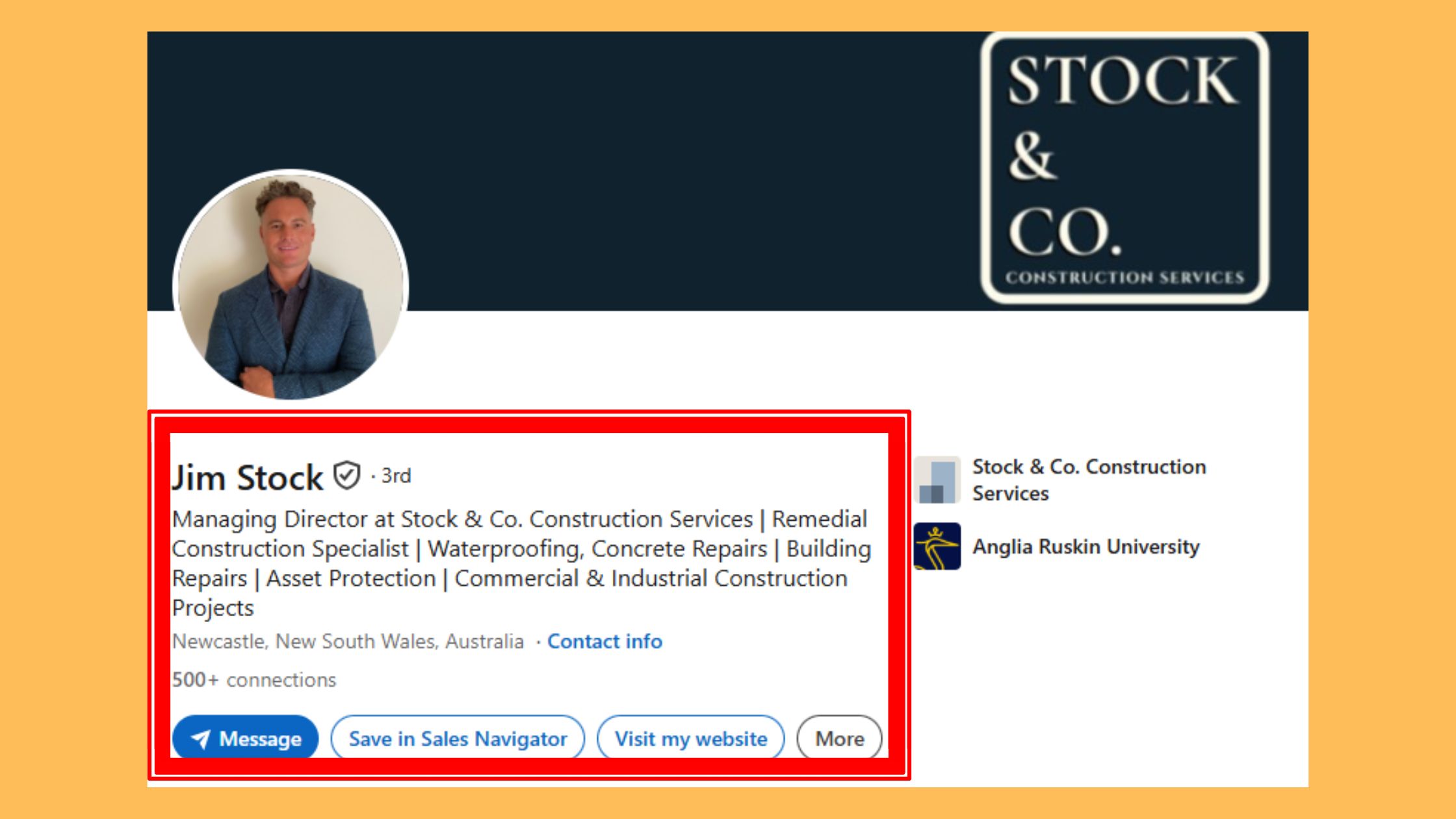
220 characters. That's how much space LinkedIn gives you in the headline field — and it's the most valuable indexing real estate on your entire profile. Most people use fewer than 60 characters on their default job title. That wastes roughly 160 characters of searchable keyword space that LinkedIn actively indexes and that recruiters see in every search result card.
The headline isn't your job title. It's a search-optimised positioning statement that happens to also tell a human why you're worth clicking on.
The formula that consistently outperforms defaults in recruiter search results follows this structure:
[Target Job Title] | [Core Skill or Specialisation] | [Value Signal or Outcome]
LinkedIn Profile Keywords Recruiters Search by Industry
Teams that build headlines around recruiter search behaviour — using the exact job title string a recruiter would type, not a creative variation — consistently see more profile views within days of updating. Here are LinkedIn headline examples for job seekers across key industries:
- Marketing: "Growth Marketing Manager | SaaS & B2B Lead Generation | Scaling from 0 to 50K users"
- Technology: "Full-Stack Engineer | React, Node.js, AWS | Building products that ship on time"
- Finance: "Financial Analyst | FP&A & Forecasting | Turning data into board-level decisions"
- HR / Talent: "HR Business Partner | Talent Acquisition & Retention | Supporting 500+ person orgs through change"
- Sales: "Enterprise Account Executive | SaaS Sales | $2M+ ARR closed in 2025"
- Design: "Senior UX Designer | Fintech & E-commerce | Reducing drop-off through research-led design"
Notice what each of these does: it contains the exact job title a recruiter would search (the LinkedIn profile keywords recruiters search for), a skill cluster for secondary keyword coverage, and a specific outcome that makes the headline readable to a human, not just a search engine.
Understanding what keywords to use is half the battle — the other half is weaving them systematically throughout every profile section, which is where the real ranking leverage lives.
How to Write a LinkedIn Summary That Attracts Recruiters
Roughly 300 words. That's the sweet spot for a LinkedIn About section that both ranks well and holds a recruiter's attention. Short enough to read in under 90 seconds, long enough to include 3–4 keyword clusters and establish your professional identity. The LinkedIn summary tips to attract recruiters that actually work follow a consistent structure — not because formulas are creative, but because recruiters are busy and structured summaries are easier to scan quickly.
The four-part structure that works:
- Hook (2–3 sentences) — who you are, what you do, and who you do it for. This appears before the "see more" cutoff at roughly 300 characters, so make it count. First-person voice ("I help B2B SaaS companies...") outperforms third-person ("John is a marketing leader who...") — it reads as direct and confident, not ghostwritten.
- Proof (3–4 sentences) — 2–3 specific, quantified outcomes from your career. "Grew organic traffic 220% in 12 months." "Managed a $4M budget across 3 product lines." Numbers anchor credibility.
- Skills and keyword paragraph — a natural paragraph (not a comma-separated list) that includes your core skills, tools, and methodologies. This is where keyword density lives without reading as keyword stuffing.
- Call to action — one sentence at the end: "Currently open to senior product roles in fintech — connect or message me directly." This tells recruiters exactly what to do next.
For in-depth examples and full templates across industries, the LinkedIn summary examples guide on HyperClapper breaks down five working summaries with annotations on what each section achieves.
Ideal Character Counts for Every LinkedIn Profile Section in 2026
Character limits aren't just technical constraints — they reflect how much content LinkedIn's algorithm indexes and how much a recruiter will realistically read. Here's what to target:
| Section | Max Characters | Recommended Target |
|---|---|---|
| Headline | 220 | 180–220 — use nearly all of it |
| About (Summary) | 2,600 | 1,200–1,500 (~220–300 words) |
| Experience (per role) | 2,000 | 400–700 for recent roles, less for older |
| Job Title (Experience) | 100 | Use industry-standard title exactly |
| Skills | Up to 50 listed | Pin 3 role-specific skills at top; fill to 20+ |
Want Your LinkedIn Posts to Get the Visibility Your Profile Deserves?
HyperClapper connects you with real engagement communities that boost your posts with genuine likes and comments — so your activity signals amplify your profile's reach.
See How HyperClapper WorksLinkedIn Profile Keyword Strategy: How to Optimise Your Profile for Recruiter Search
Think of your LinkedIn profile as a structured document that LinkedIn's search engine reads field by field, assigning different ranking weights to each. The way to optimise LinkedIn profile performance in recruiter search isn't to stuff keywords everywhere — it's to place the right keywords in the highest-weight fields, then support them with semantic terms in lower-weight fields.
The keyword placement hierarchy, ranked from most to least search weight:
- Headline — highest weight; use exact target job title here
- Pinned skills (top 3) — indexed prominently and shown in recruiter card view
- Current job title (in Experience section) — should match or closely match your target role title
- About section — good for semantic clustering and secondary keyword coverage
- Experience job titles (past roles) — medium weight; align with industry-standard titles
- Experience descriptions — lowest weight; still useful for long-tail and contextual keywords
A semantic keyword strategy — using a cluster of related terms rather than one exact phrase repeated — helps surface your profile across multiple recruiter query types. A Product Manager targeting technology companies, for instance, should include not just "Product Manager" but also "Product Strategy," "Roadmap Planning," "Cross
Frequently Asked Questions About LinkedIn Profile Optimization
What sections of a LinkedIn profile do recruiters look at first?
Recruiters see your photo, headline, and location before anything else — these appear on the profile card in search results. If those pass the 7–10 second scan, they click through to your current job title and skills. Summary and experience descriptions come last, only after the top fields earn the click.
How can I get my LinkedIn profile to appear in more recruiter searches?
Place your exact target job title in your headline, match your top three pinned skills to terms that appear most in job postings for that role, and grow your connections past 500. Each of these directly expands the recruiter search network where LinkedIn surfaces your profile.
What is a good LinkedIn profile headline for someone looking for a job?
A strong headline names your target role, a defining skill or specialisation, and a measurable outcome or industry context — for example, 'Product Manager | B2B SaaS | Turning User Insights Into Revenue Growth.' This uses the headline's 220 characters as searchable keyword space rather than defaulting to your current job title alone.
How long should a LinkedIn summary be to impress recruiters?
Aim for 200–300 words — long enough to include searchable keywords and a clear value proposition, short enough to read in under a minute. LinkedIn shows only the first three lines before the 'see more' cut-off, so open with your strongest positioning sentence rather than background context or a career chronology.
Why is my LinkedIn profile not showing up in recruiter searches?
The most common cause is keyword misalignment — your profile uses different language than recruiters type into search filters. Other culprits include a connection count below 500, a profile untouched for six or more months losing freshness signals, or an internal job title that doesn't match the industry-standard term recruiters actually search.
Does a LinkedIn profile photo affect how many recruiters view your profile?
Yes, profiles with a professional photo receive significantly more profile views than those without one. The photo appears on every search result card and is one of two visual cues — alongside your headline — that recruiters use to decide whether to click through. Poor lighting, casual settings, or no photo at all reduces click-through rates noticeably.
Is LinkedIn Premium worth it for job seekers?
LinkedIn Premium gives job seekers InMail credits, visibility into who viewed their profile, and applicant ranking data on job postings — useful signals, but not substitutes for strong keyword optimisation. If your profile isn't ranking in searches yet, fix the fundamentals first. Premium amplifies a well-optimised profile; it doesn't rescue a poorly positioned one.



