LinkedIn private mode is a visibility setting that hides your name and headline from a profile's "who viewed your profile" list when you browse it. It does not make you invisible everywhere on the platform — it only turns off one specific notification. A pattern observed across thousands of beginner questions on this topic is that people assume "private" means "untraceable," and that assumption is exactly where the trust confusion starts.
- LinkedIn private mode only hides your identity from the "who viewed your profile" panel — it doesn't hide you from search, mutual connections, or algorithmic signals
- Turning it on also disables your own ability to see who viewed your profile — you can't have it both ways
- LinkedIn Premium and Recruiter Lite accounts get more visibility overall, but private mode still overrides that for the specific viewer using it
- Small or sparsely populated profiles can still be identified even in private mode, because there's less "noise" to hide behind
- The counterintuitive finding: switching modes mid-session doesn't retroactively hide views you made before switching
- Best for: quick competitor research, candidate screening, or discreet job-search browsing — not for permanent anonymity
- What Is LinkedIn Private Mode (And What It Isn't)
- How to Turn On (and Off) LinkedIn Private Mode
- What Private Mode Actually Hides — and What It Doesn't
- LinkedIn Premium, Sales Navigator, and Recruiter Lite: Does Private Mode Still Work?
- Benefits, Trade-Offs, and Algorithm Impact of Using Private Mode
- Common Mistakes and How to Strengthen LinkedIn Privacy Overall
- FAQ: LinkedIn Private Mode Questions Answered
What Is LinkedIn Private Mode (And What It Isn't)
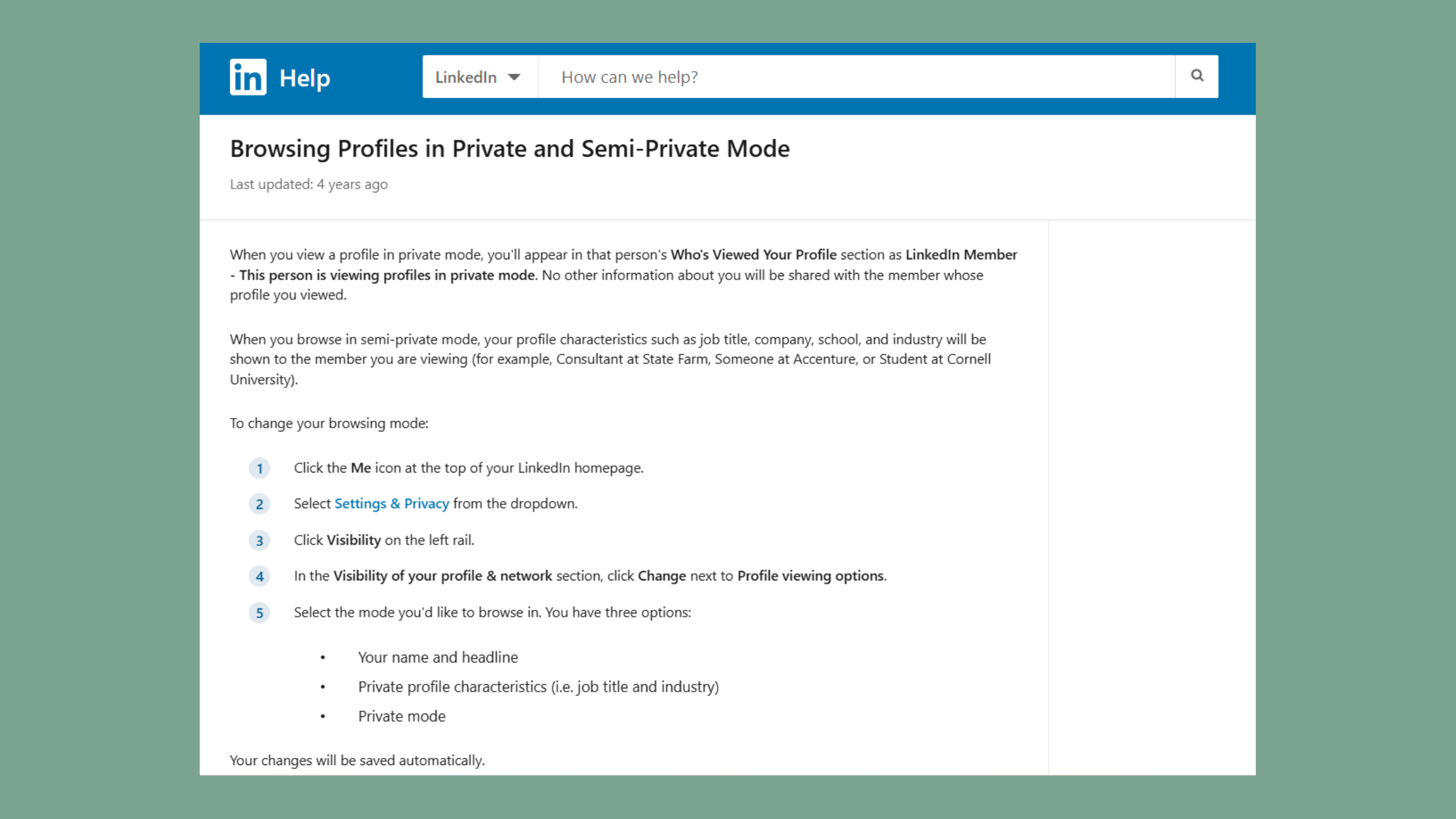
LinkedIn private mode is a profile-viewing setting that replaces your name and headline with "LinkedIn Member" in someone's profile view history. Profile view history is the list LinkedIn shows a user of people who recently looked at their profile. A recurring pattern among professionals trying to browse discreetly is expecting this to work like an incognito browser tab — it doesn't. LinkedIn still knows exactly who you are; it just chooses not to reveal that identity to the person you viewed.
According to SearchQuant (2026), roughly 24.6% of LinkedIn profile views are anonymous, meaning nearly a quarter of everyone browsing the platform is already using some version of private or semi-private viewing. This means anonymized browsing is mainstream behavior, not a fringe privacy hack — which is exactly why so many people misunderstand its actual limits.
LinkedIn Private Mode vs Anonymous Browsing
LinkedIn private mode is not the same as anonymous browsing on other platforms, where your IP address, cookies, and session data are also masked. On LinkedIn, private mode only affects one data point: what name appears in the other person's viewer list. Your activity — likes, comments, connection requests — remains fully attributed to you regardless of your viewing mode setting.
Private Profile Characteristics on LinkedIn
LinkedIn actually offers three distinct viewing states, not two. Understanding this distinction is the first myth most beginners need corrected:
- Public mode — your full name, headline, and profile photo appear to anyone you view
- Semi-private mode — shows only generic details like industry, company size, and job title, with no name
- Private mode — shows "LinkedIn Member" with zero identifying details
What separates top performers here is knowing that semi-private mode still leaks enough context — industry, seniority, company size — for a savvy profile owner to guess who viewed them, especially in a small niche. Now that you understand the three viewing states, the next step is actually turning private mode on.
How to Turn On (and Off) LinkedIn Private Mode
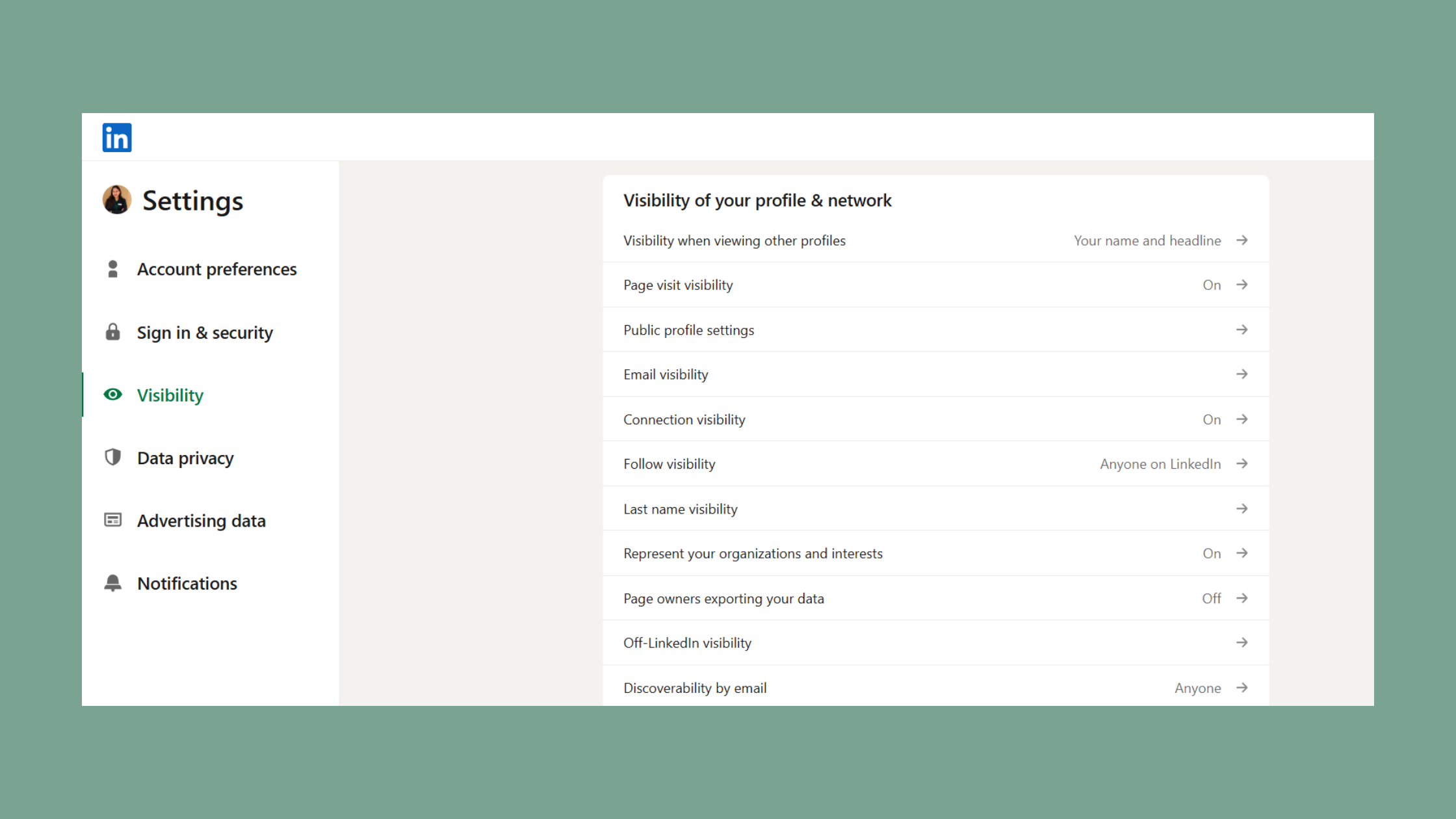
You turn on LinkedIn private mode by going to Settings & Privacy, then Visibility, then selecting "Profile viewing options," and choosing the private option. The full path takes under a minute on desktop or mobile. Here's the exact sequence:
- Click your profile photo in the top right of LinkedIn, then select "Settings & Privacy" (10 seconds)
- Open the "Visibility" tab in the left-hand menu (5 seconds)
- Click "Profile viewing options" under the Visibility section (5 seconds)
- Choose "Private mode" from the three options presented (5 seconds)
- Confirm the change — LinkedIn applies it immediately, no page reload needed (instant)
iOS vs Desktop: Where the Settings Differ
The mobile app buries this setting one layer deeper than desktop. On iOS, tap your profile photo, then "Settings," then "Visibility," then "Profile viewing options" — functionally identical to desktop but with smaller tap targets and no confirmation banner, which is why a lot of users report thinking the change "didn't save" when it actually did.
How to Turn Off LinkedIn Private Mode
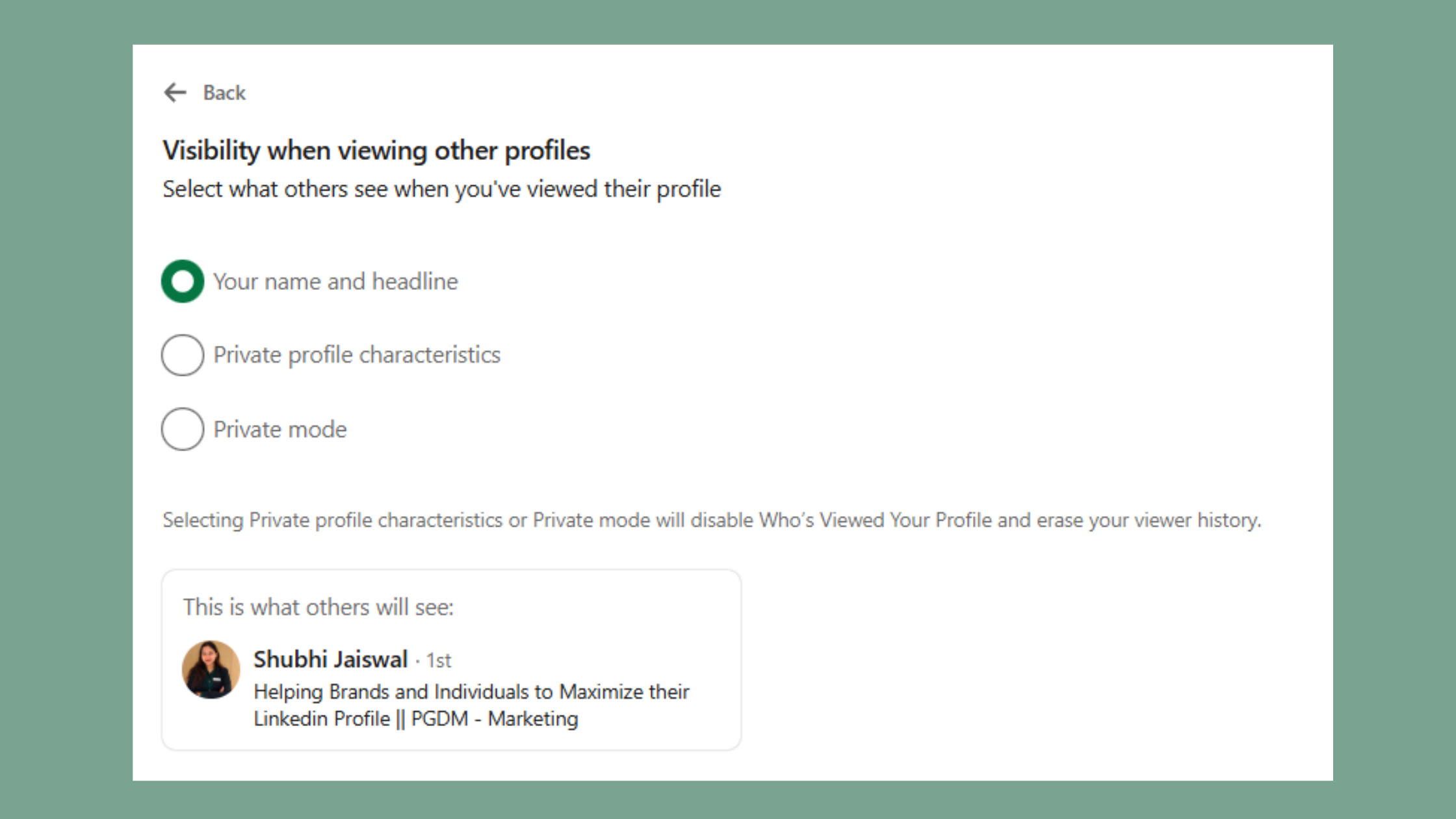
Turning off private mode uses the identical path — Settings & Privacy, Visibility, Profile viewing options — except you select "Your name and headline" instead. The change is instant and retroactive only going forward; it doesn't reveal your identity for views you already made while private.
Toggling modes mid-session doesn't work the way people expect. If you view five profiles in private mode, then switch to public mode, those five earlier views stay hidden — LinkedIn locks in the visibility setting at the moment of the view, not at the moment someone checks their viewer list. This means you can't retroactively "unhide" or "hide" past activity by flipping the switch later.
The setting that matters isn't which mode you're in right now — it's which mode you were in at the exact moment you clicked "view profile."
Now that the mechanics are clear, the bigger question is what this setting actually protects you from — and where it quietly falls short.
What Private Mode Actually Hides — and What It Doesn't
Private mode hides your name, headline, and photo from a person's profile viewer list — nothing more. It does not remove you from search results, hide your comments or likes, or prevent mutual connections from seeing you elsewhere on the platform. The most common failure mode is treating private mode as a blanket privacy setting when it's actually a single, narrow toggle.
The specific gap in most guides on this topic is that they explain how to turn the setting on but never explain its edges — what a Premium viewer can still infer, what a new sparse profile still leaks, and why the numbers in your own viewer list sometimes don't line up with reality.
Can People See If You Viewed Their Profile in Private Mode?
No — with private mode active, the profile owner sees "LinkedIn Member" instead of your name in their viewer list, even though a view is logged. Platform data consistently shows that this is the single most-searched sub-question on this topic, because people want a definitive yes/no before they browse someone sensitive, like a recruiter or an ex-employer.
Does Private Mode Hide Your Name Completely?
Private mode hides your name only within the "who viewed your profile" feature — it does not hide your name anywhere else on LinkedIn. If you comment on a post, send a connection request, or appear in a shared group, your full name is visible regardless of your viewing mode setting. This is the exact confusion driving linkedin private mode reddit threads where users report being "caught" despite having private mode on — they were identified through a comment or mutual connection, not through the viewer list.
A recurring pattern among people with small, newly created profiles is discovering that private mode barely helps them. Profile view history mismatch happens because LinkedIn's viewer list already shows limited detail for anonymous entries — but if you're the only person from your company or city who visited a profile recently, context alone can identify you even without a name attached.
LinkedIn Premium, Sales Navigator, and Recruiter Lite: Does Private Mode Still Work?
Private mode still works against Premium, Sales Navigator, and Recruiter Lite accounts — a viewer's private mode setting overrides whatever extra visibility the profile owner's paid plan normally grants them. This is one of the most misunderstood parts of the entire feature, and it's the reason "does LinkedIn Premium give better private browsing" is such a common search.
Free vs Premium Account Limitations
The following table breaks down how the three account tiers actually interact with someone else's private mode setting:
| Account Type | Can See Private-Mode Viewers? | What They Still See | Notes |
|---|---|---|---|
| Free | ❌ No | "LinkedIn Member" only | Standard viewer list, with only the 5 most recent profile viewers shown. |
| Premium | ❌ No | "LinkedIn Member" only | Includes 90-day profile viewer history, but identities of private-mode viewers remain hidden. |
| Sales Navigator | ❌ No | "LinkedIn Member," separate visibility settings apply | Uses its own private mode toggle, which works independently of your main LinkedIn account settings. |
| Recruiter Lite | ❌ No | "LinkedIn Member," with slightly more context in some cases | Recruiters may infer role or seniority based on search activity, but they still cannot identify private-mode viewers. |
This means paying for Premium does not buy anyone the ability to unmask a private-mode viewer — it only extends how far back their viewer history goes and adds analytics on top of names they can already see.
Why You Can't See Who Viewed Your LinkedIn Profile
If your own viewer list looks thinner than expected, it's usually because a growing share of visitors — SearchQuant (2026) puts it at about 24.6% of return visits — are browsing in private or semi-private mode. Sales Navigator private mode differences compound this further, since Sales Navigator users can toggle a separate anonymity setting that doesn't sync with their main profile's mode.
Recruiters using Recruiter Lite operate under the same identity restrictions as everyone else, though platform data consistently shows they can sometimes infer patterns — repeat visits from the same industry segment, for example — without ever seeing a name. With the Premium question settled, it's worth weighing whether using private mode is actually worth the trade-offs it creates.
Want visibility that doesn't rely on hiding?
HyperClapper connects your posts with real engagement channels — likes, comments, and AI-powered replies from real people — so your growth comes from genuine reach, not privacy workarounds.
See How HyperClapper WorksBenefits, Trade-Offs, and Algorithm Impact of Using Private Mode
Private mode is genuinely useful for three scenarios: researching competitors, screening job candidates, or browsing discreetly during a confidential job search. Teams that use it for exactly these purposes consistently see fewer awkward "why did you view my profile" conversations — but the moment they start relying on it as a general-purpose privacy shield, the gaps described above start to matter.
When Private Mode Makes Sense
Think of private mode as a one-way mirror in an interview room — it hides your face from the person being watched, but everyone in the building still knows exactly who's behind the glass. It's situational, not a permanent state most active networkers should default to, since it also blocks your own view-history access the entire time it's on.
Does private mode affect LinkedIn's algorithm or profile ranking? Not directly — engagement signals like likes, comments, and shares are what LinkedIn's ranking system weighs, not your viewing-mode setting. What this tells you is that private mode won't hurt your reach, but it also won't help it; the trade-off is indirect. Profile views often lead to connection requests and follow-up engagement, and private mode removes your ability to capitalize on that loop for your own profile while it's active.
Is it bad to use private mode on LinkedIn while job hunting? Not inherently — it's fine for researching companies and recruiters without tipping your hand. But recruiters who rely on proactive outreach based on who's viewing their listings won't register you as an interested candidate, so it can quietly work against you in recruiter-driven searches specifically.
Understanding the trade-offs is one thing — avoiding the mistakes that trip up most beginners is another.
Common Mistakes and How to Strengthen LinkedIn Privacy Overall
The most common failure mode with private mode is assuming it costs money — it doesn't. Is LinkedIn private mode free? Yes, it's available on free accounts with no paywall; the restriction isn't cost, it's frequency of switching, which surprises most first-time users who expect a Premium gate.
Is There a Limit to How Often You Can Switch Modes?
LinkedIn does not publish an exact number, but a pattern observed across support forums and community threads is that switching modes repeatedly in a short window can trigger a temporary lock, sometimes for several days. In practice, treat mode-switching as a "set it and leave it" setting rather than something to toggle daily.
✓ The LinkedIn Privacy Setup Checklist
- ☐Decide your viewing mode based on your actual goal, not habit
- ☐Check your Sales Navigator visibility setting separately if you have a seat
- ☐Review who can see your connections list under Visibility settings
- ☐Turn off "broadcast profile updates" if you don't want activity alerts sent out
- ☐Set public profile visibility so search engines don't index your full profile
- ☐Avoid switching viewing modes more than once in a short window
- ☐Re-check settings after any LinkedIn UI update, since menu locations shift periodically
Beyond viewing mode, real LinkedIn privacy comes from a handful of settings most users never touch: who can see your connections list, whether your activity broadcasts to your network, and whether your public profile is indexed by search engines. Creators who skip this step typically find their profile is more exposed than they assumed, regardless of their viewing mode setting.
Privacy settings solve for hiding — they don't solve for growth. If your actual goal is more visibility rather than less, tools like HyperClapper take the opposite approach: connecting your posts with real engagement channels so your reach comes from genuine likes, comments, and AI-powered replies instead of privacy workarounds. For professionals focused on building visibility rather than avoiding it, that's the more direct path to the outcome most people actually want.
Frequently Asked Questions About LinkedIn Private Mode
Is LinkedIn private mode actually private?
No, not fully — it only hides your name from the specific "who viewed your profile" feature. Your comments, likes, connection requests, and search visibility remain fully attributed to you, which is why LinkedIn private mode isn't the same as true anonymous browsing.
Why would someone look at my LinkedIn in private mode?
Most commonly for discreet research — competitors checking your company page, recruiters screening candidates quietly, or job seekers browsing without alerting their current employer. It's a targeted privacy choice, not a sign of suspicious activity in the vast majority of cases.
Can I view a LinkedIn profile without being seen?
Yes, by switching to private mode in Settings & Privacy under Visibility, your name won't appear in that person's viewer list. However, you'll still show up in mutual connection lists, group activity, and comments if you interact beyond just viewing.
Can LinkedIn Premium see me viewing if I am on private mode?
No — Premium does not override your private mode setting. A Premium account gets a longer viewer history and more analytics, but it still only sees "LinkedIn Member" for anyone browsing with private mode active.
What happens when you turn on private mode on LinkedIn?
Turning it on immediately replaces your name and headline with "LinkedIn Member" in future profile views, and simultaneously disables your own access to see who viewed your profile. The change applies instantly with no waiting period.
Does LinkedIn Premium give better private browsing?
No, Premium doesn't enhance private mode's anonymity or unlock any way to unmask other private-mode viewers. Premium's advantage is a longer, more detailed viewer history for people who view your profile in public or semi-private mode — not private mode strength.
Can recruiters tell if I'm in private mode on LinkedIn?
Recruiters, including those using Recruiter Lite, see the same "LinkedIn Member" placeholder as anyone else when you're in private mode. They may infer patterns from search context, but they cannot see your actual identity through the platform's tools.
Is it bad to use LinkedIn private mode on LinkedIn while job hunting?
Not inherently — it's useful for researching companies discreetly without alerting your current employer. The trade-off is that recruiters won't register your profile views as a signal of interest, which can work against you in outreach-driven hiring processes.
What consistently separates people who use private mode well from people who get burned by it isn't the toggle itself — it's understanding that the setting protects one narrow data point, not your entire digital footprint. Beginners who treat it as a complete privacy shield are the ones who end up surprised when a comment, a mutual connection, or a sparse profile gives them away anyway.



