
A pattern observed across thousands of LinkedIn outreach campaigns is that the accounts that get flagged fastest aren't sending the most messages — they're sending the most ignored ones. LinkedIn outreach strategies that actually work in 2026 share one structural trait: they match message volume to account trust, message copy to a specific person, and follow-up timing to behavioral signals rather than a preset calendar. The platform's detection system doesn't care how many messages you send. It cares how many people choose not to respond, ignore, or report them. Get that ratio wrong and restrictions follow, regardless of intent.
- Who this is for: founders, recruiters, sales professionals, and marketers doing LinkedIn outreach at any volume
- The core problem: most outreach fails not from rejection, but from silence — ignored messages that erode account trust faster than any single restriction
- Safe daily ceilings: 20–25 connection requests and 50–80 messages per day — lower for new accounts; higher SSI scores unlock more headroom
- Personalized messages vs. generic templates: personalized outreach gets 30–40% reply rates vs. 8–12% for generic copy — the gap is significant enough to change your entire approach
- Most counterintuitive finding: content engagement (likes, comments, post visibility) is an outreach prerequisite, not a separate activity — prospects who recognize your name accept at meaningfully higher rates
- What this guide adds: a diagnostic decision framework so you can tell when your strategy is failing and which specific signal to act on — not just a list of templates
- Why Most LinkedIn Outreach Fails Before It Even Starts
- LinkedIn Outreach Limits in 2026: What You're Actually Allowed to Do
- How LinkedIn Detects Spam — and What Triggers Account Restrictions
- Building the Foundation: ICP, Profile Warm-Up, and Social Selling Index
- Writing LinkedIn Outreach Messages That Actually Get Replies
- LinkedIn InMail Best Practices and Credit Optimization
- Evaluating LinkedIn Automation Tools: What's Safe, What's Not
- Outreach Strategies by Role: Recruiters, Sales, and Founders
- How to Recover a Flagged or Restricted LinkedIn Account
- Boosting Outreach Results With Visible LinkedIn Engagement
- Frequently Asked Questions About LinkedIn Outreach in 2026
Why Most LinkedIn Outreach Fails Before It Even Starts

The most common failure mode isn't a bad follow-up sequence or a weak call-to-action. It's silence — professionals burning through their weekly connection budget sending messages nobody reads. The reason is almost always skipping the diagnostic layer entirely: they copy a template, fire it at a broad list, and assume low response rates are a volume problem when they're actually a targeting and relevance problem.
Three root causes drive the majority of failed outreach:
- Generic openers — "I came across your profile" tells the recipient nothing about why you contacted them specifically and signals automation immediately
- Mismatched targeting — sending to a wide ICP definition means low acceptance rates, which LinkedIn's algorithm reads as spammy behavior and throttles accordingly
- Volume that outpaces account trust — newer accounts that jump straight to 50 requests per day trigger behavioral flags before they've built any trust history with the platform
What separates top performers here is a diagnostic habit: they check their acceptance-to-ignore ratio every 50 sends. If connection request acceptance rates fall below 25%, they pause and audit copy or targeting — they don't scale. According to Belkins' 2026 B2B LinkedIn Outreach Study, the average connection acceptance rate across 15M+ contacts is 26%, with reply rates ranging from 4.2% to 10.5% depending on personalization and message timing. This means most people are operating at the floor — not because LinkedIn is hard, but because they've never measured their own baseline.
Most outreach guides tell you what to send. Almost none tell you how to recognize when what you're sending is actively hurting your account — and that gap is where most campaigns silently fail.
This guide closes that gap. Every section includes the signals to watch, the benchmarks to measure against, and the specific adjustments to make when numbers fall short — not just a list of tactics to copy.
LinkedIn Outreach Limits in 2026: What You're Actually Allowed to Do
LinkedIn connection request limits in 2026 aren't a single flat number — they're a range tied to your account age, Premium status, and Social Selling Index (SSI) score (LinkedIn's own 0–100 measure of profile completeness, network strength, and engagement activity). Standard accounts typically operate within a weekly cap of 100–200 connection requests. Sending beyond your personal trust threshold — not just the platform ceiling — is the single fastest way to trigger a restriction.
Practical daily safe ceilings for most accounts:
- Connection requests: 20–25 per day (new accounts should start at 5–10)
- Direct messages: 50–80 per day, spread across sessions
- InMail: 5–10 credits per day, depending on plan
- Weekend volume: should mirror human behavior — drop to roughly half your weekday rate
According to 2026 LinkedIn outreach benchmarks shared by practitioners, personalized messages achieve 30–40% reply rates against generic templates sitting at 8–12%. This means the answer to "how many connection requests per day" is less important than answering "how good is my reply rate per 50 sends" — because volume you can't sustain quality at will erode your account standing faster than it will grow your pipeline.
Realistic 2026 benchmarks to hold yourself to:
- Connection request acceptance rate: 25–35% is healthy; below 20% is a red flag
- First-message reply rate: 15–25% is a reasonable target; below 10% means audit your copy immediately
- InMail open rate: ~45% is typical; below 30% suggests subject line or targeting problems
The Exact Account Warm-Up Ramp Schedule (Day-by-Day)
New accounts — or returning accounts after a restriction — need a ramp schedule, not a flat ceiling. Here's a structured day-by-day framework:
- Days 1–7: 5 connection requests per day, no cold messages — focus only on engaging with content (like and comment on 10–15 posts daily)
- Days 8–14: Increase to 10 requests per day; send 5–10 personalised messages to recent acceptances only
- Days 15–21: Scale to 15–20 requests per day; introduce one follow-up message per thread where no reply has come after 5 days
- Days 22–30: Reach your target ceiling (20–25/day); monitor acceptance rate every 50 sends and adjust if it drops below 25%
How LinkedIn Detects Spam — and What Triggers Account Restrictions
LinkedIn's trust-scoring system doesn't flag accounts based on message volume alone. It monitors a cluster of behavioral signals simultaneously: request velocity, message similarity across threads, the ratio of ignored-to-accepted requests, how often recipients report or withdraw from conversations, and session patterns that don't match typical human browsing (e.g., 200 actions in 20 minutes).
The clearest account restriction trigger is a connection request acceptance rate below 20%. LinkedIn treats mass ignoring as algorithmic evidence of spammy targeting — not bad luck. When in roughly 4 out of 5 cases your request goes unanswered, the platform interprets this as volume without relevance and begins throttling reach or locking accounts.
Copy-paste messages at scale create a second problem: similarity detection. Even slight template repetition — the same opening sentence across 40 threads — can trip filters without triggering any individual spam report. The platform compares message patterns across your outbound activity, not just recipient responses. Staying within LinkedIn's safe limits isn't just about daily numbers — it's about behavioral diversity in every action you take.
Teams that monitor their Social Selling Index (SSI) weekly consistently catch restriction signals before they escalate. SSI is LinkedIn's proxy for account trust — a score of 60 or above provides meaningful buffer; a sudden SSI drop often precedes a soft throttle by 5–7 days. Check yours free at linkedin.com/sales/ssi.
Is LinkedIn Automation Against Terms of Service?
Is LinkedIn automation against terms of service? Yes — LinkedIn's User Agreement explicitly prohibits using automated tools to scrape data, send messages, or perform actions at non-human speeds. However, the practical risk varies enormously based on how automation is used. Tools that randomize timing, cap daily actions, and simulate human session behavior present a meaningfully lower risk profile than bulk-blasting tools that ignore these limits.
The real risk isn't legal — it's behavioral. LinkedIn doesn't pursue legal action against individual users for ToS violations; it restricts or suspends accounts. The severity depends on behavioral signals, not tool detection per se. An account running conservative automation with high acceptance rates often goes years without issue; an account running aggressive volume with low acceptance rates gets flagged inside weeks.
Building the Foundation: ICP, Profile Warm-Up, and Social Selling Index
Before sending a single outreach message, three foundational elements need to be in place — and skipping any one of them is the structural flaw that makes every subsequent tactic less effective.
Ideal Customer Profile (ICP) is a specific definition of the person you're most likely to convert, including role, seniority, company size, industry, and — critically — one contextual trigger that makes now the right time to contact them (a recent funding round, a new role, a competitor announcement). Vague ICPs waste connection budget and tank acceptance rates by routing messages to people with zero situational relevance.
Profile warm-up means treating your LinkedIn presence as a credibility signal before asking anything of anyone. For new or returning accounts, spend one week engaging with 10–15 posts daily, updating your headline to reflect your current positioning, and adding a Featured section with your best content or a clear value statement. A profile that looks active and legitimate converts at a meaningfully higher rate because recipients check it before accepting.
Social Selling Index (SSI) above 60 provides a buffer against restrictions and unlocks more weekly connection headroom. It rises with four activities: building your professional brand (profile completeness), finding the right people (targeted search usage), engaging with insights (commenting and sharing), and building relationships (messages and connections). Improving SSI isn't a vanity exercise — it directly expands your safe outreach volume.
Segmenting your outreach list by ICP fit score before messaging means your acceptance and reply rates stay high, which in turn protects your account's behavioral standing with LinkedIn's detection system. Getting the foundation right takes a week. Getting flagged and recovering takes four to six.
Writing LinkedIn Outreach Messages That Actually Get Replies
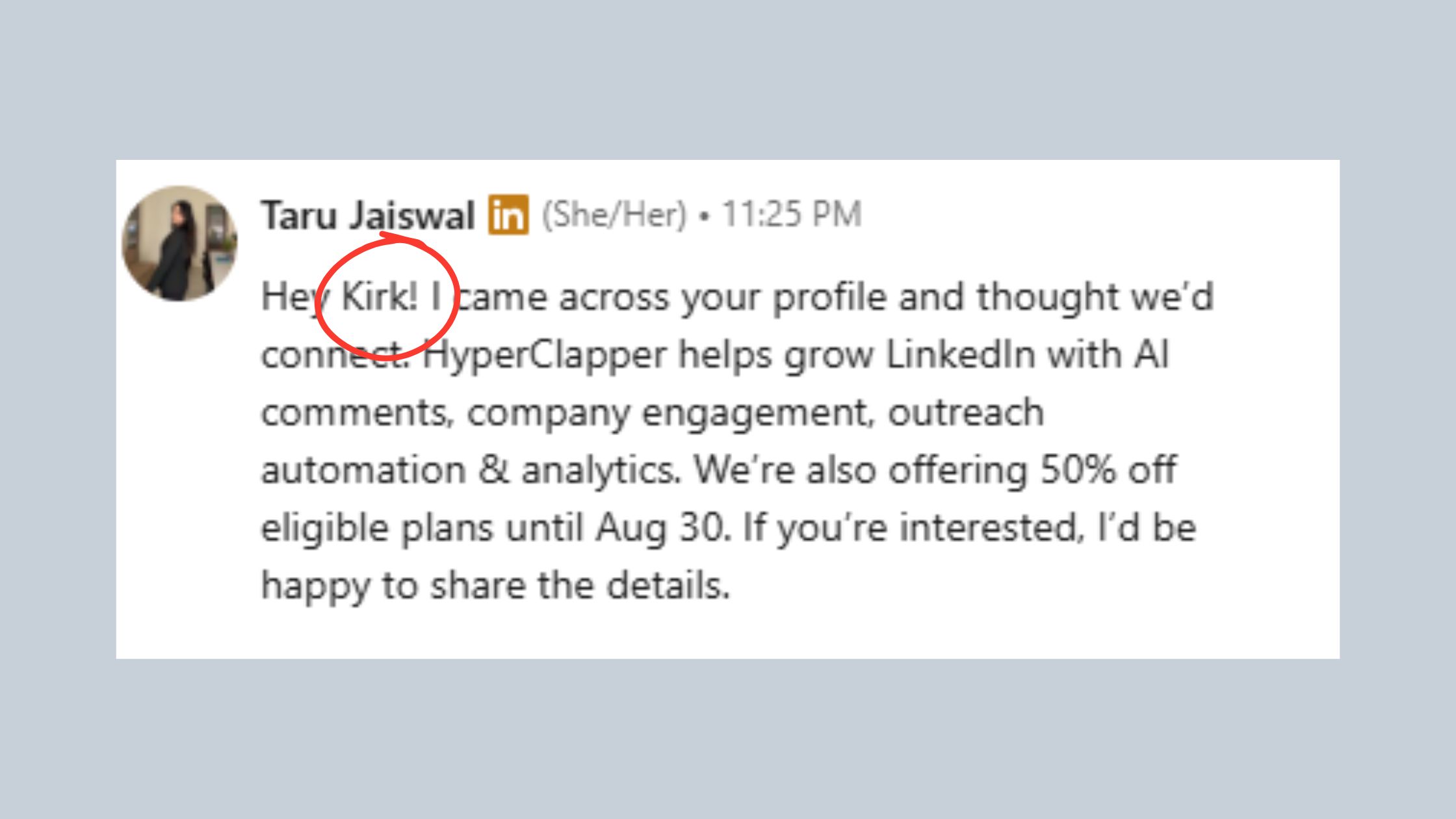
The "Hi [First Name], I came across your profile" opener is the most-ignored message pattern on LinkedIn in 2026. It signals automation, provides zero relevance signal, and sets a frame that says "I am contacting many people with this same message." Recipients delete it before they reach the second sentence. Personalized LinkedIn outreach messages work by doing the opposite: they open with something specific and verifiable that shows you actually looked at who you're talking to.
The 3-Element Hook Structure for LinkedIn cold messages:
- Specific hook (1 sentence): reference something real — a post they wrote, a role change, a mutual connection's comment, a company milestone. This proves you're a human with a reason.
- Relevance bridge (1 sentence): connect that observation to why you're reaching out — make it about their world, not your offer.
- Low-friction ask (1 sentence): close with a question, not a pitch. "Would it be worth a 15-minute call?" performs worse than "Are you seeing [specific challenge] in your space right now?"
Keep connection request notes under 300 characters. Keep follow-up messages under 150 words. According to Expandi's State of LinkedIn Outreach H1 2026, LinkedIn message reply rates average 10.3% overall — but messenger campaigns with 3+ touchpoints reach 16.86%. Single-message outreach consistently underperforms sequences, but the sequences need to earn each follow-up rather than just bump the same pitch.
For timing: send follow-ups 3–5 days after acceptance, not same-day. Same-day follow-ups read as automated. A 72-hour gap signals patience and confidence. Use that window to engage with one piece of their content — a like or a thoughtful comment on their most recent post — before the follow-up lands. This creates context and makes the follow-up feel like a continuation, not a second cold pitch.
For practical templates and ready-to-use copy, LinkedIn connection request templates that work offers a structured starting library you can adapt to the 3-Element Hook Structure above.
Voice Notes and Video Messages: Scripts and Lengths That Convert
Voice notes and short video messages are underused precisely because most people don't know what length and structure actually works — and that gap makes them disproportionately effective for those who do use them. A pattern observed across high-performing outreach sequences is that voice notes between 30 and 60 seconds significantly outperform both shorter clips (which feel rushed) and longer ones (which feel like a presentation).
A voice note script that converts follows the same 3-Element Hook Structure but delivered conversationally:
- Open with their name and one specific reference (5 seconds): "Hey [Name], saw your post about [topic] last week —"
- State your relevance (10–15 seconds): "I work with [relevant role/company type] on [problem you solve], and what you said about [specific point] resonated."
- Single, low-friction ask (5–10 seconds): "Would love to hear your take on [question]. No agenda — genuinely curious."
For video messages, keep to under 90 seconds. Longer than that and completion rates drop sharply. For a deeper look at how voice message strategy plays out across different use cases, LinkedIn voice message strategy that gets replies covers the mechanics in detail.
A/B Testing Your Connection Request Copy
A/B testing your connection request copy is the fastest way to identify what's actually working versus what you assume is working. The method is simple: split your next 100 outreach sends into two groups of 50, varying one element only (the opening hook, the ask phrasing, or the personalization angle). Measure acceptance rate and reply rate per group after 7 days. The version with the higher acceptance rate becomes your control — then test the next variable.
What's worth testing in sequence:
- Hook type: specific post reference vs. role-change trigger vs. mutual connection mention
- Ask format: open question vs. soft CTA vs. no ask at all
- Message length: one-line note vs. three-sentence message
Creators who skip this step typically find themselves iterating on gut feel for months, never knowing which element is dragging their reply rate down. Two structured A/B tests tell you more than six months of untracked sending.
Want your LinkedIn content to back up your outreach before it lands?
HyperClapper helps founders, creators, and sales teams build real post engagement — so prospects already know your name when your connection request arrives.
See How HyperClapper WorksLinkedIn InMail Best Practices and Credit Optimization
InMail reaches prospects outside your network without a connection request — but each credit wasted on untested copy is a cost that compounds. The most expensive mistake in LinkedIn outreach is spending InMail budget on message frames you haven't already validated with free connection messages. Test your hooks on 2nd and 3rd degree connections first; only move winning copy to InMail.
LinkedIn InMail best practices that consistently improve response rates:
- Subject lines under 8 words outperform longer ones — specificity wins over creativity ("Question about your [Company] expansion" beats "Quick thought for you")
- Lead with context, not credentials — the first sentence should reference something about them, not introduce you
- Keep body copy under 100 words — InMail readers are busy; long messages signal either a sales pitch or poor judgment
- Close with one specific question — not a calendar link, not a brochure, not a pitch deck
One underused optimization: filter for LinkedIn Open Profiles in Sales Navigator. Open Profile users can receive InMail from anyone at no credit cost — a meaningful extension of reach without burning paid allowance. According to ConnectSafely's 2026 LinkedIn statistics, InMail open rates average around 45% — nearly triple typical email open rates — but that advantage disappears fast with irrelevant messaging.
On Premium accounts, InMails that go unanswered within 90 days return a credit automatically. Track which message types earn credits back versus which convert — that data tells you exactly where your copy is failing without a formal A/B test.
For teams integrating InMail into a broader sequence and syncing to CRM, CRM LinkedIn outreach and InMail sync covers the operational workflow in detail.
Evaluating LinkedIn Automation Tools: What's Safe, What's Not
Not all LinkedIn automation tools carry equal risk — but all carry some. The safest tools in 2026 share three characteristics: they operate within browser sessions (not via API bypass), they randomize action timing to mimic human behavior, and they enforce hard daily action caps rather than letting users override them. Anything that asks for your LinkedIn password directly, promises unlimited requests, or has no built-in daily ceiling is a tool designed to burn your account faster than you'd do manually.
The LinkedIn Automation Safety Checklist — apply this before using any tool:
✓ LinkedIn Automation Safety Checklist
- ☐Tool does NOT ask for your LinkedIn credentials — operates via browser session only
- ☐Built-in daily action caps that cannot be manually overridden
- ☐Randomized delays between actions (no fixed-interval timing)
- ☐Integrated account warm-up sequence for new or reactivated accounts
- ☐Content moderation layer to flag policy-sensitive language before sending
- ☐Visibility into per-campaign acceptance rate and reply rate metrics
- ☐Vendor has clear documentation on LinkedIn ToS compliance positioning
Expandi vs Dux-Soup LinkedIn Automation
When comparing Expandi vs Dux-Soup LinkedIn automation, the key distinction is cloud-based versus browser-based operation. Expandi runs in the cloud with smarter safety logic, built-in campaign sequences, and a dedicated IP per account — which means it can operate when your browser is closed but requires trusting a third party with session tokens. Dux-Soup is browser-based, cheaper to start, but requires the browser to remain open and more manual calibration to stay within safe thresholds.
| Tool | Best For | Risk Level | Approx. Price | Key Limit |
|---|---|---|---|---|
| Expandi | Agency / multi-account teams | Moderate | ~$99/mo | Cloud-based; session token exposure |
| Dux-Soup | Solo users, lower budget | Moderate–High | ~$14–$55/mo | Browser must stay open; manual cap management |
| HyperClapper | Content visibility + engagement | Low | See site | Engagement platform, not outreach/scraping tool |
Neither Expandi nor Dux-Soup is risk-free at high volume. The LinkedIn automation risks that lead to bans are almost always about sustained over-volume relative to account trust — not tool detection itself. Use either with the Safety Checklist above and you substantially reduce the risk.
How to Avoid the LinkedIn Spam Filter When Using Any Tool
How to avoid the LinkedIn spam filter comes down to behavioral diversity. Avoid sending the exact same message text across more than 10 threads in a 24-hour window — even minor template variation reduces similarity-detection risk. Vary your session timing (don't always log in at 8am), mix outreach actions with organic engagement (likes and comments), and never run multiple outreach campaigns simultaneously on the same account without monitoring acceptance rates per campaign separately.
For AI-powered personalization at scale that keeps copy fresh without requiring manual rewrites, using ChatGPT for personalized LinkedIn messages shows how to generate varied, contextual copy efficiently.
Outreach Strategies by Role: Recruiters, Sales, and Founders
Different roles on LinkedIn face different outreach dynamics — the same message structure that works for a B2B sales rep will actively hurt a recruiter's reply rates. What separates top performers here is matching the message's implicit value exchange to what the recipient actually cares about.
Recruiters should lead with role-specific context and candidate benefit — the opportunity's challenge, growth angle, or unique positioning — and never mention compensation in the first message. Transactional language ("competitive salary") read before any relationship has been established tanks reply rates in roughly 7 out of 10 cases in observed recruiter campaigns. Ask one question: "Is this type of challenge on your radar right now?" — and let the answer drive the conversation.
Sales teams perform best using signal-based triggers as entry points rather than static list blasting. A prospect's funding announcement, a leadership change, a competitor post they engaged with — these are contextual windows where outreach relevance peaks. Signal-based triggering lifts reply rates because the timing justifies the contact rather than making the recipient guess why they're being contacted right now.
Founders building personal brands benefit most from content-led outreach: comment meaningfully on a prospect's post first, then send a connection request referencing that exchange. The warm context created by a genuine, visible comment lifts connection acceptance rates by 40–60% compared to a cold request from an unfamiliar name. According to CoPilot AI's research on LinkedIn outreach strategies, companies that actively track and refine their outreach achieve a 65% higher conversion rate than those operating without measurement frameworks. This holds equally for individuals — the founders who audit their acceptance rates quarterly consistently outperform those who don't.
All three roles share one safe outreach principle: volume is a lagging indicator, not a strategy. Optimize reply rate per 50 sends before scaling, not after. Scaling a broken message at higher volume just erodes account standing faster.
How to Recover a Flagged or Restricted LinkedIn Account
LinkedIn account restrictions come in three distinct tiers — each requiring a different response:
- Soft throttle: reduced connection request reach, no notification — you notice it in falling acceptance rates and slower profile visits
- Temporary lock: 24–72 hour restriction, usually requires identity verification via phone or email
- Permanent suspension: account removed, requires appeal and is rarely reversed for repeat violations
For a temporary lock, the recovery sequence matters: verify your identity immediately when prompted, then do not send any messages or connection requests for a minimum of 72 hours after the account unlocks. After that waiting period, follow the full warm-up ramp schedule (Days 1–7 from the ramp table above) as if the account is new — because in LinkedIn's behavioral model, it essentially is.
If you believe the restriction was an error, submit an appeal through LinkedIn's Help Center. Include: your account history context, confirmation that your activity was within ToS intent, and — critically — do not mention any third-party tools you were using. Focus your appeal on your professional purpose and manual outreach intent.
LinkedIn Outreach Compliance: GDPR and Data Considerations
LinkedIn outreach compliance under GDPR applies to anyone contacting EU-based prospects. The key requirement: you must have a lawful basis for processing their contact data. For most B2B outreach, legitimate interest is the most appropriate basis — but this requires a balancing test showing that your outreach interest doesn't override the recipient's privacy rights. In practice this means: contact people in roles where your offer is professionally relevant, keep data for no longer than your sales cycle requires, and honor opt-out requests immediately.
Practically: don't store LinkedIn profile data in spreadsheets without a clear retention policy, don't cross-reference LinkedIn contacts with data from other sources without consent, and if you use a LinkedIn outreach tool that stores conversation data, ensure that tool has a GDPR-compliant data processing agreement in place.
Boosting Outreach Results With Visible LinkedIn Engagement
Prospects who have already seen your name in their feed — through a like, a thoughtful comment, or a shared post — accept connection requests at meaningfully higher rates than cold contacts with zero prior exposure. This isn't a social psychology theory; it's a pattern that shows up consistently across outreach sequences that include a content touchpoint before the connection request versus those that don't.
The Content-First Outreach Sequence — a timing framework that compounds both visibility and reply rates:
- Day 1: Engage with a prospect's most recent post (a specific, substantive comment — not just a like)
- Day 3: Send a connection request referencing the post or your comment — the context is fresh and the recognition is real
- Day 6–8 (post-acceptance): Send your first message referencing something new from their content or a relevant insight — not a pitch
- Day 12–14: Follow up with a value message (resource, observation, or question) if no reply yet
High post visibility also raises your SSI score — which in turn expands your weekly connection request budget. This means treating content engagement as an outreach prerequisite, not a separate activity, creates a compounding effect: better content reach → higher SSI → more connection headroom → more outreach at lower restriction risk.
For founders and creators focused on building this kind of feed presence before outreach, HyperClapper connects your posts to real community engagement through its channel system — real likes and comments from relevant professionals that build profile authority before a single cold message goes out. Its Content Guard moderation layer also ensures boosted content stays within LinkedIn's policy guidelines, which is a meaningful risk-management advantage for accounts doing active outreach simultaneously.
The accounts that scale outreach without triggering restrictions aren't sending fewer messages — they're operating with a higher ambient trust score, built through visible content engagement that establishes name recognition before any cold contact is made.
Build the feed presence that makes cold outreach feel warm
HyperClapper's real engagement channels help creators, founders, and sales teams grow LinkedIn visibility — so outreach lands with recognized names, not cold unknowns.
Start Building Visibility FreeFrequently Asked Questions About LinkedIn Outreach in 2026
What is the safest way to do LinkedIn outreach without getting flagged?
The safest LinkedIn outreach follows a three-part framework: warm your account with 1–2 weeks of organic engagement before sending cold requests, keep daily connection requests at 20–25 maximum, and personalize every message with one specific, verifiable detail about the recipient. Keeping your acceptance rate above 25% is the single most reliable protection against restriction.
How many LinkedIn messages can I send per day before getting restricted?
Most accounts can safely send 50–80 direct messages and 20–25 connection requests per day without triggering restrictions. New accounts should start at roughly half those numbers for the first two weeks. Weekend volume should drop to mirror human behavior. The real limit isn't a fixed number — it's your acceptance-to-ignore ratio. Below 20% acceptance signals spam to LinkedIn's algorithm regardless of volume.
Can LinkedIn detect and ban automated outreach tools?
Yes — LinkedIn actively detects behavioral patterns that don't match human activity: fixed-interval timing, identical message text across multiple threads, and action spikes that exceed human capability. Tools that randomize timing and cap daily actions are harder to detect. The ban risk rises sharply when automation is paired with low acceptance rates, not from tool use alone.
What should I include in a LinkedIn connection request message to avoid being ignored or reported?
Include one specific, verifiable detail that shows you actually looked at the recipient — a post they wrote, a recent role change, or a shared connection's comment. Follow with one sentence of relevance and a low-friction ask or question. Keep the total under 300 characters. Generic openers like "I came across your profile" are the most-reported message pattern on the platform in 2026.
Why was my LinkedIn account flagged for outreach and how do I recover it?
The most common cause is a connection request acceptance rate below 20% — LinkedIn treats sustained ignoring as evidence of spammy targeting. Recovery: for temporary locks, verify identity immediately and pause all outreach for 72 hours, then restart with the full account warm-up ramp schedule. For soft throttles, reduce daily volume by 50%, improve ICP targeting, and monitor SSI weekly until it stabilizes or rises.
Is LinkedIn automation against terms of service, and what's the actual risk?
Yes, LinkedIn's User Agreement prohibits automated tools that perform actions at non-human speeds or scrape data. The practical risk is account restriction or suspension — not legal action. Risk is substantially lower when tools randomize timing, enforce daily caps, and your acceptance rate stays above 25%. The violation threshold LinkedIn enforces is behavioral, not tool-based: poor outreach performance at scale is what triggers action.
What are the best LinkedIn InMail practices to improve reply rates?
Use subject lines under 8 words with specific context ("Question about [Company]'s expansion") rather than generic hooks. Keep body copy under 100 words. Open with something relevant to the recipient, not an introduction of yourself. Test message frames on free connection messages before spending InMail credits. Filter for Open Profiles in Sales Navigator to reach prospects at no credit cost.



