The LinkedIn Jail Survival Guide for Power Users and Pros
Learn what causes LinkedIn jail, how long it lasts, and exactly how to appeal a LinkedIn account restriction or ban — with the 2026 prevention playbook.
📅 ⏱ 27 min read📝 ~5400 words
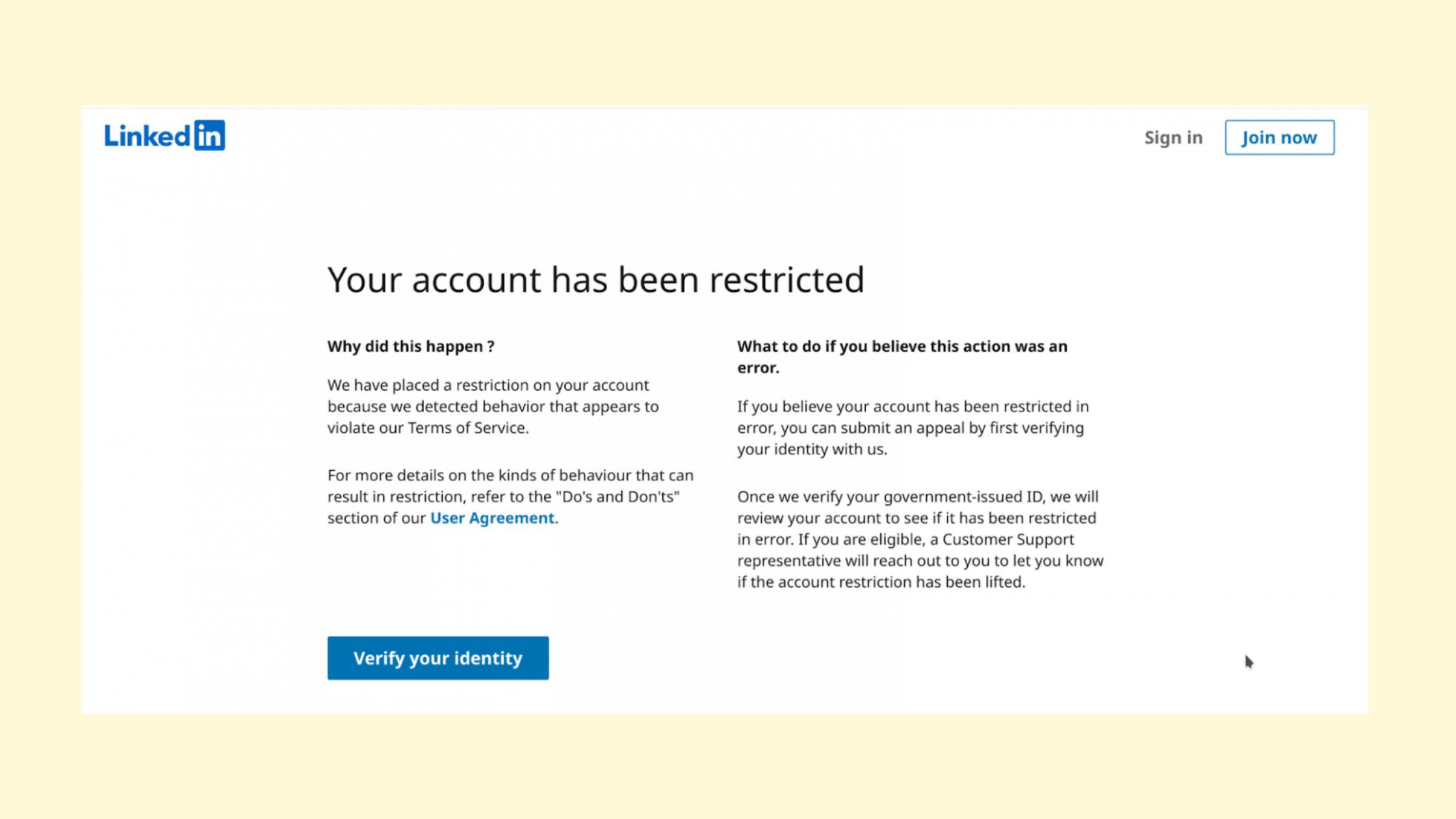
A recurring pattern among professionals hit with a LinkedIn jail restriction is that they never saw it coming — and once it happened, they had no clear path out. LinkedIn jail is the informal term for account restrictions, shadowbans, and full suspensions that LinkedIn applies when its behavioral detection system flags an account as violating platform usage policies. What makes it uniquely frustrating is that LinkedIn rarely explains exactly what triggered it, rarely confirms how long it will last, and often provides no recovery timeline at all. This guide covers both sides: what actually triggers restrictions in 2026 (including the subtler behavioral signals most guides ignore), and a concrete, step-by-step process to appeal and recover — whether you're facing a 7-day timeout or a permanent ban.
Key Takeaways
LinkedIn jail covers three distinct states — temporary restriction, shadowban, and permanent ban — each requiring a different response.
Restrictions are triggered by behavioral signals, not just automation tools — manual users get flagged too, often for connection request volume or message patterns.
LinkedIn's 2026 algorithm updates lowered detection thresholds and added behavioral velocity checks — spikes in activity within short windows can trigger flags even when daily totals stay within limits.
The most counterintuitive finding: waiting out a restriction without submitting a formal appeal rarely resolves permanent bans — you must actively contest them through the correct channel.
Industry-specific risk profiles differ sharply: recruiters, sales teams, and agencies face the highest exposure, for different reasons.
Real community engagement from actual LinkedIn members carries a fundamentally different risk profile than bot-generated activity — choosing the right tools matters more than avoiding all tools entirely.
Reach drop reported by some pod users after crackdown
7–30 days
Typical temporary restriction window
What Is LinkedIn Jail? (And Why It Happens More Than You Think)
What Is LinkedIn Jail?
LinkedIn jail is not a single punishment — it is an umbrella term covering three distinct account states that LinkedIn applies when its systems detect a policy violation or unusual behavioral pattern. Most guides treat these states as interchangeable. They are not, and confusing them leads to the wrong recovery approach.
The Difference Between a Temporary Restriction, Shadowban, and Permanent Ban
The three states — and why each requires a different response:
Temporary restriction: A hard limit applied to specific account actions — you can still log in, but LinkedIn blocks you from sending connection requests, messages, or posting for a defined period (typically 7–30 days). LinkedIn usually shows a notification explaining which action is blocked.
LinkedIn shadowban: A shadowban is a suppression of your content's reach and visibility without any notification or account warning. Your posts still publish, but LinkedIn's algorithm stops distributing them — likes, comments, and profile views drop sharply. This is the hardest state to detect because nothing appears broken on your end.
Permanent ban: A full account suspension where LinkedIn disables login access entirely. This typically follows repeated policy violations, a legal enforcement action, or a severe single breach such as confirmed data scraping.
The most dangerous state is the shadowban — not because it is the most severe, but because most users spend weeks wondering why their content stopped performing before realising the platform has quietly deprioritised their account entirely.
According to ConnectSafely AI (2026), some accounts hit with engagement pod crackdowns saw reach drops of up to 97% overnight — a figure that closely resembles shadowban suppression rather than a clean restriction. In practice, if your engagement falls off a cliff with no warning message, assume shadowban first.
Can LinkedIn Jail Affect Your Company Page?
Yes — and this is a nuance almost every existing guide misses entirely. LinkedIn account restrictions can affect individual profiles, company pages, or both simultaneously. Company pages managed by an admin account that gets restricted often lose posting capabilities. Worse, if the only admin on a company page is banned, the page can become effectively unmanageable. Agencies and marketers running multiple client pages under one account face compounded risk: a single restriction can cascade across every page they administer.
Why Did LinkedIn Restrict My Account? The Real Triggers in 2026
Why Did LinkedIn Restrict My Account?
The most common failure mode is assuming that only automation tool users get restricted. Manual users are flagged regularly — the trigger is behavioral, not just tool-based. If you have ever asked yourself why did LinkedIn restrict my account without having used any automation tools, the answer almost certainly lies in one of these behavioral patterns.
Connection Requests, Messaging Patterns, and LinkedIn Safe Usage Limits
As reported by SalesRobot (2026), safe connection request limits in 2026 sit at 15–20 per day, with a dynamic weekly cap of 50–200 per week — the range is not fixed. That ceiling shifts based on your account's trust score, meaning a newer or less-active account hits the lower end of the range far sooner than an established one. Treat these as ceilings, never as daily targets.
Messaging patterns are an equally common trigger that users underestimate:
Sending the same or near-identical message text to multiple recipients within a short window
High message-to-connection ratios (sending many messages to people you are not connected with via InMail or open profiles)
Following up on unanswered messages more than once within 48 hours at scale
Using first-degree connections to send messages but at machine-like frequency and timing
⚠️
Warning:LinkedIn's 2026 algorithm introduced behavioral velocity checks — an account that sends 15 connection requests in 20 minutes is flagged even if it sends zero more that day. The daily total is not the only metric being tracked. Rate within a session window matters equally.
Subtler Triggers Most Guides Ignore: Profile Flags, Reporting, and Data Scraping
Beyond volume thresholds, three trigger categories appear consistently in community reports but rarely in published guides:
Profile flags and user reports: If multiple users mark your connection requests as "I don't know this person" or report your messages as spam, LinkedIn's trust system weights those signals heavily — even a handful of reports from high-credibility accounts can trigger a review.
Keyword stuffing in connection notes: Personalized connection notes that pack in multiple keywords, promotional phrases, or URLs are flagged by LinkedIn's content filters as spam before they even reach the recipient.
LinkedIn automation rules violations through data scraping: Using any tool that extracts profile data at scale — even for seemingly benign purposes like building contact lists — constitutes a platform usage policy violation. LinkedIn's legal team has pursued enforcement action against scraping tools in multiple jurisdictions, meaning a ban here carries legal risk beyond account loss.
Understanding why restrictions happen is the foundation — but knowing how LinkedIn's internal scoring system evaluates risk is what lets you stay ahead of it.
How LinkedIn's Trust Score Algorithm Works in 2026
LinkedIn does not publish a public trust score framework, but patterns observed across thousands of restricted and recovered accounts reveal the key signals the system evaluates. An account trust score is LinkedIn's internal assessment of how likely an account is to represent a genuine professional versus a bad actor — it directly determines how much activity latitude your account receives.
How to Audit Your Account Health Before a Restriction Hits
The inputs LinkedIn's system most consistently weighs include:
Account age and profile completeness: Older, fully completed profiles (photo, headline, about section, employment history, education) carry higher baseline trust. A new account with an incomplete profile that immediately starts sending connection requests is treated with maximum suspicion.
Engagement-to-connection ratio: Accounts that accumulate connections but generate little actual engagement (comments, reactions, post activity) score lower — LinkedIn interprets this as collecting contacts rather than building a professional network.
Reported interactions: The "I don't know this person" flag on connection requests directly reduces trust score. Three to five of these within a week is enough to trigger a soft restriction on some accounts.
Content flagging history: Posts that have been reported or removed leave a record that contributes to future scrutiny of the account.
Login consistency: Logging in from multiple geographic locations, different devices within the same session, or through IP addresses associated with VPNs or data centres raises anomaly signals.
Human-like engagement patterns: Accounts that engage at irregular intervals, vary their message content, and mix activity types (commenting, reacting, posting, messaging) across the day consistently register lower risk profiles than accounts with machine-regular timing.
To proactively audit your account health, check these signals monthly:
Review your pending connection request count — LinkedIn flags accounts with high pending-to-sent ratios
Check your acceptance rate: if fewer than 30% of your sent requests are accepted, pull back volume immediately
Review any notifications from LinkedIn about "unusual activity" — these are early warnings, not final judgments
Verify your profile is at "All-Star" completeness level in LinkedIn's own metrics
Industry Risk Profiles: Who Gets LinkedIn Jailed Most (Recruiters, Sales, Marketers)
Not all LinkedIn users carry the same restriction risk — behavior that looks normal for a recruiter reads as coordinated spam to LinkedIn's algorithm when done at volume. Teams that ignore their industry-specific risk profile consistently encounter restrictions they consider unfair, because they are comparing their behavior to a generic average rather than their peer group's detection threshold.
Recruiters: The highest-risk profile by volume. Recruiters legitimately need to send dozens of connection requests and InMails daily — but that volume is exactly what LinkedIn's system flags. The compounding factor is that many recruiter targets respond to messages with "I don't know this person" when they feel cold-contacted, accelerating trust score erosion faster than in any other use case.
Sales teams: InMail overuse, templated follow-up sequences, and clustering profile visits around prospect research sessions are the most common LinkedIn automation rules violations in this group. A salesperson who visits 80 profiles in a two-hour window sends a clear behavioral signal to the detection system regardless of whether any tool is involved.
Marketers and agencies: Managing multiple client accounts from shared IP addresses or through the same automation platform dramatically elevates detection risk. A single flagged account can cause LinkedIn to scrutinize every account associated with the same IP, tool credentials, or email domain.
Coaches, Creators, and Founders: The Engagement-Bait Risk
Coaches, creators, and founders face a different trigger profile: engagement bait. Posts designed to generate high comment volume through controversial questions, voting prompts, or "tag someone who…" formats were heavily used in 2023–2024. According to Linkmate (2026), organic reach has dropped by up to 50% for generic content, and old tactics like engagement pods or "Agree?" posts are now actively penalized — meaning the content strategy itself can trigger algorithmic suppression even without any volume-based violation.
How Long Does LinkedIn Jail Last? Timelines and What to Expect
Temporary restrictions typically last 7 days for a first offense, extending to 14–30 days for accounts flagged repeatedly within a 90-day window. But LinkedIn does not always communicate these timelines — which is the detail that frustrates users most, not the restriction itself.
97%
Reach drop reported by some engagement pod users after LinkedIn's 2026 crackdown — the clearest signal that suppression, not just restriction, is now the platform's preferred enforcement tool
According to ConnectSafely AI (2026), pod users face reach restrictions, shadow bans, and account suspension — with some seeing that 97% reach drop overnight. This means the how long does LinkedIn jail last question has a different answer depending on which type of restriction you are experiencing:
Temporary restriction: 7–30 days, after which the specific blocked action (connection requests, messaging) is typically restored automatically — no appeal required, but filing one can sometimes shorten the window.
LinkedIn shadowban: No fixed duration. A shadowban can lift within days or persist for months. There is no notification when it ends, making it impossible to track without monitoring your own reach metrics against baseline.
Permanent ban: Does not expire. The only path back is a successful appeal, and LinkedIn is not required to reinstate any account.
Does Waiting It Out Actually Work for Temporary Restrictions?
For genuine temporary restrictions, waiting works — the action block lifts after the restriction period ends. However, waiting without changing behavior means the next restriction arrives faster and lasts longer. For permanent bans, waiting does nothing. Accounts that remain suspended for 6, 12, or 24 months without an appeal do not get automatically reinstated. The "wait and see" instinct, which is extremely common in community discussions, is productive only for the least severe restriction type and actively harmful for the most severe one.
Step-by-Step: How to Appeal a LinkedIn Account Restriction and Actually Get It Back
This is the section that competing guides consistently fail to provide with any real specificity. Most "recovery" advice amounts to "contact LinkedIn support" — which tells you nothing about which channel to use, what to say, or what success actually looks like. The process below is grounded in what appeal submissions that result in account reinstatement consistently include.
For Temporary Restrictions (7–30 Days): What to Do Right Now
Screenshot every error message immediately — note the exact wording. "Restricted" versus "suspended" versus "under review" signals different enforcement tiers and affects which support pathway you should use. Do this before you try anything else. (30 seconds)
Stop all activity on the account — do not attempt to work around the restriction using a secondary account or proxy. LinkedIn links accounts by browser fingerprint and IP, and a second flagged account escalates the original penalty. (Immediate)
Submit an appeal via LinkedIn's official Help Center form — navigate to linkedin.com/help → "Fix a problem" → "Account restriction or suspension." The form creates a support ticket with a reference ID. Email to generic support addresses routes to lower-priority queues and creates no trackable ticket. (5 minutes)
In your appeal, include: your full name, the email on the account, the exact date the restriction appeared, a brief and factual description of your normal LinkedIn usage patterns, and a specific, polite statement that you did not knowingly violate the cited policy. Vague appeals ("I didn't do anything wrong") fail at significantly higher rates than specific ones. (10–15 minutes)
Wait for a response — temporary restriction appeals are reviewed within 5–10 business days in most cases. If you do not hear back within 14 days, submit a follow-up referencing your original ticket ID.
💡
Pro Tip:LinkedIn Premium subscribers consistently report faster appeal review times. If your account generates business value and you are not on Premium, upgrading before submitting an appeal may meaningfully reduce wait time — Premium accounts are treated as higher-value users by the support routing system.
For Permanent Bans: LinkedIn Account Banned — How to Recover
How to appeal LinkedIn account restriction when it is a permanent ban requires a different, more detailed approach. A permanent ban appeal should be treated like a formal dispute, not a support request:
Use LinkedIn's dedicated appeals page at linkedin.com/help/linkedin/ask/TS-DEMOTION for suspended accounts — this routes to a specialist team, not general support.
Provide identity verification materials proactively: government ID (redact sensitive numbers), a selfie matching your LinkedIn profile photo, and the registered email address.
Write a clear, factual account of your usage — do not minimize what happened, but do explain context. If you used a third-party tool that you have since removed, say so specifically.
Request a review of specific flagged content or actions rather than a blanket reinstatement — appeals that identify and address the specific violation reason have demonstrably higher success rates.
If the first appeal fails, you are entitled to submit a second. Escalate by mentioning GDPR rights (EU users) regarding your data if LinkedIn does not respond — this creates a legal obligation for them to respond within 30 days.
How to Avoid Getting Banned on LinkedIn: The 2026 Prevention Playbook
Prevention is worth ten appeals. The behaviors that trigger LinkedIn jail in 2026 are consistent enough across community reports and enforcement data that most restrictions are genuinely avoidable with deliberate usage habits.
The accounts that never get restricted are not the ones doing the least — they are the ones whose activity patterns are indistinguishable from a highly engaged, naturally growing professional network. Volume is not the enemy. Behavioral regularity is.
Practical Daily Limits and Behavioral Rules That Actually Work
What the safest, most active LinkedIn accounts do consistently:
Send 10–15 connection requests per day maximum — staying well below the ceiling, not pushing against it
Personalize every connection note — even a single sentence referencing shared context reduces the "I don't know this person" flag rate sharply
Spread activity across the full day rather than batching it into one or two sessions
Warm up new accounts over 4–6 weeks before running any outreach or engagement campaign at scale — starting at 3–5 requests/day and increasing gradually
Mix activity types daily: post, comment, react, send messages, visit profiles — behavioral variety is a direct trust signal
Avoid running LinkedIn in multiple browser sessions simultaneously — this triggers session anomaly flags
Log in from consistent IP addresses where possible — frequent geographic jumps in login location trigger security reviews
✓ The LinkedIn Jail Prevention Checklist
☐Keep connection requests to 10–15/day maximum, never at the ceiling
☐Write a unique personalized note for every connection request you send
☐Monitor your connection request acceptance rate — if below 30%, pause and review
☐Spread LinkedIn activity across the full working day, not into two-hour blocks
☐Complete your profile to "All-Star" status before running any outreach
☐Warm up new accounts over 4–6 weeks before scaling any activity
☐Use only tools that operate through real user engagement or LinkedIn's official API — never headless browser automation
☐Withdraw old unanswered connection requests monthly to keep your pending count low
☐Check LinkedIn notifications weekly for any "unusual activity" warnings — treat them as early flags, not alerts to dismiss
Does LinkedIn Punish You for Posting Too Much?
Posting volume alone rarely triggers a LinkedIn account restriction — LinkedIn wants active content creators on the platform. The risk is not frequency but content quality signals. Posts that repeatedly receive low engagement relative to your follower count, that are reported by users, or that contain flagged keywords (promotional phrases, competitive brand mentions, certain URL patterns) can contribute to algorithmic suppression over time. Posting 3–5 times per week with content that generates genuine engagement is not a risk. Posting daily with content that gets zero engagement and occasional reports is a slow-accumulating shadowban trigger.
Want LinkedIn Visibility Without the Restriction Risk?
HyperClapper's channel-based engagement system connects your posts with real professionals — not bots — so your content gains traction the way LinkedIn's algorithm expects it to.
Does LinkedIn Detect Automation Tools? What It Actually Flags in 2026
Yes — and its detection capabilities improved substantially in 2026. LinkedIn uses a combination of browser fingerprinting, API call pattern analysis, session behavior anomalies, and data from its legal enforcement actions to identify accounts using automation tools. The LinkedIn shadowban what it means in many cases is precisely this: LinkedIn detected tool-based activity and suppressed the account without issuing a formal restriction that the user would notice and appeal.
Specific technical signals LinkedIn's system targets in 2026:
Headless browser automation: Tools that simulate a browser without rendering a visible window leave distinct fingerprint signatures — request headers, JavaScript execution timing, and canvas fingerprinting all differ from genuine browser sessions.
Identical request timing patterns: Actions performed at machine-regular intervals (e.g., exactly every 30 seconds) are immediately flagged. Human behavior is irregular. Automation is not.
Rate-limiting bypass attempts: Tools that modify HTTP request headers to avoid LinkedIn's built-in rate limiters are actively detected and result in the fastest, most severe enforcement responses.
IP address patterns: Requests from data-centre IP ranges, rotating proxies, or known VPN exit nodes trigger instant scrutiny, particularly when paired with LinkedIn activity.
Safest LinkedIn Automation Tools: Comparison and Compliance Ratings
The LinkedIn automation tools comparison question is not simply about which tools are best — it is about which tools operate within a risk profile that LinkedIn does not actively penalize. The core distinction:
The legal dimension adds a layer beyond platform bans. LinkedIn has pursued legal action against scraping tools under the Computer Fraud and Abuse Act (CFAA), and the EU's GDPR creates a separate compliance obligation: extracting and storing LinkedIn profile data without consent from the data subjects violates European privacy law, with consequences that extend beyond a platform ban to regulatory fines. For users in European jurisdictions, LinkedIn automation rules violations involving data scraping are not just a terms-of-service issue.
Common Mistakes That Send Power Users Straight to LinkedIn Jail
Power users and highly active professionals make a distinct set of mistakes from casual users — and higher activity volume means each mistake carries compounding consequences. What separates top-performing accounts from restricted ones is not raw activity level but behavioral discipline at that activity level.
🔴
Avoid:Connecting any automation tool to an account that has already received a soft warning or "unusual activity" notification from LinkedIn. In most cases observed, this escalates a warning to a formal restriction within days — LinkedIn's system interprets it as evidence that the behavior will continue regardless of warnings.
The three mistakes that appear most frequently in accounts that move from a temporary restriction to a permanent ban:
Mistake #1 — Treating limits as targets: Staying just under 20 connection requests/day while sending them in two concentrated bursts still triggers behavioral velocity flags. The number is fine; the pattern is not. LinkedIn safe usage limits connections messages are floors for safety, not performance benchmarks.
Mistake #2 — Escalating activity after a warning: A soft warning or a temporary content restriction triggers many users to increase outreach volume immediately after the restriction lifts — reasoning that the slate is clean. In practice, the account is under elevated scrutiny for 30–90 days after a restriction. Any above-average activity during this window accelerates re-restriction.
Mistake #3 — Ignoring the GDPR angle: Users who scrape LinkedIn profile data through third-party tools are violating both platform policy and EU law simultaneously. The platform ban is the minimum consequence. Regulatory exposure for GDPR violations involving LinkedIn data is a real secondary risk that almost no existing guide covers.
The Recovery Mistakes That Make a Restriction Permanent
Creating a new account while the original is still under restriction or review is the single most reliable way to convert a temporary restriction into a permanent ban. LinkedIn links accounts through device fingerprinting, email patterns, and behavioral signatures — a "fresh" account often triggers immediate association with the flagged original, and LinkedIn applies the pending penalty to both. Additionally, attempting to contest a restriction through public LinkedIn posts or social media pressure campaigns has consistently resulted in faster permanent enforcement in documented community cases, not faster resolution.
How to Use LinkedIn Engagement Tools Without Getting Flagged
The goal is not to avoid all tools — it is to use tools that generate real engagement signals rather than synthetic ones that LinkedIn's algorithm is explicitly trained to detect and penalize. This distinction is the core of what separates safest LinkedIn automation tools from risky ones.
Real engagement from real users — genuine likes, comments, and reactions from actual LinkedIn members — does not carry the same risk profile as bot-generated activity. LinkedIn's behavioral detection system is calibrated to identify signals that no real human would produce: machine-regular timing, identical message templates, and engagement that flows exclusively from the same small group of accounts to the same poster every time. Community-based engagement, where diverse real professionals interact with your content, looks organic because it is organic.
What Makes an Engagement Tool 'Safe' in LinkedIn's Terms in 2026
Tools like HyperClapper are built on a channel-based model where real professionals engage with posts — not bots. This means the engagement signals LinkedIn's algorithm sees are indistinguishable from a naturally growing, well-networked professional account. HyperClapper's AI-powered replies keep conversations active after a post's initial engagement window, which directly aligns with how LinkedIn distributes content: the platform rewards posts that sustain meaningful conversations, not just initial like spikes.
What makes an engagement tool safer in LinkedIn's 2026 detection environment comes down to five criteria:
Real users, not bots: Engagement from actual LinkedIn members with their own complete profiles and organic activity histories
No browser simulation: Does not operate by mimicking a browser session or automating clicks through a headless browser
Content moderation: Screens content to avoid flagged categories that attract LinkedIn's content policy enforcement (politics, controversy, spam signals)
Behavioral variety: Engagement arrives from diverse accounts at varied times — not a block of identical actions within a single hour
No outreach or scraping functionality: Tools that combine engagement with connection request automation or data extraction double the detection surface area
Best practice: combine any engagement tool with native LinkedIn activity — manually commenting, posting original content, engaging authentically in your feed — so the account's behavioral fingerprint stays fully human-shaped. The Behavioral Authenticity Principle: the safest LinkedIn account is one where tool-assisted activity is indistinguishable from the account's organic activity pattern.
💡
Pro Tip:Before enabling any LinkedIn engagement tool on a new account, run it for the first two weeks at minimum settings only. This establishes a low-activity baseline that makes subsequent increases look like natural growth rather than a sudden behavior change — the pattern LinkedIn's velocity checks look for.
HyperClapper's real-community engagement and AI-powered replies build post visibility through authentic signals — the kind LinkedIn's algorithm rewards, not penalises.
Temporary LinkedIn restrictions last 7 days for a first offense, and 14–30 days for repeat flags within 90 days. Shadowbans have no fixed duration and can persist for weeks without notification. Permanent bans do not expire — they require a successful appeal to lift. LinkedIn rarely communicates timelines, which is why identifying which restriction type you have is the critical first step.
How to avoid being banned on LinkedIn?
Keep connection requests to 10–15 per day maximum, personalize every outreach note, spread activity across the full day rather than in bursts, warm up new accounts over 4–6 weeks, and avoid any tool that simulates browser behavior or scrapes profile data. Human-like engagement patterns — irregular timing, varied content, mixed activity types — are the most reliable protection against LinkedIn's behavioral detection system.
Does LinkedIn punish you for posting too much?
Posting frequency alone does not trigger restrictions. LinkedIn penalizes content that consistently receives poor engagement relative to your follower base, is reported by users, or contains flagged keywords. Posting 3–5 times per week with genuinely engaging content carries no restriction risk. Posting daily content that generates zero engagement and occasional reports contributes to gradual algorithmic suppression over time.
What triggers a LinkedIn account restriction for active users?
The most common triggers are connection request volume spikes (especially in short time windows), high rates of "I don't know this person" rejections, identical or near-identical outreach messages sent to multiple recipients, automation tool detection via browser fingerprinting, and content flagging. Active users are also flagged for profile view clustering — visiting 50–80 profiles within a single session consistently registers as a behavioral anomaly.
How do I get my LinkedIn account unrestricted step by step?
First, screenshot the exact error message. Second, stop all LinkedIn activity immediately. Third, submit an appeal via LinkedIn's Help Center form (not email) to generate a ticket ID. Fourth, include your account details, a factual description of your normal usage, and a specific denial of the cited violation. Fifth, wait 5–10 business days and follow up with your ticket ID if no response arrives within 14 days.
What is the difference between a LinkedIn shadowban and a full account ban?
A LinkedIn shadowban suppresses your content's reach and visibility without any notification — you can still log in and post, but LinkedIn stops distributing your content, causing engagement to drop sharply with no explanation. A full account ban removes login access entirely. The shadowban is harder to detect precisely because nothing appears broken; you must monitor your own reach metrics against your historical baseline to identify it.
Is it safe to use LinkedIn automation tools without getting banned?
It depends entirely on the tool type. Tools that use real community engagement (not browser simulation or scraping) carry a fundamentally lower risk profile — LinkedIn's detection targets synthetic behavioral signals, not real human activity. Tools that simulate browser sessions, automate clicks, or extract profile data at scale are actively detected and result in the most severe enforcement responses, including permanent bans and potential legal action.
Can LinkedIn permanently ban you, and what happens to your data?
Yes — LinkedIn can and does issue permanent bans for severe or repeated violations. Your public profile data remains on LinkedIn's servers even after a ban, but you lose access to your connections, messages, and content. Under GDPR, EU-based users have the right to request data deletion after account termination by contacting LinkedIn's privacy team — this is a separate process from the account appeal.
How long does a LinkedIn jail appeal typically take and what is the success rate?
Temporary restriction appeals typically receive a response within 5–10 business days. Permanent ban appeals take 14–30 days for initial review. Success rates are not published by LinkedIn, but community patterns consistently show that specific, well-documented appeals with identity verification outperform vague appeals significantly. First-time temporary restriction appeals have a meaningfully higher reinstatement rate than permanent ban appeals or repeat-restriction appeals.
What consistently separates accounts that recover cleanly from those that cycle back into repeated restrictions is not the quality of the appeal — it is the behavioral change that follows. Accounts that identify the specific trigger, address it directly, and then operate with deliberate behavioral discipline post-recovery rarely return to LinkedIn jail. Accounts that treat the appeal as the solution, rather than the trigger identification and habit change, typically face a second restriction within 60 days.
👋
⚡ Free plan
Leaving already?
Grab 3 free boosts on your next LinkedIn post — real likes & comments from 5,000+ creators. No card, cancel anytime.