
A LinkedIn engagement tool is software that amplifies post visibility by coordinating early likes and comments — the exact signals LinkedIn's algorithm uses to decide whether a post gets pushed to a wider audience. Both Lempod and HyperClapper do this, but through fundamentally different approaches. What's observed consistently across accounts that use these tools is that the method matters as much as the engagement count — tools that generate spiky, uniform activity get accounts flagged; tools that mimic natural interaction patterns compound reach over time.
- What Are LinkedIn Engagement Pod Tools and How Do They Work?
- Lempod vs HyperClapper: Feature-by-Feature Comparison
- LinkedIn Pod Tool Pricing: Lempod vs HyperClapper Costs Compared
- Safety, Risks, and LinkedIn Compliance: Which Tool Is Safer?
- Which Tool Is Better for Your Use Case?
- Frequently Asked Questions About Lempod, HyperClapper, and LinkedIn Engagement Pods
- Both tools boost LinkedIn post visibility through engagement pods — but their safety models are very different
- HyperClapper uses user-triggered engagement + AI replies; Lempod relies on browser extension automation
- HyperClapper supports company page boosting; Lempod is personal-profile only
- Lempod's per-pod pricing scales poorly; HyperClapper's channel model is more predictable
- For B2B teams, agencies, and creators who post regularly, HyperClapper is the lower-risk, higher-depth choice
- No engagement pod eliminates LinkedIn compliance risk — use either tool as a supplement, not a replacement for real content
| Feature | Lempod | HyperClapper |
|---|---|---|
| Engagement method | Browser extension (automated) | User-triggered via channels |
| AI replies | No | Yes — including Feed More |
| Company page support | No | Yes |
| Content moderation | None | Content Guard filter |
| Analytics | Basic | Built-in performance tracking |
| Pricing model | Per pod/month | Channel-based tiers |
| Risk level | Higher | Lower |
What Are LinkedIn Engagement Pod Tools and How Do They Work?
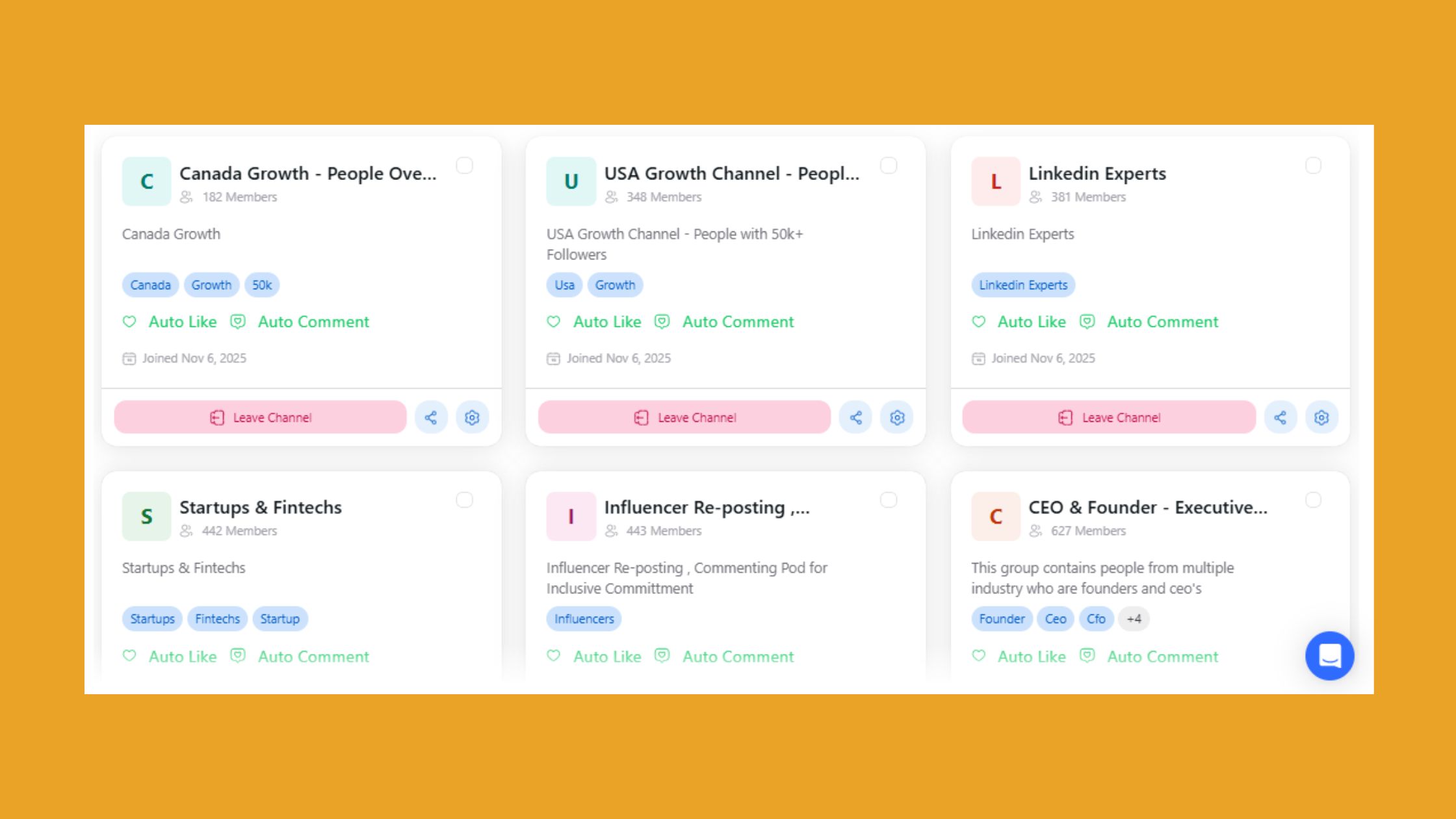
LinkedIn engagement pods are groups of users who agree to like and comment on each other's posts immediately after publishing — manufactured early engagement that tells LinkedIn's algorithm the content is worth distributing further. According to Hooktide (2026), LinkedIn's average engagement rate sits at 2.6%, meaning most posts never escape their immediate network. Pods exist to break that ceiling.
The core mechanic is the same across all LinkedIn engagement pod tools: post, trigger the pod, receive rapid engagement within the first 30–60 minutes while the algorithm is still evaluating distribution. Both Lempod and HyperClapper operate on this principle — but the execution diverges sharply.
How Does Lempod Work?
Lempod runs as a browser extension. Once installed, it automatically likes and comments on posts from other pod members without manual input. You join topic-specific pods, and every time a member posts, the extension fires engagement automatically. Simple to set up — and that simplicity is both its appeal and its liability.
How Does HyperClapper Work?
HyperClapper works through a channel system: you add your post, select channels (each representing roughly 50 real users), and those users engage. Engagement is real-person-driven, not automated by a script. You can layer in AI-generated replies to sustain conversation depth — and use the Feed More AI Replies feature to re-activate older posts days later when organic momentum stalls.
Lempod vs HyperClapper: Feature-by-Feature Comparison
The feature gap between these two tools has widened considerably. Lempod delivers what it always has: automated likes and generic comments from pod members. HyperClapper has built several layers on top of that baseline that address how LinkedIn's algorithm actually distributes content in 2026.
Engagement Quality and LinkedIn Algorithm Signals
Engagement velocity is the speed at which a post accumulates interactions after publishing — it's the primary distribution trigger LinkedIn monitors. Lempod generates this velocity, but the comment quality is often shallow and uniform, which savvy readers (and LinkedIn's systems) increasingly recognise. HyperClapper's AI replies produce contextually varied responses that improve post dwell time and interaction depth — both authentic professional networking signals LinkedIn weighs more heavily than raw reaction counts.
The difference between a pod tool that helps and one that hurts is almost never the number of engagements — it's whether those engagements look like a real conversation or a coordinated clap.
Analytics and Performance Tracking
HyperClapper includes built-in analytics covering engagement trends, post performance, and growth over time. Teams that use these insights to identify which content formats generate the deepest interaction consistently outperform teams that boost posts blindly. Lempod's analytics are minimal — you get engagement counts but little actionable data for refining your creator-led demand generation on LinkedIn strategy.
LinkedIn Pod Tool Pricing: Lempod vs HyperClapper Costs Compared
Lempod's LinkedIn pod tool pricing is structured per pod per month — which sounds reasonable until you need coverage across multiple industries or niches. Each additional pod multiplies the cost, making it expensive for anyone targeting more than one professional community.
HyperClapper pricing plans are channel-based: you pay for the volume of engagement you want across tiers. One channel delivers roughly 50 engagements; three channels roughly 150. This model gives predictable cost control at different growth stages — you scale up when you need a push, scale back during quieter periods. For agencies managing multiple client accounts or B2B teams running both personal profile and company page content, HyperClapper's flat-tier structure tends to be more cost-efficient than Lempod's per-pod accumulation.
Verify current HyperClapper pricing plans directly at hyperclapper.com before committing — both tools update their pricing structures periodically.
Safety, Risks, and LinkedIn Compliance: Which Tool Is Safer?
The most common failure mode with any LinkedIn engagement automation tool isn't getting too many likes — it's generating a pattern of activity that looks nothing like human behaviour. LinkedIn monitors engagement velocity spikes, comment uniformity, IP clustering, and session timing anomalies.
Lempod's browser extension fires engagement automatically across all pod members simultaneously. That creates sudden, concentrated spikes that can exceed safe engagement pod safety thresholds — particularly when multiple pods fire at the same time. The pattern doesn't resemble how a post organically gains traction.
HyperClapper is designed around a safer engagement philosophy: user-triggered, volume-controlled, and filtered through Content Guard — a moderation layer that screens out politically sensitive or controversial content before engagement goes out. No equivalent exists in Lempod. This matters for brand accounts and professionals who can't afford reputational or compliance exposure.
Common Mistakes to Avoid With LinkedIn Pod Tools
- Boosting every post — use pods selectively for high-value content, not every update
- Using pods as a substitute for real content quality — LinkedIn algorithm visibility signals also include saves, shares, and profile clicks that pods don't manufacture
- Ignoring comment quality — generic "Great post!" comments are visible to your audience and damage credibility
- Running pods during off-hours — engagement that arrives at 3am for your timezone looks artificial
✓ The LinkedIn Pod Safety Checklist
- ☐Boost 2–3 posts per week maximum — never every post
- ☐Use only one engagement tool at a time — no parallel automation
- ☐Enable Content Guard (HyperClapper) to filter sensitive topics
- ☐Schedule boosts during your audience's active hours
- ☐Supplement pod engagement with genuine replies to comments received
- ☐Review analytics monthly — flag posts where engagement doesn't translate to profile views
Which Tool Is Better for Your Use Case?
The right choice depends almost entirely on what you're building and how much risk you're willing to carry.
Best LinkedIn Pod for Content Creators in 2026
For LinkedIn creators and personal brand builders posting 3–5x per week, HyperClapper's combination of channel-based boosting, AI replies, and analytics creates compounding visibility over time. The Feed More AI Replies feature specifically addresses a pattern seen consistently among creators: posts that receive a second wave of comments 48 hours after publishing get re-surfaced to second-degree connections, extending reach well beyond the initial boost window.
For B2B marketers and sales teams, company page boosting is the deciding factor. Lempod doesn't support it. HyperClapper does — and the ability to add company page replies makes brand engagement look active and natural rather than inflated on a single personal profile. Check out the HyperClapper vs LinkBoost comparison and the HyperClapper vs Podawaa breakdown if you're also evaluating those alternatives.
For agencies managing multiple client accounts, the risk calculus shifts further. Lempod's automated extension creates liability when the account isn't yours — a client ban is a contract problem, not just a platform issue. HyperClapper's moderation, analytics, and controlled engagement model reduce that exposure meaningfully.

Get Real LinkedIn Engagement Without the Risk
HyperClapper connects your posts with real professionals through channels — plus AI replies that keep conversations going long after you publish.
Try HyperClapper FreeFrequently Asked Questions About Lempod, HyperClapper, and LinkedIn Engagement Pods
Do LinkedIn engagement pods actually work?
Yes — engagement pods work by triggering early algorithmic distribution signals that organic posting alone rarely generates. According to Metricool (2026), LinkedIn engagement has risen 13.82% year-over-year, making early engagement more competitive. Pods give posts a fighting chance at that first distribution window. Effectiveness drops when comment quality is poor or engagement patterns look automated.
Can LinkedIn engagement pods get your account banned?
They can — but risk is heavily tool-dependent. Automated browser extensions like Lempod create detectable engagement spikes that LinkedIn flags as inauthentic behaviour. User-triggered tools like HyperClapper that control volume and timing carry significantly lower risk. No pod tool is zero-risk; the practical approach is volume control, timing discipline, and avoiding simultaneous automation tools.
What is the best LinkedIn engagement pod tool in 2026?
HyperClapper is the strongest choice for most users in 2026 — it combines real community engagement, AI replies, company page support, and Content Guard moderation in one platform. For users who only need a simple, low-setup personal profile boost and accept higher automation risk, Lempod remains functional. For anything beyond basic boosting, HyperClapper's depth wins.
Is Lempod or HyperClapper better for growing LinkedIn reach?
HyperClapper produces deeper, more sustainable reach growth. Lempod generates engagement volume; HyperClapper generates engagement depth — AI replies, conversation continuity, and company page activity that compounds over multiple posts. Teams that use HyperClapper consistently see stronger profile view growth alongside post impressions, not just a temporary likes spike.
How do I choose between Lempod and HyperClapper for my LinkedIn strategy?
Choose based on three factors: account type (personal vs company page), risk tolerance, and posting frequency. If you manage a company page, post 3x+ weekly, or run client accounts — HyperClapper. If you want basic personal profile boosts with minimal setup and accept the compliance risk — Lempod. See the full competitive comparison here.
Is there a good Lempod alternative for B2B LinkedIn growth?
HyperClapper is the most complete Lempod alternative for B2B use cases — it adds company page boosting, AI replies, and analytics that Lempod doesn't offer. Linkboost and Podawaa are other alternatives, but neither matches HyperClapper's feature depth for teams managing both personal and brand LinkedIn presence.
Is HyperClapper safe to use on LinkedIn?
HyperClapper is designed to be safer than most alternatives — user-triggered engagement (not automated scripts), volume control through channels, and Content Guard filtering all reduce the signals LinkedIn uses to identify inauthentic activity. No tool is 100% risk-free, but HyperClapper's architecture is meaningfully lower-risk than browser extension-based tools.
What consistently separates accounts that build real, durable reach from accounts that plateau despite using engagement tools is not which tool they chose — it's whether they treated pod engagement as one signal among many, rather than a substitute for content quality, genuine replies, and consistent publishing rhythm.



