A pattern observed across high-performing LinkedIn accounts is that organic reach rarely grows by accident — it grows when early engagement signals tell the algorithm a post is worth distributing. LinkedIn engagement with HyperClapper works by connecting your posts to real channels of platform members who like and comment within that critical first window, triggering wider organic reach. This is not a bot tool or a cold outreach scraper. It is a community-driven engagement platform built around the single mechanic LinkedIn's algorithm actually rewards: meaningful early interaction from real people. The difference between posts that plateau at 200 views and posts that compound to 10,000+ is, in most cases, exactly this.
- Who this is for: LinkedIn creators, founders, coaches, recruiters, agencies, and B2B professionals who want consistent post visibility — not one-off viral moments.
- What you'll learn: How HyperClapper's channel system works, how to set it up, how it compares to Lempod and Podawaa, and what safety risks actually look like in practice.
- Why it matters: LinkedIn's algorithm weights early engagement velocity heavily — without a system to generate it, most posts never leave the first distribution tier regardless of content quality.
- The counterintuitive finding: AI-generated replies that read as real conversation outperform generic likes for algorithmic reach — LinkedIn's model scores comment depth, not just comment count.
- Safety reality check: Real-user community engagement carries meaningfully lower platform risk than bot-driven or scraped automation — but no third-party tool is entirely risk-free.
- Bottom line: HyperClapper is an amplifier, not a replacement for good content. Posts with strong hooks and clear POV see the most compounding effect.
- What Is HyperClapper and How Does It Work?
- HyperClapper Features and Setup: A Full Walkthrough
- How HyperClapper Improves LinkedIn Reach and the Algorithm
- Who Should Use HyperClapper? Use Cases by Audience
- Is LinkedIn Engagement Automation Safe? Risks and Limits to Know
- HyperClapper vs Lempod and Other LinkedIn Engagement Pod Tools
- HyperClapper Pricing Plans: What You Get at Each Tier
- How to Increase LinkedIn Engagement: Strategy Beyond the Tool
- HyperClapper Analytics: Tracking Your LinkedIn Growth Over Time
- Frequently Asked Questions About HyperClapper and LinkedIn Engagement
What Is HyperClapper and How Does It Work?
HyperClapper is a LinkedIn engagement platform — a tool that connects your LinkedIn posts with real groups of platform members who engage with your content through likes and substantive comments. The mechanism is community-driven: members opt into channels, which are topic- or audience-aligned groups, and they engage with posts submitted by other members in those channels. Everyone in the channel benefits from reciprocal visibility. No bots. No scraped profiles. No cold outreach.
What separates this from older engagement pods is the infrastructure around the engagement. HyperClapper adds AI-powered reply generation, a content moderation layer called Content Guard, analytics, and company page support — features that move it from a basic engagement swap tool into something closer to a managed visibility platform.
How the Channel System Drives Real LinkedIn Engagement
The channel model is the core mechanic. When you submit a post to HyperClapper, you select one or more channels relevant to your audience or industry. Each channel contains approximately 50 members. More channels mean more possible engagements:
- 1 channel → ~50 possible engagements
- 2 channels → ~100 possible engagements
- 3 channels → ~150 possible engagements
Those engagements arrive from real LinkedIn accounts — people who are active on the platform and have voluntarily joined the channel. This is the fundamental safety difference from automation tools that generate fake or bot-driven signals.
The tools that consistently outperform over time are the ones that generate engagement signals LinkedIn can't distinguish from organic activity — because the activity genuinely is organic, just coordinated.
For more context on how HyperClapper fits into the broader LinkedIn tool landscape, the LinkedIn engagement growth strategy guide for 2026 covers the platform mechanics in depth.
HyperClapper Features and Setup: A Full Walkthrough
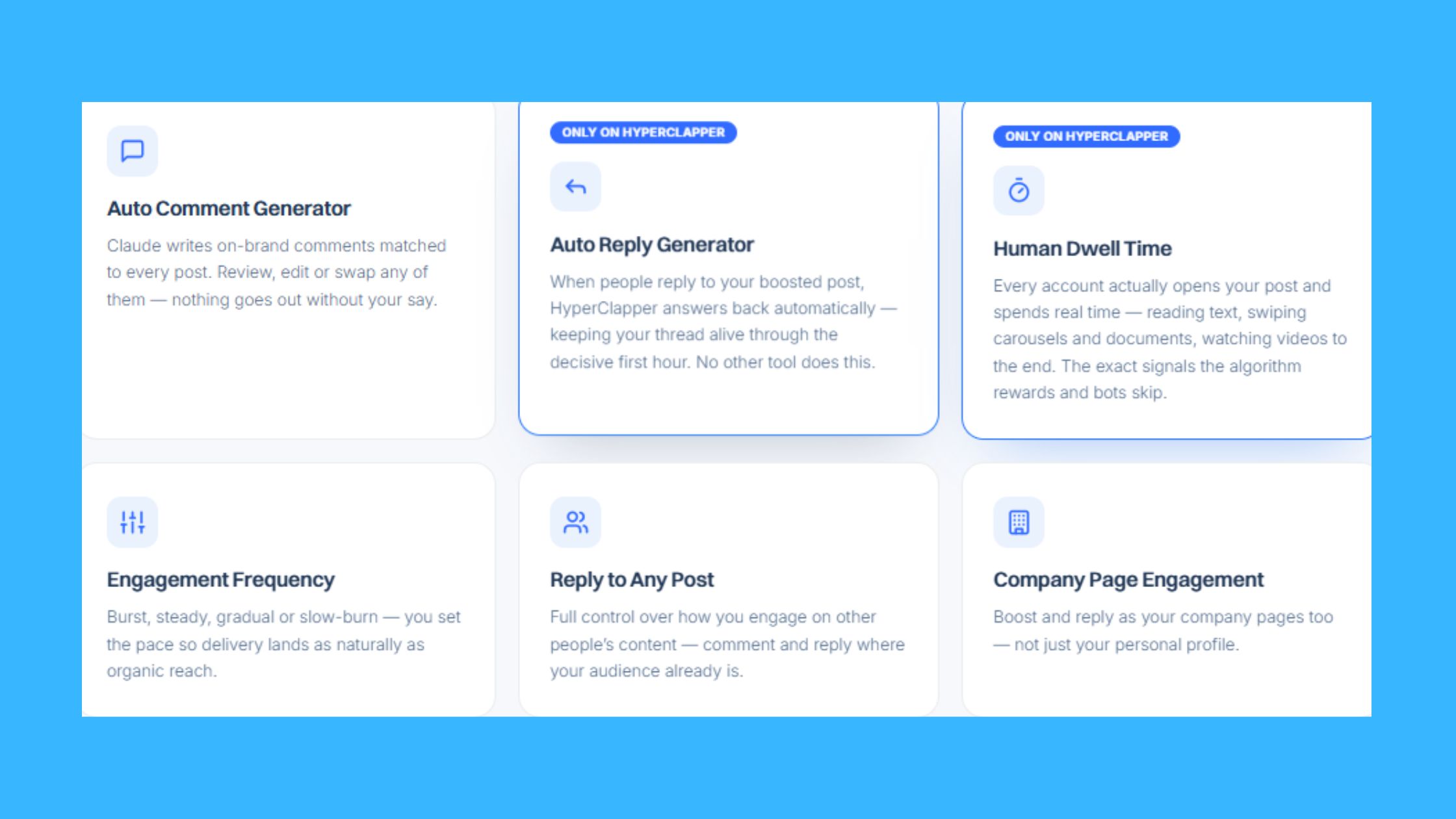
Teams that use HyperClapper beyond just the basic post boost consistently see better results — the platform's full feature set is designed to compound, not just spike. Here is what each feature does and why it matters.
- LinkedIn Post Boosting: Submit any post and receive real likes and comments from channel members within a defined window.
- Channel Selection: Choose one or more channels based on audience relevance. More channels scale the engagement volume.
- AI Replies: HyperClapper generates contextual, conversation-quality replies and posts them on your behalf to deepen the comment thread.
- Feed More AI Replies: Add additional AI replies to a post days after the initial boost — useful for extending a post's active conversation window beyond the first 24 hours.
- Company Page Boosting: Boost posts from a company LinkedIn page, not just a personal profile.
- Company Page Replies: Add replies from company page accounts to make brand presence look organically active.
- Analytics: Post-level and account-level performance data showing engagement trends and channel effectiveness.
- Content Guard: An automated moderation layer that screens submitted posts for sensitive topics — politics, violence, hate speech, and controversial global events — before they enter a channel.
How to Set Up HyperClapper for LinkedIn: Step by Step
- Create your account at app.hyperclapper.com — the onboarding flow takes under 5 minutes.
- Connect your LinkedIn profile — HyperClapper integrates directly with your account to manage engagement activity.
- Publish your LinkedIn post first, then copy the post URL into HyperClapper's submission panel.
- Select your channels — choose 1–3 based on your target audience and the engagement volume you want.
- Enable AI Replies if you want contextual conversation added to the thread — review the generated replies before they go live if you prefer manual approval.
- Submit and monitor — engagements begin arriving within the channel's active window. Check analytics after 24 hours to assess reach expansion.
Company Page Boosting and Brand Engagement Features
Company page support is a meaningful differentiator for agencies and marketing teams. Most engagement pod tools are built for personal profiles only. HyperClapper's company page boosting and company page replies features let brand accounts build visible, active engagement without requiring manual community management. For agencies running LinkedIn presence for multiple clients, this scales content performance across accounts from a single dashboard.
How HyperClapper Improves LinkedIn Reach and the Algorithm
LinkedIn's distribution model works in tiers. A post first reaches a small slice of your first-degree connections. If that initial audience engages — likes, comments, shares — the algorithm widens distribution to second-degree connections and beyond. The critical variable is engagement velocity — the speed at which a post accumulates interactions after publishing. Posts that gather strong engagement within the first 60–90 minutes consistently push into the wider distribution tier. Posts that receive sparse early engagement tend to plateau and never leave the first tier, regardless of content quality.
What HyperClapper's channel system does is make that early engagement window systematic rather than luck-dependent. Instead of hoping your network happens to be online and responsive in the first hour, channel members are primed to engage within a predictable timeframe. This is how how does HyperClapper improve LinkedIn reach translates into a real, measurable outcome: more first-tier posts become second- and third-tier posts, and organic impressions compound accordingly.
What Types of LinkedIn Engagement Does HyperClapper Support?
HyperClapper supports the engagement signals LinkedIn weights most heavily in its ranking model:
- Likes — the baseline engagement signal; increases visibility in connected feeds
- Comments — weighted more heavily than likes; signals content quality and conversation value
- AI-generated replies — contextual, substantive comment threads that increase post depth, which LinkedIn's algorithm treats as a quality indicator
- Company page engagement — brand-level likes and comments from company accounts, which builds brand presence alongside personal profile reach
What the platform does not do: it does not send connection requests, scrape profiles, send messages, or engage in any outreach automation. That boundary is deliberate — and it is what keeps the tool in a fundamentally different risk category from cold outreach tools.
This algorithmic dynamic connects directly to who benefits most from the platform — and the answer is more nuanced than "everyone on LinkedIn."
Who Should Use HyperClapper? Use Cases by Audience
After seeing this across creators, founders, and agencies using LinkedIn engagement tools, the pattern is consistent: the users who extract the most value are those who already post regularly and have a defined audience they're trying to reach — but whose content is not getting the algorithmic distribution it deserves. HyperClapper amplifies reach; it does not manufacture a reason to post.
LinkedIn Post Engagement Strategy for Creators and Founders
For LinkedIn creators and founders, the most common problem is inconsistency of reach. A post lands well one week and disappears the next — not because the content quality changed, but because early engagement was inconsistent. HyperClapper addresses this by making early engagement reliable rather than dependent on who happens to check LinkedIn in hour one.
Founders using the platform for deal flow, partnership visibility, or thought leadership see the most benefit from combining channel boosts with AI replies that invite further conversation. A thread with 8–10 substantive comments signals authority to anyone who lands on the post through second-degree distribution.
Across other audience segments, the use cases differ in emphasis:
- Coaches and consultants: Consistent post visibility builds the trust signal that converts lurkers into inquiries. Sporadic viral moments do not compound the way regular visible posting does.
- Recruiters: Posts about open roles or employer brand content reach more qualified candidates when they escape the first distribution tier reliably.
- Agencies: Managing multiple client LinkedIn profiles or company pages from one dashboard is the core value — company page boosting makes this scalable.
- Sales teams and marketers: LinkedIn post engagement strategy tied to pipeline visibility benefits from the channel system's predictable reach expansion on content like case studies, product announcements, and thought leadership.
- B2B companies: Company page posts reaching a wider audience build brand presence that paid LinkedIn promotion achieves at a much higher cost per impression.
Is LinkedIn Engagement Automation Safe? Risks and Limits to Know
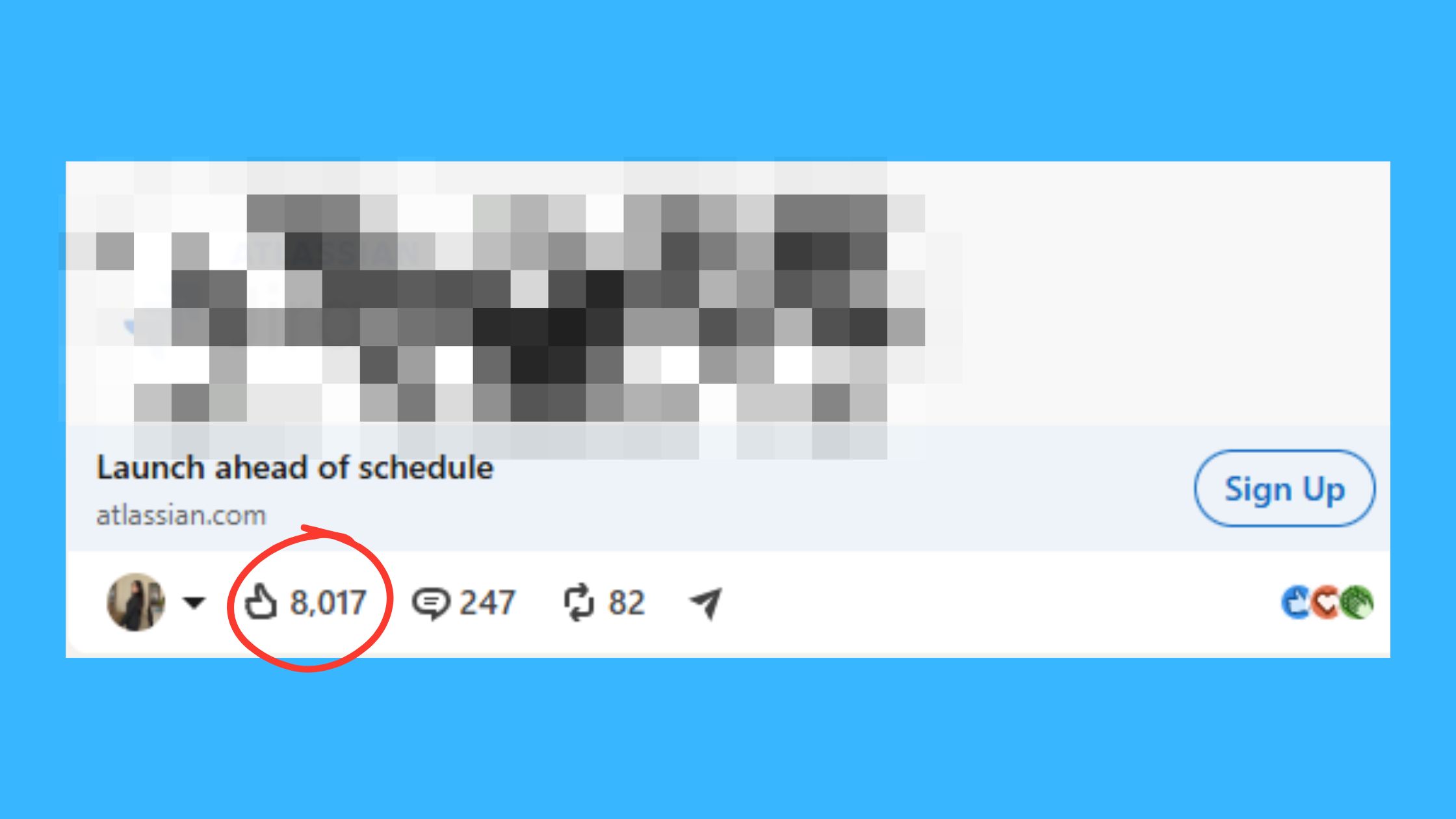
Is LinkedIn engagement automation safe is the right question — and the honest answer is: it depends entirely on how the engagement is generated. LinkedIn's Terms of Service prohibit artificial manipulation of the platform, which includes bots, fake accounts, and scraped profile activity. Tools that use those mechanisms carry real account risk. Tools that connect real users in voluntary engagement communities occupy a different position on the risk spectrum.
How HyperClapper's Safer Engagement System Works
HyperClapper's safety case rests on two structural facts:
- Real users, voluntary participation: Channel members are real LinkedIn users who have opted in to the platform. Their likes and comments are genuine human actions — not scripted bot activity.
- Content Guard moderation: Before a post enters any channel, Content Guard screens it for politically sensitive, violent, hateful, or otherwise policy-risky content. This reduces the probability that HyperClapper's engagement system touches content that would attract LinkedIn's trust and safety review.
The most common failure mode here is confusing HyperClapper with outreach automation tools — the platforms that auto-connect, auto-message, and scrape profiles at scale. Those tools are the ones that reliably generate account restrictions. HyperClapper does not do any of that. It is a LinkedIn engagement automation tool in the narrow, specific sense of coordinating community engagement — not in the broader sense of automating LinkedIn activity generally.
That said, the residual risk is real and worth naming: LinkedIn's policies evolve, and any third-party tool that coordinates engagement in ways the platform cannot monitor sits in a gray zone. The practical risk for most users who post compliant content and use the channel system as designed is low — but "low risk" is not "zero risk," and users should stay current with LinkedIn's platform policies.
✓ The LinkedIn Engagement Safety Checklist
- ☐Only submit posts with original content — no reposts, scraped material, or policy-sensitive topics
- ☐Let Content Guard run before each channel submission — do not override moderation flags
- ☐Review AI-generated replies for accuracy and tone before they publish — especially on sensitive professional topics
- ☐Do not boost more posts per day than your normal organic posting cadence — sudden engagement spikes on accounts with sparse history look anomalous
- ☐Use analytics to verify that engagement is driving real reach expansion — if it isn't, adjust channel selection rather than scaling volume
- ☐Stay current with LinkedIn's platform policies — the rules evolve and third-party tools do not always update immediately
HyperClapper vs Lempod and Other LinkedIn Engagement Pod Tools
The best LinkedIn engagement pods tools question comes down to what kind of engagement you actually need. Most pod tools — including Lempod and Podawaa — deliver volume: likes and comments arrive reliably, but comments tend to be generic or templated. The engagement looks real because real users are involved, but it reads as thin to anyone who actually reads the thread.
Feature Comparison: HyperClapper vs Competing Engagement Tools in 2026
| Tool | Engagement Type | AI Replies | Safety Controls | Company Pages | Analytics |
|---|---|---|---|---|---|
| HyperClapper | Real community members | ✅ Contextual AI replies | Content Guard + moderation | ✅ Supported | ✅ Full dashboard |
| Lempod | Real users, pod-based | ❌ Generic comments only | Minimal | ❌ Personal only | Limited |
| Podawaa | Community pods | ❌ Template comments | Basic filters | ❌ Personal only | Basic |
| LinkBoost | Network-based boosts | ❌ No AI replies | Basic | ❌ Limited | Moderate |
The differentiator that matters most in the HyperClapper vs Lempod LinkedIn engagement comparison is the AI reply layer. Lempod and Podawaa deliver engagement volume. HyperClapper delivers engagement depth — the combination of likes, comments, and contextual replies that makes a post look like a real professional conversation rather than a coordinated engagement swap.
What separates top performers here is how the comment thread reads to second-degree connections who discover the post through distribution. A thread of 12 generic "Great post!" comments signals pod activity. A thread of 8 substantive replies discussing the post's ideas signals thought leadership. The algorithm does not fully distinguish these, but the human audience does — and that human audience is the one you are actually trying to convert.
For a deeper breakdown of how these tools compare across more dimensions, the top 5 LinkedIn engagement pods comparison covers Podawaa, LinkBoost, Lempod, and Alcapod in detail. And for a closer look at LinkBoost specifically, the LinkBoost review for 2026 is worth reading before committing to any tool.
Get Real LinkedIn Engagement — Starting Today
HyperClapper connects your posts with real channel members who engage within the first critical hour — the window that determines algorithmic reach.
Try HyperClapper FreeHyperClapper Pricing Plans: What You Get at Each Tier
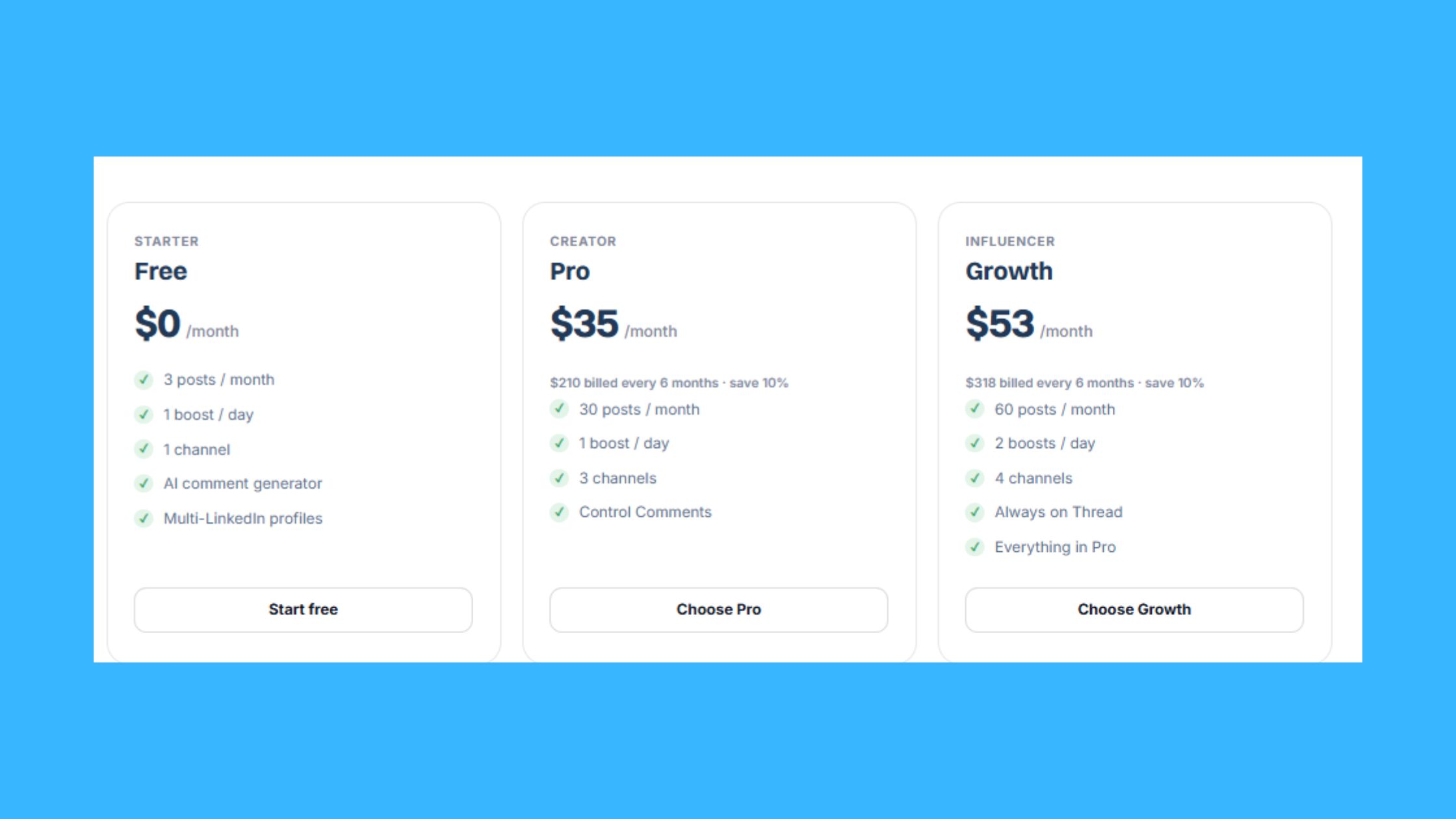
Three out of four professionals who evaluate LinkedIn engagement tools make their decision based on per-post cost rather than total monthly value — which is the wrong frame. The right question is: what is the cost per meaningful reach expansion event, and how does that compare to the alternatives?
HyperClapper's HyperClapper pricing plans are structured around channel access and post volume. Each tier determines how many posts you can boost per month, how many channels you can access per post, and whether features like AI replies and company page support are included. The exact current pricing is available at hyperclapper.com — plans and tiers do update, so checking the live pricing page gives you the most accurate breakdown.
For context on value: a single LinkedIn-sponsored post reaching 5,000 targeted professionals costs roughly $50–$100 in LinkedIn Campaign Manager, depending on targeting and bid competition. A monthly HyperClapper plan that consistently drives 3–5 posts per week into wider distribution through channel engagement compresses that cost-per-reach significantly — especially for creators and agencies posting at volume.
For agencies managing multiple client profiles, the key question is whether the plan supports multi-profile or multi-seat management. Company page boosting is included in plans that support brand accounts, making HyperClapper a more cost-efficient option than per-account LinkedIn ad spend for awareness-stage content.
How to Increase LinkedIn Engagement: Strategy Beyond the Tool
Creators who skip the content fundamentals and rely entirely on channel boosts typically find that engagement numbers climb but profile follows and inbound inquiries do not — because the channel delivers reach, but the content does not give that reach a reason to convert. HyperClapper is an amplifier. What it amplifies needs to be worth amplifying.
Common Mistakes to Avoid When Using LinkedIn Engagement Tools
The content elements that compound best with channel boosting share three characteristics: a hook that stops the scroll in the first line, a clear point of view that invites agreement or pushback, and a close that asks a specific question or invites a response. Posts that are purely informational — lists of facts without a take — tend to get engagement from channel members but not from organic distribution, because the algorithm reads comment quality as well as comment count.
Timing matters more than most users realize. Submit posts to HyperClapper within 10–15 minutes of publishing to align channel engagement
Frequently Asked Questions About HyperClapper and LinkedIn Engagement
What is the best tool to boost LinkedIn post engagement in 2025?
HyperClapper is one of the strongest options for boosting LinkedIn post engagement in 2025. It uses real community members rather than bots, adds AI-generated comments that score well with LinkedIn's algorithm, and supports both personal profiles and company pages — making it practical for creators, founders, and B2B teams alike.
Can using LinkedIn engagement tools get your account banned?
Real-user engagement tools like HyperClapper carry lower risk than bot-driven automation, but no third-party tool is entirely risk-free. LinkedIn's Terms of Service prohibit coordinated engagement in general. Tools that mimic organic human behaviour reduce detection risk significantly, though users should stay within moderate usage patterns to avoid triggering platform flags.
How do LinkedIn engagement pods work and are they effective?
LinkedIn engagement pods are groups of members who agree to like and comment on each other's posts shortly after publishing. They work by triggering LinkedIn's algorithm with early engagement velocity signals, which pushes posts into wider distribution. When members are relevant to your niche, pods consistently improve reach beyond what organic posting alone achieves.
What is HyperClapper and who should use it?
HyperClapper is a community-driven LinkedIn engagement platform that connects posts with real channel members who provide likes and substantive comments. It suits LinkedIn creators, B2B professionals, recruiters, coaches, agency operators, and founders who need consistent post visibility rather than occasional viral spikes driven by luck or timing.
How does HyperClapper compare to Lempod for LinkedIn engagement?
HyperClapper adds features Lempod lacks, including AI-generated replies, a content moderation layer called Content Guard, company page support, and post-level analytics. Lempod focuses on basic engagement swaps. For users who want compounding reach and deeper comment threads rather than simple like-for-like reciprocity, HyperClapper offers meaningfully more infrastructure.
What is the instantly cold email review connection to LinkedIn engagement tools?
Instantly is a cold email outreach platform, separate from LinkedIn engagement tools like HyperClapper. Reviews of Instantly focus on email sequencing and deliverability, while HyperClapper targets LinkedIn algorithm visibility. They solve different problems — email outreach for direct prospecting, engagement platforms for building organic authority and reach on LinkedIn.
How many LinkedIn engagements can you get per post with HyperClapper?
Each channel in HyperClapper contains roughly 50 members, so joining multiple channels scales your engagement volume directly. One channel delivers approximately 50 engagements per post, two channels around 100, and three channels around 150. The actual number depends on channel activity levels and how many members engage during the submission window.



