
A pattern observed across thousands of LinkedIn accounts is that professionals who rely entirely on manual engagement plateau — not because their content is weak, but because consistency breaks down. Manual effort builds genuine relationships, but it costs 8–12 hours weekly that most founders, marketers, and sales teams simply don't have. LinkedIn engagement tools for professionals solve the consistency problem by compressing that effort — but the best ones do it without stripping away the authenticity that actually drives trust and long-term algorithm visibility. This article breaks down exactly where HyperClapper wins over manual effort, where it doesn't, and how to choose the right LinkedIn tools for your specific goal.
- Manual LinkedIn engagement builds deep relationships but breaks down at scale — most professionals can't maintain it consistently.
- HyperClapper is an engagement platform, not an automation bot — it routes posts to real users in structured engagement channels.
- The safest LinkedIn tools use real-user community dynamics rather than scripted bot behavior to avoid account risk.
- Different goals require different tools: use HyperClapper for content visibility, dedicated outreach tools for cold lead generation.
- Measuring engagement tool effectiveness — not just features — is the gap most professionals miss when evaluating LinkedIn tools.
- Counterintuitive finding: boosting a weak post with engagement tools amplifies mediocrity, not authority — content quality still comes first.
- The Real Challenge: Automating LinkedIn Without Losing Authenticity
- What Are LinkedIn Tools and How Do They Work?
- HyperClapper vs Manual Engagement: A Side-by-Side Comparison
- Best LinkedIn Tools 2026: Where HyperClapper Fits
- Are LinkedIn Automation Tools Safe to Use?
- LinkedIn Tools for Recruiters, Marketers, Sales Teams, and Freelancers
- LinkedIn Marketing Tools: How to Measure What's Actually Working
- LinkedIn Prospecting Tools and Lead Generation: What HyperClapper Is (and Isn't)
- Common Mistakes to Avoid When Using LinkedIn Engagement Tools
- LinkedIn Browser Extensions and Free LinkedIn Tools for Marketers
- Which LinkedIn Tool Should You Use? HyperClapper Decision Guide
- Frequently Asked Questions About LinkedIn Tools and HyperClapper
The Real Challenge: Automating LinkedIn Engagement Without Losing Authenticity?
The tension professionals consistently hit is this: automation saves time, but authenticity drives trust — and LinkedIn's algorithm rewards both engagement velocity and conversation depth. Most automation tools optimise for volume, not quality, which is why community discussions repeatedly surface the same frustration: "The comments feel generic, and my connections notice."
Manual engagement solves the authenticity problem but introduces a new one. Commenting thoughtfully on 20 posts, replying to every connection message, and maintaining a consistent posting rhythm takes 10+ hours weekly. For a solo founder or a sales development rep managing a pipeline, that's simply unsustainable.
The professionals who grow fastest on LinkedIn aren't choosing between automation and authenticity — they're using engagement platforms that deliver real interactions at scale, then investing their saved time into higher-quality content and direct conversations.
This is the exact gap that LinkedIn engagement tools for professionals — when chosen correctly — are designed to fill. The key word is correctly. Not every tool in this category operates the same way, and the difference between a community-driven engagement platform and an aggressive bot matters enormously for both results and account safety.
What Are LinkedIn Tools and How Do They Work?
LinkedIn tools is a broad category covering engagement platforms, automation tools, browser extensions, analytics dashboards, and AI message personalization software — each built to solve a different problem in the LinkedIn workflow.
LinkedIn Tools Overview for Beginners
At the simplest level, LinkedIn tools fall into four categories:
- Engagement platforms (e.g. HyperClapper, Lempod) — connect you with real users who interact with your posts to boost visibility.
- Outreach and automation tools (e.g. Expandi, Waalaxy) — automate connection requests, follow-up messages, and drip campaigns.
- Analytics and content tools (e.g. Shield Analytics, Taplio) — track post performance and schedule content.
- Scraping and prospecting tools — extract contact data from LinkedIn for external CRM workflows.
Understanding this distinction matters because mixing up categories leads to both wrong tool choices and unnecessary account risk. A professional trying to grow thought leadership doesn't need an outreach sequencer — and vice versa.
How HyperClapper Works as an Engagement Platform
Post engagement velocity is the speed at which a post receives likes and comments after publishing — and it's one of LinkedIn's primary distribution signals. HyperClapper improves this by routing posts through structured channels, each containing roughly 50 real users who engage with submitted posts. Submit to 2 channels and you're looking at approximately 100 possible engagements — from real professionals, not bots.
The platform also generates AI-powered replies that keep conversations active past the initial engagement window, which matters because LinkedIn's algorithm rewards sustained conversation depth, not just opening-hour likes. See how this fits into the broader evolution of LinkedIn engagement tools for more context on why this approach works now.
HyperClapper vs Manual Engagement: A Side-by-Side Comparison?
Head-to-head, the choice between manual engagement and a platform like HyperClapper comes down to three variables: time, scale, and consistency.
| Factor | Manual Engagement | HyperClapper |
|---|---|---|
| Time per post | 2–4 hours of outreach | Under 5 minutes |
| Engagement source | Real, targeted individuals | Real users in structured channels |
| Consistency at scale | Breaks down quickly | Sustainable across multiple posts/clients |
| Relationship depth | High — 1:1 connections | Moderate — algorithmic visibility, not personal bonds |
| Company page support | Manual, time-consuming | Built-in company page boosting |
| Analytics | LinkedIn native only | Dedicated engagement analytics dashboard |
Time Investment: Manual vs Automated
Teams that shift from pure manual engagement to a platform like HyperClapper consistently reclaim 6–10 hours weekly — time that gets reinvested into content creation and direct relationship-building where it counts most.
Engagement Quality: Real People vs Random Activity
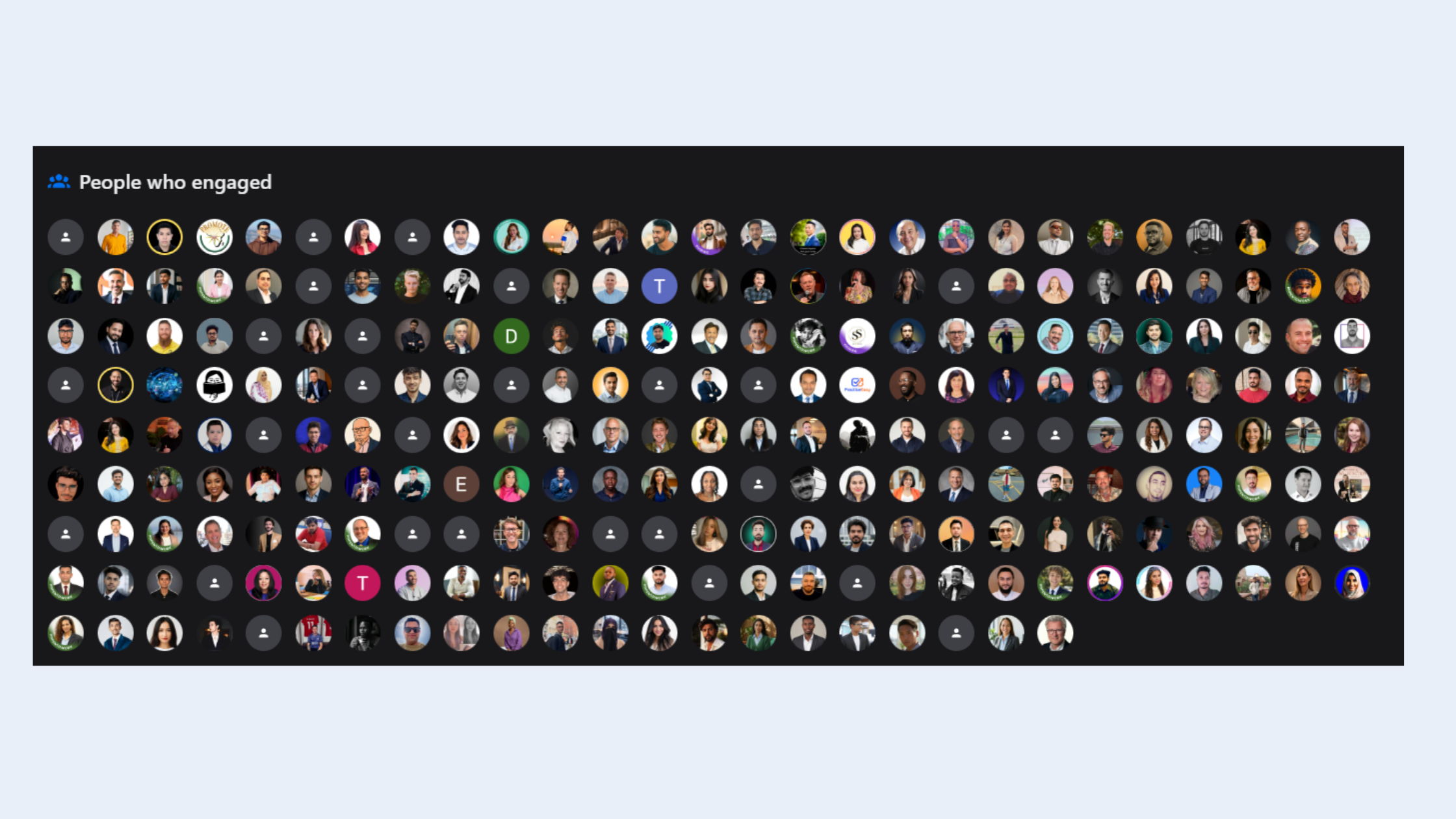
What separates HyperClapper from generic automation tools is that the engagement comes from real professionals inside the platform, not scripted bots. This distinction matters for authentic professional networking automation — the comments read naturally because they are natural. The AI reply feature adds an additional layer, sustaining post conversations beyond the first-hour engagement window where most posts die.
The verdict here isn't that one approach beats the other outright — it's that they serve different functions. Now let's look at where HyperClapper sits among the broader LinkedIn tools landscape in 2026.
Best LinkedIn Tools 2026: Where HyperClapper Fits in the Landscape?
The best LinkedIn tools 2024 — a benchmark that carries into 2026 — aren't a single category. They're a stack. The professionals seeing the strongest results combine an engagement platform for content visibility with a separate outreach tool for pipeline, and analytics tools to measure both.
HyperClapper vs Lempod and Podawaa
HyperClapper competes most directly with Lempod and Podawaa in the engagement pod space. The key differentiators:
- AI replies: HyperClapper generates contextual, conversation-sustaining replies — Lempod and Podawaa focus on likes and basic comments.
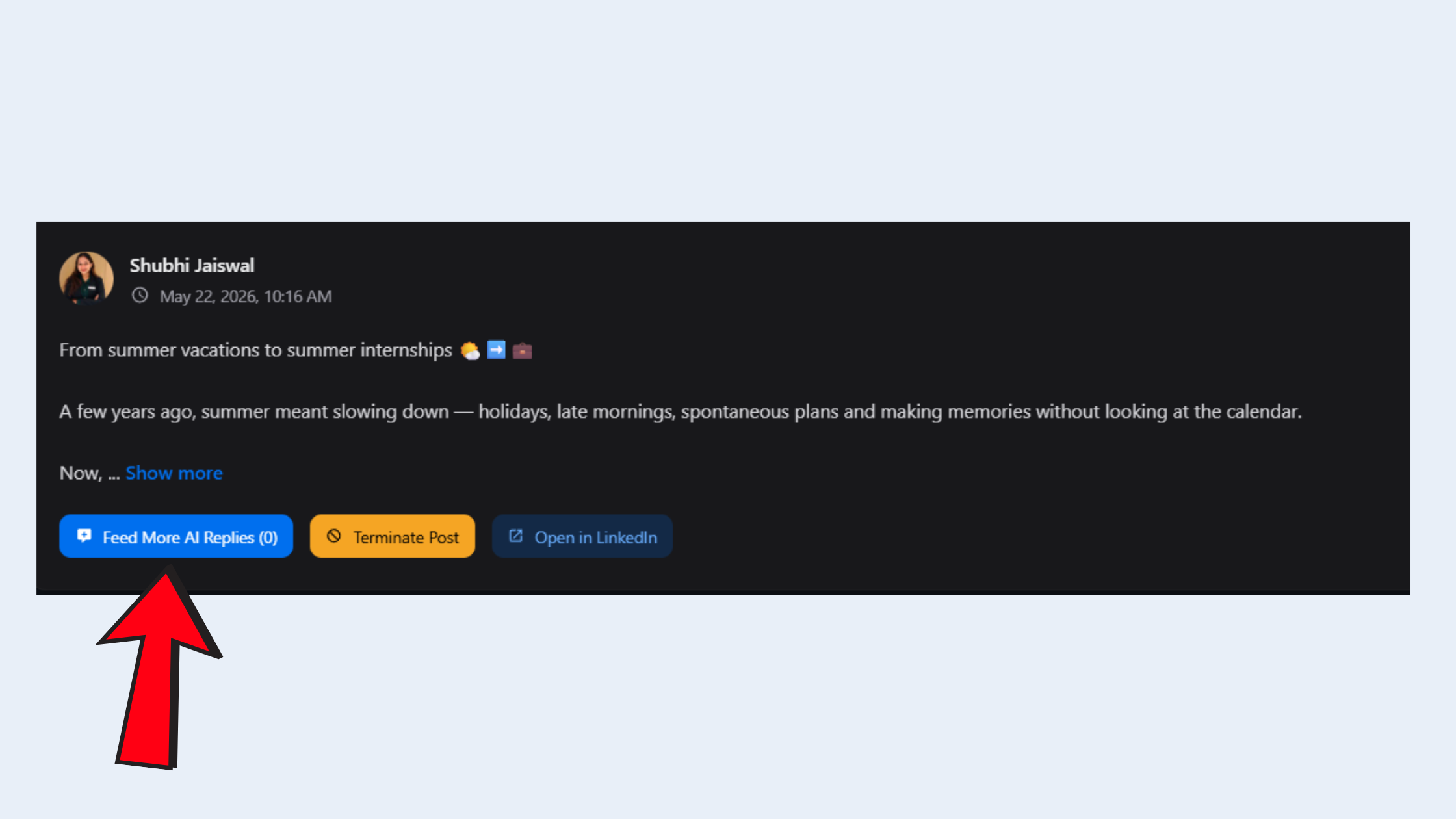
AI replies with HyperClapper - Company page support: HyperClapper extends boosting to company pages; most competitors focus on personal profiles only.
- Content Guard: A moderation layer that screens posts for risky content before boosting — reducing the chance of amplifying something controversial.
- Safety design: HyperClapper's engagement system is built for smoother, more natural activity patterns rather than high-volume aggressive automation.
For a deeper breakdown, see the HyperClapper vs Lempod comparison and the HyperClapper vs LinkBoost breakdown.
LinkedIn Tools Pricing Comparison: Is HyperClapper Worth It?
The answer to "which LinkedIn tools are worth paying for" depends entirely on your goal. For LinkedIn marketing tools focused on content visibility, HyperClapper's channel-based pricing model scales affordably — more channels mean more potential engagements, so you pay for what you actually use. For pure outreach and lead generation, tools like Expandi or Waalaxy offer dedicated sequencing at comparable price points.
Are LinkedIn Automation Tools Safe to Use?
The safety question is the first one most professionals ask — and rightly so. LinkedIn's terms of service explicitly prohibit scraping tools, mass connection automation, and bot-driven activity. Can LinkedIn tools get your account banned? Yes — the wrong ones can.
Are LinkedIn Automation Tools Against Terms of Service?
Not all LinkedIn tools are equal under LinkedIn's policies. The distinction that matters:
- Violating tools: Scrapers that extract contact data at scale, bots that auto-connect with hundreds of accounts daily, tools that simulate human behavior through browser injection at speed.
- Lower-risk platforms: Community engagement tools where real users voluntarily interact with posts — the engagement is human-generated, not bot-generated.
HyperClapper falls into the second category. Its engagement pod community dynamics are built on real user participation — not scripted activity. The Content Guard system adds an additional layer by screening posts before they enter the engagement network. That said, no third-party tool carries zero risk — using any platform requires reading their terms alongside LinkedIn's policies.
The line between authentic professional networking automation and policy-violating tools isn't about speed — it's about whether real humans are doing the engaging or whether a script is impersonating them.
Understanding safety also means knowing which tool category you're actually using — which brings us to how different professionals should think about their LinkedIn tool choices.
LinkedIn Tools for Recruiters, Marketers, Sales Teams, and Freelancers?
After seeing this across multiple professional segments, the pattern is clear: the same tool rarely serves all four audiences equally well. Role-specific needs diverge significantly.
- LinkedIn tools for recruiters and hiring: Visibility and credibility are the priority — recruiters need posts about roles and culture to reach wide audiences, making engagement boosting highly relevant.
- LinkedIn outreach tools for sales teams: Sales development reps prioritise connection sequencing and follow-up automation — tools like Expandi or Waalaxy serve this better than engagement platforms.
- LinkedIn tools for B2B marketers: Company page boosting is the standout use case — HyperClapper's company page support makes brand content look consistently active and credible.
- LinkedIn tools for freelancers and consultants: Profile view growth matters most — every boosted post drives algorithm signals that surface the profile to new potential clients.
LinkedIn Tools for Small Business Owners and Agency Owners
For LinkedIn tools for small business owners, the calculus is straightforward: you need the reach of a large marketing team without the headcount cost. HyperClapper's channels give small business owners and agency owners a way to punch above their weight on content visibility — especially for company page posts that typically get far less organic reach than personal profiles. Agency owners managing multiple client LinkedIn profiles benefit specifically from the multi-account handling and analytics that show performance across accounts.
Stop Spending 10 Hours a Week on Manual LinkedIn Engagement
HyperClapper connects your posts to real engagement channels in minutes — boosting visibility without bots or fake activity.
See How HyperClapper WorksLinkedIn Marketing Tools: How to Measure What's Actually Working?
One of the most consistent content gaps in the LinkedIn tools conversation is the absence of practical guidance on measuring effectiveness. Most reviews cover features — almost none cover how to evaluate whether those features are actually delivering results.
Key metrics worth tracking when using LinkedIn marketing tools:
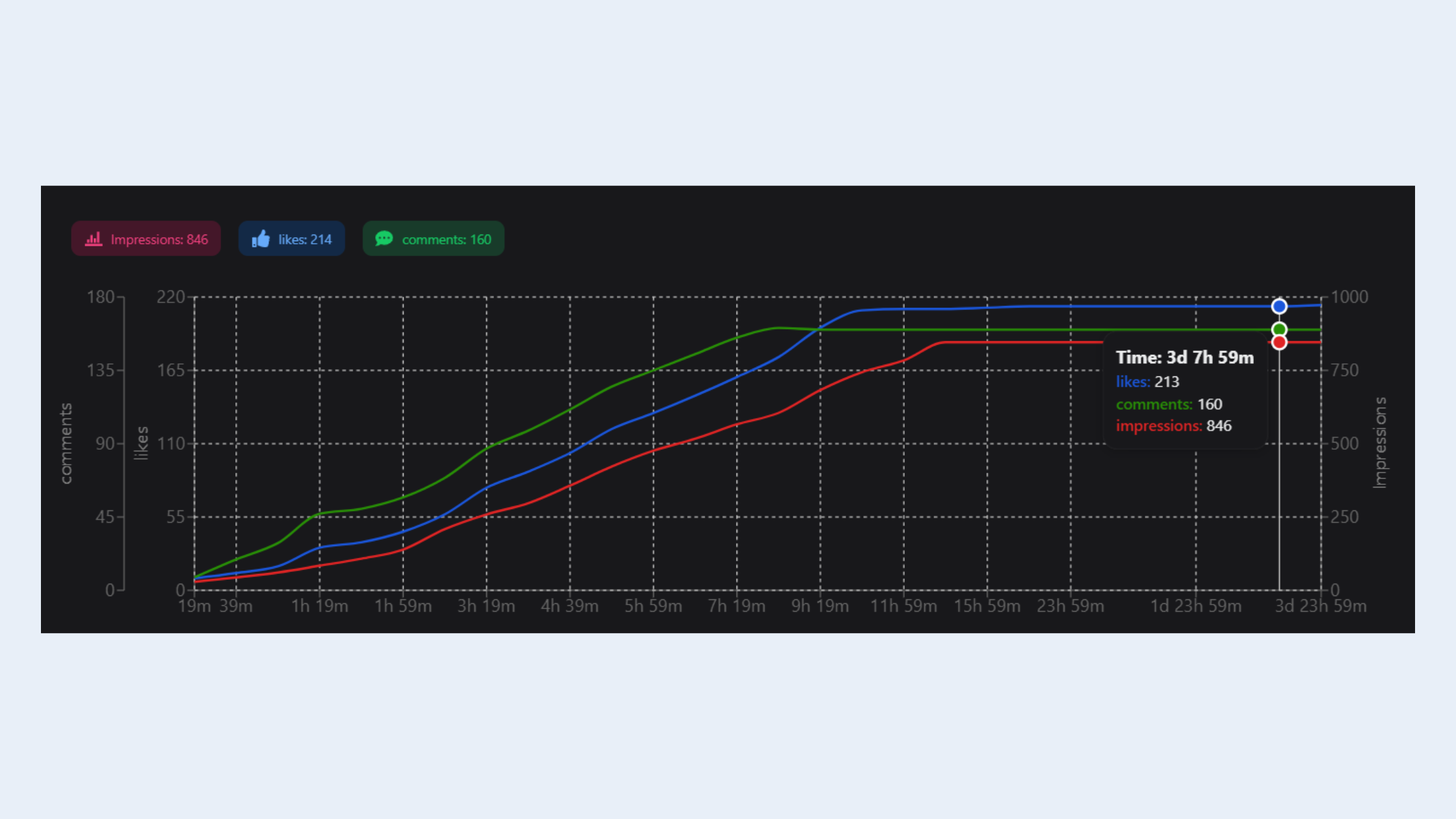
- Post reach per publish: Are boosted posts reaching 2–3× more impressions than unboosted ones?
- Comment depth: Are conversations extending past 3 reply threads? This signals genuine engagement to LinkedIn's algorithm.
- Profile views generated per post: A strong post with real engagement drives profile visits — track this in LinkedIn's native analytics.
- Connection request acceptance rate after boosted posts: If your content reaches new audiences, inbound connection requests should increase.
HyperClapper's analytics dashboard tracks engagement and post performance over time, giving users the personal brand amplification metrics they need to iterate. The most effective approach combines HyperClapper's engagement data with LinkedIn's native analytics — the overlap reveals which content types generate the highest downstream profile activity. Explore more on this in the LinkedIn AI tools guide for engagement and lead gen.
LinkedIn Prospecting Tools and Lead Generation: What HyperClapper Is (and Isn't)?
Clarity matters here. HyperClapper is not a LinkedIn prospecting tool. It does not send connection requests, build prospect lists, run drip campaigns, or integrate with CRMs for outbound sequencing. If that's what you need, LinkedIn lead generation tools like Expandi, Waalaxy, or Lemlist are purpose-built for that workflow.
HyperClapper's role in the lead generation funnel is top-of-funnel: increasing post visibility so inbound interest grows organically. Think of it as the difference between advertising and cold calling — both generate leads, but through entirely different mechanisms. LinkedIn automation tools built for outreach handle the cold calling; HyperClapper handles the advertising.
The professionals getting the strongest lead generation results from LinkedIn are combining both: HyperClapper for content visibility and a separate LinkedIn outreach tool for direct pipeline. They don't overlap — and they compound each other's effectiveness when used together. See the full comparison of top LinkedIn engagement tools to understand where each fits.
Common Mistakes to Avoid When Using LinkedIn Engagement Tools?
Creators who skip the foundational rules of engagement tool usage typically find their results disappoint — not because the tools don't work, but because the underlying approach undermines them.
✓ LinkedIn Engagement Tool Safety Checklist
- ☐Only boost posts with genuine, high-quality content — engagement amplifies what's there, not what you wish was there.
- ☐Start with 1 channel and build gradually — sudden spikes in engagement velocity can appear unnatural.
- ☐Personally reply to comments received from channels — conversation depth is what LinkedIn rewards most.
- ☐Never run LinkedIn scraping tools or aggressive outreach bots simultaneously with engagement platforms.
- ☐Review Content Guard flags before publishing — avoid boosting posts touching politics, controversy, or sensitive topics.
- ☐Track post reach and profile views weekly — if numbers aren't moving, adjust content type before adding more channels.
The most common failure mode is treating engagement tools as a shortcut to skip content work. A weak post boosted through 3 channels reaches more people who don't engage — and that negative signal (impressions without interaction) actively hurts algorithmic distribution on future posts.
LinkedIn Browser Extensions and Free LinkedIn Tools for Marketers?
Free entry points exist — and they're worth knowing before committing to paid platforms. LinkedIn browser extensions like Shield Analytics, Taplio, and Crystal offer low-cost or free capabilities covering post analytics, content scheduling, and personality insights for outreach.
The honest assessment: free LinkedIn tools for marketers are excellent for measurement and scheduling, but they don't move the needle on engagement reach. Genuine post visibility amplification requires a platform with an actual user community — you can't manufacture real engagement with a browser plugin.
A smart progression for professionals testing the space:
- Start with Shield Analytics or LinkedIn's native analytics (free) to benchmark current post performance. ~5 minutes to set up.
- Add a content scheduling tool like Taplio or Buffer to build posting consistency. ~15 minutes weekly.
- Layer in HyperClapper once you have a consistent posting cadence — the engagement channels compound faster when you're posting 3–4× weekly.
Important caveat: always verify that any LinkedIn browser extension you install doesn't violate LinkedIn's data access policies. Several extensions in this space have been blocked or deprecated after LinkedIn updated its API terms — check the tool's compliance status before installing.
Which LinkedIn Tool Should You Use? HyperClapper Decision Guide?
The best LinkedIn tools to use right now depend entirely on where you are in the funnel. Here's the clearest framework for making the decision:
- Content visibility and thought leadership → HyperClapper — real engagement channels boost post reach and algorithm signals without cold outreach.
- Cold outreach and connection sequencing → Expandi or Waalaxy — purpose-built for automated LinkedIn prospecting with drip campaign support.
- Post analytics and scheduling → Shield Analytics or Taplio — free or low-cost, excellent for measurement and consistency.
- Both visibility and pipeline → HyperClapper + a dedicated outreach tool — they serve different funnel stages and don't conflict.
- LinkedIn tools for job seekers → Focus on profile optimisation tools and engagement boosting for thought leadership posts — visibility leads to inbound recruiter interest.
What consistently separates accounts with real reach from accounts with impressive follower numbers is not any single tactic — it is the deliberate combination of content quality, consistent posting, and a tool stack aligned to the right funnel stage. Accounts that get all three right see compounding reach. Accounts that miss any one typically plateau regardless of how many channels they're running.
Ready to Grow Your LinkedIn Visibility the Right Way?
HyperClapper gives you real engagement, AI-powered replies, and post-level analytics — without bots, scraping, or fake activity.
Try HyperClapper TodayFrequently Asked Questions About LinkedIn Tools and HyperClapper
Can LinkedIn tools get your account banned?
Yes — tools that use bots, scrapers, or mass automation violate LinkedIn's Terms of Service and risk account restriction. Community-based engagement platforms like HyperClapper use real-user interactions rather than scripted automation, which carries a significantly lower risk profile. Always verify any tool's compliance approach before activating it.
What LinkedIn tools do top sales teams use in 2026?
Most high-performing sales teams use a two-layer stack: a LinkedIn outreach tool like Expandi or Waalaxy for connection sequencing and follow-up, combined with an engagement platform for content visibility. Sales teams that post thought leadership content use HyperClapper to ensure those posts reach wider audiences, warming inbound leads before outreach begins.
How do LinkedIn automation tools work for lead generation?
LinkedIn automation tools for lead generation typically automate connection requests, personalised follow-up message sequences, and drip campaigns to prospects. They work by mimicking manual outreach at scale. HyperClapper serves a different function — it boosts content visibility so leads find you, rather than automating the process of finding them.
Is HyperClapper worth paying for compared to manual engagement?
For professionals posting 3+ times weekly, yes — HyperClapper recovers 6–10 hours weekly while delivering stronger post reach than manual engagement alone. According to HyperClapper's platform design, posts submitted to multiple channels receive up to 150 real engagements per post — an output that would take hours to replicate manually, if it's achievable at all.
What is the difference between LinkedIn tools for engagement vs outreach?
Engagement tools boost post visibility by connecting your content with real users who interact with it — improving LinkedIn algorithm signals and expanding reach. Outreach tools automate connection requests and direct message sequences to target prospects. They solve different problems: engagement tools build awareness; outreach tools build pipeline. The strongest LinkedIn strategies use both.
Which LinkedIn tool is best for lead generation without cold outreach?
HyperClapper is the strongest choice for inbound lead generation without cold outreach. By boosting post visibility through real engagement channels, it increases profile views and inbound connection requests organically — ideal for founders, consultants, and coaches who prefer inbound-led growth over cold messaging campaigns.
What are the best free LinkedIn tools for marketers?
Shield Analytics offers free post performance tracking, LinkedIn's native Creator Mode analytics covers reach and follower growth, and Taplio provides a free tier for content scheduling. Free tools handle measurement and scheduling well — but genuine post reach amplification requires a paid platform with a real user community behind it.



