The sensitive content warning Twitter applies when a post — or your entire account — is flagged for adult material, graphic violence, or controversial media. A pattern observed consistently across flagged accounts is that the problem is almost never the setting itself — it's that users change the display toggle but miss the separate search toggle, or their account has been flagged at the infrastructure level where personal settings have no effect. This guide covers both: how to turn off sensitive content on Twitter correctly, and how to fix it when the toggle appears to work but the warnings persist.
- There are two separate toggles — display settings AND search settings — both must be changed, or warnings persist
- If your account itself is flagged as sensitive by Twitter, your personal display toggle is overridden and ineffective
- U.S. users and users in certain regions may find the toggle greyed out due to regional content enforcement policy
- Disabling your own filter only changes what YOU see — it does not remove warnings other users see on your content
- Over-labeling your media as sensitive trains the algorithm to suppress your reach and signals brand-unsafety to advertisers
- Mobile app settings are limited — the full controls require completing changes on desktop/web
- What Does Sensitive Content Mean on Twitter
- How to Turn Off Sensitive Content: Web, iOS, Android
- Why Your Settings Won't Save and How to Fix It
- Content Visibility Risks and What Creators Get Wrong
- How to Protect Your Reach
- Frequently Asked Questions About Twitter Sensitive Content Settings
What Does Sensitive Content Mean on Twitter (and Why It Affects Your Reach)
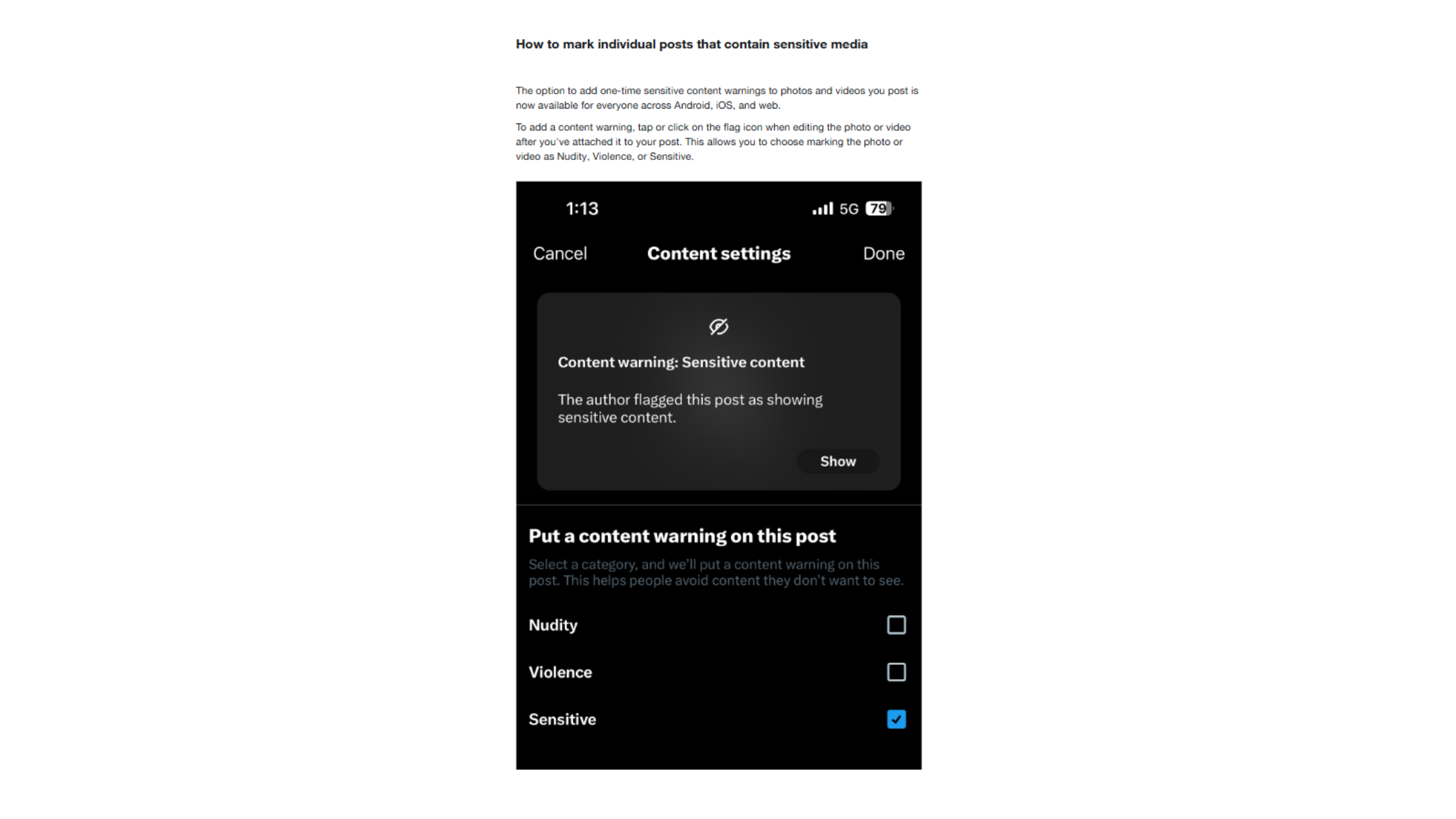
Sensitive content on Twitter/X refers to media or posts flagged for adult content, graphic violence, or controversial material — either by the platform's automated systems, by user reports, or by the creator voluntarily labeling their own posts. What most creators don't realise is there are two distinct scenarios with very different solutions: a single tweet being labeled, versus your entire account being marked sensitive. Account-level content restrictions suppress all your posts by default — not just the flagged ones.
The reach impact is direct. Flagged posts sit behind a warning click that most users won't bother with. That friction reduces organic impressions, drops engagement rate, and tells the algorithm the content isn't generating normal interaction — which compounds the suppression further.
Why Is My Twitter Content Marked Sensitive?
Twitter's automated systems flag content based on visual recognition, keyword signals, and user reports. Common triggers include nudity, blood, firearms shown in certain contexts, and political imagery during high-tension periods. Regional content enforcement policy plays a significant role: accounts based in or frequently accessed from the U.S. face stricter default thresholds than accounts in many other regions — meaning the same post might be flagged for a U.S.-based creator and not for an equivalent European account.
Does Turning Off Sensitive Content Affect Followers or Reach?
Turning off your own sensitive content filter has zero effect on your followers — it only changes what you personally see in your feed. What affects your followers is whether your account or posts carry the sensitive label outward. Removing that label (through settings or an appeal) is what restores reach. Teams that conflate "what I see" with "what others see" waste time in the wrong settings entirely.
How to Turn Off Sensitive Content on Twitter: Settings for Web, iOS, and Android (2026)
There are two paths — and most guides only cover one. Missing the second is the single most common reason the fix appears to fail.
Desktop / Web Steps
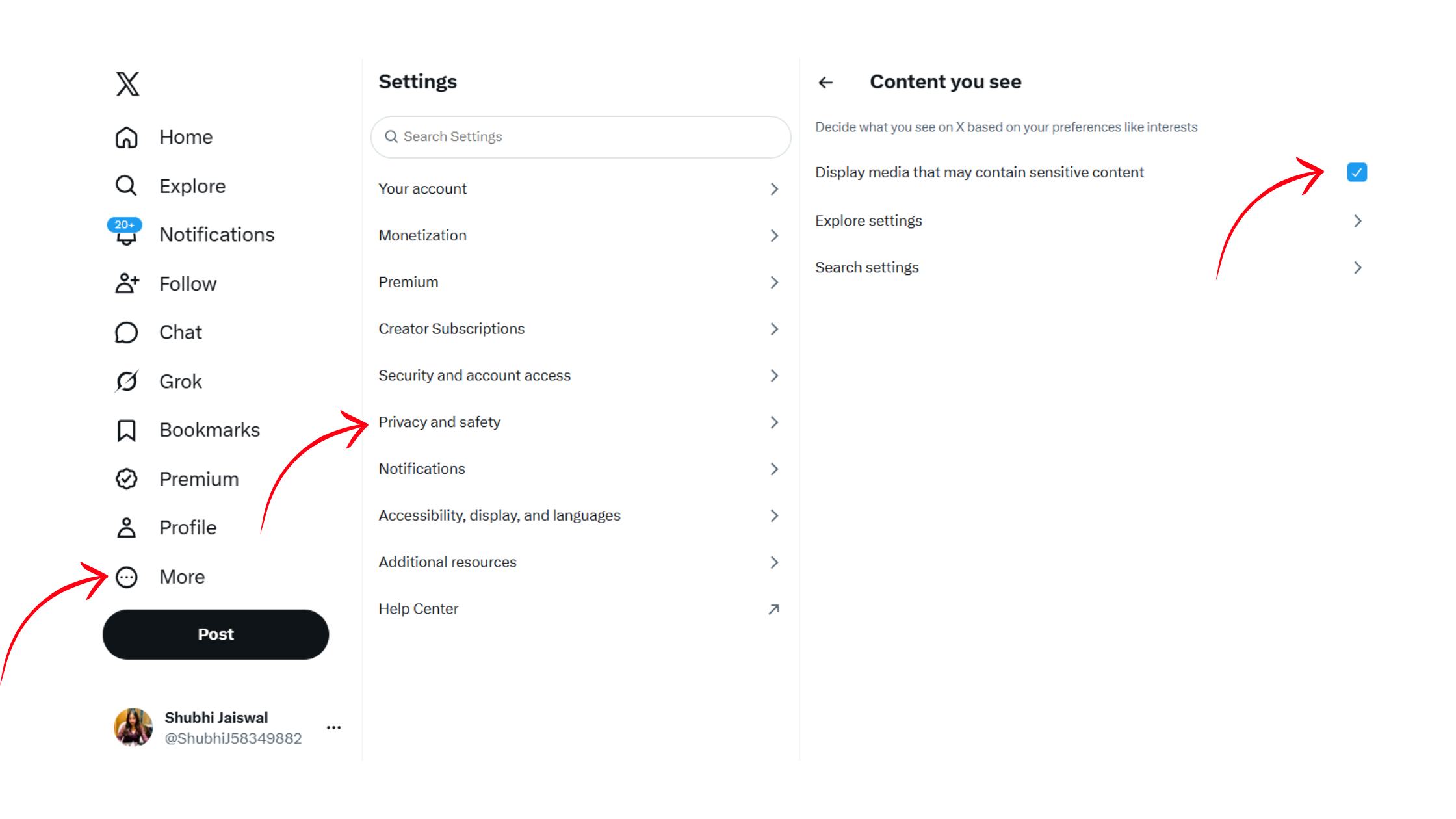
- Click More in the left sidebar → Settings and Support → Settings and privacy
- Go to Privacy and safety → Content you see
- Toggle on Display media that may contain sensitive content
- Now go back to Privacy and safety → Search settings
- Uncheck Hide sensitive content — this is the second toggle most people miss
How to Remove Content Warning on X Mobile (iOS and Android)
On mobile, go to your Profile icon → Settings and Support → Settings and privacy → Privacy and safety → Content you see. The display toggle is present on both iOS and Android — but here's the catch: for some account types, the toggle is greyed out or missing entirely on mobile. This is not a bug you can fix on your phone. If you can't find the toggle in the app, you must complete the change on desktop. This is a deliberate platform limitation, not a device issue.
How to See Sensitive Content on Twitter Without an Account
You cannot access sensitive content on X without a logged-in account. The platform requires authentication before allowing any sensitive media display settings to apply. How to view sensitive content on X always starts with creating a free account, enabling the display toggle on desktop, and confirming your age (18+) in account settings. There is no workaround for logged-out viewing.
How to Mark (or Unmark) Your Own Media as Sensitive
To mark media as sensitive Twitter mobile or desktop: go to Settings → Privacy and safety → Your tweets and toggle Mark media you tweet as containing material that may be sensitive. To remove this from a specific post after publishing, tap the three-dot menu on the tweet → Flag media as sensitive (toggling it off). Doing this retroactively on a post that's already been suppressed may not immediately restore reach — the algorithm needs a day or two to re-evaluate distribution.
Why Your Sensitive Content Settings Won't Save (and How to Fix It)
This is the question every guide skips. The most common scenario: you follow the steps, the toggle moves, the page refreshes — and the warnings are still there. Media sensitivity settings sync is the culprit in most cases. Twitter does not display a confirmation when settings save, and there's typically a delay of 15–30 minutes before changes propagate across your account's content. Refreshing immediately and seeing no change leads most users to assume it failed.
Why Is the Sensitive Content Toggle Greyed Out?
Three reasons this happens, in order of frequency:
- Regional lock: U.S. users and users in countries with strict enforcement see the toggle greyed out or absent. This is content label override behavior enforced at the infrastructure level — it cannot be changed from the settings UI.
- Account type restriction: Accounts flagged by Twitter's trust and safety team lose access to certain display settings until the flag is lifted via appeal.
- Mobile app limitation: Some account types simply don't expose the toggle in the iOS or Android app — the fix is switching to desktop.
Do Sensitive Content Settings Sync Across Devices Automatically?
Partly. Account-level settings (like whether your account is marked sensitive) apply everywhere automatically. But display preferences — what you personally see — sync across devices with a delay and occasionally require you to re-confirm them in the app after an update. If you changed settings on desktop but the mobile app still shows warnings, log out and log back in on mobile to force a sync.
✓ The Twitter Sensitive Content Fix Checklist
- ☐Change settings on desktop/web — not the mobile app
- ☐Toggle both: Content you see AND Search settings → Hide sensitive content
- ☐Wait 20–30 minutes before testing — settings have a propagation delay
- ☐Clear browser cache and reload Twitter if warnings persist after 30 minutes
- ☐Check if your account itself is flagged — go to Help Center → Account labels
- ☐If toggle is greyed out, check if you're in a restricted region or on a flagged account
Twitter Content Visibility Settings: Risks, Limits, and What Creators Get Wrong
The most common failure mode among creators managing this setting: they disable their own filter assuming it removes the warning from their posts for other users. It doesn't. Your filter controls your viewing experience. Your audience's experience is determined by whether your account or post carries the outward-facing sensitive label — which is entirely separate.
Does Sensitive Content Flag Affect Twitter Reach?
Yes, directly. Posts hidden behind a warning click generate lower engagement rates because the extra tap is enough friction to cause most users to scroll past. Lower engagement signals to the algorithm that the content isn't worth distributing — creating a suppression loop. Twitter content visibility settings that mark all your media as sensitive by default amplify this: the platform interprets blanket labeling as a signal that your account is predominantly sensitive, reducing your eligibility for broader distribution and making your account less attractive to advertisers.
Voluntarily marking all media as sensitive to "play it safe" is one of the most reach-damaging decisions a creator can make — it trains the algorithm to treat the entire account as brand-unsafe content, not just individual posts.
Can You Get Banned for Sensitive Content on Twitter?
Two distinct risks exist here. First: posting content that genuinely violates Twitter's rules without labeling it as sensitive can lead to suspension — especially for repeat violations. Second: can you get banned for sensitive content on Twitter if you label everything correctly? Labeling alone doesn't prevent a ban if the underlying content violates policy. The label reduces the chance of immediate removal for borderline content, but it's not a shield against Terms of Service enforcement.
What Happens When You Report Sensitive Content
When a user reports a post as sensitive, Twitter's trust and safety team reviews it — either automatically via classifiers or manually for escalated cases. If upheld, the post gets a sensitive label applied outward-facing regardless of the creator's own settings. The creator receives a notification but no detailed explanation. A recurring pattern among creators who appeal these decisions is that appeals with context (explaining the editorial purpose of the media) are more likely to succeed than bare "I disagree" submissions.
How Sensitive Content Settings Work with Third-Party Twitter Clients
Third-party Twitter clients that use the official API inherit your account's content label status but may not fully reflect your display preference settings. Content label override behavior set at the account level follows the post data in the API — meaning a post labeled sensitive will still appear with that label in most third-party apps regardless of the client's own settings. If you're managing content through a third-party tool and seeing inconsistent label behavior, the source of truth is always your account's status in Twitter's own settings, not the client.
Building visibility on LinkedIn too?
HyperClapper's Content Guard filters sensitive topics before your posts go live — so you grow reach without the reactive flagging that hurts distribution on social platforms.
See How It WorksHow to Protect Your Reach While Managing Sensitive Content on Twitter
Keep the account-level "mark all media as sensitive" toggle off unless your content genuinely requires blanket labeling. Selective labeling on individual posts is always preferable — it preserves your account's overall distribution eligibility while staying compliant on specific posts. What separates top-performing accounts here is precise, intentional labeling rather than defensive blanket coverage.
If your account has been incorrectly flagged, submit an appeal through the Twitter Help Center under Account labels. Resolution typically takes 3–7 business days, and normal distribution resumes once the flag is cleared. Check Twitter Analytics impressions before and after appealing — a successful appeal typically shows a measurable uptick in reach within 48 hours of the flag being lifted.
Professionals building a personal brand across platforms face different content moderation environments on each. LinkedIn operates a proactive moderation model — tools like HyperClapper's Content Guard filter sensitive topics before posts go live, which is a meaningful contrast to Twitter's reactive flagging system that punishes reach only after distribution has already been suppressed. If you're developing a cross-platform content strategy in 2026, understanding these differences in content enforcement models prevents surprises.

Audit your account's sensitive status monthly. Check both the display and search toggles after every major Twitter app update — platform updates occasionally reset user preferences without notification, and accounts that don't catch this lose distribution silently for days before noticing a drop in impressions.
Frequently Asked Questions About Twitter Sensitive Content Settings
How to get rid of sensitive content warnings on Twitter?
Go to Settings → Privacy and safety → Content you see and enable Display media that may contain sensitive content. Then go to Search settings and disable Hide sensitive content. Both toggles must be changed. If warnings persist after 30 minutes, check whether your account itself is flagged — personal display settings cannot override an account-level restriction.
How do I turn off sensitive content warnings?
The twitter how to turn off sensitive content warning process requires two steps on desktop: enable the display toggle under Content you see, and separately disable the search filter under Search settings. Mobile settings are limited — if the toggle is absent in the app, complete the change on desktop. The setting takes 15–30 minutes to fully propagate.
How do I turn off sensitive content on Twitter in 2026?
The process in 2026 is the same as above, with one addition: X Premium (formerly Twitter Blue) subscribers now have access to expanded Twitter content visibility settings including more granular content label controls under their subscription settings. Free accounts still rely on the two-toggle method described above. The mobile limitation for some account types remains unchanged.
How do I stop Twitter from hiding my posts behind a sensitive content warning?
If your posts are hidden behind a warning for other users, the issue is your account's outward-facing label — not your personal display setting. How to turn off sensitive content warning Twitter-style for your audience: check whether your account is flagged via Help Center → Account labels. If incorrectly flagged, submit an appeal. If individual posts are labeled, use the three-dot menu to remove the label from specific tweets.
What is the difference between sensitive content off and on in Twitter settings?
With sensitive content on (filter disabled), flagged posts and media appear normally in your feed and search results without a click-through warning. With it off (filter active), those posts are hidden behind a warning screen requiring an extra tap to view. This setting only affects your personal viewing experience — it has no effect on how your own posts appear to others.
Will disabling sensitive content filters on X reduce my tweet impressions?
Disabling your personal viewing filter has no effect on your impressions. What reduces impressions is having your own content labeled as sensitive — that label creates friction for your audience regardless of anyone's filter settings. Twitter disable sensitive content warning at the account level (by clearing an account flag via appeal) is what actually restores reach.
How does Twitter decide if content is sensitive, and can I appeal it?
Twitter uses automated visual and text classifiers plus user reports to apply sensitive labels. Triggers include nudity, graphic violence, certain political imagery, and flagged keyword patterns. Yes, you can appeal: go to Help Center → Account labels or use the in-app appeal option on a flagged post. Include context explaining the content's purpose — appeals with context resolve faster and more often in the creator's favour than blank submissions.



