Knowing how to follow topics on Twitter — now X — is one of the most underused levers for content discovery and organic reach in 2026. A pattern observed across high-performing accounts is that creators who actively shape their Topic interests see 2–3x more relevant content surfaced in their For You feed, which in turn sharpens their content strategy and fuels faster audience growth. Twitter Topics are curated interest channels that group posts, accounts, and conversations around a shared theme — from NBA basketball to machine learning to indie film. Follow the right ones and the algorithm treats you as a signal-rich user. Ignore them and you get a generic feed that tells you — and X's ranking system — very little about what you actually care about.
- Who this is for: creators, marketers, founders, and professionals trying to grow on X in 2026
- What you'll learn: how to follow topics on X, how the algorithm uses Topic signals, and which content formats drive the most engagement
- Why it matters: Topics feed directly into X's interest graph — they influence what your For You feed shows you AND how the algorithm distributes your posts
- Most counterintuitive finding: following Topics boosts your own reach, not just your discovery — X uses your Topic signals to decide who else should see your content
- Benchmark: accounts posting 3–5x per week in Topic-aligned niches consistently outperform higher-volume accounts posting off-topic content
- Bottom line: Twitter content strategy for growth in 2026 starts with your Topic profile, not your posting schedule
- What Are Twitter Topics — and How Did They Change After the X Rebrand?
- How to Follow (and Unfollow) Topics on Twitter in 2026
- How the X Algorithm Works in 2026 and Why Topics Are Central to It
- What Type of Content Actually Performs Best on X in 2026
- Twitter Content Strategy for Growth: How Marketers Use Topics Effectively
- Measuring What's Working: Twitter Engagement Rate Benchmarks and Analytics in 2026
- Frequently Asked Questions About Twitter Topics and Engagement in 2026
What Are Twitter Topics (and How Did They Change After the X Rebrand)?
Twitter Topics — now formally called X Topics — are curated interest channels that group posts, accounts, and conversations around a shared theme. Think of Topics as subject-matter playlists: follow "Venture Capital" and X pulls relevant posts into your feed even from accounts you don't follow. The feature launched in 2019 and survived the Twitter-to-X rebrand intact, but its underlying mechanics shifted significantly.
Post-rebrand, X folded Topics deeper into the interest graph and For You feed ranking. Pre-2022, Topics functioned more like a directory you manually browsed. Now they are more algorithmically surfaced — X suggests Topics based on your existing behaviour (accounts followed, posts liked, search history) and uses your followed Topics as ranking inputs across the entire For You feed. The UI changed too: under X's interface redesign, Topics sit within the Explore tab and are surfaced contextually inside posts via topic labels, rather than living in a standalone browsable hub.
Do Twitter Topics still work the same way after the X rebrand? Functionally yes — you still follow, unfollow, and get Topic-matched content. But discovery is now more algorithmically surfaced than manually browsed, which means passive users encounter Topics less often while active, engaged users get them surfaced constantly.
On limits: X does not publish a hard cap on how many Topics you can follow. In practice, accounts following more than 150–200 Topics report feed dilution — too many signals and the algorithm loses clarity on your core interests. Keep your followed Topics focused. On submissions: X does not offer a public self-serve tool to suggest new Topics. Topic creation is managed internally by X's curation team, typically seeded from high-volume hashtag clusters and trending conversation patterns.
Twitter Topics vs. Twitter Lists — Which Is Better?
These solve different problems. Twitter Lists are account-based — you curate a specific set of people and see only their posts. Topics are content-based — X surfaces posts from anyone tagged to that theme, including accounts you've never encountered. For discovery and audience growth, Topics win. For monitoring a known set of voices (competitors, clients, industry VIPs), Lists win. Most effective practitioners use both: Lists for relationship intelligence, Topics for content discovery and feed shaping.
How to Follow (and Unfollow) Topics on Twitter in 2026
Following a Topic on X takes under 30 seconds from any entry point. Here are the three most reliable paths in the current interface:
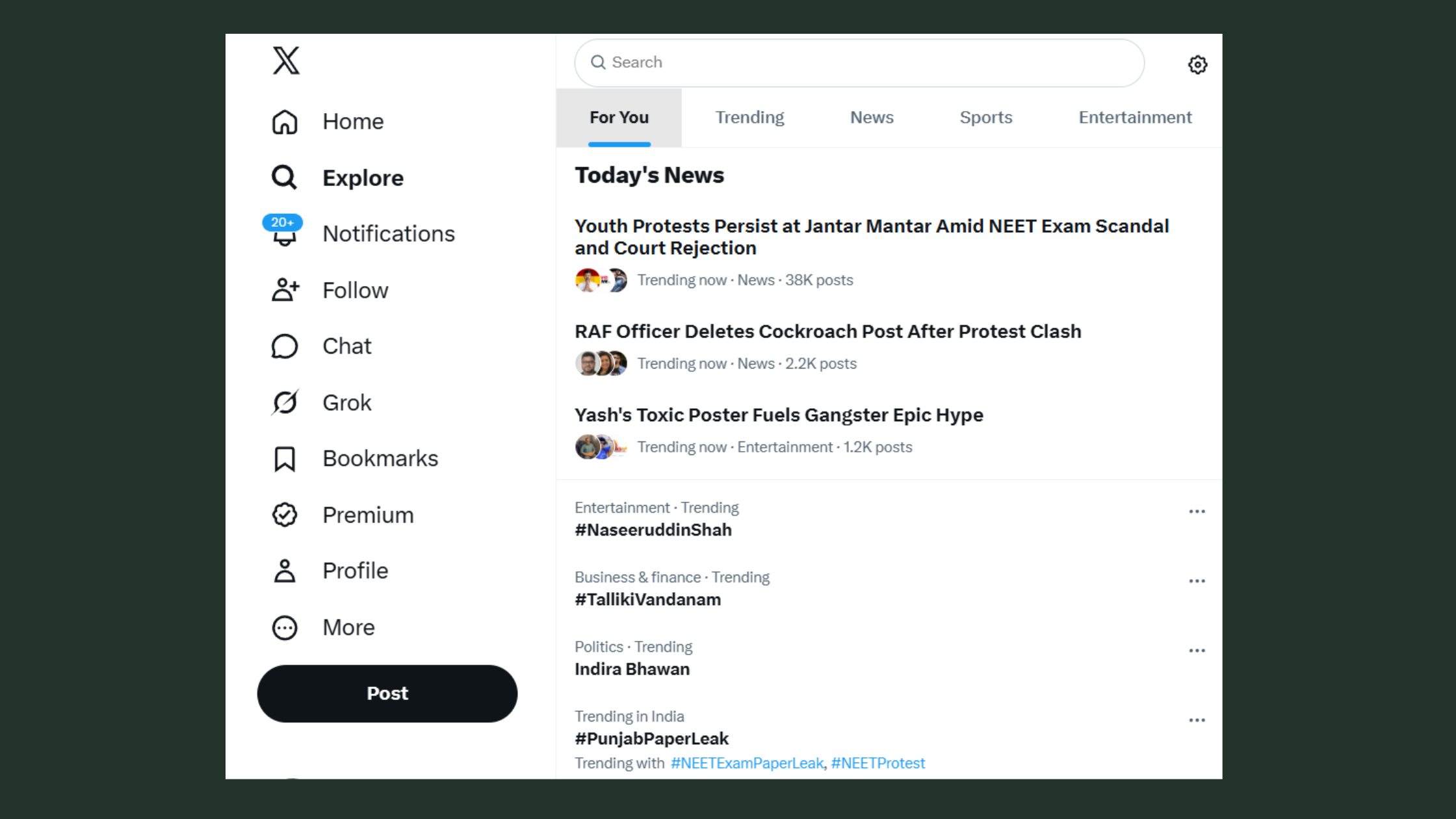
- Via the Explore tab: Tap the search/explore icon → scroll to "Topics for You" or search a keyword → tap the Topic name → tap Follow.
- Via a Topic label on a post: Posts tagged to a Topic show a small label below the content. Tap that label → it opens the Topic page → tap Follow.
- Via your Topics menu: Tap the "More" icon (desktop) or your profile icon (mobile) → tap Topics → browse suggestions and tap Follow next to any Topic.
According to the official X Help Centre, you can also follow Topics suggested directly on your home timeline — look for the "Follow this Topic" prompt that appears contextually between posts.
How to unfollow a Twitter topic — two reliable paths: go to your Topics list (More → Topics), find the Topic, and toggle off. Or open the Topic page directly and tap the checkmark/Following button. Both work identically on mobile and desktop as of 2026.
Using mute and unfollow topic controls together gives finer control than unfollowing alone. Muting a related hashtag suppresses posts that match the Topic's keyword cluster without fully removing the Topic's signal from your interest profile — useful when a Topic becomes temporarily noisy (a major news event, a viral controversy) but you want to keep the long-term feed signal intact.
Curated Twitter Feed Management: Getting the Most From Topics
The most common failure mode with Topic management is following too many at once and then ignoring the feed. Curated Twitter feed management works best as a monthly audit: check which Topics are surfacing content you actually engage with, drop the ones generating scroll-past behaviour, and add one or two new ones in adjacent interest areas. This keeps the interest graph clean and the For You feed sharp.
How the X Algorithm Works in 2026 and Why Topics Are Central to It
The X algorithm runs a three-stage pipeline to decide what appears in your For You feed. Understanding this is non-negotiable if you want to grow.
- Stage 1 — Candidate retrieval: X's systems pull a pool of candidate posts based on your interest graph — accounts you follow, Topics you've followed, posts you've engaged with, and searches you've run.
- Stage 2 — Ranking: Candidates are scored by predicted engagement probability. Replies, retweets with comment, and link clicks carry more weight than passive impressions. Recent engagement velocity (speed of early reactions) is heavily weighted.
- Stage 3 — Filtering: Safety signals, content policies, and relevance checks remove posts that don't match your inferred preferences or violate platform rules.
According to SocialBee's 2026 analysis of the X algorithm, Topics are a primary input at Stage 1 — they seed the candidate pool. Posts algorithmically matched to a Topic you follow get a distribution multiplier that can surface them even from accounts with zero mutual followers.
The Twitter interest graph is the underlying model X builds for every account — a weighted map of your interests derived from followed Topics, liked posts, replied-to accounts, dwell time on content types, and search history. It is the reason two people following the same accounts can see completely different For You feeds.
According to Backlinko (2025), X has an estimated 557 million monthly active users. This means the For You feed — powered by the interest graph — is doing enormous competitive ranking work on your behalf every time you post. This means a post that correctly matches a Topic's signal cluster reaches a far larger audience than your follower count suggests.
Why is my Twitter engagement dropping in 2026? The most common algorithm-side causes are inconsistent posting (engagement velocity resets if you go dark for more than 5–7 days), low reply depth (posts with zero replies are ranked lower than posts with even one substantive reply), and content-type mismatch — posting text threads to an audience whose Topic signals are video-heavy. The algorithm adapts to your patterns; break those patterns and reach degrades.
Twitter Topics That Drive Engagement in 2026
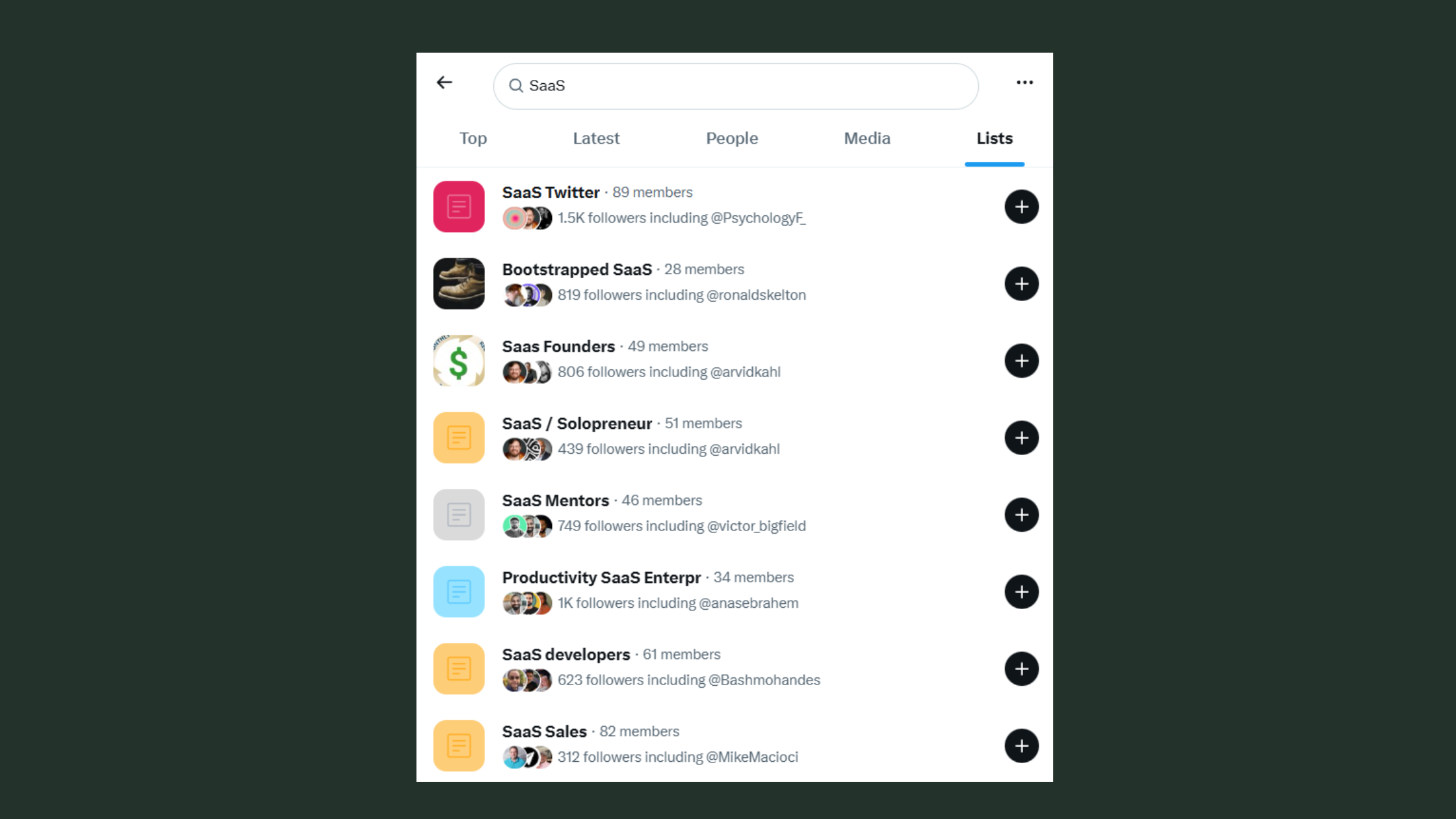
The Twitter topics that drive engagement 2026 are not necessarily the largest or most viral. Pattern-wise, mid-size niche Topics — technology, creator economy, SaaS, personal finance, fitness, B2B marketing — consistently outperform mega-Topics (sports, politics, entertainment) for engagement rate. Mega-Topics have high volume but fierce competition for attention. Niche Topics have smaller but more engaged, interest-matched audiences who reply and save more. For growth accounts, niche Topic alignment delivers better return than chasing trending mega-Topics.
Following the right Topics doesn't just improve what you see — it trains X's algorithm to show your posts to people who are already interested in that exact space, effectively expanding your distribution without a single extra follower.
What Type of Content Actually Performs Best on X in 2026
Three years of X algorithm content discovery data point to a consistent hierarchy, though the winner depends on your goal.
Does video or text get more engagement on Twitter 2026? Native video drives the highest raw reach — X's algorithm favours content that keeps users on-platform, and video does that better than any other format. But well-structured text threads hold engagement time and generate more replies and saves per impression than video. Both matter. The real answer: video for reach, threads for authority-building and community depth.
What gets engagement on Twitter 2026 — ranked by observed performance across content types:
- Native video — highest reach multiplier, especially under 60 seconds
- Data-backed threads — high saves and replies; strong Topic-matching signal
- Short punchy takes — fast virality potential, low shelf life
- Polls — strong early engagement velocity, drives replies
- Image carousels — good for step-by-step content; saves well
- External links — lowest organic reach; X suppresses link-out posts in ranking
Does Twitter reply boost reach? Yes — and this is one of the most underused levers. Replies signal conversation depth, which X's algorithm weights heavily at Stage 2 ranking. Seeding early replies within the first 30 minutes after posting is a documented reach lever. Teams that ask a question in the post itself, then reply to their own thread with additional context, consistently see higher reach than posts that go silent after publishing.
How Often to Post and When: Timing and Frequency for Growth
How often should I post on Twitter to grow — the honest answer is 3–5 times per week, consistently, beats 10 posts in one day followed by silence. According to Statista (2025), average weekly posts on X rose to over 17 per account across the platform — but volume without Topic alignment produces diminishing returns. Accounts that drop below 3x/week see algorithmic reach decay within 10–14 days, typically requiring 3–4 weeks of consistent posting to recover their distribution baseline.
On best time to post on Twitter 2026: engagement peaks are observed Tuesday through Thursday, between 9–11 AM and 6–8 PM in the account's primary audience timezone. These windows have remained stable because they align with commute and lunch behaviour. That said, accounts with strong Topic alignment see good reach even outside peak windows — the algorithm surfaces relevant content for hours after posting, not just in the first 60 minutes.
Twitter Content Strategy for Growth: How Marketers Use Topics Effectively
Topics are not just a discovery tool for reading — they are a strategic intelligence layer for content planning. What separates top-performing brand accounts from average ones is using Topic feeds as a real-time research tool, not a passive content stream.
Using Topics to monitor conversations and mine content ideas: Open the Topic page for your core niche and filter by recent posts rather than top posts. Recent posts show you what your audience is reacting to right now — questions being asked, frustrations being expressed, data being shared. That raw material becomes your content calendar. Most professionals get this wrong by only using Topics to consume content, not to generate it.
Discovering thought leaders and fellow brands through Topic pages is the lowest-effort audience growth method available. Posts with high reply counts on a Topic page signal accounts with engaged followings — those are your co-engagement and collaboration targets. Follow them, reply substantively to their posts within the Topic, and your account surfaces in the same Topic context. The algorithm reads co-engagement as a relevance signal.
Using Twitter Topics to stay up-to-date on current events in your niche creates a natural content velocity advantage: you see the news first, react first, and get the reach from being early in the conversation cycle. Timely posts on a trending Topic get a short-window distribution boost — typically 2–4 hours — before the volume of competing posts dilutes reach.
Twitter Topics for B2B vs. B2C use cases differ meaningfully. B2B teams use industry Topics (SaaS, HR Tech, Revenue Operations) for thought leadership and warm prospecting — being visible on Topics your target buyers follow builds familiarity before any direct outreach. B2C brands use culture and lifestyle Topics for community building and product discovery, where virality and share behaviour matter more than reply depth.
Growing on LinkedIn too? The same interest-graph principles apply.
See how real community engagement on LinkedIn drives compounding reach — without bots or automation risk.
Read the LinkedIn Strategy Guide →Common Mistakes to Avoid When Using Twitter Topics for Marketing
A recurring pattern among marketers trying to use Topics for growth is treating them as a broadcast channel rather than a listening post. Posting into a Topic without engaging with what's already performing in that Topic means you're missing the context that makes posts resonate. Read the Topic feed before you post into it. This single habit change consistently improves reply rates and saves.
✓ The Twitter Topics Content Strategy Checklist
- ☐Follow 5–10 niche Topics tightly aligned to your content pillars — not mega-Topics
- ☐Check your Topic feed before posting — identify what's performing today
- ☐Seed at least one early reply to your own post within 30 minutes of publishing
- ☐Engage with 2–3 top posts in your core Topic before posting your own content
- ☐Post 3–5x per week minimum — never go dark for more than 5 consecutive days
- ☐Audit your followed Topics monthly — drop those generating scroll-past behaviour
- ☐Track impressions-from-non-followers weekly — this is your Topic distribution signal
Measuring What's Working: Twitter Engagement Rate Benchmarks and Analytics in 2026
The Twitter engagement rate benchmark 2026 varies sharply by account size — and most people compare themselves to the wrong tier. Here's what's observed across account cohorts:
- Nano accounts (1K–10K followers): 1–3% engagement rate is strong. These accounts benefit from tight community bonds and high reply rates relative to reach.
- Mid-tier accounts (10K–100K followers): 0.5–1.5% is the realistic range. Reach scales but personal connection dilutes — this is the plateau zone where Topic strategy matters most for re-engaging the algorithm.
- Large accounts (100K+): below 0.5% is common and not necessarily a problem — at scale, impressions are enormous even with lower percentage engagement.
In practice, a mid-tier account hitting 1.5% engagement rate through Topic-aligned content is outperforming a large account with 200K followers posting off-topic. The algorithm rewards engagement rate, not raw follower count.
Best Twitter analytics tools 2026 — the core stack observed across serious growth accounts:
- Native X Analytics: baseline impressions, engagement rate, top posts, audience demographics — free and sufficient for early-stage tracking
- Typefully / Hypefury: thread scheduling with per-post analytics and audience growth tracking

Best Twitter analytics tools 2026 - Followerwonk: audience interest mapping and follower quality analysis
- Brandwatch / Audiense: Topic-level conversation monitoring and competitor benchmarking — enterprise tier
The metrics that actually signal Topic-driven growth are not likes. Track: impressions from non-followers (Topic distribution working), profile visits per post (content compelling enough to prompt investigation), saves (content worth returning to), and reply thread depth (conversation quality). Likes are a vanity metric. These four are the signal.
If you're applying similar engagement-intelligence thinking to LinkedIn, the complete LinkedIn engagement growth guide covers the same principle — platform signals, interest graphs, and real community engagement — in depth.

Want compounding LinkedIn reach alongside your X growth?
HyperClapper drives real LinkedIn post engagement — likes and comments from real professionals — so your content reaches beyond your existing followers, the same way Topic-aligned posts do on X.
Explore HyperClapper →Frequently Asked Questions About Twitter Topics and Engagement in 2026
How do you find Topics on Twitter?
Open the Explore tab and search for any keyword — X surfaces matching Topics at the top of results. Topics also appear as labels on individual posts and as suggestions in your timeline. Go to More → Topics in the side menu for a full personalised list of suggested Topics based on your activity.
What are Topics on Twitter?
Topics on Twitter (X) are curated interest channels that group posts, accounts, and conversations around a shared theme. When you follow a Topic, X adds it to your interest graph and surfaces matching content in your For You feed — even from accounts you don't follow. They function like subject-matter filters applied to the whole platform.
How to follow specific topics on Twitter
Search the keyword in Explore, tap the Topic name (not a hashtag), and tap Follow. You can also tap the Topic label that appears below individual posts in your feed to open the Topic page and follow it from there. On desktop, the More → Topics menu shows all Topics you currently follow and recommended new ones.
How to see the topics you follow on Twitter
Go to More (the three-dot or grid icon in the sidebar on desktop) and tap Topics. This shows every Topic you currently follow with the option to unfollow directly from the list. On mobile, tap your profile icon, then Topics — it's one of the most under-discovered menus on the platform.
What topics are trending on Twitter that get the most engagement in 2026?
Niche professional Topics — AI and machine learning, creator economy, SaaS growth, personal finance, and B2B marketing — consistently produce higher engagement rates than mega-Topics in 2026. Trending news Topics spike fast but dilute quickly. For sustained engagement, niche Topics with loyal, interest-matched audiences outperform trending ones in every metric that matters: replies, saves, and profile visits.
How has the Twitter algorithm changed for content creators in 2026?
X's algorithm now weights conversation depth more heavily than raw likes — replies, especially threaded ones, carry more ranking power than before. The interest graph has become the primary distribution mechanism, meaning Topic alignment now influences reach more than follower count. Posts with zero replies within the first 30 minutes see significantly lower reach than posts that generate early conversation.
Is it better to post threads or short tweets for engagement on X?
Short posts win for viral reach and speed — they spread faster and require less commitment from readers. Threads win for authority-building, saves, and reply depth — they perform better for building a following and demonstrating expertise. Match the format to your goal: use



