Your LinkedIn URL — the web address that points directly to your public profile — is one of the most overlooked personal branding assets on the platform. A pattern observed across thousands of professional profiles is that the people who customize their LinkedIn URL consistently present a more polished first impression than those who leave the default string of random numbers intact. The default format looks like linkedin.com/in/firstname-lastname-a1b2c3; a customized one looks like linkedin.com/in/janedoe. That difference matters more than most professionals realize — especially when the link is sitting on a resume or in an email signature being reviewed by a recruiter in under ten seconds.
- Find your URL instantly: On desktop, go to your profile and check the browser address bar — or click "Edit public profile & URL" in the right sidebar.
- On mobile: Tap your profile picture → View Profile → three-dot menu → "Share via link" to copy your URL to the clipboard.
- Customize for free: Any LinkedIn member can set a custom vanity URL — no Premium subscription required.
- URL rules matter: 3–100 characters, letters and numbers only, no spaces or special characters except hyphens.
- Change limit: You can change your LinkedIn URL up to 5 times in 6 months — treat it as permanent once set.
- Most counterintuitive finding: Changing your URL resets SEO value and breaks every link you have already shared — including links on your resume, email signature, and anywhere it has been published.
- What Is a LinkedIn URL and Why Does It Matter?
- How to Find Your LinkedIn URL on Desktop and Mobile
- How to Customize Your LinkedIn URL (Step-by-Step)
- Adding Your LinkedIn URL to Your Resume and Email Signature
- Common Mistakes to Avoid With Your LinkedIn URL
- How to Share Your LinkedIn Profile Link Effectively
- Frequently Asked Questions About LinkedIn URLs
What Is a LinkedIn URL and Why Does It Matter?
A LinkedIn URL is the unique web address assigned to every LinkedIn profile — it is the link someone follows to land directly on your public page. Every new account gets a default URL that looks like linkedin.com/in/jane-doe-a4f7b2, where the random alphanumeric string at the end is auto-generated. That string serves LinkedIn's system; it does nothing for your personal brand.
LinkedIn URL Format Explained
The standard LinkedIn URL format follows a predictable pattern:
- Base domain:
https://www.linkedin.com/in/ - Your identifier: the name or phrase you choose (e.g.,
janedoeorjane-doe-ux) - Full example:
https://www.linkedin.com/in/janedoe
A LinkedIn vanity URL is what the customized version is officially called — it replaces the auto-generated string with your chosen identifier, turning a system-generated code into a professional, human-readable address. Think of it the way a storefront thinks about a street address versus a GPS coordinate: both work, but only one is worth printing on a business card.
According to DemandSage (2026), LinkedIn has over 1.3 billion members globally. In a network that large, a clean, recognizable URL is one of the fastest signals a profile sends. What this means in practice: a recruiter searching for you by name is far more likely to find and trust a profile at linkedin.com/in/janedoe than one buried under an auto-generated string.
SEO Benefits of a Custom LinkedIn Vanity URL
The SEO benefits of a custom LinkedIn vanity URL are genuine and measurable. LinkedIn profiles rank in Google's top results for personal name searches, and a URL that contains your name reinforces the keyword signal Google uses to match the search to your profile. A custom URL also makes your profile easier to cite in articles, press mentions, and professional directories — all of which generate backlinks that strengthen LinkedIn's own search authority for your name.
With the basics of what your URL is and why it matters covered, here is exactly how to find it — on any device, in under 30 seconds.
How to Find Your LinkedIn URL on Desktop and Mobile
Finding how to find my LinkedIn URL takes under 30 seconds once you know where to look. The exact steps differ between desktop and the mobile app — both are covered below.
How to Find Your LinkedIn URL on Desktop
Here is how do I find my url on LinkedIn using a desktop browser:
- Sign in to your LinkedIn account at linkedin.com.
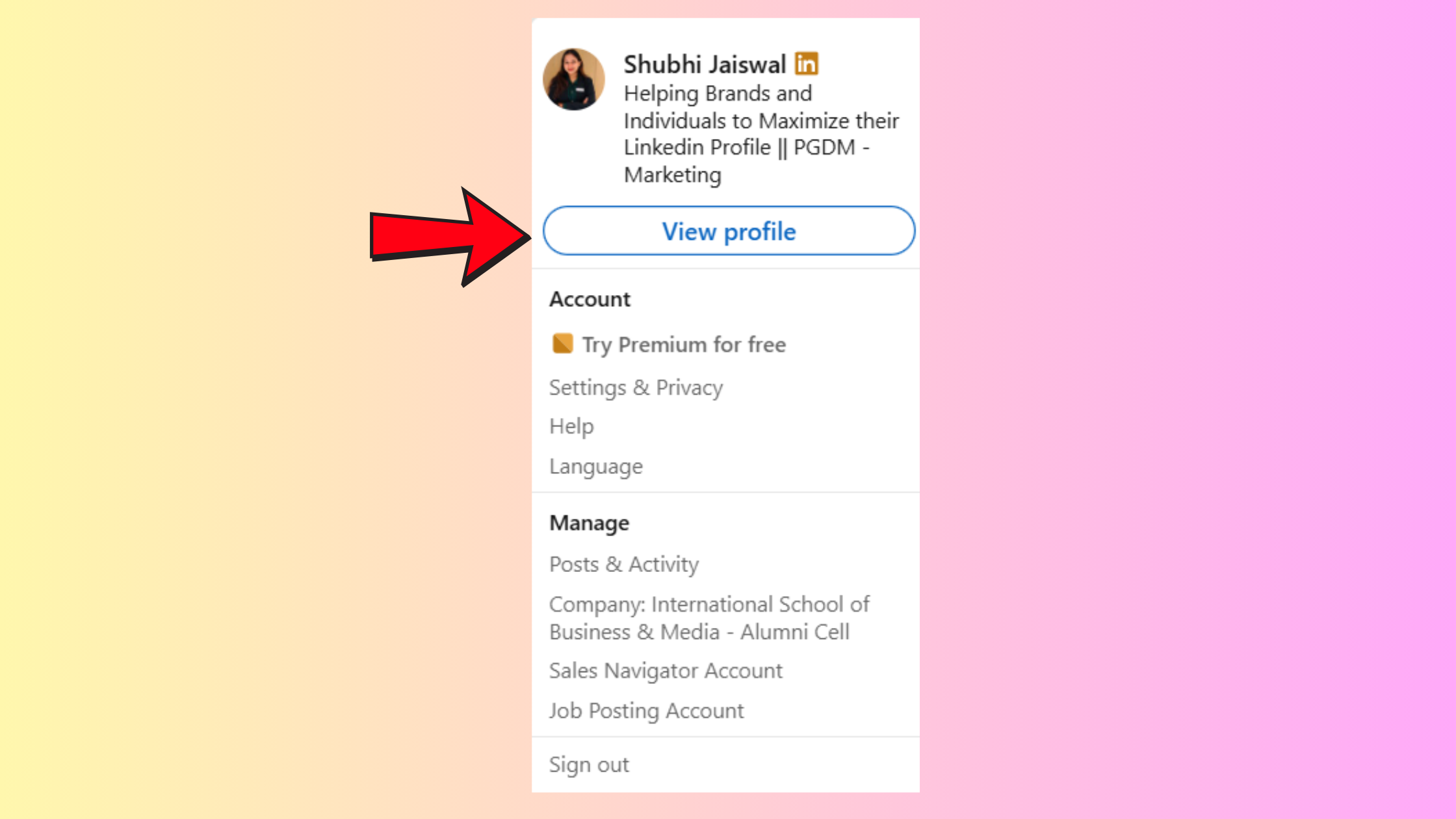
- Click your profile photo or "Me" icon at the top of the page.
- Select "View Profile."
How to Find Your LinkedIn URL on Desktop - Look at the browser address bar — the URL displayed there is your current LinkedIn profile URL.
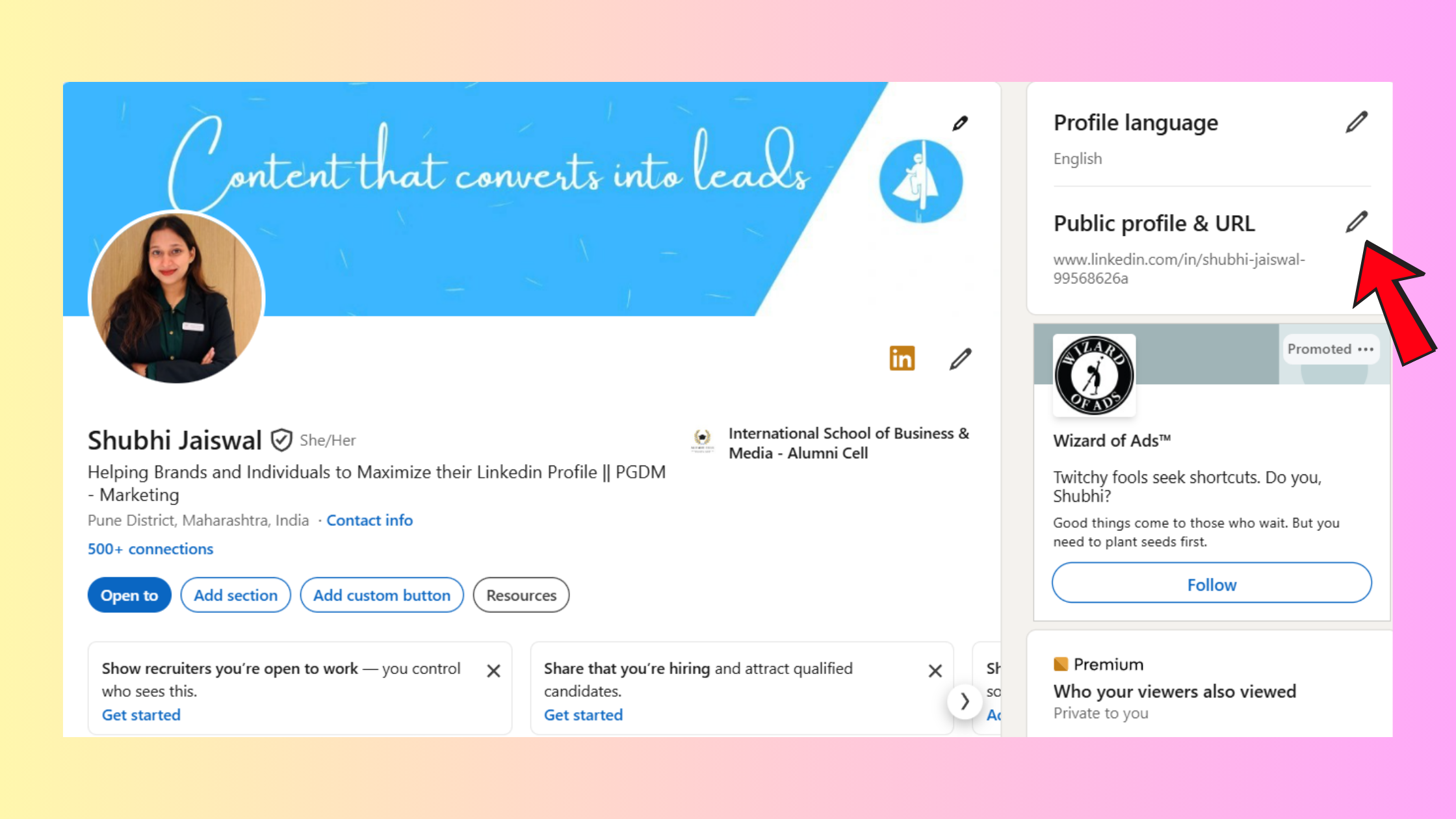
- Alternatively, scroll to the right sidebar on your profile page and click "Edit public profile & URL." Your current URL appears at the top of the page that opens.
That is the fastest path. The address bar method works in under five seconds; the Edit Public Profile route is useful when you also want to copy or change the URL in the same session.
How to Find LinkedIn URL on iPhone
Here is how to find LinkedIn URL on iPhone using the mobile app:
- Open the LinkedIn app and tap your profile picture in the top left.
- Tap "View Profile."
- Tap the three-dot menu (⋯) in the top right corner of your profile.
- Tap "Share via link." This automatically copies your shareable LinkedIn profile link to your clipboard.
You can then paste it anywhere — a message, notes app, or email — to see and use the full URL.
Where to Find LinkedIn URL on App Android
The steps for where to find LinkedIn URL on app Android are nearly identical to iPhone:
- Open LinkedIn and tap your profile picture (top left).
- Tap "View Profile."
- Tap the three-dot menu (⋯) at the top right.
- Select "Share via link" — your URL is copied to your clipboard instantly.
A secondary method on both iOS and Android: tap "Contact info" on your own profile — your current LinkedIn URL is listed there and can be tapped to copy. This is also the answer to how do I find my LinkedIn URL on the app when the three-dot menu is harder to locate.
Now that you know where to find your URL, here is how to replace the default string with something worth sharing.
How to Customize Your LinkedIn URL (Step-by-Step)
Customizing your LinkedIn profile URL is free for all members — no Premium plan required. The whole process takes about two minutes.
Desktop Steps to Customize LinkedIn URL
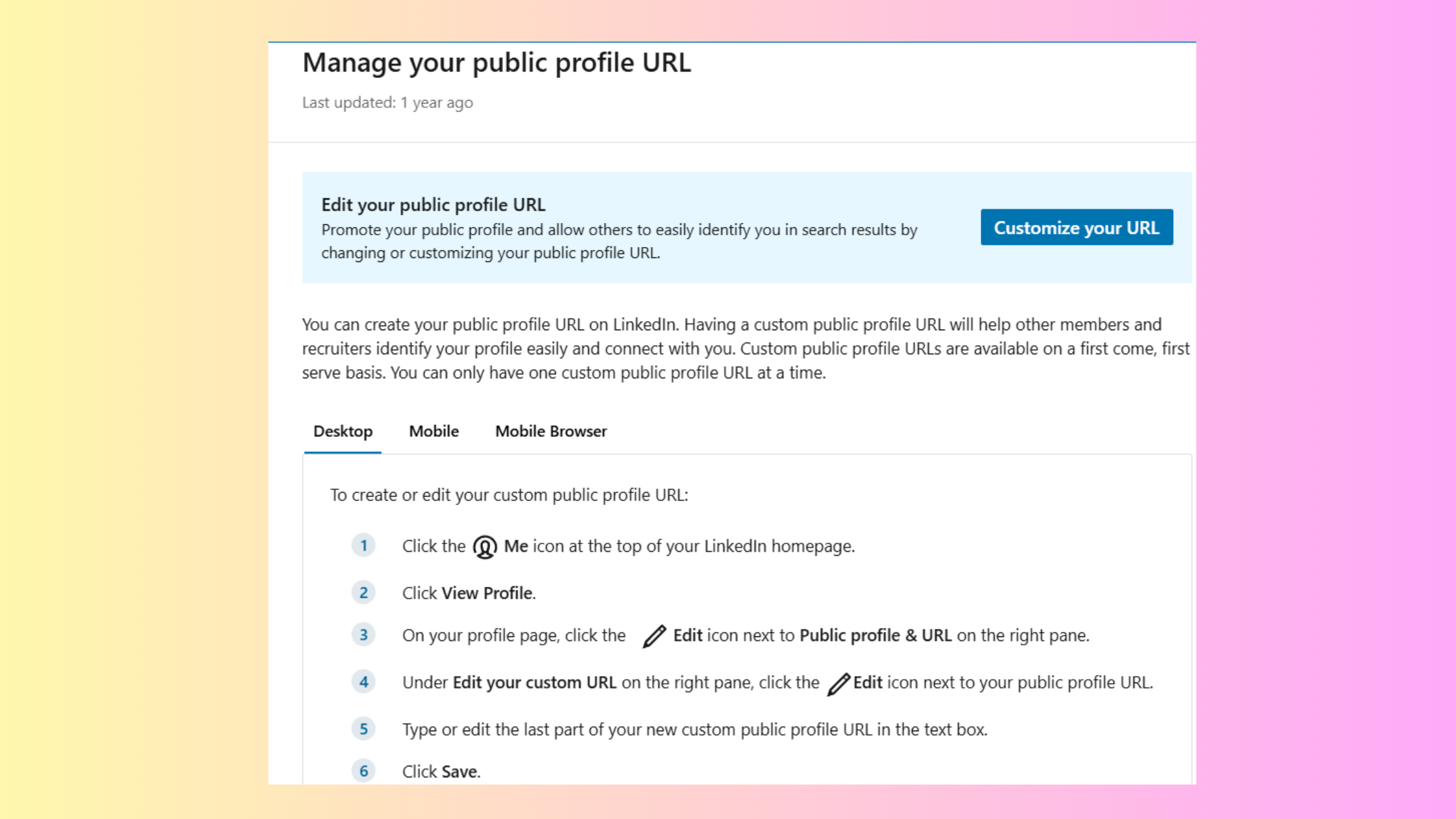
- Go to your LinkedIn profile and click "Edit public profile & URL" in the right sidebar.
- Under "Edit your custom URL", click the pencil icon next to your current URL.
- Type your chosen identifier in the text field (e.g.,
janedoeorjane-doe-ux). - Click Save. Your new custom LinkedIn URL is live immediately.
Mobile Steps to Customize LinkedIn URL
- Tap your profile picture → View Profile.
- Tap the Edit (pencil) icon on your profile.
- Scroll to "Contact info" and tap it.
- Tap the pencil icon next to your Profile URL.
- Enter your custom text and tap Save.
For how to share my LinkedIn profile link on phone after customizing: use the "Share via link" method described in the previous section — it will now copy your clean vanity URL instead of the default string.
LinkedIn URL Character Limits, Rules, and Restrictions
Before you type your chosen identifier, know the rules LinkedIn enforces:
- Length: 3–100 characters (shorter is better — aim for under 30)
- Allowed characters: Letters (a–z), numbers (0–9), and hyphens (-)
- Not allowed: Spaces, special characters (@, #, !, etc.), consecutive hyphens, or starting/ending with a hyphen
- Not allowed: Reserved words (e.g., "linkedin", "jobs", "company")
- Case-insensitive:
JaneDoeandjanedoeare treated as the same URL
janedoe-ux, janedoenyc).How Many Times Can You Change Your LinkedIn URL?
LinkedIn allows up to 5 URL changes within any 6-month rolling period. After the fifth change, you must wait until the 6-month window resets before changing it again. In practice, this limit rarely affects people who treat their URL as a permanent asset — the constraint only matters to those who keep changing it, which is a mistake for reasons covered next.
What Happens to Your Old LinkedIn URL After Changing It?
When you change your LinkedIn URL, the old URL is immediately released — it does not redirect to your new address. Anyone who clicks a link pointing to your old URL will land on a LinkedIn 404 error page, not your profile. This is the most underestimated consequence of changing a URL. Every resume, email signature, website bio, article mention, and business card that carries the old URL becomes a dead link the moment you change it. Treat your LinkedIn URL the way you treat a domain name: change it only once, get it right, and leave it alone.
The right approach for adding this URL across all your professional touchpoints is covered in the next section.
Adding Your LinkedIn URL to Your Resume and Email Signature
Recruiters scanning resumes spend an average of a few seconds before deciding whether to read further — your contact header is the first thing they see. Including your LinkedIn profile link for resume in that header is now a standard professional expectation, not an optional extra.
How to Format Your LinkedIn URL on a Resume
Place your LinkedIn URL in the resume header, in line with your phone number and email address. Use the clean vanity URL as the visible text — not the full https://www.linkedin.com/in/ prefix:
- Good:
linkedin.com/in/janedoe - Avoid:
https://www.linkedin.com/in/janedoe-a4f7b2 - Avoid: Hyperlinked text that says "LinkedIn Profile" with no visible URL — ATS systems often strip hyperlinks
For digital resumes (PDF or Word), hyperlink the URL directly so it is both readable and clickable. For printed resumes, the clean vanity URL is short enough to type easily — another reason the default random-number string is a problem worth fixing before your next application.
For a detailed walkthrough of formatting options, see how to add your LinkedIn profile to your resume.
Email Signature Formatting
In an email signature, you have two clean options:
- Hyperlink the word "LinkedIn" to your full profile URL — short, professional, universally understood
- Display the clean URL as plain text:
linkedin.com/in/janedoe— works in plain-text emails where hyperlinks are stripped
Avoid the full https:// prefix in a signature — it adds visual noise without adding clarity.
LinkedIn URL Best Practices for Recruiters vs. Job Seekers
Teams that approach their LinkedIn URL strategically — rather than just defaulting to their name — consistently see better recognition in their specific context. Job seekers should match their full professional name as closely as possible (janedoe or jane-doe) to make profile lookups frictionless for hiring managers searching by name. Recruiters, by contrast, benefit from a URL that signals their specialty — something like jane-doe-tech-recruiter or janedoe-hr — because their URL appears in candidate communications and a specialty-specific address reinforces their niche authority at first glance.
Want your LinkedIn profile to do more than just exist?
A clean URL gets people to your profile. HyperClapper turns that visit into real engagement — likes, comments, and visibility from an active professional community.
Boost Your LinkedIn PresenceCommon Mistakes to Avoid With Your LinkedIn URL
The most common failure mode here is simple neglect — most professionals set up their LinkedIn profile once and never revisit the URL. By the time they notice it on their resume, they have already sent it to dozens of recruiters. These are the four mistakes worth fixing today.
linkedin.com/in/janedoe-a4f7b2 signals the same thing as a blurry profile photo — an incomplete profile that has not been optimized.- Using random numbers when your name is taken:
janedoe123is visually identical to the default mess. Use a meaningful suffix — a title abbreviation, your city, or a middle initial. - Changing your URL repeatedly: Each change orphans every link you have previously shared. Accounts that change LinkedIn URL more than once typically find they lose accumulated Google search authority for their name and have broken links across their digital footprint.
- Mismatched branding: Your LinkedIn URL, your email, your resume name, and your online portfolio should all use the same version of your name. Using
linkedin.com/in/jdoewhen your resume says "Jane Doe" creates a friction point for anyone doing a quick verification search. - Skipping customization entirely before going job-active: Customizing your LinkedIn custom URL takes two minutes. It is one of the highest-return-per-minute tasks on LinkedIn. Do it before the next application, not after.
The professionals who treat their LinkedIn URL as a permanent address — chosen once, used everywhere, never changed — consistently present the most coherent personal brand across every channel where their name appears.
How to Share Your LinkedIn Profile Link Effectively
Once your vanity URL is set, sharing it well is the final step. Your shareable LinkedIn profile link is usable across every professional touchpoint — here is how to use it in each context.
- In messages or chat: Paste the URL as plain text (
linkedin.com/in/janedoe) — the recipient sees a clean, clickable link without confusing attachment previews. - On printed materials or business cards: Generate a QR code from your vanity URL using any free tool — QR Code Generator and QR Tiger both accept LinkedIn URLs directly. This removes the friction of manual typing entirely.
- In your email signature: Follow the formatting advice above — hyperlinked word or clean plain-text URL, never the full HTTPS string.
- In your bio on other platforms: Use the consistent vanity URL everywhere — Twitter/X, personal website, Substack, Calendly — so all paths lead to the same place.
For more strategies on how to customize and share your LinkedIn URL across platforms, the guide covers every major use case in detail.
Getting people to your profile through a clean URL is only the first step. What they see when they arrive — your engagement signals, comment activity, and post visibility — determines whether they connect or move on. Tools like HyperClapper help bridge that gap by building real engagement on your posts through community channels and AI-powered replies, so your profile looks active and credible to every visitor who follows your link.
✓ LinkedIn URL Optimization Checklist
- ☐Find your current LinkedIn URL (browser address bar or Edit Public Profile page)
- ☐Customize it to FirstnameLastname or a deliberate variation (no random numbers)
- ☐Keep it under 30 characters — short enough to include on a business card
- ☐Update your resume header with the clean vanity URL (no https:// prefix needed)
- ☐Add it to your email signature as a hyperlink or clean plain-text URL
- ☐Update any website bios, Calendly pages, or social profiles that still carry the old URL
- ☐Treat the URL as permanent — do not change it unless absolutely necessary
What consistently separates profiles with strong personal brand presence from profiles that get overlooked is not just the URL — it is the combination of a clean address, an active post history, and visible engagement that signals credibility to every visitor who arrives. Get the URL right first, then make sure the profile behind it lives up to the impression it creates.
Frequently Asked Questions About LinkedIn URLs
How do I find and copy my LinkedIn profile URL to share with someone?
On desktop, go to your profile and copy the URL from the browser address bar, or click "Edit public profile & URL" in the right sidebar. On mobile, tap your profile picture → View Profile → three-dot menu → "Share via link" — this copies your full LinkedIn profile URL directly to your clipboard, ready to paste anywhere.
How do I copy my LinkedIn URL from the app?
Open the LinkedIn app, tap your profile picture, select "View Profile," then tap the three-dot menu (⋯) in the top right corner. Tap "Share via link" — your URL is instantly copied to your clipboard. You can also find it under "Contact info" on your own profile page.
How do I copy my LinkedIn URL to my resume?
Copy your clean vanity URL (e.g., linkedin.com/in/janedoe) and paste it into your resume header alongside your phone and email. In digital resumes, hyperlink it so it is clickable. Skip the full https://www.linkedin.com/in/ prefix — the shorter version is cleaner and still fully functional. See the full guide on adding your LinkedIn profile to your resume.
How do I edit my LinkedIn profile URL?
On desktop: go to your profile → click "Edit public profile & URL" in the right sidebar → click the pencil icon next to your URL → type your new identifier → Save. On mobile: View Profile → Edit pencil → Contact info → tap the pencil next to your URL → enter new text → Save. Changes take effect immediately. For a detailed walkthrough, see how to edit your LinkedIn URL.
How do I share my LinkedIn profile link?
Paste your vanity URL as plain text in messages, add it to your resume header and email signature, generate a QR code for printed materials, or use the "Share via link" option in the LinkedIn mobile app. For a complete walkthrough of every sharing method, the guide to finding and sharing your LinkedIn profile URL covers each scenario.
Can two people have the same LinkedIn URL? What happens if your chosen URL is taken?
No — LinkedIn URLs are unique. Each identifier can only belong to one profile at a time. If your chosen URL is taken, LinkedIn will show a "LinkedIn URL not available" error and ask you to choose another. Use a meaningful variation: add a middle initial, professional title abbreviation, or city rather than a random number, which looks as messy as the default.
Does changing your LinkedIn URL affect your search ranking or profile visibility?
Yes, negatively. Changing your LinkedIn URL resets the SEO equity accumulated under the old address — Google's index treats the old and new URLs as different pages, so any search ranking your old URL built takes time to transfer. The old URL also stops working immediately, breaking every link you have previously shared. Change it only once, get it right, and leave it permanently.
What should I use as my LinkedIn custom URL if my name is already taken?
Use a deliberate, professional suffix rather than random numbers. Good options include your middle initial (janemdoe),



