Most professionals searching for linkedin automation tools hit the same wall: a list of 15 tools ranked by price, with zero guidance on which ones are actually safe for their LinkedIn account. A pattern observed across thousands of LinkedIn growth campaigns is that the tools people choose rarely cause problems — the way they combine them does. This guide focuses on two complementary tools — Closely for outreach sequences and HyperClapper for post engagement — and shows how to run them together as a cohesive growth stack without triggering LinkedIn's detection systems.
- Two distinct jobs: Closely handles outreach sequences and connection requests; HyperClapper handles post visibility and engagement depth — they are not interchangeable.
- Architecture is the safety variable: Cloud-based tools like Closely carry significantly lower detection risk than browser-extension tools that mimic clicks inside your session.
- Engagement before outreach: Boosting a post with HyperClapper before launching a Closely sequence measurably improves connection acceptance rates by building social proof on your profile.
- The most dangerous pattern on LinkedIn is running high-volume outreach from a cold profile with no engagement history — the exact combo that flags detection systems.
- HyperClapper's AI replies extend post longevity by signalling conversation depth, not just reaction count, which is what LinkedIn's algorithm now rewards.
- Free LinkedIn automation tools almost universally rely on browser extensions — lower cost, but considerably higher account risk than cloud-hosted alternatives.
- Why Most LinkedIn Automation Advice Gets It Wrong in 2026
- What Is Closely and How Does It Work for LinkedIn Lead Generation
- What Is HyperClapper and How Does It Boost LinkedIn Post Reach
- How to Use Closely and HyperClapper Together as a LinkedIn Growth Stack
- Risks, Limits, and Common Mistakes to Avoid with LinkedIn Automation
- Closely vs. Competitors: Choosing the Right LinkedIn Automation Tool for Sales Prospecting
- Frequently Asked Questions About Closely, HyperClapper, and LinkedIn Automation
Why Most LinkedIn Automation Advice Gets It Wrong in 2026
The real problem is not picking between fifteen tools — it is not knowing which ones are architecturally safe for your account before you start. According to ConnectSafely (2026), the LinkedIn automation tools market has reached an estimated $850 million annually, growing 42% year-over-year. This means more tools, more noise, and more articles that rank tools by feature count without ever asking the question that actually matters: how does this tool send actions on LinkedIn, and what does that look like to LinkedIn's detection infrastructure?
The conventional advice here is genuinely outdated. Most comparison guides treat all LinkedIn automation tools as roughly equivalent risks, then warn you generically to "stay within limits." That framing misses the most important variable entirely.
Cloud-Based vs. Browser-Extension Tools: The Architecture Gap Nobody Explains
Cloud-based tools are platforms that send LinkedIn actions from dedicated IP addresses on remote servers — your local machine does not need to be running, and your browser session stays untouched. Browser-extension tools operate inside your active browser session, injecting actions directly into your LinkedIn interface from your own IP.
The distinction matters because LinkedIn's anti-automation systems watch for behavioural patterns — action timing, IP consistency, session irregularities — not just raw volume. Browser extensions that fire actions at unnaturally consistent intervals or across multiple tabs are far more visible to those systems than cloud tools with built-in randomisation and warm-up protocols.
- Cloud-based (lower detection risk): Closely, Expandi, Dripify, LaGrowthMachine
- Browser-extension based (higher detection risk): Most free LinkedIn automation tools, Phantombuster (hybrid), older versions of Dux-Soup
Free linkedin automation tools almost always fall into the browser-extension category. Lower upfront cost comes with a meaningfully higher risk of account restriction — a trade-off most guides do not make explicit.
This guide focuses on two tools that sit on opposite ends of the growth stack — Closely for outreach, HyperClapper for engagement — and explains how they work together without stepping on each other's risk profile.
What Is Closely and How Does It Work for LinkedIn Lead Generation
Closely is a cloud-based LinkedIn automation platform built specifically for outreach sequences — connection requests, follow-up messages, and drip-style prospect nurturing. It is the Closely LinkedIn lead generation tool most often compared to Expandi and Dripify because it occupies the same category: structured, sequential outreach at scale without requiring a browser to be open. As a cloud-based tool, Closely sends all actions from its own infrastructure rather than through your local machine, which places it in the lower-risk architectural tier.
The outreach sequence engine lets you set daily send limits, insert personalisation tokens (first name, company, recent post reference), and define multi-step follow-up timing. A recruiter, for example, might set up a 4-step sequence: connection request → message on acceptance → follow-up on day 3 → final message on day 7, all with different copy variants per persona. According to CoPilot AI, personalised InMails increase acceptance rates by 40% — and Closely's token system is designed to make that level of personalisation scalable rather than manual.
Is Closely Safe to Use for LinkedIn Outreach?
Closely is among the safer choices in its category because of its cloud infrastructure and built-in warm-up protocols. Warm-up protocols are graduated activity ramp-ups that start new accounts at low daily action volumes and slowly increase them over several weeks, mimicking the pace of a human user building momentum rather than a tool suddenly sending 100 connection requests on day one.
Closely also enforces human-mimicry thresholds — randomised delays between actions, natural variation in message send timing, and daily caps that prevent the kind of uniform action cadence that LinkedIn's detection systems specifically look for. That said, no tool eliminates risk entirely. Teams that ignore Closely's recommended warm-up phase and immediately push to maximum limits consistently see higher restriction rates — the warm-up exists for a reason, and skipping it is the most common Closely-related mistake observed.
Best suited for: sales teams running structured SDR prospecting, recruiters sourcing at scale, founders doing direct outreach to potential customers or partners, and agencies managing multi-client LinkedIn outreach. For a deeper look at how Closely compares to other outreach-focused tools, the Skylead vs. HyperClapper comparison covers how outreach and engagement tools differ at the architectural level.
What Is HyperClapper and How Does It Boost LinkedIn Post Reach
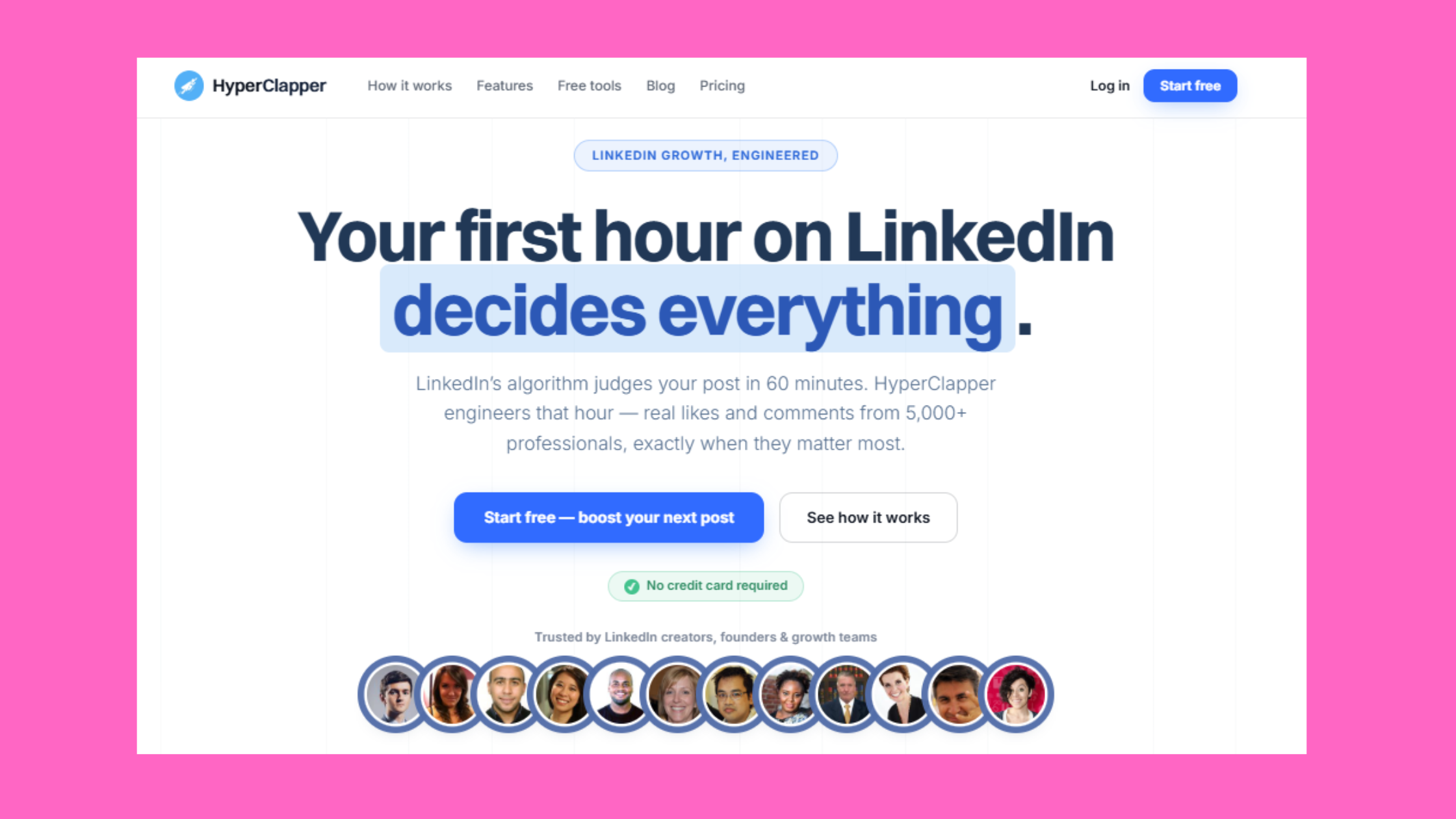
HyperClapper is a LinkedIn engagement platform — not an outreach tool. Where Closely sends messages to prospects, HyperClapper drives likes, comments, and post visibility through real community channels composed of actual LinkedIn users. The distinction matters: HyperClapper LinkedIn post engagement comes from real people inside the platform, not scripted bots or fake accounts, which is the core reason it avoids the patterns that trigger LinkedIn's anti-spam systems.
The mechanism works through channels — groups of real users who agree to engage with submitted posts. Submit a post, select channels, and those users engage with it naturally inside their own LinkedIn sessions. Engagement scales predictably:
- 1 channel ≈ ~50 possible engagements
- 2 channels ≈ ~100 possible engagements
- 3 channels ≈ ~150 possible engagements
On top of community engagement, HyperClapper's AI-powered reply system generates and posts contextual comments that keep conversations active and signal conversation depth to LinkedIn's distribution algorithm. Post engagement velocity is the speed at which a post accumulates likes and comments after publishing — and LinkedIn's feed ranking heavily weights posts that maintain momentum over 24–48 hours, not just those that spike immediately. The "Feed More AI Replies" feature lets users extend that momentum days after the initial post, which is particularly valuable because LinkedIn rewards meaningful ongoing conversations, not just reaction counts.
The accounts that compound reach on LinkedIn are not the ones with the most connections — they are the ones whose posts signal to the algorithm that real conversations are happening. Engagement depth outlasts engagement volume every time.
HyperClapper Pricing, Plans, and Who It's Built For
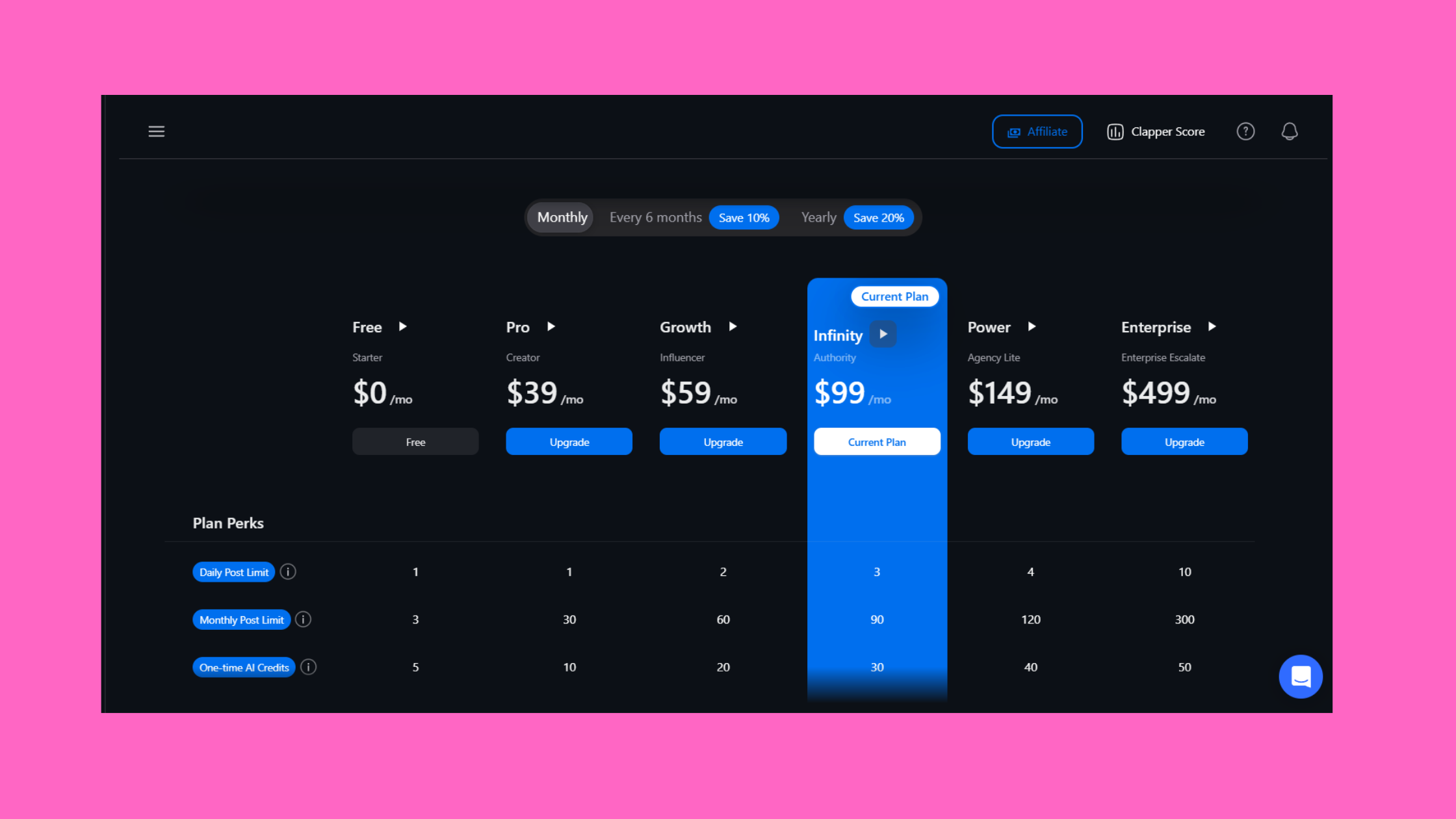
HyperClapper offers tiered plans calibrated to different growth goals — from individual creators and coaches building a personal brand to agencies and sales teams managing multiple company pages. The platform includes post boosting, AI replies, company page boosting, company page replies, analytics, and the Content Guard moderation system (which automatically screens posts to avoid politically sensitive or otherwise risky content before amplification). For current HyperClapper pricing and plans, visit app.hyperclapper.com — plans are structured around the number of channels and the volume of AI replies available per month.
HyperClapper is built for:
- LinkedIn creators and coaches growing a personal brand
- Founders wanting social proof before cold outreach campaigns
- Marketers and agencies managing client LinkedIn visibility
- Recruiters building authority and inbound candidate flow
- Sales teams warming up profiles ahead of prospecting campaigns
For a detailed side-by-side with other engagement pod tools, the HyperClapper vs. Podawaa comparison covers where the real differences in safety and engagement quality show up.
Want real LinkedIn engagement without bot risk?
HyperClapper connects your posts with real users who engage — plus AI-powered replies that keep conversations alive and signal depth to LinkedIn's algorithm.
Try HyperClapper FreeHow to Use Closely and HyperClapper Together as a LinkedIn Growth Stack
The core insight behind combining these two tools is simple: Closely fills your pipeline, and HyperClapper builds the social proof that makes that pipeline convert. A recurring pattern among founders and sales teams trying to scale LinkedIn outreach is launching high-volume Closely sequences from profiles that have zero recent engagement — and then wondering why acceptance rates are poor. Prospects check the profile of anyone who requests to connect. A profile with no recent activity, no post engagement, no visible community signals, reads cold and unconvincing.
Running HyperClapper in parallel changes that equation entirely. When your profile shows active posts with genuine engagement and live comment threads, every cold connection request from Closely lands on a warmer first impression.
Step-by-Step: Building Your Combined Outreach and Engagement Workflow
- Create and publish your LinkedIn post — content that speaks directly to your target prospect persona (problem, insight, or relevant case study). 30 seconds.
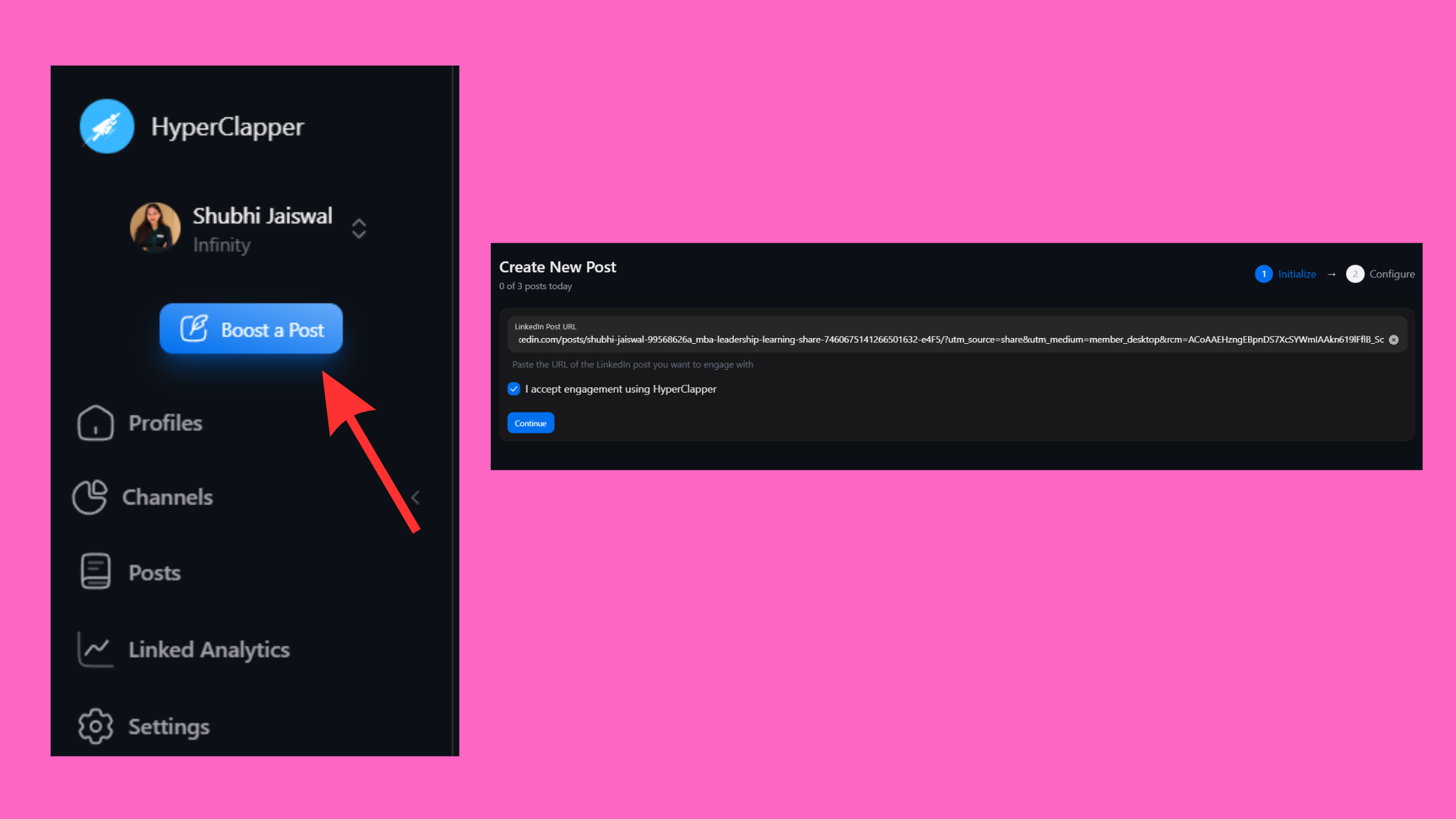
Create and publish your LinkedIn post - Submit the post to HyperClapper channels — select 2–3 channels to hit the 100–150 engagement range; add AI replies to seed the comment thread. 2 minutes.
- Wait 24–48 hours — let the post engagement velocity build and settle. LinkedIn's algorithm surfaces the post to your network during this window, expanding profile views. No action needed.
- Launch your Closely outreach sequence — now that your profile shows an actively engaged recent post, send the sequence. Reference the post theme in your message where relevant ("I recently wrote about X — relevant to what you're building at [Company]?"). 5 minutes to configure.
- Feed more AI replies via HyperClapper on days 3–5 to extend post longevity while Closely's follow-up messages are in flight. 1 minute.
- Review analytics in HyperClapper alongside Closely's sequence stats to see which post topics correlate with higher connection acceptance rates. 10 minutes weekly.
HyperClapper analytics review
This is the essence of the multi-channel LinkedIn growth stack: outreach and engagement are complementary levers, not redundant ones. Outreach without social proof underperforms. Social proof without outreach stays passive. Together, they create a compound effect. Explore more on building this kind of sustainable visibility in the LinkedIn engagement growth strategy guide for 2026.
Risks, Limits, and Common Mistakes to Avoid with LinkedIn Automation
LinkedIn's Terms of Service technically prohibit the use of third-party automation tools that perform actions on behalf of users without explicit LinkedIn authorization. In practice, the platform's enforcement is behavioural rather than categorical — meaning it is not checking whether you use a tool, it is checking whether your account's activity pattern looks human. The linkedin outreach automation tools that get accounts restricted are overwhelmingly those used without any warm-up, at volumes LinkedIn considers anomalous, from accounts with no established engagement history.
Human-Mimicry and Detection Thresholds: What LinkedIn Is Actually Looking For
LinkedIn's detection model looks for patterns that humans physically cannot produce: connection requests sent at identical 90-second intervals for 8 hours, message templates with zero variation across 200 sends, or profile views spiking from 2/day to 200/day overnight. Human-mimicry detection thresholds are the behavioral benchmarks LinkedIn uses to distinguish automated from organic activity — and the tools that stay below those thresholds consistently avoid restriction.
The most common failure modes observed across LinkedIn automation users:
- No warm-up phase — jumping to maximum daily limits on a new account or a newly connected tool. Accounts that ramp up gradually over 3–4 weeks see dramatically fewer restrictions.
- Identical message templates across all sends — even one personalisation token (first name, company name) materially reduces the pattern signature that triggers spam detection.
- Engagement pod misuse — adding irrelevant users to a channel whose comments read off-topic or generic ("Great post!") can signal inauthentic engagement as clearly as no engagement at all. HyperClapper's Content Guard and community matching exist specifically to prevent this.
- Running both outreach and engagement tools at peak settings simultaneously — stagger them rather than running both at maximum volumes on the same day.
For a deeper look at how engagement and outreach tools interact from a safety standpoint, the sales techniques for LinkedIn engagement growth guide covers practical daily limits and warm-up frameworks in detail.
Closely vs. Competitors: Choosing the Right LinkedIn Automation Tool for Sales Prospecting
When evaluating linkedin automation tools for sales prospecting, the dimensions that matter are safety architecture, sequence depth, pricing, and how much technical setup non-developers can handle. The market has consolidated around a few strong options — and the right choice depends almost entirely on your use case rather than which tool has more features.
| Tool | Best For | Architecture | Safety Level | Starting Price |
|---|---|---|---|---|
| Closely | Sales teams, recruiters, structured sequences | Cloud-based | High | ~$49/month |
| Expandi | Agencies, multi-account advanced use | Cloud-based | High | ~$99/month |
| Dripify | Solo users, simpler workflows | Cloud-based | High | ~$39/month |
| HyperClapper | Creators, founders, post engagement, brand visibility | Cloud-based | High (real users) | See hyperclapper.com |
According to Reply.io (2026), personalised messages increase open rates by 26% — which means sequence tools like Closely that support token-level personalisation at scale provide a measurable edge over generic outreach. In practice, this means even a basic first-name token plus a company-specific hook outperforms a polished generic template every time.
Where Closely stands out: its UI is clean enough for non-technical sales reps to use without extensive onboarding, and its sequence flexibility covers most B2B prospecting patterns without requiring custom development. Where alternatives fit better: Expandi handles complex multi-account agency setups more gracefully; Dripify is simpler if you are a solo founder who only needs basic sequences. For a Closely review is it worth it verdict — for structured outreach with a team, yes. For solo users doing occasional prospecting, Dripify's lower price point is harder to justify against.
What separates top performers in this category is not which tool they pick — it is how deliberately they combine outreach volume with profile engagement. For comparisons with other engagement-focused alternatives, the HyperClapper vs. Alcapod comparison covers where engagement pod architectures meaningfully diverge.
✓ The LinkedIn Automation Safety Checklist
- ☐Use a cloud-based tool (not browser extension) for outreach sequences
- ☐Complete a 3–4 week warm-up phase before hitting maximum daily limits
- ☐Include at least one personalisation token per message template
- ☐Boost at least one recent post with HyperClapper before launching cold outreach
- ☐Stagger outreach and engagement activity — never maximum volume on both tools simultaneously
- ☐Use HyperClapper's Content Guard to screen posts before amplification
- ☐Review analytics weekly to align post topics with outreach sequence themes
- ☐Verify channel relevance — engagement from off-topic communities signals inauthenticity
Build the profile that makes your outreach convert
HyperClapper gives your posts the engagement velocity and comment depth that makes every cold connection request land on a credible, active profile.
Start Boosting Your LinkedIn PostsFrequently Asked Questions About Closely, HyperClapper, and LinkedIn Automation
What is the difference between Closely and HyperClapper for LinkedIn?
Closely is an outreach tool that automates connection requests and follow-up message sequences; HyperClapper is an engagement platform that drives likes, comments, and post visibility through real user channels. They solve different problems — outreach vs. content amplification — and work best when used together as a Closely HyperClapper LinkedIn automation stack rather than treated as alternatives.
How can I use HyperClapper to increase LinkedIn post impressions?
Submit your published post to HyperClapper channels, select 2–3 channels for 100–150 engagements, and add AI replies to build comment thread depth. Use the "Feed More Replies" feature on days 3–5 to extend engagement velocity. Posts with active conversations consistently receive broader algorithmic distribution than posts with only basic reactions.
Is LinkedIn automation against LinkedIn's Terms of Service?
Yes, LinkedIn's Terms of Service prohibit unauthorised third-party tools that perform automated actions on your account. In practice, enforcement targets behavioural anomalies — uniform action timing, volume spikes, no warm-up — not tool use per se. Cloud-based tools with built-in warm-up and randomisation protocols operate closer to human behavioural patterns and carry lower practical enforcement risk.
How do LinkedIn engagement pods work and are they effective?
An engagement pod is a group of LinkedIn users who agree to engage with each other's posts to boost algorithmic reach. Pods are effective when members are relevant to the content topic — signals of real interest. They underperform when members are off-topic or when comments are visibly generic. HyperClapper's channel system is designed to match posts with relevant engagers, which is what separates effective pods from ones that can actually suppress reach.
Can you use Closely and HyperClapper together without risking your LinkedIn account?
Yes — and it is the recommended approach for Closely and HyperClapper for LinkedIn growth. The key is staggering activity: boost posts with HyperClapper first, wait 24–48 hours, then launch Closely sequences. Running both tools at peak settings simultaneously creates an unusually high activity signature. Kept staggered and within recommended daily limits, the two tools complement each other without compounding detection risk.
What tools do LinkedIn growth hackers use to get more leads and grow their audience?
The most consistently effective linkedin tools for lead generation combine a cloud-based outreach sequencer (Closely, Expandi, or Dripify) with an engagement platform (HyperClapper) to build profile credibility in parallel with prospecting. Top performers also use LinkedIn Sales Navigator for targeting and analytics dashboards to correlate post performance with outreach conversion rates — treating content and outreach as one connected system rather than separate tactics.
What are the best linkedin automation tools for lead generation in 2026?
The strongest setups in 2026 pair a cloud-based sequencer with an engagement platform. Closely leads for structured outreach sequences; HyperClapper leads for post engagement and profile visibility. According to SBL (2026), there are now over 40 credible options in the market — the best choice depends on whether your primary bottleneck is outreach volume or content visibility.
The accounts that consistently win on LinkedIn in 2026 are not running the most automation — they are running the right automation in the right sequence, treating engagement and outreach as two halves of the same strategy rather than competing approaches.
What consistently separates accounts that compound LinkedIn reach from accounts that plateau is not any single tool — it is the deliberate combination of social proof and structured outreach, built on an architecture that stays within the behavioral ranges LinkedIn actually tolerates. Tools that get this right see results that look disproportionate to their effort. Tools used in isolation, or at the wrong time in the wrong order, tend to deliver exactly average outcomes regardless of how much they cost.



