
Lead generation on LinkedIn fails for most people not because the platform doesn't work — but because they treat it like a cold-call list. A pattern observed across thousands of LinkedIn accounts is that the gap between "LinkedIn doesn't work for me" and "LinkedIn is my best lead source" almost always comes down to three things: profile credibility, content consistency, and outreach sequencing. Get all three wrong, and you're invisible. Get them right, and the platform's 1 billion+ members — including 40 million decision-makers — become your most accessible prospecting pool.
- LinkedIn drives 80% of all B2B social media leads — but only for users with the right strategy in place
- The #1 failure mode is pitching too early: in connection requests, in first messages, before any trust is established
- A weak profile silently kills lead generation before any outreach even begins
- Content-driven inbound beats cold outreach — prospects who come to you convert at dramatically higher rates
- Automation tools sit on a spectrum from safe (engagement amplification) to risky (mass DMs, scraping bots)
- Measuring ROI from LinkedIn lead generation requires tracking profile views, reply rates, and downstream pipeline — not just connections
- Does LinkedIn Actually Work for Lead Generation in 2026?
- The Real Reasons LinkedIn Lead Generation Fails
- How to Actually Find Leads on LinkedIn
- Automation Tools, Content Strategy, and Boosting Visibility
- Common LinkedIn Prospecting Mistakes to Stop Making in 2026
- Frequently Asked Questions About LinkedIn Lead Generation
Does LinkedIn Actually Work for Lead Generation in 2026?
Yes — and the numbers are hard to argue with. According to Martal Group (2026), 89% of B2B marketers use LinkedIn, and it drives 80% of all social media leads in B2B. That figure alone makes it the dominant channel for decision-maker outreach, outperforming every other social platform combined for B2B prospecting.
According to Brenton Way (2026), LinkedIn's visitor-to-lead conversion rate sits at 2.74% — compared to Facebook's 0.77%. In practice, this means the same budget spent on LinkedIn prospecting produces roughly 3.5x more qualified leads than on Facebook. This matters most for B2B teams where lead quality determines sales cycle length.
Is LinkedIn Good for B2B Lead Generation?
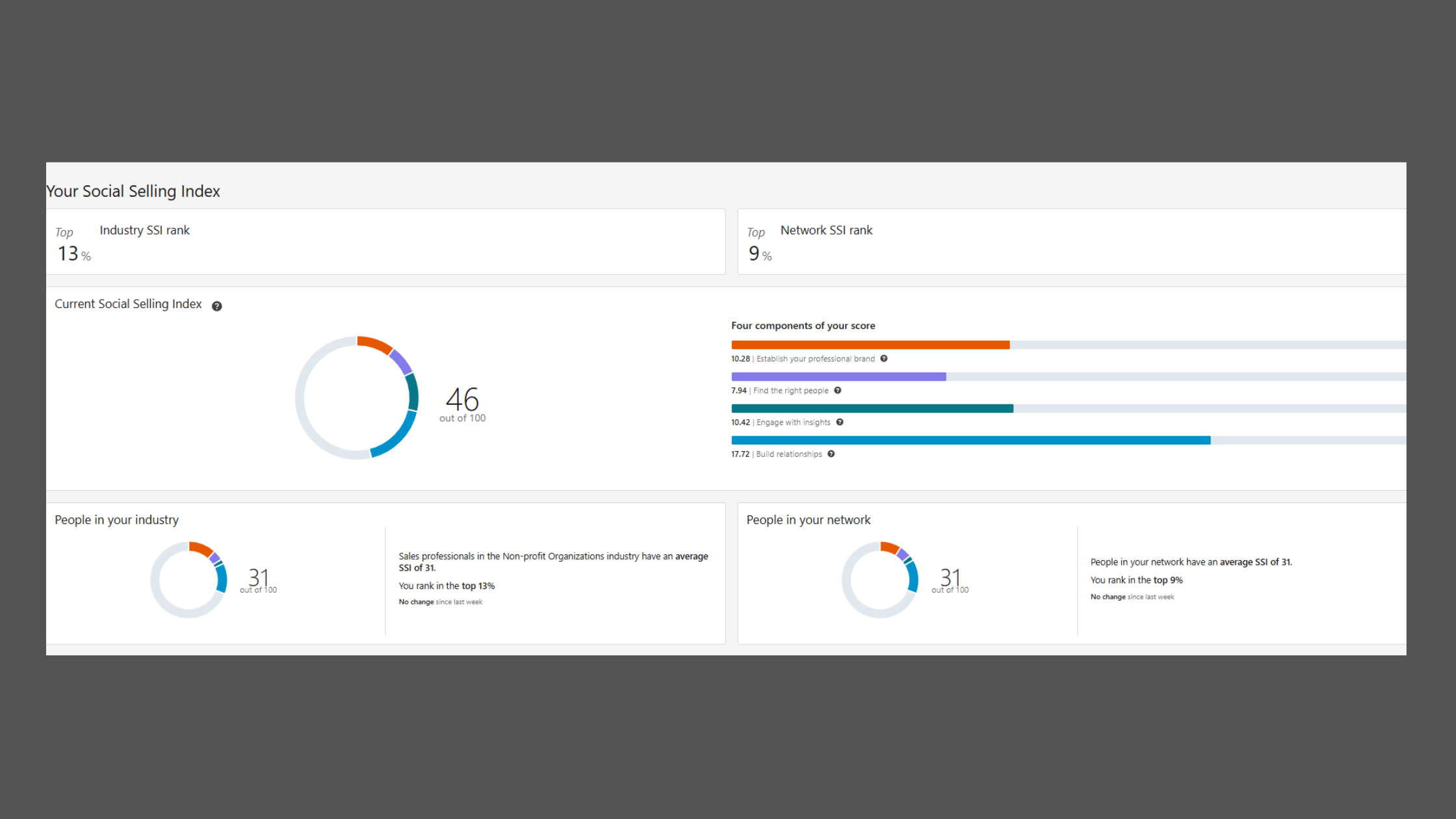
LinkedIn is the strongest social channel for B2B lead generation, but only when users move beyond passive presence. The Social Selling Index (SSI) — LinkedIn's free score measuring profile completeness, network quality, engagement, and relationship building — is a direct signal of how the algorithm rewards active users. Professionals with high SSI scores consistently see wider organic reach and higher connection request acceptance rates. Passive profiles, regardless of follower count, generate almost no inbound interest.
The platform works. The approach most people take is broken — and the gap between the two is almost always visible within the first 30 seconds of reviewing someone's profile and outreach sequence.
The distinction that matters: passive presence (having a profile, occasionally liking posts) versus active social selling (publishing content, engaging with target accounts, running warm outreach sequences). The former produces nothing. The latter, done correctly, turns LinkedIn into a consistent pipeline.
The Real Reasons LinkedIn Lead Generation Fails (And What's Going Wrong)
The most common failure mode is treating LinkedIn like a cold-email database — sending generic connection requests immediately followed by a sales pitch. This approach has a near-zero response rate and actively harms your account's reputation with LinkedIn's algorithm.
Why Your LinkedIn Profile Is Not Attracting Clients
A LinkedIn profile that isn't attracting clients is almost always missing one thing: a clear answer to "why should I trust this person?" Specifically:
- Headline written for a job search, not for a client ("Sales Manager at Acme Corp" vs. "I help SaaS companies cut churn by 30%")
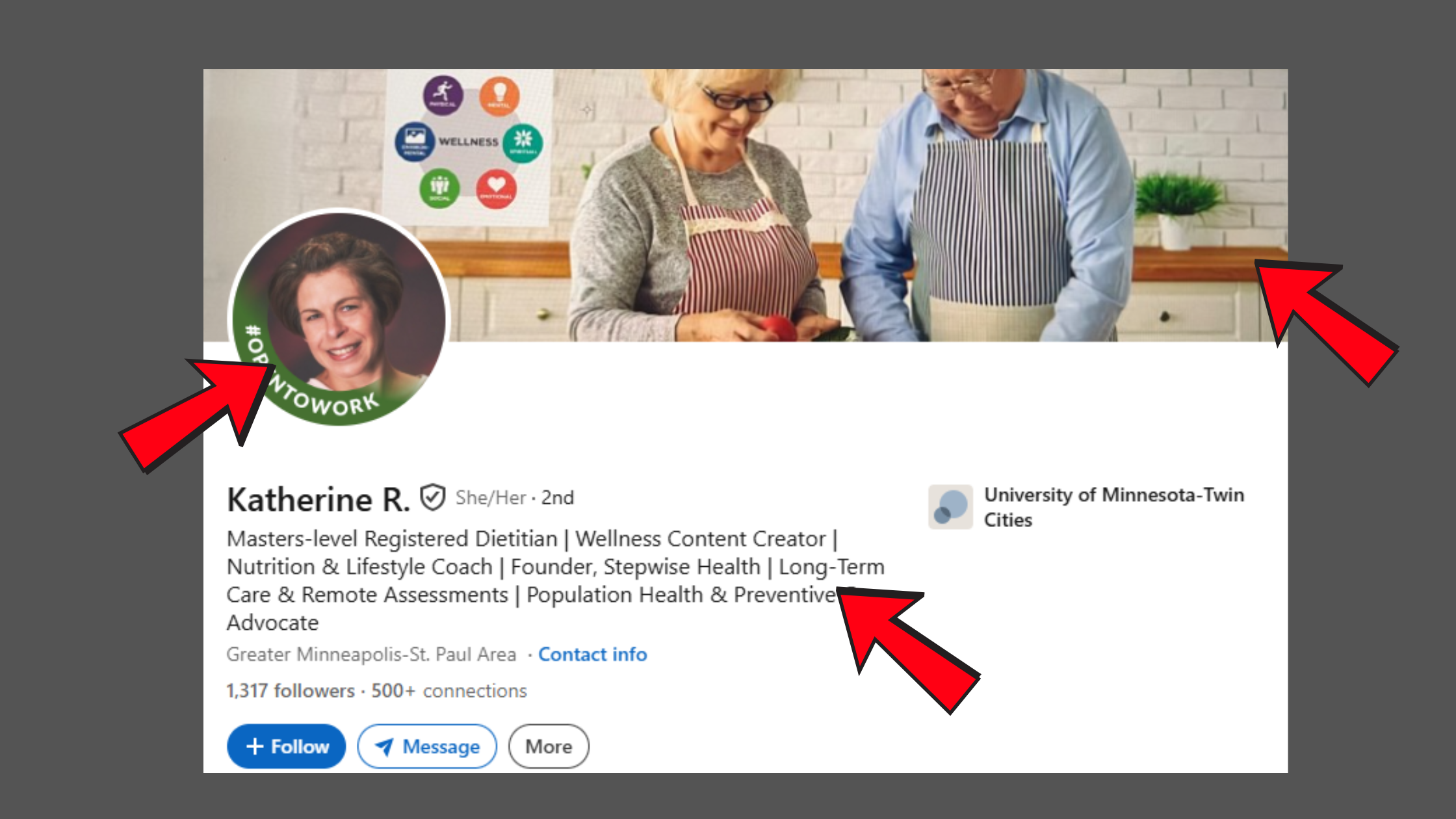
Linkedin profile optimization - About section that reads like a CV rather than a value proposition
- No featured section showcasing proof — case studies, media mentions, lead magnets
- No recent activity — a profile with no posts in 90 days signals irrelevance to both the algorithm and visitors
Creators who skip profile optimization before launching outreach typically find their connection acceptance rates drop below 15% — making every subsequent step in the funnel harder. Fix the profile first. Everything else depends on it.
Why LinkedIn Messages Get Ignored
LinkedIn outreach not getting responses is almost always a sequencing problem. The pitch arrives before trust has been established. What works: connect with a personalized note referencing shared context (a mutual connection, a post they wrote, a company milestone), then wait. Message one should deliver value — a relevant insight, a resource, a genuine observation — not an ask. The ask comes in message two or three, after reciprocity has begun.
How to Actually Find Leads on LinkedIn: A Practical Strategy That Works
The full lead generation funnel on LinkedIn runs in this order: profile optimization → content for inbound visibility → targeted prospecting → warm outreach → conversion tracking. Skipping steps doesn't save time — it kills conversion at the step you skipped.
LinkedIn Outreach Message Templates That Actually Convert
The connection request that works references something specific: "Saw your post on [topic] — really aligned with how we're thinking about [related challenge]. Would love to connect." After connecting, the first message delivers value before asking for anything:
"Noticed you're scaling your [team/function] — we put together a short breakdown of [relevant insight] that's been useful for similar teams. Happy to share if useful."
The LinkedIn connection request strategy that consistently outperforms generic approaches: personalization + shared context + zero immediate ask. Teams using this three-part structure typically see acceptance rates above 35%, compared to under 15% for generic requests.
Is LinkedIn Sales Navigator Worth It for Lead Generation?
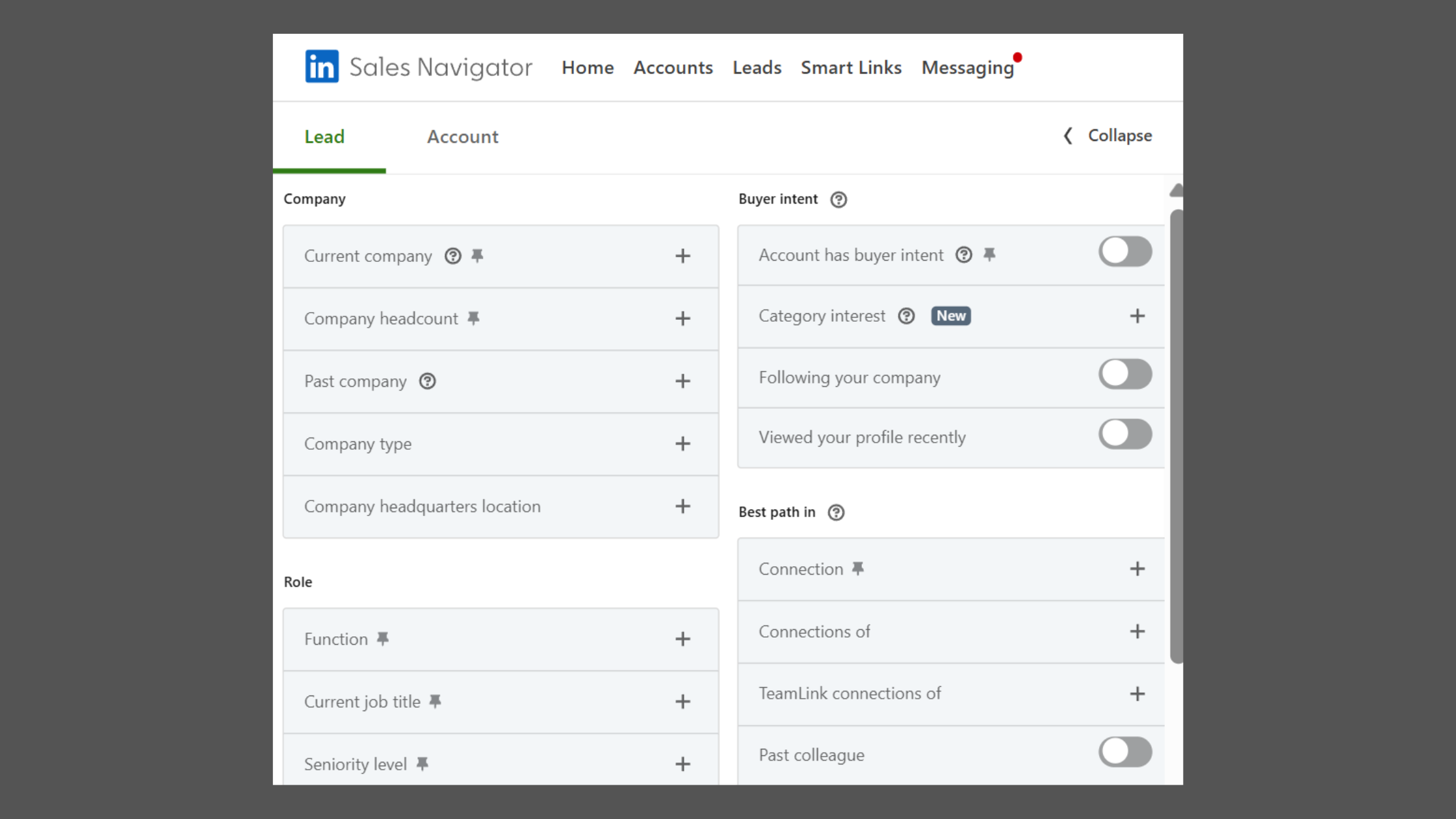
LinkedIn Sales Navigator is worth the investment for teams doing 20+ targeted outreach conversations per week. It unlocks advanced filters (buyer intent signals, recent job changes, department headcount), saves lead lists, and shows who viewed your profile. At approximately $99/month per seat, it pays for itself if even one mid-market deal closes from its targeting capabilities. For solo users doing light prospecting, the free version with Boolean search covers most use cases.
Lead Generation Tools, Content Strategy, and Boosting Visibility
Choosing the right lead generation tools depends on where your bottleneck actually is. If your posts reach 200 people, no amount of outreach optimization fixes the funnel — visibility is the problem. If your profile converts well and content is strong, then outreach sequencing tools become the highest-leverage investment.
Safe vs. Risky LinkedIn Automation: What You Need to Know
Automation tools for LinkedIn sit on a clear spectrum. On one end: engagement amplification platforms that work with real community members to boost post visibility through genuine likes, comments, and conversations. On the other: mass-DM bots and scraping tools that violate LinkedIn's Terms of Service and can result in account restrictions within days.
The best LinkedIn automation tools for lead generation focus on the visibility layer — getting your content in front of more of the right people — rather than replacing human judgment in outreach conversations. HyperClapper, for example, connects creators with real engagement channels where genuine community members interact with posts, while AI-powered replies keep conversations active. This widens the top of the lead funnel without the account risk that comes from automated DM blasting.
Content-driven trust building is the highest-leverage play for inbound lead generation. Publishing thought leadership posts 3–5 times per week, engaging with target accounts' content, and demonstrating expertise publicly means prospects come to you — and inbound leads convert at significantly higher rates than cold outreach recipients. According to Digital Applied (2026), LinkedIn's targeting precision produces a 28% lower cost-per-qualified-lead than Google paid search — making organic content investment even more attractive relative to paid alternatives.
Measuring ROI from LinkedIn lead generation means tracking the full funnel: profile views, connection acceptance rate, reply rates on outreach, meetings booked, and downstream pipeline attribution via UTM-tagged links in your content and messages. LinkedIn Analytics covers the top-of-funnel signals; your CRM covers the rest.
Want more people to actually see your LinkedIn posts?
HyperClapper boosts your post reach through real engagement channels and AI-powered replies — so your content reaches decision-makers, not just your existing connections.
See How HyperClapper WorksCommon LinkedIn Prospecting Mistakes to Stop Making in 2026
What mistakes do people make on LinkedIn prospecting? The same four patterns appear repeatedly across accounts that plateau despite consistent effort.
✓ The LinkedIn Lead Generation Mistakes Audit
- ☐Stop pitching in the connection request — it's an introduction, not a sales call
- ☐Post consistently (3–5x/week) — one post a month produces near-zero algorithmic reach
- ☐Check your SSI score (free at linkedin.com/sales/ssi) — low scores correlate directly with low reach
- ☐Define a tight ICP before prospecting — mass outreach to everyone converts for no one
- ☐Optimize your profile headline and About section for clients, not recruiters
- ☐Track reply rates and meetings booked — not just connection count
B2B prospecting on LinkedIn tips that get overlooked: targeting too broadly is the silent conversion killer. An ICP (ideal customer profile — a precise definition of your best-fit buyer by title, industry, company size, and pain point) should filter your prospect list to under 500 tightly matched accounts. A recurring pattern among professionals asking "why is LinkedIn not generating leads for me" is that their target list is actually 5,000 loosely relevant people — and they're reaching none of them effectively.
What separates top performers from everyone else asking "how do you actually get leads from LinkedIn" is not a secret tactic — it's disciplined execution of the fundamentals: a profile that converts visitors into curiosity, content that builds trust at scale, and outreach that feels human because it is.
Turn your LinkedIn content into a lead generation engine
HyperClapper gives your posts real reach through community engagement channels and AI replies — so the right decision-makers actually see your expertise.
Start Boosting Your PostsFrequently Asked Questions About LinkedIn Lead Generation
Is LinkedIn good for lead generation?
Yes — LinkedIn is the most effective social platform for B2B lead generation. According to Martal Group (2026), it drives 80% of all B2B social media leads, with a visitor-to-lead conversion rate of 2.74% — over three times higher than Facebook. Its effectiveness depends entirely on having the right profile, content, and outreach strategy in place.
What are the most common reasons people fail to generate leads on LinkedIn?
The three most common failure reasons are: pitching before trust is established, having a profile optimized for job seekers rather than clients, and posting so infrequently that the algorithm provides near-zero reach. Most people fail because they skip the trust-building phase entirely — no content, no engagement — then expect cold outreach to convert.
Why do most LinkedIn cold messages fail to convert?
Most LinkedIn cold messages fail because they arrive before any relationship exists and lead with a pitch rather than value. The sequence matters: connect with context, follow up with a relevant insight, and introduce the ask only after some reciprocity is established. Generic "I'd love to connect / here's what we do" messages are ignored because they show no awareness of the recipient's specific situation.
How can I improve my LinkedIn strategy to get more leads?
Start with your profile — it must answer "why trust this person?" within seconds. Then establish a consistent posting schedule of at least 3x per week with content that demonstrates expertise. Only then begin targeted outreach using personalized, value-first messages. Track your lead pipeline from LinkedIn using UTM links and CRM attribution.
How much does LinkedIn lead generation cost?
Organic LinkedIn lead generation costs only time — consistent posting and outreach are free. LinkedIn Sales Navigator adds approximately $99/month per seat for advanced targeting. Paid LinkedIn Lead Gen Forms (via Campaign Manager) typically run $50–$200+ per lead depending on targeting and industry. According to Digital Applied (2026), LinkedIn's cost-per-qualified-lead runs 28% lower than Google paid search for B2B audiences.
How many connection requests or messages per day is safe on LinkedIn?
Stay below 20–25 connection requests per day to avoid triggering LinkedIn's automation detection systems. For messages, keep direct outreach to 15–20 per day maximum. Exceeding these thresholds consistently — especially with identical message text — risks temporary or permanent restriction of your account's outreach capabilities. Vary timing and message content to stay within safe patterns.
Does LinkedIn work for lead generation if you don't have many followers?
Yes — follower count matters less than content quality and targeted outreach. A profile with 500 connections but highly relevant content reaching the right niche consistently outperforms a 5,000-follower account posting generically. Targeted prospecting and a strong profile convert even small audiences, especially in B2B where decision-maker outreach is one-to-one, not broadcast.



