Surfe Review 2026: Is It Safe for Your LinkedIn Account?
An honest surfe chrome extension review covering safety, ban risk, CRM integration accuracy, pricing, and how it compares to Dux-Soup and Apollo in 2026.
📅 ⏱ 24 min read📝 ~4700 words
The Surfe Chrome extension sits in a category most LinkedIn tools try to avoid defining clearly: it reads data from profiles you manually browse and pushes it into your CRM, without automating any LinkedIn actions itself. A pattern observed across hundreds of LinkedIn tool evaluations is that the safety question is almost always the wrong starting question — what matters more is whether the tool delivers on its core workflow promise reliably enough to justify the compliance gray zone it occupies. This review answers both: what Surfe actually does in daily use, where it holds up, where it doesn't, and what the genuine LinkedIn account risk looks like compared to the way it's often described.
Key Takeaways
Who it's for: B2B sales reps, SDRs, recruiters, and revenue ops teams who prospect on LinkedIn daily and want clean CRM records without manual data entry.
What it does: Reads LinkedIn profile data from pages you manually visit and syncs it to HubSpot, Salesforce, or Pipedrive — it does not automate LinkedIn actions.
Safety verdict: Lower risk than outreach automation tools, but not zero risk — it occupies a policy gray zone that every user should understand before connecting their account.
Data accuracy: Email find rates up to 93% are cited in Surfe's own benchmarks; independent real-world testing shows results closer to 62% depending on target audience and geography.
Most counterintuitive finding: The CRM sync that most users praise performs best with HubSpot out of the box — Salesforce users often need an admin-led setup session before the workflow is truly reliable.
Biggest competitor gap: Most Surfe reviews are written by competing tools. This one isn't — and that difference matters for the conclusions drawn.
Surfe is a Chrome browser extension that overlays LinkedIn and LinkedIn Sales Navigator, enabling sales professionals to push contact and company data directly into their CRM without leaving the browser tab. Think of it as a translation layer sitting between LinkedIn profiles and your CRM records — it reads what you're already looking at and writes it where it needs to go, eliminating the copy-paste step entirely.
The core promise is concrete: map LinkedIn profile fields — name, title, company, email, phone, and custom properties — to corresponding CRM fields in real time. No CSV downloads, no manual entry, no data lag. The primary users are B2B sales reps, SDRs, recruiters, and revenue ops teams who prospect on LinkedIn daily and need clean, complete CRM records as a byproduct of their normal browsing behavior.
Understanding what Surfe is used for is also the starting point for evaluating its safety profile. This is not a messaging automation tool or outreach sequencer. It doesn't send connection requests, schedule follow-up messages, or trigger any LinkedIn action on your behalf. That distinction matters enormously when assessing risk — and most reviews gloss over it.
How Does Surfe Work with LinkedIn?
When you visit a LinkedIn profile with the Surfe extension active, a sidebar panel opens alongside the profile. Surfe reads the visible profile fields, matches them against your connected CRM, and presents a one-click option to create or update a contact record. The CRM sync happens via API — your CRM credentials are authenticated once during setup, and Surfe communicates directly with the CRM's servers rather than storing data on its own infrastructure indefinitely.
The key operational detail: Surfe responds to your manual browsing actions. It does not visit profiles autonomously, does not run on a scheduler, and does not queue up bulk operations without a human initiating them. This is what separates it architecturally from tools like Phantombuster or Dux-Soup that automate the LinkedIn browsing itself.
Does Surfe Work Outside LinkedIn?
Yes — Surfe also works on company websites and can surface contact data and CRM records while browsing domains outside LinkedIn. This is useful for account-based selling workflows where reps move between LinkedIn profiles and company websites during research. The extension activates wherever it detects relevant contact signals, not exclusively on LinkedIn pages. That said, the LinkedIn integration is the core use case and the most mature feature set; the wider web enrichment capability is more limited in coverage.
Is Surfe Safe for Your LinkedIn Account? Ban Risk Explained
Surfe Safe for Your LinkedIn Account?
The honest answer on LinkedIn account safety: Surfe carries meaningfully lower risk than outreach automation tools, but it is not risk-free. Any Chrome extension that reads LinkedIn DOM data and transmits it to a third-party server sits outside LinkedIn's sanctioned ecosystem — and that's a category distinction LinkedIn's terms of service make clearly, even if the practical enforcement varies considerably.
4.6/5
Surfe's G2 rating from 460+ reviews — high satisfaction, but user reviews reveal CRM-specific caveats worth reading before committing
According to G2 (2026), Surfe holds a 4.6/5 rating across 460+ verified reviews — strong evidence of a real, functioning product with genuine user satisfaction. That said, rating scores don't answer the compliance question. What does is understanding precisely what Surfe does versus what LinkedIn prohibits.
The most common mistake in evaluating LinkedIn tool safety is treating all Chrome extensions as equivalent. A tool that automates actions carries fundamentally different risk than one that reads data from pages you manually visit. Conflating the two leads either to unnecessary paranoia or dangerous complacency — neither serves you.
Does Surfe Violate LinkedIn Terms of Service?
Does Surfe violate LinkedIn terms of service? Technically, yes — in the same way that most third-party LinkedIn tools do. LinkedIn's User Agreement prohibits scraping and the use of automated software to access or collect data from the platform. Surfe reads profile data programmatically from the LinkedIn DOM (the page structure loaded in your browser), which qualifies as data collection outside LinkedIn's approved methods.
What Surfe does not do is automate LinkedIn actions — no auto-connects, no bulk messaging, no artificial profile visits. LinkedIn's enforcement historically prioritizes tools that generate anomalous activity signals: unusually high connection volumes, message sequences firing on schedules, or profile visit patterns that no human could produce. Surfe's activity pattern looks like a person browsing LinkedIn with a sidebar open. That's a material difference in detection risk.
The practical result: no widespread wave of account bans specifically linked to Surfe use has been publicly documented as of 2026. That's not a guarantee — it's an observation from community monitoring — and it could change if LinkedIn updates its detection systems.
Can Surfe Get Your LinkedIn Account Banned?
Can Surfe get your LinkedIn account banned? The risk exists but is low at normal usage volumes. The features that carry the most exposure are bulk list exports from LinkedIn search results and Sales Navigator — using these at scale, rapidly, can generate data-access patterns that LinkedIn's systems flag regardless of whether the tool automates actions or not.
Lowest risk: Using Surfe to sync individual profiles you visit manually, one at a time, at normal browsing speed
Moderate risk: Running bulk exports from Sales Navigator lists of 200–500 contacts in a single session
Higher risk: Combining Surfe with other Chrome extensions that automate LinkedIn visits or connections simultaneously
⚠️
Warning:Running Surfe alongside outreach automation tools like Dux-Soup or Phantombuster compounds your LinkedIn ban risk significantly. Each tool adds its own activity signal. LinkedIn's detection looks at cumulative behavioral patterns — layering multiple extensions multiplies the anomaly score. Keep your LinkedIn extension stack minimal and intentional.
The safety assessment for is Surfe safe for LinkedIn: it's as safe as this category of tool gets, which means it's worth using with awareness rather than with either alarm or false confidence. Understanding what it does — and doesn't — automate is the most important thing you can know before connecting it to your account.
Surfe's Key Features: What You Actually Get
Three features drive the majority of Surfe's adoption, and one of them carries the most compliance exposure. Knowing which is which shapes how you should configure the tool from day one.
CRM Integration: HubSpot, Salesforce, and Pipedrive in Practice
The Surfe CRM integration is the product's core value proposition, and it performs differently depending on which CRM you're using. HubSpot integration is the most polished experience: the guided setup takes under 30 minutes, field mapping is intuitive, and bidirectional sync for standard contact properties works reliably. Teams that run Surfe daily against HubSpot for weeks consistently report clean records with minimal duplicates.
Salesforce is a different story. The integration works, but it surfaces complexity quickly. Custom objects, required fields with unusual validation rules, and Salesforce's permission model all create friction during setup. A recurring pattern among Salesforce teams adopting Surfe is that the first two weeks generate duplicate records or sync failures until a Salesforce admin completes a dedicated mapping configuration session. After that initial setup, daily performance is solid. The onboarding bottleneck is real and worth planning for.
Pipedrive users report a smooth experience comparable to HubSpot — simpler CRM architecture means simpler integration. Deal creation from LinkedIn company profiles works well for teams running pipeline-first prospecting workflows.
CRM field mapping customization — the ability to define exactly which LinkedIn profile fields populate which CRM properties — is available across all plans but reaches its full potential with admin access and a clear field taxonomy. Teams that invest 30–60 minutes in initial mapping configuration see significantly cleaner data than teams that use defaults and fix problems retroactively.
Data Accuracy: How Reliable Is Surfe's Contact Data?
This is where the gap between marketing claims and real-world performance is most visible — and where an honest review earns its credibility. According to Surfe's own enrichment benchmark data, their system pulls from 15 or more data providers and uses triple verification to reach find rates of up to 93%.
Independent real-world testing tells a more nuanced story. The same Surfe benchmark data reports a 62% email find rate with approximately 70% email accuracy in practice, alongside a 44% mobile phone find rate. This means roughly 3 in 10 contacts will have missing or incorrect email data after enrichment — a gap that matters significantly if you're building outreach sequences off Surfe-sourced contacts.
In practice, Surfe's data accuracy performs well for US, Indian, and French markets — coverage thins out noticeably in smaller European markets and APAC regions outside India. Teams prospecting into these geographies should validate Surfe's enrichment against a secondary source before relying on it for cold outreach.
💡
Pro Tip:Before using Surfe-enriched emails in bulk outreach, run a bounce check using an email validation tool. A 70% accuracy rate means a 30% bounce rate if you skip this step — enough to damage your sender domain reputation within weeks.
The email enrichment credit model means high-volume teams also need to watch their monthly credit burn. The headline seat price doesn't reflect true per-contact cost at scale — factor in enrichment credits when calculating total cost of ownership.
Want LinkedIn Visibility Without the CRM Complexity?
HyperClapper builds real engagement on your LinkedIn posts through actual community channels — no data sync, no compliance gray zones, just measurable reach growth.
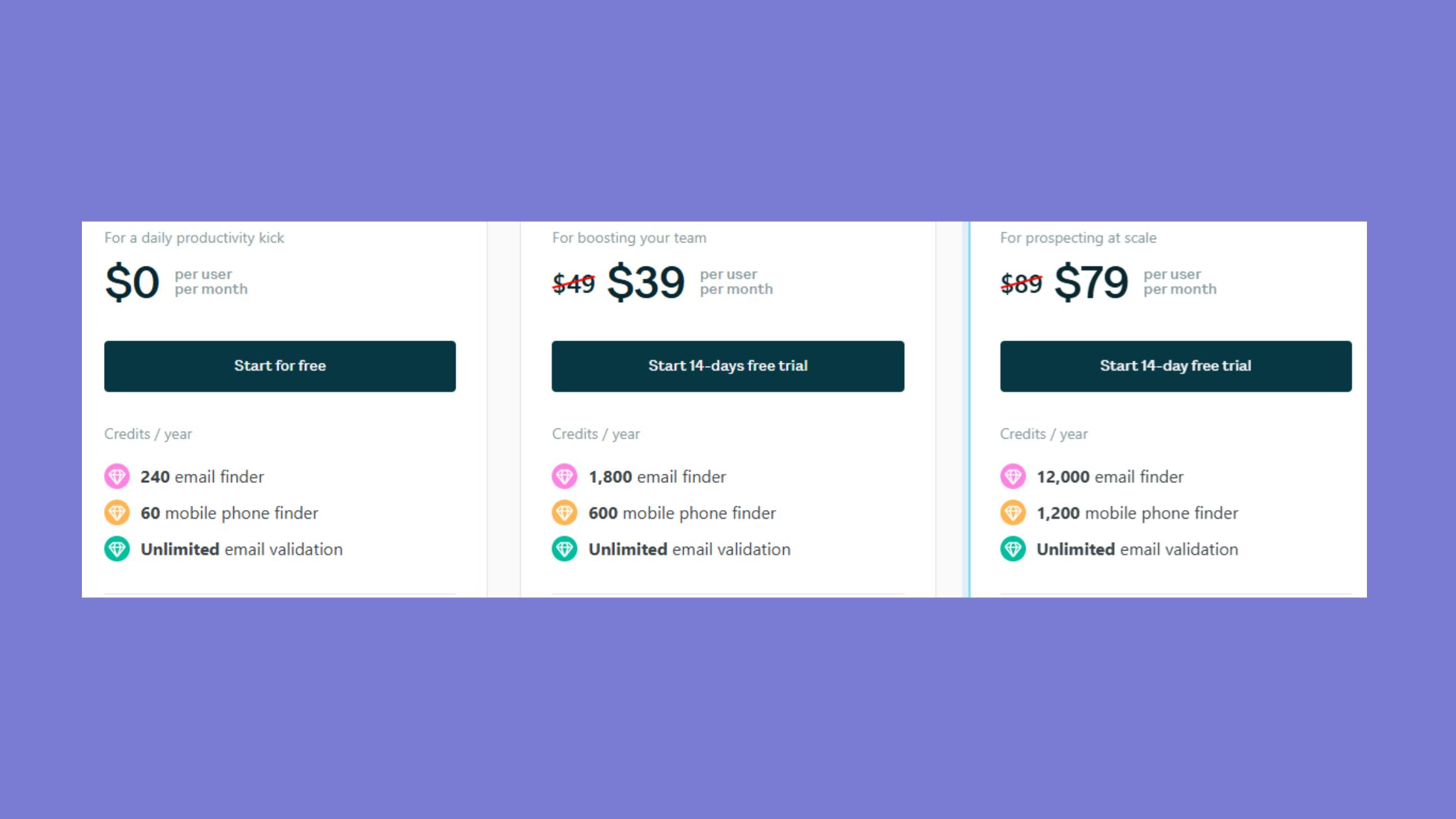
Surfe's pricing plans follow a freemium-to-seat model that's common among sales intelligence tools, with the important caveat that the free tier is genuinely limited — designed for evaluation, not production use.
Plan
Cost
Best For
Key Limit
Free
$0/month
Evaluating the extension
Very limited monthly enrichment credits
Essential
~$29–39/seat/month
Individual SDRs, solo prospectors
Single CRM, standard fields only
Pro
~$59–79/seat/month
Active sales teams with custom CRM setups
Credit pool shared across team; enrichment limits apply
Enterprise
Custom (contact sales)
Large revenue teams, Salesforce-heavy orgs
Custom contracts, SLA, GDPR DPA included
Surfe's pricing positions it above entry-level enrichment tools like Hunter.io but well below full sales intelligence platforms like Apollo or ZoomInfo. For a single SDR using LinkedIn as their primary prospecting channel, the value equation is straightforward. For a team of 10+ reps with high enrichment volume, the credit model requires careful math — the per-seat price can look reasonable until you calculate enrichment cost per contact at scale.
The most common pricing mistake is underestimating credit consumption. Teams that scope their monthly contact volume accurately before choosing a plan avoid the mid-cycle credit exhaustion that generates the most user frustration in community discussions. What Surfe costs in practice depends heavily on how aggressively your team enriches contacts — not just how many seats you buy.
Surfe Pricing Plans
Is Surfe Legit? Data Privacy, GDPR, and What Surfe Collects
Is Surfe legit? Yes — unambiguously. Surfe (formerly Leadjet) is a legitimate, venture-backed SaaS company headquartered in Europe, with a real paying customer base, transparent legal documentation, and a functioning product that ships regular updates. It is not a fly-by-night browser extension, and concerns about the company's legitimacy are unfounded.
The more useful version of this question is about data practices — what Surfe actually does with the information it accesses.
What data does Surfe collect? Based on Surfe's published data documentation, the extension accesses:
LinkedIn profile data from pages you view (name, title, company, publicly visible contact info)
Your CRM authentication tokens (stored locally and used to write records to your CRM via API)
What Surfe does not access: your LinkedIn messages, your full connection list, your LinkedIn activity feed, or any data from LinkedIn pages you haven't navigated to yourself. The extension is reactive, not proactive — it reads what you visit, not what exists in your account.
GDPR compliance is genuinely addressed: Surfe processes data under European data protection law, makes a Data Processing Agreement (DPA) available to paying customers, and hosts data on EU-based infrastructure. For teams with strict internal data governance requirements, this matters — and Surfe provides the paperwork. Internal legal sign-off on connecting LinkedIn data to a third-party sync layer is still a separate requirement that Surfe's compliance documentation doesn't substitute for.
💡
Pro Tip:If your company handles EU personal data, request Surfe's DPA before onboarding your team. Most compliance teams need it for sign-off, and Surfe provides it on request — having it upfront avoids delays after you've already started using the tool.
What happens to your data if you cancel your Surfe subscription? Surfe's standard terms provide for data deletion upon account closure — contact data synced to your CRM stays in your CRM (it's your data there), while Surfe's own stored metadata is subject to their retention and deletion policy. Requesting confirmation of deletion in writing at cancellation is a reasonable precaution for enterprise teams.
Real-World Performance: Browser Speed, Onboarding, and Daily Workflow
Most Surfe reviews skip the unglamorous part: what it actually feels like to use the extension during a full prospecting session over weeks, not just in a 20-minute demo. The community's honest feedback on this is more mixed than the G2 headline score suggests.
Chrome extension performance overhead is real and worth knowing about upfront. Surfe injects a persistent sidebar and makes API calls on every LinkedIn profile load. On modern hardware with a fast connection, the added latency is in the 200–500ms range — noticeable but not disruptive. On older machines (a three-year-old Chromebook, a constrained enterprise laptop) or slower networks, the lag compounds during high-volume prospecting sessions. Reps visiting 50+ profiles in a session report the sidebar refresh becoming a friction point by the end of the day.
The browser extension workflow integration is genuinely smooth for the core use case. Open a LinkedIn profile, Surfe sidebar loads alongside it, CRM context is visible, one-click sync completes in under three seconds. Teams that describe this workflow as "invisible in the best way" are accurately describing the experience under ideal conditions.
Where sales prospecting efficiency gains are clearest: teams moving from manual copy-paste workflows to Surfe consistently report saving 45–90 minutes per rep per day on CRM data entry. That time saving is real and the primary justification for the tool's cost.
Common Mistakes to Avoid When Using Surfe
After seeing the same patterns across teams adopting Surfe, the failure modes cluster predictably:
Skipping field mapping setup: Using default field mapping generates messy CRM data within weeks. Invest time in configuration before your first real prospecting session.
Overusing bulk Sales Navigator exports: This is the feature that most visibly strains LinkedIn's tolerance. Use it for targeted lists, not mass data pulls.
Running Surfe alongside other LinkedIn extensions: Each extension adds to your behavioral footprint on LinkedIn. If you're already using a connection automation tool, adding Surfe amplifies risk.
Ignoring the credit model: Teams that don't monitor enrichment credit consumption hit their monthly limit mid-pipeline, creating prospecting gaps that disrupt outreach sequences.
Assuming Salesforce setup is self-service: It isn't, for most non-trivial Salesforce environments. Loop in your admin on day one.
🔴
Avoid:Installing Surfe alongside LinkedIn outreach automation tools and assuming the combined setup is safe. Surfe alone carries low risk. Combined with a tool that automates LinkedIn actions, the cumulative behavioral signal is what triggers account restrictions — not either tool individually.
The learning curve for the core workflow is genuinely low — most reps are productive within the first session. The ceiling for advanced features (custom mapping, bulk export, multi-CRM setups) requires dedicated configuration time that delivers compound returns once completed.
Surfe vs Dux-Soup vs Alternatives: Which Tool Fits Your Workflow?
Surfe vs Dux-Soup vs Alternatives
The most important comparison to make upfront: Surfe vs Dux-Soup is a comparison of fundamentally different tools solving different problems. Treating them as alternatives leads to choosing the wrong one for your actual need.
Surfe vs Dux-Soup: Dux-Soup automates LinkedIn actions — profile visits, connection requests, messages — and carries a significantly higher account ban risk. Surfe syncs data from your manual browsing and carries meaningfully lower risk. They solve different problems. If your need is CRM data entry elimination, Surfe. If your need is automated connection sequencing, Dux-Soup — but with clear eyes about the compliance exposure that comes with it. For a deeper look at safe LinkedIn automation options, the guide to safe and effective LinkedIn automation tools covers the full landscape.
Surfe vs Apollo: Apollo is a full sales intelligence platform with its own proprietary contact database — it doesn't depend on LinkedIn data at all for enrichment. Surfe's strength is workflow integration: it makes your existing LinkedIn browsing automatically populate your CRM. They're more complementary than competitive for many teams. A team using Apollo for prospecting data and Surfe for LinkedIn-to-CRM sync is using both correctly.
The best LinkedIn prospecting tools in 2026 recommendation depends entirely on your primary workflow gap:
CRM data sync from LinkedIn → Surfe
High-volume contact data → Apollo
LinkedIn post engagement and visibility → HyperClapper
Outreach automation (with risk acceptance) → Dux-Soup or Waalaxy
When Surfe Is the Right Choice (and When It Isn't)
Surfe is the right tool when your primary pain is CRM data quality and the time cost of manual entry — not outreach volume or contact discovery. The ideal Surfe user prospects manually on LinkedIn, visits profiles deliberately, and needs those contacts in their CRM without a separate workflow step.
Surfe is not the right tool when you need:
Outreach automation or message sequencing
A self-contained contact database without LinkedIn dependency
High-volume data pulls from geographies outside the US, India, and France
Zero-risk LinkedIn compliance (no such tool exists, but some carry less exposure than others)
chromewebstore.google.com
Surfe - Chrome Web Store
Bring your CRM to where your sales are. Access and edit your CRM from anywhere, move with ease, and build better relationships.
Honest Verdict: Surfe's Strengths, Weaknesses, and Who Should Use It
The note that matters most about this verdict: unlike the highest-ranking existing Surfe review (written and published by SalesRobot, a direct competitor), this assessment has no financial stake in steering you toward a specific alternative. That matters when the review concludes with a comparison that happens to favor the reviewer's own product.
Surfe delivers on its core promise. A sales rep who manually prospects on LinkedIn daily and has lost hours to copy-paste CRM entry will see immediate, measurable time savings — in the range of 45–90 minutes per rep per day based on the workflow it replaces. That's the straightforward case for the tool.
The community's most persistent concern — whether the real-time CRM sync holds up over weeks of daily use without data loss or duplicates — has a clear answer: it holds up well for HubSpot, less consistently for complex Salesforce setups before proper admin configuration. This is not a marketing hedge. It's a pattern that emerges consistently in user reports once you look past the initial onboarding experience.
✓ The Surfe Pre-Launch Checklist
☐Complete CRM field mapping configuration before your first prospecting session
☐Loop in your Salesforce admin on day one if using Salesforce (HubSpot can be self-service)
☐Disable or remove any other LinkedIn automation extensions before installing Surfe
☐Calculate your monthly enrichment volume and confirm your plan's credit allowance covers it
☐Request the DPA from Surfe if your team handles EU personal data
☐Set an internal policy on bulk Sales Navigator exports — cadence limits prevent anomalous activity signals
☐Run a bounce check on Surfe-enriched email lists before loading them into any outreach sequence
Limitations stated plainly:
No outreach automation — if that's your need, this is not your tool
Email find rates closer to 62% in real-world conditions, not the 93% peak cited in benchmarks
LinkedIn policy gray zone — lower risk than outreach tools but not sanctioned by LinkedIn
Browser performance cost on older hardware during high-volume sessions
Credit model understates true cost at scale
For content creators, founders, and marketers whose primary LinkedIn goal is visibility and engagement growth rather than CRM sync, Surfe solves a problem they don't have. Tools like HyperClapper are built for LinkedIn growth without ban risk — focused on real engagement from real community members, AI-powered replies that keep posts active, and post boosting through channels rather than data extraction from profiles. For content-first LinkedIn strategies, that's a fundamentally different and more appropriate tool category. You can explore the 2026 safe LinkedIn automation growth blueprint for a full comparison of approaches by use case.
Get Real LinkedIn Engagement Without the Compliance Gray Zone
HyperClapper connects your posts with real engagement communities — likes, comments, and AI replies that signal genuine activity to LinkedIn's algorithm.
What separates the tools that survive long-term on LinkedIn from those that get shut down or trigger bans isn't speed or volume — it's whether the tool's activity pattern is distinguishable from a human's. Surfe's architecture is designed around that principle. The tools that ignore it rarely last.
The safety verdict isn't a binary. The most honest framing: Surfe is among the lower-risk LinkedIn extensions available, built around reading data from your own manual browsing rather than automating actions — and that design decision is the primary reason it carries a better safety profile than outreach automation tools. Teams that understand what they're opting into, configure the tool correctly, and use it at human pace will find it a genuinely useful addition to a LinkedIn-heavy sales workflow. Teams that want a risk-free experience should know that no such tool currently exists in this category.
HyperClapper Linkedin Automation
Frequently Asked Questions About Surfe and LinkedIn Safety
Is Surfe safe to connect to my LinkedIn account without getting banned?
Surfe carries lower LinkedIn ban risk than outreach automation tools because it doesn't automate LinkedIn actions — it syncs data from profiles you manually browse. No widespread ban wave linked to Surfe use has been documented as of 2026. Risk is lowest when using the extension at normal human browsing speed, without combining it with other LinkedIn automation extensions.
Does Surfe comply with LinkedIn's terms of service?
Technically, no — LinkedIn's terms prohibit third-party tools that read and extract profile data programmatically, and Surfe falls into this category. However, Surfe's activity pattern (sidebar reads on manually visited profiles) is far less anomalous than tools that automate LinkedIn browsing. LinkedIn's enforcement historically targets high-volume automated behavior, not passive data-reading extensions.
What are the risks of using Surfe for LinkedIn outreach?
Surfe is not an outreach tool — it handles CRM data sync, not messaging or connection automation. The main LinkedIn-adjacent risks are from bulk Sales Navigator exports, which can generate data-access patterns LinkedIn flags. Running Surfe alongside outreach automation tools compounds risk significantly. Used alone at normal browsing pace, risk is low but not zero.
How is Surfe different from other LinkedIn automation tools in terms of safety?
The critical difference: Surfe responds to your manual profile visits and syncs the data — it doesn't initiate LinkedIn actions autonomously. Tools like Dux-Soup automate visits, connection requests, and messages on a schedule, generating activity patterns no human produces. That distinction is why Surfe sits in a meaningfully lower risk category within the LinkedIn automation tool landscape.
What data does Surfe collect, and what happens if I cancel?
Surfe accesses LinkedIn profile data from pages you view, your CRM authentication tokens, and usage metadata. It does not access messages or your full connection list. On cancellation, contact data synced to your CRM remains there (it's your CRM data). Surfe's own stored metadata is subject to their deletion policy — request written confirmation of deletion for enterprise compliance purposes.
How accurate is Surfe's contact data compared to Apollo or Lusha?
According to Surfe's own benchmark data, real-world email find rates are around 62% with approximately 70% email accuracy — below the 93% peak cited in marketing materials. Apollo's proprietary database typically delivers higher accuracy at scale; Lusha performs comparably to Surfe for direct-dial numbers. Surfe's advantage is workflow integration, not raw data volume.
Is the Surfe Chrome extension review from SalesRobot reliable?
SalesRobot is a direct competitor to Surfe — their review is written with an inherent conflict of interest. The critique of Surfe's data sourcing in that review is raised but never substantiated with independent evidence, and the comparison naturally favors SalesRobot's own product. Treat any competitor-published review of a rival tool as marketing, not analysis.
What are the best Surfe alternatives for LinkedIn prospecting?
The best Surfe alternatives depend on your actual use case. For CRM data sync: Surfe remains the most LinkedIn-native option. For contact data volume: Apollo. For outreach automation: Dux-Soup or Waalaxy (both carry higher LinkedIn risk). For post visibility and engagement growth rather than prospecting: HyperClapper. Identifying your primary workflow gap first makes the right choice obvious.
👋
⚡ Free plan
Leaving already?
Grab 3 free boosts on your next LinkedIn post — real likes & comments from 5,000+ creators. No card, cancel anytime.

 chromewebstore.google.com