.png)
LinkedIn has become the go-to platform for sharing job opportunities, making it essential for companies aiming to attract both active and passive candidates. A well-crafted LinkedIn job posting not only reaches a broad professional audience but also engages potential hires who might not be actively searching but are open to the right opportunity.
If you want to know how to share a job posting on LinkedIn effectively, this article offers practical insights supported by real-world job posting examples on LinkedIn. Whether you're looking for a straightforward job posting sample or creative ways to present your opening, you’ll find strategies that work.
What you will learn:
- Best practices for creating clear and attractive LinkedIn job posts
- Different styles of posts with engaging language and visuals
- How to leverage AI tools like ChatGPT to draft compelling updates quickly
- Sample templates and LinkedIn job posting examples that get noticed
The tips shared here aim to help you craft posts that stand out in crowded feeds, attract quality candidates, and maximize your hiring success. Additionally, understanding how to write great LinkedIn recommendations can further enhance your profile's appeal, making it more attractive to potential candidates.
Why LinkedIn is Essential for Job Postings
LinkedIn stands out as the premier platform for job postings due to its unparalleled reach and professional network advantages. When you post a job on LinkedIn, your opportunity gains exposure beyond traditional job boards. You tap into a vast, engaged audience of professionals actively seeking new roles or open to opportunities—this includes both active and passive candidates.
Key reasons LinkedIn is essential for your job advertisement include:
- Extensive Professional Network: LinkedIn connects you directly with millions of professionals worldwide. Unlike general social media platforms, it’s designed specifically for career development and recruitment. Your job announcements on LinkedIn reach individuals already invested in their professional growth.
- Targeted Industry-Specific Talent Pools: The platform allows precise targeting based on industry, job function, experience level, location, and more. This makes it easier to connect with qualified candidates who fit your niche requirements. For example, a new job LinkedIn post example targeting software engineers in healthcare technology will efficiently reach that specialized talent pool.
- Real-Time Engagement and Sharing: Job posts on LinkedIn benefit from real-time visibility on feeds and enable direct interactions such as likes, comments, and shares. This organic engagement boosts post visibility beyond initial reach. Employees can amplify the message by sharing company linkedin job announcement examples, turning their networks into recruitment channels.
- Enhanced Discoverability Through Hashtags and Keywords: Including relevant hashtags like #Hiring or #JobOpening alongside industry-specific tags ensures your post surfaces in targeted searches. This strategy increases chances that your new job announcement LinkedIn examples gain traction with the right audience.
- Integration With Company Profiles and Employer Branding: Your job postings live alongside company updates and culture showcases, reinforcing the employer brand. A well-crafted linkedin job post example paired with engaging visuals and clear value propositions attracts candidates who align with your mission.
Examples of Successful Job Postings
Here are examples of companies effectively using these advantages:
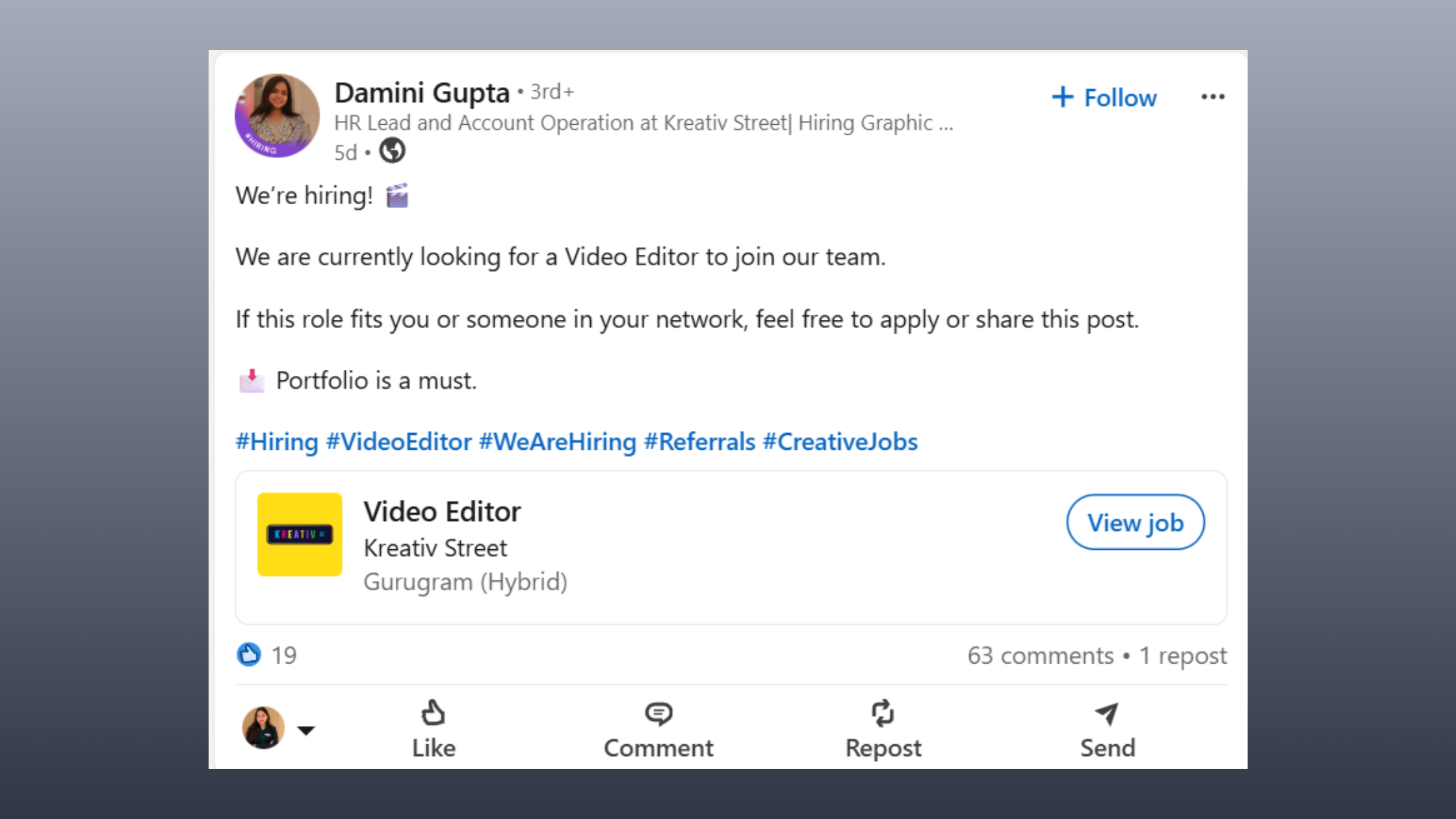
“We’re hiring! Join us as a Marketing Manager.” – a straightforward approach targeting marketing professionals within the company’s network.
“At XYZ Corp, we believe innovation drives success. Ready to be part of our team as a Software Engineer?” – storytelling combined with a call-to-action reaching tech talent passionate about innovation.
These methods highlight how leveraging LinkedIn’s unique ecosystem transforms simple job advertisements into dynamic recruitment campaigns. The ability to target, engage, and build relationships through your posts makes LinkedIn irreplaceable in modern hiring strategies.
Maximizing Your Job Posting's Effectiveness
Understanding what makes an effective post is crucial to maximizing these benefits. Here are key elements of an effective LinkedIn job posting:
- Crafting Attention-Grabbing Headlines: Your headline should be clear and concise while also grabbing attention. It sets the tone for the rest of the post.
- Utilizing Engaging Content Formats: Incorporating different formats such as videos or infographics can make your post more engaging. For instance, using LinkedIn hook examples can significantly increase user interaction.
- Adding Experience to Your Profile: To attract top talent, consider adding experience to your LinkedIn profile.
Key Elements of an Effective LinkedIn Job Posting
Crafting a compelling LinkedIn job posting requires attention to several core components that make your announcement clear, attractive, and actionable. Many recruiters seek job description examples LinkedIn or linkedin job posting template to guide their writing. Understanding these key elements helps you create posts that stand out and draw the right candidates.
1. Clear Job Title and Role Description
The job title should be precise and industry-standard so that candidates immediately understand the position. Avoid jargon or overly creative titles that confuse search algorithms or readers. The role description must be concise yet informative, detailing the main responsibilities without overwhelming the reader. This practice improves discoverability when people search for specific roles on LinkedIn and ensures clarity from the start.
Example of a job posting section:
- Job Title: Senior Product Designer
- Role Summary: Lead design projects from concept through launch, collaborating with cross-functional teams to create intuitive user experiences.
2. Value Proposition
Showcase what makes your company unique to attract candidates who align with your culture and values. Highlight benefits such as:
- Company culture emphasizing innovation or teamwork
- Growth opportunities like mentorship programs or career advancement
- Perks including flexible work hours, health benefits, or remote options
This section transforms a basic sample job posting into an engaging opportunity that resonates beyond just tasks and requirements.
“At XYZ Tech, we foster creativity and support continuous learning to help you grow your career while making an impact.”
3. Call to Action (CTA)
Guide candidates clearly on how to proceed after reading your post. Use direct instructions such as:
- “Apply now through our careers page”
- “Send your resume to [email address]”
- “Contact our recruiter for more info”
A strong CTA removes ambiguity, increases application rates, and simplifies candidate engagement.
4. Visual Elements
Posts with images or videos generate higher engagement on LinkedIn feeds. Incorporate:
- Branded graphics featuring your company logo or colors
- Short videos showcasing the workplace or team testimonials
- Infographics summarizing role highlights
Visuals attract attention amidst text-heavy feeds and reinforce brand identity, making your job posting example more memorable.
5. Use of Hashtags
Hashtags improve post visibility by categorizing content for users searching specific topics. Include relevant tags such as:
- #Hiring
- #JobOpening
- Industry-specific tags like #MarketingJobs or #TechCareers
Research trending hashtags related to your sector to increase reach without overloading the post.
6. Engaging Language
Write in an inviting tone that encourages interaction rather than just broadcasting information. Use catchy phrases or questions that spark curiosity:
- “Ready to take the next step in your marketing career?”
- “Join our team of passionate developers transforming fintech.”
Avoid overly formal language; instead, aim for approachable yet professional wording that matches your employer brand voice.
Implementing these elements transforms typical job posting linkedin content into compelling announcements that resonate with target talent pools efficiently. For further insights on how to optimize your postings for better results, consider exploring this guide on free LinkedIn job posting. Additionally, understanding the best times to post on LinkedIn can further enhance the visibility of your job postings.
Different Styles of LinkedIn Job Postings with Examples
When crafting your LinkedIn new job post, choosing the right style can significantly impact how your message resonates with potential candidates. Here are three popular approaches, each with distinct advantages and practical examples to inspire your next update.
1. Straightforward Announcements
This style gets straight to the point—ideal for quick, clear communication that immediately tells your audience you’re hiring. It’s efficient and effective, especially when you want to reach a broad audience without distractions.
Characteristics:
- Clear and concise language
- Direct call to action
- Often includes the job title and a simple invitation
Example:
We’re hiring! Join us as a Marketing Manager at [Company Name].
Ready to create impactful campaigns and grow your career? Apply today!
#Hiring #MarketingJobs #JoinOurTeam
This kind of LinkedIn hiring post works well when you want to maximize clarity and reduce any ambiguity about the opportunity. It’s one of the most common job post examples companies use because it respects the busy attention span of LinkedIn users.
2. Storytelling Approach
Storytelling taps into emotions and company culture, helping candidates connect on a deeper level. Instead of just listing a position, this style highlights your mission, values, or team atmosphere.
Characteristics:
- Emphasizes company culture or mission
- Invites candidates to be part of a bigger story
- Uses engaging narrative tone
Example:
At [Company Name], we believe innovation drives success.
We’re looking for a Software Engineer who thrives in collaborative environments and is passionate about building products that make a difference.
Join us to build the future together.
#WeAreHiring #TechJobs #CompanyCulture
This approach serves well for attracting candidates who align with your values and are motivated by more than just the role itself. Among great job posting examples, storytelling posts foster stronger emotional engagement.
3. Question-Based Hooks
Opening with a question sparks curiosity and encourages readers to pause and reflect on their own career goals. This style invites interaction and can increase engagement rates on LinkedIn.
Characteristics:
- Starts with an inviting question
- Creates a conversational tone
- Encourages readers to envision themselves in the role
Example:
Ready for your next challenge? We’re seeking a Project Manager who can lead dynamic teams to success at [Company Name].
Think you have what it takes? Let’s talk!
#JobOpening #ProjectManager #CareerOpportunity
Question-based hooks work as excellent we’re hiring LinkedIn post examples because they break away from traditional announcements, making your post stand out in crowded feeds.
These different styles show how versatile you can be when sharing new job updates on LinkedIn. Selecting one depends on your company’s brand voice, target candidate profile, and recruitment goals. Experimenting across these formats will help you discover what resonates best with your audience while keeping your posts fresh and engaging.
Use these templates as starting points or inspiration for creating job postings examples that capture attention effectively across LinkedIn’s professional community. Additionally, consider incorporating some [question-based hooks](https://www.neals
How to Write a LinkedIn Job Description That Resonates
.png?token=eyJraWQiOiJzdG9yYWdlLXVybC1zaWduaW5nLWtleV8yNzIwYzE2OC0wMDRlLTQzZDItYjk3Yi03ZWQzMDE4NzU5NzciLCJhbGciOiJIUzI1NiJ9.eyJ1cmwiOiJ1c2VyLWdlbmVyYXRlZC1pbWFnZXMvODkwN2I3ZTItNzdhMy00OTAwLTkxODgtMzE1ZTkzOGRlZGM2L0Jyb3duICYgV2hpdGUgQ3JlYXRpdmUgRG9uYXRlIEJsb2cgQmFubmVyICgzKS5wbmciLCJpYXQiOjE3NzYzMzc0MzYsImV4cCI6MjA5MTY5NzQzNn0.dexzZTap4wztno2371rlA7zG0sanKuNG52CFt6y3v9c)
Crafting a job description on LinkedIn requires a balance between clarity, engagement, and strategic keyword use. When you focus on how to write a LinkedIn job description effectively, your goal is to attract the right candidates by making the role’s expectations and benefits unmistakable.
AI technologies, including large language models like ChatGPT and Claude, are revolutionizing professional workflows and job posting strategies on LinkedIn by automating content creation, enhancing personalization, and streamlining communication processes. Emerging trends in AI-driven content creation for recruitment include the use of predictive analytics to tailor job descriptions that resonate with specific candidate profiles and the integration of chatbots for real-time engagement during the application process.
Structure with Clear Responsibilities and Qualifications
Break down the job description into digestible sections:
- Key Responsibilities: List specific duties the candidate will perform. Use bullet points for easy reading.
- Qualifications: Highlight essential skills, experience levels, certifications, or education.
- Preferred Attributes: Include soft skills or additional qualifications that would give candidates an edge.
Example of formatting in a sample LinkedIn job description:
Responsibilities:
- Manage digital marketing campaigns across platforms
- Analyze campaign performance and optimize strategies
- Collaborate with cross-functional teams to align marketing goals
Qualifications:
- 3+ years experience in digital marketing
- Expertise in SEO and Google Analytics
- Strong communication and project management skills
Incorporate Role-Relevant Keywords for SEO
LinkedIn’s search algorithm favors posts containing keywords commonly searched by candidates. To improve discoverability:
- Use phrases that candidates might type when looking for jobs, such as "project manager," "entry-level software engineer," or "remote marketing specialist."
- Include industry-specific terms and jargon without cluttering the description.
- Repeat important keywords naturally within the responsibilities and qualifications sections.
For instance, if you want visibility for a “data analyst” role, include variations like “data analysis,” “data visualization,” or tools like “Tableau” or “SQL.” This helps your post appear in more searches relevant to those skills.
Emphasize What Makes This Opportunity Unique
Candidates see many similar job posts daily. What sets yours apart?
- Highlight company culture—mention values or work environment.
- Showcase growth opportunities such as career advancement or training programs.
- Mention benefits that matter most to your target audience (flexible hours, remote work options, healthcare).
Example of a LinkedIn new job announcement example emphasizing uniqueness:
At [Company Name], innovation drives everything we do. Join us as a Software Engineer and enjoy continuous learning opportunities, flexible schedules, and a collaborative team environment where your ideas matter.
Examples of Job Descriptions on LinkedIn That Work
Sample linkedin job descriptions often follow this formula:
- Engaging opening sentence that captures attention.
- Clear list of responsibilities.
- Detailed qualifications section.
- A closing call-to-action encouraging applications.
Here’s a simple job post example for an entry-level position:
Looking for an enthusiastic Marketing Assistant to support our campaigns. If you’re passionate about social media and eager to grow in a dynamic team, apply now!
A well-written example of linkedin job description blends precision with personality — it invites curiosity while providing enough detail to filter serious applicants.
Mastering how to write a LinkedIn job description involves these components working together seamlessly—structure + keywords + unique value—to ensure your linkedin new job announcement grabs attention from quality candidates.
For further insights into crafting effective LinkedIn summaries that can complement your job descriptions, consider exploring some [LinkedIn summary examples](https://www.hyperclapper.com/blog
Leveraging ChatGPT and AI Tools for Crafting Job Posts on LinkedIn
.png?token=eyJraWQiOiJzdG9yYWdlLXVybC1zaWduaW5nLWtleV8yNzIwYzE2OC0wMDRlLTQzZDItYjk3Yi03ZWQzMDE4NzU5NzciLCJhbGciOiJIUzI1NiJ9.eyJ1cmwiOiJ1c2VyLWdlbmVyYXRlZC1pbWFnZXMvODkwN2I3ZTItNzdhMy00OTAwLTkxODgtMzE1ZTkzOGRlZGM2L0Jyb3duICYgV2hpdGUgQ3JlYXRpdmUgRG9uYXRlIEJsb2cgQmFubmVyICgyKS5wbmciLCJpYXQiOjE3NzYzMzczMDMsImV4cCI6MjA5MTY5NzMwM30.h-DchqbKYW8oZc60vZIl6gTu1X3f8VvmPI_-LyCOauE)
AI tools like ChatGPT have transformed how you create LinkedIn job posts, making the process faster and more effective. You can generate polished drafts in seconds, saving time while maintaining professional quality.
Key advantages of using AI tools for LinkedIn posts:
- Speed and Efficiency: Instead of starting from scratch, you provide a few details about the role, and AI instantly produces a coherent draft.
- Tone and Style Customization: Whether you want a formal announcement or a friendly conversational post, AI adapts the language to match your brand voice.
- Consistency Across Posts: AI helps maintain uniformity in messaging when posting multiple job openings or updates.
AI Content Creation: ChatGPT Tips for Job Posting on LinkedIn
To get the most out of ChatGPT when crafting job updates, using precise prompts is essential. Here are some examples that guide AI to create engaging and clear job posts:
- “Write a LinkedIn job post announcing an open position for a Senior Data Analyst. Highlight company culture focused on innovation and teamwork. Use a friendly yet professional tone.”
- “Create a concise LinkedIn job update for hiring a Marketing Specialist. Include key qualifications and mention growth opportunities within the company.”
- “Generate an inviting job post for a Software Engineer role that encourages passive candidates to apply. Use question-based hooks to attract attention.”
These prompts focus on clarity, engagement, and relevance—elements that make your post stand out.
Tailoring Tone Automatically with AI Content Creation
AI tools analyze your input to adjust language style automatically:
- For technical roles, expect precise terminology and structured descriptions.
- For creative positions, expect more casual, inspirational language.
- For leadership roles, tone shifts toward authoritative but approachable messaging.
This automatic tailoring means you don’t need separate drafts for different audiences; one prompt can cover multiple needs by specifying audience type.
How AI Enhances Your Workflow in Content Creation
Using AI also allows iterative refinement without rewriting from scratch:
- Generate multiple versions quickly to test which resonates best.
- Ask AI to simplify complex jargon or add persuasive calls-to-action.
- Incorporate keywords seamlessly for better SEO within LinkedIn’s search algorithm.
AI-powered drafting integrates well with human review. You keep control over final edits while gaining efficiency.
Practical use of AI tools for LinkedIn posts offers:
- Time-saving content creation
- Enhanced language precision
- Flexibility in voice adaptation
- Improved SEO relevance through keyword optimization
Mastering ChatGPT tips for job posting on LinkedIn unlocks new possibilities in recruitment marketing. These AI tools for LinkedIn posts empower you to consistently produce high-quality announcements that catch attention and attract the right talent. Additionally, exploring creative ways to boost engagement in LinkedIn posts can further enhance your recruitment marketing strategy. Lastly, understanding ways to add links in LinkedIn posts can provide valuable resources or references directly within your job postings.
Best Practices for Sharing Job Updates on LinkedIn Effectively
.png?token=eyJraWQiOiJzdG9yYWdlLXVybC1zaWduaW5nLWtleV8yNzIwYzE2OC0wMDRlLTQzZDItYjk3Yi03ZWQzMDE4NzU5NzciLCJhbGciOiJIUzI1NiJ9.eyJ1cmwiOiJ1c2VyLWdlbmVyYXRlZC1pbWFnZXMvODkwN2I3ZTItNzdhMy00OTAwLTkxODgtMzE1ZTkzOGRlZGM2L0Jyb3duICYgV2hpdGUgQ3JlYXRpdmUgRG9uYXRlIEJsb2cgQmFubmVyICgxKS5wbmciLCJpYXQiOjE3NzYzMzcxOTMsImV4cCI6MjA5MTY5NzE5M30.AHyYzOME1_XelcEl6HvA4uxJPWCriUHecr4ZEwVnr80)
Sharing a job posting on LinkedIn requires more than just crafting a great message. How and when you share it can significantly impact the visibility and engagement of your post. Understanding how to share a job posting on LinkedIn effectively involves focusing on timing, frequency, and leveraging your network strategically. Consider using AI tools like ChatGPT or Claude to help draft compelling messages that capture attention.
Optimal Timing for LinkedIn Posts
Your target audience’s activity patterns dictate the best timing for your posts. Aim to publish when professionals in your industry are most likely to be online and scrolling through their feeds. Research and practical experience suggest:
- Midweek days (Tuesday to Thursday) tend to generate higher engagement.
- Morning hours (around 8-10 AM local time) catch users starting their workday.
- Lunch breaks (12-1 PM) offer another window when users check social media.
- Avoid late evenings or weekends unless targeting industries where these times fit their work rhythm.
Posting during these peak periods increases the chances your job update appears near the top of feeds and reaches active and passive candidates alike. Tools like Gemini can analyze engagement trends in your network to help determine the best times to post.
Frequency Recommendations: Reposting Without Spamming
Keeping your job post visible without overwhelming your network requires balance:
- Initial post visibility typically peaks within the first 24-48 hours.
- Consider reposting or updating the status every 1-2 weeks if the position remains open.
- When reposting, refresh the content slightly — update benefits, highlight new aspects of the role, or use different visuals. AI tools can assist in generating varied content that maintains interest.
- Avoid multiple posts per day for the same job; this risks being flagged as spam and can annoy followers.
Consistency matters. Regularly sharing updates signals urgency and keeps your hiring needs top-of-mind without appearing pushy. Utilizing AI like ChatGPT for scheduling reminders about these updates can ensure you stay on track.
Encouraging Employee Advocacy
Your employees are powerful amplifiers of job postings. Encourage them to share openings within their professional networks by:
- Providing easy-to-share LinkedIn job posting examples that they can personalize.
- Creating internal campaigns or incentives around employee sharing.
- Equipping them with key messages or branded graphics to maintain consistency.
Posts shared by employees often reach niche talent pools otherwise inaccessible through official company channels. This peer endorsement boosts trustworthiness and engagement.
“When our team shares a job opening, we've noticed a significant spike in quality applicants from diverse backgrounds.”
Empowering employees transforms them into brand ambassadors who extend your recruiting reach naturally.
Mastering how to share a job posting on LinkedIn means timing posts strategically, managing repost frequency thoughtfully, and activating your internal network. These practices ensure maximum exposure and attract relevant candidates efficiently.
Visuals and Hashtag Strategies to Boost Visibility in Your LinkedIn Job Posts
Visual elements in LinkedIn posts play a crucial role in capturing attention and conveying your brand identity quickly. When selecting images or videos for your job update, focus on:
- Brand Consistency: Use colors, logos, and styles that reflect your company’s visual identity. This builds recognition and trust among viewers.
- Relevance: Choose visuals that relate directly to the role or department you’re hiring for. For example, a snapshot of your collaborative workspace or team events can evoke company culture.
- Quality: High-resolution images or professionally produced videos hold more credibility and stand out in crowded feeds.
- Diversity and Inclusion: Showcase diverse teams or inclusive work environments through your visuals to attract a broader range of candidates.
Videos can be especially effective, such as short clips featuring current employees sharing what they love about their roles or quick tours of the office space. These formats increase engagement by adding a human touch.
Hashtags for Hiring Posts: Maximizing Discoverability
Hashtags expand the reach of your job posts beyond immediate connections by tapping into relevant conversations and searches. Effective hashtag use should balance generality with specificity:
- Common hashtags:
#Hiring,#JobOpening,#NowHiring - Industry-specific tags: For tech roles:
#TechJobs,#SoftwareEngineering; for marketing positions:#MarketingJobs,#DigitalMarketing; for healthcare:#HealthcareJobs,#NursingJobs - Location-based hashtags: Use city or region names to target local talent, e.g.,
#NYCJobs,#LondonHiring.
A good practice is to combine two or three broad hashtags with two to three niche-specific ones. Avoid overloading posts with too many hashtags; 5–7 well-chosen hashtags maintain professionalism while improving visibility.
Examples of Effective Hashtag Combinations
- Example 1 (Tech Role): #Hiring #SoftwareEngineer #TechJobs #RemoteWork #Innovation
- Example 2 (Marketing Role): #JobOpening #MarketingManager #DigitalMarketing #CreativeJobs #BrandStrategy
- Example 3 (Healthcare Role): #NowHiring #NursingJobs #HealthcareCareers #PatientCare #MedicalStaff
Integrating these hashtag strategies with compelling visual content ensures your LinkedIn job posts cut through the noise and engage the right talent efficiently.
For further inspiration on creating captivating LinkedIn posts, including effective hook examples, take a look at this resource.
Sample Templates & Examples of Successful LinkedIn Job Posts
Creating an effective sample job posting on LinkedIn becomes easier with clear, adaptable templates tailored to various roles and industries. These examples illustrate how best practices translate into engaging, professional posts that attract top talent.
1. Marketing Manager — Straightforward Announcement
Before:
We're hiring a Marketing Manager. Apply now!
After applying best practices:
🚀 We're Hiring: Marketing Manager
Join [Company Name] and lead our dynamic marketing team! If you have a passion for digital campaigns, creative strategy, and driving brand growth, we want to hear from you.
What You'll Do:
- Develop and execute marketing strategies across channels
- Collaborate with sales and product teams to align goals
- Analyze campaign performance to optimize results
Why Join Us?
Thrive in a culture that values innovation, offers remote work flexibility, and supports your professional development.
Apply here 👉 [Insert Link]
#Hiring #MarketingJobs #JobOpening
2. Software Engineer — Storytelling Approach
Before:
We're looking for a software engineer to join our team.
Enhanced version:
At [Company Name], innovation drives us forward—and we're searching for a Software Engineer who shares that passion. Be part of a team building cutting-edge solutions that impact millions worldwide.
Your Role:
- Write clean, scalable code for new features
- Collaborate in agile teams to deliver high-quality products
- Participate in code reviews and knowledge sharing sessions
What Sets Us Apart:
A supportive environment where your ideas matter, competitive benefits, and opportunities for career growth await you. Ready to code your future? Apply today!
🔗 [Application Link] | #SoftwareEngineer #TechJobs #Hiring
3. Project Manager — Question-Based Hook
Before:
Project manager needed at our company.
Improved example:
Ready for your next challenge? We're seeking an experienced Project Manager at [Company Name] to lead cross-functional teams toward successful project delivery. If you're driven by results and thrive in fast-paced environments, this opportunity is for you!
Key Responsibilities: Manage timelines, coordinate stakeholders, ensure project goals are met on time and within budget.
Perks: Flexible hours, professional development programs, inclusive culture. Let’s make great things happen together!
Apply now 👉 [Link] #ProjectManagement #HiringNow
Additional Sample LinkedIn Job Posting Templates
- Sales Executive Template: Focuses on commission structure and client engagement opportunities.
- Customer Support Specialist Template: Highlights empathy-driven culture and continuous training.
- Data Analyst Template: Emphasizes data-driven decision-making and use of advanced analytics tools.
Each template uses:
- Precise job titles
- Clear role descriptions
- Compelling value propositions
- Calls-to-action with application links
- Relevant hashtags (#Hiring #JobOpening plus industry-specific tags)
Before-and-After Comparison Using Best Practices
Aspect | Before | After (Best Practices Applied) |
Job Title | General ("We need help!") | Specific ("Senior Graphic Designer") |
Crafting New Job Announcement Posts on LinkedIn That Stand Out
Announcing new job openings on LinkedIn requires a balance between professionalism and creativity. You want to capture attention without overwhelming your audience. Using a new job announcement example as a guide can help you structure posts that invite engagement while clearly communicating the opportunity.
Key Strategies for a Memorable Job Announcement
Start with a Hook
Grab attention using an engaging opener. This could be an exciting statement, a question, or a bold claim about your company culture or mission. For example:
"Ready to take your career to the next level? We're looking for passionate professionals to join our team."
You can explore more about effective LinkedIn job announcement hooks for inspiration.
Be Clear but Concise
Avoid jargon or vague language. Clearly state the job title, location (if applicable), and key responsibilities in just a few sentences. Candidates should instantly understand what the role involves.
Highlight What Makes It Special
Use your LinkedIn job announcement template to emphasize unique benefits, growth opportunities, or company values. This differentiates your posting from generic listings.
Include a Call to Action (CTA)
Direct candidates on how to apply or learn more with phrases like:
"Apply today via the link below"
"Reach out directly if you want to chat about this role"
Examples of Effective New Job Announcements
- Creative and Professional Blend
Example:🚀 Exciting news! We’re expanding our team and looking for a talented UX Designer who thrives in fast-paced environments. Join us as we build products that change lives. Interested? Apply now! #Hiring #UXDesign
- Starting New Position LinkedIn Post Template
Example:Thrilled to announce an opening for a Senior Data Analyst at [Company Name]. If you have a passion for data-driven decision-making and thrive in collaborative teams, this is your chance! Check out the full job description here [link].
- Question-Based Engagement
Example:Looking for your next challenge? We might have just the right role for you—Project Manager at [Company]. Ready to lead dynamic projects that make an impact? Let’s connect! #JobOpening #ProjectManagement
Tips for Balancing Excitement with Clarity
- Use energetic language without overpromising or sounding too casual.
- Avoid lengthy paragraphs; break down information into bullet points or short sections.
- Maintain professionalism by using correct grammar and consistent branding.
- Visual cues like emojis can add personality but use them sparingly depending on your company tone.
- Ensure contact information or application links are front and center.
Structuring Your Announcement Effectively
Here’s an example of how to structure your LinkedIn job announcement using the format suggested by various linkedin new job announcement examples:
Section | Content Example |
Hook | “We’re growing! Join our innovative marketing team.” |
Role Description | “Position: Marketing Manager — Lead campaigns & strategies that drive growth.” |
Value Proposition | *“" |
Boosting LinkedIn Job Post Performance with AI and HyperClapper
.png?token=eyJraWQiOiJzdG9yYWdlLXVybC1zaWduaW5nLWtleV8yNzIwYzE2OC0wMDRlLTQzZDItYjk3Yi03ZWQzMDE4NzU5NzciLCJhbGciOiJIUzI1NiJ9.eyJ1cmwiOiJ1c2VyLWdlbmVyYXRlZC1pbWFnZXMvODkwN2I3ZTItNzdhMy00OTAwLTkxODgtMzE1ZTkzOGRlZGM2L0Jyb3duICYgV2hpdGUgQ3JlYXRpdmUgRG9uYXRlIEJsb2cgQmFubmVyICg1KS5wbmciLCJpYXQiOjE3NzY2OTg2ODcsImV4cCI6MjA5MjA1ODY4N30.avaTL28DiNu4Cb-f0y39VGjmzAN_3PLpZHJMs14Klqo)
Crafting effective LinkedIn job posts requires a balance between clear information and an engaging presentation. The best job posting examples share common traits: they communicate the role’s essentials while capturing attention with compelling language, strong positioning, and engaging visuals. High-performing LinkedIn job posts are those that speak directly to the target audience, highlight what makes the opportunity unique, and confidently encourage candidates to take action.
To maximize results, it’s important to:
- Use precise and concise language that clearly conveys responsibilities and benefits.
- Incorporate branded visuals or videos to stand out in crowded LinkedIn feeds.
- Leverage relevant hashtags like #Hiring and niche industry tags to improve discoverability.
While AI tools like ChatGPT help streamline content creation, the real challenge often lies in distribution and visibility. Even well-written job posts can underperform if they don’t receive engagement in the first few hours. This is where HyperClapper becomes a powerful addition to your strategy. HyperClapper ensures your job posts gain early traction by distributing them through engagement channels (pods), generating real likes and comments that signal relevance to LinkedIn’s algorithm. Its AI-powered comment generation and Feed Mode auto-replies keep conversations active, increasing engagement depth and keeping your post visible for longer periods.
By automating the entire engagement lifecycle—likes, comments, and replies—HyperClapper helps maintain consistent activity without manual effort, allowing you to focus on crafting better content and attracting the right candidates. Combined with analytics and performance tracking, it also enables continuous optimization of your posting strategy.
Ultimately, the most effective LinkedIn job posting strategy combines strong content, AI-assisted writing, and smart engagement distribution. By integrating tools like HyperClapper, you can significantly improve reach, build credibility, and create a scalable system that consistently attracts high-quality talent while strengthening your employer brand.
tFAQs (Frequently Asked Questions)
Why is LinkedIn essential for posting job openings?
LinkedIn offers unparalleled reach within professional networks, allowing recruiters to target industry-specific talent pools effectively. Its platform supports real-time engagement and sharing on feeds, making it a powerful tool for attracting both active and passive candidates.
What are the key elements of an effective LinkedIn job posting?
An effective LinkedIn job posting includes a clear and concise job title and role description, a compelling value proposition highlighting company culture and growth opportunities, a strong call to action with application instructions, engaging visuals like images or videos, relevant hashtags such as #Hiring or #JobOpening for better discoverability, and inviting language that encourages candidate interaction.
How can AI tools like ChatGPT enhance LinkedIn job postings?
AI tools like ChatGPT can quickly generate polished drafts tailored to different audiences, ensuring clarity and engagement. They help customize tone and style automatically and provide useful prompts to create compelling job posts efficiently, streamlining the content creation process for recruiters.
What best practices should be followed when sharing job updates on LinkedIn?
Best practices include posting during times when your target audience is most active on LinkedIn, maintaining an optimal frequency by reposting or updating status regularly without spamming, and encouraging employee advocacy by sharing posts within company networks to maximize visibility and engagement.
How can visuals and hashtags boost the visibility of LinkedIn job posts?
Using compelling images or videos aligned with your brand identity captures attention and enhances post appeal. Incorporating effective hashtag combinations like #Hiring, #JobOpening, along with industry-specific tags increases discoverability among relevant candidates searching for opportunities on LinkedIn.



