A company page linkedin setup takes less than 10 minutes when you walk in prepared — yet a recurring pattern among founders and marketers is stalling mid-setup because they didn't have their logo, description copy, or company domain email ready. The page itself is free, requires only a personal LinkedIn account in good standing, and immediately unlocks B2B lead generation tools — follower growth, analytics, showcase pages, and ad targeting — that a personal profile simply cannot access. Here's exactly how to do it right the first time, plus how to turn an empty page into a credible brand presence from day one.
- Who this is for: founders, marketers, recruiters, and agencies ready to build a brand presence on LinkedIn.
- What you'll learn: every step to create, optimize, and grow a LinkedIn company page — including what competitors' guides skip.
- It's completely free — LinkedIn Premium is not required to create or manage a page.
- You need a personal account first — LinkedIn requires it for identity verification, but the two profiles operate independently.
- Counterintuitive finding: personal profile posts typically reach 3–5x more people than company page posts early on — employee advocacy is the key to closing that gap.
- Complete pages get 30% more weekly views than incomplete ones — filling every field is the single highest-ROI action after publishing.
- What Is a LinkedIn Company Page (and Why You Need One)
- What You Need Before You Start: LinkedIn Business Page Requirements
- How to Set Up a LinkedIn Company Page: Step-by-Step Guide
- LinkedIn Company Page Optimization Tips
- Managing and Growing Your LinkedIn Company Page Long-Term
- Frequently Asked Questions About LinkedIn Company Pages
What Is a LinkedIn Company Page (and Why You Actually Need One in 2026)
A LinkedIn company page is a dedicated brand profile — separate from any personal account — where your business is publicly discoverable by followers, job seekers, potential clients, and partner organisations. Unlike a personal profile, it lets multiple admins post content, run paid ads, view audience analytics, and represent the brand as an entity rather than an individual.
The most common point of confusion — and the one that generates the most support questions — is the relationship between personal profiles and company pages. You need a personal account to create one, but once the page exists, it operates independently. Your personal posts and your company page posts have separate audiences, separate algorithms, and separate metrics.
What the page actually unlocks matters more than the page itself. Showcase pages (sub-pages targeting distinct audience segments), LinkedIn Ads targeting by company, follower growth analytics, and employee advocacy features are all gated behind having a company page. For B2B businesses especially, none of these are available through a personal profile alone.
| Feature | Personal Profile | Company Page |
|---|---|---|
| Multiple admins | ❌ No | ✅ Yes |
| LinkedIn Ads | ❌ No | ✅ Yes |
| Follower analytics | ⚠️ Limited | ✅ Full dashboard |
| Showcase pages | ❌ No | ✅ Yes |
| Employee advocacy tools | ❌ No | ✅ Yes |
| Organic reach (early posts) | ✅ Higher (people-first algorithm) | ⚠️ Lower (~2% of followers) |
| Free to create | ✅ Yes | ✅ Yes |
💡
What You Need Before You Start: LinkedIn Business Page Requirements
Three things are non-negotiable before you can create a company page in linkedin: a personal LinkedIn account in good standing, a profile strength of at least "Intermediate," and an account that is more than 7 days old. LinkedIn uses your personal profile for identity verification — without it, the page creation option won't appear.
Beyond the account prerequisites, gather these assets before you open the creation form:
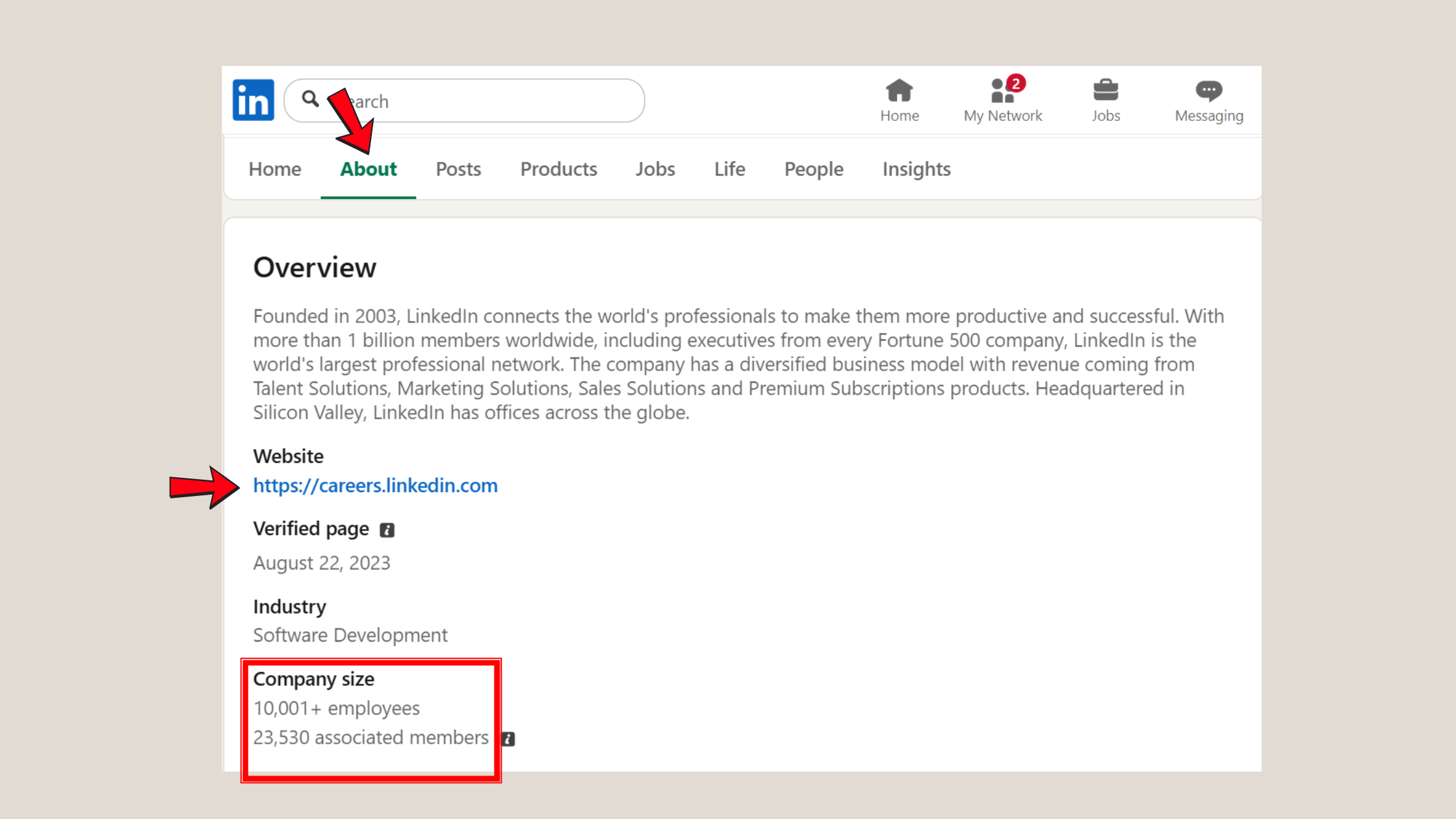
- Company legal name — this becomes your page URL
- Website URL
- Industry category — choose carefully; it affects how LinkedIn surfaces your page in search
- Company size (employee range)
- About section copy — 250–2,000 characters; write it before you start
- Logo file — PNG or JPG, 300×300px minimum
- Banner/cover image — 1128×191px
- Work email with your company domain — strongly recommended for verification
Can I create a LinkedIn company page for free? Yes — entirely free. LinkedIn charges nothing to create or run a company page. LinkedIn Premium adds benefits to your personal profile (InMail, who-viewed-you data), but it does not unlock additional company page features. For most organisations in their first six months, consistent posting and employee advocacy deliver far more ROI than a Premium subscription.
Image Dimensions and Asset Specs for 2026
- Logo: 300×300px, PNG/JPG, max 4MB
- Cover image: 1128×191px, PNG/JPG, max 4MB
- Life tab cover photo: 1128×376px
- Shared image posts: 1200×627px for best display
- Carousel/document posts: 1080×1080px (square) or 1080×1350px (portrait)
How to Set Up a LinkedIn Company Page: Step-by-Step Setup Guide
Here's how to create a company page on linkedin — from zero to published — in the correct sequence. Creators who skip ahead and skip steps typically find they need to go back and re-edit fields that affect their page URL or discoverability. Follow this order.
LinkedIn Company Page Setup Steps at a Glance
- Log in to LinkedIn and click the Work grid icon (top right). ~30 seconds.
- Select "Create a Company Page" from the dropdown. Choose page type: Company, Showcase Page, or Educational Institution. ~30 seconds.
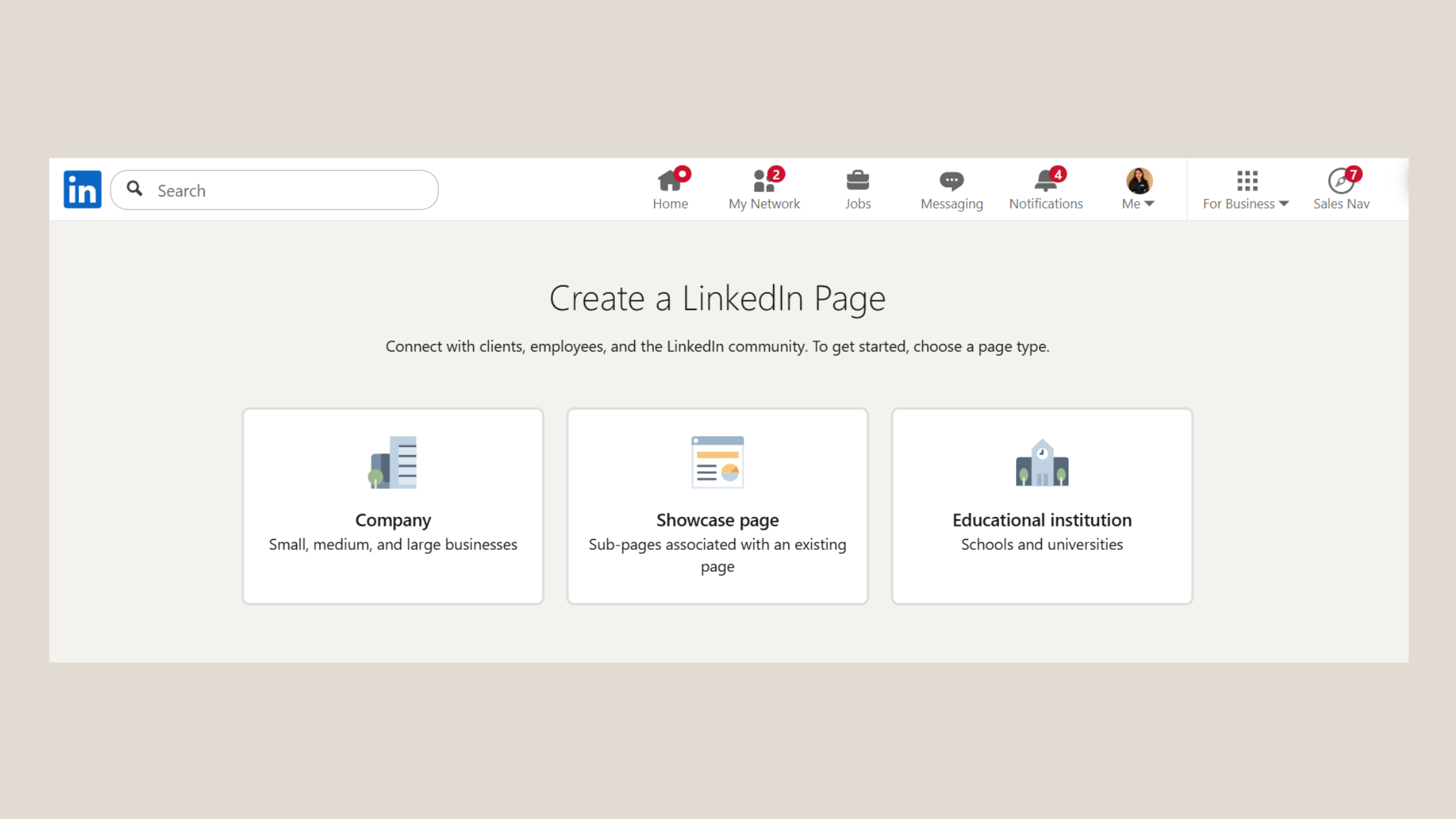
Create a Company Page - Enter your company identity: legal name, LinkedIn URL (auto-generated but editable now — you can't easily change it later), website, industry, size, and page type. ~2 minutes.
- Upload your logo (300×300px) and cover image (1128×191px). ~1 minute.
- Write your tagline — 120 characters that summarise what your company does. Use your primary keyword naturally here. ~1 minute.
- Complete the About section — 250 to 2,000 characters. Lead with what you do, who you serve, and why it matters. This is LinkedIn's primary indexing field. ~3 minutes.
- Click "Create page" — your page is now live in draft. Do not stop here.
- Add your first post before inviting anyone — an empty page at launch loses the trust of first visitors. A simple welcome post or company announcement works. ~2 minutes.
How long does it take to set up a LinkedIn company page? With assets prepared, the technical steps take 5–8 minutes. The About section is where most time goes — but it's also the highest-impact field, so it's worth a focused 3–5 minutes rather than rushing it.
For a full walkthrough with screenshots, see the step-by-step guide on HyperClapper.
What to Include in Your LinkedIn Company Page for Maximum Impact
Beyond the required fields, what should I include in my LinkedIn company page to look professional? Complete every optional field — LinkedIn's own data shows that pages with complete information get 30% more weekly views than incomplete ones. Specifically:
- Specialties — up to 20 keywords; this is your SEO field for LinkedIn's internal search
- Location(s) — even if remote-first, a location improves local discoverability
- Featured groups — link any LinkedIn Groups your team moderates
- Hashtags to follow — select 3 relevant industry hashtags to surface trending content
- Custom button (CTA) — "Visit website", "Contact us", or "Learn more" with your URL
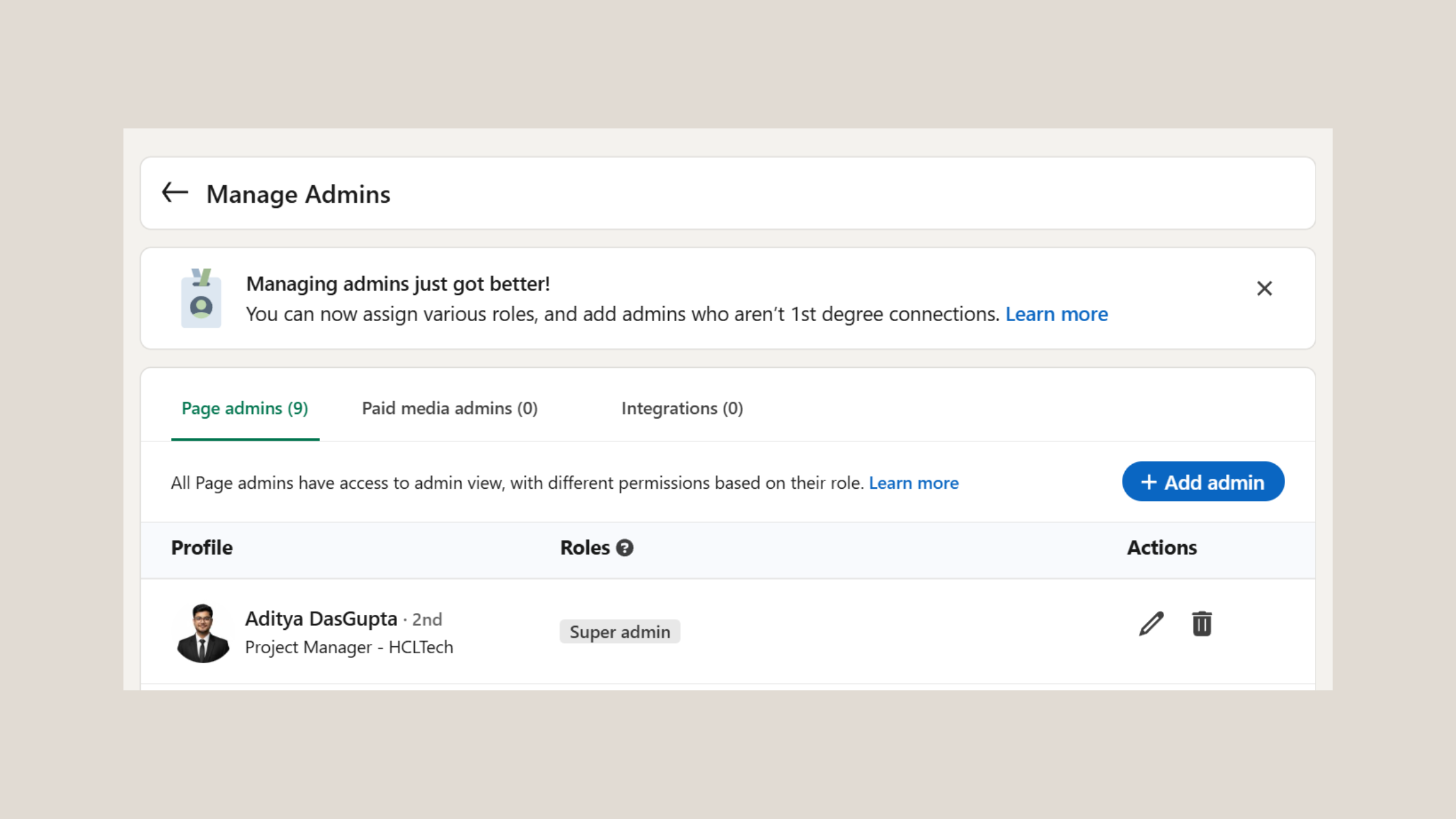
How to add a LinkedIn company page admin: Go to your page → Settings → Manage Admins → Add Admin. Search by name or email. The person must already be a 1st-degree connection or listed as an employee on the page. Assign the correct role — Super Admin for full access, Content Admin for posting only.
If you're wondering how to create a linkedin company page without attaching it to your personal profile, note that LinkedIn does not currently support this — a personal account is always required as the creator, even if other admins are added later.
LinkedIn Company Page Optimization Tips: From Empty Page to Credible Brand
Most guides stop at "publish your page." What separates pages that gain traction from pages that stay at 50 followers for six months is what happens in the first two weeks after publishing.
LinkedIn company page SEO starts with keyword placement — specifically in your company name (if accurate), tagline, About section, and Specialties. LinkedIn's internal search indexes all four fields. Google also crawls public company pages, so a well-written About section with your target keywords can rank in web search results too — making it a dual-channel SEO opportunity most competitors underuse.
The most underused LinkedIn company page feature is the Specialties field. Most pages leave it half-empty. It's essentially a free keyword tag that LinkedIn uses to surface your page in both search and "people also viewed" suggestions.
On the question of how many followers you need before a company page becomes effective for lead generation: a pattern observed across growing brand pages is that 500 followers tends to be the inflection point. Below that, organic post reach is thin — often reaching only about ~2% of your follower base per post. Above 500, employee resharing and algorithmic distribution create compounding visibility. This means the first 90 days should be focused on reaching that threshold through invitations, employee advocacy, and consistent posting.
Showcase Pages vs Company Pages: Showcase pages are sub-pages linked to your main company page, designed to highlight a specific product line, vertical, or audience segment. A cybersecurity firm might use one Showcase Page for enterprise clients and another for SMBs. They're not a replacement for a well-optimised main page — they're an extension for companies with meaningfully distinct audiences.
Common LinkedIn Company Page Mistakes to Avoid
- Leaving the page on "Not listed" — always switch to "Public" before sending it to anyone
- Skipping the Specialties field — this is your primary keyword targeting field for LinkedIn search
- Not inviting employees — every connected employee who follows the page is an organic amplifier
- Launching with no content — a page with zero posts looks abandoned, not new
- Using a personal email for the associated domain — LinkedIn gives more verification trust to company domain emails
Why is my LinkedIn company page not showing up? The three most common causes are: the page is still set to "Not listed," the company email domain isn't verified (affecting search ranking), or LinkedIn's index delay — newly published pages can take 24–72 hours to appear in LinkedIn search and 3–7 days to appear in Google. See the full fix guide here.
Boosting Company Page Visibility: Organic Reach, Ads, and Engagement Tools
Personal LinkedIn profiles consistently outperform company pages on organic reach — according to Refine Labs research, personal profiles drive 2.75x more impressions and up to 5x more engagement than equivalent company page posts. This means employee advocacy — having team members reshare and comment on company posts — is not optional if you want real reach from a brand page.
For teams serious about building company page visibility faster, tools like HyperClapper are built specifically for this: the platform lets you boost company page posts through real engagement channels, add AI-powered replies to keep conversations active, and even post replies directly from your company page — making brand engagement look natural and driving the algorithmic signals LinkedIn rewards.
Want Your Company Page Posts to Actually Get Seen?
HyperClapper boosts company page visibility with real engagement from relevant professionals — no bots, no fake activity.
See How It WorksManaging and Growing Your LinkedIn Company Page Long-Term
Teams that assign clear admin roles and review analytics weekly consistently see faster follower growth than those who post sporadically and ignore the data. It sounds obvious — but in practice, most company pages are managed reactively rather than strategically.
Admin roles: Super Admins have full control over settings, ads, and all content. Content Admins can post and respond to comments only. Assign roles by function, not seniority — giving a busy executive Super Admin access when they only need to approve posts creates unnecessary risk of accidental setting changes.
Analytics to track weekly:
- Visitor demographics — are the right job titles and industries finding your page?
- Follower growth rate — week-over-week trend is more useful than raw count
- Post impressions and engagement rate — benchmark is 2–5% for company pages; above 5% is strong
- Top-performing content — double down on formats and topics that outperform
Competitor benchmarking: LinkedIn's built-in "Companies to Track" feature (under Analytics) lets you compare your follower growth, posting frequency, and engagement rate against named competitors — at no cost. What consistently separates companies that use this feature from those that don't is a faster content iteration cycle: they see what's working competitively and adjust within weeks, not quarters.
Building a Content Rhythm That Drives LinkedIn Page Follower Growth
According to LinkedIn's own page best practices data, companies that post at least weekly see a 2x lift in engagement with their content. Pages that drop below one post per week see algorithmic reach decay — and recovery typically takes 3–4 weeks of consistent posting to restore baseline distribution.
The 3-Format Company Page Rhythm — a content pattern that works consistently across B2B and professional services pages:
- Insight post (Mon/Tue) — a short observation, data point, or perspective from your industry
- Social proof or team post (Wed/Thu) — client result, employee feature, or behind-the-scenes
- CTA or product post (Fri) — what you offer, who it's for, clear next step
This rhythm keeps the page active without burning out whoever manages it. The LinkedIn business page setup checklist covers the full launch workflow if you want a ready-to-use reference.
✓ LinkedIn Company Page Launch Checklist
- ☐Logo uploaded at 300×300px, no blurring or cropping
- ☐Cover image at 1128×191px, brand-consistent
- ☐About section completed (250–2,000 characters), keywords included
- ☐Specialties field filled with up to 20 relevant keywords
- ☐Website URL and custom CTA button added
- ☐Page set to "Public" (not "Not listed")
- ☐First post published before inviting followers
- ☐All relevant employees invited to follow the page
- ☐Admin roles assigned (Super Admin vs Content Admin) correctly
- ☐Analytics baseline noted — record week-1 metrics for benchmarking
Turn Your New Company Page Into a Lead-Generating Asset
HyperClapper's company page boosting and AI-powered replies help you build engagement momentum from day one — with real people, not bots.
Start Growing Your PageFrequently Asked Questions About LinkedIn Company Pages
How to make a LinkedIn company page?
Log in to LinkedIn, click the Work grid icon (top right), and select "Create a Company Page." Choose "Company," fill in your name, URL, industry, and size, upload a logo and cover image, complete the About section, then click Publish. The full process takes under 10 minutes with assets ready. See the complete creation guide for screenshots.
What is a LinkedIn company page?
A LinkedIn company page is a public brand profile — separate from any personal account — that represents a business on LinkedIn. It allows multiple admins to post content, run ads, track follower analytics, and access B2B tools like Showcase Pages and employee advocacy features that personal profiles cannot access.
Are company pages free on LinkedIn?
Yes — creating and running a LinkedIn company page is completely free. LinkedIn Premium applies to personal accounts only and does not unlock additional company page features. Paid LinkedIn products relevant to pages are LinkedIn Ads and Career Pages, which are optional upgrades, not requirements.
What is the difference between LinkedIn profile and company page?
A personal profile represents an individual; a company page represents a business. Key differences: company pages support multiple admins, LinkedIn Ads, follower analytics, and Showcase Pages — none of which are available on personal profiles. Personal profiles typically get higher organic post reach due to LinkedIn's people-first algorithm.
What is the fastest way to set up a LinkedIn company page from scratch?
Prepare your logo (300×300px), cover image (1128×191px), About section copy, and company details before opening the form. With assets ready, the technical setup takes 5–8 minutes: fill in company details, upload images, complete the About section and Specialties, then publish. Write your first post immediately so the page isn't empty.
Do I need a personal LinkedIn account to create a company page?
Yes — LinkedIn requires a personal account in good standing to create a company page. Your profile must have at least "Intermediate" strength and be more than 7 days old. Once the page is created, it operates independently from your personal profile; you can add other admins who manage it day-to-day.
What information should a LinkedIn company page include to look professional?
At minimum: a 300×300px logo, 1128×191px cover image, completed About section with relevant keywords, up to 20 Specialties, website URL, location, company size, and a custom CTA button. According to LinkedIn, complete pages receive 30% more weekly views — every empty field is a missed discoverability opportunity.
How do I verify my LinkedIn company page after creating it?
LinkedIn verifies company pages primarily through the associated company email domain. Use a work email matching your company's website domain when creating the page. LinkedIn may also surface a verification badge option under your page settings if your organisation qualifies — check Settings → Verification. Domain-matched emails significantly improve page trust ranking in LinkedIn search.
LinkedIn Premium for business pages — is it worth it?
For the page itself, no — LinkedIn Premium doesn't add company page features. It benefits the individual admin's personal profile (InMail, who viewed, AI writing tools). For most organisations in their first 6 months, investing that budget in consistent content and employee advocacy delivers measurably more page growth than a Premium subscription.
After observing how pages perform across industries and company sizes, what consistently separates brand pages with real organic reach from those that plateau at a few hundred followers is not ad spend or Premium tools — it is the combination of a fully optimised page, a consistent posting rhythm, and employees who actively reshare. Get all three in place in the first 30 days, and the compounding effect becomes visible in your analytics well before the 90-day mark.



