Relevance AI Review: 5 Truths No One Is Talking About
Relevance AI pricing explained: how Actions and token consumption really work, what teams actually pay each month, and when the platform stops being worth it.
📅 ⏱ 16 min read📝 ~3200 words
Relevance AI pricing is the question most teams get wrong before they sign up. A pattern observed consistently across teams evaluating AI agent platforms is this: they compare the headline plan price, ignore token consumption mechanics entirely, and then experience genuine sticker shock three months into production. This review cuts through that. Relevance AI is a no-code platform for building, deploying, and managing AI agents — AI agents being autonomous software that completes multi-step tasks using large language models (LLMs) without human involvement at each step. What makes it genuinely useful, and where it quietly fails teams, comes down to five realities that competitor reviews consistently skip. This article covers all of them: actual pricing tiers with real numbers, ROI breakdowns by use case, the limitations that only surface after deployment, and honest comparisons with Make, n8n, and Lindy.
Key Takeaways
Who this is for: Founders, marketers, and agencies evaluating Relevance AI before committing — especially if you're unsure whether the cost is justified.
Pricing reality: The Team plan costs $234/month (annual) and includes 7,000 Actions — but production deployments regularly push total costs to $500–$1,500/month once LLM token consumption is factored in.
ROI sweet spot: Relevance AI pays off fastest for teams replacing $2,000+/month of manual work with no in-house developer to build custom solutions.
Most underrated risk: Platform lock-in — workflows built in Relevance AI's visual builder cannot be exported as portable code.
Counterintuitive finding: Non-technical teams often find Relevance AI harder than expected because prompt engineering and context window management are unavoidable, regardless of the no-code interface.
Best alternatives: Make.com for deterministic workflows, Lindy for pre-built business templates, n8n for teams with a developer on staff.
Average revenue increase for AI-adopting marketing teams
20–37%
Rise in AI software prices across vendor categories
28%
AI tools' share of average marketing tech stack
According to SQ Magazine (2026), organizations implementing AI in marketing report an average 41% revenue increase and a 32% reduction in customer acquisition costs. Meanwhile, according to Tropic via Yahoo Finance (2024), AI software prices have already risen 20–37% across vendor categories — making it more important than ever to evaluate what you're actually getting for the cost before committing to a platform like Relevance AI.
What Is Relevance AI and How Does It Actually Work
What Is Relevance AI and How Does It Actually Work
Relevance AI is a no-code AI agent platform that lets teams build, deploy, and manage autonomous AI agents without writing code. No-code automation here means users design agent logic through a visual drag-and-drop interface rather than writing Python or JavaScript. The platform connects to large language model providers (OpenAI, Anthropic, Google), lets you define agent instructions, link data sources, and deploy agents that execute multi-step tasks on your behalf — things like qualifying leads, extracting data from documents, answering customer questions, or summarising research.
What is Relevance AI used for in practice? The most common deployments include:
Customer support chatbots that resolve tier-1 inquiries without human handoff
Sales qualification agents that score inbound leads based on defined criteria
Internal knowledge assistants that answer employee questions from uploaded documents
Data extraction workflows that pull structured information from unstructured sources
The platform sits in a specific and useful middle ground: more flexible than simple chatbot builders like Chatbase or Tidio, but less technically demanding than building with LangChain or custom API code. Think of it as a visual programming environment where the "code" is natural language instructions to an LLM.
The Technology Behind Relevance AI Agents
A Relevance AI agent works by chaining together a sequence of steps — called a workflow — where each step can call an LLM, query a database, send a message, or trigger an external tool. Each execution consumes credits based on the LLM tokens used: LLM token consumption is the count of words (approximately) sent to and received from the language model. A simple one-turn question-answer interaction might consume 500–1,000 tokens. A complex multi-turn conversation with a large system prompt and document context can consume 10,000–50,000 tokens per session.
This token-based cost model is the single most important thing to understand before evaluating Relevance AI pricing — everything downstream flows from it.
Relevance AI Pricing: What You Actually Pay in 2026
Relevance AI pricing in 2026 is structured around Actions (their credit unit) rather than per-seat or per-agent fees. One Action represents a single step execution within a workflow — calling an LLM counts as one Action, as does a tool call or API request. This matters because a single agent conversation doesn't consume one Action; it consumes as many Actions as there are steps in your workflow, multiplied by the number of conversations.
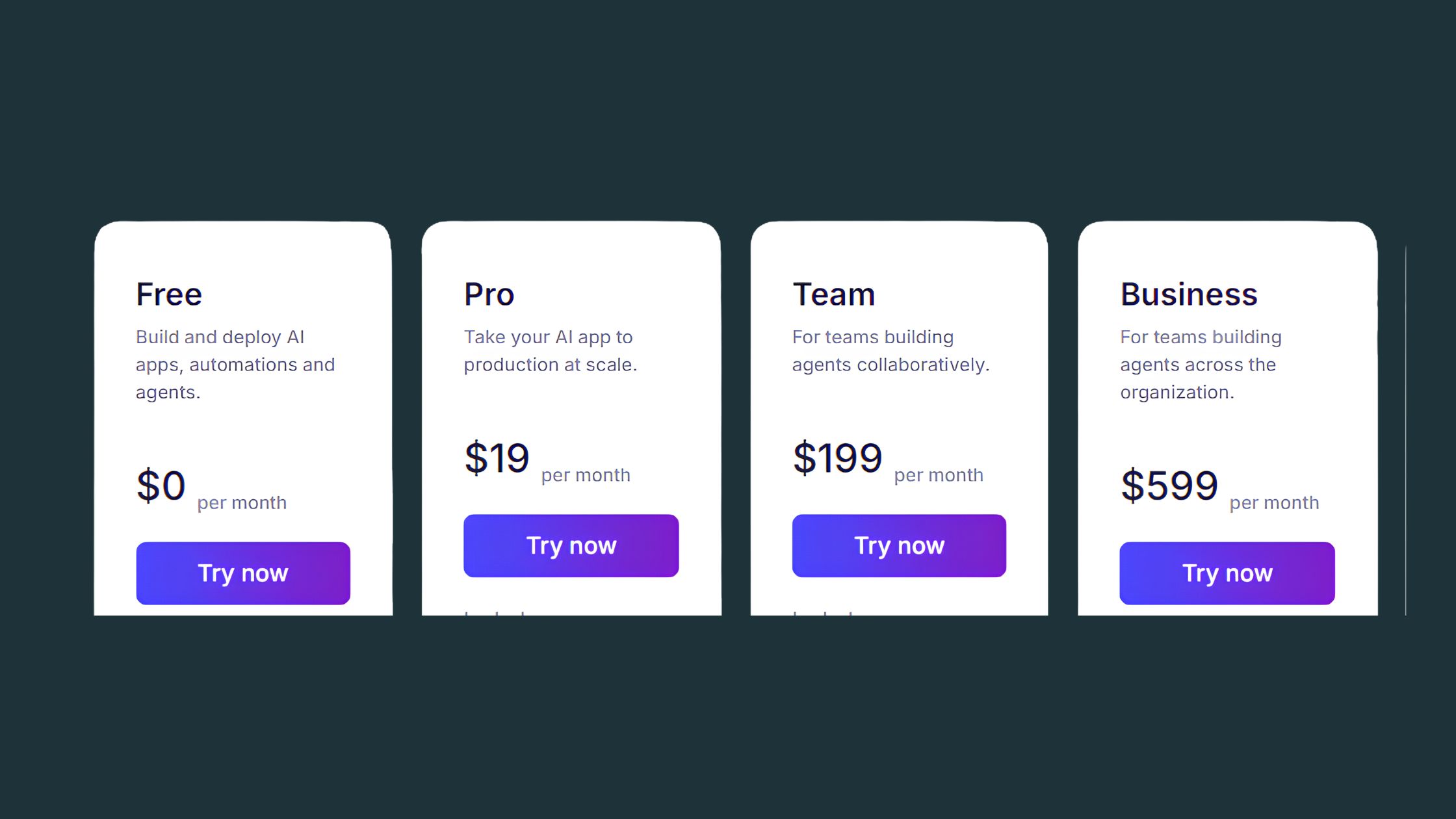
According to ColdIQ (2026), here are the current plan tiers:
Free: Limited Actions for testing — enough to prototype, not enough for production
Team: $234/month billed annually ($349/month billed monthly) — 7,000 Actions plus $70 in Vendor Credits
Enterprise: Custom pricing — contact sales, designed for high-volume production workloads
Relevance AI
The discrepancy between "Pro" credits (10,000) and "Team" Actions (7,000) reflects a product rebranding from credits to Actions — the units changed, not the underlying compute. What matters is consumption rate, not the label.
$234/mo
Team plan entry point (annual billing) — but real production costs typically run 2–6x higher once LLM token usage scales
Breaking Down Real Monthly Costs by Use Case
The most common mistake teams make is budgeting based on plan price alone. A pattern consistently observed across deployments is that actual monthly spend diverges from plan price within 60 days of going live. Here's how costs realistically play out:
Low-volume internal tool (50–200 conversations/month): Team plan typically sufficient — total cost stays near $234–$349/month
Mid-volume customer support bot (500–1,000 conversations/month): Action consumption pushes teams into overage territory, adding $150–$400/month on top of base plan
High-volume sales qualification agent (2,000+ interactions/month): Monthly costs routinely reach $800–$1,500 depending on workflow complexity and prompt length
Multi-agent orchestration (several agents running in parallel): Enterprise tier typically required; costs begin at $2,000+/month
⚠️
Warning:Relevance AI does not automatically cap spending when Actions run out. Deploying a production agent without explicit usage limits can result in unexpected monthly bills that far exceed your plan's base cost. Set hard caps before going live.
Cost Comparison vs Traditional Automation Tools
The workflow automation budget question most teams face is whether to pay Relevance AI's premium or build the same outcome with a cheaper tool. A direct cost comparison:
Platform
Pricing Model
Best For
Est. Monthly Cost (mid-volume)
Relevance AI
Actions (LLM tokens)
Conversational AI agents
$400–$800
Make.com
Per operation (fixed)
Deterministic workflows
$29–$99
n8n (self-hosted)
Flat fee or free (self-host)
Tech teams, custom logic
$0–$50 + server costs
Lindy
Per task/run
Pre-built business workflows
$149–$299
Custom OpenAI API
Direct token pricing
High-volume production
$50–$200 (requires dev)
This means Relevance AI carries a meaningful cost premium over every alternative — and that premium is the price of speed and no-code accessibility. Whether it's worth paying depends entirely on what your time is worth and whether you have developer resources available.
Relevance AI Pros and Cons: What Actually Works
Relevance AI
Teams that succeed with Relevance AI share a specific profile: they have a clear, bounded use case, limited technical resources, and a genuine need to move fast. In those conditions, the platform delivers. The visual builder genuinely reduces development time — workflows that would take a developer two weeks to build from scratch are deployable in two to three days with Relevance AI's interface.
Genuine strengths worth highlighting:
Rapid prototyping: The visual builder cuts agent deployment time from weeks to days for non-technical users
Template library: Pre-built templates for common use cases (lead qualification, support bots, document Q&A) reduce cold-start friction significantly
LLM provider flexibility: Native integrations with OpenAI, Anthropic, and Google mean you aren't locked into a single model provider
Tool integrations: Built-in connectors for Slack, HubSpot, Airtable, and Google Workspace save setup time vs. building from scratch
Version control: Agent iterations are tracked, making it possible to roll back a breaking change without starting over
Testing playground: Running agents in a sandboxed environment before deployment is genuinely useful for catching prompt failures before they cost real credits
The testing playground is one of the most underused features on the platform — teams that use it consistently before each deployment see dramatically lower wasted credit spend in the first 30 days.
Where Relevance AI Falls Short
The most common failure mode among new Relevance AI users is discovering that "no-code" does not mean "no expertise required." Prompt engineering — the practice of crafting precise natural language instructions that produce reliable LLM outputs — is unavoidable regardless of the interface. Teams that go in expecting a drag-and-drop solution with no learning curve consistently hit a wall around week two when their agents produce inconsistent or hallucinated outputs.
Additional pain points observed across deployments:
Complex branching logic becomes awkward in the visual builder — workflows with more than 7–8 conditional branches tend to become difficult to debug and maintain
Context window management is manual — users must understand token limits and manage what information agents retain across turns
Support quality varies by plan tier — free and Pro users primarily rely on documentation and community forums; real-time support is largely an enterprise feature
Migration difficulty is high — because workflows are built in proprietary visual logic rather than exportable code, moving to a custom solution later requires rebuilding from scratch
Relevance AI Limitations No One Talks About
What are the downsides of Relevance AI that don't appear in most reviews? The most significant one is platform lock-in — not in the sense of contracts, but in the architectural sense. Every workflow you build in Relevance AI lives in their proprietary visual format. There is no "export to Python" button. If you outgrow the platform or decide to bring development in-house, you are rebuilding, not migrating. That's a meaningful risk for any team planning to scale.
The second underreported issue is budget unpredictability. The credit-based model creates a fundamental tension: the more useful your agents are (longer conversations, more context, more steps), the more they cost. There is no way to know in advance exactly how many Actions a live deployment will consume because that depends on how users actually interact with the agent — their message length, how many turns they take, whether they trigger complex branches. Budgeting for this requires monitoring actual consumption and iterating, not just reading the pricing page.
🔴
Avoid:Building your entire agent architecture in Relevance AI before validating that your use case stays within budget at realistic usage volumes. Prototype first, measure token consumption per conversation, multiply by expected monthly volume, then decide on a plan.
Technical Limitations That Impact Real Projects
Beyond cost and lock-in, several technical constraints affect what you can realistically build:
API rate limits: Relevance AI inherits the rate limits of your underlying LLM provider. High-concurrency deployments hitting OpenAI's rate limits will cause agent failures that are difficult to debug through Relevance AI's interface
Data residency: Enterprise-grade data residency controls (required for HIPAA, GDPR-sensitive, or financial data) are not available on lower tiers — a real barrier for regulated industries
On-premise deployment: Not available at any tier — the platform is cloud-only, which disqualifies it for organizations with strict on-premise requirements
Long-term memory: Persistent memory across sessions (knowing a user from conversation to conversation) requires custom configuration and additional storage costs — it is not out-of-the-box behaviour
Performance at scale: Response latency increases with workflow complexity — agents with 10+ steps and large context windows can have 8–15 second response times, which is noticeable in customer-facing deployments
💡
Pro Tip:Before committing to a paid plan, run 50–100 test conversations through your intended workflow and divide the total Actions consumed by conversation count. That gives you a real per-conversation cost you can multiply against expected monthly volume for an accurate budget projection.
Is Relevance AI Worth It? ROI Analysis for 2026
Whether Relevance AI justifies its cost depends on a specific calculation, not a general opinion. The platform delivers positive ROI under clear conditions: you need to deploy a conversational AI agent or document-processing workflow, you lack an in-house developer to build it, and speed-to-deployment matters more than long-term cost efficiency.
The ROI Breakeven Framework — a useful way to think about this decision:
Calculate the monthly cost of the manual process you're replacing (staff time × hourly rate)
Estimate realistic Relevance AI monthly cost at expected usage volume (use your test data)
If (manual cost) ÷ (Relevance AI cost) ≥ 2.0, the platform likely pays for itself within 3–6 months
If the ratio is below 1.5, reconsider whether a simpler tool (Make, Zapier) solves the same problem cheaper
In practice: a team spending $3,000/month on a two-person support operation that Relevance AI can reduce to one person plus a $600/month agent deployment is clearly ROI-positive. A team spending $200/month on manual data entry that a $400/month Relevance AI workflow replaces is not.
Real-World ROI Scenarios
Based on the typical deployment patterns seen across teams using AI agent platforms, here are three honest scenarios:
Scenario A — Sales qualification agent for a 10-person startup:
Use case: Qualify inbound leads before passing to sales. Volume: ~500 conversations/month.
Estimated cost: $300–$500/month on Team plan with overages.
Value replaced: 15–20 hours/month of SDR time (~$600–$800 value at $40/hr). Verdict: Borderline positive ROI. Worth it if SDR time is redirected to closing, not saved entirely.
Scenario B — Internal knowledge assistant for a 50-person company:
Use case: Answer HR/IT policy questions from employees. Volume: ~200 queries/month.
Estimated cost: $234–$300/month (Team plan, low overage).
Value replaced: ~8 hours/month of HR admin time (~$400 value). Verdict: Marginal ROI, but value includes faster employee response times and reduced context-switching for HR staff.
Scenario C — High-volume customer support bot for a SaaS product:
Use case: Handle tier-1 support. Volume: 3,000+ conversations/month.
Estimated cost: $1,200–$2,000/month at scale.
Value replaced: 2 full-time support reps at $4,000–$6,000/month combined. Verdict: Strong positive ROI — but only if the bot maintains high resolution rates, which requires ongoing prompt maintenance.
The no-code automation ROI case is strongest when you're replacing high-cost human labor with medium-cost automated conversations. It weakens when the automation itself requires significant ongoing maintenance effort that eats back the labor savings.
Build LinkedIn Visibility While Your AI Agents Handle the Backend
If you're evaluating AI tools to grow your business presence, don't neglect the LinkedIn side of the equation. HyperClapper helps founders, marketers, and agencies get real engagement on their LinkedIn content through community-powered post boosting and AI replies.
Who Is Relevance AI Best For (And Who Should Avoid It)
3 out of 4 teams that get strong results from Relevance AI fit a specific profile: they're deploying conversational agents or document-processing workflows, they have no developer to build custom solutions, and their use case involves unpredictable natural language inputs that rule out simpler rule-based tools. Outside that profile, the value proposition weakens fast.
Who is Relevance AI best for:
Founders and solo operators testing an AI agent concept before hiring a developer
Marketing teams building lead qualification or nurturing workflows without engineering support
Agencies building client-facing chatbots at low-to-medium conversation volumes
Operations teams replacing document-heavy manual processes (contract review, data extraction, compliance checks)
Startups who need to move in days, not months, to validate an AI-powered product feature
Relevance AI use cases where it consistently delivers value:
Sales lead qualification forms that adapt questions based on prospect answers
Frequently Asked Questions About Relevance AI
Is Relevance AI worth it?
Relevance AI is worth it for teams replacing $2,000 or more per month in manual work who lack an in-house developer. For lighter workflows or teams with coding resources, cheaper or more flexible alternatives exist. The ROI calculation breaks down quickly if your token consumption is higher than estimated.
Is Relevance AI free?
Yes, Relevance AI has a free plan, but it provides only enough Actions to prototype — not run production workflows. Real deployments require a paid plan starting around $19/month for the Pro tier, and most teams running live agents end up spending significantly more once token consumption scales up.
What are the alternatives to Relevance AI?
The strongest alternatives are Make.com for deterministic, logic-heavy automations that don't need LLMs, Lindy for non-technical teams who want pre-built business templates, and n8n for teams with a developer who want full control and self-hosting. Each trades some of Relevance AI's flexibility for lower cost or simpler setup.
What are the biggest problems with Relevance AI that users don't talk about?
Platform lock-in is the most underreported problem — workflows built in Relevance AI's visual builder cannot be exported as portable code. The second is cost unpredictability: token consumption scales with conversation complexity, so production costs routinely reach $500–$1,500 per month even on plans that appear affordable at signup.
Is Relevance AI a good platform for non-technical teams?
Only partially. The visual builder removes the need to write code, but prompt engineering and context window management are unavoidable in practice. Non-technical users frequently hit a skill ceiling when agents behave inconsistently — debugging those issues requires understanding how LLMs process instructions, which is not a beginner skill.
How does Relevance AI compare to other AI agent platforms?
Relevance AI sits between rigid no-code tools and full developer frameworks — more flexible than chatbot builders like Chatbase, less demanding than LangChain. Compared to Make, it handles unstructured language tasks better but costs more at scale. Compared to n8n, it requires no coding but sacrifices portability and fine-grained control.
What should I know before using Relevance AI?
Understand the Actions credit model before signing up — each workflow step counts separately, so a five-step agent burns five Actions per run. Calculate your expected monthly volume against plan limits before committing. Also account for the fact that your workflows cannot be migrated out if you later switch platforms.
👋
⚡ Free plan
Leaving already?
Grab 3 free boosts on your next LinkedIn post — real likes & comments from 5,000+ creators. No card, cancel anytime.