
PhantomBuster is a cloud-based linkedin automation tool that runs pre-built scraping and outreach workflows — but whether it belongs on your LinkedIn stack in 2026 depends almost entirely on how you configure it, not just what it can do. A pattern observed consistently across thousands of LinkedIn automation users is that the tool itself rarely causes bans; the settings do. Default configurations are almost always too aggressive for LinkedIn's current detection thresholds, and the vast majority of reported restrictions trace back to out-of-the-box usage rather than the platform itself. This review cuts through the affiliate noise to give you an honest, safety-first assessment of PhantomBuster's real risk profile, pricing, and whether safer alternatives deliver better outcomes for most users in 2026.
- Who this is for: Growth marketers, sales teams, data teams, and outreach specialists evaluating PhantomBuster for LinkedIn in 2026.
- Core risk: PhantomBuster operates via session cookie injection — LinkedIn sees activity as yours, making detection risk real and ongoing.
- Safety verdict: Usable safely, but only with strict manual throttling — default settings regularly trigger LinkedIn's behavioral detection systems.
- Pricing reality: Credit-based plans start ~$56/month but heavy usage burns credits faster than most users expect.
- Most counterintuitive finding: The accounts that get banned aren't always running the biggest campaigns — they're often the ones who trusted the defaults.
- Safer alternative: Tools focused on engagement (not outreach) like HyperClapper carry fundamentally lower detection risk because they don't trigger connection request or scraping signals at all.
- What Is PhantomBuster and How Does It Work for LinkedIn?
- Is PhantomBuster Safe to Use on LinkedIn in 2026?
- PhantomBuster LinkedIn Account Ban Risk: What Actually Happens
- PhantomBuster Pricing Plans 2026: Is It Worth the Cost?
- PhantomBuster vs. Expandi and Other LinkedIn Alternatives in 2026
- Who Should (and Shouldn't) Use PhantomBuster for LinkedIn
- Frequently Asked Questions About PhantomBuster and LinkedIn Safety
What Is PhantomBuster and How Does It Work for LinkedIn?
PhantomBuster is a cloud-based automation platform that executes pre-built workflows — called Phantoms — to scrape data, send connection requests, and automate LinkedIn outreach without requiring your browser to stay open. Each Phantom mimics a specific LinkedIn action: profile visits, connection requests, message sequences, post likes, or data extraction. The platform runs these workflows on PhantomBuster's own servers, using your LinkedIn session cookie (a unique identifier that authenticates your account) to perform actions on your behalf.
This mechanism is the key detail most reviews gloss over. Because PhantomBuster authenticates via session cookie injection rather than an official LinkedIn API integration, LinkedIn's systems see every action as coming directly from your account — not from a named third-party application. There's no OAuth handshake, no app-level visibility. To LinkedIn's detection algorithms, the activity looks like you.
Key Features: Scraping, Outreach, and Workflow Automation
PhantomBuster's feature set is genuinely broad. Key capabilities include:
- LinkedIn profile scraping — extract contact data, job titles, and company information at scale
- Automated connection requests — send personalized invites in bulk with configurable delays
- Message sequences — multi-step drip campaigns triggered after connection acceptance
- Post engagement automation — auto-like and auto-comment on targeted posts
- Sales Navigator integration — extract leads from saved searches (though Sales Navigator detection risk is elevated here)
- Multi-platform support — beyond LinkedIn, PhantomBuster covers Twitter/X, Instagram, and dozens of other platforms
This flexibility is both PhantomBuster's greatest strength and its core liability on LinkedIn. A general-purpose tool built for 100 platforms will never match the safety optimisation of one built exclusively for LinkedIn's detection environment.
Understanding the mechanism sets up the real evaluation: how safe is this in practice, and at what settings?
Is PhantomBuster Safe to Use on LinkedIn in 2026?
PhantomBuster LinkedIn automation safety is not binary — it exists on a spectrum that you control through configuration. The tool is not inherently safe or unsafe; it is a lever, and how hard you pull it determines your risk. What's shifted significantly since 2023 is LinkedIn's detection sophistication. The platform now tracks engagement velocity thresholds (the speed at which you send messages or requests), off-hours activity clusters, and geographic session inconsistencies with considerably more precision than even two years ago.
The accounts that stay safe aren't the ones using less powerful tools — they're the ones treating every configurable limit as a safety dial, not a ceiling to push against.
Does PhantomBuster Violate LinkedIn's Terms of Service?
Yes — unambiguously. PhantomBuster does not have official LinkedIn approval and its core functionality (automated actions, scraping, session cookie reuse) directly violates LinkedIn's User Agreement, specifically the prohibitions on automated data collection and unauthorized account access via third-party tools. This isn't a gray area in 2026. LinkedIn's legal team has sent cease-and-desist notices to multiple scraping platforms, and their ToS has been explicitly tightened to address session-based automation.
What this means practically: using PhantomBuster puts your LinkedIn account at risk regardless of volume. A restricted account doesn't require that you ran 500 connection requests — LinkedIn's detection can flag unusual patterns at low volumes if the behavioral signature looks non-human.
What Are the Best PhantomBuster Settings for LinkedIn Safety?
The best PhantomBuster settings for LinkedIn safety follow what experienced operators call The Conservative Velocity Rule: never let any single automation metric exceed 30% of LinkedIn's stated (or estimated) daily limits, and always add randomised delays between actions.
Specific settings that reduce restriction risk:
- Connection requests: Cap at 15–20 per day (not the 80–100 some defaults allow)
- Message sending: No more than 40–50 messages per day with 3–8 minute randomised gaps
- Operating hours: Restrict Phantom execution to your local business hours only — never overnight
- Profile visit limits: Stay under 80 per day; spikes above this pattern as bot behaviour
- Proxy setup: Use a residential proxy matching your usual geographic location to close the IP mismatch gap
- Account age: Do not run any automation on accounts under 6 months old
Even with perfect settings, the residual risk doesn't drop to zero. It drops to manageable — which is the honest ceiling PhantomBuster operates at.
PhantomBuster LinkedIn Account Ban Risk: What Actually Happens If You Get Caught
LinkedIn's enforcement process follows a predictable escalation ladder — though automated tool detection can skip steps. According to GigRadar's LinkedIn automation data, 15–45% of accounts using automation tools face restrictions within 6 months, and LinkedIn restricted over 1 million accounts in 2025 alone. Those aren't edge-case numbers.
The typical enforcement escalation looks like this:
- Temporary action block — a specific action (messaging, connecting) is suspended for 24–48 hours
- Connection request restrictions — weekly limits are slashed, often to single digits
- Account restriction with identity verification — you're locked out pending phone or document verification
- Permanent ban — account removed entirely, often with associated IP flagged
The most common PhantomBuster LinkedIn account ban risk trigger isn't running a massive campaign — it's the IP geography mismatch. When PhantomBuster's servers execute actions from a datacenter IP in a different country from your usual login location, LinkedIn's anomaly detection flags it within hours. This is the mechanism behind the majority of restriction reports in automation communities.
Common Mistakes That Get LinkedIn Accounts Flagged
Teams that skip the configuration phase consistently see the same failure patterns:
- Running default settings out of the box — PhantomBuster's defaults are calibrated for capability demonstration, not LinkedIn safety
- Automating on new accounts — accounts under 3–6 months old have no behavioral baseline, making any automation immediately anomalous
- Running multiple Phantoms simultaneously — creates simultaneous multi-action sessions that humans never produce
- No residential proxy — datacenter IPs are the single clearest automation signal LinkedIn's systems check
- Ignoring connection request limits — LinkedIn enforces weekly caps; exceeding them even once can trigger a manual review flag
- Overnight execution — activity during hours your account has never been active historically is a behavioral red flag
PhantomBuster Pricing Plans 2026: Is It Worth the Cost?
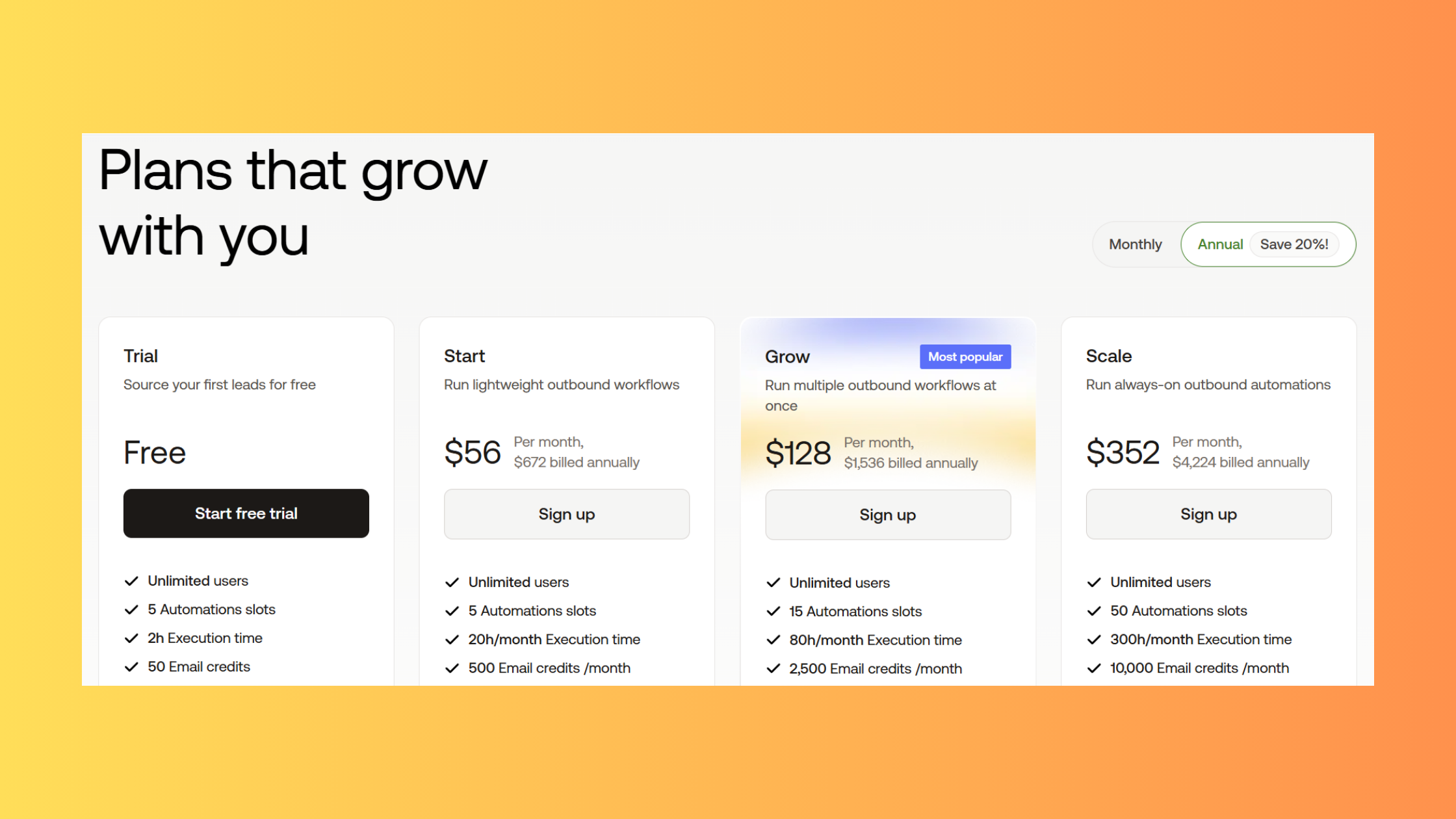
PhantomBuster pricing plans 2026 use a credit-based execution model where you pay for "slot time" — the number of minutes Phantoms run per month — rather than a flat per-user or per-action fee. This model sounds reasonable until you see how quickly it consumes credits in practice.
Current tier structure (approximate, as PhantomBuster adjusts pricing periodically):
| Plan | Price/Month | Execution Hours | Best For | Key Limit |
|---|---|---|---|---|
| Free Trial | $0 | Limited credits | Testing only | No production use |
| Starter | ~$56/mo | 20 hours | Solo, low-volume outreach | Burns fast with scraping |
| Pro | ~$128/mo | 80 hours | Regular campaigns | Proxy cost is additional |
| Team | ~$250+/mo | 300 hours | Agencies, multi-user | Per seat cost adds up |
The most important thing to understand about PhantomBuster's credit system: data-heavy scraping Phantoms consume execution time at a rate most users don't anticipate. A LinkedIn profile scrape of 500 leads can consume 3–4 hours of slot time. Run that twice a week on the Starter plan and you've used your monthly allocation in 10 days.
PhantomBuster Limits and Restrictions to Know Before You Buy
Beyond the credit model, PhantomBuster limits and restrictions that affect real-world use include:
- Concurrent Phantom slots: Limited by plan — Starter runs 1 Phantom at a time, Pro allows 5
- No built-in LinkedIn daily limits enforcement — you set the caps manually; the tool won't stop you from exceeding safe thresholds
- Proxy not included — residential proxies are a separate cost (typically $15–40/month from providers like Bright Data or Oxylabs)
- No native LinkedIn safety mode — unlike purpose-built tools, there's no automatic "human behavior simulation" layer
Is PhantomBuster worth it in 2026? For technical users running targeted, low-volume outreach with proper safety configuration and a residential proxy, it can deliver genuine ROI. For beginners, high-volume campaigners, or anyone unwilling to invest in ongoing configuration, the combination of ban risk, learning curve, and true total cost (plan + proxy + time investment) often makes it a poor value compared to purpose-built alternatives.
Want LinkedIn Growth Without the Ban Risk?
HyperClapper boosts your post visibility through real community engagement and AI-powered replies — no scraping, no session cookies, no restriction risk.
See How HyperClapper Works
PhantomBuster vs. Expandi and Other LinkedIn Automation Alternatives in 2026

PhantomBuster vs Expandi is the comparison most serious LinkedIn outreach operators reach eventually — and they're not as interchangeable as review aggregators suggest. Expandi is purpose-built for LinkedIn with built-in daily limits, timezone-aware sending windows, and a dedicated residential IP assigned per user account. These aren't premium add-ons; they're core to the architecture. PhantomBuster's general-purpose design means you have to engineer all of those safety layers yourself — or skip them and accept higher risk.
What PhantomBuster has over Expandi is flexibility. It's not LinkedIn-only. Hundreds of supported platforms, custom scraping workflows, and the ability to chain Phantoms into complex multi-platform sequences make it genuinely more powerful for technical users who need data extraction at scale across multiple channels. For pure LinkedIn outreach, though, Expandi's safety-first design wins on risk-adjusted value for most users.
Best Safe LinkedIn Automation Tools 2026: How They Compare
The best linkedin automation tool for your situation depends on your primary goal — outreach/prospecting versus content visibility and engagement. These are meaningfully different risk categories.
| Tool | Best For | Risk Level | Price From | Our Rating |
|---|---|---|---|---|
| PhantomBuster | Scraping, multi-platform | ⚠️ High (if misconfigured) | ~$56/mo | 3.5/5 |
| Expandi | Safer LinkedIn outreach | 🟡 Medium | ~$99/mo | 4/5 |
| Dripify | Drip sequence automation | 🟡 Medium | ~$39/mo | 4/5 |
| LinkedIn Helper | Budget outreach automation | 🟡 Medium | ~$15/mo | 3.5/5 |
| Dux-Soup | Browser-based profile visits | 🟡 Medium | ~$14/mo | 3/5 |
| HyperClapper | Post visibility & engagement growth | 🟢 Low | Freemium | 4.5/5 |
Dripify is worth separate attention for teams focused on linkedin outreach automation tool use cases — its drip sequence builder is one of the cleanest in its class, with daily action limits enforced by the platform. A linkedin helper is a broadly used term, but the tool by that name (LinkedIn Helper 2) is a browser extension, which means it runs locally rather than on cloud servers — lower IP mismatch risk, but still carries ToS violation risk. Dux-soup (also written as Dux-Soup) is another browser-based option; the dux soup linkedin automation tool has been around since 2015 and has a loyal following for its simplicity, though its detection risk profile is similar to other non-official tools.
For linkedin tools for lead generation that prioritise safety, the real differentiator is whether the tool triggers outreach-related detection signals (connection requests, message sequences, scraping) versus engagement signals (likes, comments, post visibility). HyperClapper falls entirely in the latter category — its channels connect your posts with real people who engage with them, and its AI-powered replies keep conversations active without any scraping or cold outreach. For content creators focused on LinkedIn visibility, it's the strongest choice because it eliminates the outreach-related detection risk class entirely.
The risk-reward calculation on LinkedIn automation isn't really about which tool you choose — it's about which action category you're automating. Engagement actions carry fundamentally different risk profiles than prospecting actions, and most review guides collapse both into a single risk bucket.
For those evaluating a free linkedin automation tool specifically, PhantomBuster's free trial covers basic workflow testing, LinkedIn Helper has a 14-day free trial, and HyperClapper offers a freemium plan for exploring engagement-focused growth without upfront cost. See our full breakdown of LinkedIn automation tools and their 2026 safety profiles for a deeper comparison.
Who Should (and Shouldn't) Use PhantomBuster for LinkedIn
The community consensus heading into 2026 is remarkably consistent: users who treat PhantomBuster as a set-and-forget linkedin automation tool are the ones getting banned. Users who treat it as a precision instrument — with strict self-imposed limits, residential proxies, and regular configuration audits — tend to get results without restriction. That gap between user types is wider than the gap between any two competing tools.
PhantomBuster is a strong fit for:
- Technical growth marketers who understand LinkedIn account restrictions and detection architecture
- Data teams who need scalable LinkedIn profile or company data extraction
- Experienced outreach specialists running small, targeted campaigns (<50 connection requests/day)
- Multi-platform operators who need one tool for LinkedIn, Twitter/X, and other platforms simultaneously
PhantomBuster is a poor fit for:
- LinkedIn newcomers without an established behavioral baseline on their account
- Recruiters whose livelihood depends on uninterrupted LinkedIn access — a restriction at the wrong moment costs far more than any tool subscription
- Personal brand builders prioritising long-term account safety over short-term outreach volume
- Anyone who won't invest 2–4 hours in initial configuration and ongoing monitoring
- Marketers whose primary goal is content visibility and post engagement rather than prospecting
✓ The PhantomBuster LinkedIn Safety Checklist
- ☐Account is at least 3–6 months old with established activity history before any automation
- ☐Residential proxy configured and geographically matched to your real location
- ☐Connection requests capped at 15–20 per day (not LinkedIn's stated maximum)
- ☐Execution hours restricted to your local business hours only — no overnight runs
- ☐Randomised delays (not fixed intervals) between all automated actions
- ☐No two Phantoms running simultaneously on the same LinkedIn session
- ☐Weekly review of LinkedIn account standing — action blocks are early warning signals, not one-offs to ignore
- ☐Alternative engagement strategy in place (e.g. HyperClapper for post visibility) so outreach automation isn't your only LinkedIn growth lever
The most common failure mode among PhantomBuster users isn't technical — it's strategic. Marketers reach for it as a volume solution when their actual problem is a visibility and credibility problem. Scraping 1,000 leads and sending cold connection requests doesn't solve poor post engagement or weak personal brand signals. For that gap, engagement-first tools are both safer and more directly effective.
Build LinkedIn Visibility Without Outreach Risk
HyperClapper connects your posts with real engagement channels — real likes, comments, and AI-powered replies that build reach the way LinkedIn's algorithm actually rewards it.
Try HyperClapper FreeFrequently Asked Questions About PhantomBuster and LinkedIn Safety
Is it safe to use PhantomBuster for LinkedIn outreach in 2026?
PhantomBuster is conditionally safe — safe only with careful manual throttling, residential proxies, and strict daily limits well below LinkedIn's stated caps. Out of the box, it is not safe. According to GigRadar (2025), 15–45% of accounts using automation face restrictions within 6 months. Treating it as a precision instrument rather than a set-and-forget tool is the key differentiator between restricted and active accounts.
What happens if LinkedIn detects PhantomBuster automation?
LinkedIn's enforcement escalates from a temporary action block, to connection request restrictions, to a full account restriction requiring identity verification — and in severe cases, a permanent ban. Detection most commonly triggers from IP geography mismatches (PhantomBuster's server IP vs. your usual location) and connection request velocity spikes above LinkedIn's acceptable human-like activity patterns.
How can I use PhantomBuster without getting banned on LinkedIn?
Use a residential proxy matching your real location, cap connection requests at 15–20 per day, restrict execution to business hours only, add randomised delays between actions, and never run multiple Phantoms simultaneously. Also wait until your LinkedIn account is at least 3–6 months old with established manual activity before running any automation.
What are the risks of using automation tools on LinkedIn in 2026?
The primary risks are account restriction or permanent ban, loss of lead pipeline access, and reputational damage if spam-like behavior is visible to your network. LinkedIn's behavioral detection has become significantly more sophisticated since 2023, tracking engagement velocity thresholds, session geography, and off-hours activity. The risk is real at any volume — not just large-scale campaigns.
Is PhantomBuster worth it compared to safer LinkedIn alternatives?
For technical users running targeted low-volume prospecting with proper configuration, yes. For most professionals — especially those prioritising account safety, post visibility, or personal brand growth — purpose-built tools with native safety controls (Expandi for outreach, HyperClapper for engagement) deliver better risk-adjusted value. The learning curve and proxy overhead add real cost and time.
Does PhantomBuster violate LinkedIn's terms of service?
Yes, unambiguously. PhantomBuster's session cookie injection method and automated action capabilities directly violate LinkedIn's User Agreement, which prohibits automated data collection and unauthorized third-party account access. This is not a gray area — LinkedIn has explicitly tightened its ToS to address this category of tool, and enforcement has increased year over year since 2022.
What are the best PhantomBuster alternatives for LinkedIn automation?
The best PhantomBuster alternatives for LinkedIn automation in 2026 depend on your goal. For outreach: Expandi (safer dedicated LinkedIn tool) or Dripify (strong drip sequences). For post visibility and engagement growth without outreach risk: HyperClapper, which uses real community channels and AI-powered replies instead of scraping or cold outreach. See also our guide to LinkedIn scraper tool limits and safe tactics.
What consistently separates LinkedIn accounts that grow sustainably from those that cycle through restriction and recovery is not any single tool choice — it is the decision to match the automation method to the actual growth goal. Outreach tools solve a prospecting problem. Engagement tools solve a visibility problem. Reaching for the wrong category, regardless of how well you configure it, is the pattern behind most of the frustration in LinkedIn automation communities heading into 2026.



