
A linkedin automation tool is software that handles one of two distinct LinkedIn growth problems — getting into people's inboxes (outreach) or getting eyeballs on your content (engagement). What consistently separates professionals who grow fast on LinkedIn from those who plateau is recognising that these are two separate problems requiring two separate tools. MeetAlfred handles the outreach layer: connection requests, follow-up sequences, and multi-channel touches. HyperClapper handles the engagement layer: boosting posts through real community channels, AI-powered replies, and feed visibility. Used together, they create a reinforcing growth loop most single-tool setups can't replicate.
- Two tools, two problems: MeetAlfred automates outreach sequences; HyperClapper amplifies post visibility through real engagement communities.
- They don't conflict: MeetAlfred operates in LinkedIn's messaging layer; HyperClapper operates in the feed layer — both can run simultaneously.
- Safety depends on behavior, not just the tool: Staying under ~80–100 connection requests per week and using cloud-based tools dramatically reduces ban risk.
- LinkedIn engagement pods still work — but only when built on real community engagement, not bot activity or fake accounts.
- The combined workflow pays off fast: Prospects who receive a MeetAlfred connection request while seeing an active, engaged profile convert at significantly higher rates.
- Counterintuitive finding: More comments — not more likes — are what LinkedIn's algorithm amplifies most. HyperClapper's AI reply feature directly exploits this.
- What Is a LinkedIn Automation Tool — and Why Most Professionals Need Two
- How MeetAlfred LinkedIn Automation Works: Setup, Sequences, and Workflow
- How HyperClapper Boosts LinkedIn Post Reach Automatically
- Can You Use MeetAlfred and HyperClapper Together?
- Is LinkedIn Automation Safe in 2026? Risks, Limits, and How to Avoid a Ban
- Best LinkedIn Automation Tools for Outreach in 2026
- Frequently Asked Questions About MeetAlfred, HyperClapper, and LinkedIn Automation
The LinkedIn automation tools market has reached an estimated $850 million annually, growing 42% year-over-year, according to ConnectSafely (2026). And based on practitioner data shared on Reddit's SaaS community, AI-powered LinkedIn outreach is achieving 22% connection acceptance rates in B2B SaaS — a number that makes the category hard to ignore. What this tells you is that the category has matured well past "experimental" into a genuine growth channel. The question is no longer whether to automate — it's which tools to use and how to use them without triggering a LinkedIn restriction.
What Is a LinkedIn Automation Tool — and Why Most Professionals Need Two
A LinkedIn automation tool is software that performs repetitive LinkedIn actions — sending connection requests, following up with messages, liking and commenting on posts — without manual effort. But here's what most guides miss: there are actually two categories of LinkedIn automation, and conflating them is the most common mistake professionals make when choosing a tool.
- Outreach automation tools (e.g. MeetAlfred, Expandi, HeyReach): handle prospecting, connection requests, and multi-step message sequences
- Engagement amplification tools (e.g. HyperClapper, Lempod, Podawaa): boost the visibility of content posts through coordinated community engagement
A pattern observed across thousands of LinkedIn profiles is that professionals who invest in only one category stall out. The outreach-only user sends hundreds of connection requests to an empty, low-engagement feed — and wonders why reply rates are poor. The content-only user publishes great posts that reach their existing audience but never breaks into new networks. Both tools are needed, and they operate on different LinkedIn surfaces — which is exactly why using them simultaneously doesn't create conflicts.
MeetAlfred vs HyperClapper: What Each Tool Actually Does
| Tool | Best For | LinkedIn Surface | Risk Level | Starting Price |
|---|---|---|---|---|
| MeetAlfred | Outreach sequences, prospecting | Messaging + InMail | Low–Medium (cloud-based) | ~$59/month |
| HyperClapper | Post visibility, engagement pods | Feed + Comments | Low (real users, content guard) | Subscription-based |
| Dripify | Outreach + basic analytics | Messaging | Low–Medium | ~$39/month |
| Dux-Soup | Profile visiting, basic sequences | Browser extension | Medium–High | ~$14.99/month |
Understanding the difference between these two categories sets the foundation — next, let's walk through exactly how to set MeetAlfred up so it runs without burning your outreach quota.
How MeetAlfred LinkedIn Automation Works: Setup, Sequences, and Workflow
MeetAlfred is a cloud-based linkedin automation tool for outreach, meaning it runs from MeetAlfred's own servers rather than your browser — a critical safety distinction explained further in the safety section. Setup takes roughly 20–30 minutes and follows a clear sequence.
Building a LinkedIn Outreach Automation Workflow Step by Step
- Connect your LinkedIn account (2 minutes) — MeetAlfred authenticates via LinkedIn's login flow and assigns a dedicated IP, reducing the simultaneous-login risk that triggers flags.
- Build your prospect list (5–10 minutes) — Import from LinkedIn Sales Navigator search, a CSV, or an existing CRM. Filter by role, industry, geography, and seniority.
- Configure your outreach sequence (10 minutes) — Set the number of steps: typically a connection request → 3-day wait → follow-up message → 5-day wait → final nudge. MeetAlfred staggers timing to mimic human behavior.
- Set daily send limits (2 minutes) — Stay under 20–25 connection requests per day (roughly 100–125/week) as a safe operating ceiling. Going higher is where most users get flagged.
- Activate and monitor — MeetAlfred's dashboard shows connection request acceptance rate, reply rate, and sequence drop-off points in real time.
Multi-channel outreach sequencing — the practice of staggering LinkedIn connection requests, messages, and email or Twitter touches into a single automated workflow — is where MeetAlfred genuinely differentiates from simpler tools. Prospects who receive a LinkedIn connection request followed by a relevant email two days later convert at meaningfully higher rates than those receiving one channel alone.
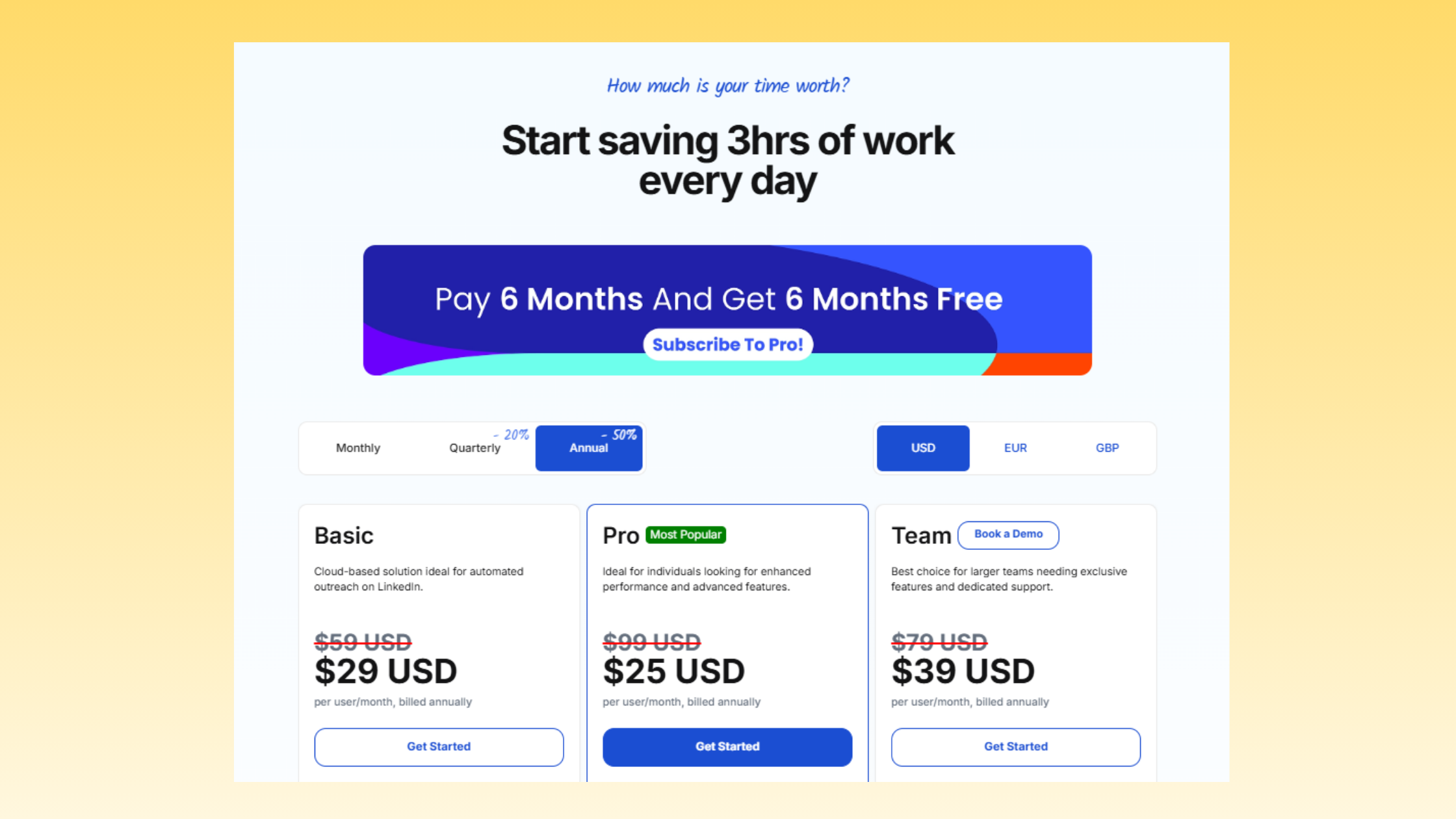
MeetAlfred pricing and plans run at approximately $59/month per seat for individual users, with agency tiers that accommodate multiple LinkedIn accounts. Solo founders and small teams typically find the individual plan sufficient; agencies managing 6+ client accounts should evaluate the per-seat economics carefully — community data from Reddit's automation community suggests $59/seat scales to roughly $354/month for six accounts, which tracks with reported agency usage patterns.
With your outreach running on autopilot, the next step is making sure the profile those prospects land on actually looks worth engaging with — which is exactly what HyperClapper handles.
How HyperClapper Boosts LinkedIn Post Reach Automatically
What is a LinkedIn engagement pod? A LinkedIn engagement pod is a coordinated group of LinkedIn users who agree to like and comment on each other's posts immediately after publishing, triggering the platform's early-engagement signals before the algorithm decides how widely to distribute the content. HyperClapper operationalises this concept through its channels system — structured communities of real users who engage with submitted posts.
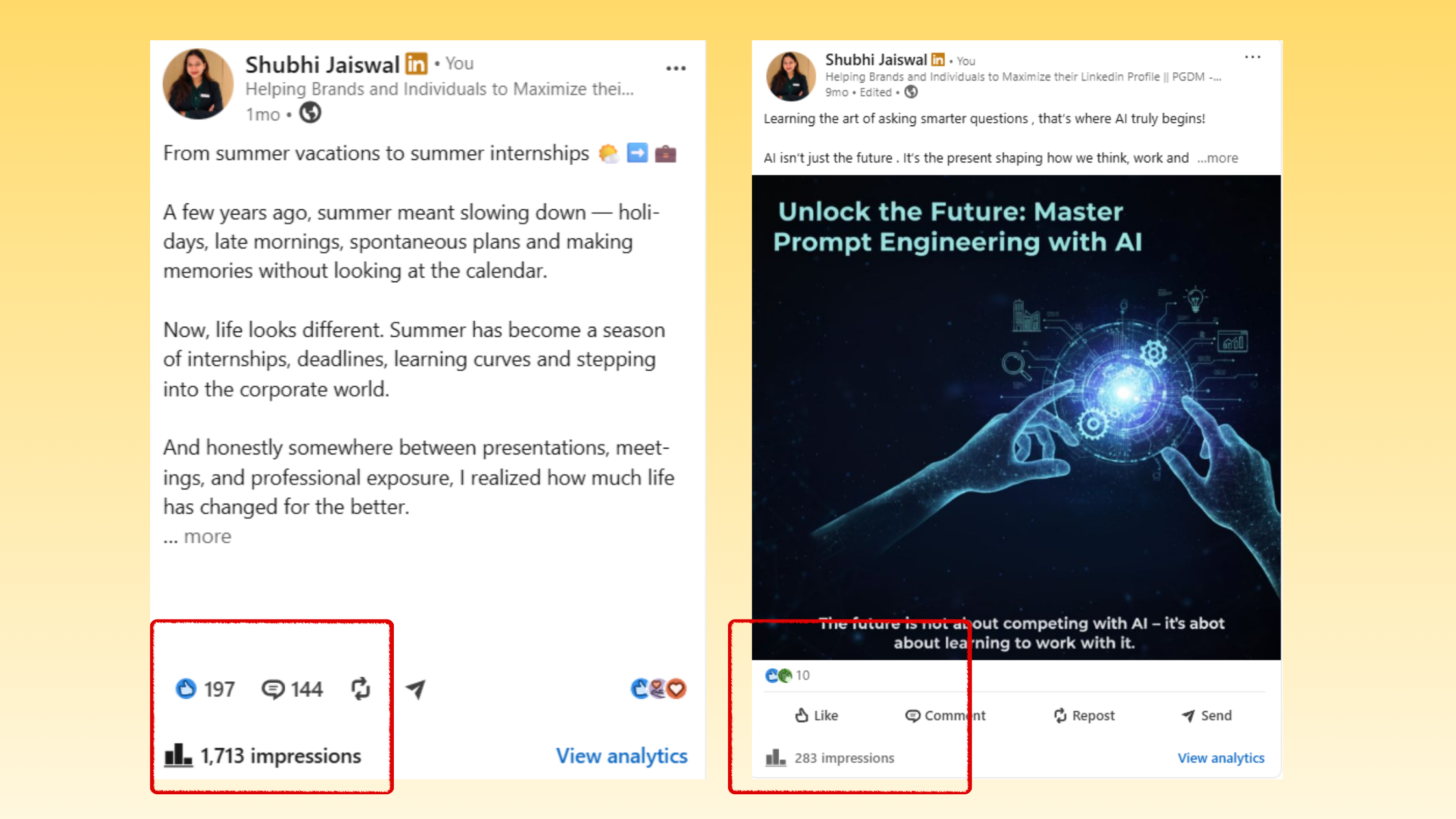
Here's why this matters mechanically: LinkedIn algorithm dwell signals — the data points LinkedIn collects on how long users spend reading a post, whether they click, comment, or share — are weighted most heavily in the first 60–90 minutes after publishing. Early engagement tells LinkedIn's distribution model that the content is worth showing to second and third-degree connections. The platform's own data confirms that posts with strong early engagement receive up to 2× more visibility than those without — a pattern consistent with how LinkedIn's distribution model has behaved across documented accounts.
The most reliable way to increase LinkedIn post reach is not to post more often — it's to manufacture early engagement velocity on every post you do publish. That's the entire premise of engagement pod amplification, and it works because it aligns with how LinkedIn's algorithm actually distributes content.
HyperClapper's channel system gives concrete scale to this: 1 channel delivers approximately 50 possible engagements, 2 channels around 100, and 3 channels around 150. That initial wave of real likes and comments from real community members — not bots — is what pushes the post into wider organic distribution.
When thinking about HyperClapper vs manual LinkedIn engagement: doing this by hand through Slack engagement groups requires coordinating timing with dozens of people, manually tracking whose posts you've engaged with, and spending 60–90 minutes per post. HyperClapper compresses that to minutes. And unlike manual Slack pods, HyperClapper's Content Guard moderation system automatically flags and blocks risky or controversial content — reducing the chance that your account gets associated with sensitive topics that could generate negative signal.
For more detail on how HyperClapper compares to alternatives like LinkBoost specifically, see this direct comparison between HyperClapper and LinkBoost.
AI Replies and Feed More: Keeping Posts Active Beyond Day One
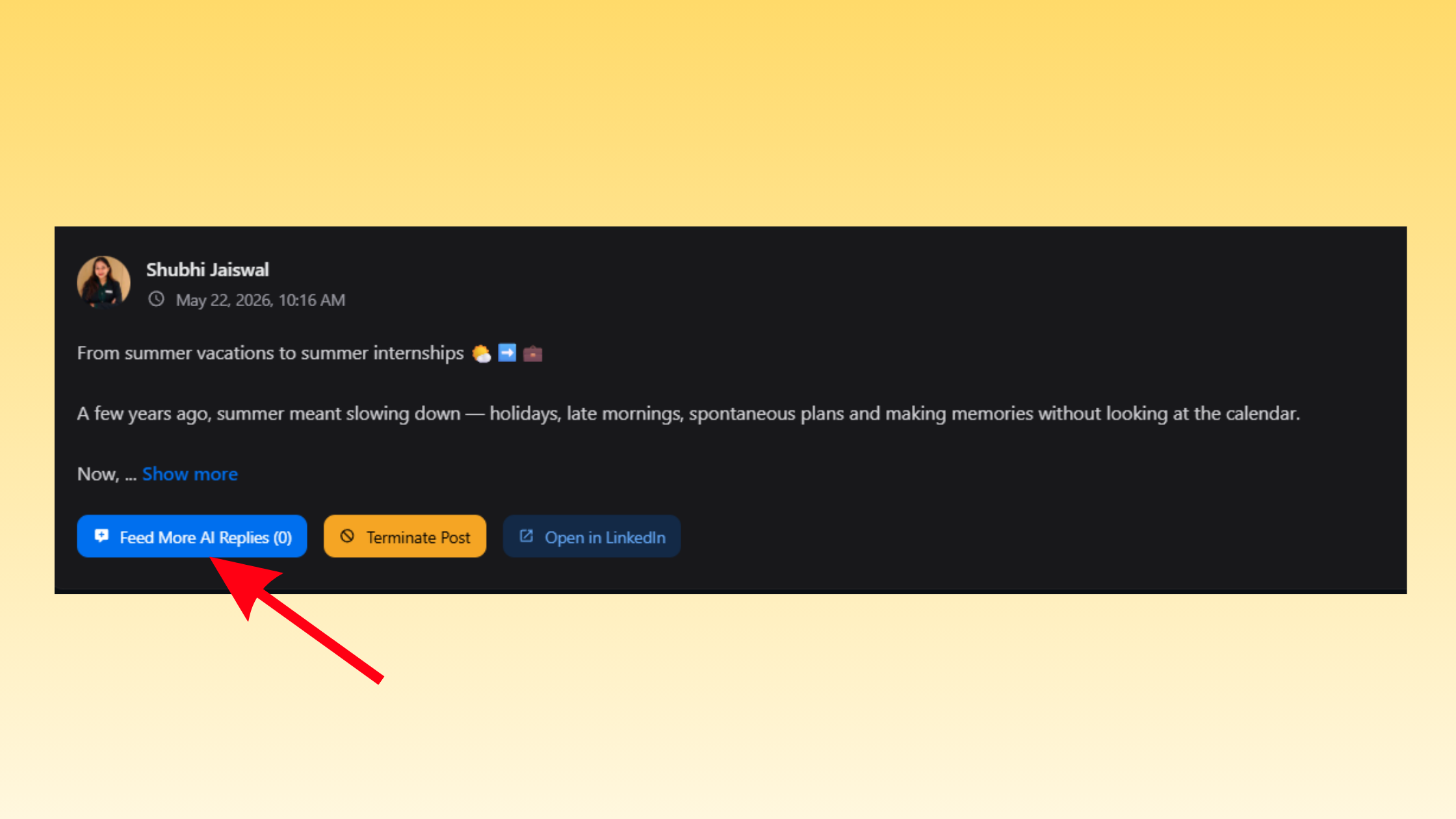
Most engagement tools front-load all activity on the day of publishing. HyperClapper's AI Replies feature takes a different approach: it generates and posts contextually relevant replies to keep conversation threads active over multiple days. The Feed More feature lets users add additional AI replies to older posts — extending the engagement lifecycle well past the initial 24-hour window.
This matters because LinkedIn's algorithm doesn't only reward posts that spike fast — it also rewards posts that sustain conversation. A post that accumulates meaningful comments on day three performs better than one that got 50 likes and went silent. Teams that use Feed More on posts that are already performing well typically see a second distribution wave 48–72 hours after the initial boost.
It's also worth noting that LinkedIn is actively prioritising comment visibility, with some comments receiving 2× the impressions of regular posts — which reinforces exactly why AI-powered reply depth matters more than raw like counts.
Can You Use MeetAlfred and HyperClapper Together? The Combined Workflow
Yes — and the reason they combine cleanly is structural. MeetAlfred operates entirely within LinkedIn's messaging layer (connection requests, InMail, follow-ups). HyperClapper operates within the feed layer (post engagement, comments, visibility). These are distinct LinkedIn surfaces with separate behavioral signals, so running both simultaneously creates no technical conflict and doesn't compound the risk profile of either tool.
The combined workflow for MeetAlfred HyperClapper LinkedIn automation looks like this:
- Publish a content post on LinkedIn (article, insight, case study, or question)
- Immediately submit it to HyperClapper channels to generate early engagement velocity within the first hour
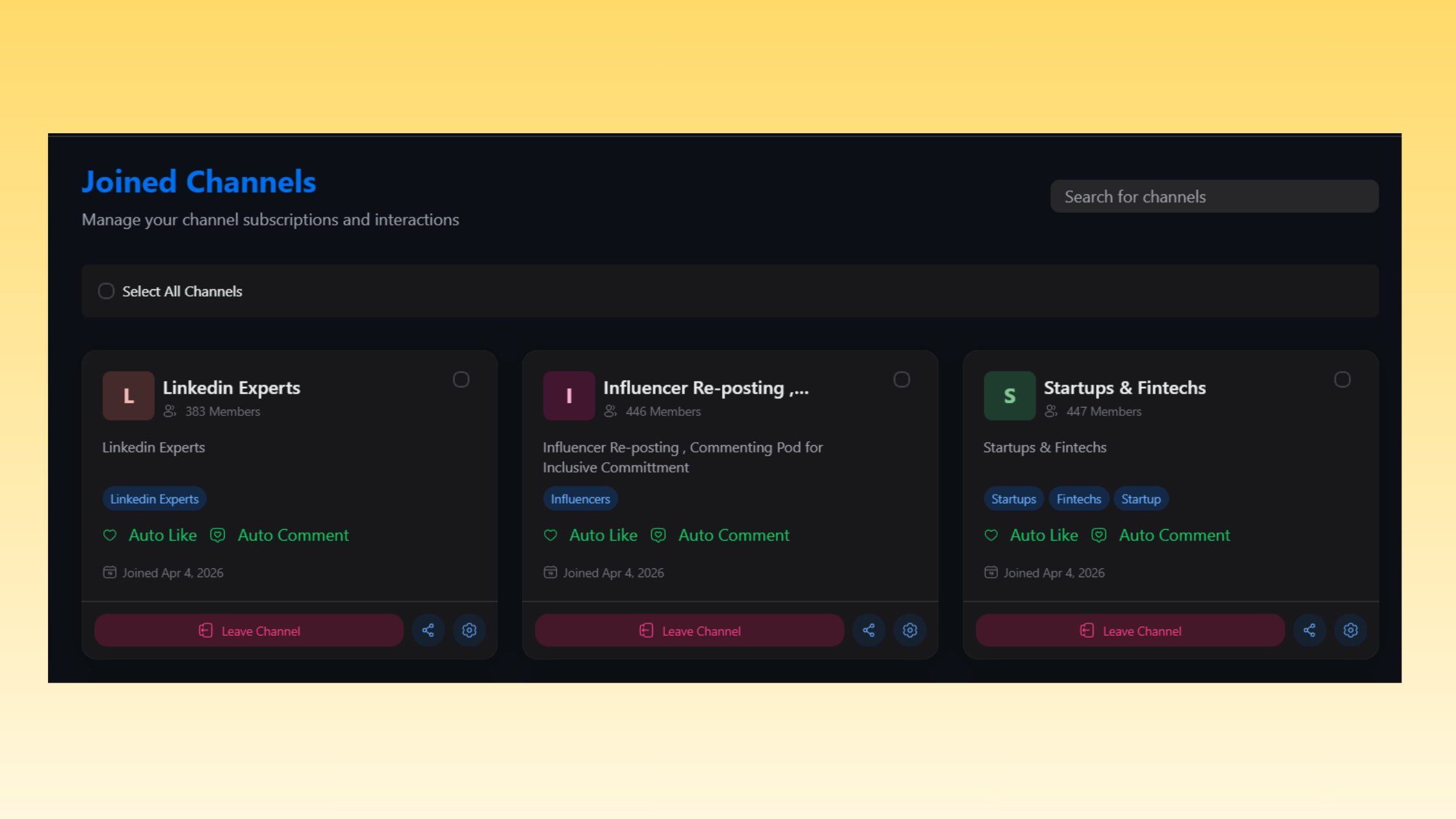
HyperClapper channels - Run a MeetAlfred outreach sequence to your target prospect list, where the opening message references your post as context ("I shared something recently about X that might be relevant to what you're working on...")
- Prospects receive the connection request and, when they visit your profile, see an active, highly-engaged feed — which functions as social proof that you're a credible, active voice in your space
The reinforcing loop this creates: high-engagement posts lift your perceived authority → authority lifts connection request acceptance rate → more accepted connections expand your organic reach → larger reach makes future posts perform better without additional boost spend. This is what practitioners call the Compounding Visibility Effect — and it's the core argument for using both tools rather than either one alone.
For a deeper look at how to run LinkedIn outreach without over-relying on automation risk, see this guide on cold LinkedIn outreach without automation risk.
Practical Example: A Week-One Launch Workflow for a Founder
Here's how a B2B SaaS founder might run this in week one of a new product launch:
- Monday: Publish a "lessons learned" post about a problem your product solves. Boost immediately via 2 HyperClapper channels (~100 engagements). Activate a MeetAlfred sequence targeting 15 ICP prospects per day.
- Wednesday: Use HyperClapper's Feed More to add 3–5 AI replies to the Monday post, restarting the conversation thread and triggering a second visibility wave.
- Thursday: Prospects receiving day-3 MeetAlfred follow-ups see the Monday post still active in their feed — warm social context for what would otherwise be a cold message.
- Friday: Review HyperClapper analytics for post performance; review MeetAlfred dashboard for acceptance rate and reply rate. Adjust message copy where open rates are below 30%.
Want real engagement on your next LinkedIn post — not bots, not fake likes?
HyperClapper connects your posts with real community members who engage, comment, and amplify — with AI replies that keep the conversation going for days.
Try HyperClapper FreeIs LinkedIn Automation Safe in 2026? Risks, Limits, and How to Avoid a Ban
The honest answer: LinkedIn automation carries real risk, and the risk is almost entirely determined by how you use it, not just which tool you use. The most common failure mode is treating automation limits as a target rather than a ceiling — users who push to the maximum allowed send volume are the ones who get flagged, not those who use tools thoughtfully within conservative thresholds.
Here are the specific LinkedIn account safety thresholds that matter most:
- Connection requests: Stay under 80–100 per week. Accounts that send 150+ weekly — even with a premium tool — face elevated restriction risk.
- Message velocity: Avoid sending identical or near-identical messages to large lists in a single session. LinkedIn's spam detection reads message similarity, not just volume.
- Login patterns: Simultaneous logins from multiple IPs (e.g. running both your browser and a non-cloud tool at the same time) are a significant flag. Cloud-based tools like MeetAlfred mitigate this by using a dedicated IP per account.
- Profile scraping: Visiting 200+ profiles per day at high speed — typically a browser-extension behavior — triggers LinkedIn's anomaly detection faster than almost any other action.
The automation behavior that gets accounts banned most often isn't sending too many messages — it's sending messages that look automated: identical copy, inhuman timing, and high velocity all at once. The fix is randomised delays, personalised variables, and conservative daily limits.
Common Mistakes That Get LinkedIn Accounts Restricted
The tools that create the most risk share a common profile:
- Browser extensions that simulate clicks inside LinkedIn's actual interface
- Tools that scrape profile data at high volume without rate limiting
- Platforms that use shared IPs across multiple users (your "safe" behavior is contaminated by other users on the same IP)
- Any tool that sends connection requests without personalisation variables
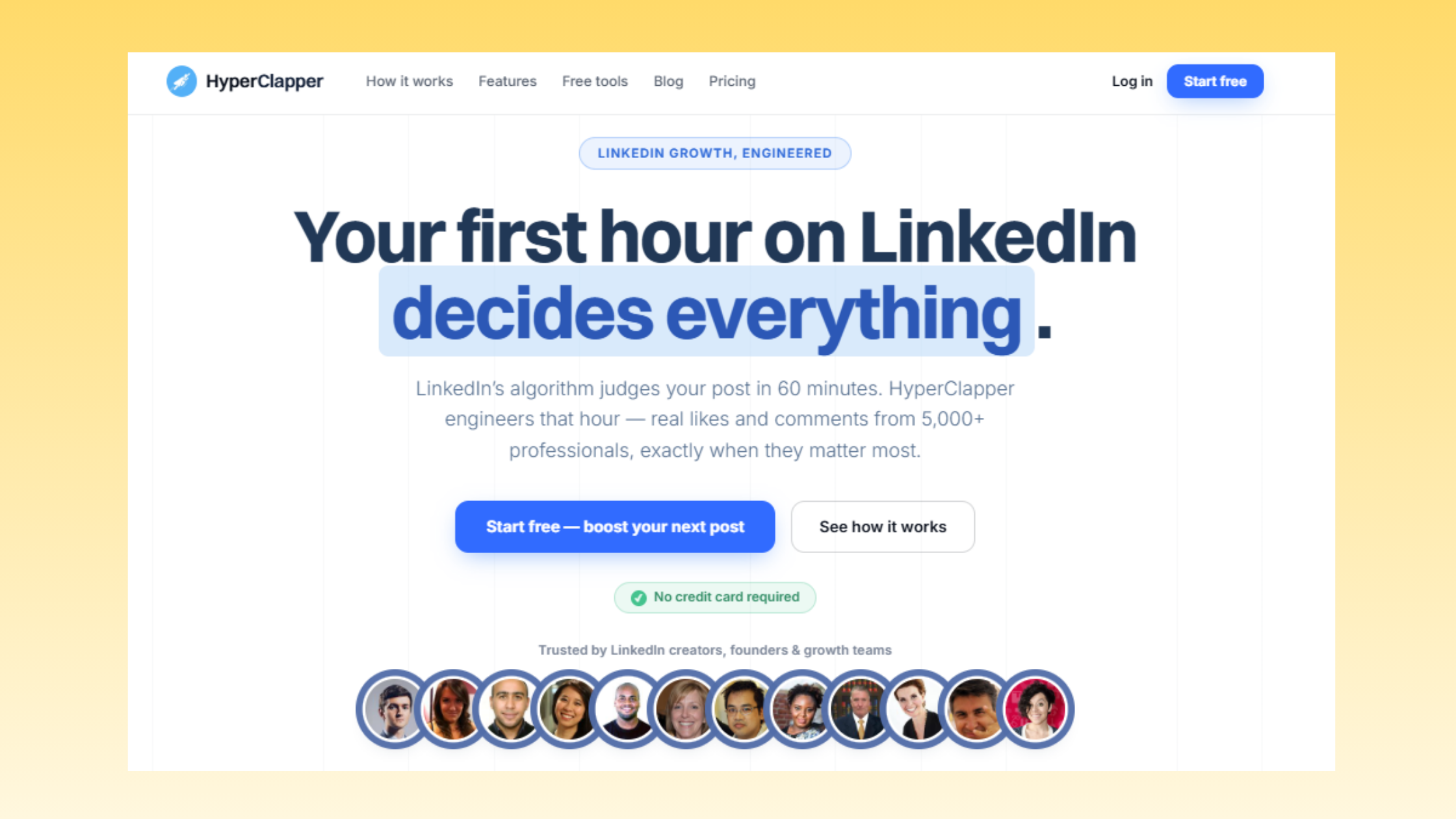
HyperClapper sidesteps most of these risks entirely because engagement pod amplification — real users clicking real buttons — looks identical to organic engagement from LinkedIn's perspective. There's no bot behavior to detect because there is no bot. The Content Guard system adds an additional layer by preventing posts with sensitive or policy-violating content from being submitted, reducing the chance that a boosted post generates a negative signal on your account.
For a broader look at how LinkedIn tools for automation and outreach compare on safety, this comparison covers the major platforms in detail.
Best LinkedIn Automation Tools for Outreach in 2026: How MeetAlfred Stacks Up
Teams that evaluate the best linkedin automation tool options by feature list alone tend to overpay for complexity they don't need. The right framework is matching the tool to the specific growth problem — and understanding where each major player genuinely wins.
According to Clearout's 2026 LinkedIn automation tool review, top outreach tools now range from $39 to $167+ per month depending on channel volume and seat count. What separates top performers here is not price — it's fit between the tool's architecture and the user's actual workflow.
For LinkedIn outreach automation:
- MeetAlfred — Best for solo users and small teams who want multi-channel outreach sequencing with a clean UX. Cloud-based, lower detection risk.
- HeyReach — Best for agencies managing many client accounts at scale. Strong seat management and per-account analytics.
- Expandi — Best for advanced users who need conditional logic in sequences (if-then branching based on prospect behavior).
- Dripify — A solid entry-level option for professionals new to linkedin outreach automation tool workflows. Simpler sequencing, lower price point (~$39/month), good for testing before committing to a more powerful platform.
For LinkedIn engagement amplification:
- HyperClapper — Best for professionals who want real community engagement, AI-powered replies, and content moderation built in. The strongest choice for creators and founders focused on feed visibility and post reach.
- Lempod / Podawaa — Lower-cost alternatives, but with less sophisticated content moderation and predominantly like-focused engagement (fewer comments, which matters for algorithm weighting).
The LinkedIn automation tool for lead generation decision framework:
- Solo founder or small team, budget-conscious: MeetAlfred individual plan + HyperClapper base channels
- Growth-stage company with consistent content volume: MeetAlfred Business tier + multiple HyperClapper channels per post
- Agency managing multiple client accounts: HeyReach (outreach) + HyperClapper with company page boosting enabled
For users evaluating whether a free linkedin automation tool is viable: most free tiers are too limited for meaningful volume (typically capped at 10–20 actions per day) and often run as browser extensions rather than cloud tools — raising the risk profile without delivering enough volume to justify the tradeoff. Free trials are worth using for evaluation, but production workflows need a paid plan.
Also worth exploring: the broader landscape of sales automation and outreach tools if your workflow extends beyond LinkedIn into email or multi-channel sales sequences.
✓ The LinkedIn Automation Safety Checklist
- ☐Use a cloud-based tool (not a browser extension) for outreach automation
- ☐Set daily connection request limit to 15–20/day for first two weeks, then raise gradually
- ☐Add personalisation variables (first name, company, role) to every outreach message template
- ☐Never run your automation tool and LinkedIn in your regular browser simultaneously
- ☐Enable Content Guard on HyperClapper to prevent politically sensitive or policy-violating posts from being boosted
- ☐Monitor weekly connection acceptance rate — if it drops below 15%, pause and revise message copy before resuming
- ☐Keep outreach sequences under 3–4 steps; longer chains have sharply diminishing returns and higher unsubscribe signals
- ☐Review HyperClapper analytics weekly to identify which post formats generate the strongest second-wave engagement
Ready to increase LinkedIn post reach automatically — with real engagement, not bots?
HyperClapper is built for creators, founders, and agencies who want stronger LinkedIn visibility without the account risk that comes with aggressive automation.
Get Started with HyperClapperFrequently Asked Questions About MeetAlfred, HyperClapper, and LinkedIn Automation
What is the best way to automate LinkedIn outreach and boost post engagement at the same time?
The most effective approach combines a cloud-based outreach tool (like MeetAlfred) with an engagement amplification platform (like HyperClapper). Run both simultaneously: boost content posts through HyperClapper channels immediately after publishing, then reference those posts in MeetAlfred outreach sequences as conversation starters. Prospects see an active, engaged profile — which lifts connection acceptance rates and reply rates together.
How do MeetAlfred and HyperClapper work together to grow a LinkedIn audience?
They operate on separate LinkedIn surfaces without conflict. MeetAlfred handles the messaging layer — connection requests and follow-up sequences. HyperClapper handles the feed layer — post visibility through real community engagement. When combined, outreach prospects encounter a credible, high-engagement profile, creating a social proof loop that reinforces both tools' performance simultaneously.
Is LinkedIn automation safe to use in 2026?
LinkedIn automation is manageable in 2026 if kept within safe thresholds. The key limits: under 80–100 connection requests per week, personalised message copy, and cloud-based tools (not browser extensions). The riskiest behaviors are high-velocity scraping, identical messages at scale, and simultaneous logins from multiple IPs. Used conservatively, cloud-based tools like MeetAlfred carry relatively low account risk.
What are LinkedIn engagement pods and do they still work in 2026?
A LinkedIn engagement pod is a coordinated group of users who mutually engage with each other's posts immediately after publishing to trigger LinkedIn's early-distribution algorithm. They still work in 2026 — but only when built on real user engagement, not bots. Platforms like HyperClapper have formalised this into structured channels with real community members and content moderation, making the approach more reliable and safer than informal Slack pods.
What is a LinkedIn pod automation tool and how is HyperClapper different from Lempod or Podawaa?
A LinkedIn pod automation tool automates the coordination of engagement groups so you don't have to manually organise who engages with what. HyperClapper differentiates from Lempod and Podawaa primarily on three points: real community members (not bot accounts), AI-powered comment replies that add genuine conversation depth, and a Content Guard system that filters policy-violating content before it's boosted.
What is a linkedin automation tool for lead generation, and which tools work best?
A linkedin automation tool for lead generation automates the process of identifying prospects, sending connection requests, and following up — turning LinkedIn into a scalable outbound channel. MeetAlfred, Dripify, and Expandi are the leading options in 2026. MeetAlfred wins for UX simplicity and multi-channel sequencing; Expandi wins for advanced conditional logic; Dripify is the most accessible entry point for first-time automation users.
How much do MeetAlfred and HyperClapper cost, and is the combination worth it?
MeetAlfred starts at approximately $59/month per seat. HyperClapper uses a subscription model with pricing based on channel volume. Together, the combined spend is reasonable compared to a single enterprise outreach platform — and the two tools solve genuinely different problems, so it's rarely a case of overlap. For most founders and marketers, the combination pays for itself quickly if outreach and content are already core growth channels.
What consistently separates LinkedIn accounts with compounding reach from those with impressive follower counts but stagnant visibility is not any single tool — it is the decision to treat outreach and engagement as two separate, simultaneous growth systems rather than one interchangeable activity. Accounts that run both well see each tool's performance lift the other. Accounts that run only one typically plateau within 90 days, regardless of how well that one tool is configured.



