
A pattern observed across thousands of LinkedIn video posts is that most reach failures trace back to the same root cause: wrong specs. The LinkedIn video length limit for personal feed posts runs from 3 seconds to 10 minutes, with a 5 GB file size ceiling — but those headline numbers hide the details that actually trip creators up. Dimension choices, codec selection, and the gap between organic and ad requirements all quietly kill distribution before a single person watches. This guide consolidates every number you need so you stop troubleshooting after the damage is done.
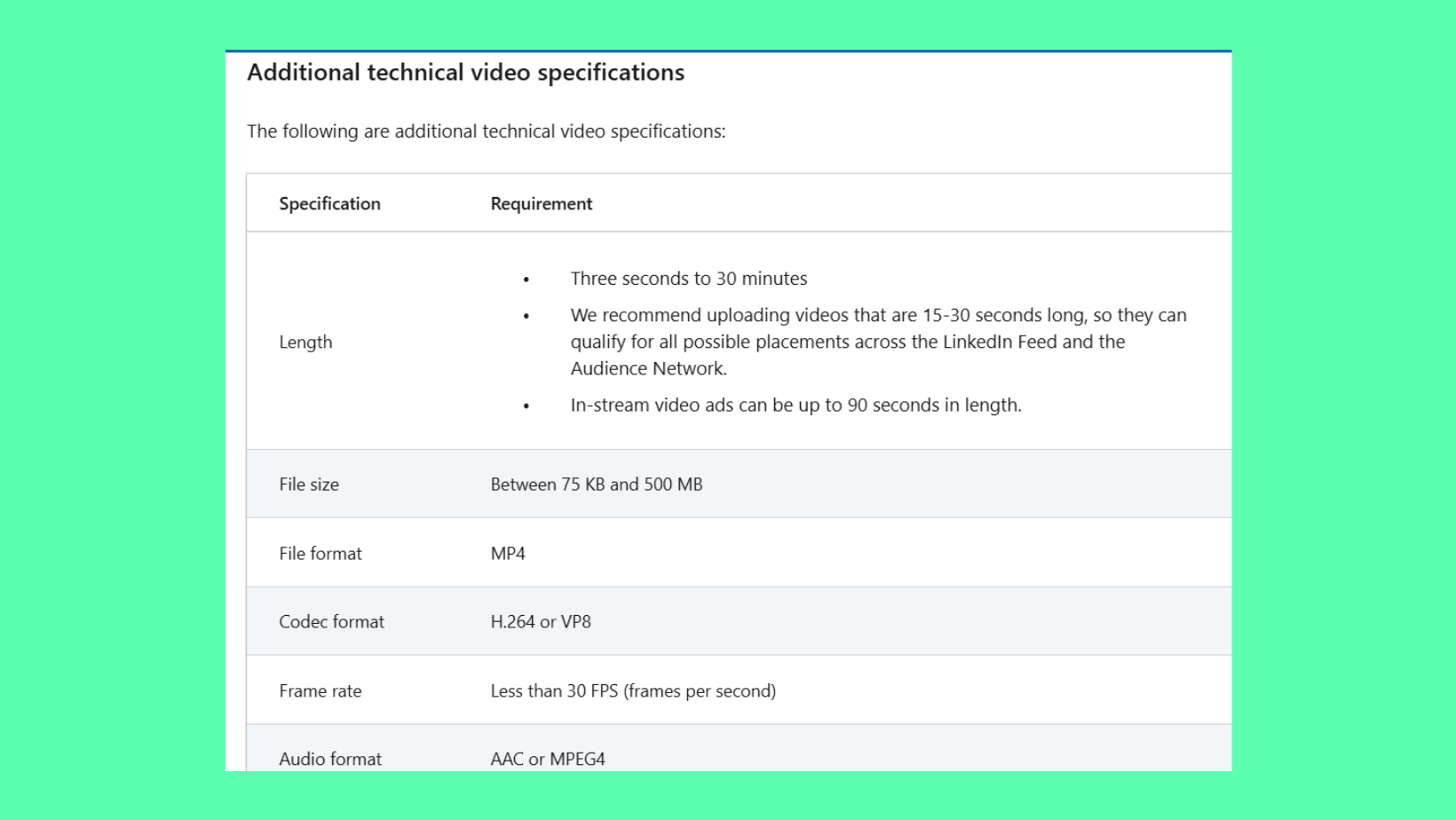
- LinkedIn organic video: 3 seconds–10 minutes long, up to 5 GB, MP4 strongly recommended
- Practical sweet spot is under 200 MB — anything larger risks stalled processing and slower autoplay in feed
- LinkedIn video ad specs are stricter: 200 MB max file size, 15–30 seconds for best completion rates
- Vertical (9:16), square (1:1), and landscape (16:9) are all supported — taller formats win more scroll-stopping real estate on mobile
- LinkedIn Live requires third-party software and pre-approval, but delivers 7× more reactions than pre-recorded video
- Skipping captions is the single most common engagement killer — over 80% of LinkedIn videos play on mute
Why So Many Creators Get LinkedIn Video Specs Wrong in 2026?
LinkedIn's video requirements are stricter and more fragmented than almost any other social platform — and the official documentation spreads the details across multiple help pages depending on whether you're posting organically, running ads, or going live. The most common failure mode is treating LinkedIn like YouTube or Instagram, where generous limits and forgiving compression are the norm. On LinkedIn, a video that uploads fine can still autoplay poorly, display at the wrong ratio, or stall in processing because of a codec mismatch — none of which produce a clear error message.
Getting specs right isn't just a technical checkbox. Wrong dimensions reduce the feed real estate your post occupies. Oversized files slow down autoplay in feed — the automatic silent playback that determines whether a viewer stops scrolling. And because LinkedIn's algorithm measures LinkedIn algorithm dwell time (how long a viewer lingers on your post), a technically broken video directly suppresses distribution before a single human decision is made.
The creators who consistently see strong video reach aren't producing better content — they're uploading it correctly. Spec errors are invisible to the creator and punishing to the algorithm.
LinkedIn Video Length Limit and File Size: The Numbers You Actually Need?
The linkedin video limit for personal feed posts is a minimum of 3 seconds and a maximum of 10 minutes. The linkedin video file size limit sits at 5 GB — technically generous, but practically a trap. Uploading a 4 GB file against a slow connection creates processing delays that delay autoplay, and LinkedIn sometimes serves a broken thumbnail in the meantime.
The linkedin video upload limit on accepted formats is broader than most creators realise. Accepted containers include:
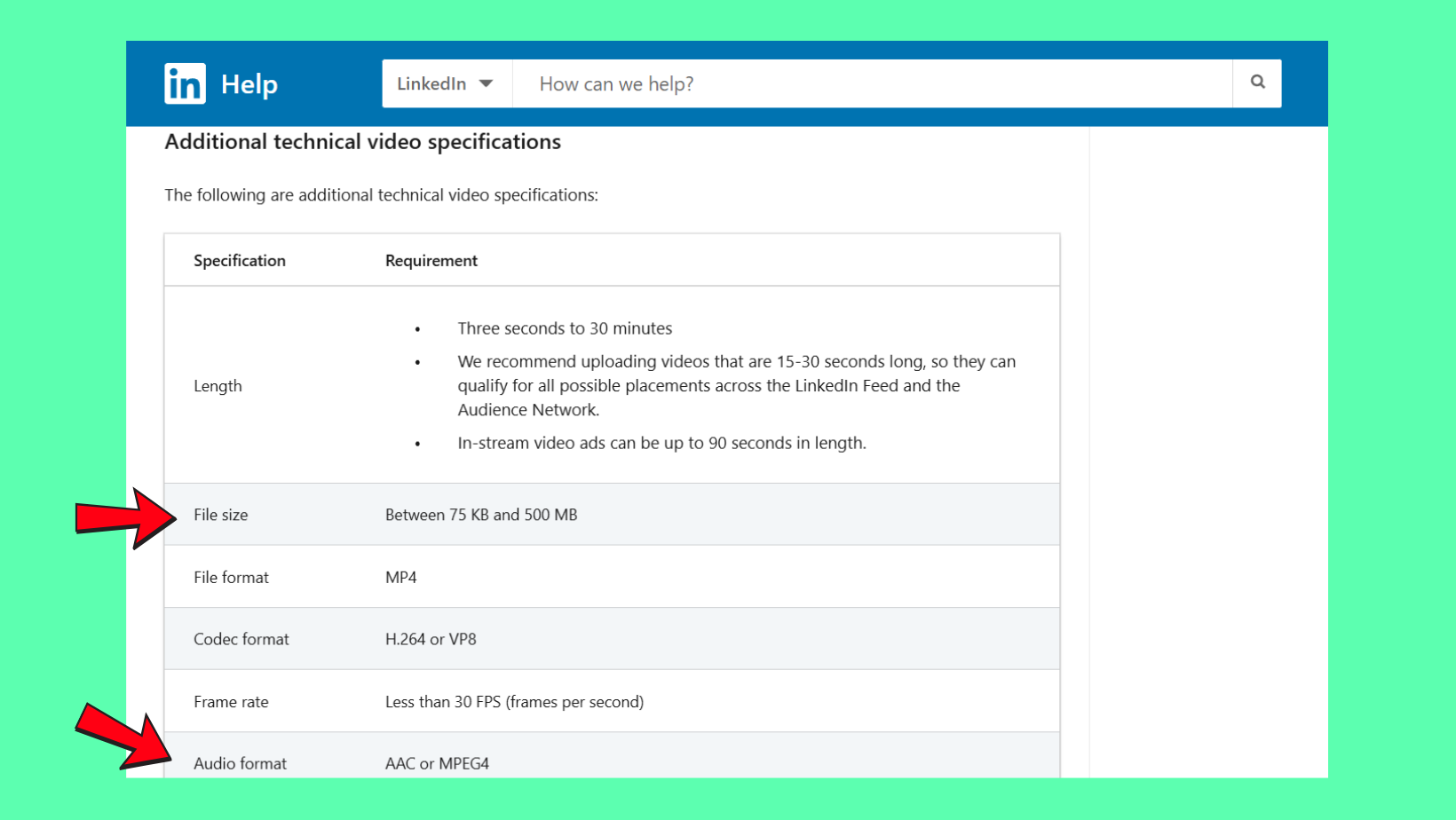
- MP4 — safest, most consistent processing
- MOV, AVI, MKV, WebM, FLV, ASF, MPEG-1, MPEG-2, MPEG-4
In practice, every non-MP4 format carries some risk of processing failure, especially on longer files. Use MP4 with H.264 encoding as your default. Think of it as the lingua franca of video — LinkedIn's servers speak it natively.
Is a 3-Minute Video Too Long? What the Data Says About LinkedIn Video Length and Engagement
Three minutes is not too long — but it requires a strong hook in the first 3–8 seconds. Video engagement drop-off rate on LinkedIn is steepest between seconds 8 and 30; viewers who pass that threshold tend to watch significantly further. Teams that front-load value in the first 10 seconds consistently see lower drop-off across the entire video. For most educational or thought-leadership content, 1–3 minutes is the practical sweet spot. Beyond 5 minutes, completion rates fall sharply unless the content is a structured tutorial or event recording with a pre-committed audience.
LinkedIn Video Specs: Size Ratio, Dimensions, and Vertical Video?
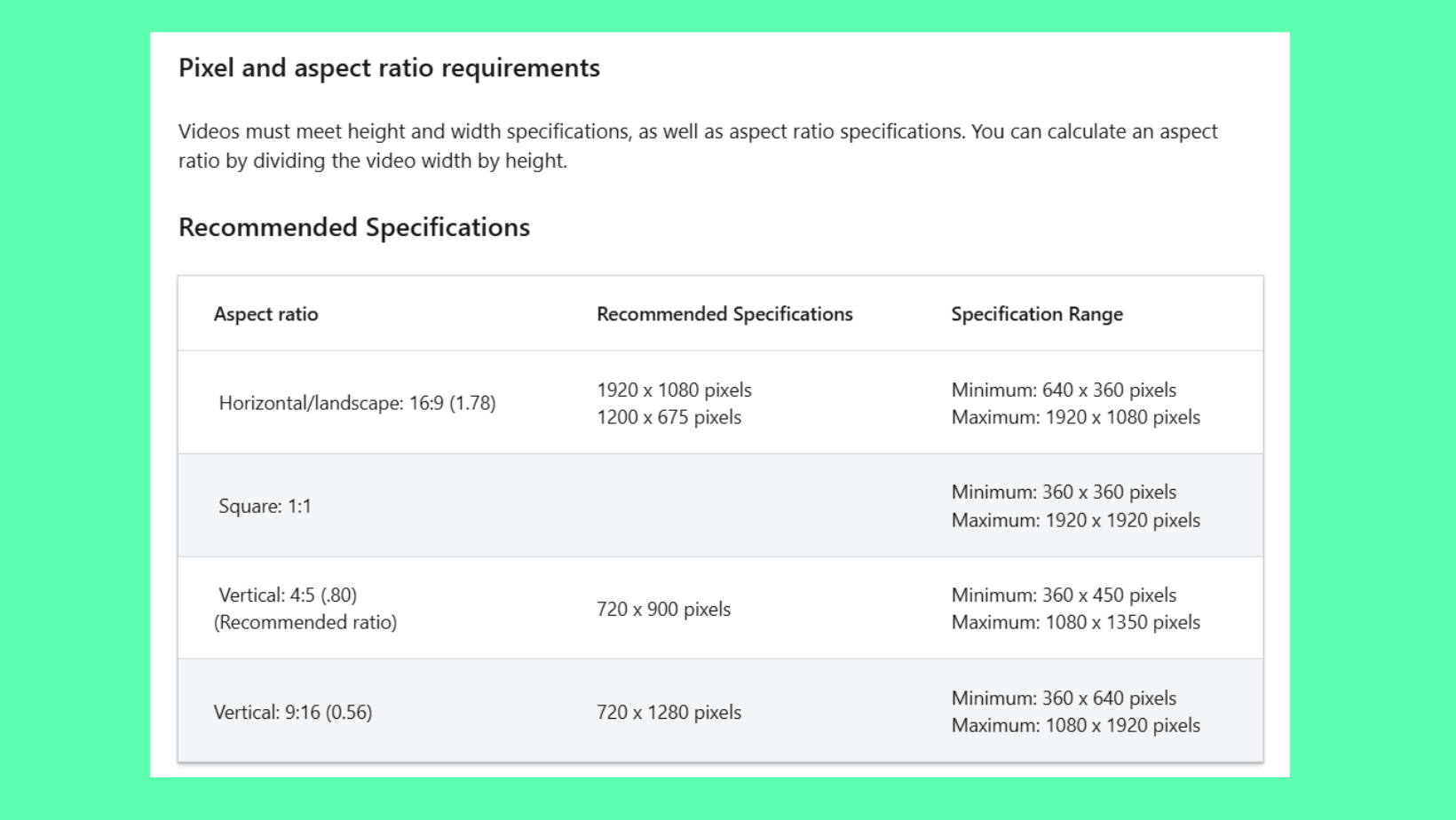
Accepted linkedin video size ratio options cover four aspect ratios: 1:1 (square), 16:9 (landscape), 4:5 (portrait), and 9:16 (vertical). The linkedin vertical video size — 1080×1920 pixels — is now fully supported in the mobile feed after LinkedIn expanded its vertical format support in 2023. This matters because over 60% of LinkedIn sessions happen on mobile, where taller formats occupy significantly more visible screen space before the user scrolls.
Here are the video dimensions for linkedin by format:
| Format | Aspect Ratio | Recommended Resolution | Best For |
|---|---|---|---|
| Landscape | 16:9 | 1920×1080 | Tutorials, presentations, desktop viewers |
| Square | 1:1 | 1080×1080 | Feed posts, cross-platform repurposing |
| Vertical | 9:16 | 1080×1920 | Mobile-first content, short clips |
| Portrait | 4:5 | 1080×1350 | Talking head, testimonials |
See also: LinkedIn banner size specs and examples for how dimensions affect other profile elements alongside your video posts.
Vertical vs. Landscape vs. Square: Which Ratio Actually Performs Better?
What separates top performers here is format-to-placement matching, not a single "best" ratio. Vertical (9:16) earns the most feed real estate on mobile and tends to drive higher early engagement for short, punchy clips. Square (1:1) performs most reliably across both mobile and desktop without cropping. Landscape (16:9) remains the standard for webinar replays or structured tutorials where the viewer has already committed to watching. Creators who skip the mobile preview step before publishing often find their carefully composed 16:9 video appears as a small rectangle on phones, losing the scroll-stopping impact entirely.
LinkedIn Ad Video Specs: What's Different from Organic Posts?
The linkedin ad video specs follow a completely separate ruleset from organic posts — and confusing the two is one of the most common campaign launch failures observed across advertisers. The linkedin video ad size maximum drops to 200 MB (versus 5 GB organically), and the maximum video length for Sponsored Content video ads extends to 30 minutes — though that ceiling is essentially irrelevant, since 15–30 seconds drives the best completion rates in paid placements.
Organic Video vs. LinkedIn Video Ads: A Side-by-Side Spec Comparison
| Spec | Organic Post | Video Ad (Sponsored Content) |
|---|---|---|
| Max Length | 10 minutes | 30 minutes |
| Max File Size | 5 GB | 200 MB |
| Min Resolution | 256×144 | 360p |
| Audio Required | No | Yes |
| Best Length | 1–3 minutes | 15–30 seconds |
For a deeper look at staying within LinkedIn's platform rules across all content types, the guide to avoiding LinkedIn account suspension and safe limits covers the broader compliance picture.
How LinkedIn Live Works: Setup, Requirements, and Whether It's Worth It?
Going live on LinkedIn requires two things most creators don't realise upfront: pre-approval from LinkedIn and a third-party streaming tool. LinkedIn Live is not a native in-app broadcast button — it's an RTMP-based system that pushes a stream from external software into the LinkedIn feed.
How to do a LinkedIn Live in practice:
- Apply for LinkedIn Live access via the LinkedIn Creator Hub — approval typically takes 2–5 business days
- Set up a streaming tool: StreamYard, Restream, or OBS Studio are the most commonly used options
- Generate your RTMP stream key from LinkedIn's broadcast settings
- Connect the stream key to your chosen software and configure video/audio inputs
- Go live — the live stream on LinkedIn notification pushes to your followers in real time
Does LinkedIn Live work for engagement? The numbers say yes clearly. According to LinkedIn Engineering Blog data (2023), live videos average 7× more reactions and 24× more comments than pre-recorded uploads. This means a live broadcast with 200 viewers will routinely outperform a polished pre-recorded video seen by 2,000. The algorithmic priority LinkedIn gives to live streams — pushing real-time notifications to followers — is the primary driver of that gap.
Want your LinkedIn videos to get more traction after uploading?
HyperClapper connects your posts with real engagement groups — real people who like, comment, and keep your video active in the feed when early engagement matters most.
See How HyperClapper WorksCommon LinkedIn Video Mistakes That Kill Reach (And How to Fix Them)?
After seeing this pattern across high-volume LinkedIn accounts, the most consistent reach killers are not bad content — they are preventable upload errors.
- Linking to YouTube/Vimeo instead of native video upload: Linked videos do not autoplay in feed and receive significantly less algorithmic distribution — LinkedIn treats external links as traffic it loses, not gains.
- Skipping captions: Over 80% of LinkedIn videos are watched on mute (LinkedIn Marketing Solutions, 2024). No captions means the majority of viewers bounce before the 10-second mark, and the resulting dwell time signal suppresses further distribution.
- Over-compressing files: Crushing bitrates below 1 Mbps produces blurry thumbnails and choppy playback. This erodes credibility immediately — creators who do this typically notice their video underperforms despite technically uploading successfully.
- Wrong ratio for placement: Posting a 9:16 vertical video into an organic post without checking the mobile preview first often results in unexpected cropping or letterboxing that makes the video look amateurish.
How to Boost LinkedIn Video Performance After Uploading
Getting the video specs for linkedin right gets you into the game — what happens in the first 60–90 minutes after posting decides your ceiling. LinkedIn's algorithm evaluates early engagement velocity to determine whether to push the post to second-degree connections. Tools like HyperClapper address this directly by connecting posts with real engagement channels — groups of real users who engage with content, producing the early signal LinkedIn uses to widen distribution. For anyone relying on growing their LinkedIn connections through content, that early window is the highest-leverage point in the entire process.
The video spec checklist is table stakes. The real variable is whether the post earns enough early engagement to escape your immediate network — and that's determined in the first hour, not by the upload settings.
✓ LinkedIn Video Upload Checklist
- ☐File format: MP4 with H.264 encoding
- ☐File size: under 200 MB for smooth processing
- ☐Frame rate: 30 fps; bitrate: 1–5 Mbps
- ☐Aspect ratio confirmed against intended placement (organic vs. ad)
- ☐Captions added (SRT file or burned-in text)
- ☐Mobile preview checked before publishing
- ☐Native upload used — not a YouTube or Vimeo link
For creators who also download and repurpose video content from LinkedIn, the LinkedIn video downloader Chrome extension guide and HyperClapper's video downloader make that workflow straightforward.
Frequently Asked Questions About LinkedIn Video Specs
Is a 3-minute video too long for LinkedIn?
No — 3 minutes is within the effective range for educational and thought-leadership content. The critical variable is the hook: viewers who don't engage in the first 8–10 seconds rarely reach the 3-minute mark. Front-load your key insight and 3 minutes becomes entirely watchable.
Can I post a 4–5 minute video on LinkedIn?
Yes, LinkedIn's video length limit allows up to 10 minutes for organic posts. A 4–5 minute video works well for structured tutorials or event recaps where the audience has pre-existing interest. Expect lower average completion rates than shorter clips unless the content is highly targeted.
Can you post a 10-minute video on LinkedIn?
Yes. The maximum organic video length on LinkedIn is exactly 10 minutes. In practice, 10-minute videos perform best for webinar highlights or deep-dive content with an already engaged audience — they require a compelling title and strong thumbnail to earn the commitment from cold viewers.
What is the LinkedIn video file size limit?
The linkedin video size limit for organic posts is 5 GB. For video ads, it drops to 200 MB. Even for organic posts, staying under 200 MB is the practical recommendation — larger files process more slowly and can delay or disrupt autoplay in the feed.
What aspect ratio should I use for LinkedIn video?
For mobile-first content, 9:16 vertical or 1:1 square are the strongest choices — both occupy more feed space on phones where most LinkedIn browsing happens. For desktop-heavy audiences or presentations, 16:9 landscape remains appropriate. Always check the mobile preview before publishing.
Do I need special access to go live on LinkedIn?
Yes. LinkedIn Live requires pre-approval through the LinkedIn Creator Hub — you cannot simply start streaming. Once approved, you'll need a third-party tool (StreamYard, Restream, or OBS) and an RTMP stream key from LinkedIn's broadcast settings. Approval typically takes 2–5 business days.
What happens if I upload the wrong video format to LinkedIn?
LinkedIn will either reject the upload outright or process it with degraded quality — blurry playback, broken thumbnails, or silent audio are the most common symptoms. MP4 with H.264 encoding avoids this entirely. Non-standard formats like ASF or FLV carry the highest rejection risk.



