Your Complete Guide to LinkedIn Private Mode Risk Management
Learn how LinkedIn private mode works, what you actually lose by going anonymous, and how to manage privacy settings without hurting your professional visibility.
📅 ⏱ 16 min read📝 ~3000 words
LinkedIn private mode is a profile visibility setting that hides your identity when you view other people's profiles — the person you visit sees "LinkedIn Member" instead of your name. A pattern observed consistently across LinkedIn users is that most believe private mode works like browser incognito: invisible to everyone, everywhere. It doesn't. LinkedIn still logs every visit internally; only the visited person loses your identity data. That distinction matters enormously for how you manage your professional reputation and visibility strategy.
Key Takeaways
Private mode ≠ incognito: LinkedIn tracks your browsing internally — only the profile owner loses your name.
Three visibility settings exist — full, semi-private, and fully private — and most users only use the extremes.
Going fully private has real costs: you lose your own viewer list (free plan), inbound connection triggers, and algorithmic discovery signals.
Free vs. Premium gap: Premium users browsing privately still see who viewed them; free users lose that reciprocity entirely.
Best default for most professionals: semi-private mode for research, full visibility when actively networking or posting.
Counterintuitive finding: private mode can actively hurt passive job seekers by cutting off inbound recruiter outreach triggered by profile views.
What Is LinkedIn Private Mode and How Does It Actually Work?
LinkedIn Private Mode
LinkedIn private mode — also called anonymous profile browsing — replaces your name and photo with "LinkedIn Member" on the profile viewer list of anyone whose profile you visit. LinkedIn offers three profile visibility settings, not two:
Full visibility: Your full name, headline, and photo appear in the viewer's "Who Viewed Your Profile" list.
Semi-private: Only your general characteristics appear — job category, industry, and general location — without identifying you by name.
Fully private (private mode): No information about you is shown. You appear as "LinkedIn Member."
Most guides skip the middle option entirely. Semi-private mode is one of the most underused settings on the platform — and often the smartest choice.
Here is the critical mechanism to understand: when you browse in private mode, LinkedIn still records your visit on its own servers. The anonymity is one-directional. The person you viewed cannot identify you, but LinkedIn's systems know exactly who visited and when. This is fundamentally different from browser incognito mode, which prevents your browser from storing data locally. Private mode in LinkedIn is about what the other person sees — not about what LinkedIn itself tracks.
One important operational detail: private mode settings persist until you manually toggle them off. LinkedIn does not automatically reset your visibility after a session. A recurring pattern among professionals trying to manage this is that they enable private mode for a research session, forget to switch back, and unknowingly browse anonymously for days or weeks — silently missing inbound connection triggers the entire time.
⚠️
Warning:Private mode does not reset between sessions. If you enable it for competitive research and forget to disable it, you will silently lose inbound connection triggers from profile views for as long as it stays on — potentially for weeks.
Free vs. LinkedIn Premium: Private Mode Differences That Matter
The free-versus-Premium distinction here is sharper than most users realise:
Free accounts: If you browse in private mode, you lose access to your own "Who Viewed Your Profile" list entirely. LinkedIn enforces strict reciprocity — you can't stay anonymous and see who viewed you at the same time.
LinkedIn Premium: Premium users can browse in private mode AND still see who viewed their profile. This is one of the most meaningful privacy advantages of upgrading. LinkedIn Premium private mode features effectively let you research one-way without losing visibility data on your end.
Sales Navigator and Recruiter accounts: These tiers have their own visibility nuances. Sales Navigator users browsing privately lose some of the "viewed your profile" signals that drive warm outreach — a significant cost for social selling workflows.
How to Turn On (and Off) LinkedIn Private Mode — Desktop and Mobile
Knowing how to turn on LinkedIn private mode takes under a minute on either platform. Here are the exact steps for both.
Desktop (browser):
Click your profile photo in the top navigation bar.
Select Settings & Privacy from the dropdown.
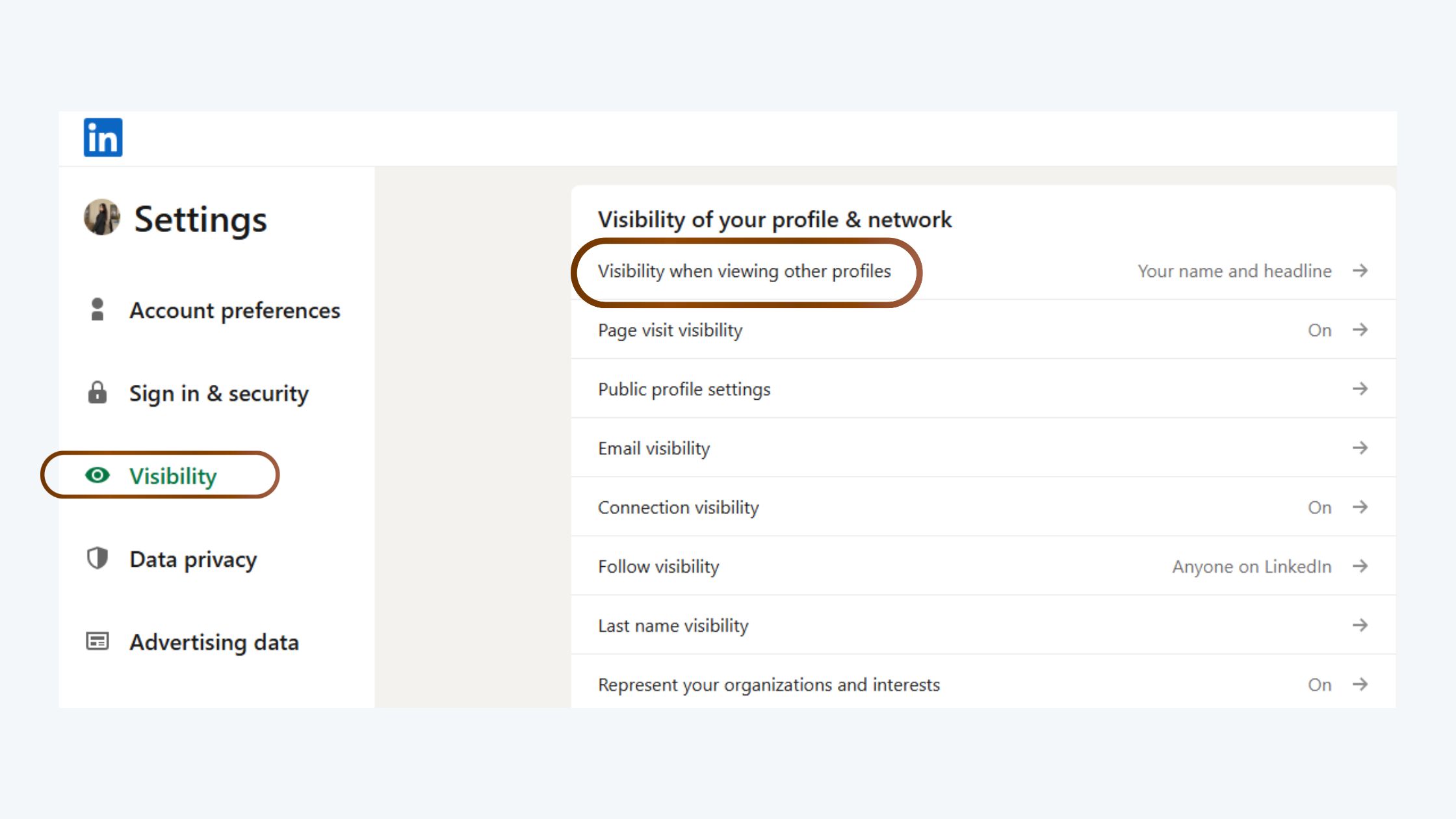
Go to Visibility → Profile viewing options.
Select Private mode (or semi-private if you prefer partial anonymity).
Click Save. The setting activates immediately.
Mobile (iOS and Android) — how to enable private mode on LinkedIn:
Tap your profile photo in the top-left corner of the LinkedIn app.
Tap View Profile, then the pencil/edit icon.
Scroll to find Settings (or tap the gear icon directly from the home feed).
Tap Visibility → Profile viewing options.
Select your preferred visibility level and confirm.
To turn off LinkedIn private mode, follow the same path and reselect Your name and headline (full visibility). This is the step most guides miss entirely — and it's the one that matters most once you switch from research mode to active networking.
💡
Pro Tip:Bookmark the LinkedIn Settings > Visibility page directly. Toggling private mode takes 10 seconds when you know the exact path — making it practical to switch modes before and after research sessions rather than leaving it permanently on.
Now that you know how the setting works mechanically, the more important question is what it actually costs you when you use it.
LinkedIn Private Mode Risks: What You Actually Lose by Going Anonymous
LinkedIn Private Mode Risks
LinkedIn private mode risks are real and often underestimated. The core trade-off is straightforward: LinkedIn profile views hidden in private mode means the person you viewed cannot identify you — but that anonymity cuts both ways, removing signals that would have driven inbound interest toward your own profile.
Here is what you specifically lose when you enable private mode:
Your own "Who Viewed Your Profile" data (free plan only — Premium retains this)
Inbound connection triggers — profile views frequently prompt the viewed person to visit your profile back and connect
Algorithmic discovery signals — LinkedIn's feed algorithm uses profile engagement, including views, as a signal for content distribution
The "viewed your profile" nudge — one of the highest-converting passive outreach mechanisms on the platform
The most underappreciated cost of LinkedIn private mode is not what you hide from others — it is the organic inbound pipeline you silently switch off for yourself.
Can Recruiters See You in Private Mode? The Honest Answer
Can recruiters see you in private mode LinkedIn? No — a recruiter viewing their "Who Viewed Your Profile" list will see only "LinkedIn Member" if you browsed their profile in private mode. They cannot identify you, contact you based on that visit, or add you to a candidate pipeline from that signal alone.
This is a significant LinkedIn private mode job searching consideration. Passive candidates often assume that browsing company pages or recruiter profiles anonymously is risk-free. It is — but it's also opportunity-free. Recruiters who notice a profile view from a relevant professional frequently reach out. In private mode, that outreach never happens. You've researched them; they don't know you exist.
Does Private Mode Affect Your LinkedIn Visibility and Post Engagement?
Does private mode affect the LinkedIn algorithm? Not directly — your published posts are distributed based on their own engagement signals, not your browsing mode. However, the indirect effect is measurable. Profile views generate reciprocal profile traffic, and that traffic can translate into follows, connection requests, and post engagement over time. Browsing anonymously quietly removes that compounding discovery loop. Does LinkedIn private mode affect your visibility on posts? Your content reach itself is unaffected — but the profile-to-content discovery path, where someone visits your profile and then sees your posts in their feed, is shortened.
Understanding these costs doesn't mean private mode is the wrong choice — it means you need to choose it deliberately, not by default.
LinkedIn Private Mode vs. Public Browsing: When Each Option Actually Makes Sense
The right setting depends entirely on what you're trying to accomplish. LinkedIn private mode vs public browsing is not a binary better/worse comparison — it's a tool-to-job match.
Goal
Recommended Mode
Reason
Competitive research
Private mode
Avoid signalling intent to competitors
Active networking / personal branding
Full visibility
Profile views drive reciprocal connections
Passive job searching (employed)
Private or semi-private
Avoid alerting current employer connections
Active job searching (unemployed)
Full visibility
Maximise inbound recruiter discovery
Sales prospecting / research
Semi-private
Partial signal without full exposure
Content publishing + active engagement
Full visibility
Every profile visit is a potential follower
When to turn off LinkedIn private mode is the decision most guides don't address. The answer: the moment you shift from passive research to active outreach or content publishing. Switching back to public mode before posting content means every person who engages with your post and then visits your profile sees a complete, visible identity — and that visit loop can compound into followers and connections over time.
Is LinkedIn private mode worth it? For competitive intelligence, due diligence research, or sensitive job exploration while employed — yes, absolutely. As a permanent default setting for any professional trying to grow their presence — rarely. The visibility cost outweighs the privacy benefit in most networking-forward use cases.
Common Mistakes to Avoid With LinkedIn Privacy Settings
🔴
Avoid:Leaving private mode on permanently "just in case." This is the single most common misuse pattern — professionals enable it once, forget about it, and quietly lose weeks of inbound visibility signals without realising it.
Treating private mode as a full privacy shield — LinkedIn's internal data is unaffected; only the visited person is kept in the dark.
Using full private mode instead of semi-private for research — semi-private preserves some discovery signal at almost zero cost.
Forgetting to switch back after a research session — set a phone reminder if needed.
Assuming private mode blocks third-party tools — some premium analytics platforms surface aggregated viewer signals even when individual identities are masked. Third-party tools cannot reveal your name directly, but aggregate behavioural patterns can sometimes narrow down anonymous visitors in small networks.
Protecting Your Visibility While Staying Anonymous: Practical Risk Management Strategies
Protecting Your Visibility
The smartest approach to LinkedIn anonymous browsing risks is not to avoid private mode — it's to use it with a deliberate toggle strategy rather than a permanent setting. What separates professionals who manage this well from those who don't is almost always the same thing: they treat private mode as a temporary research state, not a passive identity shield.
The Research-Publish Toggle Method is the practical framework that resolves most of the risk:
Before a research session: Enable private mode (or semi-private for lower stakes research).
Complete your research batch — competitor profiles, target accounts, recruiter pages.
Before posting content or starting outreach: Switch back to full visibility.
Engage actively — your profile views during this window generate maximum reciprocal discovery.
Repeat the cycle based on your weekly workflow, not on a "set and forget" basis.
On the ethical side: LinkedIn anonymous browsing is entirely legal and within LinkedIn's terms of service — the platform explicitly provides the feature. In most professional contexts, anonymously researching a peer or competitor is neutral behaviour. The ethical consideration arises mostly in small communities where patterns of anonymous visits can be inferred even without identity data — something to be aware of in tight-knit industry niches.
Maintaining Post Engagement and Reach While Using Private Mode
Here's the practical reality: does private mode affect LinkedIn algorithm for your content? Your post distribution is driven by engagement signals on the post itself — reactions, comments, shares, dwell time — not by your profile viewing behaviour. Private mode does not reduce your post reach directly.
What it does affect is the discovery loop: someone sees your post → visits your profile → follows you → sees future posts. When you're browsing anonymously, you don't generate the reciprocal leg of that loop. For creators actively trying to grow an audience, keeping full visibility on during content-active periods is the higher-leverage choice.
Tools like HyperClapper address the content reach side of this equation directly — by connecting your posts with real engagement communities (channels) that generate authentic likes, comments, and conversation depth. This means your post performance stays strong regardless of what your profile viewing settings are doing. If you're in a research-heavy phase with private mode enabled, HyperClapper's real community engagement ensures your content continues building momentum without requiring you to be visible at the profile level simultaneously. You can explore how private mode and engagement strategy intersect in more detail.
Keep Your Posts Performing While You Research in Private
HyperClapper's real engagement channels keep your LinkedIn content active and visible — even when your profile is in research mode.
Frequently Asked Questions About LinkedIn Private Mode
Is LinkedIn Private Mode Actually Private?
Partially. Private mode hides your identity from the person whose profile you viewed — they see "LinkedIn Member" instead of your name. However, LinkedIn itself still logs the visit internally. It is not equivalent to browser incognito mode. Your activity remains visible to LinkedIn's own systems, just not to other users.
Can Someone See If I Viewed Their Profile in Private Mode?
No — they cannot see your name, photo, or any identifying information. Their "Who Viewed Your Profile" list will show an anonymous "LinkedIn Member" entry. However, third-party analytics tools cannot directly identify you either, though they may detect patterns in small networks where anonymous visitors can sometimes be inferred from timing or behaviour.
Can I See Who Viewed My LinkedIn Profile If They Are in Private Mode?
No. If someone viewed your profile in private mode, you will see only "LinkedIn Member" on your viewer list — no name, no headline, no photo. LinkedIn Premium does not change this for the person being viewed. Even Premium members cannot unmask anonymous visitors to their own profile.
How Do I Put LinkedIn in Private Mode?
On desktop: go to Settings & Privacy → Visibility → Profile viewing options → select Private mode. On mobile: tap your profile photo → Settings → Visibility → Profile viewing options. The setting activates immediately and stays on until you manually change it back — it does not reset automatically between sessions.
What Are the Risks of Using LinkedIn Private Mode for Job Seekers?
The primary risk is cutting off passive inbound recruiter outreach. Recruiters who notice a relevant profile view frequently reach out to that person — in private mode, that trigger disappears. For employed professionals researching quietly, the trade-off is often worth it. For active job seekers who need maximum visibility, private mode typically costs more than it protects.
Does Using LinkedIn Private Mode Reduce Profile Views or Engagement on My Posts?
Private mode does not directly reduce post reach — LinkedIn's content algorithm runs on post engagement signals, not browsing mode. However, it removes the profile-view discovery loop where someone visits your profile after seeing your content and then follows you. Over time, this can slow audience compounding for creators who browse anonymously by default.
How Do I Use LinkedIn Private Mode Without Hurting My Personal Brand?
Use the Research-Publish Toggle Method: enable private mode only during dedicated research sessions, then switch back to full visibility before posting content or starting outreach. This preserves your professional visibility during the periods that matter most while still giving you anonymity for competitive research. Semi-private mode is also a useful middle ground — it hides your name but preserves some industry-level signal.
If I Browse LinkedIn in Private Mode, Can the Person Whose Profile I Viewed Know I Was There?
Not through LinkedIn's native tools — they see only "LinkedIn Member." No third-party tool can directly unmask your identity either, since LinkedIn does not expose that data via its API. In very small professional networks, some users attempt to infer anonymous visitors by timing and context, but this is educated guesswork rather than a reliable identification method.
Teams that manage LinkedIn privacy settings intentionally — toggling between modes based on their current goal — consistently see better outcomes than those who treat private mode as a permanent setting. The setting itself is not the variable. How deliberately you use it is.
Ready to Grow Your LinkedIn Presence Beyond Profile Views?
HyperClapper's real engagement channels, AI-powered replies, and post boosting help you build consistent LinkedIn visibility — regardless of your privacy settings.
☐Decide your default mode based on current goal: researching → private/semi-private; networking/posting → full visibility
☐Confirm your current setting before each LinkedIn session (Settings → Visibility → Profile viewing options)
☐Switch to full visibility before publishing any LinkedIn post or starting an outreach campaign
☐If on a free plan: confirm whether private mode has disabled your "Who Viewed Your Profile" access
☐Consider semi-private mode as a default research setting — it's a better balance than fully anonymous for most use cases
☐If on LinkedIn Premium or Sales Navigator, verify that private browsing doesn't conflict with your Sales Navigator warm lead workflows
☐Supplement profile-level visibility with post-level engagement (real reactions and comments) so your content reach doesn't depend solely on profile browsing signals
👋
⚡ Free plan
Leaving already?
Grab 3 free boosts on your next LinkedIn post — real likes & comments from 5,000+ creators. No card, cancel anytime.