LinkedIn Connection Request Limits: Ignore These and Get Restricted
LinkedIn connection request limits explained for 2026: weekly caps, SSI score impact, recovery from restrictions, and smart outreach strategies that outperform mass sends.
📅 ⏱ 19 min read📝 ~3700 words
The LinkedIn connection request limit is not a single fixed number — it is a dynamic ceiling that shifts based on your account age, acceptance rate, SSI score, and recent activity. A pattern consistently observed across outreach campaigns is that professionals who treat the limit as a hard cap of "100 per week" routinely trigger restrictions they never see coming, while those who understand its behaviour-dependent nature scale without incident. According to LeadLoft (2026), most accounts sit in the 100–200 weekly request range — but the operative word is most. New accounts, low-SSI profiles, and anyone with a high proportion of unanswered invites can find their effective ceiling at 20–30 per week. Knowing the mechanics is the first step to using them strategically.
Key Takeaways
The weekly limit is 100–200 requests — not a fixed number; it scales with your account trust score, SSI, and acceptance history.
There is no published daily limit, but algorithmic throttling kicks in well before you hit weekly caps — especially on new accounts.
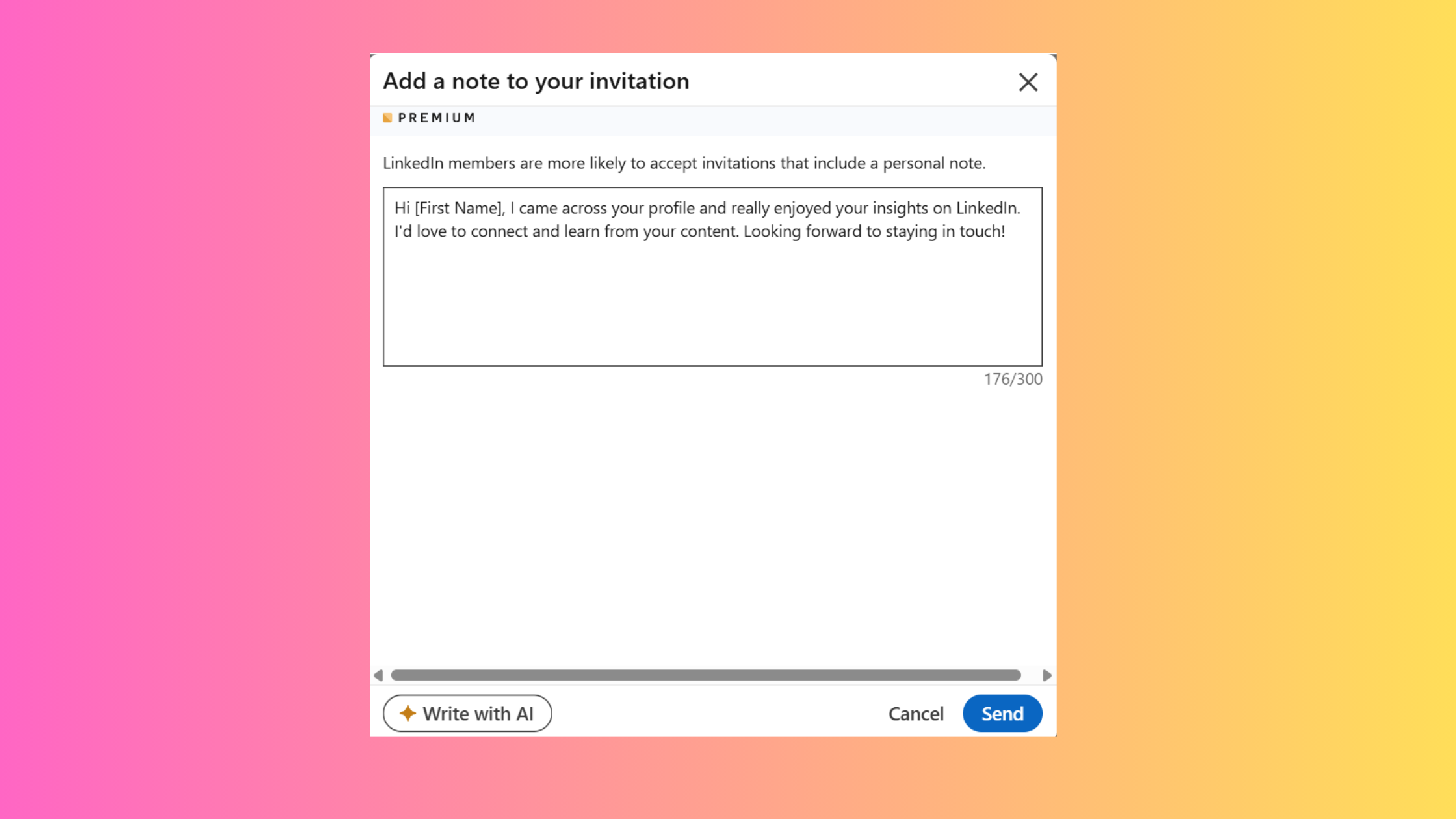
Free accounts get roughly 5 personalised notes per month; the note itself is capped at 300 characters.
Smart outreach beats mass requests — a 60% acceptance rate on 50 targeted sends outperforms a 10% rate on 200 cold blasts, and actively improves your future limits.
Restrictions range from 24-hour soft blocks to indefinite holds — recovery requires withdrawing pending invites, pausing outreach, and improving your SSI score.
The 30,000 connection cap is a lifetime ceiling — once hit, visibility through content and followers becomes the primary growth lever.
LinkedIn Connection Request Limit in 2026: The Complete Breakdown
LinkedIn Connection Request Limit in 2026
The core LinkedIn connection request limit sits at roughly 100–200 invitations per week, as confirmed by Wandify's 2026 limits guide. That range matters: the difference between 100 and 200 is not arbitrary — it reflects LinkedIn's algorithmic assessment of your account's trustworthiness. Fresh accounts, profiles with thin activity, and anyone who has accumulated a backlog of unanswered invites typically land at the lower end.
Weekly Invite Limit vs Daily Throttling: How LinkedIn Actually Counts
LinkedIn does not publish a hard daily cap — but its algorithm paces requests within the week. Sending 80 invitations in a single day when your weekly allowance is 100 will trigger throttling far sooner than spreading those same 80 across five days. Think of the weekly limit as a budget, and the daily pacing as LinkedIn's way of checking whether you're spending it like a human or a bot. Accounts that spike their send volume in short bursts are flagged at the algorithmic level, often before hitting their nominal weekly ceiling.
Free Account vs Premium vs Recruiter Lite vs Full Recruiter: Limit Differences
Account Type
Weekly Connection Limit
Personalised Notes/Month
InMail Credits/Month
Best For
Free
~100 (SSI-dependent)
~5
0
Organic network building
Premium (Career/Business)
~150–200
Unlimited
5–15
Job seekers, individual sellers
Sales Navigator
~200 (higher trust threshold)
Unlimited
50
B2B prospecting, lead gen
Recruiter Lite
~200 (focused on InMail)
Unlimited
30
SMB hiring, single-seat recruiters
Full Recruiter (Corporate)
Higher (team-level quotas)
Unlimited
150+
Enterprise talent acquisition
The key distinction between Recruiter Lite and Full Recruiter is that corporate Recruiter seats operate under team-level outreach quotas, not individual account caps — making them a fundamentally different model. Most content online conflates the two, which is why advice aimed at solo recruiters is often useless for enterprise teams.
Company Pages vs Personal Profiles: Connection Limit Rules
LinkedIn Company Pages cannot send connection requests at all — they can only be followed. This is a hard platform rule, not a limit that scales with account quality. Outreach for lead generation and LinkedIn outreach strategy for lead generation must always originate from personal profiles. Company Pages contribute to visibility and inbound authority, but they play no role in direct connection-building. This distinction matters for agencies and sales teams who sometimes attempt to run outreach from branded pages and wonder why it simply does not work.
100–200
Weekly connection requests LinkedIn allows — but this range isn't fixed. Your SSI score, acceptance rate, and account age all determine where you fall within it.
Now that the tier differences are clear, the more important question is why LinkedIn restricts accounts far below these nominal ceilings — and what drives that decision algorithmically.
Why LinkedIn Throttles Your Requests Early — and What SSI Score Has to Do With It
LinkedIn's Social Selling Index
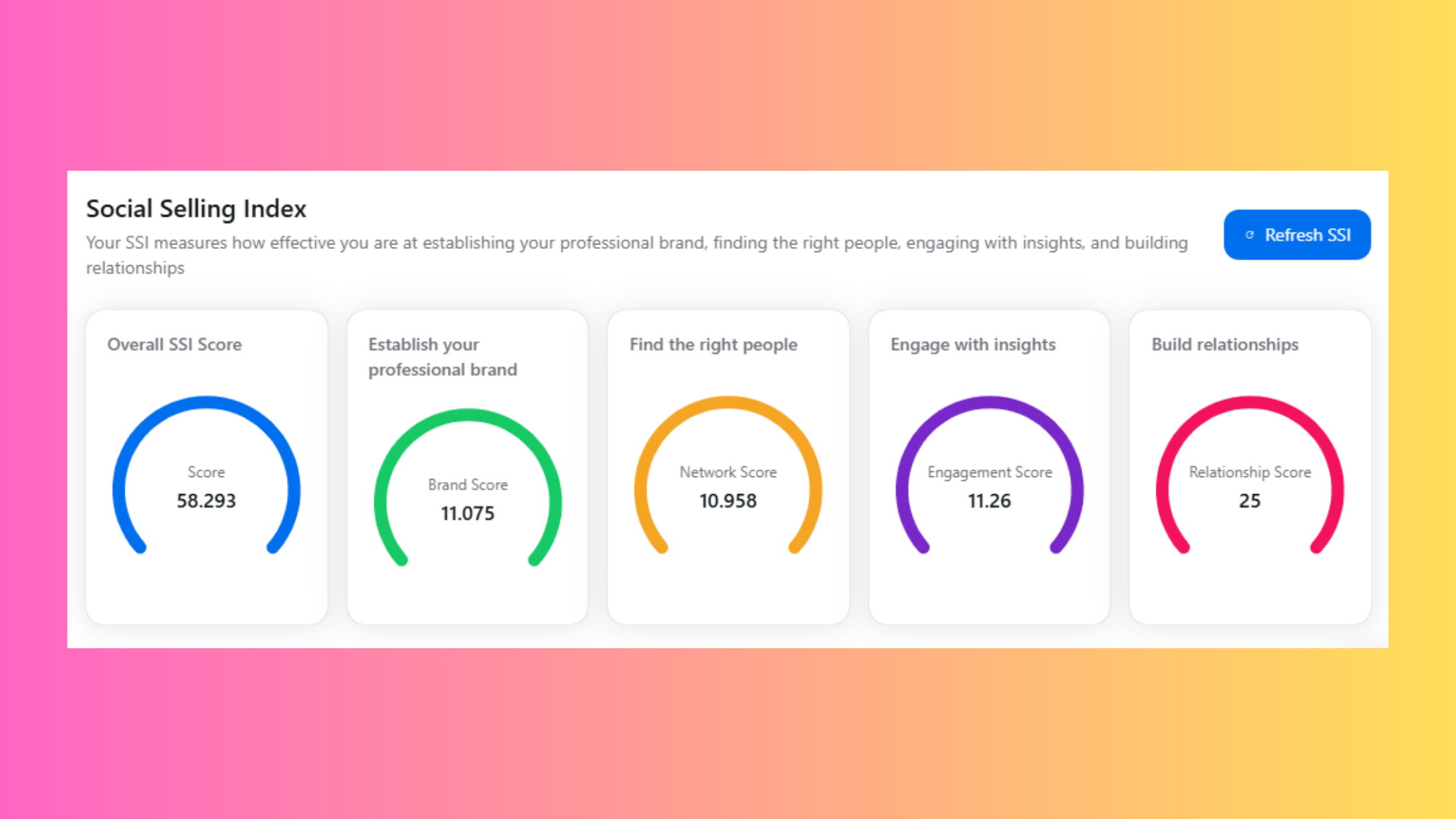
LinkedIn's Social Selling Index (SSI) — a score from 0–100 measuring profile strength, network quality, engagement activity, and relationship-building behaviour — directly influences how aggressively the platform throttles your outreach cadence. Accounts with SSI scores below 40 routinely see effective weekly limits of 20–30 requests, regardless of their account tier. Accounts above 70 typically operate close to the full 200-request ceiling. This is not documented anywhere in LinkedIn's official help centre, but it is a pattern observed consistently across high-volume outreach accounts.
The algorithm's trust logic is straightforward: if you engage with content, post regularly, have a complete profile, and receive responses to your invitations, LinkedIn treats you as a genuine networker. If you only send requests — especially to people who ignore them — it treats you as a potential spammer.
💡
Pro Tip:Check your SSI score for free at linkedin.com/sales/ssi. Improving it by 10–15 points through regular posting and engagement can meaningfully expand your effective weekly connection allowance within 4–6 weeks.
New account penalty periods typically last 4–8 weeks. Graduating out of them faster requires three specific behaviours — not just waiting:
Complete your profile to 100% (LinkedIn's own "All-Star" completeness level)
Post or engage with content at least 3x per week to build engagement history
Keep early invitation acceptance rates high by targeting only warm or highly relevant contacts first
Geographic and industry-specific throttling is a real but underreported factor. Accounts based in regions with historically high spam rates, or operating in industries like finance and recruiting that LinkedIn has flagged for aggressive outreach, face tighter algorithmic scrutiny — even at identical SSI scores to accounts in lower-risk categories.
Pending Invitation Management: How Unaccepted Requests Work Against You
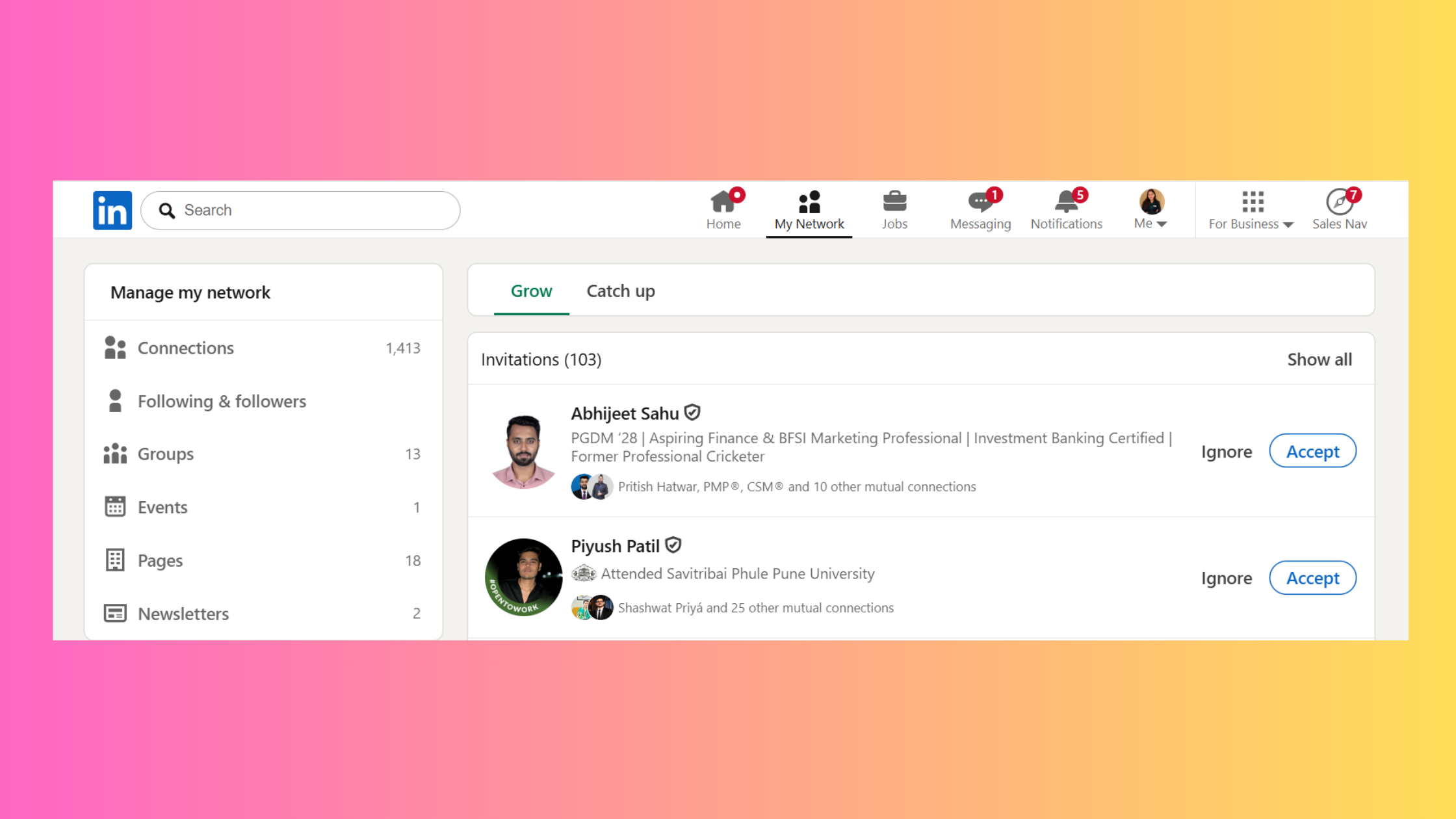
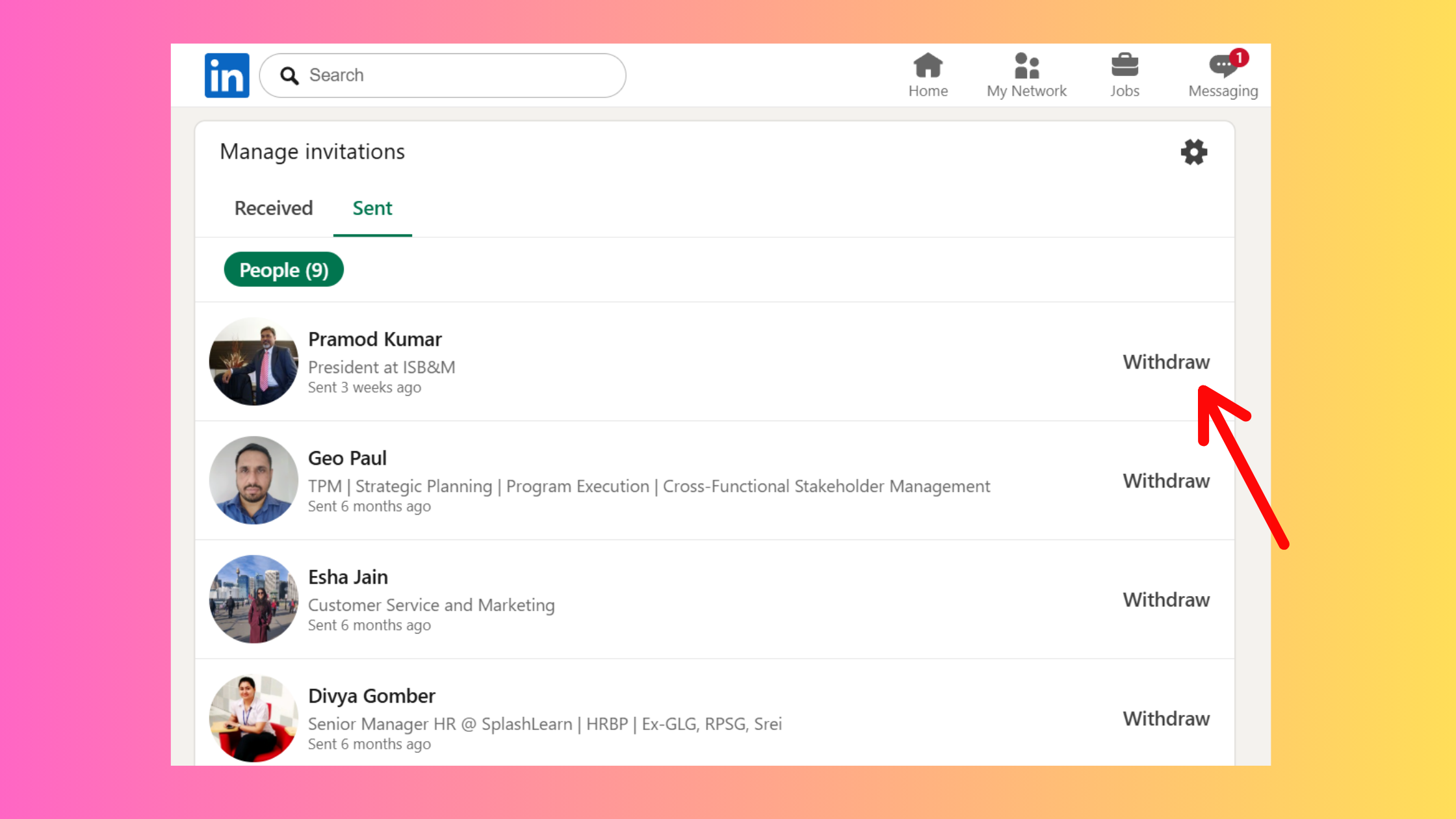
Pending invitations are a silent account health killer. According to LinkedAPI's 2026 connection limit guide, keeping your outstanding invitations below 500 is critical — the hard cap is 700, but exceeding 500 signals poor targeting to LinkedIn's algorithm and actively reduces your future sending capacity. The practical rule: if an invitation has gone unanswered for more than 3–4 weeks, withdraw it. This is the single most underused lever for restoring network growth velocity without needing to wait for a weekly reset.
The accounts that scale LinkedIn outreach without restrictions are not the ones sending the most requests — they are the ones managing their pending queue as actively as their new sends.
LinkedIn Account Restricted for Too Many Invites: Risks, Recovery, and How Long It Lasts
A LinkedIn account restricted for too many invites is not an immediate ban — but it is a serious account health flag that escalates with repeated offences. The first restriction is usually a 24-hour soft block, during which LinkedIn prevents you from sending new invitations. Ignore the warning and continue aggressive sending after it lifts, and the next restriction can be indefinite, requiring a formal appeal through LinkedIn's Help Center.
The question "does sending too many LinkedIn requests get you banned?" has a nuanced answer: LinkedIn rarely outright bans accounts purely for volume. What it does is progressively restrict and flag them — and a flagged account sees reduced algorithmic reach across everything, not just outreach. Your posts get less distribution. Your profile appears lower in search results. The damage compounds.
Recovery steps for a restricted account:
Withdraw Linkedin connection request all pending invitations sent to people who are unlikely to accept — reduce your pending queue below 200.
Pause all outreach activity for 7–14 days minimum.
Submit a formal appeal through LinkedIn's Help Center, explaining the context clearly (e.g., a campaign launch that triggered the spike).
During the pause, focus on improving your SSI score through posting and engagement.
Resume at 10–15 invitations per day maximum, ramping up gradually over 3–4 weeks.
⚠️
Warning:Restriction duration scales with repeat offences. A first restriction typically lasts 24–48 hours. A second or third can result in an indefinite hold that requires direct appeal — there is no guaranteed timeline for resolution once your account reaches that stage.
How to Bypass LinkedIn Connection Limits Safely (What Actually Works)
The phrase "how to bypass LinkedIn connection limit safely" is how many people phrase this search — but "bypass" is the wrong frame. What actually works is working within the system intelligently rather than around it. Effective approaches include:
Improving your SSI score to expand your effective ceiling organically
Managing your pending queue aggressively to signal good targeting behaviour
Using InMail (LinkedIn's paid direct-messaging feature) for high-priority contacts outside your connection threshold
Building inbound connection requests through high-visibility content — which bypasses the outbound limit entirely, since you are not the one sending
Warming up new accounts properly before running any structured campaign
The most sustainable bypass is visibility. When your content surfaces to the right audience and they send you the request, you face zero limit exposure. This is the inbound-led outreach model that consistently outperforms cold volume strategies over a 90-day horizon.
Smart Outreach Strategy vs Mass Connection Requests: Why Precision Wins for Lead Generation
Here is the number that reframes the entire debate: a 60% acceptance rate on 50 carefully targeted requests generates 30 new connections. A 10% acceptance rate on 200 spray-and-pray requests also generates 20 — but it also generates 180 ignored invitations sitting in your pending queue, dragging down your LinkedIn algorithm trust score and consuming your weekly allowance with zero return. The math favours precision every time.
What separates top-performing outreach campaigns from average ones is not volume — it is sequencing. The smart LinkedIn outreach cadence follows a consistent pattern:
Engage with the prospect's content (a like or a substantive comment) — 30 seconds, done 1–2 days before sending.
Send a personalised connection note referencing shared context (mutual connection, recent post, shared group).
After acceptance, wait 48–72 hours before sending a first message — don't pitch immediately.
Use InMail only as a premium escalation for high-value prospects who did not accept within 2 weeks.
🔴
Avoid:Pitching in your connection request note. It is the single fastest way to get "I don't know this person" reports — which directly damage your account trust score and reduce your future limits.
How to Personalized LinkedIn Connection Requests at Scale
Personalise LinkedIn Connection Requests
Personalisation at scale sounds contradictory, but the practical approach is template-plus-variable: build a base message referencing a shared signal (industry, group, content engagement), then swap one specific detail per send. The 300-character limit forces brevity — which is actually helpful. A well-constructed note runs: "[Shared context]. [One specific reason for connecting]. [No ask — just openness]." That structure fits in 200 characters, leaving 100 for the personalised variable. Teams that build this process into a simple spreadsheet with five or six template variants consistently outperform teams using fully custom notes, because they maintain both quality and pace.
LinkedIn InMail vs Connection Request: Which to Use and When
LinkedIn InMail vs connection request is fundamentally a question of relationship stage and budget. Connection requests are free, scalable, and appropriate for anyone you have a plausible reason to connect with — they should be the default first move. InMail costs credits (5–50 per month depending on account tier), bypasses the need for a prior connection, and has significantly higher open rates — but those rates drop sharply when InMail is overused or impersonal. The rule of thumb: use connection requests first, InMail for decision-makers and high-value prospects who did not respond to a connection attempt, and never InMail cold with a pitch as the opening line.
LinkedIn Sales Navigator vs Free Account for Prospecting
LinkedIn Sales Navigator vs free account for prospecting comes down to targeting precision and outreach volume. Sales Navigator's advanced search filters allow you to build lists with 20+ filters (company size, seniority, intent signals, recent job changes) that the free account cannot access. For teams running structured Sales Navigator lead generation campaigns, the higher connection limit ceiling (~200/week) and unlimited personalised notes make the upgrade cost-effective at even modest conversion rates. For individuals building a general professional network, the free account with a strong SSI score is sufficient.
Stop Relying Only on Outbound Requests — Build Inbound Visibility Too
HyperClapper helps creators, founders, and sales teams boost LinkedIn post engagement with real community interactions — so the right people find and connect with you.
Best LinkedIn Automation Tools for Outreach in 2026: What to Use and What to Avoid
The best LinkedIn automation tools for outreach in 2026 are the ones that respect the platform's behavioural signals — not the ones that claim to "unlock" limits. Every automation tool that requires your LinkedIn credentials and operates faster than a human could carries account restriction risk. That risk is not eliminated by any tool; it is only managed.
Expandi vs Dripify LinkedIn outreach — both sit at the safer end of the automation spectrum:
Expandi uses cloud-based automation with built-in safety delays and human-behaviour mimicry (randomised send times, natural pacing). Strong for personalised outreach sequences with good safety controls.
Dripify offers multi-step drip sequences with A/B testing capabilities. Better suited for teams running structured campaigns with measurable conversion tracking.
Both tools reduce (not eliminate) restriction risk when configured conservatively. The most common failure mode is users setting both tools to their maximum capacity immediately — which defeats their built-in safety logic entirely.
hyperclapper.com
HyperClapper — Engineer your first hour on LinkedIn
Real likes and comments from 5,000+ professionals in your post's first hour. 30M+ engagements delivered, zero ad spend.
Boosting Inbound Connections with Content Engagement (The HyperClapper Approach)
The most durable alternative to outbound request volume is building a content presence that generates inbound connection requests — people reaching out to you after seeing your posts. HyperClapper addresses this directly: its channels model connects your posts with real engagement groups, generating authentic likes and comments that expand algorithmic reach. When a post surfaces to a relevant audience and earns early engagement, LinkedIn's distribution model amplifies it further — creating a visibility loop that drives inbound connections without touching your weekly outbound limit at all.
Hyperclapper
For content creators focused on growing their LinkedIn network sustainably, HyperClapper is among the stronger choices because it operates on the engagement side of the equation, not the outreach side — meaning it carries none of the ToS exposure that direct connection automation tools do. You can explore how it fits into a broader LinkedIn automation strategy for lead generation on the HyperClapper blog.
Common Mistakes That Burn Your LinkedIn Connection Limit Fast
After seeing this pattern across thousands of outreach accounts, the most consistent finding is that accounts get restricted not from a single large mistake but from a cluster of smaller bad habits compounding over weeks. Here are the five that cause the most damage:
Sending without a note to strangers. Blank requests to people outside your industry or geography produce low acceptance rates — the fastest algorithmic throttle trigger.
Ignoring your pending invitation backlog. Letting 200+ invitations sit unanswered for months is a silent account health killer. Audit and withdraw monthly.
Treating LinkedIn Premium as a limit-removal tool. It is not. Premium improves InMail access and search filters but does not meaningfully raise connection request caps in isolation — your SSI score does more for your ceiling than your subscription tier.
Running automation at maximum speed after a slow period. Trying to "catch up" by sending 50 requests per day after a two-week pause is one of LinkedIn's clearest bot-behaviour signals.
Not warming up new accounts before launching campaigns. Jumping to 30–40 sends per day on a two-week-old profile is the single most common reason new users get restricted. The LinkedIn weekly invite limit 2024 behaviour — and its 2026 equivalent — applies most harshly to accounts that have not yet established behavioural trust. Spend the first 4–6 weeks building profile completeness and content engagement before running structured outreach.
✓ The LinkedIn Connection Request Safety Checklist
☐Keep pending invitations below 500 — audit and withdraw monthly
☐Check your SSI score before launching any outreach campaign
☐Complete your LinkedIn profile to All-Star status before scaling sends
☐Pace sends across the week — never send more than 30% of your weekly allowance in a single day
☐Personalise every note with at least one specific shared-context variable
☐New account? Wait 4–6 weeks of active engagement before structured outreach
☐Track acceptance rate weekly — if it drops below 30%, pause and reassess your targeting
☐Use content engagement (posting, HyperClapper channels) in parallel to build inbound connection requests
Turn Your LinkedIn Content Into a Connection Magnet
HyperClapper's real engagement channels boost your post reach so the right audience finds you — reducing your dependence on cold outbound requests entirely.
Frequently Asked Questions About LinkedIn Connection Request Limits
How many connection requests can you send per day on LinkedIn?
LinkedIn does not publish a hard daily limit, but the practical safe ceiling is 20–25 per day for established accounts. According to Quora user data, exceeding this pacing — even within your weekly allowance — triggers algorithmic throttling. Spread requests across the week and avoid sending batches larger than 15–20 in a single session.
What is the LinkedIn connection request limit per week and how does it affect outreach campaigns?
The what is the LinkedIn connection request limit per week answer: roughly 100–200 per week, depending on your SSI score, account age, and acceptance rate history. For outreach campaigns, this means segmenting your prospect list carefully — prioritising highest-fit contacts first so your limited weekly allowance generates the maximum accepted connections and SSI-improving signals.
When does LinkedIn weekly limit reset?
The when does LinkedIn weekly limit reset: LinkedIn resets weekly connection limits on a rolling 7-day basis, not on a fixed calendar day (e.g., Monday). This means your limit refreshes exactly 7 days from when you first used it — not at midnight Sunday. Plan your outreach cadence accordingly rather than front-loading sends at the start of each week.
How to reset LinkedIn connection request limit — and does withdrawing pending invites restore allowance immediately?
There is no manual reset for the weekly limit. Withdrawing pending invitations does not immediately restore your weekly sending allowance — withdrawn invites free up your pending queue (important for account health) but the weekly counter refreshes on its own 7-day rolling cycle. The correct interpretation: withdrawal improves your long-term algorithmic standing but does not create a short-term limit top-up.
What happens to your LinkedIn account if you exceed the connection limit — and how long does a restriction last?
Exceeding the LinkedIn connection request limit triggers a temporary sending restriction. A first offence typically lasts 24–48 hours. Repeat violations escalate to indefinite restrictions requiring a formal LinkedIn Help Center appeal — with no guaranteed resolution timeline. The account's overall algorithmic reach (posts, search visibility) also degrades during active restriction periods.
Is it better to send personalised LinkedIn connection requests or use InMail for B2B prospecting?
For most B2B prospecting, personalised connection requests should be the first move — they are free, scalable, and effective when targeted well. InMail is best reserved as a premium escalation for high-value decision-makers who did not respond to a connection attempt. A recurring pattern among B2B teams is burning InMail credits on first-touch outreach, when a well-personalised connection note would have achieved the same result at zero cost.
What happens when you reach 30,000 connections on LinkedIn?
The maximum connections on linkedin per week you can accumulate is capped by a lifetime 30,000 first-degree connection ceiling. Once you hit it, LinkedIn stops accepting new connection requests. At this stage, your growth strategy shifts entirely to followers — people who follow your content without being first-degree connections — making consistent posting and content visibility the primary network growth lever. You can also remove connections strategically to make room for higher-value ones.
How can I grow my LinkedIn network quickly without getting restricted?
The fastest safe approach combines three levers: improve your SSI score (expand your ceiling), post content consistently (generate inbound requests), and run structured outreach at conservative daily pacing (15–20 per day). Tools like HyperClapper's engagement platform add a fourth lever — amplifying post reach so your ideal audience finds you, reducing pressure on your outbound limit entirely. The combination grows networks 3–5x faster than outreach alone, based on engagement patterns observed across the platform.
What consistently separates accounts that scale without restrictions from those that plateau or get flagged is not any single tactic — it is the combination: a high SSI score that expands the ceiling, a managed pending queue that preserves account health, and a content presence that generates inbound requests the outbound limit never touches.
👋
⚡ Free plan
Leaving already?
Grab 3 free boosts on your next LinkedIn post — real likes & comments from 5,000+ creators. No card, cancel anytime.
%2520(1).png) hyperclapper.com
hyperclapper.com